# Fine Tuning Similar Cars Search
Supervised classification is one of the most widely used training objectives in machine learning,
but not every task can be defined as such. For example,
1. Your classes may change quickly —e.g., new classes may be added over time,
2. You may not have samples from every possible category,
3. It may be impossible to enumerate all the possible classes during the training time,
4. You may have an essentially different task, e.g., search or retrieval.
All such problems may be efficiently solved with similarity learning.
N.B.: If you are new to the similarity learning concept, checkout the [awesome-metric-learning](https://github.com/qdrant/awesome-metric-learning) repo for great resources and use case examples.
However, similarity learning comes with its own difficulties such as:
1. Need for larger batch sizes usually,
2. More sophisticated loss functions,
3. Changing architectures between training and inference.
Quaterion is a fine tuning framework built to tackle such problems in similarity learning.
It uses [PyTorch Lightning](https://www.pytorchlightning.ai/)
as a backend, which is advertised with the motto, "spend more time on research, less on engineering."
This is also true for Quaterion, and it includes:
1. Trainable and servable model classes,
2. Annotated built-in loss functions, and a wrapper over [pytorch-metric-learning](https://kevinmusgrave.github.io/pytorch-metric-learning/) when you need even more,
3. Sample, dataset and data loader classes to make it easier to work with similarity learning data,
4. A caching mechanism for faster iterations and less memory footprint.
## A closer look at Quaterion
Let's break down some important modules:
- `TrainableModel`: A subclass of `pl.LightNingModule` that has additional hook methods such as `configure_encoders`, `configure_head`, `configure_metrics` and others
to define objects needed for training and evaluation —see below to learn more on these.
- `SimilarityModel`: An inference-only export method to boost code transfer and lower dependencies during the inference time.
In fact, Quaterion is composed of two packages:
1. `quaterion_models`: package that you need for inference.
2. `quaterion`: package that defines objects needed for training and also depends on `quaterion_models`.
- `Encoder` and `EncoderHead`: Two objects that form a `SimilarityModel`.
In most of the cases, you may use a frozen pretrained encoder, e.g., ResNets from `torchvision`, or language modelling
models from `transformers`, with a trainable `EncoderHead` stacked on top of it.
`quaterion_models` offers several ready-to-use `EncoderHead` implementations,
but you may also create your own by subclassing a parent class or easily listing PyTorch modules in a `SequentialHead`.
Quaterion has other objects such as distance functions, evaluation metrics, evaluators, convenient dataset and data loader classes, but these are mostly self-explanatory.
Thus, they will not be explained in detail in this article for brevity.
However, you can always go check out the [documentation](https://quaterion.qdrant.tech) to learn more about them.
The focus of this tutorial is a step-by-step solution to a similarity learning problem with Quaterion.
This will also help us better understand how the abovementioned objects fit together in a real project.
Let's start walking through some of the important parts of the code.
If you are looking for the complete source code instead, you can find it under the [examples](https://github.com/qdrant/quaterion/tree/master/examples/cars)
directory in the Quaterion repo.
## Dataset
In this tutorial, we will use the [Stanford Cars](https://pytorch.org/vision/main/generated/torchvision.datasets.StanfordCars.html)
dataset.
Stanford Cars Dataset
It has 16185 images of cars from 196 classes,
and it is split into training and testing subsets with almost a 50-50% split.
To make things even more interesting, however, we will first merge training and testing subsets,
then we will split it into two again in such a way that the half of the 196 classes will be put into the training set and the other half will be in the testing set.
This will let us test our model with samples from novel classes that it has never seen in the training phase,
which is what supervised classification cannot achieve but similarity learning can.
In the following code borrowed from [`data.py`](https://github.com/qdrant/quaterion/blob/master/examples/cars/data.py):
- `get_datasets()` function performs the splitting task described above.
- `get_dataloaders()` function creates `GroupSimilarityDataLoader` instances from training and testing datasets.
- Datasets are regular PyTorch datasets that emit `SimilarityGroupSample` instances.
N.B.: Currently, Quaterion has two data types to represent samples in a dataset. To learn more about `SimilarityPairSample`, check out the [NLP tutorial](https://quaterion.qdrant.tech/tutorials/nlp_tutorial.html)
```python
import numpy as np
import os
import tqdm
from torch.utils.data import Dataset, Subset
from torchvision import datasets, transforms
from typing import Callable
from pytorch_lightning import seed_everything
from quaterion.dataset import (
GroupSimilarityDataLoader,
SimilarityGroupSample,
)
# set seed to deterministically sample train and test categories later on
seed_everything(seed=42)
# dataset will be downloaded to this directory under local directory
dataset_path = os.path.join(".", "torchvision", "datasets")
def get_datasets(input_size: int):
# Use Mean and std values for the ImageNet dataset as the base model was pretrained on it.
# taken from https://www.geeksforgeeks.org/how-to-normalize-images-in-pytorch/
mean = [0.485, 0.456, 0.406]
std = [0.229, 0.224, 0.225]
# create train and test transforms
transform = transforms.Compose(
[
transforms.Resize((input_size, input_size)),
transforms.ToTensor(),
transforms.Normalize(mean, std),
]
)
# we need to merge train and test splits into a full dataset first,
# and then we will split it to two subsets again with each one composed of distinct labels.
full_dataset = datasets.StanfordCars(
root=dataset_path, split="train", download=True
) + datasets.StanfordCars(root=dataset_path, split="test", download=True)
# full_dataset contains examples from 196 categories labeled with an integer from 0 to 195
# randomly sample half of it to be used for training
train_categories = np.random.choice(a=196, size=196 // 2, replace=False)
# get a list of labels for all samples in the dataset
labels_list = np.array([label for _, label in tqdm.tqdm(full_dataset)])
# get a mask for indices where label is included in train_categories
labels_mask = np.isin(labels_list, train_categories)
# get a list of indices to be used as train samples
train_indices = np.argwhere(labels_mask).squeeze()
# others will be used as test samples
test_indices = np.argwhere(np.logical_not(labels_mask)).squeeze()
# now that we have distinct indices for train and test sets, we can use `Subset` to create new datasets
# from `full_dataset`, which contain only the samples at given indices.
# finally, we apply transformations created above.
train_dataset = CarsDataset(
Subset(full_dataset, train_indices), transform=transform
)
test_dataset = CarsDataset(
Subset(full_dataset, test_indices), transform=transform
)
return train_dataset, test_dataset
def get_dataloaders(
batch_size: int,
input_size: int,
shuffle: bool = False,
):
train_dataset, test_dataset = get_datasets(input_size)
train_dataloader = GroupSimilarityDataLoader(
train_dataset, batch_size=batch_size, shuffle=shuffle
)
test_dataloader = GroupSimilarityDataLoader(
test_dataset, batch_size=batch_size, shuffle=False
)
return train_dataloader, test_dataloader
class CarsDataset(Dataset):
def __init__(self, dataset: Dataset, transform: Callable):
self._dataset = dataset
self._transform = transform
def __len__(self) -> int:
return len(self._dataset)
def __getitem__(self, index) -> SimilarityGroupSample:
image, label = self._dataset[index]
image = self._transform(image)
return SimilarityGroupSample(obj=image, group=label)
```
## Trainable Model
Now it's time to review one of the most exciting building blocks of Quaterion: [TrainableModel](https://quaterion.qdrant.tech/quaterion.train.trainable_model.html#module-quaterion.train.trainable_model).
It is the base class for models you would like to configure for training,
and it provides several hook methods starting with `configure_` to set up every aspect of the training phase
just like [`pl.LightningModule`](https://pytorch-lightning.readthedocs.io/en/stable/api/pytorch_lightning.core.LightningModule.html), its own base class.
It is central to fine tuning with Quaterion, so we will break down this essential code in [`models.py`](https://github.com/qdrant/quaterion/blob/master/examples/cars/models.py)
and review each method separately. Let's begin with the imports:
```python
import torch
import torchvision
from quaterion_models.encoders import Encoder
from quaterion_models.heads import EncoderHead, SkipConnectionHead
from torch import nn
from typing import Dict, Union, Optional, List
from quaterion import TrainableModel
from quaterion.eval.attached_metric import AttachedMetric
from quaterion.eval.group import RetrievalRPrecision
from quaterion.loss import SimilarityLoss, TripletLoss
from quaterion.train.cache import CacheConfig, CacheType
from .encoders import CarsEncoder
```
In the following code snippet, we subclass `TrainableModel`.
You may use `__init__()` to store some attributes to be used in various `configure_*` methods later on.
The more interesting part is, however, in the [`configure_encoders()`](https://quaterion.qdrant.tech/quaterion.train.trainable_model.html#quaterion.train.trainable_model.TrainableModel.configure_encoders) method.
We need to return an instance of [`Encoder`](https://quaterion-models.qdrant.tech/quaterion_models.encoders.encoder.html#quaterion_models.encoders.encoder.Encoder) (or a dictionary with `Encoder` instances as values) from this method.
In our case, it is an instance of `CarsEncoders`, which we will review soon.
Notice now how it is created with a pretrained ResNet152 model whose classification layer is replaced by an identity function.
```python
class Model(TrainableModel):
def __init__(self, lr: float, mining: str):
self._lr = lr
self._mining = mining
super().__init__()
def configure_encoders(self) -> Union[Encoder, Dict[str, Encoder]]:
pre_trained_encoder = torchvision.models.resnet152(pretrained=True)
pre_trained_encoder.fc = nn.Identity()
return CarsEncoder(pre_trained_encoder)
```
In Quaterion, a [`SimilarityModel`](https://quaterion-models.qdrant.tech/quaterion_models.model.html#quaterion_models.model.SimilarityModel) is composed of one or more `Encoder`s
and an [`EncoderHead`](https://quaterion-models.qdrant.tech/quaterion_models.heads.encoder_head.html#quaterion_models.heads.encoder_head.EncoderHead).
`quaterion_models` has [several `EncoderHead` implementations](https://quaterion-models.qdrant.tech/quaterion_models.heads.html#module-quaterion_models.heads)
with a unified API such as a configurable dropout value.
You may use one of them or create your own subclass of `EncoderHead`.
In either case, you need to return an instance of it from [`configure_head`](https://quaterion.qdrant.tech/quaterion.train.trainable_model.html#quaterion.train.trainable_model.TrainableModel.configure_head)
In this example, we will use a `SkipConnectionHead`, which is lightweight and more resistant to overfitting.
```python
def configure_head(self, input_embedding_size) -> EncoderHead:
return SkipConnectionHead(input_embedding_size, dropout=0.1)
```
Quaterion has implementations of [some popular loss functions](https://quaterion.qdrant.tech/quaterion.loss.html) for similarity learning, all of which subclass either [`GroupLoss`](https://quaterion.qdrant.tech/quaterion.loss.group_loss.html#quaterion.loss.group_loss.GroupLoss)
or [`PairwiseLoss`](https://quaterion.qdrant.tech/quaterion.loss.pairwise_loss.html#quaterion.loss.pairwise_loss.PairwiseLoss).
In this example, we will use [`TripletLoss`](https://quaterion.qdrant.tech/quaterion.loss.triplet_loss.html#quaterion.loss.triplet_loss.TripletLoss),
which is a subclass of `GroupLoss`. In general, subclasses of `GroupLoss` are used with
datasets in which samples are assigned with some group (or label). In our example label is a make of the car.
Those datasets should emit `SimilarityGroupSample`.
Other alternatives are implementations of `PairwiseLoss`, which consume `SimilarityPairSample` - pair of objects for which similarity is specified individually.
To see an example of the latter, you may need to check out the [NLP Tutorial](https://quaterion.qdrant.tech/tutorials/nlp_tutorial.html)
```python
def configure_loss(self) -> SimilarityLoss:
return TripletLoss(mining=self._mining, margin=0.5)
```
`configure_optimizers()` may be familiar to PyTorch Lightning users,
but there is a novel `self.model` used inside that method.
It is an instance of `SimilarityModel` and is automatically created by Quaterion from the return values of `configure_encoders()` and `configure_head()`.
```python
def configure_optimizers(self):
optimizer = torch.optim.Adam(self.model.parameters(), self._lr)
return optimizer
```
Caching in Quaterion is used for avoiding calculation of outputs of a frozen pretrained `Encoder` in every epoch.
When it is configured, outputs will be computed once and cached in the preferred device for direct usage later on.
It provides both a considerable speedup and less memory footprint.
However, it is quite a bit versatile and has several knobs to tune.
To get the most out of its potential, it's recommended that you check out the [cache tutorial](https://quaterion.qdrant.tech/tutorials/cache_tutorial.html).
For the sake of making this article self-contained, you need to return a [`CacheConfig`](https://quaterion.qdrant.tech/quaterion.train.cache.cache_config.html#quaterion.train.cache.cache_config.CacheConfig)
instance from [`configure_caches()`](https://quaterion.qdrant.tech/quaterion.train.trainable_model.html#quaterion.train.trainable_model.TrainableModel.configure_caches)
to specify cache-related preferences such as:
- [`CacheType`](https://quaterion.qdrant.tech/quaterion.train.cache.cache_config.html#quaterion.train.cache.cache_config.CacheType), i.e., whether to store caches on CPU or GPU,
- `save_dir`, i.e., where to persist caches for subsequent runs,
- `batch_size`, i.e., batch size to be used only when creating caches - the batch size to be used during the actual training might be different.
```python
def configure_caches(self) -> Optional[CacheConfig]:
return CacheConfig(
cache_type=CacheType.AUTO, save_dir="./cache_dir", batch_size=32
)
```
We have just configured the training-related settings of a `TrainableModel`.
However, evaluation is an integral part of experimentation in machine learning,
and you may configure evaluation metrics by returning one or more [`AttachedMetric`](https://quaterion.qdrant.tech/quaterion.eval.attached_metric.html#quaterion.eval.attached_metric.AttachedMetric)
instances from `configure_metrics()`. Quaterion has several built-in [group](https://quaterion.qdrant.tech/quaterion.eval.group.html)
and [pairwise](https://quaterion.qdrant.tech/quaterion.eval.pair.html)
evaluation metrics.
```python
def configure_metrics(self) -> Union[AttachedMetric, List[AttachedMetric]]:
return AttachedMetric(
"rrp",
metric=RetrievalRPrecision(),
prog_bar=True,
on_epoch=True,
on_step=False,
)
```
## Encoder
As previously stated, a `SimilarityModel` is composed of one or more `Encoder`s and an `EncoderHead`.
Even if we freeze pretrained `Encoder` instances,
`EncoderHead` is still trainable and has enough parameters to adapt to the new task at hand.
It is recommended that you set the `trainable` property to `False` whenever possible,
as it lets you benefit from the caching mechanism described above.
Another important property is `embedding_size`, which will be passed to `TrainableModel.configure_head()` as `input_embedding_size`
to let you properly initialize the head layer.
Let's see how an `Encoder` is implemented in the following code borrowed from [`encoders.py`](https://github.com/qdrant/quaterion/blob/master/examples/cars/encoders.py):
```python
import os
import torch
import torch.nn as nn
from quaterion_models.encoders import Encoder
class CarsEncoder(Encoder):
def __init__(self, encoder_model: nn.Module):
super().__init__()
self._encoder = encoder_model
self._embedding_size = 2048 # last dimension from the ResNet model
@property
def trainable(self) -> bool:
return False
@property
def embedding_size(self) -> int:
return self._embedding_size
```
An `Encoder` is a regular `torch.nn.Module` subclass,
and we need to implement the forward pass logic in the `forward` method.
Depending on how you create your submodules, this method may be more complex;
however, we simply pass the input through a pretrained ResNet152 backbone in this example:
```python
def forward(self, images):
embeddings = self._encoder.forward(images)
return embeddings
```
An important step of machine learning development is proper saving and loading of models.
Quaterion lets you save your `SimilarityModel` with [`TrainableModel.save_servable()`](https://quaterion.qdrant.tech/quaterion.train.trainable_model.html#quaterion.train.trainable_model.TrainableModel.save_servable)
and restore it with [`SimilarityModel.load()`](https://quaterion-models.qdrant.tech/quaterion_models.model.html#quaterion_models.model.SimilarityModel.load).
To be able to use these two methods, you need to implement `save()` and `load()` methods in your `Encoder`.
Additionally, it is also important that you define your subclass of `Encoder` outside the `__main__` namespace,
i.e., in a separate file from your main entry point.
It may not be restored properly otherwise.
```python
def save(self, output_path: str):
os.makedirs(output_path, exist_ok=True)
torch.save(self._encoder, os.path.join(output_path, "encoder.pth"))
@classmethod
def load(cls, input_path):
encoder_model = torch.load(os.path.join(input_path, "encoder.pth"))
return CarsEncoder(encoder_model)
```
## Training
With all essential objects implemented, it is easy to bring them all together and run a training loop with the [`Quaterion.fit()`](https://quaterion.qdrant.tech/quaterion.main.html#quaterion.main.Quaterion.fit)
method. It expects:
- A `TrainableModel`,
- A [`pl.Trainer`](https://pytorch-lightning.readthedocs.io/en/stable/common/trainer.html),
- A [`SimilarityDataLoader`](https://quaterion.qdrant.tech/quaterion.dataset.similarity_data_loader.html#quaterion.dataset.similarity_data_loader.SimilarityDataLoader) for training data,
- And optionally, another `SimilarityDataLoader` for evaluation data.
We need to import a few objects to prepare all of these:
```python
import os
import pytorch_lightning as pl
import torch
from pytorch_lightning.callbacks import EarlyStopping, ModelSummary
from quaterion import Quaterion
from .data import get_dataloaders
from .models import Model
```
The `train()` function in the following code snippet expects several hyperparameter values as arguments.
They can be defined in a `config.py` or passed from the command line.
However, that part of the code is omitted for brevity.
Instead let's focus on how all the building blocks are initialized and passed to `Quaterion.fit()`,
which is responsible for running the whole loop.
When the training loop is complete, you can simply call `TrainableModel.save_servable()`
to save the current state of the `SimilarityModel` instance:
```python
def train(
lr: float,
mining: str,
batch_size: int,
epochs: int,
input_size: int,
shuffle: bool,
save_dir: str,
):
model = Model(
lr=lr,
mining=mining,
)
train_dataloader, val_dataloader = get_dataloaders(
batch_size=batch_size, input_size=input_size, shuffle=shuffle
)
early_stopping = EarlyStopping(
monitor="validation_loss",
patience=50,
)
trainer = pl.Trainer(
gpus=1 if torch.cuda.is_available() else 0,
max_epochs=epochs,
callbacks=[early_stopping, ModelSummary(max_depth=3)],
enable_checkpointing=False,
log_every_n_steps=1,
)
Quaterion.fit(
trainable_model=model,
trainer=trainer,
train_dataloader=train_dataloader,
val_dataloader=val_dataloader,
)
model.save_servable(save_dir)
```
## Evaluation
Let's see what we have achieved with these simple steps.
[`evaluate.py`](https://github.com/qdrant/quaterion/blob/master/examples/cars/evaluate.py) has two functions to evaluate both the baseline model and the tuned similarity model.
We will review only the latter for brevity.
In addition to the ease of restoring a `SimilarityModel`, this code snippet also shows
how to use [`Evaluator`](https://quaterion.qdrant.tech/quaterion.eval.evaluator.html#quaterion.eval.evaluator.Evaluator)
to evaluate the performance of a `SimilarityModel` on a given dataset
by given evaluation metrics.
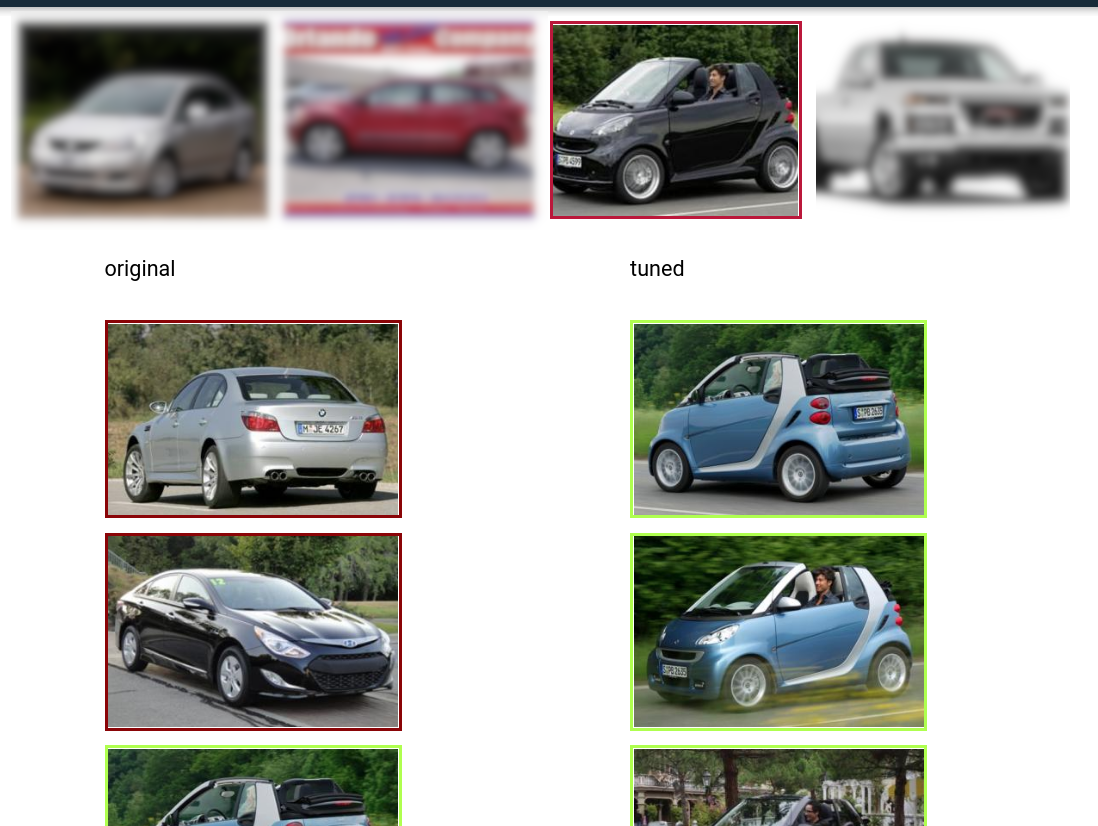
Comparison of original and tuned models for retrieval
Full evaluation of a dataset usually grows exponentially,
and thus you may want to perform a partial evaluation on a sampled subset.
In this case, you may use [samplers](https://quaterion.qdrant.tech/quaterion.eval.samplers.html)
to limit the evaluation.
Similar to `Quaterion.fit()` used for training, [`Quaterion.evaluate()`](https://quaterion.qdrant.tech/quaterion.main.html#quaterion.main.Quaterion.evaluate)
runs a complete evaluation loop. It takes the following as arguments:
- An `Evaluator` instance created with given evaluation metrics and a `Sampler`,
- The `SimilarityModel` to be evaluated,
- And the evaluation dataset.
```python
def eval_tuned_encoder(dataset, device):
print("Evaluating tuned encoder...")
tuned_cars_model = SimilarityModel.load(
os.path.join(os.path.dirname(__file__), "cars_encoders")
).to(device)
tuned_cars_model.eval()
result = Quaterion.evaluate(
evaluator=Evaluator(
metrics=RetrievalRPrecision(),
sampler=GroupSampler(sample_size=1000, device=device, log_progress=True),
),
model=tuned_cars_model,
dataset=dataset,
)
print(result)
```
## Conclusion
In this tutorial, we trained a similarity model to search for similar cars from novel categories unseen in the training phase.
Then, we evaluated it on a test dataset by the Retrieval R-Precision metric.
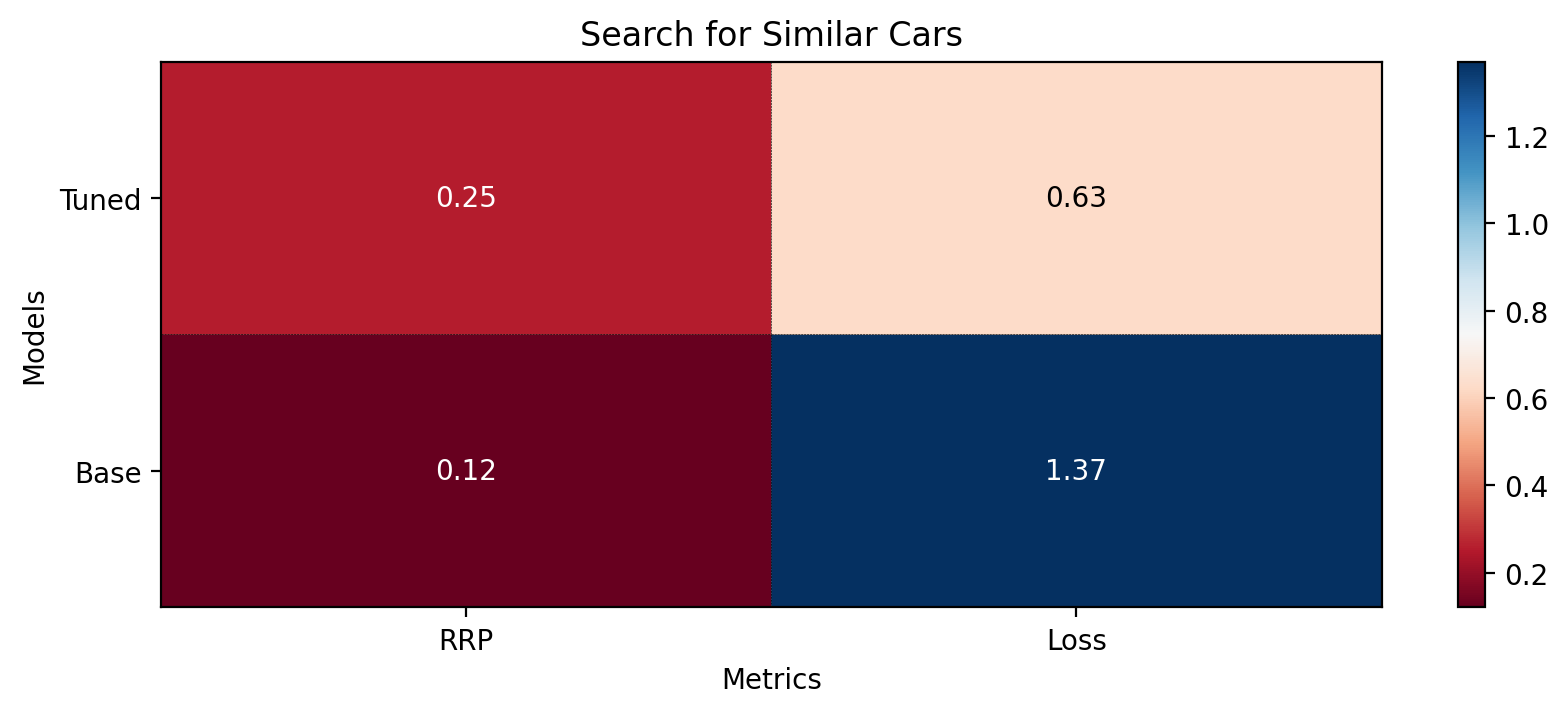
The base model scored 0.1207,
and our tuned model hit 0.2540, a twice higher score.
These scores can be seen in the following figure: