> Explore Qdrant's agent skills catalog at https://skills.qdrant.tech/
> Search the documentation at https://skills.qdrant.tech/search?query=your+query+here
> Use this file to discover all available pages: https://qdrant.tech/llms.txt
Once a collection no longer fits in RAM, the kernel evicts vector pages, and the next query waits on a disk read to get them back. Quantization buys that memory back. Qdrant keeps a compressed copy of each dense vector in RAM and moves the full-precision originals to disk.
[TurboQuant](https://qdrant.tech/documentation/manage-data/quantization/index.md#turboquant-quantization) is the method measured here. It rotates each vector before compressing it, which spreads the error evenly across coordinates, and its `bits` parameter sets the depth from `bits4` down to `bits1`. Start at `bits4`, a good default for many workloads at eight times compression.
A lower-precision [datatype](https://qdrant.tech/documentation/manage-data/vectors/index.md#datatypes) such as `float16` shrinks the same vectors a different way. Quantization adds a compressed copy beside the originals, while a datatype changes the originals themselves, and that difference decides whether anything full-precision survives to rescore against.
Dense vectors take most of that memory in a single-vector collection. If you use a late interaction model, its multivectors dominate instead, at one vector per token.
Every measurement below comes from a dense-only request. In hybrid search the dense and sparse reads share one page cache, so rerun your full query before you size a deployment or set a latency budget.
## Set Quantization in Four Steps
1. Estimate the resident footprint of your dense vectors, and how far it overshoots the memory you have.
2. Choose the quantization method and bit depth, starting from `bits4`.
3. Pin the quantized copy and leave the original vectors `cold`.
4. Set `rescore` and `oversampling` from measurements on the deployment you will serve.
For step 1, this formula estimates the RAM needed to keep all `float32` dense vectors resident:
```text
RAM = number of vectors × vector dimensions × 4 bytes × 1.5
```
The extra 50% covers metadata, indexes, point versions, and temporary segments created during optimization. Treat the result as a starting estimate, not a container limit. For a full estimate with payloads, indexes, and replication, use the [Qdrant Sizing Calculator](https://sizing.qdrant.tech/).
Qdrant [recommends pinning the quantized copy with `cold` originals](https://qdrant.tech/documentation/manage-data/quantization/index.md#memory-and-speed-tuning) to shrink the footprint while keeping search fast. The following two sections measure what that pairing costs in disk reads and what rescoring recovers.
Step 4 needs a [labeled set](https://qdrant.tech/articles/before-tuning-a-qdrant-collection/index.md). Compare `nDCG@k` with `k` set to the number of results you return, pick the configuration on one part of the set, then confirm it on queries that took no part in the selection. Use `Recall@k` against exact search to explain a loss.
## Rescoring Adds the Disk Read
`rescore` repairs part of the error that compression introduces. Qdrant reads the original vectors back after the dense prefetch and reorders the top candidates by their full-precision scores.
`oversampling` sets how many candidates Qdrant pre-selects for that pass. At `oversampling` 2 with a limit of 10, the prefetch collects 20 candidates from the quantized copy, scores them against the originals, and returns the best 10.
Both are query parameters, so a request can change them without touching the collection. Once the originals live on disk, each of those rereads is a disk read.
Since v1.19, Qdrant sets [memory placement](https://qdrant.tech/documentation/ops-configuration/memory-tiers/index.md) per structure with `memory`, replacing the deprecated `on_disk` and `always_ram` flags. Data moves between disk and RAM in fixed-size pages, typically 4 KiB on Linux, and the placement decides where a structure's pages sit.
- `cold` loads lazily from disk, so the first request that needs a page waits for it.
- `cached` enters the page cache when the collection loads, and the kernel may evict it later.
- `pinned` stays in RAM, so the structure has to fit.
Only the quantized copy can be pinned. Qdrant reads the [original vectors through a memory map](https://qdrant.tech/documentation/ops-configuration/memory-tiers/index.md#limitations), so they take `cold` or `cached`. Set both placements explicitly, because the quantized copy defaults to following the originals.
In hybrid search, budget for the [sparse vector index](https://qdrant.tech/documentation/ops-configuration/memory-tiers/index.md#sparse-vector-index) too: it takes the same placements and defaults to `pinned`, holding RAM the quantized copy needs.
The memory cap decides what those placements deliver. The same query took about 4 ms with the originals resident, and 43 ms when rescoring reread them under a 4 GiB limit.
| Limit | Original Vectors | Quantized Vectors | `rescore` | p50 ms | GB Read, Both Passes |
|---|---|---|---|---|---|
| 12 GiB | `cached` | `pinned` | off | 3.8 | 0.30 |
| 12 GiB | `cached` | `pinned` | on | 4.1 | 0.52 |
| 4 GiB | `cached` | `pinned` | off | 4.3 | 0.30 |
| 4 GiB | `cached` | `pinned` | on | 43.4 | 2.98 |
| 4 GiB | `cold` | `cached` | on | 45.7 | 3.02 |
| 4 GiB | `cold` | `pinned` | on | 52.0 | 3.50 |
Rescoring is nearly free while the originals stay in cache, and it becomes the slowest part of the query once they do not. At 12 GiB it added 0.3 ms. At 4 GiB it added 39.1 ms.
Neither the cap nor the rescoring pass causes it alone: with rescoring off, the query ran within half a millisecond of itself at both limits. The penalty is rereading original-vector pages rather than scoring candidates, and at 4 GiB rescoring read 2.98 GB instead of 0.30 GB. Moving the originals from `cached` to `cold` left the median inside its own run-to-run spread, so placement does not remove those reads. Test both settings under your own container limit to see what rescoring costs you.
Two changes reduce that read. More memory keeps the originals resident, and a lower `oversampling` rereads fewer candidates without needing any. At `bits1`, the candidates past the first rescoring pass buy little quality, which the next section measures.
Set placement for the footprint instead. Pin the quantized copy, which is a fraction of the originals' size and fits where they cannot, and leave the originals `cold`.
Async I/O then makes those `cold` reads cheaper without more memory. Set [`storage.performance.io_uring` to `auto`](https://qdrant.tech/documentation/ops-configuration/memory-tiers/index.md#async-io) in the configuration file, and Qdrant issues a query's rereads together and waits for them in parallel rather than one after another. It is disabled by default, covers `cold` structures only, and needs a Linux kernel that supports io_uring.
## What Rescoring Recovers
Two measurements answer different questions here. An exact search scans every vector and gives the reference result, while graph search trades some of those neighbors for lower latency.
`Recall@10` against exact search is the share of the exact top 10 that a configuration returned, so it reports what happened inside the dense prefetch. `nDCG@10` grades the returned top 10 against DBPedia-entity's labels, giving more credit to relevant documents near the top, so it reports what the user sees.
We picked a candidate on a separate labeled set. The rule was the lowest `oversampling` and lowest `bits` value staying within 0.01 `nDCG@10` of float32, and within 0.02 `Recall@10`.
The table reports how each configuration then scored on 200 held-out queries.
| Quantization | `rescore` | `nDCG@10` | `Recall@10` Against Exact |
|---|---|---|---|
| float32 | not applicable | 0.3103 | 0.957 |
| TurboQuant `bits4` | off | 0.3218 | 0.918 |
| TurboQuant `bits4` | on, `oversampling` 4 | 0.3238 | 0.993 |
| TurboQuant `bits1` | off | 0.2786 | 0.605 |
| TurboQuant `bits1` | on, `oversampling` 1 | 0.3114 | 0.951 |
| TurboQuant `bits1` | on, `oversampling` 2 | 0.3128 | 0.977 |
| TurboQuant `bits1` | on, `oversampling` 4 | 0.3178 | 0.988 |
Measure float32 at your own graph-search settings first, so you can separate what the graph misses from what quantization costs. Here it returned 0.957 `Recall@10`, so approximate traversal missed roughly 4% of the exact top 10 before quantization entered the comparison.
What rescoring recovers depends on how much precision the bit depth discarded. At `bits4` it lifted dense-prefetch `Recall@10` from 0.918 to 0.993, while 200 held-out queries did not establish an `nDCG@10` difference. Recovered neighbors can improve dense-prefetch recall without improving the labeled top 10.
At a deep bit depth, rescoring is what makes the quantization usable. One pass raised `bits1` from 0.605 to 0.951 `Recall@10`. Qdrant [enables `rescore` by default](https://qdrant.tech/documentation/manage-data/quantization/index.md#searching-with-quantization) for `bits1`, `bits1_5`, `bits2`, and binary quantization for this reason.
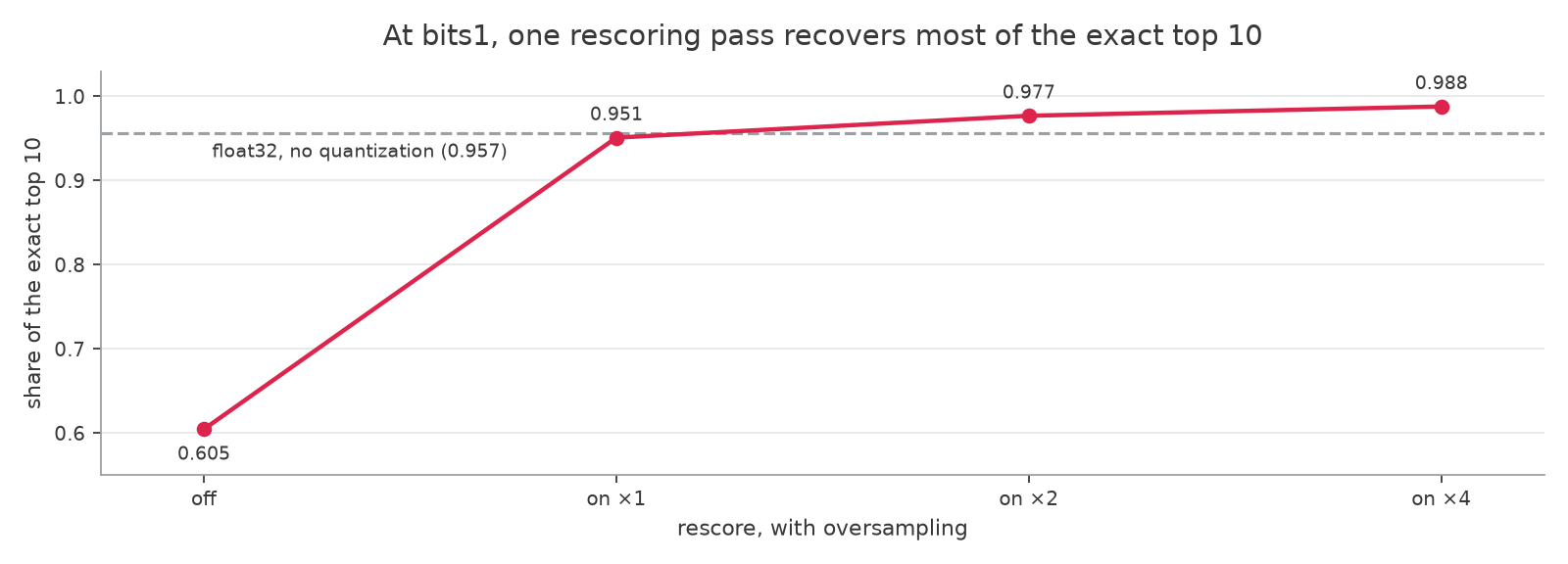
_One rescoring pass does most of the recovery at bits1. Raising oversampling past 1 buys little, which is why the disk reads it adds are the cost to watch._
After `oversampling` 1, extra candidates add disk reads for little recall. `bits1` reached 0.977 `Recall@10` at `oversampling` 2 and 0.988 at `oversampling` 4.
The selection rule picked `bits1` with `rescore` and `oversampling` 1. Against float32 on the held-out queries, its `nDCG@10` came in 0.0011 higher, with a paired 95% interval from -0.003 to +0.005.
Read that interval as a bound rather than proof of an identical ranking. On this dataset it holds the `nDCG@10` difference within 0.005 either way, and `Recall@10` came in 0.006 lower.
## If TurboQuant Is Not the Right Fit
For a comparison of TurboQuant bit depths across ten datasets, see [TurboQuant in Qdrant](https://qdrant.tech/articles/turboquant-quantization/index.md). Qdrant also supports [Scalar, Binary, and Product Quantization](https://qdrant.tech/documentation/manage-data/quantization/index.md), and each one validates with the same dense-prefetch and held-out checks.
- [Scalar Quantization](https://qdrant.tech/documentation/manage-data/quantization/index.md#scalar-quantization): converts vector components to `int8`. Start here when moderate compression is enough.
- [Binary Quantization](https://qdrant.tech/documentation/manage-data/quantization/index.md#binary-quantization): a compact, fast option that works best with high-dimensional embeddings whose components have a centered distribution. Measure whether rescoring recovers enough quality for your workload.
- [Product Quantization](https://qdrant.tech/documentation/manage-data/quantization/index.md#product-quantization): prioritizes a smaller memory footprint, with a larger accuracy and search-speed trade-off to validate.
### `turbo4` Changes What Rescoring Reads
The [`turbo4` datatype](https://qdrant.tech/documentation/manage-data/vectors/index.md#turbo4) stores each dense vector as 4 bits per dimension, about one-eighth of its original size. It is built on TurboQuant, and it replaces the full-precision vector rather than sitting beside it.
Rescoring still works on top of it. Pairing `turbo4` with 1-bit TurboQuant searches the compact index and rescores against the 4-bit vectors, which costs less storage than 1-bit over full precision and gives up some rescoring precision.
Keep full-precision vectors when you want rescoring at the accuracy this article measures. This article does not measure `turbo4`, so validate it on your own queries and labels.
## Verify It on Your Own Collection
Configure the bit depth and the two placements on the collection you already have, using the name of your dense vector. `rescore` and `oversampling` belong on the query, which is what makes them cheap to compare.
```python
from qdrant_client import QdrantClient, models
client = QdrantClient(
url="https://YOUR-CLUSTER.cloud.qdrant.io",
api_key="",
)
client.update_collection(
# Replace with the collection that contains your dense vector.
collection_name="products",
quantization_config=models.TurboQuantization(
turbo=models.TurboQuantQuantizationConfig(
# Replace with the bit depth selected by your evaluation.
bits=models.TurboQuantBitSize.BITS1,
memory=models.Memory.PINNED,
)
),
vectors_config={"dense": models.VectorParamsDiff(memory=models.Memory.COLD)},
)
```
First, compute the exact dense top `k` once for a representative sample of your queries. This article reports `k=10`. An exact search reads every original vector, so keep the sample small enough for the cost you can accept.
Then run your existing dense prefetch with each `rescore` and `oversampling` variant, changing nothing else. `Recall@k` against the exact result shows what quantization changed in the dense prefetch. Without labels, that check and the latency numbers still stand on their own.
For hybrid search, keep the prefetches, [fusion settings](https://qdrant.tech/articles/how-to-tune-hybrid-search/index.md), and filters your service already uses, then compare the final `nDCG@k`.
### Self-Hosted
Run the dense-prefetch check under the memory cap you deploy with, from a cold page cache followed by a measured pass. Run `rescore=False` even if you would never ship it, because it shows the cost of the rest of the dense prefetch.
### Qdrant Cloud
Measure the full request under its normal operating conditions. The cluster sets the container limit and the page-cache state, which leaves the placements and the query parameters as what you compare.
## What to Tune Next
Keep the first configuration that meets your held-out `nDCG@k` and latency targets. If none qualifies, test another quantization method or a higher `oversampling` value.
On a multi-shard hybrid collection, rerun the full request on your deployed shard layout once the dense-vector placements are set. Each shard runs the prefetch and rescoring against its own data.
With a `limit` of 200 and `oversampling` 1, rescoring can read up to 200 original vectors per shard, or up to 2,400 across 12 shards. [Candidate depth](https://qdrant.tech/articles/candidate-depth/index.md) covers how to set the limit that total scales with.
If you do not have a labeled query set yet, [What to Check Before Tuning a Qdrant Collection](https://qdrant.tech/articles/before-tuning-a-qdrant-collection/index.md) covers how to build one.