



Scalable PDF Retrieval with Cohere Embed 5 and Qdrant Asymmetric Quantization
Evgeniya Sukhodolskaya
·October 23, 2026

On this page:
Cohere released Embed 5, a family of embedding models. The family has a quality-focused model, Embed 5 Pro (embed-v5.0-pro), and a lighter one, Embed 5 Fast (embed-v5.0-fast). Both accept text and images, support 100+ languages, and share an embedding space.

Cohere’s launch post calls out “visually rich documents”, including PDFs, and the model’s performance on them deserves attention. To our understanding, for their ViDoRe V3 results they evaluated PDF retrieval in an OCR-like setting; in their words, on ViDoRe V3 “evaluations consisted of parsed text outputs, curated by the authors of ViDoRe”.
However, Cohere Embed 5 models also accept page images directly.
For searching PDF page images, we usually advise using late-interaction visual models to avoid text parsing and extraction. We didn’t think dense embeddings could compete with late interaction, but tested them out of curiosity, and found out that Embed 5 Pro, which represents a whole PDF page image with a single dense vector, scored above several late-interaction models on five public English ViDoRe V3 corpora.
That meant that our community could use a recipe to run Cohere models for scalable PDF retrieval in Qdrant, so here’s a blog about it:)
If you want to see the recipe already, go directly to “This could have been an email”.
PDF Retrieval Caveats
Many PDFs have answers in charts, tables, and diagrams. The classical path of extracting text with OCR (turning the image into text) for subsequent text retrieval can lose the information hiding in complex visual layouts, as relationships between words on the page might not survive the OCR blender.
For these documents, an advised approach is to use late-interaction visual models, such as ColPali and ColQwen. They keep a vector for each small image patch and score each query token against its best-matching piece. That gives us granularity and releases us from OCR layout pain, but also comes with about a thousand vectors per page.

There are some known tricks for reducing the number of vectors in a page’s representation:
- Our PDF retrieval tutorial walks through pooling combined with rescoring: averaging patch vectors by rows or columns reduces the number of vectors in first-stage retrieval 20-30 times.
- MUVERA turns a list of late interaction token vectors of any length into one fixed-length (really long) vector that approximates the multi-vector score. This vector is used for the first stage retrieval, followed by the rescoring with original multivectors.
Late interaction is tricky to scale not only due to the sizing problem. MaxSim, the similarity used by late-interaction models, cannot directly use HNSW, the vector search index, leaving us rather with MUVERA-like approaches at billions of points.
So a dreamlike scenario would be to use one dense vector for visually rich document retrieval, if we want it to really scale. But how feasible is it?
Dense Models Are Getting There
We got curious after seeing the phrase “visually rich documents” in Cohere’s post.
We tested Embed 5 on ViDoRe V3’s 5 public English corpora: computer science textbooks, financial reports, EU labor reports, US Air Force technical orders, and FDA pharmaceutical documents. Together, these contain 12,969 page images and 1,489 English questions.
Cohere’s ViDoRe launch results use RCP-nDCG. It’s a valuable approach to address false negatives in public benchmarks that might become the future of retrieval evaluation; however, we, out of habit, use standard nDCG over the full corpus to compare with the published ViDoRe results.
And woah, Embed 5 Pro seems to beat several late-interaction models (the training data is not published, so we might be accidentally testing on train here, but if not, woahhh!).
That’s great news for production, as with one dense vector it gets far far more convenient: throw in a page, get one vector, no OCR to struggle with. That vector fits ordinary HNSW search, avoiding the MaxSim asymmetry caveat while keeping the page image as the input.
Spectacular, Give Me 14 of Them Right Now
For production pipelines at scale, every KB saved matters, as it adds up with this scale (a roughly translated saying from my mother tongue would be: “a saved cent provides you a dollar later”).
A full Embed 5 vector has 2048 dimensions by default. Stored as float32, that’s 8 KB per page, but that’s Embed 5 used at “full power”, so to say.
Cohere designed these models with “production needs optimizing” in mind. The Embed 5 family supports Matryoshka representation learning (MRL): the first N numbers of a vector retain most of the vector’s “meaning”.
Cohere recommends 1024 Matryoshka dimensions in int8 as the production default: 1 KB per vector, with what they describe as near-full-precision quality.
Can We Be More Scrudgy?
For the smallest footprint, they advise binary vectors as a fast first pass before higher-precision re-ranking. Let’s see how far we can go with it.
We can combine MRL with 1-bit binary quantization: storing only whether each dimension’s value is above zero. For a full Embed 5 vector, the memory needed falls from 8 KB to 256 bytes, 32x smaller.
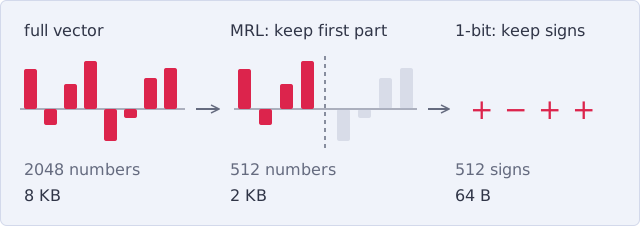
We lose information when we compress the numbers this much. But what if we don’t compress the query as hard as the documents?
Add Qdrant Asymmetric Quantization
With our asymmetric quantization, we can keep the query at 8 bits per number while the page vectors stay at 1 bit.
If both page and query keep only signs, the score counts matching signs, with every dimension contributing equally: a query value barely above zero gets the same vote as a large positive value.
Keeping the query at 8 bits lets stronger query dimensions carry more weight.

At the same time, let’s not limit ourselves in our greed, we can experiment with MRL, too, stacking it together with asymmetric quantization. You can go even further, and experiment with swapping Pro with Fast on queries, following the latest trend of inference-light swappable query models (we also ride the trend train, check out Constella).
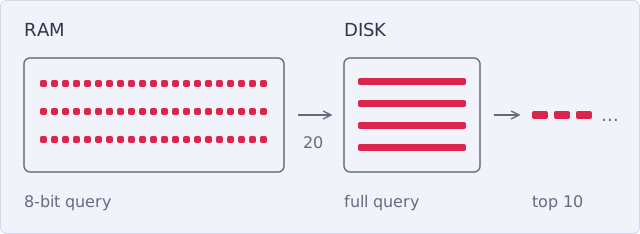
We use the compressed vectors to find a short list of candidates, then rerank that retrieved list of candidates with the full vectors, as Cohere advises. The compressed copies stay in RAM; the full vectors stay on disk until we need them for re-scoring.
Full code: collection, upload, query
Tested with Qdrant 1.19.2 and qdrant-client 1.20.0.
Connect to Qdrant Cloud and load one page image:
import base64

from qdrant_client import QdrantClient, models
from qdrant_client.context_headers import headers

client = QdrantClient(
    url="https://xyz-example.qdrant.io:6333",
    api_key="<your-qdrant-api-key>",
    cloud_inference=True,
)
COHERE_API_KEY = "<your-cohere-api-key>"

# one PDF page rendered as an image
page_id = 1
with open("page.jpg", "rb") as f:
    page_data_url = "data:image/jpeg;base64," + base64.b64encode(f.read()).decode()
Create the collection:
client.create_collection(
    collection_name="pdf_pages",
    vectors_config={
        "full": models.VectorParams(
            size=2048,
            distance=models.Distance.COSINE,
            memory=models.Memory.COLD,
            # only used to re-score candidates, so no HNSW graph
            hnsw_config=models.HnswConfigDiff(m=0),
        ),
        "small": models.VectorParams(
            size=512,
            distance=models.Distance.COSINE,
            memory=models.Memory.COLD,
            quantization_config=models.BinaryQuantization(
                binary=models.BinaryQuantizationConfig(
                    encoding=models.BinaryQuantizationEncoding.ONE_BIT,
                    query_encoding=models.BinaryQuantizationQueryEncoding.SCALAR8BITS,
                    memory=models.Memory.PINNED,
                ),
            ),
        ),
    },
)
Upload a page:
with headers({"cohere-api-key": COHERE_API_KEY}):
    client.upsert(
        collection_name="pdf_pages",
        points=[
            models.PointStruct(
                id=page_id,
                vector={
                    # full 2048-dimensional vector
                    "full": models.Image(
                        image=page_data_url,
                        model="cohere/embed-v5.0-pro",
                    ),
                    # first 512 dimensions of the same vector
                    "small": models.Image(
                        image=page_data_url,
                        model="cohere/embed-v5.0-pro",
                        options={"mrl": 512},
                    ),
                },
            )
        ],
    )
Search:
query = "What drove the drop in posted workers in Germany in 2022?"

with headers({"cohere-api-key": COHERE_API_KEY}):
    results = client.query_points(
        collection_name="pdf_pages",
        prefetch=models.Prefetch(
            query=models.Document(
                text=query,
                model="cohere/embed-v5.0-pro",
                options={"input_type": "search_query", "mrl": 512},
            ),
            using="small",
            limit=20,
            params=models.SearchParams(
                quantization=models.QuantizationSearchParams(rescore=False),
            ),
        ),
        query=models.Document(
            text=query,
            model="cohere/embed-v5.0-pro",
            options={"input_type": "search_query"},
        ),
        using="full",
        limit=10,
    )
| Setup | Search Vector per Page in RAM | Re-Scoring | Retained |
|---|---|---|---|
| 2048 dims, float32 | 8 KB | None | 100% |
| 2048 dims, 1-bit, 1-bit query | 256 B | Top 20 with full vectors from disk | 99.9% |
| 1024 dims, 1-bit, 1-bit query | 128 B | Top 20 with full vectors from disk | 99.2% |
| 512 dims, 1-bit, 1-bit query | 64 B | Top 20 with full vectors from disk | 97.1% |
| 2048 dims, 1-bit, 8-bit query | 256 B | Top 20 with full vectors from disk | 100.1% |
| 1024 dims, 1-bit, 8-bit query | 128 B | Top 20 with full vectors from disk | 99.9% |
| 512 dims, 1-bit, 8-bit query | 64 B | Top 20 with full vectors from disk | 99.2% |
| 512 dims, 1-bit, 8-bit query from Embed 5 Fast | 64 B | Top 20 with full vectors from disk | 98.5% |
Here, “retained” means the share of full 2048-dimensional float32 ranking quality: mean nDCG@10 of 65.85 is our 100% reference. All compression results use Pro pages and Pro queries on those same 5 corpora unless stated otherwise.
In our measurements, the shorter the stored vector, the more the higher-precision query helped. The intuition is that fewer dimensions make the equal-weight sign count coarser, so keeping the query’s strength in each dimension helps more.
As a result of quick benchmarking, we found a nice compromise: 512 dimensions, 1-bit pages, and an 8-bit query, with the top 20 candidates re-scored by the full vectors.
It keeps 99.2% of the full-vector quality at 64 B per page in RAM, 128x less than the full float32 vector.
Using memory tiers from Qdrant 1.19, we keep the original vectors cold on disk and pin the small binary vectors in RAM, as in our guide When Your Collection Outgrows RAM. RAM is the expensive part of the setup and the part fast search depends on, so that’s what we optimize here; our sizes count only the vectors, not the index or payload.
Fetching vectors for re-scoring from disk slows us down, but only the candidates’ full vectors are read (20 per shard). These reads also go through the OS page cache, so over time the full vectors touched by re-scoring take up spare RAM as well; the OS gives that memory back when something else needs it.
This Could Have Been an Email
To search PDFs without OCR, we usually go for late interaction. Embed 5 Pro gives us a competitive single-vector alternative on ViDoRe V3 corpora, and combined with Qdrant features, it saves even more of the resources used for PDF search at scale:

Let’s do some napkin math: For 10 million PDF pages, uncompressed ColPali float32 vectors would take about 4.8 TB, full Embed 5 float32 vectors about 76 GB, and our recipe’s search vectors about 610 MB in RAM, with 99.2% of Embed 5 ranking quality on the 5 tested corpora, still above ColPali’s score in the chart.
Disclaimer: 610 MB is the starting RAM; full vectors read for re-scoring also fill the OS page cache over time. The recipe also keeps about 95 GB of full and shortened float vectors on disk. ColPali can be compressed too; these are vector-byte calculations, excluding index and payload, with 1 KB = 1,024 bytes.
Bonus: Cohere Rerank 5 (Pro & Fast)
The tiny part of saved money on RAM should be spent on gifting me a sleeping mask with Cohere’s logo, because Rerank 5 dropped while I was finishing this post and did me dirty, as I had to check what it would add to the pipeline.
The image search finds pages without OCR. If you already use OCR and it works for you, Rerank 5 might be a good aid to improve the quality of your OCR-based pipelines further, as Rerank 5 takes text, not images.
We embedded ViDoRe V3’s OCR text (its markdown field) with Embed 5 Pro, searched it, and re-ranked the top 20 pages with Rerank 5 Pro.
Mean nDCG@10 over the same 5 corpora rose from 66.8 to 73.2, and from 66.2 to 71.7 when the text search uses our 64 B recipe.
Conclusion
We searched page images with one Embed 5 Pro vector per page, then combined Matryoshka, asymmetric quantization, and full-vector re-scoring to reduce the RAM needed for search.
With Qdrant Cloud Inference, we can directly send the page image as a base64 data URI to Qdrant Cloud. Qdrant calls Cohere and stores the vector in the same request, so the client code needs no separate embedding step, and you save a separate round trip from your application to Cohere.
Besides asymmetric quantization, TurboQuant is another compression option to test; our EmbeddingGemma 2 post and quantization guide cover it.
Use our recipe in your production PDF retrieval pipelines, write us how it’s working out for you, and sleep well, while we monitor releases for you!
