



Google Summer of Code 2023 - Polygon Geo Filter for Qdrant
Zein Wen
·October 12, 2023

On this page:
Editor’s note: This 2023 post was edited for length and clarity. Read the original version.
I’m Zein Wen, and I worked on polygon filtering with Arnaud Gourlay during Google Summer of Code 2023. Restaurant recommendations often need a geographic boundary as well as a similarity score. A circle or rectangle cannot describe every neighborhood, so my project added polygon filters to Qdrant.
This post records my 2023 contribution. For current usage, see the geo polygon filtering documentation.
Finding Points Inside a Boundary
Before this project, Qdrant supported radius and rectangle filters. Polygon filtering let users describe irregular areas and combine them with vector search.
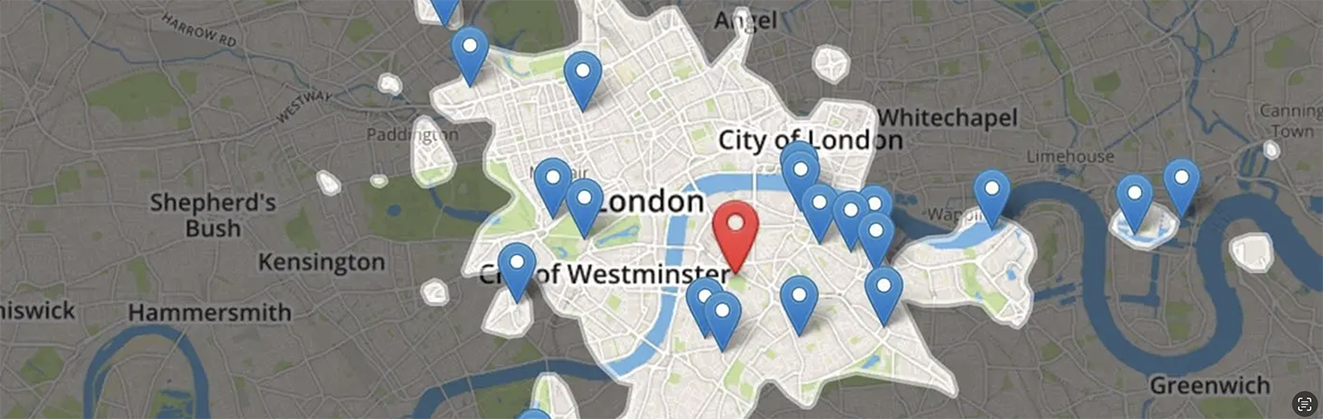
A geographic search area. Source: TravelTime.
The geographic index uses geohashes to group locations into rectangular cells. During a query, it finds cells that could overlap the polygon, then checks candidate locations against the polygon itself. This avoids testing every stored location.
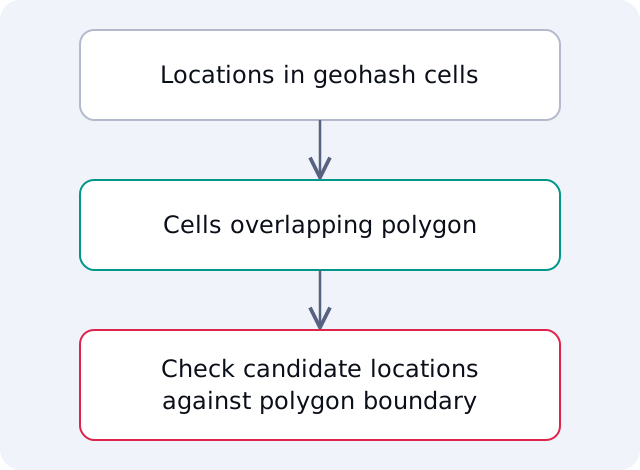
The index narrows the candidates before checking the polygon boundary.
Two geometry operations needed careful testing: checking whether a polygon intersects a rectangle and whether a point lies inside a polygon. The Rust geo library provided these operations, but we still needed to understand their behavior and verify edge cases.
I explored winding-number and ray-casting algorithms and used visual tests to compare results. That work helped me learn an unfamiliar part of the codebase through small, testable questions.

Geometry test cases from the project.
Keeping the API Consistent
We considered GeoJSON for the interface. Its coordinate representation differed from Qdrant’s existing radius and rectangle filters, so we kept the polygon interface consistent with those filters.
We also considered a separate multi-polygon filter. Combining polygon conditions already covered that use case, just as users could combine circles or rectangles. Adding another filter type would have increased the API’s complexity without adding a necessary operation.
This was a useful lesson in API design. A familiar standard can help users, but consistency with the surrounding API matters too.
Learning Through Open Source
This was my first opportunity to write Rust for a production project. Arnaud and the other Qdrant engineers helped me work through unfamiliar code, compare alternatives, and explain my decisions during review.
I learned to keep the user’s task in mind when designing an interface. I also gained confidence in discussing different approaches and asking questions before committing to a design.
Thank you to everyone who reviewed the work and helped me contribute. To try polygon filtering, follow the current documentation with a Qdrant Cloud cluster or a local deployment.
