



Qdrant 1.19 - TurboQuant Datatype & Memory Tiers
Andrey Vasnetsov
·August 05, 2026
On this page:
Qdrant 1.19.0 is out! Let’s look at the main features for this version:
TurboQuant Datatype: A new storage format that compresses vectors to four bits without keeping their original full-precision representation, reducing storage by up to nine times compared to TurboQuant quantization.
Memory Tiers: A single memory parameter unifies per-component memory tier placement, with three tiers: pinned, cached, and cold.
Per-Tenant IDF Statistics: Narrow the IDF corpus to a specific tenant so term rarity reflects that tenant’s vocabulary rather than the whole dataset, improving BM25 scoring in multi-tenant deployments.
Filtering Enhancements: Prefix matching on keyword fields and a new slice filter condition for partitioning a collection’s points into deterministic, disjoint subsets.
Web UI Enhancements: Live resharding progress, an overhauled Collection Visualizer that scales to tens of thousands of points, and payload index management.
TurboQuant Datatype

Version 1.18 introduced TurboQuant, a quantization method that compresses vectors with minimal loss in recall. It operates as a secondary layer: Qdrant keeps the original full-precision vectors on disk alongside the compressed copy, using the quantized representation during HNSW traversal and rescoring against the original vectors for accuracy. The two-copy model delivers good recall, but storing both representations increases disk usage.
In version 1.19, we’ve applied the same method to storage itself. The new Turbo4 datatype stores vectors using 4-bit TurboQuant compression as the only representation, with no full-precision copy kept.
Storing only the 4-bit representation drops storage from 36 bits per coordinate (the full float32 original plus the 4-bit compressed copy) to four bits, resulting in a ninefold reduction. This reduces data reads and writes per operation, improving throughput. The same compression applies to multi-vector collections used for ColBERT-style late interaction search, where the benefit is proportionally larger.
That ninefold storage reduction comes at a cost: without a full-precision copy, Qdrant cannot rescore top candidates against the original vectors. This makes the TurboQuant datatype the right choice when reducing disk usage is the primary goal. When maximum recall is the priority, TurboQuant quantization on top of a full-precision storage type remains the better option.
Memory Tiers

A Qdrant collection stores data across several components, each with its own memory footprint: vectors, the HNSW index, quantized vectors, the sparse index, payloads, and payload indexes. Until now, each had its own way to configure whether that data is loaded into RAM or served from disk: on_disk, always_ram, and on_disk_payload. This release replaces these parameters with a single, unified memory parameter. It works the same way on every component, giving you one consistent way to configure the memory tier for any part of a collection.
There are three memory tiers: pinned loads the component entirely into memory, where it’s never evicted (for components that support it); cached keeps data on disk and pre-populates the OS disk cache at startup for fast first reads while remaining evictable under memory pressure; and cold loads it lazily from disk on first access. The existing per-component flags remain functional but are deprecated.
Beyond cleaner configuration, version 1.19 also adds new capabilities: HNSW graph links can now be pinned in memory, sparse indexes have gained a new cached tier, and quantized vectors can now be pinned, cached, or cold independently of the original vectors’ placement.
Per-Tenant IDF Statistics

Sparse vector search commonly uses the inverse document frequency (IDF) to score matching documents, giving rarer terms more weight than common ones. Calculating the IDF requires two statistics: the total number of documents and the number of documents containing each term.
Qdrant computes these statistics for the complete dataset in each shard being queried, which creates a problem for multi-tenant collections. If tenant A’s documents use different vocabulary than tenant B’s, blending both populations into one set of statistics distorts a term’s IDF, so it no longer reflects how rare that term is within either tenant’s data.
Version 1.19 lets you narrow the corpus that the IDF statistics are computed over, for example down to a single tenant, so the IDF reflects term rarity within that tenant’s data rather than the whole collection.
Filtering Enhancements

This release adds two new filtering capabilities to Qdrant: prefix matching on keyword fields, and a slice filter condition for partitioning a collection’s points into deterministic subsets.
Prefix Matching on Keyword Fields
Keyword indexes store values verbatim for exact matching, which is the right choice for identifiers like URLs, file paths, and SKUs. Filtering by prefix over these values, like “find all entries where the URL starts with https://qdrant.”, wasn’t possible without either a full payload scan or switching to a text index, which tokenizes values and breaks exact matching.
This release adds support for prefix matching to keyword indexes. Enable it with "prefix": true in the keyword index configuration, then use the prefix condition in your filter. Prefix queries are served from a dedicated index structure, making them as fast as any other indexed filter.
Slicing
The new slice filter condition groups a collection’s points into deterministic, disjoint subsets. Each slice selects a fixed, stable portion of the collection without overlap.
This opens up two patterns that were previously difficult to implement efficiently. For parallel processing, divide a collection into n slices and assign one worker per slice. This lets you scroll the full dataset concurrently without coordination between workers. For reproducible sampling, use the same slice across multiple queries. The same subset of points is always selected, making it straightforward to benchmark, test, or run experiments on a consistent portion of your data.
Web UI Enhancements

The Web UI is Qdrant’s user interface for managing deployments and collections. It enables you to create and manage collections, run API calls, import sample datasets, and learn about Qdrant’s API through interactive tutorials. In version 1.19, the Web UI has gained several new features.
Resharding Progress
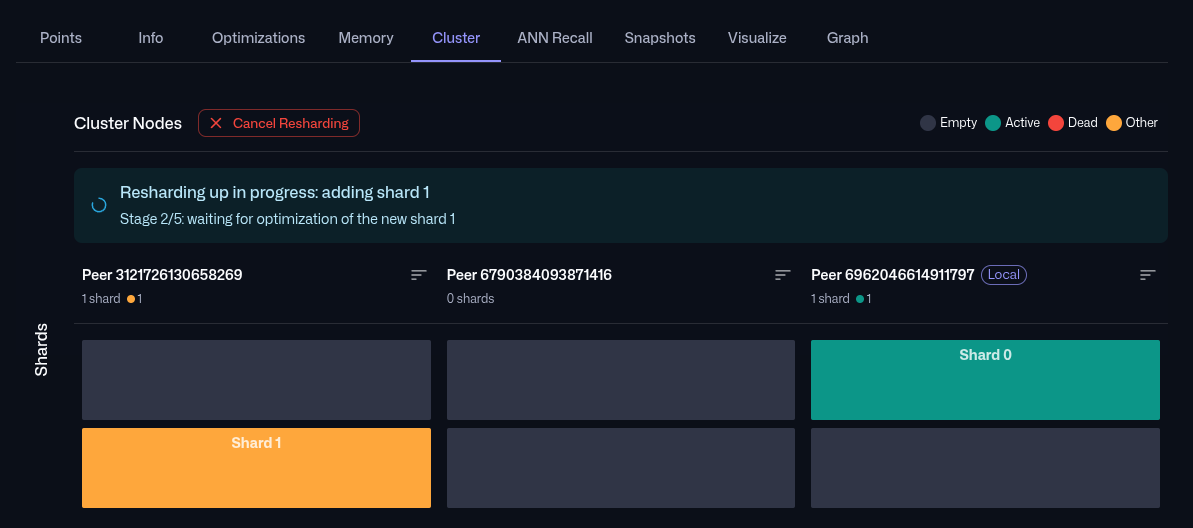
Resharding changes the number of shards for a collection, a process that can take a long time on large collections. Previously, the Web UI only showed that resharding was running, without visibility into its progress.
The Collection Cluster tab now displays a live progress message for the duration of the operation. It names the shards being added or removed, and shows the current stage.
Collection Visualizations
The Collection Visualize tab shows interactive 2D visualizations of your vectors, so you can visually explore your data and see how it clusters.
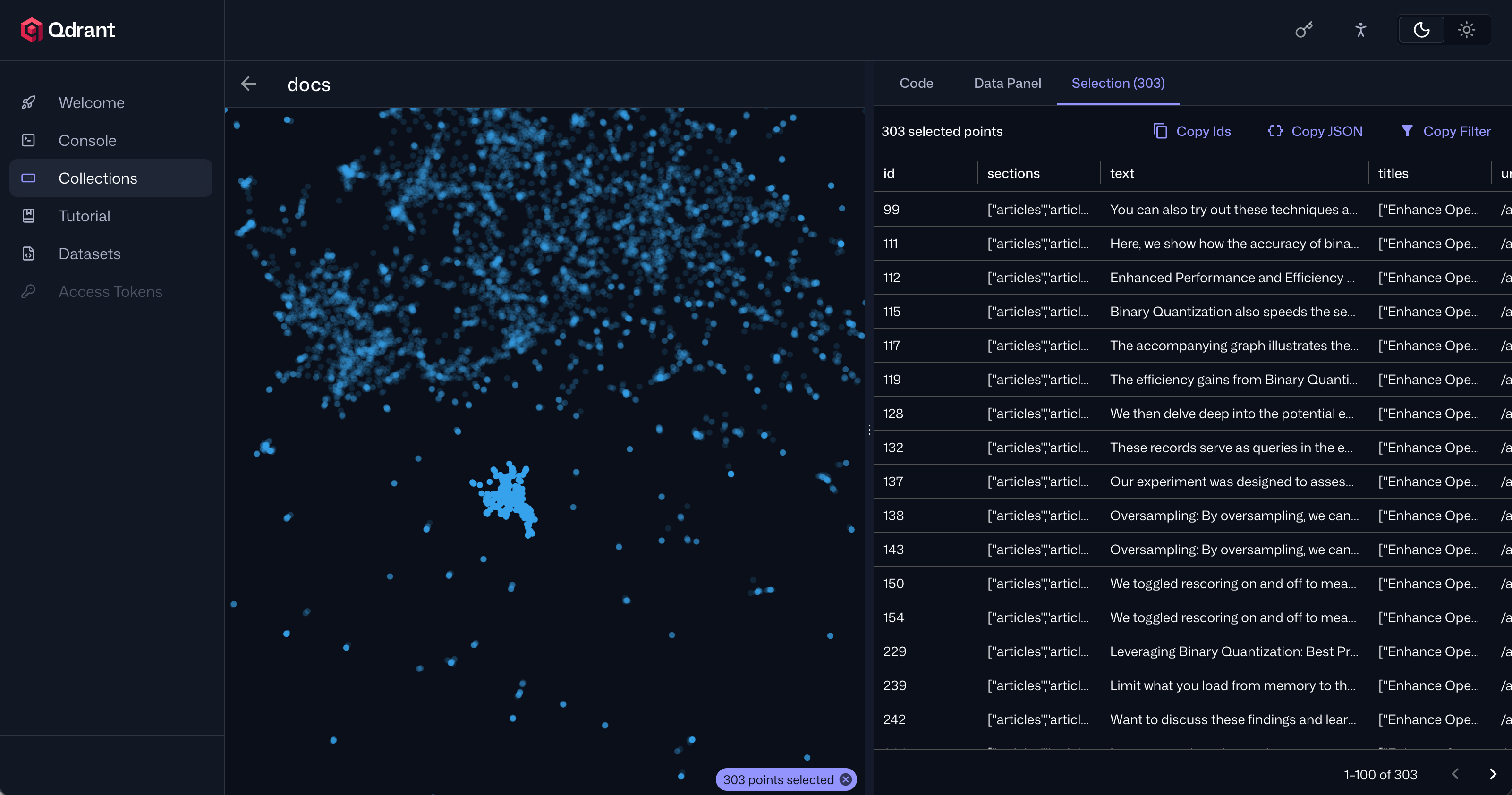
In this release, the Collection Visualizer has moved from a browser-side pipeline to a server-driven one. Qdrant now computes distances server-side, instead of the browser downloading raw vectors, and the layout engine runs in WebAssembly for a much more responsive experience. Together, these changes raise the practical point limit from a few thousand to tens of thousands, and a new WebGL2 renderer keeps panning and zooming smoothly at that scale.
The Collection Visualizer also gains new ways to explore a collection: click a point to see its nearest neighbors highlighted, or Shift+drag to select a region of points to open a selection panel listing them, with one-click copy for their IDs, JSON, or a matching filter. You can also apply a filter to highlight matching points.
Payload Index Configuration
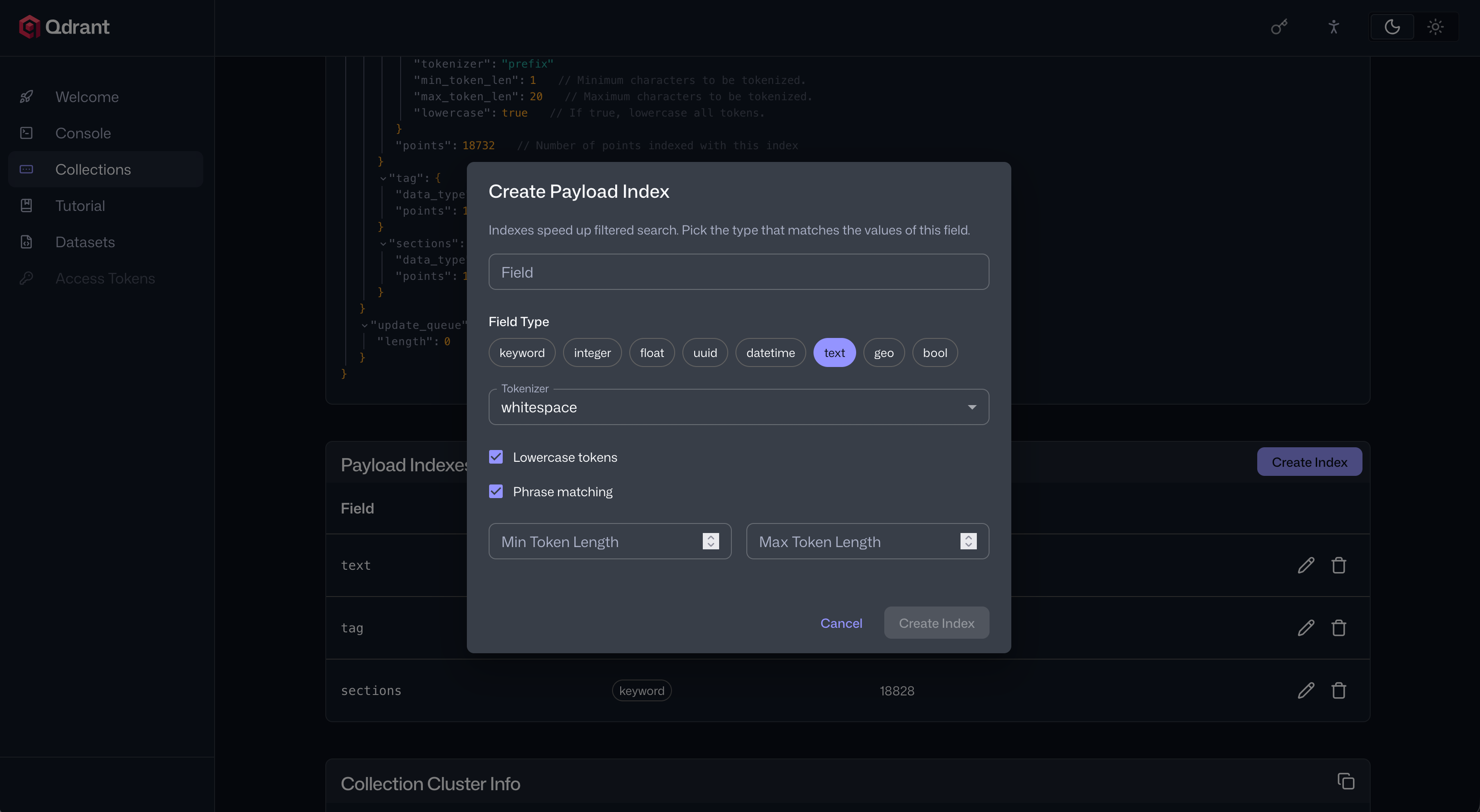
Previously, you could only create and manage payload indexes through Qdrant’s API. The Web UI now lets you do this interactively: hover over any payload field in the Collections Points tab and click the index icon to configure an index on that field. Qdrant suggests the index type automatically from the field value, and type-specific options appear where applicable: the tokenizer and phrase matching settings for text indexes, or the range and lookup toggles for integer indexes.
The Collection Info tab now includes a payload indexes overview that lists all indexed fields with their types, and lets you edit or delete any of them from one place.
Also in This Release

- Resource Quotas: Prevent nodes from running out of memory or disk space by limiting how much memory and disk they can use. This supersedes the per-collection
max_resident_memory_percentstrict mode setting, which is now deprecated. - Replica Read Affinity: Provide an
X-Qdrant-Route-AffinityHTTP header with a user or session ID to pin that user’s reads to the same replica, eliminating read inconsistency when sequential reads land on different replicas. - BM25: Language-Neutral Text Processing: Turn off English stemming and stopword removal in BM25 text processing for a clean language-neutral text search pipeline, better suited to technical content, product identifiers, or multilingual text.
- Faster Faceting: Faceting is a query feature that counts how many points match each distinct value of a payload field within a filtered result set. In 1.19, facet queries are faster, especially on large collections with high-cardinality fields.
- Removal of deprecated endpoints: We’ve removed the legacy
/search,/recommend, and/discoverendpoints. The unified/queryAPI superseded these endpoints in version 1.10. If you still use these endpoints, migrate to the/queryAPI before upgrading to 1.19.
For a full list of all changes in version 1.19, see the changelog.
Upgrading to Version 1.19

On Qdrant Cloud, navigate to the Cluster Details screen and select Version 1.19 from the dropdown menu. The upgrade process may take a few moments.
We recommend upgrading versions one by one. Qdrant Cloud does this automatically when you select the target version. If you’re self-hosting, upgrade to the latest patch version of each intermediate minor version first, for example, 1.17.x→1.18.x→1.19.0.
If you still use the legacy
/search,/recommend, or/discoverendpoints, migrate to the/queryAPI before upgrading to 1.19.
Need help with your upgrade? The Qdrant Advisor agent skill can help you navigate upgrades, troubleshoot configurations, and answer questions about your Qdrant setup, whether you’re on Qdrant Cloud or self-hosting.
Engage

We would love to hear your thoughts on this release. If you have any questions or feedback, join our Discord or create an issue on GitHub.
