# Confluent Kafka

Built by the original creators of Apache Kafka®, [Confluent Cloud](https://www.confluent.io/confluent-cloud/?utm_campaign=tm.pmm_cd.cwc_partner_Qdrant_generic&utm_source=Qdrant&utm_medium=partnerref) is a cloud-native and complete data streaming platform available on AWS, Azure, and Google Cloud. The platform includes a fully managed, elastically scaling Kafka engine, 120+ connectors, serverless Apache Flink®, enterprise-grade security controls, and a robust governance suite.
With our [Qdrant-Kafka Sink Connector](https://github.com/qdrant/qdrant-kafka), Qdrant is part of the [Connect with Confluent](https://www.confluent.io/partners/connect/) technology partner program. It brings fully managed data streams directly to organizations from Confluent Cloud, making it easier for organizations to stream any data to Qdrant with a fully managed Apache Kafka service.
## Usage
### Pre-requisites
- A Confluent Cloud account. You can begin with a [free trial](https://www.confluent.io/confluent-cloud/tryfree/?utm_campaign=tm.pmm_cd.cwc_partner_qdrant_tryfree&utm_source=qdrant&utm_medium=partnerref) with credits for the first 30 days.
- Qdrant instance to connect to. You can get a free cloud instance at [cloud.qdrant.io](https://cloud.qdrant.io/).
### Installation
1) Download the latest connector zip file from [Confluent Hub](https://www.confluent.io/hub/qdrant/qdrant-kafka).
2) Configure an environment and cluster on Confluent and create a topic to produce messages for.
3) Navigate to the `Connectors` section of the Confluent cluster and click `Add Plugin`. Upload the zip file with the following info.
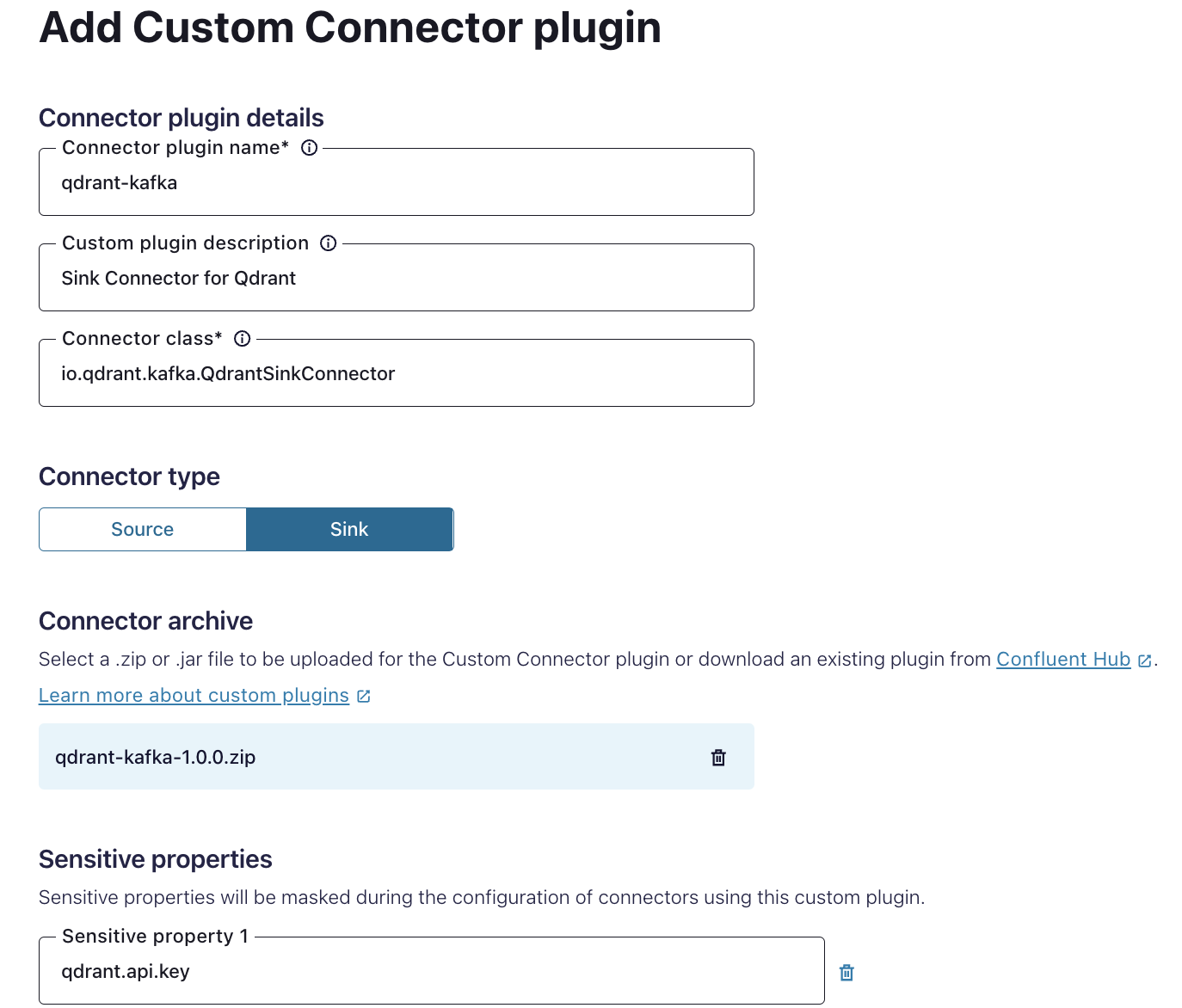
4) Once installed, navigate to the connector and set the following configuration values.
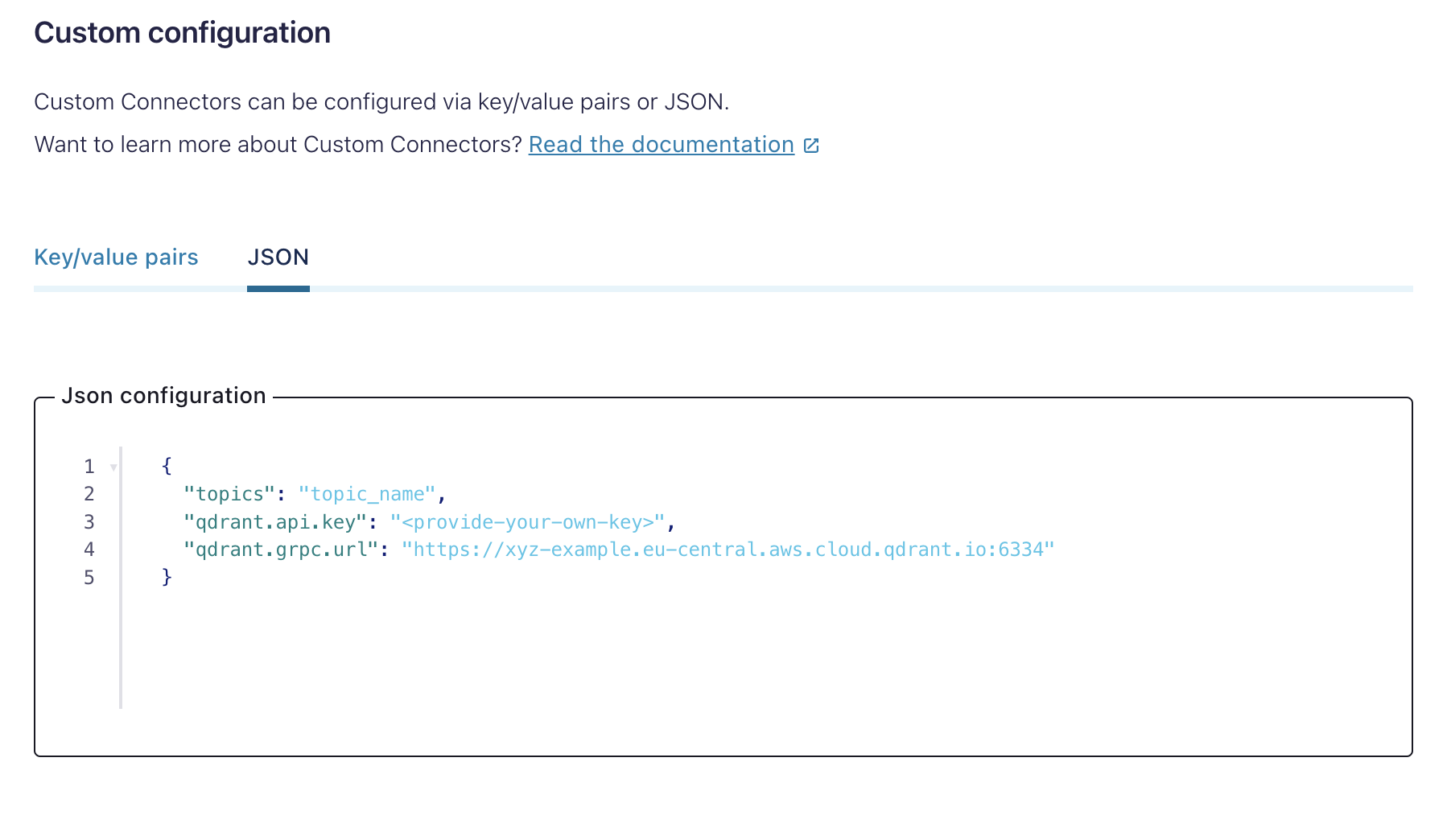
Replace the placeholder values with your credentials.
5) Add the Qdrant instance host to the allowed networking endpoints.
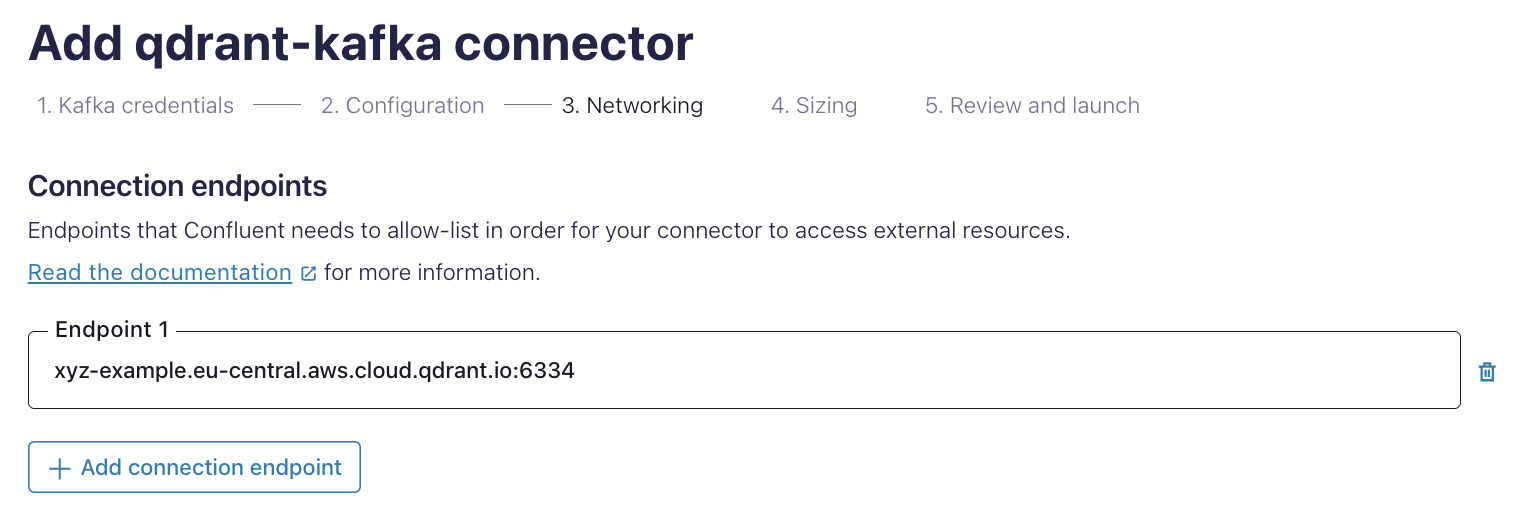
7) Start the connector.
## Producing Messages
You can now produce messages for the configured topic, and they'll be written into the configured Qdrant instance.
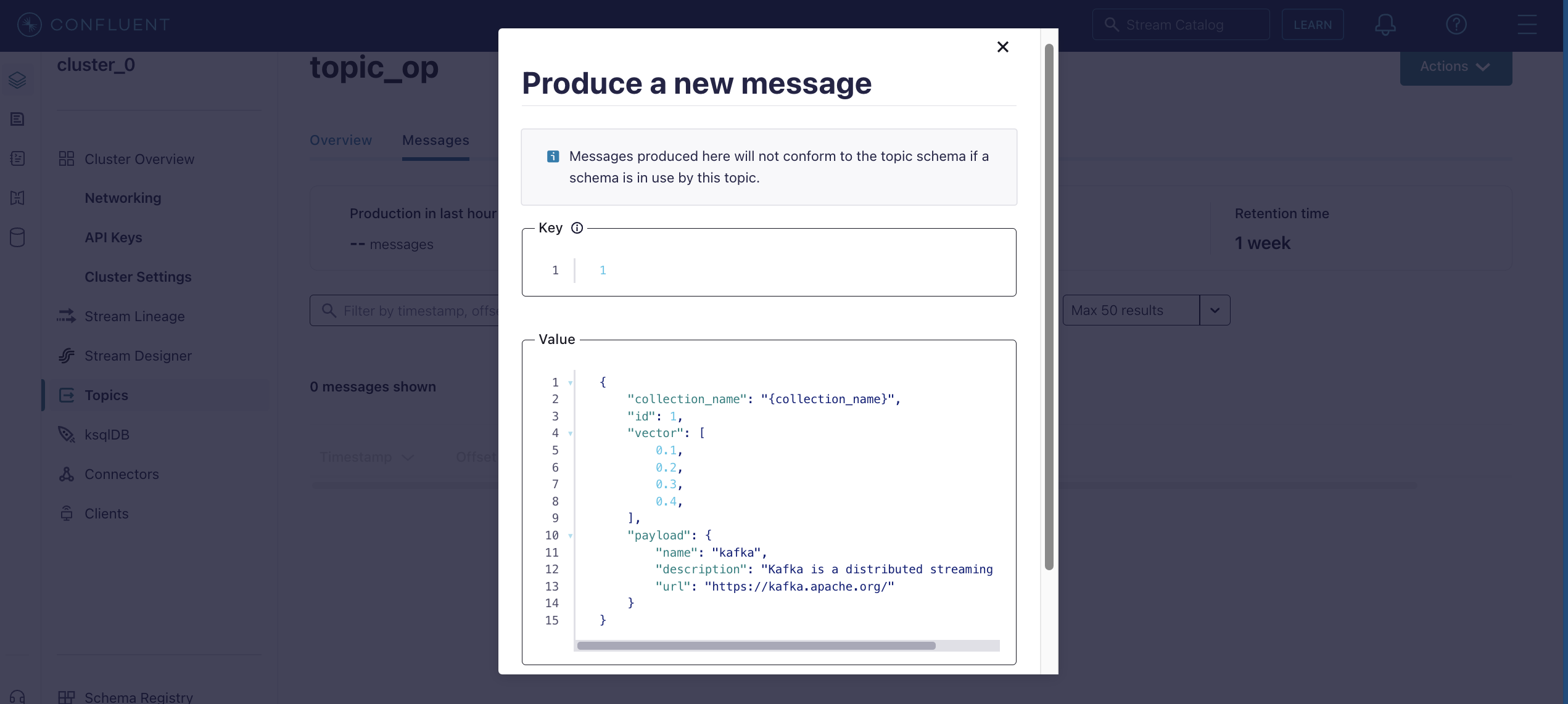
## Message Formats
The connector supports messages in the following formats.
_Click each to expand._
Unnamed/Default vector
Reference: [Creating a collection with a default vector](/documentation/manage-data/collections/index.md#create-a-collection).
```json
{
"collection_name": "{collection_name}",
"id": 1,
"vector": [
0.1,
0.2,
0.3,
0.4,
0.5,
0.6,
0.7,
0.8
],
"payload": {
"name": "kafka",
"description": "Kafka is a distributed streaming platform",
"url": "https://kafka.apache.org/"
}
}
```
Named multiple vectors
Reference: [Creating a collection with multiple vectors](/documentation/manage-data/collections/index.md#collection-with-multiple-vectors).
```json
{
"collection_name": "{collection_name}",
"id": 1,
"vector": {
"some-dense": [
0.1,
0.2,
0.3,
0.4,
0.5,
0.6,
0.7,
0.8
],
"some-other-dense": [
0.1,
0.2,
0.3,
0.4,
0.5,
0.6,
0.7,
0.8
]
},
"payload": {
"name": "kafka",
"description": "Kafka is a distributed streaming platform",
"url": "https://kafka.apache.org/"
}
}
```
Sparse vectors
Reference: [Creating a collection with sparse vectors](/documentation/manage-data/collections/index.md#collection-with-sparse-vectors).
```json
{
"collection_name": "{collection_name}",
"id": 1,
"vector": {
"some-sparse": {
"indices": [
0,
1,
2,
3,
4,
5,
6,
7,
8,
9
],
"values": [
0.1,
0.2,
0.3,
0.4,
0.5,
0.6,
0.7,
0.8,
0.9,
1.0
]
}
},
"payload": {
"name": "kafka",
"description": "Kafka is a distributed streaming platform",
"url": "https://kafka.apache.org/"
}
}
```
Multi-vectors
Reference:
- [Multi-vectors](/documentation/manage-data/vectors/index.md#multivectors)
```json
{
"collection_name": "{collection_name}",
"id": 1,
"vector": {
"some-multi": [
[
0.1,
0.2,
0.3,
0.4,
0.5,
0.6,
0.7,
0.8,
0.9,
1.0
],
[
1.0,
0.9,
0.8,
0.5,
0.4,
0.8,
0.6,
0.4,
0.2,
0.1
]
]
},
"payload": {
"name": "kafka",
"description": "Kafka is a distributed streaming platform",
"url": "https://kafka.apache.org/"
}
}
```
Combination of named dense and sparse vectors
Reference:
- [Creating a collection with multiple vectors](/documentation/manage-data/collections/index.md#collection-with-multiple-vectors).
- [Creating a collection with sparse vectors](/documentation/manage-data/collections/index.md#collection-with-sparse-vectors).
```json
{
"collection_name": "{collection_name}",
"id": "a10435b5-2a58-427a-a3a0-a5d845b147b7",
"vector": {
"some-other-dense": [
0.1,
0.2,
0.3,
0.4,
0.5,
0.6,
0.7,
0.8
],
"some-sparse": {
"indices": [
0,
1,
2,
3,
4,
5,
6,
7,
8,
9
],
"values": [
0.1,
0.2,
0.3,
0.4,
0.5,
0.6,
0.7,
0.8,
0.9,
1.0
]
}
},
"payload": {
"name": "kafka",
"description": "Kafka is a distributed streaming platform",
"url": "https://kafka.apache.org/"
}
}
```
## Further Reading
- [Kafka Connect Docs](https://docs.confluent.io/platform/current/connect/index.html)
- [Confluent Connectors Docs](https://docs.confluent.io/cloud/current/connectors/bring-your-connector/custom-connector-qs.html)