
Build a GraphRAG Agent with Neo4j and Qdrant

| Time: 30 min | Level: Intermediate | Output: GitHub |
|---|
To make Artificial Intelligence (AI) systems more intelligent and reliable, we face a paradox: Large Language Models (LLMs) possess remarkable reasoning capabilities, yet they struggle to connect information in ways humans find intuitive. While groundbreaking, Retrieval-Augmented Generation (RAG) approaches often fall short when tasked with complex information synthesis. When asked to connect disparate pieces of information or understand holistic concepts across large documents, these systems frequently miss crucial connections that would be obvious to human experts.
To solve these problems, Microsoft introduced GraphRAG, which uses Knowledge Graphs (KGs) instead of vectors as a context for LLMs. GraphRAG depends mainly on LLMs for creating KGs and querying them. However, this reliance on LLMs can lead to many problems. We will address these challenges by combining vector search engines with graph-based databases.
This tutorial will demonstrate how to build a GraphRAG system with vector search using Neo4j and Qdrant.
| Additional Materials |
|---|
| This advanced tutorial is based on our original integration doc: Neo4j - Qdrant Integration |
| The output for this tutorial is in our GitHub Examples repo: Neo4j - Qdrant Agent in Python |
Watch the Video
RAG & Its Challenges
RAG combines retrieval-based and generative AI to enhance LLMs with relevant, up-to-date information from a knowledge base, like a vector search engine. However, RAG faces several challenges:
- Understanding Context: Models may misinterpret queries, particularly when the context is complex or ambiguous, leading to incorrect or irrelevant answers.
- Balancing Similarity vs. Relevance: RAG systems can struggle to ensure that retrieved information is contextually relevant.
- Answer Completeness: Traditional RAGs might not be able to capture all relevant details for complex queries that require LLMs to find relationships in the context that are not explicitly present.
Introduction to GraphRAG
Unlike RAG, which typically relies on document retrieval, GraphRAG builds knowledge graphs (KGs) to capture entities and their relationships. For datasets or use cases that demand human-level intelligence from an AI system, GraphRAG offers a promising solution:
- It can follow chains of relationships to answer complex queries, making it suitable for better reasoning beyond simple document retrieval.
- The graph structure allows a deeper understanding of the context, leading to more accurate and relevant responses.
The workflow of GraphRAG is as follows:
- The LLM analyzes the dataset to identify entities (people, places, organizations) and their relationships, creating a comprehensive knowledge graph where entities are nodes and their connections form edges.
- A bottom-up clustering algorithm organizes the KG into hierarchical semantic groups. This creates meaningful segments of related information, enabling understanding at different levels of abstraction.
- GraphRAG uses both the KG and semantic clusters to select a relevant context for the LLM when answering queries.
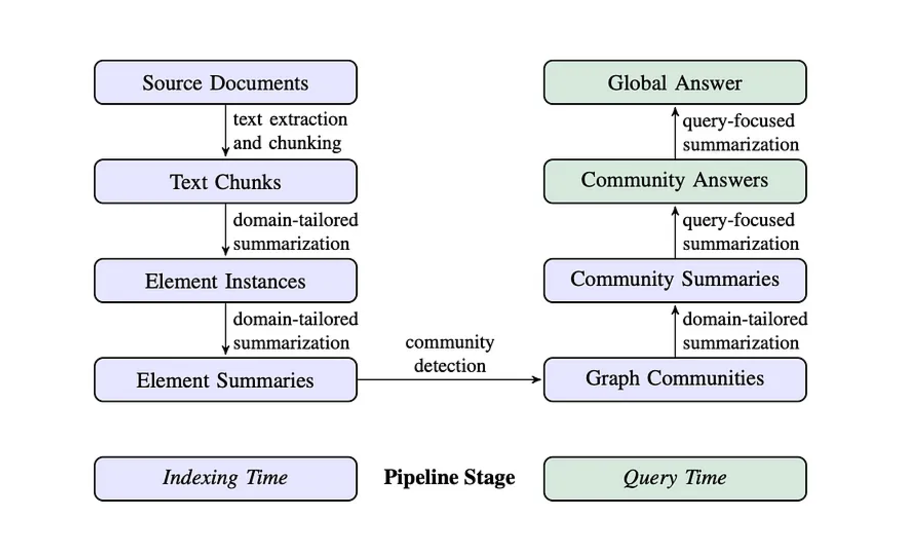
Figure 1 from Edge et al., 2024, From Local to Global: A Graph RAG Approach to Query-Focused Summarization: Graph RAG pipeline using an LLM-derived graph index of source document text.
Challenges of GraphRAG
Despite its advantages, the LLM-centric GraphRAG approach faces several challenges:
- KG Construction with LLMs: Since the LLM is responsible for constructing the knowledge graph, there are risks such as inconsistencies, propagation of biases or errors, and lack of control over the ontology used.
- Querying KG with LLMs: Once the graph is constructed, an LLM translates the human query into a declarative query language. However, crafting complex queries may result in inaccurate outcomes.
- Scalability & Cost Consideration: To be practical, applications must be both scalable and cost-effective. Relying on LLMs increases costs and decreases scalability, as they are used every time data is added, queried, or generated.
To address these challenges, a more controlled and structured knowledge representation system may be required for GraphRAG to function optimally at scale.
Architecture Overview
The architecture has two main components: Ingestion and Retrieval & Generation. Ingestion processes raw data into structured knowledge and vector representations, while Retrieval and Generation enable efficient querying and response generation.
Let’s start with Ingestion.
Ingestion
The GraphRAG ingestion pipeline combines a Graph Database and a Vector Search Engine to improve RAG workflows.


Fig 2: Overview of Ingestion Pipeline
Let’s break it down:
- Raw Data: Serves as the foundation, comprising unstructured or structured content.
- Ontology Creation: An LLM processes the raw data into an ontology, structuring entities, relationships, and hierarchies. Better approaches exist to extracting more structured information from raw data, like using NER to identify the names of people, organizations, and places. Unlike LLMs, this method creates.
- Graph Database: The ontology is stored in a Graph database to capture complex relationships.
- Vector Embeddings: An Embedding model converts the raw data into high-dimensional vectors capturing semantic similarities.
- Vector Search Engine: These embeddings are stored in a Vector search engine for similarity-based retrieval.
- Database Interlinking: The Graph database (e.g., Neo4j) and Vector search engine (e.g., Qdrant) share unique IDs, enabling cross-referencing between ontology-based and vector-based results.
Retrieval & Generation
The Retrieval and Generation process is designed to handle user queries by leveraging both semantic search and graph-based context extraction.


Fig 3: Overview of Retrieval and Generation Pipeline
The architecture can be broken down into the following steps:
- Query Vectorization: An embedding model converts a user query into a high-dimensional vector.
- Semantic Search: The vector performs a similarity-based search in the Vector search engine, retrieving relevant documents or entries.
- ID Extraction: Extracted IDs from the semantic search results are used to query the Graph database.
- Graph Context Retrieval: The Graph database provides contextual information, including relationships and entities linked to the extracted IDs.
- Response Generation: The context retrieved from the graph is passed to an LLM to generate a final response.
- Results: The generated response is returned to the user.
This architecture combines the strengths of both databases:
- Semantic Search with Vector Search Engine: The user query is first processed semantically to identify the most relevant data points without needing explicit keyword matches.
- Contextual Expansion with Graph Database: IDs or entities retrieved from the vector search engine query the graph database for detailed relationships, enriching the retrieved data with structured context.
- Enhanced Generation: The architecture combines semantic relevance (from the vector search engine) and graph-based context to enable the LLM to generate more informed, accurate, and contextually rich responses.
Implementation
We’ll walk through a complete pipeline that ingests data into Neo4j and Qdrant, retrieves relevant data, and generates responses using an LLM based on the retrieved graph context.
The main components of this pipeline include data ingestion (to Neo4j and Qdrant), retrieval, and generation steps.
Prerequisites
These are the tutorial prerequisites, which are divided into setup, imports, and initialization of the two DBs.
Setup
Let’s start with setting up instances with Qdrant and Neo4j.
Qdrant Setup
You can use Qdrant Cloud or run Qdrant yourself. This tutorial uses Qdrant Cloud:
- Go to Qdrant Cloud and sign up or log in.
- Once logged in, click on Create New Cluster.
- Follow the on-screen instructions to create your cluster.
- Once your cluster is created, you’ll be given a Cluster URL and API Key, which you will use in the client to interact with Qdrant.
Neo4j Setup
You can use Neo4j Aura, Neo4j’s managed service, or host Neo4j yourself. This tutorial uses Neo4j Aura:
- Go to the Neo4j Aura console and sign up or log in.
- After setting up, an instance will be created if it is the first time.
- After the database is set up, you’ll receive a connection URI, username, and password.
Install packages and set credentials
Install the Python packages:
pip install "neo4j-graphrag[qdrant]" openai python-dotenv
Then put the credentials in a .env file next to your script:
QDRANT_URL=https://<your-cluster>.cloud.qdrant.io
QDRANT_KEY=<your-qdrant-api-key>
NEO4J_URI=neo4j+s://<your-instance>.databases.neo4j.io
NEO4J_USERNAME=<your-neo4j-username>
NEO4J_PASSWORD=<your-neo4j-password>
OPENAI_API_KEY=<your-openai-api-key>
This tutorial was tested in October 2026 on Qdrant Cloud and Neo4j Aura, with qdrant-client 1.19.1, neo4j 6.4.0, neo4j-graphrag 1.22.0, and openai 3.24.0.
Imports
First, we import the required libraries for working with Neo4j, Qdrant, OpenAI, and other utility functions.
Show code
from neo4j import GraphDatabase
from qdrant_client import QdrantClient, models
from dotenv import load_dotenv
from pydantic import BaseModel
from openai import OpenAI
from neo4j_graphrag.retrievers import QdrantNeo4jRetriever
import uuid
import os
- Neo4j: Used to store and query the graph database.
- Qdrant: A vector search engine used for semantic similarity search.
- dotenv: Loads environment variables for credentials and API keys.
- Pydantic: Ensures data is structured properly when interacting with the graph data.
- OpenAI: Interfaces with the OpenAI API to generate responses and embeddings.
- neo4j_graphrag: A helper package to retrieve data from both Qdrant and Neo4j.
Setting Up Environment Variables
Before initializing the clients, we load the necessary credentials from environment variables.
Show code
# Load environment variables
load_dotenv()

# Get credentials from environment variables
qdrant_key = os.getenv("QDRANT_KEY")
qdrant_url = os.getenv("QDRANT_URL")
neo4j_uri = os.getenv("NEO4J_URI")
neo4j_username = os.getenv("NEO4J_USERNAME")
neo4j_password = os.getenv("NEO4J_PASSWORD")
openai_key = os.getenv("OPENAI_API_KEY")
This ensures that sensitive information (like API keys and database credentials) is securely stored in environment variables.
Initializing Neo4j and Qdrant Clients
Now, we initialize the Neo4j and Qdrant clients using the credentials.
Show code
# Initialize Neo4j driver
neo4j_driver = GraphDatabase.driver(neo4j_uri, auth=(neo4j_username, neo4j_password))

# Initialize Qdrant client
qdrant_client = QdrantClient(
    url=qdrant_url,
    api_key=qdrant_key
)
- Neo4j: We set up a connection to the Neo4j graph database.
- Qdrant: We initialize the connection to the Qdrant vector search engine.
This will connect with Neo4j and Qdrant, and we can now start with Ingestion.
Ingestion
We will follow the workflow of the ingestion pipeline presented in the architecture section. Let’s examine it implementation-wise.
Defining Output Parser
The single and GraphComponents classes structure the LLM’s responses into a usable format.
class single(BaseModel):
    node: str
    target_node: str
    relationship: str

class GraphComponents(BaseModel):
    graph: list[single]
These classes help ensure that data from the OpenAI LLM is parsed correctly into the graph components (nodes and relationships).
Defining OpenAI Client and LLM Parser Function
We now initialize the OpenAI client and define a function to send prompts to the LLM and parse its responses.
client = OpenAI()

def openai_llm_parser(prompt):
    completion = client.chat.completions.create(
        model="gpt-5-mini",
        response_format={"type": "json_object"},
        messages=[
            {
                "role": "system",
                "content":

                """ You are a precise graph relationship extractor. Extract all
                    relationships from the text and format them as a JSON object
                    with this exact structure:
                    {
                        "graph": [
                            {"node": "Person/Entity",
                             "target_node": "Related Entity",
                             "relationship": "Type of Relationship"},
                            ...more relationships...
                        ]
                    }
                    Include ALL relationships mentioned in the text, including
                    implicit ones. Be thorough and precise. """

            },
            {
                "role": "user",
                "content": prompt
            }
        ]
    )

    return GraphComponents.model_validate_json(completion.choices[0].message.content)
Extracting Graph Components
def extract_graph_components(raw_data, node_ids):
    prompt = f"Extract nodes and relationships from the following text:\n{raw_data}"

    parsed_response = openai_llm_parser(prompt)  # Assuming this returns a list of dictionaries
    parsed_response = parsed_response.graph  # Assuming the 'graph' structure is a key in the parsed response

    nodes = {}
    relationships = []

    for entry in parsed_response:
        node = entry.node
        target_node = entry.target_node  # Get target node if available
        relationship = entry.relationship  # Get relationship if available

        # Reuse the ID of an entity already seen in an earlier paragraph
        nodes[node] = node_ids.setdefault(node, str(uuid.uuid4()))

        if target_node:
            nodes[target_node] = node_ids.setdefault(target_node, str(uuid.uuid4()))

        # Add relationship to the relationships list with node IDs
        if target_node and relationship:
            relationships.append({
                "source": nodes[node],
                "target": nodes[target_node],
                "type": relationship
            })

    return nodes, relationships
The pipeline calls this function once per paragraph. node_ids keeps one ID per entity name across paragraphs, so an entity mentioned in several paragraphs becomes a single node.
Ingesting Data to Neo4j
Each paragraph becomes a Chunk node, linked to the entities it mentions by MENTIONS relationships. The chunk’s ID is what connects Neo4j to Qdrant.
def ingest_to_neo4j(nodes, relationships, chunk_id):
    """
    Ingest a paragraph's nodes and relationships into Neo4j,
    linked to a Chunk node that represents the paragraph.
    """

    with neo4j_driver.session() as session:
        session.run("CREATE (c:Chunk {id: $id})", id=chunk_id)

        # Create nodes in Neo4j, once per entity, and link them to the chunk
        for name, node_id in nodes.items():
            session.run(
                "MERGE (n:Entity {id: $id, name: $name}) "
                "WITH n MATCH (c:Chunk {id: $chunk_id}) "
                "CREATE (c)-[:MENTIONS]->(n)",
                id=node_id,
                name=name,
                chunk_id=chunk_id
            )

        # Create relationships in Neo4j
        for relationship in relationships:
            session.run(
                "MATCH (a:Entity {id: $source_id}), (b:Entity {id: $target_id}) "
                "CREATE (a)-[:RELATIONSHIP {type: $type}]->(b)",
                source_id=relationship["source"],
                target_id=relationship["target"],
                type=relationship["type"]
            )

    return nodes
To look at the result, run MATCH (e:Entity)-[r:RELATIONSHIP]->(n:Entity) RETURN e, r, n LIMIT 15 in the Neo4j Aura console. With this tutorial’s sample data, part of the graph looks like this:
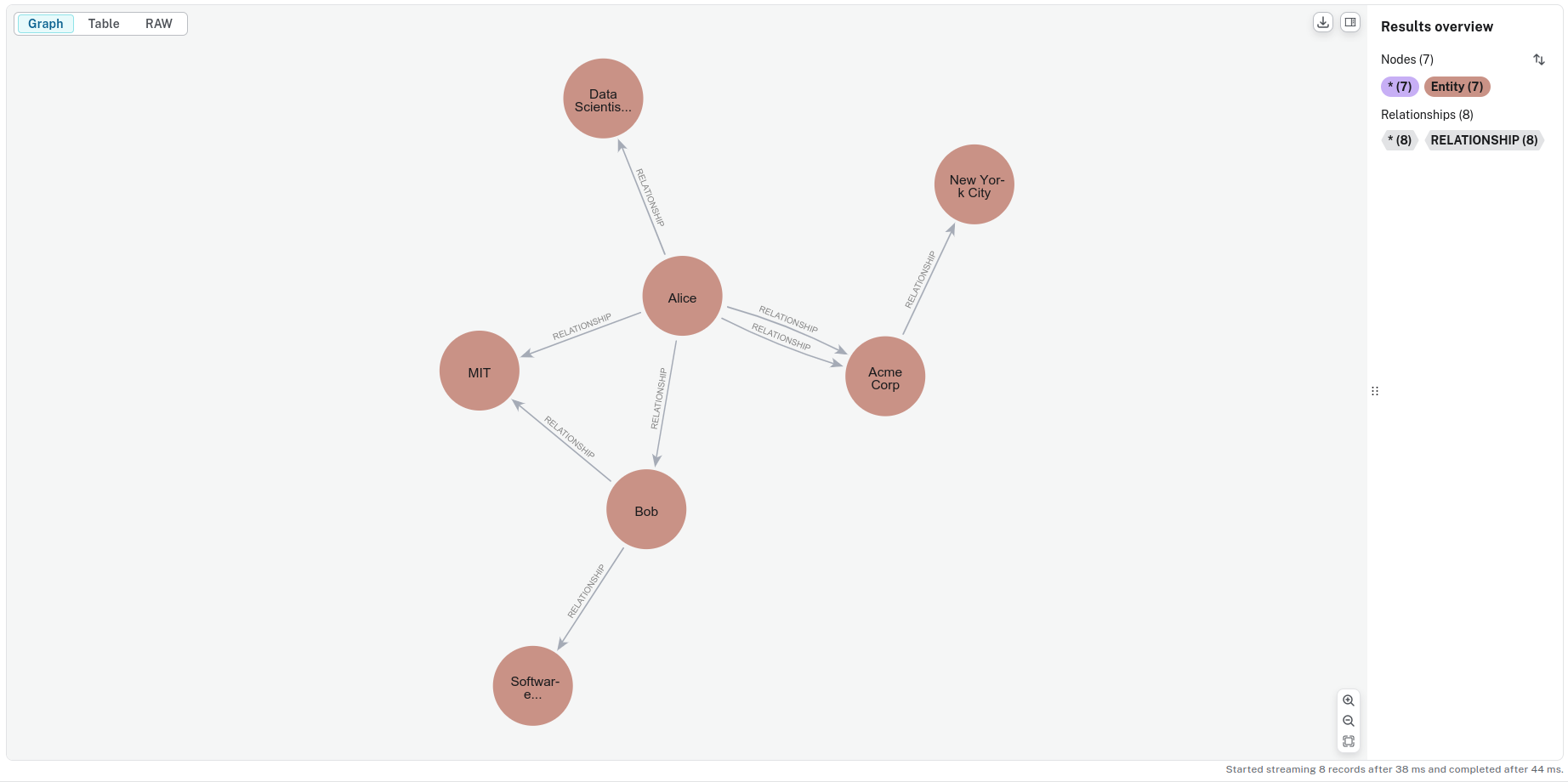
Fig 4: Visualization of the Knowledge Graph
Next, store each paragraph’s embedding in Qdrant under the same chunk ID. First, create a Qdrant collection.
Creating Qdrant Collection
You can create a collection once you have set up your Qdrant instance. A collection in Qdrant holds vectors for search and retrieval.
def create_collection(client, collection_name, vector_dimension):
    if client.collection_exists(collection_name):
        print(f"Skipping creating collection; '{collection_name}' already exists.")
        return

    client.create_collection(
        collection_name=collection_name,
        vectors_config=models.VectorParams(size=vector_dimension, distance=models.Distance.COSINE)
    )
    print(f"Collection '{collection_name}' created successfully.")
Generating Embeddings
Next, we define a function that generates embeddings for text using OpenAI’s API.
def openai_embeddings(text):
    response = client.embeddings.create(
        input=text,
        model="text-embedding-3-small"
    )

    return response.data[0].embedding
Ingesting into Qdrant
Let’s ingest the data into the vector search engine.
def ingest_to_qdrant(collection_name, chunk_id, paragraph):
    qdrant_client.upsert(
        collection_name=collection_name,
        points=[
            models.PointStruct(
                id=chunk_id,
                vector=openai_embeddings(paragraph),
                payload={"id": chunk_id, "text": paragraph}
            )
        ]
    )
Each point uses the chunk ID as its point ID and stores it in the payload as id. The retriever reads that payload field to find the matching Chunk node in Neo4j.
Retrieval & Generation
In this section, we will create the retrieval and generation engine for the system.
Building a Retriever
The retriever integrates vector search and graph data, enabling semantic similarity searches with Qdrant and fetching relevant graph data from Neo4j. This enriches the RAG process and allows for more informed responses.
def retriever_search(neo4j_driver, qdrant_client, collection_name, query):
    retriever = QdrantNeo4jRetriever(
        driver=neo4j_driver,
        client=qdrant_client,
        collection_name=collection_name,
        id_property_external="id",
        id_property_neo4j="id",
    )

    results = retriever.get_search_results(query_vector=openai_embeddings(query), top_k=5)

    return results
The QdrantNeo4jRetriever handles both vector search and graph data fetching, combining Qdrant for vector-based retrieval and Neo4j for graph-based queries.
Vector Search:
qdrant_clientconnects to Qdrant for efficient vector similarity search.collection_namespecifies where vectors are stored.id_property_external="id"names the payload field that holds the chunk ID.
Graph Fetching:
neo4j_driverconnects to Neo4j for querying graph data.id_property_neo4j="id"names the Neo4j node property to match, here theChunknode’sid.
get_search_results returns the matched Neo4j records, so the pipeline reads each chunk ID from record["node"].
Querying Neo4j for Related Graph Data
Starting from the chunks the retriever found, fetch the entities they mention and the relationships around them.
def fetch_related_graph(neo4j_client, chunk_ids):
    query = """
    MATCH (c:Chunk)-[:MENTIONS]->(e:Entity)-[r1:RELATIONSHIP]-(n1:Entity)-[r2:RELATIONSHIP]-(n2:Entity)
    WHERE c.id IN $chunk_ids
    RETURN e, r1 as r, n1 as related, r2, n2
    UNION
    MATCH (c:Chunk)-[:MENTIONS]->(e:Entity)-[r:RELATIONSHIP]-(related:Entity)
    WHERE c.id IN $chunk_ids
    RETURN e, r, related, null as r2, null as n2
    """
    with neo4j_client.session() as session:
        result = session.run(query, chunk_ids=chunk_ids)
        subgraph = []
        for record in result:
            subgraph.append({
                "entity": record["e"],
                "relationship": record["r"],
                "related_node": record["related"]
            })
            if record["r2"] and record["n2"]:
                subgraph.append({
                    "entity": record["related"],
                    "relationship": record["r2"],
                    "related_node": record["n2"]
                })
    return subgraph
The query follows MENTIONS from each chunk to its entities, then returns their relationships up to two hops away. It only follows RELATIONSHIP edges, so chunk nodes don’t end up in the context.
This subgraph is essential for generating context to answer user queries.
Setting up the Graph Context
The second part of the implementation involves preparing a graph context. We’ll fetch relevant subgraph data from a Neo4j database and format it for the model. Let’s break it down.
def format_graph_context(subgraph):
    nodes = set()
    edges = []

    for entry in subgraph:
        entity = entry["entity"]
        related = entry["related_node"]
        relationship = entry["relationship"]

        nodes.add(entity["name"])
        nodes.add(related["name"])

        edges.append(f"{entity['name']} {relationship['type']} {related['name']}")

    return {"nodes": list(nodes), "edges": list(dict.fromkeys(edges))}  # drop repeated edges
The two-hop query returns the same edge many times, so the function keeps each edge once.
Integrating with the LLM
Now that we have the graph context, we need to generate a prompt for the LLM. This is where the core of the Retrieval-Augmented Generation (RAG) happens: we combine the graph data and the user query into a comprehensive prompt for the model.
def graphRAG_run(graph_context, user_query):
    nodes_str = ", ".join(graph_context["nodes"])
    edges_str = "; ".join(graph_context["edges"])
    prompt = f"""
    You are an intelligent assistant with access to the following knowledge graph:

    Nodes: {nodes_str}

    Edges: {edges_str}

    Using this graph, Answer the following question:

    User Query: "{user_query}"
    """

    try:
        response = client.chat.completions.create(
            model="gpt-5-mini",
            messages=[
                {"role": "system", "content": "Provide the answer for the following question:"},
                {"role": "user", "content": prompt}
            ]
        )
        return response.choices[0].message.content

    except Exception as e:
        return f"Error querying LLM: {str(e)}"
End-to-End Pipeline
Finally, let’s integrate everything into an end-to-end pipeline where we ingest some sample data, run the retrieval process, and query the language model.
if __name__ == "__main__":
    print("Script started")
    print("Creating collection...")
    collection_name = "graphrag"
    vector_dimension = 1536
    create_collection(qdrant_client, collection_name, vector_dimension)
    print("Collection created/verified")

    print("Extracting graph components...")

    raw_data = """Alice is a data scientist at TechCorp's Seattle office.
    Bob and Carol collaborate on the Alpha project.
    Carol transferred to the New York office last year.
    Dave mentors both Alice and Bob.
    TechCorp's headquarters is in Seattle.
    Carol leads the East Coast team.
    Dave started his career in Seattle.
    The Alpha project is managed from New York.
    Alice previously worked with Carol at DataCo.
    Bob joined the team after Dave's recommendation.
    Eve runs the West Coast operations from Seattle.
    Frank works with Carol on client relations.
    The New York office expanded under Carol's leadership.
    Dave's team spans multiple locations.
    Alice visits Seattle monthly for team meetings.
    Bob's expertise is crucial for the Alpha project.
    Carol implemented new processes in New York.
    Eve and Dave collaborated on previous projects.
    Frank reports to the New York office.
    TechCorp's main AI research is in Seattle.
    The Alpha project revolutionized East Coast operations.
    Dave oversees projects in both offices.
    Bob's contributions are mainly remote.
    Carol's team grew significantly after moving to New York.
    Seattle remains the technology hub for TechCorp."""

    node_ids = {}  # entity name -> ID, shared across paragraphs
    for paragraph in raw_data.split("\n"):
        paragraph = paragraph.strip()
        chunk_id = str(uuid.uuid4())

        nodes, relationships = extract_graph_components(paragraph, node_ids)
        ingest_to_neo4j(nodes, relationships, chunk_id)
        ingest_to_qdrant(collection_name, chunk_id, paragraph)
    print("Ingested", len(node_ids), "entities to Neo4j and Qdrant")

    query = "How is Bob connected to New York?"
    print("Starting retriever search...")
    retriever_result = retriever_search(neo4j_driver, qdrant_client, collection_name, query)
    print("Retriever results:", retriever_result)

    print("Extracting chunk IDs...")
    chunk_ids = [record["node"]["id"] for record in retriever_result.records]
    print("Chunk IDs:", chunk_ids)

    print("Fetching related graph...")
    subgraph = fetch_related_graph(neo4j_driver, chunk_ids)
    print("Subgraph:", subgraph)

    print("Formatting graph context...")
    graph_context = format_graph_context(subgraph)
    print("Graph context:", graph_context)

    print("Running GraphRAG...")
    answer = graphRAG_run(graph_context, query)
    print("Final Answer:", answer)
Here’s what’s happening:
- First, the user query is defined (“How is Bob connected to New York?”).
- The QdrantNeo4jRetriever finds the 5 paragraphs most similar to the query (
top_k=5) and matches them to theirChunknodes in Neo4j. - The chunk IDs are read from the retriever result.
- The fetch_related_graph function retrieves related entities and their relationships from the Neo4j database.
- The format_graph_context function prepares the graph data in a format the LLM can understand.
- Finally, the graphRAG_run function is called to generate and query the language model, producing an answer based on the retrieved graph context.
The answer varies between runs. In our test run, it was:
Final Answer: Bob is connected to New York in several ways:

- He worked on the Alpha project, which is managed from New York and by the New York management team; Bob's expertise was crucial to that project.
- He collaborates with Carol, who transferred to and leads the New York office / East Coast team.
- His contributions to those efforts are primarily remote.
Clean up
To delete the data this tutorial created, remove the Qdrant collection and the Neo4j nodes:
qdrant_client.delete_collection(collection_name)

with neo4j_driver.session() as session:
    session.run("MATCH (n:Entity|Chunk) DETACH DELETE n")
Retrieval Behavior and Limits
- Qdrant searches paragraph embeddings, and
QdrantNeo4jRetrievermatches the hits to Neo4jChunknodes by ID. These nodes link paragraphs to extracted entities. - A Cypher query follows entity relationships up to two hops. It has no result limit, so the graph context can grow with the number of connected entities.
- Ingestion makes an LLM extraction call for each paragraph to populate Neo4j. This adds per-paragraph indexing cost, and the graph context depends on the quality of the extracted entities and relationships.
- Entities are merged by name, so two different entities with the same name, such as two people called Alice, become one node. Separating them requires entity resolution, for example a stable key or an extra LLM step that uses the surrounding text.
Conclusion
This example uses vector search to select paragraphs, expands their entities’ graph neighborhoods, and passes the resulting context to an LLM for answer generation.
This implementation template we’ve explored offers a foundation for your projects. You can adapt and customize it based on your specific needs, whether for document analysis, knowledge management, or other information retrieval tasks.
 Ready to try Qdrant?