# External Embedding Model Providers
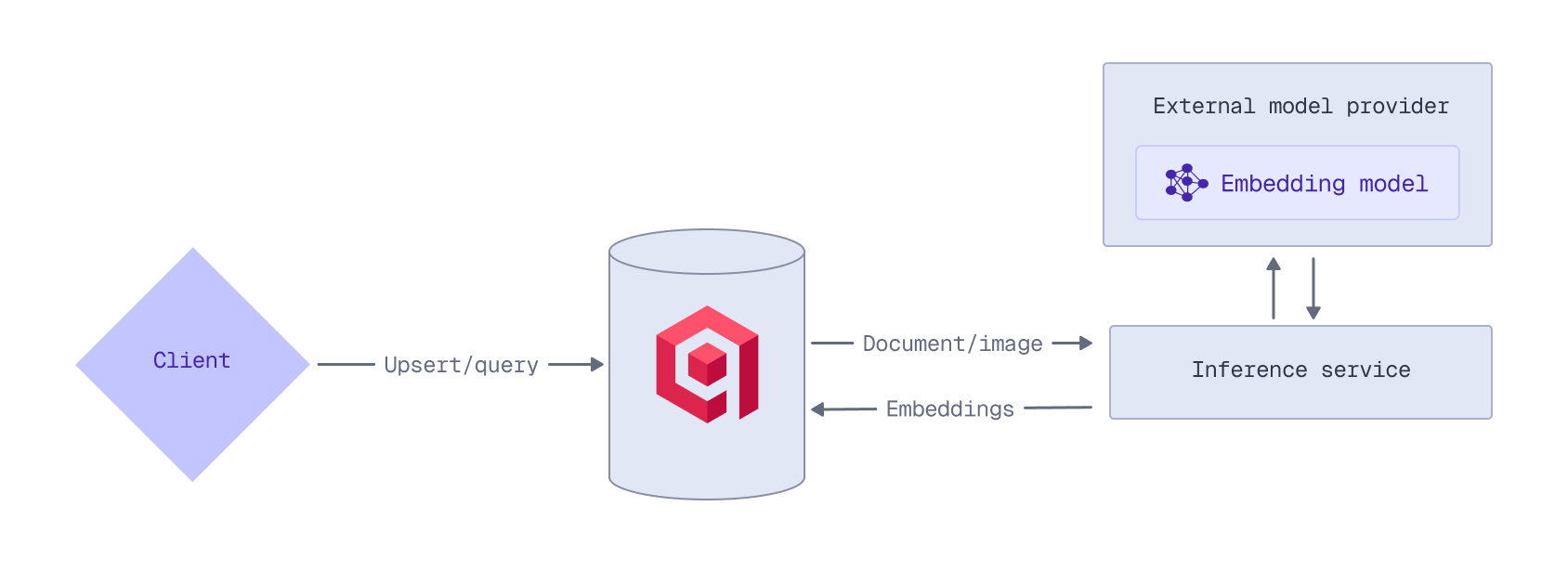
Qdrant Cloud can act as a proxy for the APIs of external embedding model providers:
- OpenAI
- Cohere
- Jina AI
- OpenRouter
This enables you to access any of the embedding models provided by these providers through the Qdrant API.
When using an external embedding model, ensure that your collection has been configured for vectors with the correct dimensionality. Refer to the model's documentation for details on the output dimensions.
## API Key
To use an external provider's embedding model, you need an API key from that provider. For example, to access OpenAI models, you need an OpenAI API key. Qdrant does not store or cache your API keys; they must be provided with each inference request.
Provide the provider's API key in the request header (`openai-api-key`, `cohere-api-key`, `jina-api-key`, or `openrouter-api-key`). For example:
```python
from qdrant_client import QdrantClient, models
from qdrant_client.context_headers import headers
client = QdrantClient(
url="https://xyz-example.qdrant.io:6333",
api_key="",
cloud_inference=True
)
with headers({"openai-api-key": ""}):
client.upsert(
collection_name="{collection_name}",
points=[
models.PointStruct(
id=1,
vector=models.Document(
text="Recipe for baking chocolate chip cookies",
model="openai/text-embedding-3-large",
)
)
]
)
```
```typescript
import { QdrantClient, withHeaders } from "@qdrant/js-client-rest";
await withHeaders({ 'openai-api-key': '' }, () =>
client.upsert("{collection_name}", {
points: [
{
id: 1,
vector: {
text: 'Recipe for baking chocolate chip cookies',
model: 'openai/text-embedding-3-large',
},
},
],
})
);
```
```rust
use qdrant_client::{
Payload, Qdrant,
qdrant::{Document, PointStruct, UpsertPointsBuilder},
};
use std::collections::HashMap;
client
.with_header("openai-api-key", "")
.upsert_points(
UpsertPointsBuilder::new(
"{collection_name}",
vec![PointStruct::new(
1,
Document {
text: "Recipe for baking chocolate chip cookies".into(),
model: "openai/text-embedding-3-large".into(),
options: HashMap::new(),
},
Payload::default(),
)],
)
.wait(true),
)
.await?;
```
```java
import static io.qdrant.client.PointIdFactory.id;
import static io.qdrant.client.VectorsFactory.vectors;
import io.grpc.Context;
import io.qdrant.client.QdrantClient;
import io.qdrant.client.QdrantGrpcClient;
import io.qdrant.client.RequestHeaders;
import io.qdrant.client.grpc.Points.Document;
import io.qdrant.client.grpc.Points.PointStruct;
import java.util.List;
Context ctx = RequestHeaders.withHeader(
Context.current(), "openai-api-key", "");
ctx.call(() -> client
.upsertAsync(
"{collection_name}",
List.of(
PointStruct.newBuilder()
.setId(id(1))
.setVectors(
vectors(
Document.newBuilder()
.setModel("openai/text-embedding-3-large")
.setText("Recipe for baking chocolate chip cookies")
.build()))
.build()))
.get());
```
```csharp
using Qdrant.Client;
using Qdrant.Client.Grpc;
using (RequestHeaders.Use("openai-api-key", ""))
await client.UpsertAsync(
collectionName: "{collection_name}",
points: new List
{
new()
{
Id = 1,
Vectors = new Document()
{
Model = "openai/text-embedding-3-large",
Text = "Recipe for baking chocolate chip cookies",
},
},
}
);
```
```go
import (
"context"
"github.com/qdrant/go-client/qdrant"
)
ctx := qdrant.WithHeader(context.Background(), "openai-api-key", "")
client.Upsert(ctx, &qdrant.UpsertPoints{
CollectionName: "{collection_name}",
Points: []*qdrant.PointStruct{
{
Id: qdrant.NewIDNum(uint64(1)),
Vectors: qdrant.NewVectorsDocument(&qdrant.Document{
Model: "openai/text-embedding-3-large",
Text: "Recipe for baking chocolate chip cookies",
}),
},
},
})
```
Alternatively, provide the API key in the request body in the `options` object:
```http
PUT /collections/{collection_name}/points?wait=true
{
"points": [
{
"id": 1,
"vector": {
"text": "Recipe for baking chocolate chip cookies",
"model": "openai/text-embedding-3-large",
"options": {
"openai-api-key": ""
}
}
}
]
}
```
```python
from qdrant_client import QdrantClient, models
client = QdrantClient(
url="https://xyz-example.qdrant.io:6333",
api_key="",
cloud_inference=True
)
client.upsert(
collection_name="{collection_name}",
points=[
models.PointStruct(
id=1,
vector=models.Document(
text="Recipe for baking chocolate chip cookies",
model="openai/text-embedding-3-large",
options={
"openai-api-key": ""
}
)
)
]
)
```
```typescript
import { QdrantClient } from "@qdrant/js-client-rest";
client.upsert("{collection_name}", {
points: [
{
id: 1,
vector: {
text: 'Recipe for baking chocolate chip cookies',
model: 'openai/text-embedding-3-large',
options: {
'openai-api-key': '',
},
},
},
],
});
```
```rust
use qdrant_client::{
Payload, Qdrant,
qdrant::{Document, PointStruct, UpsertPointsBuilder},
};
use std::collections::HashMap;
let mut options = HashMap::new();
options.insert("openai-api-key".to_string(), "".into());
client
.upsert_points(UpsertPointsBuilder::new("{collection_name}",
vec![
PointStruct::new(1,
Document {
text: "Recipe for baking chocolate chip cookies".into(),
model: "openai/text-embedding-3-large".into(),
options,
},
Payload::default())
]).wait(true))
.await?;
```
```java
import static io.qdrant.client.PointIdFactory.id;
import static io.qdrant.client.ValueFactory.value;
import static io.qdrant.client.VectorsFactory.vectors;
import io.qdrant.client.QdrantClient;
import io.qdrant.client.QdrantGrpcClient;
import io.qdrant.client.grpc.Points.Document;
import io.qdrant.client.grpc.Points.PointStruct;
import java.util.List;
import java.util.Map;
client
.upsertAsync(
"{collection_name}",
List.of(
PointStruct.newBuilder()
.setId(id(1))
.setVectors(
vectors(
Document.newBuilder()
.setModel("openai/text-embedding-3-large")
.setText("Recipe for baking chocolate chip cookies")
.putAllOptions(
Map.of(
"openai-api-key",
value("")))
.build()))
.build()))
.get();
```
```csharp
using Qdrant.Client;
using Qdrant.Client.Grpc;
await client.UpsertAsync(
collectionName: "{collection_name}",
points: new List
{
new()
{
Id = 1,
Vectors = new Document()
{
Model = "openai/text-embedding-3-large",
Text = "Recipe for baking chocolate chip cookies",
Options = { ["openai-api-key"] = ""},
},
},
}
);
```
```go
import (
"context"
"github.com/qdrant/go-client/qdrant"
)
client.Upsert(context.Background(), &qdrant.UpsertPoints{
CollectionName: "{collection_name}",
Points: []*qdrant.PointStruct{
{
Id: qdrant.NewIDNum(uint64(1)),
Vectors: qdrant.NewVectorsDocument(&qdrant.Document{
Model: "openai/text-embedding-3-large",
Text: "Recipe for baking chocolate chip cookies",
Options: qdrant.NewValueMap(map[string]any{
"openai-api-key": "",
}),
}),
},
},
})
```
## OpenAI
When you prepend a model name with `openai/`, the embedding request is automatically routed to the [OpenAI Embeddings API](https://platform.openai.com/docs/guides/embeddings).
For example, to use OpenAI's `text-embedding-3-large` model when ingesting data, prepend the model name with `openai/`. Provide your OpenAI API key in the request header (`openai-api-key`), or in the request body in the `options` object. Any OpenAI-specific API parameters can be passed using the `options` object. This example uses the OpenAI-specific API `dimensions` parameter to reduce the dimensionality to 512:
```http
PUT /collections/{collection_name}/points?wait=true
{
"points": [
{
"id": 1,
"vector": {
"text": "Recipe for baking chocolate chip cookies",
"model": "openai/text-embedding-3-large",
"options": {
"openai-api-key": "",
"dimensions": 512
}
}
}
]
}
```
```python
from qdrant_client import QdrantClient, models
from qdrant_client.context_headers import headers
client = QdrantClient(
url="https://xyz-example.qdrant.io:6333",
api_key="",
cloud_inference=True
)
with headers({"openai-api-key": ""}):
client.upsert(
collection_name="{collection_name}",
points=[
models.PointStruct(
id=1,
vector=models.Document(
text="Recipe for baking chocolate chip cookies",
model="openai/text-embedding-3-large",
options={
"dimensions": 512
}
)
)
]
)
```
```typescript
import { QdrantClient, withHeaders } from "@qdrant/js-client-rest";
await withHeaders({ 'openai-api-key': '' }, () =>
client.upsert("{collection_name}", {
points: [
{
id: 1,
vector: {
text: 'Recipe for baking chocolate chip cookies',
model: 'openai/text-embedding-3-large',
options: {
dimensions: 512,
},
},
},
],
})
);
```
```rust
use qdrant_client::{
Payload, Qdrant,
qdrant::{Document, PointStruct, UpsertPointsBuilder},
};
use std::collections::HashMap;
let mut options = HashMap::new();
options.insert("dimensions".to_string(), 512.into());
client
.with_header("openai-api-key", "")
.upsert_points(UpsertPointsBuilder::new("{collection_name}",
vec![
PointStruct::new(1,
Document {
text: "Recipe for baking chocolate chip cookies".into(),
model: "openai/text-embedding-3-large".into(),
options,
},
Payload::default())
]).wait(true))
.await?;
```
```java
import static io.qdrant.client.PointIdFactory.id;
import static io.qdrant.client.ValueFactory.value;
import static io.qdrant.client.VectorsFactory.vectors;
import io.grpc.Context;
import io.qdrant.client.QdrantClient;
import io.qdrant.client.QdrantGrpcClient;
import io.qdrant.client.RequestHeaders;
import io.qdrant.client.grpc.Points.Document;
import io.qdrant.client.grpc.Points.PointStruct;
import java.util.List;
import java.util.Map;
Context ctx = RequestHeaders.withHeader(
Context.current(), "openai-api-key", "");
ctx.call(() -> client
.upsertAsync(
"{collection_name}",
List.of(
PointStruct.newBuilder()
.setId(id(1))
.setVectors(
vectors(
Document.newBuilder()
.setModel("openai/text-embedding-3-large")
.setText("Recipe for baking chocolate chip cookies")
.putAllOptions(
Map.of(
"dimensions",
value(512)))
.build()))
.build()))
.get());
```
```csharp
using Qdrant.Client;
using Qdrant.Client.Grpc;
using (RequestHeaders.Use("openai-api-key", ""))
await client.UpsertAsync(
collectionName: "{collection_name}",
points: new List
{
new()
{
Id = 1,
Vectors = new Document()
{
Model = "openai/text-embedding-3-large",
Text = "Recipe for baking chocolate chip cookies",
Options = { ["dimensions"] = 512 },
},
},
}
);
```
```go
import (
"context"
"github.com/qdrant/go-client/qdrant"
)
ctx := qdrant.WithHeader(context.Background(), "openai-api-key", "")
client.Upsert(ctx, &qdrant.UpsertPoints{
CollectionName: "{collection_name}",
Points: []*qdrant.PointStruct{
{
Id: qdrant.NewIDNum(uint64(1)),
Vectors: qdrant.NewVectorsDocument(&qdrant.Document{
Model: "openai/text-embedding-3-large",
Text: "Recipe for baking chocolate chip cookies",
Options: qdrant.NewValueMap(map[string]any{
"dimensions": 512,
}),
}),
},
},
})
```
At query time, you can use the same model by prepending the model name with `openai/` and providing your OpenAI API key in the `options` object. This example again uses the OpenAI-specific API `dimensions` parameter to reduce the dimensionality to 512:
```http
POST /collections/{collection_name}/points/query
{
"query": {
"text": "How to bake cookies?",
"model": "openai/text-embedding-3-large",
"options": {
"openai-api-key": "",
"dimensions": 512
}
}
}
```
```python
from qdrant_client import QdrantClient, models
from qdrant_client.context_headers import headers
client = QdrantClient(
url="https://xyz-example.qdrant.io:6333",
api_key="",
cloud_inference=True
)
with headers({"openai-api-key": ""}):
client.query_points(
collection_name="{collection_name}",
query=models.Document(
text="How to bake cookies?",
model="openai/text-embedding-3-large",
options={
"dimensions": 512
}
)
)
```
```typescript
import { QdrantClient, withHeaders } from "@qdrant/js-client-rest";
await withHeaders({ 'openai-api-key': '' }, () =>
client.query("{collection_name}", {
query: {
text: 'How to bake cookies?',
model: 'openai/text-embedding-3-large',
options: {
dimensions: 512,
},
},
})
);
```
```rust
use qdrant_client::{
Qdrant,
qdrant::{Document, Query, QueryPointsBuilder, Value},
};
use std::collections::HashMap;
let mut options = HashMap::::new();
options.insert("dimensions".to_string(), 512.into());
client
.with_header("openai-api-key", "")
.query(
QueryPointsBuilder::new("{collection_name}")
.query(Query::new_nearest(Document {
text: "How to bake cookies?".into(),
model: "openai/text-embedding-3-large".into(),
options,
}))
.build(),
)
.await?;
```
```java
import static io.qdrant.client.QueryFactory.nearest;
import static io.qdrant.client.ValueFactory.value;
import io.grpc.Context;
import io.qdrant.client.QdrantClient;
import io.qdrant.client.QdrantGrpcClient;
import io.qdrant.client.RequestHeaders;
import io.qdrant.client.grpc.Points.Document;
import io.qdrant.client.grpc.Points.QueryPoints;
import java.util.Map;
Context ctx = RequestHeaders.withHeader(
Context.current(), "openai-api-key", "");
ctx.call(() -> client
.queryAsync(
QueryPoints.newBuilder()
.setCollectionName("{collection_name}")
.setQuery(
nearest(
Document.newBuilder()
.setModel("openai/text-embedding-3-large")
.setText("How to bake cookies?")
.putAllOptions(
Map.of(
"dimensions",
value(512)))
.build()))
.build())
.get());
```
```csharp
using Qdrant.Client;
using Qdrant.Client.Grpc;
using (RequestHeaders.Use("openai-api-key", ""))
await client.QueryAsync(
collectionName: "{collection_name}",
query: new Document()
{
Model = "openai/text-embedding-3-large",
Text = "How to bake cookies?",
Options = { ["dimensions"] = 512 },
}
);
```
```go
import (
"context"
"github.com/qdrant/go-client/qdrant"
)
ctx := qdrant.WithHeader(context.Background(), "openai-api-key", "")
client.Query(ctx, &qdrant.QueryPoints{
CollectionName: "{collection_name}",
Query: qdrant.NewQueryNearest(
qdrant.NewVectorInputDocument(&qdrant.Document{
Model: "openai/text-embedding-3-large",
Text: "How to bake cookies?",
Options: qdrant.NewValueMap(map[string]any{
"dimensions": 512,
}),
}),
),
})
```
Note that, because Qdrant does not store or cache your OpenAI API key, you need to provide it with each inference request.
## Cohere
When you prepend a model name with `cohere/`, the embedding request is automatically routed to the [Cohere Embed API](https://docs.cohere.com/reference/embed).
For example, to use Cohere's multimodal `embed-v4.0` model when ingesting data, prepend the model name with `cohere/`. Provide your Cohere API key in the request header (`cohere-api-key`), or in the request body in the `options` object. This example uses the Cohere-specific API `output_dimension` parameter to reduce the dimensionality to 512:
```http
PUT /collections/{collection_name}/points?wait=true
{
"points": [
{
"id": 1,
"vector": {
"image": "data:image/png;base64,iVBORw0KGgoAAAANSUhEUgAAAAoAAAAKCAYAAACNMs+9AAAAFUlEQVR42mNk+M9Qz0AEYBxVSF+FAAhKDveksOjmAAAAAElFTkSuQmCC",
"model": "cohere/embed-v4.0",
"options": {
"cohere-api-key": "",
"output_dimension": 512
}
}
}
]
}
```
```python
from qdrant_client import QdrantClient, models
from qdrant_client.context_headers import headers
client = QdrantClient(
url="https://xyz-example.qdrant.io:6333",
api_key="",
cloud_inference=True
)
with headers({"cohere-api-key": ""}):
client.upsert(
collection_name="{collection_name}",
points=[
models.PointStruct(
id=1,
vector=models.Image(
image="data:image/png;base64,iVBORw0KGgoAAAANSUhEUgAAAAoAAAAKCAYAAACNMs+9AAAAFUlEQVR42mNk+M9Qz0AEYBxVSF+FAAhKDveksOjmAAAAAElFTkSuQmCC",
model="cohere/embed-v4.0",
options={
"output_dimension": 512
}
)
)
]
)
```
```typescript
import { QdrantClient, withHeaders } from "@qdrant/js-client-rest";
await withHeaders({ 'cohere-api-key': '' }, () =>
client.upsert("{collection_name}", {
points: [
{
id: 1,
vector: {
image: 'data:image/png;base64,iVBORw0KGgoAAAANSUhEUgAAAAoAAAAKCAYAAACNMs+9AAAAFUlEQVR42mNk+M9Qz0AEYBxVSF+FAAhKDveksOjmAAAAAElFTkSuQmCC',
model: 'cohere/embed-v4.0',
options: {
output_dimension: 512,
},
},
},
],
})
);
```
```rust
use qdrant_client::{
Payload, Qdrant,
qdrant::{Image, PointStruct, UpsertPointsBuilder},
};
use std::collections::HashMap;
let mut options = HashMap::new();
options.insert("output_dimension".to_string(), 512.into());
client
.with_header("cohere-api-key", "")
.upsert_points(UpsertPointsBuilder::new("{collection_name}",
vec![
PointStruct::new(1,
Image {
image: Some("data:image/png;base64,iVBORw0KGgoAAAANSUhEUgAAAAoAAAAKCAYAAACNMs+9AAAAFUlEQVR42mNk+M9Qz0AEYBxVSF+FAAhKDveksOjmAAAAAElFTkSuQmCC".into()),
model: "cohere/embed-v4.0".into(),
options,
},
Payload::default())
]).wait(true))
.await?;
```
```java
import static io.qdrant.client.PointIdFactory.id;
import static io.qdrant.client.ValueFactory.value;
import static io.qdrant.client.VectorsFactory.vectors;
import io.grpc.Context;
import io.qdrant.client.QdrantClient;
import io.qdrant.client.QdrantGrpcClient;
import io.qdrant.client.RequestHeaders;
import io.qdrant.client.grpc.Points.Image;
import io.qdrant.client.grpc.Points.PointStruct;
import java.util.List;
import java.util.Map;
Context ctx = RequestHeaders.withHeader(
Context.current(), "cohere-api-key", "");
ctx.call(() -> client
.upsertAsync(
"{collection_name}",
List.of(
PointStruct.newBuilder()
.setId(id(1))
.setVectors(
vectors(
Image.newBuilder()
.setModel("cohere/embed-v4.0")
.setImage(
value(
"data:image/png;base64,iVBORw0KGgoAAAANSUhEUgAAAAoAAAAKCAYAAACNMs+9AAAAFUlEQVR42mNk+M9Qz0AEYBxVSF+FAAhKDveksOjmAAAAAElFTkSuQmCC"))
.putAllOptions(
Map.of(
"output_dimension",
value(512)))
.build()))
.build()))
.get());
```
```csharp
using Qdrant.Client;
using Qdrant.Client.Grpc;
using (RequestHeaders.Use("cohere-api-key", ""))
await client.UpsertAsync(
collectionName: "{collection_name}",
points: new List
{
new()
{
Id = 1,
Vectors = new Image()
{
Model = "cohere/embed-v4.0",
Image_ =
"data:image/png;base64,iVBORw0KGgoAAAANSUhEUgAAAAoAAAAKCAYAAACNMs+9AAAAFUlEQVR42mNk+M9Qz0AEYBxVSF+FAAhKDveksOjmAAAAAElFTkSuQmCC",
Options =
{
["output_dimension"] = 512,
},
},
},
}
);
```
```go
import (
"context"
"github.com/qdrant/go-client/qdrant"
)
ctx := qdrant.WithHeader(context.Background(), "cohere-api-key", "")
client.Upsert(ctx, &qdrant.UpsertPoints{
CollectionName: "{collection_name}",
Points: []*qdrant.PointStruct{
{
Id: qdrant.NewIDNum(uint64(1)),
Vectors: qdrant.NewVectorsImage(&qdrant.Image{
Model: "cohere/embed-v4.0",
Image: qdrant.NewValueString("data:image/png;base64,iVBORw0KGgoAAAANSUhEUgAAAAoAAAAKCAYAAACNMs+9AAAAFUlEQVR42mNk+M9Qz0AEYBxVSF+FAAhKDveksOjmAAAAAElFTkSuQmCC"),
Options: qdrant.NewValueMap(map[string]any{
"output_dimension": 512,
}),
}),
},
},
})
```
Note that the Cohere `embed-v4.0` model does not support passing an image as a URL. You need to provide a base64-encoded image as a Data URL.
At query time, you can use the same model by prepending the model name with `cohere/` and providing your Cohere API key in the `options` object. This example again uses the Cohere-specific API `output_dimension` parameter to reduce the dimensionality to 512:
```http
POST /collections/{collection_name}/points/query
{
"query": {
"text": "a green square",
"model": "cohere/embed-v4.0",
"options": {
"cohere-api-key": "",
"output_dimension": 512
}
}
}
```
```python
from qdrant_client import QdrantClient, models
from qdrant_client.context_headers import headers
client = QdrantClient(
url="https://xyz-example.qdrant.io:6333",
api_key="",
cloud_inference=True
)
with headers({"cohere-api-key": ""}):
client.query_points(
collection_name="{collection_name}",
query=models.Document(
text="a green square",
model="cohere/embed-v4.0",
options={
"output_dimension": 512
}
)
)
```
```typescript
import { QdrantClient, withHeaders } from "@qdrant/js-client-rest";
await withHeaders({ 'cohere-api-key': '' }, () =>
client.query("{collection_name}", {
query: {
text: 'a green square',
model: 'cohere/embed-v4.0',
options: {
output_dimension: 512,
},
},
})
);
```
```rust
use qdrant_client::{
Qdrant,
qdrant::{Document, Query, QueryPointsBuilder, Value},
};
use std::collections::HashMap;
let mut options = HashMap::::new();
options.insert("output_dimension".to_string(), 512.into());
client
.with_header("cohere-api-key", "")
.query(
QueryPointsBuilder::new("{collection_name}")
.query(Query::new_nearest(Document {
text: "a green square".into(),
model: "cohere/embed-v4.0".into(),
options,
}))
.build(),
)
.await?;
```
```java
import static io.qdrant.client.QueryFactory.nearest;
import static io.qdrant.client.ValueFactory.value;
import io.grpc.Context;
import io.qdrant.client.QdrantClient;
import io.qdrant.client.QdrantGrpcClient;
import io.qdrant.client.RequestHeaders;
import io.qdrant.client.grpc.Points.Document;
import io.qdrant.client.grpc.Points.QueryPoints;
import java.util.Map;
Context ctx = RequestHeaders.withHeader(
Context.current(), "cohere-api-key", "");
ctx.call(() -> client
.queryAsync(
QueryPoints.newBuilder()
.setCollectionName("{collection_name}")
.setQuery(
nearest(
Document.newBuilder()
.setModel("cohere/embed-v4.0")
.setText("a green square")
.putAllOptions(
Map.of(
"output_dimension",
value(512)))
.build()))
.build())
.get());
```
```csharp
using Qdrant.Client;
using Qdrant.Client.Grpc;
using (RequestHeaders.Use("cohere-api-key", ""))
await client.QueryAsync(
collectionName: "{collection_name}",
query: new Document()
{
Model = "cohere/embed-v4.0",
Text = "a green square",
Options = { ["output_dimension"] = 512 },
}
);
```
```go
import (
"context"
"github.com/qdrant/go-client/qdrant"
)
ctx := qdrant.WithHeader(context.Background(), "cohere-api-key", "")
client.Query(ctx, &qdrant.QueryPoints{
CollectionName: "{collection_name}",
Query: qdrant.NewQueryNearest(
qdrant.NewVectorInputDocument(&qdrant.Document{
Text: "a green square",
Model: "cohere/embed-v4.0",
Options: qdrant.NewValueMap(map[string]any{
"output_dimension": 512,
}),
}),
),
})
```
Note that, because Qdrant does not store or cache your Cohere API key, you need to provide it with each inference request.
## Jina AI
When you prepend a model name with `jinaai/`, the embedding request is automatically routed to the [Jina AI Embedding API](https://jina.ai/embeddings/).
For example, to use Jina AI's multimodal `jina-clip-v2` model when ingesting data, prepend the model name with `jinaai/`. Provide your Jina AI API key in the request header (`jina-api-key`), or in the request body in the `options` object. This example uses the Jina AI-specific API `dimensions` parameter to reduce the dimensionality to 512:
```http
PUT /collections/{collection_name}/points?wait=true
{
"points": [
{
"id": 1,
"vector": {
"image": "https://qdrant.tech/example.png",
"model": "jinaai/jina-clip-v2",
"options": {
"jina-api-key": "",
"dimensions": 512
}
}
}
]
}
```
```python
from qdrant_client import QdrantClient, models
from qdrant_client.context_headers import headers
client = QdrantClient(
url="https://xyz-example.qdrant.io:6333",
api_key="",
cloud_inference=True
)
with headers({"jina-api-key": ""}):
client.upsert(
collection_name="{collection_name}",
points=[
models.PointStruct(
id=1,
vector=models.Image(
image="https://qdrant.tech/example.png",
model="jinaai/jina-clip-v2",
options={
"dimensions": 512
}
)
)
]
)
```
```typescript
import { QdrantClient, withHeaders } from "@qdrant/js-client-rest";
await withHeaders({ 'jina-api-key': '' }, () =>
client.upsert("{collection_name}", {
points: [
{
id: 1,
vector: {
image: 'https://qdrant.tech/example.png',
model: 'jinaai/jina-clip-v2',
options: {
dimensions: 512,
},
},
},
],
})
);
```
```rust
use qdrant_client::{
Payload, Qdrant,
qdrant::{Image, PointStruct, UpsertPointsBuilder},
};
use std::collections::HashMap;
let mut options = HashMap::new();
options.insert("dimensions".to_string(), 512.into());
client
.with_header("jina-api-key", "")
.upsert_points(UpsertPointsBuilder::new("{collection_name}",
vec![
PointStruct::new(1,
Image {
image: Some("https://qdrant.tech/example.png".into()),
model: "jinaai/jina-clip-v2".into(),
options,
},
Payload::default())
]).wait(true))
.await?;
```
```java
import static io.qdrant.client.PointIdFactory.id;
import static io.qdrant.client.ValueFactory.value;
import static io.qdrant.client.VectorsFactory.vectors;
import io.grpc.Context;
import io.qdrant.client.QdrantClient;
import io.qdrant.client.QdrantGrpcClient;
import io.qdrant.client.RequestHeaders;
import io.qdrant.client.grpc.Points.Image;
import io.qdrant.client.grpc.Points.PointStruct;
import java.util.List;
import java.util.Map;
Context ctx = RequestHeaders.withHeader(
Context.current(), "jina-api-key", "");
ctx.call(() -> client
.upsertAsync(
"{collection_name}",
List.of(
PointStruct.newBuilder()
.setId(id(1))
.setVectors(
vectors(
Image.newBuilder()
.setModel("jinaai/jina-clip-v2")
.setImage(value("https://qdrant.tech/example.png"))
.putAllOptions(
Map.of(
"dimensions",
value(512)))
.build()))
.build()))
.get());
```
```csharp
using Qdrant.Client;
using Qdrant.Client.Grpc;
using (RequestHeaders.Use("jina-api-key", ""))
await client.UpsertAsync(
collectionName: "{collection_name}",
points: new List
{
new()
{
Id = 1,
Vectors = new Image()
{
Model = "jinaai/jina-clip-v2",
Image_ = "https://qdrant.tech/example.png",
Options = { ["dimensions"] = 512 },
},
},
}
);
```
```go
import (
"context"
"github.com/qdrant/go-client/qdrant"
)
ctx := qdrant.WithHeader(context.Background(), "jina-api-key", "")
client.Upsert(ctx, &qdrant.UpsertPoints{
CollectionName: "{collection_name}",
Points: []*qdrant.PointStruct{
{
Id: qdrant.NewIDNum(uint64(1)),
Vectors: qdrant.NewVectorsImage(&qdrant.Image{
Model: "jinaai/jina-clip-v2",
Image: qdrant.NewValueString("https://qdrant.tech/example.png"),
Options: qdrant.NewValueMap(map[string]any{
"dimensions": 512,
}),
}),
},
},
})
```
At query time, you can use the same model by prepending the model name with `jinaai/` and providing your Jina AI API key in the `options` object. This example again uses the Jina AI-specific API `dimensions` parameter to reduce the dimensionality to 512:
```http
POST /collections/{collection_name}/points/query
{
"query": {
"text": "Mission to Mars",
"model": "jinaai/jina-clip-v2",
"options": {
"jina-api-key": "",
"dimensions": 512
}
}
}
```
```python
from qdrant_client import QdrantClient, models
from qdrant_client.context_headers import headers
client = QdrantClient(
url="https://xyz-example.qdrant.io:6333",
api_key="",
cloud_inference=True
)
with headers({"jina-api-key": ""}):
client.query_points(
collection_name="{collection_name}",
query=models.Document(
text="Mission to Mars",
model="jinaai/jina-clip-v2",
options={
"dimensions": 512
}
)
)
```
```typescript
import { QdrantClient, withHeaders } from "@qdrant/js-client-rest";
await withHeaders({ 'jina-api-key': '' }, () =>
client.query("{collection_name}", {
query: {
text: 'Mission to Mars',
model: 'jinaai/jina-clip-v2',
options: {
dimensions: 512,
},
},
})
);
```
```rust
use qdrant_client::{
Qdrant,
qdrant::{Document, Query, QueryPointsBuilder, Value},
};
use std::collections::HashMap;
let mut options = HashMap::::new();
options.insert("dimensions".to_string(), 512.into());
client
.with_header("jina-api-key", "")
.query(
QueryPointsBuilder::new("{collection_name}")
.query(Query::new_nearest(Document {
text: "Mission to Mars".into(),
model: "jinaai/jina-clip-v2".into(),
options,
}))
.build(),
)
.await?;
```
```java
import static io.qdrant.client.QueryFactory.nearest;
import static io.qdrant.client.ValueFactory.value;
import io.grpc.Context;
import io.qdrant.client.QdrantClient;
import io.qdrant.client.QdrantGrpcClient;
import io.qdrant.client.RequestHeaders;
import io.qdrant.client.grpc.Points.Document;
import io.qdrant.client.grpc.Points.QueryPoints;
import java.util.Map;
Context ctx = RequestHeaders.withHeader(
Context.current(), "jina-api-key", "");
ctx.call(() -> client
.queryAsync(
QueryPoints.newBuilder()
.setCollectionName("{collection_name}")
.setQuery(
nearest(
Document.newBuilder()
.setModel("jinaai/jina-clip-v2")
.setText("Mission to Mars")
.putAllOptions(
Map.of(
"dimensions",
value(512)))
.build()))
.build())
.get());
```
```csharp
using Qdrant.Client;
using Qdrant.Client.Grpc;
using (RequestHeaders.Use("jina-api-key", ""))
await client.QueryAsync(
collectionName: "{collection_name}",
query: new Document()
{
Model = "jinaai/jina-clip-v2",
Text = "Mission to Mars",
Options = { ["dimensions"] = 512 },
}
);
```
```go
import (
"context"
"github.com/qdrant/go-client/qdrant"
)
ctx := qdrant.WithHeader(context.Background(), "jina-api-key", "")
client.Query(ctx, &qdrant.QueryPoints{
CollectionName: "{collection_name}",
Query: qdrant.NewQueryNearest(
qdrant.NewVectorInputDocument(&qdrant.Document{
Text: "Mission to Mars",
Model: "jinaai/jina-clip-v2",
Options: qdrant.NewValueMap(map[string]any{
"dimensions": 512,
}),
}),
),
})
```
Note that, because Qdrant does not store or cache your Jina AI API key, you need to provide it with each inference request
## OpenRouter
OpenRouter is a platform that provides [several embedding models](https://openrouter.ai/models?fmt=cards&output_modalities=embeddings). To use one of the models provided by the [OpenRouter Embeddings API](https://openrouter.ai/docs/api/reference/embeddings), prepend the model name with `openrouter/`.
For example, to use the `mistralai/mistral-embed-2312` model when ingesting data, prepend the model name with `openrouter/`. Provide your OpenRouter API key in the request header (`openrouter-api-key`), or in the request body in the `options` object.
```http
PUT /collections/{collection_name}/points?wait=true
{
"points": [
{
"id": 1,
"vector": {
"text": "Recipe for baking chocolate chip cookies",
"model": "openrouter/mistralai/mistral-embed-2312",
"options": {
"openrouter-api-key": ""
}
}
}
]
}
```
```python
from qdrant_client import QdrantClient, models
from qdrant_client.context_headers import headers
client = QdrantClient(
url="https://xyz-example.qdrant.io:6333",
api_key="",
cloud_inference=True
)
with headers({"openrouter-api-key": ""}):
client.upsert(
collection_name="{collection_name}",
points=[
models.PointStruct(
id=1,
vector=models.Document(
text="Recipe for baking chocolate chip cookies",
model="openrouter/mistralai/mistral-embed-2312",
)
)
]
)
```
```typescript
import { QdrantClient, withHeaders } from "@qdrant/js-client-rest";
await withHeaders({ 'openrouter-api-key': '' }, () =>
client.upsert("{collection_name}", {
points: [
{
id: 1,
vector: {
text: 'Recipe for baking chocolate chip cookies',
model: 'openrouter/mistralai/mistral-embed-2312',
},
},
],
})
);
```
```rust
use qdrant_client::{
Payload, Qdrant,
qdrant::{Document, PointStruct, UpsertPointsBuilder},
};
use std::collections::HashMap;
client
.with_header("openrouter-api-key", "")
.upsert_points(UpsertPointsBuilder::new("{collection_name}",
vec![
PointStruct::new(1,
Document {
text: "Recipe for baking chocolate chip cookies".into(),
model: "openrouter/mistralai/mistral-embed-2312".into(),
options: HashMap::new(),
},
Payload::default())
]).wait(true))
.await?;
```
```java
import static io.qdrant.client.PointIdFactory.id;
import static io.qdrant.client.VectorsFactory.vectors;
import io.grpc.Context;
import io.qdrant.client.QdrantClient;
import io.qdrant.client.QdrantGrpcClient;
import io.qdrant.client.RequestHeaders;
import io.qdrant.client.grpc.Points.Document;
import io.qdrant.client.grpc.Points.PointStruct;
import java.util.List;
Context ctx = RequestHeaders.withHeader(
Context.current(), "openrouter-api-key", "");
ctx.call(() -> client
.upsertAsync(
"{collection_name}",
List.of(
PointStruct.newBuilder()
.setId(id(1))
.setVectors(
vectors(
Document.newBuilder()
.setModel("openrouter/mistralai/mistral-embed-2312")
.setText("Recipe for baking chocolate chip cookies")
.build()))
.build()))
.get());
```
```csharp
using Qdrant.Client;
using Qdrant.Client.Grpc;
using (RequestHeaders.Use("openrouter-api-key", ""))
await client.UpsertAsync(
collectionName: "{collection_name}",
points: new List
{
new()
{
Id = 1,
Vectors = new Document()
{
Model = "openrouter/mistralai/mistral-embed-2312",
Text = "Recipe for baking chocolate chip cookies",
},
},
}
);
```
```go
import (
"context"
"github.com/qdrant/go-client/qdrant"
)
ctx := qdrant.WithHeader(context.Background(), "openrouter-api-key", "")
client.Upsert(ctx, &qdrant.UpsertPoints{
CollectionName: "{collection_name}",
Points: []*qdrant.PointStruct{
{
Id: qdrant.NewIDNum(uint64(1)),
Vectors: qdrant.NewVectorsDocument(&qdrant.Document{
Model: "openrouter/mistralai/mistral-embed-2312",
Text: "Recipe for baking chocolate chip cookies",
}),
},
},
})
```
At query time, you can use the same model by prepending the model name with `openrouter/` and providing your OpenRouter API key in the `options` object:
```http
POST /collections/{collection_name}/points/query
{
"query": {
"text": "How to bake cookies?",
"model": "openrouter/mistralai/mistral-embed-2312",
"options": {
"openrouter-api-key": ""
}
}
}
```
```python
from qdrant_client import QdrantClient, models
from qdrant_client.context_headers import headers
client = QdrantClient(
url="https://xyz-example.qdrant.io:6333",
api_key="",
cloud_inference=True
)
with headers({"openrouter-api-key": ""}):
client.query_points(
collection_name="{collection_name}",
query=models.Document(
text="How to bake cookies?",
model="openrouter/mistralai/mistral-embed-2312",
)
)
```
```typescript
import { QdrantClient, withHeaders } from "@qdrant/js-client-rest";
await withHeaders({ 'openrouter-api-key': '' }, () =>
client.query("{collection_name}", {
query: {
text: 'How to bake cookies?',
model: 'openrouter/mistralai/mistral-embed-2312',
},
})
);
```
```rust
use qdrant_client::{
Qdrant,
qdrant::{Document, Query, QueryPointsBuilder},
};
use std::collections::HashMap;
client
.with_header("openrouter-api-key", "")
.query(
QueryPointsBuilder::new("{collection_name}")
.query(Query::new_nearest(Document {
text: "How to bake cookies?".into(),
model: "openrouter/mistralai/mistral-embed-2312".into(),
options: HashMap::new(),
}))
.build(),
)
.await?;
```
```java
import static io.qdrant.client.QueryFactory.nearest;
import io.grpc.Context;
import io.qdrant.client.QdrantClient;
import io.qdrant.client.QdrantGrpcClient;
import io.qdrant.client.RequestHeaders;
import io.qdrant.client.grpc.Points.Document;
import io.qdrant.client.grpc.Points.QueryPoints;
Context ctx = RequestHeaders.withHeader(
Context.current(), "openrouter-api-key", "");
ctx.call(() -> client
.queryAsync(
QueryPoints.newBuilder()
.setCollectionName("{collection_name}")
.setQuery(
nearest(
Document.newBuilder()
.setModel("openrouter/mistralai/mistral-embed-2312")
.setText("How to bake cookies?")
.build()))
.build())
.get());
```
```csharp
using Qdrant.Client;
using Qdrant.Client.Grpc;
using (RequestHeaders.Use("openrouter-api-key", ""))
await client.QueryAsync(
collectionName: "{collection_name}",
query: new Document()
{
Model = "openrouter/mistralai/mistral-embed-2312",
Text = "How to bake cookies?",
}
);
```
```go
import (
"context"
"github.com/qdrant/go-client/qdrant"
)
ctx := qdrant.WithHeader(context.Background(), "openrouter-api-key", "")
client.Query(ctx, &qdrant.QueryPoints{
CollectionName: "{collection_name}",
Query: qdrant.NewQueryNearest(
qdrant.NewVectorInputDocument(&qdrant.Document{
Model: "openrouter/mistralai/mistral-embed-2312",
Text: "How to bake cookies?",
}),
),
})
```
Note that, because Qdrant does not store or cache your OpenRouter API key, you need to provide it with each inference request.