
Horizontal Scaling
Horizontal scaling means adding more nodes to a Qdrant cluster instead of making existing nodes bigger. It’s how Qdrant handles data that no longer fits on one node, and it’s also the mechanism underlying Qdrant’s fault tolerance. This page covers how it works under the hood: sharding, replication, Raft consensus, and consistency guarantees.
For what these mechanics buy you in terms of fault tolerance and failover, see Resilience. For the practical configuration steps, see Distributed Deployment.
How Many Qdrant Nodes Should I Run?
The ideal number of Qdrant nodes depends on how much you value cost-saving, resilience, and performance/scalability in relation to each other.
One Node
One node gives you the lowest cost and is easy to set up, but it offers no high availability. This is not recommended for production environments. Drawbacks:
- Resilience: Users will experience downtime during node restarts. If the data on the node is permanently lost or corrupted, it cannot be recovered aside from snapshots or backups.
- Performance: Limited to the resources of a single server.
Two Nodes
Two nodes give you twice the capacity of a single node, and a two-node Qdrant cluster with replicated shards can respond to most read/write requests even when one node is down, such as during maintenance events. But it does not give you true high availability. Drawbacks:
- No high availability for cluster-wide operations, like creating, editing, or deleting collections. The cluster cannot perform collection operations when one node is down, since those require >50% of nodes to be running, which is only possible in a 3+ node cluster. This may be acceptable if you don’t require true high availability.
- Data integrity: If the data on one of the two nodes is permanently lost or corrupted, it cannot be recovered aside from snapshots or backups. Only 3+ node clusters can recover from the permanent loss of a single node since recovery operations require >50% of the cluster to be healthy.
- Cost: Replicating your shards requires storing two copies of your data.
Three or More Nodes
Three nodes or more provide a highly available cluster, as long as the replication factor is two or higher. Clusters with three or more nodes and replication can perform all operations even while one node is down. They also gain performance benefits from load-balancing, and can recover from the permanent loss of one node without needing backups or snapshots (though backups are still strongly recommended). This is the recommended configuration for production environments. Drawbacks:
- Cost: Replicating your shards requires storing two copies of your data.
- Cost: Larger clusters are more costly than smaller clusters.
Which Configuration Is Right for You?
In summary:
- One node is suitable for non-production workloads.
- Two nodes give you more capacity than one, without true high availability.
- Three or more nodes and a replication factor of two or higher are the gold standard for production.
Sharding
A Qdrant collection is partitioned into one or more shards. Each shard is an independent store of points capable of performing all the operations a collection supports. Each shard holds a distinct portion of the collection’s points.
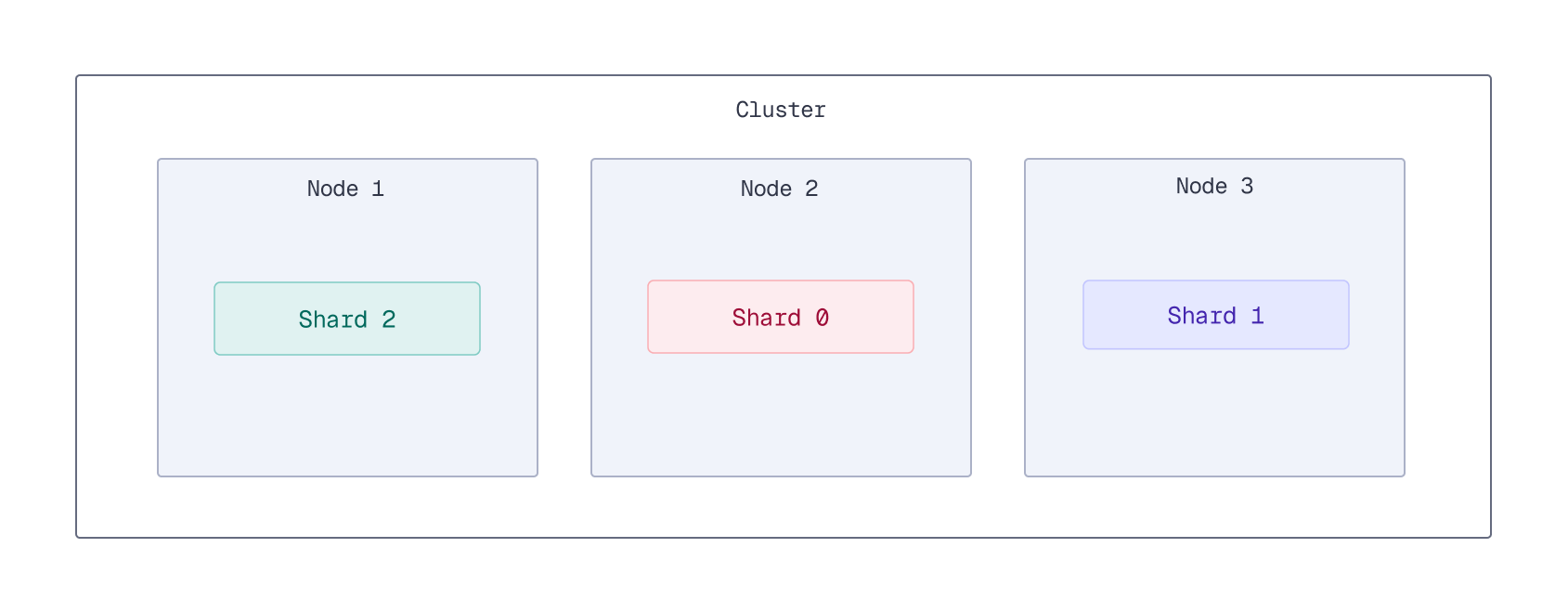
Qdrant distributes points across shards in one of two ways:
- Automatic sharding (default): points are assigned to shards using a consistent hashing algorithm, so each shard manages a non-overlapping subset of points without manual placement.
- User-defined sharding: each point is uploaded to a shard you choose, so operations can target only the shard or shards they need. This is useful for isolating tenants or regions onto dedicated shards.
Every node knows where all shards are stored through Raft consensus, so a search request sent to any single node automatically fans out to the rest of the cluster to gather the full result.
As a rule of thumb, create at least 2 shards per node so the cluster can grow without resharding, since resharding is only available in Qdrant Cloud and otherwise requires recreating the collection. If you anticipate significant growth, 12 shards is a common starting point, since it divides evenly as you scale from 1 node up to 2, 3, 6, and 12 nodes. Beyond that, more shards add overhead without much benefit on smaller clusters.
See Sharding in Distributed Deployment for how to set the shard count, enable user-defined sharding, and move shards between nodes.
Replication
Qdrant allows you to replicate shards between nodes in the cluster, keeping several copies of a shard spread across the cluster. This ensures the availability of data in case of node failures, except if all replicas are lost.
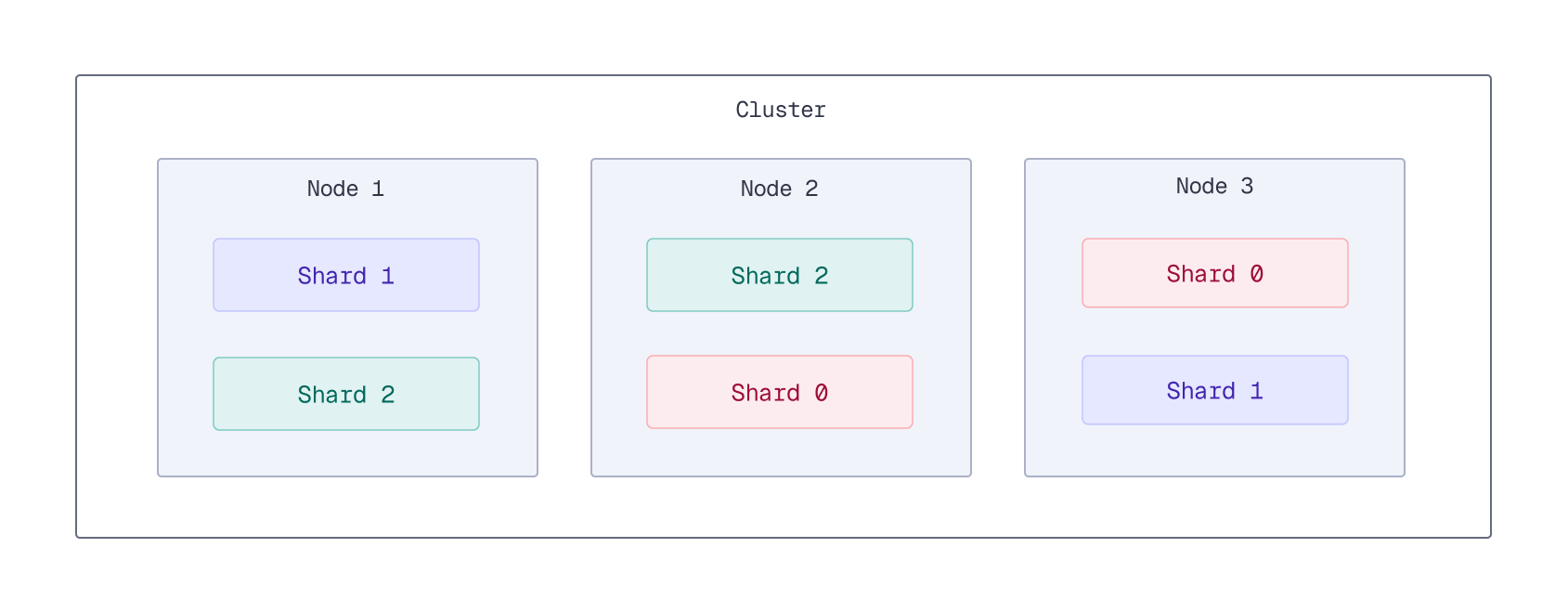
By default, Qdrant has no primary or secondary replicas. Writes execute in parallel on all active replicas of a shard, and any replica can serve reads or writes. A “leader” replica only exists when a collection is configured with medium or strong write ordering; even then, the leader is dynamically elected rather than fixed, and it exists to serialize writes for consistency, not to act as a permanent primary. See Replication factor and Creating new shard replicas for how to configure replication.
Each replica is in one of three states: active (healthy and serving traffic), dead (unresponsive to health checks or failing to serve traffic), or partial (resynchronizing before it can become active). A dead replica stops receiving traffic from other peers and may need manual intervention if it doesn’t recover on its own. This state model is what keeps data consistent and available when only a subset of replicas fail during an update.
Consistency Guarantees
Replication affects consistency. By default, Qdrant prioritizes availability and throughput, so concurrent updates to the same document can leave replicas temporarily inconsistent. The write consistency factor, read consistency, and write ordering options let you tighten those guarantees when your workload requires it. See Consistency Guarantees for configuration details.
Raft Consensus
Qdrant uses the Raft consensus protocol to maintain consistency regarding the cluster topology and the collections structure. Raft consensus only applies to cluster metadata, not to the data itself:
- Collection operations are part of the consensus. This guarantees that all operations are durable and eventually executed by all nodes. A majority of nodes must agree on what operations to apply before Qdrant performs them.
- Point operations don’t go through the consensus infrastructure. Qdrant trades strong transaction guarantees for low overhead on point operations: it doesn’t guarantee atomic distributed updates, but you can wait until an operation is complete to see the results of your writes.
Use the Check Cluster Status API to check the consensus state.
For high availability, run at least three voting nodes. A two-node cluster can’t form a majority if either node is unavailable, so Raft can’t elect or confirm a leader until both nodes can communicate again. During this transition state — whether electing a new leader after a failure or starting up — Qdrant will deny collection update operations.
Qdrant keeps a Raft log of operations that have modified the cluster state. To keep the Raft log from growing indefinitely, Qdrant uses consensus checkpointing.
Where to Go Next
- Resilience covers what these mechanics buy you in fault tolerance, Multi-AZ, and failover.
- Distributed Deployment covers the practical configuration: enabling distributed mode, sharding, replication, and node failure recovery.
- Vertical Scaling covers resizing existing nodes instead of adding more.
 Ready to try Qdrant?