# Explore
# Explore the data
After mastering the concepts in [search](/documentation/search/search/index.md), you can start exploring your data in other ways. Qdrant provides a stack of APIs that allow you to find similar vectors in a different fashion, as well as to find the most dissimilar ones. These are useful tools for recommendation systems, data exploration, and data cleaning.
## Recommendation API
In addition to the regular search, Qdrant also allows you to search based on multiple positive and negative examples. The API is called ***recommend***, and the examples can be point IDs, so that you can leverage the already encoded objects; and, as of v1.6, you can also use raw vectors as input, so that you can create your vectors on the fly without uploading them as points.
REST API - API Schema definition is available [here](https://api.qdrant.tech/api-reference/search/recommend-points)
```http
POST /collections/{collection_name}/points/query
{
"query": {
"recommend": {
"positive": [100, 231],
"negative": [718, [0.2, 0.3, 0.4, 0.5]],
"strategy": "average_vector"
}
},
"filter": {
"must": [
{
"key": "city",
"match": {
"value": "London"
}
}
]
}
}
```
```python
from qdrant_client import QdrantClient, models
client = QdrantClient(url="http://localhost:6333")
client.query_points(
collection_name="{collection_name}",
query=models.RecommendQuery(
recommend=models.RecommendInput(
positive=[100, 231],
negative=[718, [0.2, 0.3, 0.4, 0.5]],
strategy=models.RecommendStrategy.AVERAGE_VECTOR,
)
),
query_filter=models.Filter(
must=[
models.FieldCondition(
key="city",
match=models.MatchValue(
value="London",
),
)
]
),
limit=3,
)
```
```typescript
import { QdrantClient } from "@qdrant/js-client-rest";
const client = new QdrantClient({ host: "localhost", port: 6333 });
client.query("{collection_name}", {
query: {
recommend: {
positive: [100, 231],
negative: [718, [0.2, 0.3, 0.4, 0.5]],
strategy: "average_vector"
}
},
filter: {
must: [
{
key: "city",
match: {
value: "London",
},
},
],
},
limit: 3
});
```
```rust
use qdrant_client::qdrant::{
Condition, Filter, QueryPointsBuilder, RecommendInputBuilder, RecommendStrategy,
};
use qdrant_client::Qdrant;
let client = Qdrant::from_url("http://localhost:6334").build()?;
client
.query(
QueryPointsBuilder::new("{collection_name}")
.query(
RecommendInputBuilder::default()
.add_positive(100)
.add_positive(231)
.add_positive(vec![0.2, 0.3, 0.4, 0.5])
.add_negative(718)
.strategy(RecommendStrategy::AverageVector)
.build(),
)
.limit(3)
.filter(Filter::must([Condition::matches(
"city",
"London".to_string(),
)])),
)
.await?;
```
```java
import static io.qdrant.client.ConditionFactory.matchKeyword;
import static io.qdrant.client.QueryFactory.recommend;
import static io.qdrant.client.VectorInputFactory.vectorInput;
import io.qdrant.client.QdrantClient;
import io.qdrant.client.QdrantGrpcClient;
import io.qdrant.client.grpc.Common.Filter;
import io.qdrant.client.grpc.Points.QueryPoints;
import io.qdrant.client.grpc.Points.RecommendInput;
import io.qdrant.client.grpc.Points.RecommendStrategy;
import java.util.List;
QdrantClient client =
new QdrantClient(QdrantGrpcClient.newBuilder("localhost", 6334, false).build());
client.queryAsync(QueryPoints.newBuilder()
.setCollectionName("{collection_name}")
.setQuery(recommend(RecommendInput.newBuilder()
.addAllPositive(List.of(vectorInput(100), vectorInput(200), vectorInput(100.0f, 231.0f)))
.addAllNegative(List.of(vectorInput(718), vectorInput(0.2f, 0.3f, 0.4f, 0.5f)))
.setStrategy(RecommendStrategy.AverageVector)
.build()))
.setFilter(Filter.newBuilder().addMust(matchKeyword("city", "London")))
.setLimit(3)
.build()).get();
```
```csharp
using Qdrant.Client;
using Qdrant.Client.Grpc;
using static Qdrant.Client.Grpc.Conditions;
var client = new QdrantClient("localhost", 6334);
await client.QueryAsync(
collectionName: "{collection_name}",
query: new RecommendInput {
Positive = { 100, 231 },
Negative = { 718 }
},
filter: MatchKeyword("city", "London"),
limit: 3
);
```
```go
import (
"context"
"github.com/qdrant/go-client/qdrant"
)
client, err := qdrant.NewClient(&qdrant.Config{
Host: "localhost",
Port: 6334,
})
client.Query(context.Background(), &qdrant.QueryPoints{
CollectionName: "{collection_name}",
Query: qdrant.NewQueryRecommend(&qdrant.RecommendInput{
Positive: []*qdrant.VectorInput{
qdrant.NewVectorInputID(qdrant.NewIDNum(100)),
qdrant.NewVectorInputID(qdrant.NewIDNum(231)),
},
Negative: []*qdrant.VectorInput{
qdrant.NewVectorInputID(qdrant.NewIDNum(718)),
},
}),
Filter: &qdrant.Filter{
Must: []*qdrant.Condition{
qdrant.NewMatch("city", "London"),
},
},
})
```
Example result of this API would be
```json
{
"result": [
{ "id": 10, "score": 0.81 },
{ "id": 14, "score": 0.75 },
{ "id": 11, "score": 0.73 }
],
"status": "ok",
"time": 0.001
}
```
The algorithm used to get the recommendations is selected from the available `strategy` options. Each of them has its own strengths and weaknesses, so experiment and choose the one that works best for your case.
### Average vector strategy
The default and first strategy added to Qdrant is called `average_vector`. It preprocesses the input examples to create a single vector that is used for the search. Since the preprocessing step happens very fast, the performance of this strategy is on-par with regular search. The intuition behind this kind of recommendation is that each vector component represents an independent feature of the data, so, by averaging the examples, we should get a good recommendation.
The way to produce the searching vector is by first averaging all the positive and negative examples separately, and then combining them into a single vector using the following formula:
```rust
avg_positive + avg_positive - avg_negative
```
In the case of not having any negative examples, the search vector will simply be equal to `avg_positive`.
This is the default strategy that's going to be set implicitly, but you can explicitly define it by setting `"strategy": "average_vector"` in the recommendation request.
### Best score strategy
*Available as of v1.6.0*
A new strategy introduced in v1.6, is called `best_score`. It is based on the idea that the best way to find similar vectors is to find the ones that are closer to a positive example, while avoiding the ones that are closer to a negative one.
The way it works is that each candidate is measured against every example, then we select the best positive and best negative scores. The final score is chosen with this step formula:
```rust
// Sigmoid function to normalize the score between 0 and 1
let sigmoid = |x| 0.5 * (1.0 + (x / (1.0 + x.abs())));
let score = if best_positive_score > best_negative_score {
sigmoid(best_positive_score)
} else {
-sigmoid(best_negative_score)
};
```
Since we are computing similarities to every example at each step of the search, the performance of this strategy will be linearly impacted by the amount of examples. This means that the more examples you provide, the slower the search will be. However, this strategy can be very powerful and should be more embedding-agnostic.
To use this algorithm, you need to set `"strategy": "best_score"` in the recommendation request.
#### Using only negative examples
A beneficial side-effect of `best_score` strategy is that you can use it with only negative examples. This will allow you to find the most dissimilar vectors to the ones you provide. This can be useful for finding outliers in your data, or for finding the most dissimilar vectors to a given one.
Combining negative-only examples with filtering can be a powerful tool for data exploration and cleaning.
### Sum scores strategy
Another strategy for using multiple query vectors simultaneously is to just sum their scores against the candidates. In qdrant, this is called `sum_scores` strategy.
This strategy was used in [this paper](https://arxiv.org/abs/2210.10695) by [UKP Lab](http://www.ukp.tu-darmstadt.de/), [hessian.ai](https://hessian.ai) and [cohere.ai](https://cohere.ai) to incorporate relevance feedback into a subsequent search. In the paper this boosted the nDCG@20 performance by 5.6% points when using 2-8 positive feedback documents.
The formula that this strategy implements is
$$
s_i = \sum_{v_q\in Q^+}s(v_q, v_i) - \sum_{v_q\in Q^-}s(v_q, v_i)
$$
where $Q^+$ is the set of positive examples, $Q^-$ is the set of negative examples, and $s(v_q, v_i)$ is the score of the vector $v_q$ against the vector $v_i$
As with `best_score`, this strategy also allows using only negative examples.
### Multiple vectors
*Available as of v0.10.0*
If the collection was created with multiple vectors, the name of the vector should be specified in the recommendation request:
```http
POST /collections/{collection_name}/points/query
{
"query": {
"recommend": {
"positive": [100, 231],
"negative": [718]
}
},
"using": "image",
"limit": 10
}
```
```python
client.query_points(
collection_name="{collection_name}",
query=models.RecommendQuery(
recommend=models.RecommendInput(
positive=[100, 231],
negative=[718],
)
),
using="image",
limit=10,
)
```
```typescript
client.query("{collection_name}", {
query: {
recommend: {
positive: [100, 231],
negative: [718],
}
},
using: "image",
limit: 10
});
```
```rust
use qdrant_client::qdrant::{QueryPointsBuilder, RecommendInputBuilder};
client
.query(
QueryPointsBuilder::new("{collection_name}")
.query(
RecommendInputBuilder::default()
.add_positive(100)
.add_positive(231)
.add_negative(718)
.build(),
)
.limit(10)
.using("image"),
)
.await?;
```
```java
import static io.qdrant.client.QueryFactory.recommend;
import static io.qdrant.client.VectorInputFactory.vectorInput;
import io.qdrant.client.grpc.Points.QueryPoints;
import io.qdrant.client.grpc.Points.RecommendInput;
import java.util.List;
client.queryAsync(QueryPoints.newBuilder()
.setCollectionName("{collection_name}")
.setQuery(recommend(RecommendInput.newBuilder()
.addAllPositive(List.of(vectorInput(100), vectorInput(231)))
.addAllNegative(List.of(vectorInput(718)))
.build()))
.setUsing("image")
.setLimit(10)
.build()).get();
```
```csharp
using Qdrant.Client;
using Qdrant.Client.Grpc;
var client = new QdrantClient("localhost", 6334);
await client.QueryAsync(
collectionName: "{collection_name}",
query: new RecommendInput {
Positive = { 100, 231 },
Negative = { 718 }
},
usingVector: "image",
limit: 10
);
```
```go
import (
"context"
"github.com/qdrant/go-client/qdrant"
)
client, err := qdrant.NewClient(&qdrant.Config{
Host: "localhost",
Port: 6334,
})
client.Query(context.Background(), &qdrant.QueryPoints{
CollectionName: "{collection_name}",
Query: qdrant.NewQueryRecommend(&qdrant.RecommendInput{
Positive: []*qdrant.VectorInput{
qdrant.NewVectorInputID(qdrant.NewIDNum(100)),
qdrant.NewVectorInputID(qdrant.NewIDNum(231)),
},
Negative: []*qdrant.VectorInput{
qdrant.NewVectorInputID(qdrant.NewIDNum(718)),
},
}),
Using: qdrant.PtrOf("image"),
})
```
Parameter `using` specifies which stored vectors to use for the recommendation.
### Lookup vectors from another collection
*Available as of v0.11.6*
If you have collections with vectors of the same dimensionality,
and you want to look for recommendations in one collection based on the vectors of another collection,
you can use the `lookup_from` parameter.
It might be useful, e.g. in the item-to-user recommendations scenario.
Where user and item embeddings, although having the same vector parameters (distance type and dimensionality), are usually stored in different collections.
```http
POST /collections/{collection_name}/points/query
{
"query": {
"recommend": {
"positive": [100, 231],
"negative": [718]
}
},
"limit": 10,
"lookup_from": {
"collection": "{external_collection_name}",
"vector": "{external_vector_name}"
}
}
```
```python
client.query_points(
collection_name="{collection_name}",
query=models.RecommendQuery(
recommend=models.RecommendInput(
positive=[100, 231],
negative=[718],
)
),
using="image",
limit=10,
lookup_from=models.LookupLocation(
collection="{external_collection_name}", vector="{external_vector_name}"
),
)
```
```typescript
client.query("{collection_name}", {
query: {
recommend: {
positive: [100, 231],
negative: [718],
}
},
using: "image",
limit: 10,
lookup_from: {
collection: "{external_collection_name}",
vector: "{external_vector_name}"
}
});
```
```rust
use qdrant_client::qdrant::{LookupLocationBuilder, QueryPointsBuilder, RecommendInputBuilder};
client
.query(
QueryPointsBuilder::new("{collection_name}")
.query(
RecommendInputBuilder::default()
.add_positive(100)
.add_positive(231)
.add_negative(718)
.build(),
)
.limit(10)
.using("image")
.lookup_from(
LookupLocationBuilder::new("{external_collection_name}")
.vector_name("{external_vector_name}"),
),
)
.await?;
```
```java
import static io.qdrant.client.QueryFactory.recommend;
import static io.qdrant.client.VectorInputFactory.vectorInput;
import io.qdrant.client.grpc.Points.LookupLocation;
import io.qdrant.client.grpc.Points.QueryPoints;
import io.qdrant.client.grpc.Points.RecommendInput;
import java.util.List;
client.queryAsync(QueryPoints.newBuilder()
.setCollectionName("{collection_name}")
.setQuery(recommend(RecommendInput.newBuilder()
.addAllPositive(List.of(vectorInput(100), vectorInput(231)))
.addAllNegative(List.of(vectorInput(718)))
.build()))
.setUsing("image")
.setLimit(10)
.setLookupFrom(
LookupLocation.newBuilder()
.setCollectionName("{external_collection_name}")
.setVectorName("{external_vector_name}")
.build())
.build()).get();
```
```csharp
using Qdrant.Client;
using Qdrant.Client.Grpc;
var client = new QdrantClient("localhost", 6334);
await client.QueryAsync(
collectionName: "{collection_name}",
query: new RecommendInput {
Positive = { 100, 231 },
Negative = { 718 }
},
usingVector: "image",
limit: 10,
lookupFrom: new LookupLocation
{
CollectionName = "{external_collection_name}",
VectorName = "{external_vector_name}",
}
);
```
```go
import (
"context"
"github.com/qdrant/go-client/qdrant"
)
client, err := qdrant.NewClient(&qdrant.Config{
Host: "localhost",
Port: 6334,
})
client.Query(context.Background(), &qdrant.QueryPoints{
CollectionName: "{collection_name}",
Query: qdrant.NewQueryRecommend(&qdrant.RecommendInput{
Positive: []*qdrant.VectorInput{
qdrant.NewVectorInputID(qdrant.NewIDNum(100)),
qdrant.NewVectorInputID(qdrant.NewIDNum(231)),
},
Negative: []*qdrant.VectorInput{
qdrant.NewVectorInputID(qdrant.NewIDNum(718)),
},
}),
Using: qdrant.PtrOf("image"),
LookupFrom: &qdrant.LookupLocation{
CollectionName: "{external_collection_name}",
VectorName: qdrant.PtrOf("{external_vector_name}"),
},
})
```
Vectors are retrieved from the external collection by ids provided in the `positive` and `negative` lists.
These vectors then used to perform the recommendation in the current collection, comparing against the "using" or default vector.
## Batch recommendation API
*Available as of v0.10.0*
Similar to the batch search API in terms of usage and advantages, it enables the batching of recommendation requests.
```http
POST /collections/{collection_name}/query/batch
{
"searches": [
{
"query": {
"recommend": {
"positive": [100, 231],
"negative": [718]
}
},
"filter": {
"must": [
{
"key": "city",
"match": {
"value": "London"
}
}
]
},
"limit": 10
},
{
"query": {
"recommend": {
"positive": [200, 67],
"negative": [300]
}
},
"filter": {
"must": [
{
"key": "city",
"match": {
"value": "London"
}
}
]
},
"limit": 10
}
]
}
```
```python
from qdrant_client import QdrantClient, models
client = QdrantClient(url="http://localhost:6333")
filter_ = models.Filter(
must=[
models.FieldCondition(
key="city",
match=models.MatchValue(
value="London",
),
)
]
)
recommend_queries = [
models.QueryRequest(
query=models.RecommendQuery(
recommend=models.RecommendInput(positive=[100, 231], negative=[718])
),
filter=filter_,
limit=3,
),
models.QueryRequest(
query=models.RecommendQuery(
recommend=models.RecommendInput(positive=[200, 67], negative=[300])
),
filter=filter_,
limit=3,
),
]
client.query_batch_points(
collection_name="{collection_name}", requests=recommend_queries
)
```
```typescript
import { QdrantClient } from "@qdrant/js-client-rest";
const client = new QdrantClient({ host: "localhost", port: 6333 });
const filter = {
must: [
{
key: "city",
match: {
value: "London",
},
},
],
};
const searches = [
{
query: {
recommend: {
positive: [100, 231],
negative: [718]
}
},
filter,
limit: 3,
},
{
query: {
recommend: {
positive: [200, 67],
negative: [300]
}
},
filter,
limit: 3,
},
];
client.queryBatch("{collection_name}", {
searches,
});
```
```rust
use qdrant_client::qdrant::{
Condition, Filter, QueryBatchPointsBuilder, QueryPointsBuilder,
RecommendInputBuilder,
};
use qdrant_client::Qdrant;
let client = Qdrant::from_url("http://localhost:6334").build()?;
let filter = Filter::must([Condition::matches("city", "London".to_string())]);
let recommend_queries = vec![
QueryPointsBuilder::new("{collection_name}")
.query(
RecommendInputBuilder::default()
.add_positive(100)
.add_positive(231)
.add_negative(718)
.build(),
)
.filter(filter.clone())
.build(),
QueryPointsBuilder::new("{collection_name}")
.query(
RecommendInputBuilder::default()
.add_positive(200)
.add_positive(67)
.add_negative(300)
.build(),
)
.filter(filter)
.build(),
];
client
.query_batch(QueryBatchPointsBuilder::new(
"{collection_name}",
recommend_queries,
))
.await?;
```
```java
import static io.qdrant.client.ConditionFactory.matchKeyword;
import static io.qdrant.client.QueryFactory.recommend;
import static io.qdrant.client.VectorInputFactory.vectorInput;
import io.qdrant.client.QdrantClient;
import io.qdrant.client.QdrantGrpcClient;
import io.qdrant.client.grpc.Common.Filter;
import io.qdrant.client.grpc.Points.QueryPoints;
import io.qdrant.client.grpc.Points.RecommendInput;
import java.util.List;
QdrantClient client =
new QdrantClient(QdrantGrpcClient.newBuilder("localhost", 6334, false).build());
Filter filter = Filter.newBuilder().addMust(matchKeyword("city", "London")).build();
List recommendQueries = List.of(
QueryPoints.newBuilder()
.setCollectionName("{collection_name}")
.setQuery(recommend(
RecommendInput.newBuilder()
.addAllPositive(List.of(vectorInput(100), vectorInput(231)))
.addAllNegative(List.of(vectorInput(731)))
.build()))
.setFilter(filter)
.setLimit(3)
.build(),
QueryPoints.newBuilder()
.setCollectionName("{collection_name}")
.setQuery(recommend(
RecommendInput.newBuilder()
.addAllPositive(List.of(vectorInput(200), vectorInput(67)))
.addAllNegative(List.of(vectorInput(300)))
.build()))
.setFilter(filter)
.setLimit(3)
.build());
client.queryBatchAsync("{collection_name}", recommendQueries).get();
```
```csharp
using Qdrant.Client;
using Qdrant.Client.Grpc;
using static Qdrant.Client.Grpc.Conditions;
var client = new QdrantClient("localhost", 6334);
var filter = MatchKeyword("city", "london");
await client.QueryBatchAsync(
collectionName: "{collection_name}",
queries:
[
new QueryPoints()
{
CollectionName = "{collection_name}",
Query = new RecommendInput {
Positive = { 100, 231 },
Negative = { 718 },
},
Limit = 3,
Filter = filter,
},
new QueryPoints()
{
CollectionName = "{collection_name}",
Query = new RecommendInput {
Positive = { 200, 67 },
Negative = { 300 },
},
Limit = 3,
Filter = filter,
}
]
);
```
```go
import (
"context"
"github.com/qdrant/go-client/qdrant"
)
client, err := qdrant.NewClient(&qdrant.Config{
Host: "localhost",
Port: 6334,
})
filter := qdrant.Filter{
Must: []*qdrant.Condition{
qdrant.NewMatch("city", "London"),
},
}
client.QueryBatch(context.Background(), &qdrant.QueryBatchPoints{
CollectionName: "{collection_name}",
QueryPoints: []*qdrant.QueryPoints{
{
CollectionName: "{collection_name}",
Query: qdrant.NewQueryRecommend(&qdrant.RecommendInput{
Positive: []*qdrant.VectorInput{
qdrant.NewVectorInputID(qdrant.NewIDNum(100)),
qdrant.NewVectorInputID(qdrant.NewIDNum(231)),
},
Negative: []*qdrant.VectorInput{
qdrant.NewVectorInputID(qdrant.NewIDNum(718)),
},
},
),
Filter: &filter,
},
{
CollectionName: "{collection_name}",
Query: qdrant.NewQueryRecommend(&qdrant.RecommendInput{
Positive: []*qdrant.VectorInput{
qdrant.NewVectorInputID(qdrant.NewIDNum(200)),
qdrant.NewVectorInputID(qdrant.NewIDNum(67)),
},
Negative: []*qdrant.VectorInput{
qdrant.NewVectorInputID(qdrant.NewIDNum(300)),
},
},
),
Filter: &filter,
},
},
},
)
```
The result of this API contains one array per recommendation requests.
```json
{
"result": [
[
{ "id": 10, "score": 0.81 },
{ "id": 14, "score": 0.75 },
{ "id": 11, "score": 0.73 }
],
[
{ "id": 1, "score": 0.92 },
{ "id": 3, "score": 0.89 },
{ "id": 9, "score": 0.75 }
]
],
"status": "ok",
"time": 0.001
}
```
## Discovery API
*Available as of v1.7*
REST API Schema definition available [here](https://api.qdrant.tech/api-reference/search/discover-points)
In this API, Qdrant introduces the concept of `context`, which is used for splitting the space. Context is a set of positive-negative pairs, and each pair divides the space into positive and negative zones. In that mode, the search operation prefers points based on how many positive zones they belong to (or how much they avoid negative zones).
The interface for providing context is similar to the recommendation API (ids or raw vectors). Still, in this case, they need to be provided in the form of positive-negative pairs.
Discovery API lets you do two new types of search:
- **Discovery search**: Uses the context (the pairs of positive-negative vectors) and a target to return the points more similar to the target, but constrained by the context.
- **Context search**: Using only the context pairs, get the points that live in the best zone, where loss is minimized
The way positive and negative examples should be arranged in the context pairs is completely up to you. So you can have the flexibility of trying out different permutation techniques based on your model and data.
### Discovery search
This type of search works specially well for combining multimodal, vector-constrained searches. Qdrant already has extensive support for filters, which constrain the search based on its payload, but using discovery search, you can also constrain the vector space in which the search is performed.
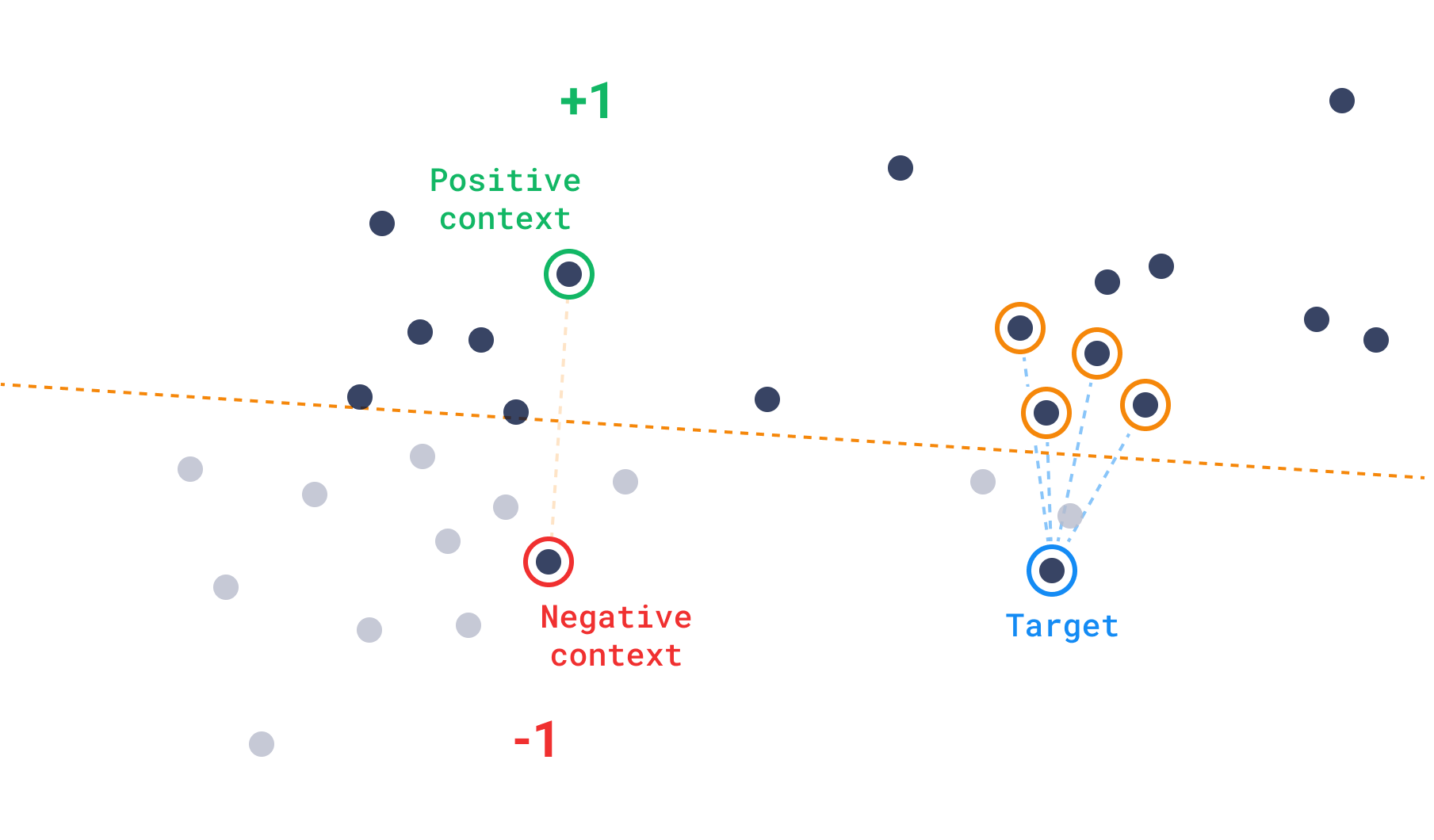
The formula for the discovery score can be expressed as:
$$
\text{rank}(v^+, v^-) = \begin{cases}
1, &\quad s(v^+) \geq s(v^-) \\\\
-1, &\quad s(v^+) < s(v^-)
\end{cases}
$$
where $v^+$ represents a positive example, $v^-$ represents a negative example, and $s(v)$ is the similarity score of a vector $v$ to the target vector. The discovery score is then computed as:
$$
\text{discovery score} = \text{sigmoid}(s(v_t))+ \sum \text{rank}(v_i^+, v_i^-),
$$
where $s(v)$ is the similarity function, $v_t$ is the target vector, and again $v_i^+$ and $v_i^-$ are the positive and negative examples, respectively. The sigmoid function is used to normalize the score between 0 and 1 and the sum of ranks is used to penalize vectors that are closer to the negative examples than to the positive ones. In other words, the sum of individual ranks determines how many positive zones a point is in, while the closeness hierarchy comes second.
Example:
```http
POST /collections/{collection_name}/points/query
{
"query": {
"discover": {
"target": [0.2, 0.1, 0.9, 0.7],
"context": [
{
"positive": 100,
"negative": 718
},
{
"positive": 200,
"negative": 300
}
]
}
},
"limit": 10
}
```
```python
from qdrant_client import QdrantClient, models
client = QdrantClient(url="http://localhost:6333")
discover_queries = [
models.QueryRequest(
query=models.DiscoverQuery(
discover=models.DiscoverInput(
target=[0.2, 0.1, 0.9, 0.7],
context=[
models.ContextPair(
positive=100,
negative=718,
),
models.ContextPair(
positive=200,
negative=300,
),
],
)
),
limit=10,
),
]
client.query_batch_points(
collection_name="{collection_name}", requests=discover_queries
)
```
```typescript
import { QdrantClient } from "@qdrant/js-client-rest";
const client = new QdrantClient({ host: "localhost", port: 6333 });
client.query("{collection_name}", {
query: {
discover: {
target: [0.2, 0.1, 0.9, 0.7],
context: [
{
positive: 100,
negative: 718,
},
{
positive: 200,
negative: 300,
},
],
}
},
limit: 10,
});
```
```rust
use qdrant_client::qdrant::{ContextInputBuilder, DiscoverInputBuilder, QueryPointsBuilder};
client
.query(
QueryPointsBuilder::new("{collection_name}").query(
DiscoverInputBuilder::new(
vec![0.2, 0.1, 0.9, 0.7],
ContextInputBuilder::default()
.add_pair(100, 718)
.add_pair(200, 300),
)
.build(),
),
)
.await?;
```
```java
import static io.qdrant.client.QueryFactory.discover;
import static io.qdrant.client.VectorInputFactory.vectorInput;
import io.qdrant.client.QdrantClient;
import io.qdrant.client.QdrantGrpcClient;
import io.qdrant.client.grpc.Points.ContextInput;
import io.qdrant.client.grpc.Points.ContextInputPair;
import io.qdrant.client.grpc.Points.DiscoverInput;
import io.qdrant.client.grpc.Points.QueryPoints;
import java.util.List;
QdrantClient client =
new QdrantClient(QdrantGrpcClient.newBuilder("localhost", 6334, false).build());
client.queryAsync(QueryPoints.newBuilder()
.setCollectionName("{collection_name}")
.setQuery(discover(DiscoverInput.newBuilder()
.setTarget(vectorInput(0.2f, 0.1f, 0.9f, 0.7f))
.setContext(ContextInput.newBuilder()
.addAllPairs(List.of(
ContextInputPair.newBuilder()
.setPositive(vectorInput(100))
.setNegative(vectorInput(718))
.build(),
ContextInputPair.newBuilder()
.setPositive(vectorInput(200))
.setNegative(vectorInput(300))
.build()))
.build())
.build()))
.setLimit(10)
.build()).get();
```
```csharp
using Qdrant.Client;
using Qdrant.Client.Grpc;
var client = new QdrantClient("localhost", 6334);
await client.QueryAsync(
collectionName: "{collection_name}",
query: new DiscoverInput {
Target = new float[] { 0.2f, 0.1f, 0.9f, 0.7f },
Context = new ContextInput {
Pairs = {
new ContextInputPair {
Positive = 100,
Negative = 718
},
new ContextInputPair {
Positive = 200,
Negative = 300
},
}
},
},
limit: 10
);
```
```go
import (
"context"
"github.com/qdrant/go-client/qdrant"
)
client, err := qdrant.NewClient(&qdrant.Config{
Host: "localhost",
Port: 6334,
})
client.Query(context.Background(), &qdrant.QueryPoints{
CollectionName: "{collection_name}",
Query: qdrant.NewQueryDiscover(&qdrant.DiscoverInput{
Target: qdrant.NewVectorInput(0.2, 0.1, 0.9, 0.7),
Context: &qdrant.ContextInput{
Pairs: []*qdrant.ContextInputPair{
{
Positive: qdrant.NewVectorInputID(qdrant.NewIDNum(100)),
Negative: qdrant.NewVectorInputID(qdrant.NewIDNum(718)),
},
{
Positive: qdrant.NewVectorInputID(qdrant.NewIDNum(200)),
Negative: qdrant.NewVectorInputID(qdrant.NewIDNum(300)),
},
},
},
}),
})
```
### Context search
Conversely, in the absence of a target, a rigid integer-by-integer function doesn't provide much guidance for the search when utilizing a proximity graph like HNSW. Instead, context search employs a function derived from the [triplet-loss](/articles/triplet-loss/index.md) concept, which is usually applied during model training. For context search, this function is adapted to steer the search towards areas with fewer negative examples.
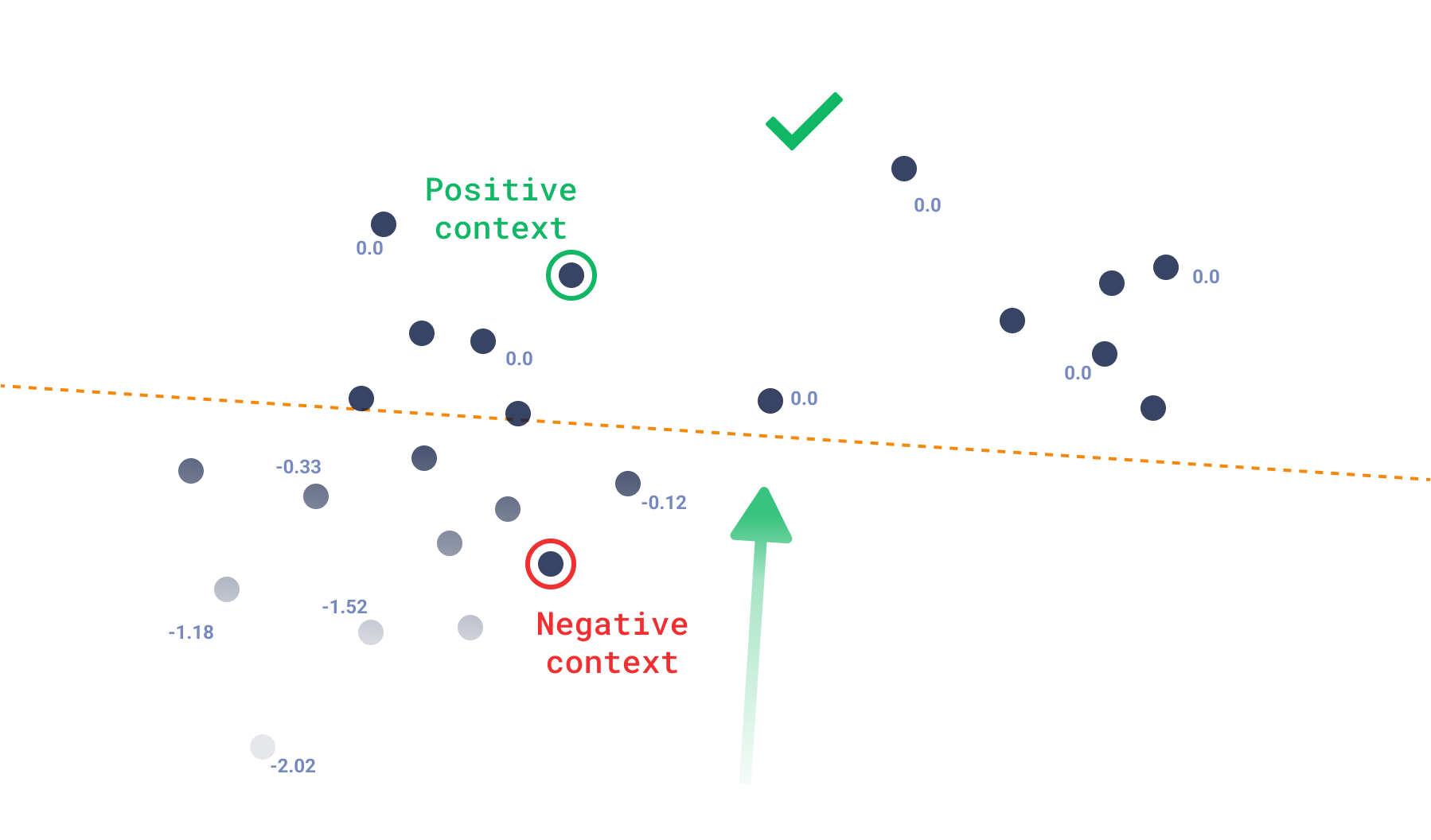
We can directly associate the score function to a loss function, where 0.0 is the maximum score a point can have, which means it is only in positive areas. As soon as a point exists closer to a negative example, its loss will simply be the difference of the positive and negative similarities.
$$
\text{context score} = \sum \min(s(v^+_i) - s(v^-_i), 0.0)
$$
Where $v^+_i$ and $v^-_i$ are the positive and negative examples of each pair, and $s(v)$ is the similarity function.
Using this kind of search, you can expect the output to not necessarily be around a single point, but rather, to be any point that isn’t closer to a negative example, which creates a constrained diverse result. So, even when the API is not called [`recommend`](#recommendation-api), recommendation systems can also use this approach and adapt it for their specific use-cases.
Example:
```http
POST /collections/{collection_name}/points/query
{
"query": {
"context": [
{
"positive": 100,
"negative": 718
},
{
"positive": 200,
"negative": 300
}
]
},
"limit": 10
}
```
```python
from qdrant_client import QdrantClient, models
client = QdrantClient(url="http://localhost:6333")
discover_queries = [
models.QueryRequest(
query=models.ContextQuery(
context=[
models.ContextPair(
positive=100,
negative=718,
),
models.ContextPair(
positive=200,
negative=300,
),
],
),
limit=10,
),
]
client.query_batch_points(
collection_name="{collection_name}", requests=discover_queries
)
```
```typescript
import { QdrantClient } from "@qdrant/js-client-rest";
const client = new QdrantClient({ host: "localhost", port: 6333 });
client.query("{collection_name}", {
query: {
context: [
{
positive: 100,
negative: 718,
},
{
positive: 200,
negative: 300,
},
]
},
limit: 10,
});
```
```rust
use qdrant_client::qdrant::{ContextInputBuilder, QueryPointsBuilder};
use qdrant_client::Qdrant;
let client = Qdrant::from_url("http://localhost:6334").build()?;
client
.query(
QueryPointsBuilder::new("{collection_name}").query(
ContextInputBuilder::default()
.add_pair(100, 718)
.add_pair(200, 300)
.build(),
),
)
.await?;
```
```java
import static io.qdrant.client.QueryFactory.context;
import static io.qdrant.client.VectorInputFactory.vectorInput;
import io.qdrant.client.QdrantClient;
import io.qdrant.client.QdrantGrpcClient;
import io.qdrant.client.grpc.Points.ContextInput;
import io.qdrant.client.grpc.Points.ContextInputPair;
import io.qdrant.client.grpc.Points.QueryPoints;
import java.util.List;
QdrantClient client =
new QdrantClient(QdrantGrpcClient.newBuilder("localhost", 6334, false).build());
client.queryAsync(QueryPoints.newBuilder()
.setCollectionName("{collection_name}")
.setQuery(context(ContextInput.newBuilder()
.addAllPairs(List.of(
ContextInputPair.newBuilder()
.setPositive(vectorInput(100))
.setNegative(vectorInput(718))
.build(),
ContextInputPair.newBuilder()
.setPositive(vectorInput(200))
.setNegative(vectorInput(300))
.build()))
.build()))
.setLimit(10)
.build()).get();
```
```csharp
using Qdrant.Client;
using Qdrant.Client.Grpc;
var client = new QdrantClient("localhost", 6334);
await client.QueryAsync(
collectionName: "{collection_name}",
query: new ContextInput {
Pairs = {
new ContextInputPair {
Positive = 100,
Negative = 718
},
new ContextInputPair {
Positive = 200,
Negative = 300
},
}
},
limit: 10
);
```
```go
import (
"context"
"github.com/qdrant/go-client/qdrant"
)
client, err := qdrant.NewClient(&qdrant.Config{
Host: "localhost",
Port: 6334,
})
client.Query(context.Background(), &qdrant.QueryPoints{
CollectionName: "{collection_name}",
Query: qdrant.NewQueryContext(&qdrant.ContextInput{
Pairs: []*qdrant.ContextInputPair{
{
Positive: qdrant.NewVectorInputID(qdrant.NewIDNum(100)),
Negative: qdrant.NewVectorInputID(qdrant.NewIDNum(718)),
},
{
Positive: qdrant.NewVectorInputID(qdrant.NewIDNum(200)),
Negative: qdrant.NewVectorInputID(qdrant.NewIDNum(300)),
},
},
}),
})
```
## Distance Matrix
*Available as of v1.12.0*
The distance matrix API allows to calculate the distance between sampled pairs of vectors and to return the result as a sparse matrix.
Such API enables new data exploration use cases such as clustering similar vectors, visualization of connections or dimension reduction.
The API input request consists of the following parameters:
- `sample`: the number of vectors to sample
- `limit`: the number of scores to return per sample
- `filter`: the filter to apply to constraint the samples
Let's have a look at a basic example with `sample=100`, `limit=10`:
The engine starts by selecting `100` random points from the collection, then for each of the selected points, it will compute the top `10` closest points **within** the samples.
This will results in a total of 1000 scores represented as a sparse matrix for efficient processing.
The distance matrix API offers two output formats to ease the integration with different tools.
### Pairwise format
Returns the distance matrix as a list of pairs of point `ids` with their respective score.
```http
POST /collections/{collection_name}/points/search/matrix/pairs
{
"sample": 10,
"limit": 2,
"filter": {
"must": {
"key": "color",
"match": { "value": "red" }
}
}
}
```
```python
from qdrant_client import QdrantClient, models
client = QdrantClient(url="http://localhost:6333")
client.search_matrix_pairs(
collection_name="{collection_name}",
sample=10,
limit=2,
query_filter=models.Filter(
must=[
models.FieldCondition(
key="color", match=models.MatchValue(value="red")
),
]
),
)
```
```typescript
import { QdrantClient } from "@qdrant/js-client-rest";
const client = new QdrantClient({ host: "localhost", port: 6333 });
client.searchMatrixPairs("{collection_name}", {
filter: {
must: [
{
key: "color",
match: {
value: "red",
},
},
],
},
sample: 10,
limit: 2,
});
```
```rust
use qdrant_client::qdrant::{Condition, Filter, SearchMatrixPointsBuilder};
client
.search_matrix_pairs(
SearchMatrixPointsBuilder::new("collection_name")
.filter(Filter::must(vec![Condition::matches(
"color",
"red".to_string(),
)]))
.sample(10)
.limit(2),
)
.await?;
```
```java
import static io.qdrant.client.ConditionFactory.matchKeyword;
import io.qdrant.client.QdrantClient;
import io.qdrant.client.QdrantGrpcClient;
import io.qdrant.client.grpc.Common.Filter;
import io.qdrant.client.grpc.Points.SearchMatrixPoints;
QdrantClient client =
new QdrantClient(QdrantGrpcClient.newBuilder("localhost", 6334, false).build());
client
.searchMatrixPairsAsync(
SearchMatrixPoints.newBuilder()
.setCollectionName("{collection_name}")
.setFilter(Filter.newBuilder().addMust(matchKeyword("color", "red")).build())
.setSample(10)
.setLimit(2)
.build())
.get();
```
```csharp
using Qdrant.Client;
using Qdrant.Client.Grpc;
using static Qdrant.Client.Grpc.Conditions;
var client = new QdrantClient("localhost", 6334);
await client.SearchMatrixPairsAsync(
collectionName: "{collection_name}",
filter: MatchKeyword("color", "red"),
sample: 10,
limit: 2
);
```
```go
import (
"context"
"github.com/qdrant/go-client/qdrant"
)
client, err := qdrant.NewClient(&qdrant.Config{
Host: "localhost",
Port: 6334,
})
sample := uint64(10)
limit := uint64(2)
res, err := client.SearchMatrixPairs(context.Background(), &qdrant.SearchMatrixPoints{
CollectionName: "{collection_name}",
Sample: &sample,
Limit: &limit,
Filter: &qdrant.Filter{
Must: []*qdrant.Condition{
qdrant.NewMatch("color", "red"),
},
},
})
```
Returns
```json
{
"result": {
"pairs": [
{"a": 1, "b": 3, "score": 1.4063001},
{"a": 1, "b": 4, "score": 1.2531},
{"a": 2, "b": 1, "score": 1.1550001},
{"a": 2, "b": 8, "score": 1.1359},
{"a": 3, "b": 1, "score": 1.4063001},
{"a": 3, "b": 4, "score": 1.2218001},
{"a": 4, "b": 1, "score": 1.2531},
{"a": 4, "b": 3, "score": 1.2218001},
{"a": 5, "b": 3, "score": 0.70239997},
{"a": 5, "b": 1, "score": 0.6146},
{"a": 6, "b": 3, "score": 0.6353},
{"a": 6, "b": 4, "score": 0.5093},
{"a": 7, "b": 3, "score": 1.0990001},
{"a": 7, "b": 1, "score": 1.0349001},
{"a": 8, "b": 2, "score": 1.1359},
{"a": 8, "b": 3, "score": 1.0553}
]
}
}
```
### Offset format
Returns the distance matrix as a four arrays:
- `offsets_row` and `offsets_col`, represent the positions of non-zero distance values in the matrix.
- `scores` contains the distance values.
- `ids` contains the point ids corresponding to the distance values.
```http
POST /collections/{collection_name}/points/search/matrix/offsets
{
"sample": 10,
"limit": 2,
"filter": {
"must": {
"key": "color",
"match": { "value": "red" }
}
}
}
```
```python
from qdrant_client import QdrantClient, models
client = QdrantClient(url="http://localhost:6333")
client.search_matrix_offsets(
collection_name="{collection_name}",
sample=10,
limit=2,
query_filter=models.Filter(
must=[
models.FieldCondition(
key="color", match=models.MatchValue(value="red")
),
]
),
)
```
```typescript
import { QdrantClient } from "@qdrant/js-client-rest";
const client = new QdrantClient({ host: "localhost", port: 6333 });
client.searchMatrixOffsets("{collection_name}", {
filter: {
must: [
{
key: "color",
match: {
value: "red",
},
},
],
},
sample: 10,
limit: 2,
});
```
```rust
use qdrant_client::qdrant::{Condition, Filter, SearchMatrixPointsBuilder};
client
.search_matrix_offsets(
SearchMatrixPointsBuilder::new("collection_name")
.filter(Filter::must(vec![Condition::matches(
"color",
"red".to_string(),
)]))
.sample(10)
.limit(2),
)
.await?;
```
```java
import static io.qdrant.client.ConditionFactory.matchKeyword;
import io.qdrant.client.QdrantClient;
import io.qdrant.client.QdrantGrpcClient;
import io.qdrant.client.grpc.Common.Filter;
import io.qdrant.client.grpc.Points.SearchMatrixPoints;
QdrantClient client =
new QdrantClient(QdrantGrpcClient.newBuilder("localhost", 6334, false).build());
client
.searchMatrixOffsetsAsync(
SearchMatrixPoints.newBuilder()
.setCollectionName("{collection_name}")
.setFilter(Filter.newBuilder().addMust(matchKeyword("color", "red")).build())
.setSample(10)
.setLimit(2)
.build())
.get();
```
```csharp
using Qdrant.Client;
using Qdrant.Client.Grpc;
using static Qdrant.Client.Grpc.Conditions;
var client = new QdrantClient("localhost", 6334);
await client.SearchMatrixOffsetsAsync(
collectionName: "{collection_name}",
filter: MatchKeyword("color", "red"),
sample: 10,
limit: 2
);
```
```go
import (
"context"
"github.com/qdrant/go-client/qdrant"
)
client, err := qdrant.NewClient(&qdrant.Config{
Host: "localhost",
Port: 6334,
})
sample := uint64(10)
limit := uint64(2)
res, err := client.SearchMatrixOffsets(context.Background(), &qdrant.SearchMatrixPoints{
CollectionName: "{collection_name}",
Sample: &sample,
Limit: &limit,
Filter: &qdrant.Filter{
Must: []*qdrant.Condition{
qdrant.NewMatch("color", "red"),
},
},
})
```
Returns
```json
{
"result": {
"offsets_row": [0, 0, 1, 1, 2, 2, 3, 3, 4, 4, 5, 5, 6, 6, 7, 7],
"offsets_col": [2, 3, 0, 7, 0, 3, 0, 2, 2, 0, 2, 3, 2, 0, 1, 2],
"scores": [
1.4063001, 1.2531, 1.1550001, 1.1359, 1.4063001,
1.2218001, 1.2531, 1.2218001, 0.70239997, 0.6146, 0.6353,
0.5093, 1.0990001, 1.0349001, 1.1359, 1.0553
],
"ids": [1, 2, 3, 4, 5, 6, 7, 8]
}
}
```