
Full-Text Search
Full-text search is similar to full-text filtering, with the key difference being that full-text queries are used for ranking. For each document that matches the search terms, Qdrant calculates a relevance score based on how well the document matches the search terms. That score is used to rank the results. Qdrant supports several full-text search scoring algorithms.
Full-text search in Qdrant is powered by sparse vectors. Why sparse vectors? Because they are a flexible way to represent data for search purposes, from classic BM25-based search, to semantic search, and collaborative filtering. Each term in the vocabulary corresponds to one or more dimension of the sparse vector, and the values in those dimensions represent the weight of that term in the document. Weights can be calculated using document statistics for use with the BM25 ranking algorithm, or you can use transformer-based models that can capture semantic meaning, like SPLADE++, and miniCOIL.
BM25
BM25 (Best Matching 25) is a popular ranking algorithm that takes a probabilistic approach to score calculation. For each search term, BM25 considers several statistics about the term and the document to calculate a relevance score:
- Term frequency (TF): the more often a term appears in a document, the more relevant that document is likely to be.
- Inverse document frequency (IDF): the rarer a term is across all documents, the higher the weight of that term.
- Document length: a term appearing in a shorter document is more relevant than the same term appearing in a longer document.
Qdrant provides native support for BM25 through an inference model that generates sparse vectors, or you can generate vectors on the client side using the FastEmbed library.
The BM25 model supports the same text processing options as text indices, including tokenization, lowercasing, ASCII folding, stemming, and stopword removal. A notable difference with text indices is that BM25 defaults to English stemming and stopword removal. If you are using a language other than English, ensure that you configure the model accordingly.
To use BM25, configure a sparse vector:
PUT /collections/books
{
  "sparse_vectors": {
    "title-bm25": {
      "modifier": "idf"
    }
  }
}
from qdrant_client import QdrantClient, models

client = QdrantClient(
    url="https://xyz-example.qdrant.io:6333",
    api_key="<your-api-key>",
    cloud_inference=True,
)

client.create_collection(
    collection_name="books",
    sparse_vectors_config={
        "title-bm25": models.SparseVectorParams(modifier=models.Modifier.IDF)
    },
)
client.createCollection("books", {
  sparse_vectors: {
    "title-bm25": { modifier: "idf" },
  },
});
use qdrant_client::Qdrant;
use qdrant_client::qdrant::{
    CreateCollectionBuilder, Modifier, SparseVectorParamsBuilder, SparseVectorsConfigBuilder,
};

let mut sparse = SparseVectorsConfigBuilder::default();
sparse.add_named_vector_params(
    "title-bm25",
    SparseVectorParamsBuilder::default().modifier(Modifier::Idf),
);

client
    .create_collection(CreateCollectionBuilder::new("books").sparse_vectors_config(sparse))
    .await?;
import io.qdrant.client.QdrantClient;
import io.qdrant.client.QdrantGrpcClient;
import io.qdrant.client.grpc.Collections.*;

QdrantClient client =

client
    .createCollectionAsync(
        CreateCollection.newBuilder()
            .setCollectionName("books")
            .setSparseVectorsConfig(
                SparseVectorConfig.newBuilder()
                    .putMap(
                        "title-bm25",
                        SparseVectorParams.newBuilder().setModifier(Modifier.Idf).build())
                    .build())
            .build())
    .get();
using Qdrant.Client;
using Qdrant.Client.Grpc;

await client.CreateCollectionAsync(
    collectionName: "books",
    sparseVectorsConfig: ("title-bm25", new SparseVectorParams { Modifier = Modifier.Idf })
);
client.CreateCollection(context.Background(), &qdrant.CreateCollection{
	CollectionName: "books",
	SparseVectorsConfig: qdrant.NewSparseVectorsConfig(
		map[string]*qdrant.SparseVectorParams{
			"title-bm25": {Modifier: qdrant.Modifier_Idf.Enum()},
		}),
})
Note the IDF modifier, which configures the sparse vector for queries that use the inverse document frequency (IDF). By default, IDF statistics are computed over all data in the shard being queried; see Per-Tenant IDF Statistics to scope them to a subset, such as a single tenant.
Now you can ingest data. The following example ingests a book with its title represented as a sparse vector generated by the BM25 model:
PUT /collections/books/points?wait=true
{
  "points": [
    {
      "id": 1,
      "vector": {
        "title-bm25": {
          "text": "The Time Machine",
          "model": "qdrant/bm25"
        }
      },
      "payload": {
        "title": "The Time Machine",
        "author": "H.G. Wells",
        "isbn": "9780553213515"
      }
    }
  ]
}
from qdrant_client import QdrantClient, models

client = QdrantClient(
    url="https://xyz-example.qdrant.io:6333",
    api_key="<your-api-key>",
    cloud_inference=True,
)

client.upsert(
    collection_name="books",
    points=[
        models.PointStruct(
            id=1,
            vector={
                "title-bm25": models.Document(
                    text="The Time Machine",
                    model="qdrant/bm25",
                )
            },
            payload={
                "title": "The Time Machine",
                "author": "H.G. Wells",
                "isbn": "9780553213515",
            },
        )
    ],
)
client.upsert("books", {
  wait: true,
  points: [
    {
      id: 1,
      vector: {
        "title-bm25": {
          text: "The Time Machine",
          model: "qdrant/bm25",
        },
      },
      payload: {
        title: "The Time Machine",
        author: "H.G. Wells",
        isbn: "9780553213515",
      },
    },
  ],
});
use std::collections::HashMap;

use qdrant_client::qdrant::{Document, PointStruct, UpsertPointsBuilder};
use qdrant_client::{Payload, Qdrant};
use serde_json::json;

let point = PointStruct::new(
    1,
    HashMap::from([(
        "title-bm25".to_string(),
        Document::new("The Time Machine", "qdrant/bm25"),
    )]),
    Payload::try_from(json!({
        "title": "The Time Machine",
        "author": "H.G. Wells",
        "isbn": "9780553213515",
    }))
    .unwrap(),
);

client
    .upsert_points(UpsertPointsBuilder::new("books", vec![point]).wait(true))
    .await?;
import static io.qdrant.client.PointIdFactory.id;
import static io.qdrant.client.ValueFactory.value;
import static io.qdrant.client.VectorFactory.vector;
import static io.qdrant.client.VectorsFactory.namedVectors;

import io.qdrant.client.QdrantClient;
import io.qdrant.client.QdrantGrpcClient;
import io.qdrant.client.grpc.Points.*;
import java.util.*;

QdrantClient client =

PointStruct point =
    PointStruct.newBuilder()
        .setId(id(1))
        .setVectors(
            namedVectors(
                Map.of(
                    "title-bm25",
                    vector(
                        Document.newBuilder()
                            .setText("The Time Machine")
                            .setModel("qdrant/bm25")
                            .build()))))
        .putAllPayload(
            Map.of(
                "title", value("The Time Machine"),
                "author", value("H.G. Wells"),
                "isbn", value("9780553213515")))
        .build();

client.upsertAsync("books", List.of(point)).get();
using Qdrant.Client;
using Qdrant.Client.Grpc;

await client.UpsertAsync(
    collectionName: "books",
    wait: true,
    points: new List<PointStruct>
    {
        new()
        {
            Id = 1,
            Vectors = new Dictionary<string, Vector>
            {
                ["title-bm25"] = new Document
                {
                    Text = "The Time Machine",
                    Model = "qdrant/bm25",
                },
            },
            Payload =
            {
                ["title"] = "The Time Machine",
                ["author"] = "H.G. Wells",
                ["isbn"] = "9780553213515",
            },
        },
    }
);
client.Upsert(context.Background(), &qdrant.UpsertPoints{
	CollectionName: "books",
	Points: []*qdrant.PointStruct{
		{
			Id: qdrant.NewIDNum(uint64(1)),
			Vectors: qdrant.NewVectorsMap(map[string]*qdrant.Vector{
				"title-bm25": qdrant.NewVectorDocument(&qdrant.Document{
					Model: "qdrant/bm25",
					Text:  "The Time Machine",
				}),
			}),
			Payload: qdrant.NewValueMap(map[string]any{
				"title":  "The Time Machine",
				"author": "H.G. Wells",
				"isbn":   "9780553213515",
			}),
		},
	},
})
After ingesting data, you can query the sparse vector. The following example searches for books with “time travel” in the title using the BM25 model:
POST /collections/books/points/query
{
  "query": {
    "text": "time travel",
    "model": "qdrant/bm25"
  },
  "using": "title-bm25",
  "limit": 10,
  "with_payload": true
}
from qdrant_client import QdrantClient, models

client = QdrantClient(
    url="https://xyz-example.qdrant.io:6333",
    api_key="<your-api-key>",
    cloud_inference=True,
)

client.query_points(
    collection_name="books",
    query=models.Document(text="time travel", model="qdrant/bm25"),
    using="title-bm25",
    limit=10,
    with_payload=True,
)
client.query("books", {
  query: {
    text: "time travel",
    model: "qdrant/bm25",
  },
  using: "title-bm25",
  limit: 10,
  with_payload: true,
});
use qdrant_client::Qdrant;
use qdrant_client::qdrant::{Document, Query, QueryPointsBuilder};

client
    .query(
        QueryPointsBuilder::new("books")
            .query(Query::new_nearest(Document::new("time travel", "qdrant/bm25")))
            .using("title-bm25")
            .limit(10)
            .with_payload(true)
            .build(),
    )
    .await?;
import static io.qdrant.client.QueryFactory.nearest;
import static io.qdrant.client.WithPayloadSelectorFactory.enable;

import io.qdrant.client.QdrantClient;
import io.qdrant.client.QdrantGrpcClient;
import io.qdrant.client.grpc.Points.*;

QdrantClient client =

client
    .queryAsync(
        QueryPoints.newBuilder()
            .setCollectionName("books")
            .setQuery(
                nearest(
                    Document.newBuilder()
                        .setText("time travel")
                        .setModel("qdrant/bm25")
                        .build()))
            .setUsing("title-bm25")
            .setLimit(10)
            .setWithPayload(enable(true))
            .build())
    .get();
using Qdrant.Client;
using Qdrant.Client.Grpc;

await client.QueryAsync(
    collectionName: "books",
    query: new Document { Text = "time travel", Model = "qdrant/bm25" },
    usingVector: "title-bm25",
    payloadSelector: true,
    limit: 10
);
client.Query(context.Background(), &qdrant.QueryPoints{
	CollectionName: "books",
	Query: qdrant.NewQueryNearest(
		qdrant.NewVectorInputDocument(&qdrant.Document{
			Model: "qdrant/bm25",
			Text:  "time travel",
		}),
	),
	Using:       qdrant.PtrOf("title-bm25"),
	WithPayload: qdrant.NewWithPayload(true),
	Limit:       qdrant.PtrOf(uint64(10)),
})
Configuring BM25 Parameters
The BM25 ranking function includes three adjustable parameters that you can set at ingest time to optimize search results for your specific use case:
k. Controls term frequency saturation. Higher values increase the influence of term frequency. Defaults to 1.2.b. Controls document length normalization. Ranges from 0 (no normalization) to 1 (full normalization). A higher value means longer documents have less impact. Defaults to 0.75.avg_len. Average number of words in the field being queried. Defaults to 256.
For instance, book titles are generally shorter than 256 words. To achieve more accurate scoring when searching for book titles, you could calculate or estimate the average title length and set the avg_len parameter accordingly:
PUT /collections/books/points?wait=true
{
  "points": [
    {
      "id": 1,
      "vector": {
        "title-bm25": {
          "text": "The Time Machine",
          "model": "qdrant/bm25",
          "options": {
            "avg_len": 5.0
          }
        }
      },
      "payload": {
        "title": "The Time Machine",
        "author": "H.G. Wells",
        "isbn": "9780553213515"
      }
    }
  ]
}
from qdrant_client import QdrantClient, models

client = QdrantClient(
    url="https://xyz-example.qdrant.io:6333",
    api_key="<your-api-key>",
    cloud_inference=True,
)

client.upsert(
    collection_name="books",
    points=[
        models.PointStruct(
            id=1,
            vector={
                "title-bm25": models.Document(
                    text="The Time Machine",
                    model="qdrant/bm25",
                    options={"avg_len": 5.0}
                )
            },
            payload={
                "title": "The Time Machine",
                "author": "H.G. Wells",
                "isbn": "9780553213515",
            },
        )
    ],
)
client.upsert("books", {
  wait: true,
  points: [
    {
      id: 1,
      vector: {
        "title-bm25": {
          text: "The Time Machine",
          model: "qdrant/bm25",
          options: { avg_len: 5.0 },
        },
      },
      payload: {
        title: "The Time Machine",
        author: "H.G. Wells",
        isbn: "9780553213515",
      },
    },
  ],
});
use std::collections::HashMap;

use qdrant_client::qdrant::{DocumentBuilder, PointStruct, UpsertPointsBuilder, Value};
use qdrant_client::{Payload, Qdrant};
use serde_json::json;

let mut options = HashMap::new();
options.insert("avg_len".to_string(), Value::from(5.0));

let point = PointStruct::new(
    1,
    HashMap::from([(
        "title-bm25".to_string(),
        DocumentBuilder::new("The Time Machine", "qdrant/bm25")
                    .options(options)
                    .build(),
    )]),
    Payload::try_from(json!({
        "title": "The Time Machine",
        "author": "H.G. Wells",
        "isbn": "9780553213515",
    }))
    .unwrap(),
);

client
    .upsert_points(UpsertPointsBuilder::new("books", vec![point]).wait(true))
    .await?;
import static io.qdrant.client.PointIdFactory.id;
import static io.qdrant.client.ValueFactory.value;
import static io.qdrant.client.VectorFactory.vector;
import static io.qdrant.client.VectorsFactory.namedVectors;

import io.qdrant.client.QdrantClient;
import io.qdrant.client.QdrantGrpcClient;
import io.qdrant.client.grpc.Points.*;
import java.util.*;

QdrantClient client =

PointStruct point =
    PointStruct.newBuilder()
        .setId(id(1))
        .setVectors(
            namedVectors(
                Map.of(
                    "title-bm25",
                    vector(
                        Document.newBuilder()
                            .setText("The Time Machine")
                            .setModel("qdrant/bm25")
                            .putOptions("avg_len", value(5.0))
                            .build()))))
        .putAllPayload(
            Map.of(
                "title", value("The Time Machine"),
                "author", value("H.G. Wells"),
                "isbn", value("9780553213515")))
        .build();

client.upsertAsync("books", List.of(point)).get();
using Qdrant.Client;
using Qdrant.Client.Grpc;

await client.UpsertAsync(
    collectionName: "books",
    wait: true,
    points: new List<PointStruct>
    {
        new()
        {
            Id = 1,
            Vectors = new Dictionary<string, Vector>
            {
                ["title-bm25"] = new Document
                {
                    Text = "The Time Machine",
                    Model = "qdrant/bm25",
                    Options = { ["avg_len"] = 5.0 },
                },
            },
            Payload =
            {
                ["title"] = "The Time Machine",
                ["author"] = "H.G. Wells",
                ["isbn"] = "9780553213515",
            },
        },
    }
);
client.Upsert(context.Background(), &qdrant.UpsertPoints{
	CollectionName: "books",
	Points: []*qdrant.PointStruct{
		{
			Id: qdrant.NewIDNum(uint64(1)),
			Vectors: qdrant.NewVectorsMap(map[string]*qdrant.Vector{
				"title-bm25": qdrant.NewVectorDocument(&qdrant.Document{
					Model: "qdrant/bm25",
					Text:  "The Time Machine",
					Options: qdrant.NewValueMap(map[string]any{"avg_len": 5.0}),
				}),
			}),
			Payload: qdrant.NewValueMap(map[string]any{
				"title":  "The Time Machine",
				"author": "H.G. Wells",
				"isbn":   "9780553213515",
			}),
		},
	},
})
When designing a multi-representation collection (combining short fields like titles and tags with longer body text), the practical default is BM25 on the shorter, structured fields with dense vectors carrying the longer ones. BM25F is the principled extension for multi-field text of varying length; Qdrant doesn’t support it natively today, but the Multi-Representation Search tutorial shows the workaround: separate sparse vectors per field, fused via the Query API.
BM25 Text Processing
Before BM25 can score a text, Qdrant breaks it down into individual tokens (words) and applies several normalization steps to them. This ensures that searches can match variations of words. For query tokens to match the indexed tokens, the query text must go through the same steps.
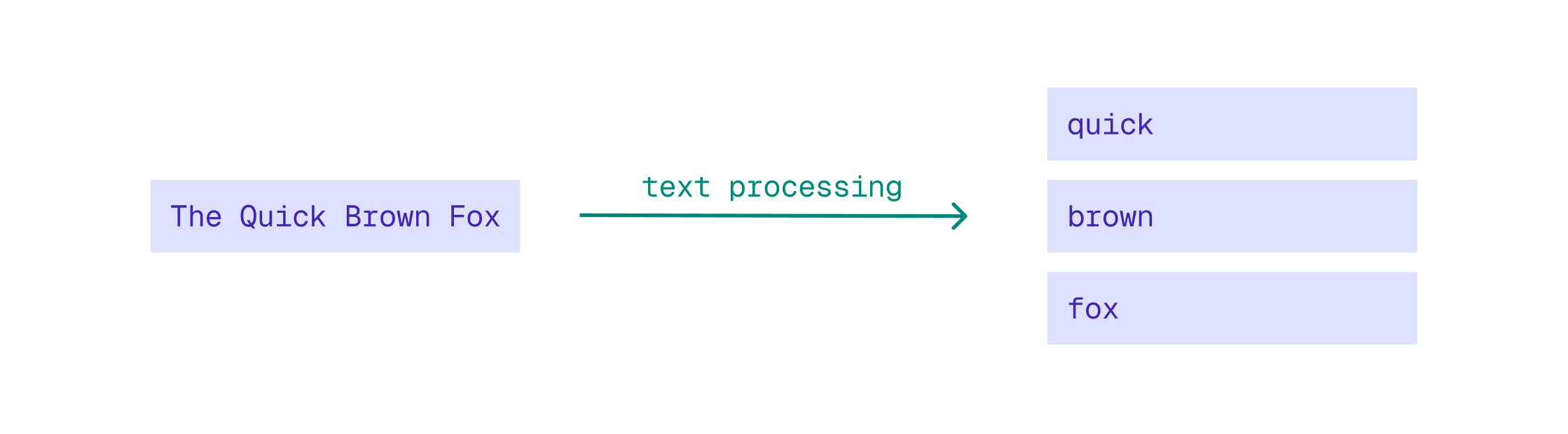
By default, BM25 uses English-specific settings for tokenization, stemming, and stopword removal. Words are reduced to their English root form, and common English stopwords are removed. If your data is not in English, this leads to suboptimal search results. To achieve optimal results for other languages, configure language-specific BM25 settings.
Stemming and Stopwords
To configure stemming and stopword removal, use the following options:
language: sets the language for stemming and stopword removal. Defaults toenglish.stemmer: defaults to stemming forlanguage(if set), but can be configured independently. Set to{"type": "none"}to explicitly disable stemming.stopwords: defaults to a set of stopwords forlanguage(if set) but can be configured independently. You can configure a specificlanguageand/or configure an explicit set of stopwords that will be merged with the stopword set of the configured language. Configure an empty stopwords set to disable stopword removal.
For example, to use Spanish stemming and stopwords during data ingestion, use:
PUT /collections/books/points?wait=true
{
  "points": [
    {
      "id": 1,
      "vector": {
        "title-bm25": {
          "text": "La Máquina del Tiempo",
          "model": "qdrant/bm25",
          "options": {
            "language": "spanish"
          }
        }
      },
      "payload": {
        "title": "La Máquina del Tiempo",
        "author": "H.G. Wells",
        "isbn": "9788411486880"
      }
    }
  ]
}
from qdrant_client import QdrantClient, models

client = QdrantClient(
    url="https://xyz-example.qdrant.io:6333",
    api_key="<your-api-key>",
    cloud_inference=True,
)

client.upsert(
    collection_name="books",
    points=[
        models.PointStruct(
            id=1,
            vector={
                "title-bm25": models.Document(
                    text="La Máquina del Tiempo",
                    model="qdrant/bm25",
                    options={"language": "spanish"},
                )
            },
            payload={
                "title": "La Máquina del Tiempo",
                "author": "H.G. Wells",
                "isbn": "9788411486880",
            },
        )
    ],
)
client.upsert("books", {
  wait: true,
  points: [
    {
      id: 1,
      vector: {
        "title-bm25": {
          text: "La Máquina del Tiempo",
          model: "qdrant/bm25",
          options: { language: "spanish" },
        },
      },
      payload: {
        title: "La Máquina del Tiempo",
        author: "H.G. Wells",
        isbn: "9788411486880",
      },
    },
  ],
});
use std::collections::HashMap;

use qdrant_client::qdrant::{DocumentBuilder, PointStruct, UpsertPointsBuilder, Value};
use qdrant_client::{Payload, Qdrant};
use serde_json::json;

let mut options = HashMap::new();
options.insert("language".to_string(), Value::from("spanish"));

let point = PointStruct::new(
    1,
    HashMap::from([(
        "title-bm25".to_string(),
        DocumentBuilder::new("La Máquina del Tiempo", "qdrant/bm25")
            .options(options)
            .build(),
    )]),
    Payload::try_from(json!({
        "title": "La Máquina del Tiempo",
        "author": "H.G. Wells",
        "isbn": "9788411486880",
    }))
    .unwrap(),
);

client
    .upsert_points(UpsertPointsBuilder::new("books", vec![point]).wait(true))
    .await?;
import static io.qdrant.client.PointIdFactory.id;
import static io.qdrant.client.ValueFactory.value;
import static io.qdrant.client.VectorFactory.vector;
import static io.qdrant.client.VectorsFactory.namedVectors;

import io.qdrant.client.QdrantClient;
import io.qdrant.client.QdrantGrpcClient;
import io.qdrant.client.grpc.Points.*;
import java.util.*;

QdrantClient client =

PointStruct point =
    PointStruct.newBuilder()
        .setId(id(1))
        .setVectors(
            namedVectors(
                Map.of(
                    "title-bm25",
                    vector(
                        Document.newBuilder()
                            .setText("La Máquina del Tiempo")
                            .setModel("qdrant/bm25")
                            .build()))))
        .putAllPayload(
            Map.of(
                "title", value("La Máquina del Tiempo"),
                "author", value("H.G. Wells"),
                "isbn", value("9788411486880")))
        .build();

client.upsertAsync("books", List.of(point)).get();
using Qdrant.Client;
using Qdrant.Client.Grpc;

await client.UpsertAsync(
    collectionName: "books",
    wait: true,
    points: new List<PointStruct>
    {
        new()
        {
            Id = 1,
            Vectors = new Dictionary<string, Vector>
            {
                ["title-bm25"] = new Document
                {
                    Text = "La Máquina del Tiempo",
                    Model = "qdrant/bm25",
                },
            },
            Payload =
            {
                ["title"] = "La Máquina del Tiempo",
                ["author"] = "H.G. Wells",
                ["isbn"] = "9788411486880",
            },
        },
    }
);
client.Upsert(context.Background(), &qdrant.UpsertPoints{
	CollectionName: "books",
	Points: []*qdrant.PointStruct{
		{
			Id: qdrant.NewIDNum(uint64(1)),
			Vectors: qdrant.NewVectorsMap(map[string]*qdrant.Vector{
				"title-bm25": qdrant.NewVectorDocument(&qdrant.Document{
					Model: "qdrant/bm25",
					Text:  "La Máquina del Tiempo",
				}),
			}),
			Payload: qdrant.NewValueMap(map[string]any{
				"title":  "La Máquina del Tiempo",
				"author": "H.G. Wells",
				"isbn":   "9788411486880",
			}),
		},
	},
})
At query time, use the exact same parameters to ensure consistent text processing:
POST /collections/books/points/query
{
  "query": {
    "text": "tiempo",
    "model": "qdrant/bm25",
    "options": {
      "language": "spanish"
    }
  },
  "using": "title-bm25",
  "limit": 10,
  "with_payload": true
}
from qdrant_client import QdrantClient, models

client = QdrantClient(
    url="https://xyz-example.qdrant.io:6333",
    api_key="<your-api-key>",
    cloud_inference=True,
)

client.query_points(
    collection_name="books",
    query=models.Document(text="tiempo", model="qdrant/bm25", options={"language": "spanish"}),
    using="title-bm25",
    limit=10,
    with_payload=True,
)
client.query("books", {
  query: {
    text: "tiempo",
    model: "qdrant/bm25",
    options: { language: "spanish" },
  },
  using: "title-bm25",
  limit: 10,
  with_payload: true,
});
use std::collections::HashMap;

use qdrant_client::Qdrant;
use qdrant_client::qdrant::{DocumentBuilder, Query, QueryPointsBuilder, Value};

let mut options = HashMap::new();
options.insert("language".to_string(), Value::from("spanish"));

client
    .query(
        QueryPointsBuilder::new("books")
            .query(Query::new_nearest(
                DocumentBuilder::new("tiempo", "qdrant/bm25")
                    .options(options)
                    .build(),
            ))
            .using("title-bm25")
            .limit(10)
            .with_payload(true)
            .build(),
    )
    .await?;
import static io.qdrant.client.QueryFactory.nearest;
import static io.qdrant.client.WithPayloadSelectorFactory.enable;

import io.qdrant.client.QdrantClient;
import io.qdrant.client.QdrantGrpcClient;
import io.qdrant.client.grpc.Points.*;

QdrantClient client =

client
    .queryAsync(
        QueryPoints.newBuilder()
            .setCollectionName("books")
            .setQuery(
                nearest(
                    Document.newBuilder().setText("tiempo").setModel("qdrant/bm25").build()))
            .setUsing("title-bm25")
            .setLimit(10)
            .setWithPayload(enable(true))
            .build())
    .get();
using Qdrant.Client;
using Qdrant.Client.Grpc;

await client.QueryAsync(
    collectionName: "books",
    query: new Document
    {
        Text = "tiempo",
        Model = "qdrant/bm25",
        Options = { ["language"] = "spanish" },
    },
    usingVector: "title-bm25",
    payloadSelector: true,
    limit: 10
);
client.Query(context.Background(), &qdrant.QueryPoints{
	CollectionName: "books",
	Query: qdrant.NewQueryNearest(
		qdrant.NewVectorInputDocument(&qdrant.Document{
			Model:   "qdrant/bm25",
			Text:    "tiempo",
			Options: qdrant.NewValueMap(map[string]any{"language": "spanish"}),
		}),
	),
	Using:       qdrant.PtrOf("title-bm25"),
	WithPayload: qdrant.NewWithPayload(true),
	Limit:       qdrant.PtrOf(uint64(10)),
})
To use only stemming, set an empty stopword list. To use only stopword removal, disable stemming by setting stemmer: {"type": "none"}.
ASCII Folding
ASCII folding is the process of removing diacritics (accents) from characters. By removing diacritics, ASCII folding enables you to ignore accents when searching. For instance, with ASCII folding enabled, searching for “cafe” matches both “cafe” and “café”.
To enable ASCII folding, set the ascii_folding option to true at both ingest and query time:
POST /collections/books/points/query
{
  "query": {
    "text": "Mieville",
    "model": "qdrant/bm25",
    "options": {
      "ascii_folding": true
    }
  },
  "using": "author-bm25",
  "limit": 10,
  "with_payload": true
}
from qdrant_client import QdrantClient, models

client = QdrantClient(
    url="https://xyz-example.qdrant.io:6333",
    api_key="<your-api-key>",
    cloud_inference=True,
)

# Note: the ascii_folding option is not supported by FastEmbed
client.query_points(
    collection_name="books",
    query=models.Document(text="Mieville", model="qdrant/bm25", options={"ascii_folding": True}),
    using="author-bm25",
    limit=10,
    with_payload=True,
)
client.query("books", {
  query: {
    text: "Mieville",
    model: "qdrant/bm25",
    options: { ascii_folding: true },
  },
  using: "author-bm25",
  limit: 10,
  with_payload: true,
});
use std::collections::HashMap;

use qdrant_client::Qdrant;
use qdrant_client::qdrant::{DocumentBuilder, Query, QueryPointsBuilder, Value};

let mut options = HashMap::new();
options.insert("ascii_folding".to_string(), Value::from(true));

client
    .query(
        QueryPointsBuilder::new("books")
            .query(Query::new_nearest(
                DocumentBuilder::new("Mieville", "qdrant/bm25")
                    .options(options)
                    .build(),
            ))
            .using("author-bm25")
            .limit(10)
            .with_payload(true)
            .build(),
    )
    .await?;
import static io.qdrant.client.QueryFactory.nearest;
import static io.qdrant.client.WithPayloadSelectorFactory.enable;

import io.qdrant.client.QdrantClient;
import io.qdrant.client.QdrantGrpcClient;
import io.qdrant.client.grpc.Points.*;

QdrantClient client =

client
    .queryAsync(
        QueryPoints.newBuilder()
            .setCollectionName("books")
            .setQuery(
                nearest(
                    Document.newBuilder().setText("Mieville").setModel("qdrant/bm25").build()))
            .setUsing("author-bm25")
            .setLimit(10)
            .setWithPayload(enable(true))
            .build())
    .get();
using Qdrant.Client;
using Qdrant.Client.Grpc;

await client.QueryAsync(
    collectionName: "books",
    query: new Document
    {
        Text = "Mieville",
        Model = "qdrant/bm25",
        Options = { ["ascii_folding"] = true },
    },
    usingVector: "author-bm25",
    payloadSelector: true,
    limit: 10
);
client.Query(context.Background(), &qdrant.QueryPoints{
	CollectionName: "books",
	Query: qdrant.NewQueryNearest(
		qdrant.NewVectorInputDocument(&qdrant.Document{
			Model:   "qdrant/bm25",
			Text:    "Mieville",
			Options: qdrant.NewValueMap(map[string]any{"ascii_folding": true}),
		}),
	),
	Using:       qdrant.PtrOf("author-bm25"),
	WithPayload: qdrant.NewWithPayload(true),
	Limit:       qdrant.PtrOf(uint64(10)),
})
Tokenizer
The tokenizer breaks down text into individual tokens (words). By default, the BM25 model uses the word tokenizer, which splits text based on word boundaries like whitespace and punctuation. This method is effective for Latin-based languages but may not work well for languages with non-Latin alphabets or languages that do not use spaces to separate words. For those languages, use the multilingual tokenizer. This tokenizer supports multiple languages, including those with non-Latin alphabets and non-space delimiters.
POST /collections/books/points/query
{
  "query": {
    "text": "村上春樹",
    "model": "qdrant/bm25",
    "options": {
      "tokenizer": "multilingual"
    }
  },
  "using": "author-bm25",
  "limit": 10,
  "with_payload": true
}
from qdrant_client import QdrantClient, models

client = QdrantClient(
    url="https://xyz-example.qdrant.io:6333",
    api_key="<your-api-key>",
    cloud_inference=True,
)

# Note: the tokenizer option is not supported by FastEmbed
client.query_points(
    collection_name="books",
    query=models.Document(text="村上春樹", model="qdrant/bm25", options={"tokenizer": "multilingual"}),
    using="author-bm25",
    limit=10,
    with_payload=True,
)
client.query("books", {
  query: {
    text: "村上春樹",
    model: "qdrant/bm25",
    options: { tokenizer: "multilingual" },
  },
  using: "author-bm25",
  limit: 10,
  with_payload: true,
});
use std::collections::HashMap;

use qdrant_client::Qdrant;
use qdrant_client::qdrant::{DocumentBuilder, Query, QueryPointsBuilder, Value};

let mut options = HashMap::new();
options.insert("tokenizer".to_string(), Value::from("multilingual"));

client
    .query(
        QueryPointsBuilder::new("books")
            .query(Query::new_nearest(
                DocumentBuilder::new("村上春樹", "qdrant/bm25")
                    .options(options)
                    .build(),
            ))
            .using("author-bm25")
            .limit(10)
            .with_payload(true)
            .build(),
    )
    .await?;
import static io.qdrant.client.QueryFactory.nearest;
import static io.qdrant.client.WithPayloadSelectorFactory.enable;

import io.qdrant.client.QdrantClient;
import io.qdrant.client.QdrantGrpcClient;
import io.qdrant.client.grpc.Points.*;

QdrantClient client =

client
    .queryAsync(
        QueryPoints.newBuilder()
            .setCollectionName("books")
            .setQuery(
                nearest(Document.newBuilder().setText("村上春樹").setModel("qdrant/bm25").build()))
            .setUsing("author-bm25")
            .setLimit(10)
            .setWithPayload(enable(true))
            .build())
    .get();
using Qdrant.Client;
using Qdrant.Client.Grpc;

await client.QueryAsync(
    collectionName: "books",
    query: new Document
    {
        Text = "村上春樹",
        Model = "qdrant/bm25",
        Options = { ["tokenizer"] = "multilingual" },
    },
    usingVector: "author-bm25",
    payloadSelector: true,
    limit: 10
);
client.Query(context.Background(), &qdrant.QueryPoints{
	CollectionName: "books",
	Query: qdrant.NewQueryNearest(
		qdrant.NewVectorInputDocument(&qdrant.Document{
			Model:   "qdrant/bm25",
			Text:    "村上春樹",
			Options: qdrant.NewValueMap(map[string]any{"tokenizer": "multilingual"}),
		}),
	),
	Using:       qdrant.PtrOf("author-bm25"),
	WithPayload: qdrant.NewWithPayload(true),
	Limit:       qdrant.PtrOf(uint64(10)),
})
Language-neutral Text Processing
Available as of v1.19.0
In some situations, you may want to disable language-specific processing altogether. For example, when searching for author names, that don’t necessarily conform to the rules of a specific language.
To disable language-specific processing, set the following options:
stemmer: set to{"type": "none"}to explicitly disable stemming.stopwords: configure an empty stopwords set to disable stopword removal.tokenizer: set tomultilingualfor language-aware tokenization that automatically detects the script and applies the appropriate segmentation for each language.- Optionally, set
ascii_foldingtotrueto enable ASCII folding and ignore diacritics.
POST /collections/books/points/query
{
  "query": {
    "text": "Mieville",
    "model": "qdrant/bm25",
    "options": {
      "stemmer": {"type": "none"},
      "stopwords": {},
      "tokenizer": "multilingual",
      "ascii_folding": true
    }
  },
  "using": "author-bm25",
  "limit": 10,
  "with_payload": true
}
from qdrant_client import QdrantClient, models

client = QdrantClient(
    url="https://xyz-example.qdrant.io:6333",
    api_key="<your-api-key>",
    cloud_inference=True,
)

client.query_points(
    collection_name="books",
    query=models.Document(
        text="Mieville",
        model="qdrant/bm25",
        options=models.Bm25Config(
            stemmer=models.DisabledStemmerParams(type=models.NoStemmer.NONE),
            stopwords=models.StopwordsSet(),
            tokenizer=models.TokenizerType.MULTILINGUAL,
            ascii_folding=True,
        ),
    ),
    using="author-bm25",
    limit=10,
    with_payload=True,
)
client.query("books", {
  query: {
    text: "Mieville",
    model: "qdrant/bm25",
    options: { stemmer: { type: "none" }, stopwords: {}, tokenizer: "multilingual", ascii_folding: true },
  },
  using: "author-bm25",
  limit: 10,
  with_payload: true,
});
use std::collections::HashMap;

use qdrant_client::Qdrant;
use qdrant_client::qdrant::{value::Kind, DocumentBuilder, Query, QueryPointsBuilder, Struct, Value};

let mut options = HashMap::new();
options.insert("stemmer".to_string(), Value::from(vec![("type", "none")]));
options.insert(
    "stopwords".to_string(),
    Value {
        kind: Some(Kind::StructValue(Struct {
            fields: HashMap::new(),
        })),
    },
);
options.insert("tokenizer".to_string(), Value::from("multilingual"));
options.insert("ascii_folding".to_string(), Value::from(true));

client
    .query(
        QueryPointsBuilder::new("books")
            .query(Query::new_nearest(
                DocumentBuilder::new("Mieville", "qdrant/bm25")
                    .options(options)
                    .build(),
            ))
            .using("author-bm25")
            .limit(10)
            .with_payload(true)
            .build(),
    )
    .await?;
import static io.qdrant.client.QueryFactory.nearest;
import static io.qdrant.client.ValueFactory.value;
import static io.qdrant.client.WithPayloadSelectorFactory.enable;

import io.qdrant.client.QdrantClient;
import io.qdrant.client.QdrantGrpcClient;
import io.qdrant.client.grpc.Points.*;
import java.util.*;

QdrantClient client =

client
    .queryAsync(
        QueryPoints.newBuilder()
            .setCollectionName("books")
            .setQuery(
                nearest(
                    Document.newBuilder()
                        .setText("Mieville")
                        .setModel("qdrant/bm25")
                        .putOptions("stemmer", value(Map.of("type", value("none"))))
                        .putOptions("stopwords", value(Map.of()))
                        .putOptions("tokenizer", value("multilingual"))
                        .putOptions("ascii_folding", value(true))
                        .build()))
            .setUsing("author-bm25")
            .setLimit(10)
            .setWithPayload(enable(true))
            .build())
    .get();
using Qdrant.Client;
using Qdrant.Client.Grpc;

await client.QueryAsync(
    collectionName: "books",
    query: new Document
    {
        Text = "Mieville",
        Model = "qdrant/bm25",
        Options =
        {
            ["stemmer"] = new Dictionary<string, Value> { ["type"] = "none" },
            ["stopwords"] = new Dictionary<string, Value>(),
            ["tokenizer"] = "multilingual",
            ["ascii_folding"] = true,
        },
    },
    usingVector: "author-bm25",
    payloadSelector: true,
    limit: 10
);
client.Query(context.Background(), &qdrant.QueryPoints{
	CollectionName: "books",
	Query: qdrant.NewQueryNearest(
		qdrant.NewVectorInputDocument(&qdrant.Document{
			Model:   "qdrant/bm25",
			Text:    "Mieville",
			Options: qdrant.NewValueMap(map[string]any{
			"stemmer":       map[string]any{"type": "none"},
			"stopwords":     map[string]any{},
			"tokenizer":     "multilingual",
			"ascii_folding": true,
		}),
		}),
	),
	Using:       qdrant.PtrOf("author-bm25"),
	WithPayload: qdrant.NewWithPayload(true),
	Limit:       qdrant.PtrOf(uint64(10)),
})
SPLADE++
The SPLADE (Sparse Lexical and Dense) family of models are transformer-based models that generate sparse vectors out of text. These models combine the benefits of traditional lexical search with the power of transformer-based models by accounting for homonyms and synonyms. SPLADE models achieve this by expanding the vocabulary of the input text using contextual embeddings from the transformer model. For example, when processing the input text “time travel”, a SPLADE model may expand the input to include related terms like “temporal”, “journey”, and “chronology”. This expansion allows SPLADE models to capture the semantic meaning of the text while still leveraging the strengths of lexical search.
The advantage of using SPLADE models is that they perform better than traditional BM25. They also have several downsides though. First, because they use a fixed vocabulary, you can’t use SPLADE models to find terms that are not in the vocabulary, such as product IDs and out-of-domain language (words not seen in training). Secondly, because they are transformer-based models, SPLADE models are slower and require more computational resources than the traditional BM25 model.
On Qdrant Cloud, you can use the SPLADE++ model with inference. Alternatively, you can generate vectors on the client side using the FastEmbed library.
POST /collections/books/points/query
{
  "query": {
    "text": "time travel",
    "model": "prithivida/splade_pp_en_v1"
  },
  "using": "title-splade",
  "limit": 10,
  "with_payload": true
}
from qdrant_client import QdrantClient, models

client = QdrantClient(
    url="https://xyz-example.qdrant.io:6333",
    api_key="<your-api-key>",
    cloud_inference=True,
)

client.query_points(
    collection_name="books",
    query=models.Document(text="time travel", model="prithivida/splade_pp_en_v1"),
    using="title-splade",
    limit=10,
    with_payload=True,
)
client.query("books", {
  query: {
    text: "time travel",
    model: "prithivida/splade_pp_en_v1",
  },
  using: "title-splade",
  limit: 10,
  with_payload: true,
});
use qdrant_client::Qdrant;
use qdrant_client::qdrant::{Document, Query, QueryPointsBuilder};

client
    .query(
        QueryPointsBuilder::new("books")
            .query(Query::new_nearest(Document::new(
                "time travel",
                "prithivida/splade_pp_en_v1",
            )))
            .using("title-splade")
            .limit(10)
            .with_payload(true)
            .build(),
    )
    .await?;
import static io.qdrant.client.QueryFactory.nearest;
import static io.qdrant.client.WithPayloadSelectorFactory.enable;

import io.qdrant.client.QdrantClient;
import io.qdrant.client.QdrantGrpcClient;
import io.qdrant.client.grpc.Points.*;

QdrantClient client =

client
    .queryAsync(
        QueryPoints.newBuilder()
            .setCollectionName("books")
            .setQuery(
                nearest(
                    Document.newBuilder()
                        .setText("time travel")
                        .setModel("prithivida/splade_pp_en_v1")
                        .build()))
            .setUsing("title-splade")
            .setLimit(10)
            .setWithPayload(enable(true))
            .build())
    .get();
using Qdrant.Client;
using Qdrant.Client.Grpc;

await client.QueryAsync(
    collectionName: "books",
    query: new Document { Text = "time travel", Model = "prithivida/splade_pp_en_v1" },
    usingVector: "title-splade",
    payloadSelector: true,
    limit: 10
);
client.Query(context.Background(), &qdrant.QueryPoints{
	CollectionName: "books",
	Query: qdrant.NewQueryNearest(
		qdrant.NewVectorInputDocument(&qdrant.Document{
			Model: "prithivida/splade_pp_en_v1",
			Text:  "time travel",
		}),
	),
	Using:       qdrant.PtrOf("title-splade"),
	WithPayload: qdrant.NewWithPayload(true),
	Limit:       qdrant.PtrOf(uint64(10)),
})
For a tutorial on using SPLADE++ with FastEmbed, refer to How to Generate Sparse Vectors with SPLADE.
miniCOIL
miniCOIL strikes a balance between the flexibility of BM25 and the performance of SPLADE++. miniCOIL is a transformer-based model that generates sparse vectors for text. Unlike SPLADE++, it doesn’t use a vocabulary expansion mechanism. To capture the context and meaning of terms, the model generates a four-dimensional vector for each term. miniCOIL does not use a fixed vocabulary, making it an effective model for lexical search that ranks results based on the contextual meaning of keywords.
miniCOIL can be used with the FastEmbed library.
 Ready to try Qdrant?