
Ingest Databricks Data into Qdrant
| Time: 30 min | Level: Intermediate | Stack: Python, Databricks, Apache Spark, FastEmbed |
|---|
Databricks is a unified analytics platform for big data and AI. It’s built around Apache Spark, an open-source system for distributed data processing and analytics.
Apache Spark distributes embedding computation across partitions. This tutorial uses 100 rows to demonstrate ingestion; it does not measure large-scale throughput.
Use Qdrant’s FastEmbed library to generate dense and sparse embeddings, then load them into a Qdrant cluster with the Qdrant Spark connector on Databricks.
All code is included on this page. Copy each Python block into its own cell in a blank Databricks notebook and run the cells in order. Run the HTTP requests in the Qdrant API console at the indicated steps.
Set Up a Databricks Project
Set up Databricks dedicated compute with Databricks Runtime 16.4 LTS, Scala 2.13 variant, which includes Spark 3.5.2 and Python 3.12.3. Select the Scala 2.13 image to match the connector.
This example uses the Python Resilient Distributed Dataset (RDD) API (
.rdd.mapPartitions), which is not supported on standard or serverless compute. Databricks Free Edition only provides serverless compute and cannot run this example.Install the Qdrant Spark connector as a library:
Navigate to the
Librariessection in your cluster dashboard.Select
Install Newto open the library installation modal.Install the Maven coordinate
io.qdrant:spark:2.2.0.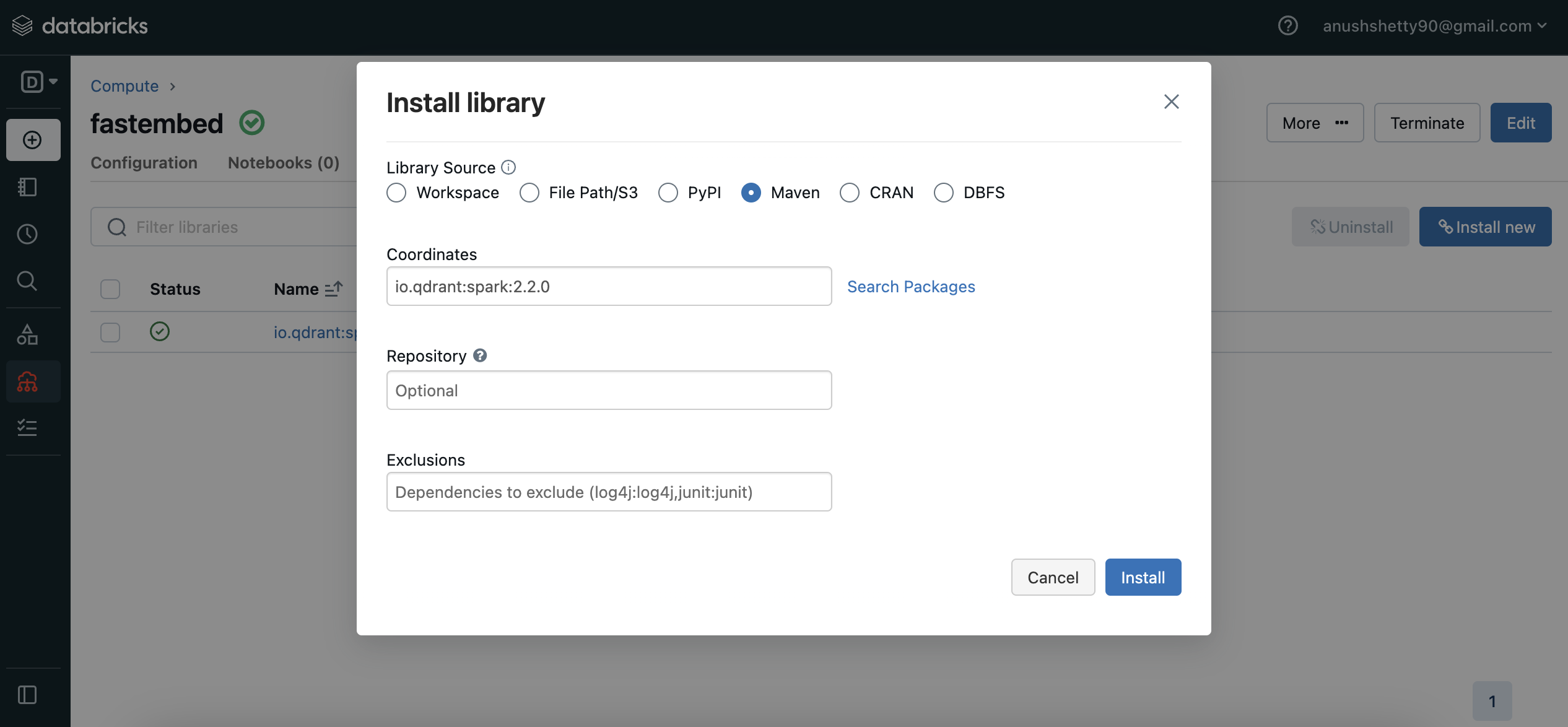
Create a blank Python notebook in Databricks attached to that compute. The notebook provides the
sparksession anddbutilsutilities used in the code.Have a running Qdrant cluster that is reachable from your Databricks workers over gRPC. You also need access to its API console to create and inspect a collection.
Download a Dataset
Install the required dependencies:
%pip install fastembed==0.9.0 datasets==5.1.0
Restart Python after installation, then run the remaining cells in order:
dbutils.library.restartPython()
Download the dataset:
from datasets import load_dataset

dataset_name = "tasksource/med"
dataset = load_dataset(
    dataset_name,
    revision="f54332921146ca97173da1868ac510e9e07c413e",
    split="train",
)
# We'll use the first 100 entries from this dataset and exclude some unused columns.
dataset = dataset.select(range(100)).remove_columns(["gold_label", "genre"])
For this 100-row sample, create the DataFrame directly. This avoids a dependency on deprecated DBFS root storage. For larger datasets, load data through Spark from a table or supported storage location instead of collecting it on the driver.
dataset_df = spark.createDataFrame(
    list(dataset), schema="sentence1 string, sentence2 string"
)
Vectorize the Data
Generate both dense and sparse vectors using FastEmbed in a partition function. Each partition initializes its own models. Workers need network access to download the model files on first use.
Both models embed sentence1, so the two vector representations describe the same text. Keep sentence2 as payload for reference; it is not embedded in this example.
Create the Partition Function
from collections.abc import Iterator

from fastembed import SparseTextEmbedding, TextEmbedding
from pyspark.sql import Row


def vectorize(partition_data: Iterator[Row]) -> Iterator[Row]:
    # Initialize dense and sparse models
    dense_model = TextEmbedding(model_name="BAAI/bge-small-en-v1.5")
    sparse_model = SparseTextEmbedding(model_name="Qdrant/bm25")

    for row in partition_data:
        # Generate dense and sparse vectors
        text = row.sentence1
        dense_vector = next(dense_model.embed([text]))
        sparse_vector = next(sparse_model.embed([text]))

        yield Row(
            sentence1=row.sentence1,
            sentence2=row.sentence2,
            dense_vector=dense_vector.tolist(),
            sparse_vector_indices=sparse_vector.indices.tolist(),
            sparse_vector_values=sparse_vector.values.tolist(),
        )
The function uses BAAI/bge-small-en-v1.5 for dense embeddings and BM25 for sparse embeddings.
Apply the Partition Function
Apply vectorize to the DataFrame’s partitions to generate embeddings.
embeddings = dataset_df.rdd.mapPartitions(vectorize)
The mapPartitions() method returns a Resilient Distributed Dataset (RDD). Convert it back to a Spark DataFrame using the schema in the next step.
Build the DataFrame with Vectors
Use this schema to create embeddings_df from the vectorized data:
from pyspark.sql.types import (
    ArrayType,
    FloatType,
    IntegerType,
    StringType,
    StructField,
    StructType,
)

# Define the schema for the new dataframe
schema = StructType(
    [
        StructField("sentence1", StringType()),
        StructField("sentence2", StringType()),
        StructField("dense_vector", ArrayType(FloatType())),
        StructField("sparse_vector_indices", ArrayType(IntegerType())),
        StructField("sparse_vector_values", ArrayType(FloatType())),
    ]
)

# Create the new dataframe with the vectorized data
embeddings_df = spark.createDataFrame(data=embeddings, schema=schema)
Upload the Data to Qdrant
Choose a new collection name and replace {collection_name} in the HTTP requests with that name. Use the same name in the upload options.
Create a Qdrant collection:
- Create a new collection using the Qdrant API console. The dense vector has 384 dimensions. The
Qdrant/bm25model requires the sparse vector’s inverse document frequency (IDF) modifier: Qdrant maintains document-frequency statistics and applies IDF weighting during sparse queries.
PUT /collections/{collection_name} Content-Type: application/json { "vectors": { "dense": { "size": 384, "distance": "Cosine" } }, "sparse_vectors": { "sparse": { "modifier": "idf" } } }- Create a new collection using the Qdrant API console. The dense vector has 384 dimensions. The
Upload the DataFrame to Qdrant:
Replace <QDRANT_GRPC_URL>, <QDRANT_API_KEY>, and <QDRANT_COLLECTION_NAME> with your cluster’s values before running this cell. Use the gRPC endpoint, such as https://<cluster-host>:6334. The collection name must match the collection you created.
options = {
    "qdrant_url": "<QDRANT_GRPC_URL>",
    "api_key": "<QDRANT_API_KEY>",
    "collection_name": "<QDRANT_COLLECTION_NAME>",
    "vector_fields": "dense_vector",
    "vector_names": "dense",
    "sparse_vector_value_fields": "sparse_vector_values",
    "sparse_vector_index_fields": "sparse_vector_indices",
    "sparse_vector_names": "sparse",
    "schema": embeddings_df.schema.json(),
}

embeddings_df.write.format("io.qdrant.spark.Qdrant").options(**options).mode(
    "append"
).save()
See the Spark connector options for the supported configuration fields.
If id_field is not specified, the connector generates random UUIDs. Running the write again adds another set of points, so use a fresh collection for the following count check.
Verify the Ingestion
In the Qdrant API console, count the points in the collection. The connector can return before all points are visible. If the count is below 100, wait briefly and repeat this count request; do not repeat the write:
POST /collections/{collection_name}/points/count
Content-Type: application/json

{
  "exact": true
}
For one successful write of this 100-row sample to an empty collection, expect result.count to be 100. Inspect a point in the Qdrant dashboard to confirm that it has dense and sparse vectors and both source sentences in its payload.
Validation: On October 12, 2026, the core ingestion code passed a local integration test using Apache Spark 3.5.2 (Scala 2.13.8), Python 3.12.13, Java 17.0.20.1, io.qdrant:spark:2.2.0, FastEmbed 0.9.0, Datasets 5.1.0, and Qdrant 1.19.2. The test confirmed 100 points, both vector types, matching source payloads, and the IDF modifier. The Databricks Runtime 16.4 LTS setup above has not yet been validated on dedicated compute.
You can now use these representations for hybrid queries, embedding each query with the same dense and sparse models used during ingestion.
 Ready to try Qdrant?