
Generate Text Embeddings on CPU with FastEmbed and Qdrant
| Time: 10 min | Level: Beginner |
|---|
FastEmbed is a Python library that generates embeddings on CPU, with no GPU, PyTorch, or API key required. In this tutorial, you generate embeddings for a few documents, then let qdrant-client use FastEmbed to embed, index, and search them in Qdrant.
Setup
Install the Qdrant client with the FastEmbed extra:
pip install "qdrant-client[fastembed]>=1.14.2"
Generate Embeddings
Create a TextEmbedding model and embed a list of documents:
from typing import List
import numpy as np
from fastembed import TextEmbedding

documents: List[str] = [
    "Hello, World!",
    "fastembed is supported by and maintained by Qdrant."
]
embedding_model = TextEmbedding()
embeddings: List[np.ndarray] = list(embedding_model.embed(documents))
On first use, FastEmbed downloads the default model, BAAI/bge-small-en-v1.5, as a quantized ONNX file. It then embeds the documents in batches.
embed() returns a generator, so the code wraps it in list(). Each item is a NumPy array with one embedding per document. For the default model, each embedding has 384 dimensions.
Use FastEmbed with Qdrant
Passing the model to qdrant-client lets it embed documents and queries for you, so you never handle the vectors yourself.
Create a client. An in-memory client needs no server:
from qdrant_client import QdrantClient, models

client = QdrantClient(":memory:")  # or QdrantClient(path="path/to/db")
Prepare documents, metadata, and IDs.
docs = [
    "Qdrant has Langchain integrations",
    "Qdrant also has Llama Index integrations"
]
metadata = [
    {"source": "Langchain-docs"},
    {"source": "LlamaIndex-docs"},
]
ids = [42, 2]
Create a collection. Qdrant needs the vector size and distance metric up front. Ask the client for the size of the model instead of hardcoding it:
model_name = "BAAI/bge-small-en-v1.5"

client.create_collection(
    collection_name="demo_collection",
    vectors_config=models.VectorParams(
        size=client.get_embedding_size(model_name),
        distance=models.Distance.COSINE,
    ),
)
Upload the documents. Wrap each text in
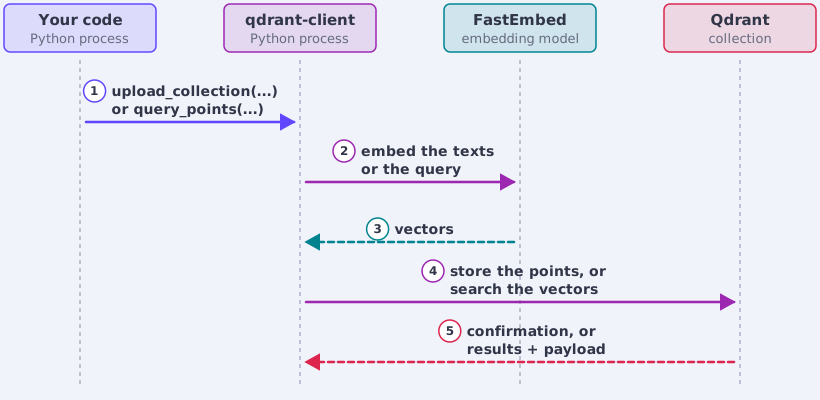
models.Documentto tell the client which model embeds it:metadata_with_docs = [ {"document": doc, **meta} for doc, meta in zip(docs, metadata) ] client.upload_collection( collection_name="demo_collection", vectors=[models.Document(text=doc, model=model_name) for doc in docs], payload=metadata_with_docs, ids=ids, )The client runs FastEmbed in your Python process, then uploads the vectors with the payload.
Search. Wrap the query text in
models.Documentthe same way:search_result = client.query_points( collection_name="demo_collection", query=models.Document(text="This is a query document", model=model_name), ).points print(search_result)The client embeds the query with FastEmbed and searches the collection with the resulting vector. The diagram shows both flows, from upload to search:
Next Steps
- Pick another model. FastEmbed also supports sparse (
SparseTextEmbedding, including BM25, SPLADE, and miniCOIL), multi-vector (LateInteractionTextEmbedding, including ColBERT), and image (ImageEmbedding) embeddings, plus cross-encoder rerankers (TextCrossEncoder). Compare dense candidates for your language and task on the MTEB leaderboard. - Use prefixes where a model needs them. Some models expect a different prefix for documents than for queries.
passage_embed()andquery_embed()apply it for you. The default model needs no prefix, soembed()is enough here. - Mind the context window. The default model reads at most 512 tokens. For longer texts, embed chunks and pool them, for example by taking the mean of the chunk embeddings.
- Scale up. Install
fastembed-gpuand passcuda=True, withdevice_idsfor multiple GPUs. Useparallelto spread CPU work across workers andlazy_loadto defer model loading. - Pin the version. Lock the FastEmbed version in your project, because the default model can change in a future release.
- Run Qdrant for real. Start with a free cluster on Qdrant Cloud or follow the Quickstart with Docker.
To report a bug or request a feature, open an issue in the FastEmbed repository. For questions, join the Qdrant Discord.
 Ready to try Qdrant?