
Multimodal and Multilingual Vector Search with Cohere and Qdrant
| Time: 15 min | Level: Beginner | Output: GitHub |  |
|---|
Overview
You often understand and share information more effectively when combining different types of data. The taste of comfort food can trigger childhood memories. A song might be described with just “pam pam clap” sounds instead of a paragraph. Emojis and stickers can express a feeling or a complex idea faster than words.
Modalities of data such as text, images, video, and audio, in various combinations, form valuable use cases for semantic search applications.
Vector databases, being modality-agnostic, are well suited for building these applications.
This tutorial works with two modalities: image and text data. You can build a semantic search application with any combination of modalities, as long as you choose an embedding model that bridges the semantic gap.
The semantic gap refers to the difference between low-level features, such as brightness, and high-level concepts, such as cuteness.
Cohere Embed 4.0, for example, is built for multimodal and multilingual embedding, and supports more than 100 languages. Instead of running the model yourself, this tutorial calls it through Qdrant Cloud Inference, so Qdrant generates the embeddings and stores them in a collection in one step.
Cohere Embed 4 is one model that bridges image and text. The Choose a multimodal model prompt has an agent work out which model fits your own modalities and languages, and how to check the fit before you embed everything.
Agent Prompt Choose a multimodal model
Help me choose an embedding model for multimodal search over my own data. First, read https://skills.qdrant.tech/qdrant-search-quality/diagnosis/SKILL.md

Ask me which modalities I need to search across and in which direction, for example, text queries that find images. Also ask which languages my content and queries use, and roughly how much data I have in each modality.

Use those details to identify models that support my search needs. Distinguish between support for different modalities and support for different languages: a model that puts images and text in the same embedding space may not work well for my language pair. Explain each option’s embedding dimensions, storage requirements, and inference costs.

Before I embed the full dataset, help me test the model on a small sample using a handful of queries with known relevant results. Explain what to look for and which failures would suggest the model is a poor fit.

Once I’ve chosen a model, give me the corresponding Qdrant collection configuration. Explain which choices I can change later, which require rebuilding the collection or index, and which require re-embedding the data.
Uses the
qdrant-search-quality/diagnosis
agent skill.
What are agent skills?
Setup
Install the client:
pip install qdrant-client
npm install @qdrant/js-client-rest
cargo add qdrant-client
// build.gradle
dependencies {
    implementation("io.qdrant:client:+") // specify the desired version
}
dotnet add package Qdrant.Client
go get github.com/qdrant/go-client
Dataset
To make the demonstration simple, this tutorial uses a tiny dataset of images and their captions.
Download the tutorial images and place them in a folder named images, in the same folder as your code or notebook.
Connect to Qdrant
- Create a client object for Qdrant, with Cloud Inference enabled.
You’ll use a Qdrant Cloud Free Tier Cluster. Create a free cluster, save the associated API key and endpoint URL, and instantiate the Qdrant client. Set cloud_inference=True so Qdrant can generate embeddings for you:
import os

from qdrant_client import QdrantClient, models

client = QdrantClient(
    url=os.getenv("QDRANT_URL"),
    api_key=os.getenv("QDRANT_API_KEY"),
    cloud_inference=True,
)
const client = new QdrantClient({
    url: process.env.QDRANT_URL,
    apiKey: process.env.QDRANT_API_KEY,
});
let client = Qdrant::from_url(&std::env::var("QDRANT_URL")?)
    .api_key(std::env::var("QDRANT_API_KEY")?)
    .build()?;
QdrantClient client =
    new QdrantClient(
        QdrantGrpcClient.newBuilder(QDRANT_URL, 6334, true)
            .withApiKey(QDRANT_API_KEY)
            .build());
var client = new QdrantClient(
	host: QDRANT_URL,
	https: true,
	apiKey: QDRANT_API_KEY
);
client, err := qdrant.NewClient(&qdrant.Config{
	Host:   QDRANT_URL,
	APIKey: QDRANT_API_KEY,
	UseTLS: true,
})
- Define the dataset and a helper to encode images.
Cloud Inference accepts images as base64 data URLs, so convert each file before uploading it:
import base64

def image_to_base64_url(image_path: str) -> str:
    prefix = "data:image/png;base64"
    with open(image_path, "rb") as image_file:
        return prefix + "," + base64.b64encode(image_file.read()).decode("utf-8")

documents = [
    {"caption": "An image about plane emergency safety.", "image": "images/image-1.png"},
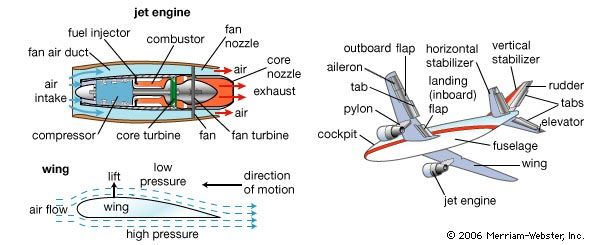
    {"caption": "An image about airplane components.", "image": "images/image-2.png"},
    {"caption": "An image about COVID safety restrictions.", "image": "images/image-3.png"},
    {"caption": "A confidential image about UFO sightings.", "image": "images/image-4.png"},
    {"caption": "An image about unusual footprints on Aralar 2011.", "image": "images/image-5.png"},
]
function imageToBase64Url(imagePath: string): string {
    const prefix = "data:image/png;base64";
    const imageBuffer = readFileSync(imagePath);
    return `${prefix},${imageBuffer.toString("base64")}`;
}

const documents = [
    { caption: "An image about plane emergency safety.", image: "images/image-1.png" },
    { caption: "An image about airplane components.", image: "images/image-2.png" },
    { caption: "An image about COVID safety restrictions.", image: "images/image-3.png" },
    { caption: "A confidential image about UFO sightings.", image: "images/image-4.png" },
    { caption: "An image about unusual footprints on Aralar 2011.", image: "images/image-5.png" },
];
fn image_to_base64_url(image_path: &str) -> anyhow::Result<String> {
    let prefix = "data:image/png;base64";
    let bytes = std::fs::read(image_path)?;
    Ok(format!("{prefix},{}", BASE64_STANDARD.encode(bytes)))
}

struct Doc {
    caption: &'static str,
    image: &'static str,
}

let documents = vec![
    Doc { caption: "An image about plane emergency safety.", image: "images/image-1.png" },
    Doc { caption: "An image about airplane components.", image: "images/image-2.png" },
    Doc { caption: "An image about COVID safety restrictions.", image: "images/image-3.png" },
    Doc { caption: "A confidential image about UFO sightings.", image: "images/image-4.png" },
    Doc { caption: "An image about unusual footprints on Aralar 2011.", image: "images/image-5.png" },
];
static class Doc {
    final String caption;
    final String image;
    Doc(String caption, String image) {
        this.caption = caption;
        this.image = image;
    }
}

static String imageToBase64Url(String imagePath) throws Exception {
    String prefix = "data:image/png;base64";
    byte[] bytes = Files.readAllBytes(Path.of(imagePath));
    return prefix + "," + Base64.getEncoder().encodeToString(bytes);
}

static List<Doc> documents = List.of(
    new Doc("An image about plane emergency safety.", "images/image-1.png"),
    new Doc("An image about airplane components.", "images/image-2.png"),
    new Doc("An image about COVID safety restrictions.", "images/image-3.png"),
    new Doc("A confidential image about UFO sightings.", "images/image-4.png"),
    new Doc("An image about unusual footprints on Aralar 2011.", "images/image-5.png")
);
static string ImageToBase64Url(string imagePath)
{
	string prefix = "data:image/png;base64";
	byte[] bytes = File.ReadAllBytes(imagePath);
	return $"{prefix},{Convert.ToBase64String(bytes)}";
}

var documents = new[]
{
	new { Caption = "An image about plane emergency safety.", Image = "images/image-1.png" },
	new { Caption = "An image about airplane components.", Image = "images/image-2.png" },
	new { Caption = "An image about COVID safety restrictions.", Image = "images/image-3.png" },
	new { Caption = "A confidential image about UFO sightings.", Image = "images/image-4.png" },
	new { Caption = "An image about unusual footprints on Aralar 2011.", Image = "images/image-5.png" },
};
type Doc struct {
	Caption string
	Image   string
}

func imageToBase64Url(imagePath string) (string, error) {
	prefix := "data:image/png;base64"
	bytes, err := os.ReadFile(imagePath)
	if err != nil {
		return "", err
	}
	return fmt.Sprintf("%s,%s", prefix, base64.StdEncoding.EncodeToString(bytes)), nil
}

var documents = []Doc{
	{Caption: "An image about plane emergency safety.", Image: "images/image-1.png"},
	{Caption: "An image about airplane components.", Image: "images/image-2.png"},
	{Caption: "An image about COVID safety restrictions.", Image: "images/image-3.png"},
	{Caption: "A confidential image about UFO sightings.", Image: "images/image-4.png"},
	{Caption: "An image about unusual footprints on Aralar 2011.", Image: "images/image-5.png"},
}
- Create a collection for the images with captions.
COLLECTION_NAME = "multimodal-embeddings"

if not client.collection_exists(COLLECTION_NAME):
    client.create_collection(
        collection_name=COLLECTION_NAME,
        vectors_config={
            "image": models.VectorParams(size=512, distance=models.Distance.COSINE),
            "text": models.VectorParams(size=512, distance=models.Distance.COSINE),
        }
    )
const collectionName = "multimodal-embeddings";

if (!(await client.collectionExists(collectionName)).exists) {
    await client.createCollection(collectionName, {
        vectors: {
            image: { size: 512, distance: "Cosine" },
            text: { size: 512, distance: "Cosine" },
        },
    });
}
let collection_name = "multimodal-embeddings";

if !client.collection_exists(collection_name).await? {
    let mut vectors = VectorsConfigBuilder::default();
    vectors.add_named_vector_params("image", VectorParamsBuilder::new(512, Distance::Cosine));
    vectors.add_named_vector_params("text", VectorParamsBuilder::new(512, Distance::Cosine));

    client
        .create_collection(CreateCollectionBuilder::new(collection_name).vectors_config(vectors))
        .await?;
}
String collectionName = "multimodal-embeddings";

if (!client.collectionExistsAsync(collectionName).get()) {
    client.createCollectionAsync(
        CreateCollection.newBuilder()
            .setCollectionName(collectionName)
            .setVectorsConfig(
                VectorsConfig.newBuilder()
                    .setParamsMap(
                        VectorParamsMap.newBuilder()
                            .putMap(
                                "image",
                                VectorParams.newBuilder()
                                    .setSize(512)
                                    .setDistance(Distance.Cosine)
                                    .build())
                            .putMap(
                                "text",
                                VectorParams.newBuilder()
                                    .setSize(512)
                                    .setDistance(Distance.Cosine)
                                    .build())
                            .build()))
            .build()
    ).get();
}
string collectionName = "multimodal-embeddings";

if (!await client.CollectionExistsAsync(collectionName))
{
	await client.CreateCollectionAsync(
		collectionName: collectionName,
		vectorsConfig: new VectorParamsMap
		{
			Map =
			{
				["image"] = new VectorParams { Size = 512, Distance = Distance.Cosine },
				["text"] = new VectorParams { Size = 512, Distance = Distance.Cosine },
			}
		}
	);
}
collectionName := "multimodal-embeddings"

exists, err := client.CollectionExists(context.Background(), collectionName)
if !exists {
	client.CreateCollection(context.Background(), &qdrant.CreateCollection{
		CollectionName: collectionName,
		VectorsConfig: qdrant.NewVectorsConfigMap(
			map[string]*qdrant.VectorParams{
				"image": {
					Size:     512,
					Distance: qdrant.Distance_Cosine,
				},
				"text": {
					Size:     512,
					Distance: qdrant.Distance_Cosine,
				},
			},
		),
	})
}
Upload Data to Qdrant
Upload your images with captions to the collection. Each image and its caption is embedded by Cohere Embed 4.0, through Cloud Inference, and stored as a point.
Pass your Cohere API key through a header, and describe each vector as a models.Document (for text) or models.Image (for the image), naming the Cohere model and the output dimension you want:
from qdrant_client.context_headers import headers

cohere_api_key = os.getenv("COHERE_API_KEY")

with headers({"cohere-api-key": cohere_api_key}):
    client.upsert(
        collection_name=COLLECTION_NAME,
        points=[
            models.PointStruct(
                id=idx,
                vector={
                    "text": models.Document(
                        text=doc["caption"],
                        model="cohere/embed-v4.0",
                        options={"output_dimension": 512},
                    ),
                    "image": models.Image(
                        image=image_to_base64_url(doc["image"]),
                        model="cohere/embed-v4.0",
                        options={"output_dimension": 512},
                    ),
                },
                payload=doc
            )
            for idx, doc in enumerate(documents)
        ]
    )
const cohereApiKey = process.env.COHERE_API_KEY!;

await withHeaders({ "cohere-api-key": cohereApiKey }, () =>
    client.upsert(collectionName, {
        points: documents.map((doc, idx) => ({
            id: idx,
            vector: {
                text: { text: doc.caption, model: "cohere/embed-v4.0", options: { output_dimension: 512 } },
                image: { image: imageToBase64Url(doc.image), model: "cohere/embed-v4.0", options: { output_dimension: 512 } },
            },
            payload: doc,
        })),
    })
);
let cohere_api_key = std::env::var("COHERE_API_KEY")?;

let mut options: HashMap<String, Value> = HashMap::new();
options.insert("output_dimension".to_string(), 512i64.into());

let mut points = Vec::new();
for (idx, doc) in documents.iter().enumerate() {
    let vectors = NamedVectors::default()
        .add_vector(
            "text",
            DocumentBuilder::new(doc.caption, "cohere/embed-v4.0")
                .options(options.clone())
                .build(),
        )
        .add_vector(
            "image",
            ImageBuilder::new_from_base64(image_to_base64_url(doc.image)?, "cohere/embed-v4.0")
                .options(options.clone())
                .build(),
        );

    points.push(PointStruct::new(
        idx as u64,
        vectors,
        [
            ("caption", doc.caption.into()),
            ("image", doc.image.into()),
        ],
    ));
}

client
    .with_header("cohere-api-key", &cohere_api_key)
    .upsert_points(UpsertPointsBuilder::new(collection_name, points))
    .await?;
String cohereApiKey = System.getenv("COHERE_API_KEY");
Context ctx = RequestHeaders.withHeader(
    Context.current(), "cohere-api-key", cohereApiKey);

List<PointStruct> points = new java.util.ArrayList<>();
for (int idx = 0; idx < documents.size(); idx++) {
    Doc doc = documents.get(idx);
    points.add(
        PointStruct.newBuilder()
            .setId(io.qdrant.client.PointIdFactory.id(idx))
            .setVectors(
                namedVectors(
                    Map.of(
                        "text",
                        vector(
                            Document.newBuilder()
                                .setText(doc.caption)
                                .setModel("cohere/embed-v4.0")
                                .putOptions("output_dimension", value(512))
                                .build()),
                        "image",
                        vector(
                            Image.newBuilder()
                                .setImage(value(imageToBase64Url(doc.image)))
                                .setModel("cohere/embed-v4.0")
                                .putOptions("output_dimension", value(512))
                                .build()))))
            .putAllPayload(
                Map.of(
                    "caption", value(doc.caption),
                    "image", value(doc.image)))
            .build());
}

ctx.call(() -> client.upsertAsync(collectionName, points).get());
string cohereApiKey = Environment.GetEnvironmentVariable("COHERE_API_KEY")!;

var points = documents.Select((doc, idx) => new PointStruct
{
	Id = (ulong)idx,
	Vectors = new Dictionary<string, Vector>
	{
		["text"] = new Document
		{
			Text = doc.Caption,
			Model = "cohere/embed-v4.0",
			Options = { ["output_dimension"] = 512 },
		},
		["image"] = new Image
		{
			Image_ = ImageToBase64Url(doc.Image),
			Model = "cohere/embed-v4.0",
			Options = { ["output_dimension"] = 512 },
		},
	},
	Payload = { ["caption"] = doc.Caption, ["image"] = doc.Image }
}).ToList();

using (RequestHeaders.Use("cohere-api-key", cohereApiKey))
	await client.UpsertAsync(collectionName: collectionName, points: points);
cohereApiKey := os.Getenv("COHERE_API_KEY")
ctx := qdrant.WithHeader(context.Background(), "cohere-api-key", cohereApiKey)

points := make([]*qdrant.PointStruct, len(documents))
for idx, doc := range documents {
	imageUrl, err := imageToBase64Url(doc.Image)

	points[idx] = &qdrant.PointStruct{
		Id: qdrant.NewIDNum(uint64(idx)),
		Vectors: qdrant.NewVectorsMap(map[string]*qdrant.Vector{
			"text": qdrant.NewVectorDocument(&qdrant.Document{
				Text:  doc.Caption,
				Model: "cohere/embed-v4.0",
				Options: qdrant.NewValueMap(map[string]any{
					"output_dimension": 512,
				}),
			}),
			"image": qdrant.NewVectorImage(&qdrant.Image{
				Image: qdrant.NewValueString(imageUrl),
				Model: "cohere/embed-v4.0",
				Options: qdrant.NewValueMap(map[string]any{
					"output_dimension": 512,
				}),
			}),
		}),
		Payload: qdrant.NewValueMap(map[string]any{
			"caption": doc.Caption,
			"image":   doc.Image,
		}),
	}
}

client.Upsert(ctx, &qdrant.UpsertPoints{
	CollectionName: collectionName,
	Points:         points,
})
Search
Text-to-Image
See what image comes back for the query “Plane components”. Wrap the query in a models.Document the same way you did while uploading, so Cloud Inference embeds it with the same model:
from PIL import Image

with headers({"cohere-api-key": cohere_api_key}):
    payload = client.query_points(
        collection_name=COLLECTION_NAME,
        query=models.Document(
            text="Plane components",
            model="cohere/embed-v4.0",
            options={"output_dimension": 512},
        ),
        using="image",
        with_payload=["image"],
        limit=1
    ).points[0].payload

Image.open(payload["image"])
const textToImageResults = await withHeaders({ "cohere-api-key": cohereApiKey }, () =>
    client.query(collectionName, {
        query: { text: "Plane components", model: "cohere/embed-v4.0", options: { output_dimension: 512 } },
        using: "image",
        with_payload: ["image"],
        limit: 1,
    })
);

console.log(textToImageResults.points[0].payload!.image);
let results = client
    .with_header("cohere-api-key", &cohere_api_key)
    .query(
        QueryPointsBuilder::new(collection_name)
            .query(Query::new_nearest(
                DocumentBuilder::new("Plane components", "cohere/embed-v4.0")
                    .options(options.clone())
                    .build(),
            ))
            .using("image")
            .with_payload(true)
            .limit(1),
    )
    .await?;

println!("{:?}", results.result[0].payload.get("image"));
var results = ctx.call(() -> client.queryAsync(
    QueryPoints.newBuilder()
        .setCollectionName(collectionName)
        .setQuery(
            nearest(
                Document.newBuilder()
                    .setText("Plane components")
                    .setModel("cohere/embed-v4.0")
                    .putOptions("output_dimension", value(512))
                    .build()))
        .setUsing("image")
        .setWithPayload(enable(true))
        .setLimit(1)
        .build()
).get());

System.out.println(results.get(0).getPayloadMap().get("image"));
IReadOnlyList<ScoredPoint> results;
using (RequestHeaders.Use("cohere-api-key", cohereApiKey))
	results = await client.QueryAsync(
		collectionName: collectionName,
		query: new Document
		{
			Text = "Plane components",
			Model = "cohere/embed-v4.0",
			Options = { ["output_dimension"] = 512 },
		},
		usingVector: "image",
		payloadSelector: true,
		limit: 1
	);

Console.WriteLine(results[0].Payload["image"]);
results, err := client.Query(ctx, &qdrant.QueryPoints{
	CollectionName: collectionName,
	Query: qdrant.NewQueryDocument(&qdrant.Document{
		Text:  "Plane components",
		Model: "cohere/embed-v4.0",
		Options: qdrant.NewValueMap(map[string]any{
			"output_dimension": 512,
		}),
	}),
	Using:       qdrant.PtrOf("image"),
	WithPayload: qdrant.NewWithPayloadInclude("image"),
	Limit:       qdrant.PtrOf(uint64(1)),
})

fmt.Println(results[0].Payload["image"])
Response:
Multilingual Search
Now run the same query in Italian, one of the more than 100 languages Cohere Embed 4.0 supports, and compare the results:
with headers({"cohere-api-key": cohere_api_key}):
    payload = client.query_points(
        collection_name=COLLECTION_NAME,
        query=models.Document(
            text="Componenti di un aereo",
            model="cohere/embed-v4.0",
            options={"output_dimension": 512},
        ),
        using="image",
        with_payload=["image"],
        limit=1
    ).points[0].payload

Image.open(payload["image"])
const multilingualResults = await withHeaders({ "cohere-api-key": cohereApiKey }, () =>
    client.query(collectionName, {
        query: { text: "Componenti di un aereo", model: "cohere/embed-v4.0", options: { output_dimension: 512 } },
        using: "image",
        with_payload: ["image"],
        limit: 1,
    })
);

console.log(multilingualResults.points[0].payload!.image);
let results = client
    .with_header("cohere-api-key", &cohere_api_key)
    .query(
        QueryPointsBuilder::new(collection_name)
            .query(Query::new_nearest(
                DocumentBuilder::new("Componenti di un aereo", "cohere/embed-v4.0")
                    .options(options.clone())
                    .build(),
            ))
            .using("image")
            .with_payload(true)
            .limit(1),
    )
    .await?;

println!("{:?}", results.result[0].payload.get("image"));
results = ctx.call(() -> client.queryAsync(
    QueryPoints.newBuilder()
        .setCollectionName(collectionName)
        .setQuery(
            nearest(
                Document.newBuilder()
                    .setText("Componenti di un aereo")
                    .setModel("cohere/embed-v4.0")
                    .putOptions("output_dimension", value(512))
                    .build()))
        .setUsing("image")
        .setWithPayload(enable(true))
        .setLimit(1)
        .build()
).get());

System.out.println(results.get(0).getPayloadMap().get("image"));
using (RequestHeaders.Use("cohere-api-key", cohereApiKey))
	results = await client.QueryAsync(
		collectionName: collectionName,
		query: new Document
		{
			Text = "Componenti di un aereo",
			Model = "cohere/embed-v4.0",
			Options = { ["output_dimension"] = 512 },
		},
		usingVector: "image",
		payloadSelector: true,
		limit: 1
	);

Console.WriteLine(results[0].Payload["image"]);
results, err = client.Query(ctx, &qdrant.QueryPoints{
	CollectionName: collectionName,
	Query: qdrant.NewQueryDocument(&qdrant.Document{
		Text:  "Componenti di un aereo",
		Model: "cohere/embed-v4.0",
		Options: qdrant.NewValueMap(map[string]any{
			"output_dimension": 512,
		}),
	}),
	Using:       qdrant.PtrOf("image"),
	WithPayload: qdrant.NewWithPayloadInclude("image"),
	Limit:       qdrant.PtrOf(uint64(1)),
})

fmt.Println(results[0].Payload["image"])
Response:
Image-to-Text
Now run a reverse search, starting from this image:
Embed the image with models.Image, and search only among the text vectors:
with headers({"cohere-api-key": cohere_api_key}):
    payload = client.query_points(
        collection_name=COLLECTION_NAME,
        query=models.Image(
            image=image_to_base64_url("images/image-2.png"),
            model="cohere/embed-v4.0",
            options={"output_dimension": 512},
        ),
        using="text",
        with_payload=["caption"],
        limit=1
    ).points[0].payload

print(payload["caption"])
const imageToTextResults = await withHeaders({ "cohere-api-key": cohereApiKey }, () =>
    client.query(collectionName, {
        query: { image: imageToBase64Url("images/image-2.png"), model: "cohere/embed-v4.0", options: { output_dimension: 512 } },
        using: "text",
        with_payload: ["caption"],
        limit: 1,
    })
);

console.log(imageToTextResults.points[0].payload!.caption);
let results = client
    .with_header("cohere-api-key", &cohere_api_key)
    .query(
        QueryPointsBuilder::new(collection_name)
            .query(Query::new_nearest(
                ImageBuilder::new_from_base64(
                    image_to_base64_url("images/image-2.png")?,
                    "cohere/embed-v4.0",
                )
                .options(options.clone())
                .build(),
            ))
            .using("text")
            .with_payload(true)
            .limit(1),
    )
    .await?;

println!("{:?}", results.result[0].payload.get("caption"));
results = ctx.call(() -> client.queryAsync(
    QueryPoints.newBuilder()
        .setCollectionName(collectionName)
        .setQuery(
            nearest(
                Image.newBuilder()
                    .setImage(value(imageToBase64Url("images/image-2.png")))
                    .setModel("cohere/embed-v4.0")
                    .putOptions("output_dimension", value(512))
                    .build()))
        .setUsing("text")
        .setWithPayload(enable(true))
        .setLimit(1)
        .build()
).get());

System.out.println(results.get(0).getPayloadMap().get("caption"));
using (RequestHeaders.Use("cohere-api-key", cohereApiKey))
	results = await client.QueryAsync(
		collectionName: collectionName,
		query: new Image
		{
			Image_ = ImageToBase64Url("images/image-2.png"),
			Model = "cohere/embed-v4.0",
			Options = { ["output_dimension"] = 512 },
		},
		usingVector: "text",
		payloadSelector: true,
		limit: 1
	);

Console.WriteLine(results[0].Payload["caption"]);
queryImageUrl, err := imageToBase64Url("images/image-2.png")

results, err = client.Query(ctx, &qdrant.QueryPoints{
	CollectionName: collectionName,
	Query: qdrant.NewQueryNearest(
		qdrant.NewVectorInputImage(&qdrant.Image{
			Image: qdrant.NewValueString(queryImageUrl),
			Model: "cohere/embed-v4.0",
			Options: qdrant.NewValueMap(map[string]any{
				"output_dimension": 512,
			}),
		}),
	),
	Using:       qdrant.PtrOf("text"),
	WithPayload: qdrant.NewWithPayloadInclude("caption"),
	Limit:       qdrant.PtrOf(uint64(1)),
})

fmt.Println(results[0].Payload["caption"])
Response:
'An image about airplane components.'
Next Steps
Even image and text multimodal search alone supports many use cases: e-commerce, media management, content recommendation, emotion recognition, biomedical image retrieval, and spoken sign language transcription, among others.
Consider a shopper who has a picture of a product they want, plus a specific textual requirement, like “in beige color”. You can search using text or images alone, or combine their embeddings through late fusion (summing and weighting the vectors can work surprisingly well).
Combining both modalities with Discovery Search can also surface results that neither modality would find on its own.
Join our Discord community, where we talk about vector search and similarity learning, experiment, and have fun!
 Ready to try Qdrant?