> Explore Qdrant's agent skills catalog at https://skills.qdrant.tech/
> Search the documentation at https://skills.qdrant.tech/search?query=your+query+here
> Use this file to discover all available pages: https://qdrant.tech/llms.txt
# Multimodal and Multilingual Vector Search with Cohere and Qdrant
| Time: 15 min | Level: Beginner |Output: [GitHub](https://github.com/qdrant/examples/blob/master/multimodal-search/Multimodal_Search_with_Cohere_and_Cloud_Inference.ipynb)|[](https://githubtocolab.com/qdrant/examples/blob/master/multimodal-search/Multimodal_Search_with_Cohere_and_Cloud_Inference.ipynb) |
| --- | ----------- | ----------- | ----------- |
## Overview
You often understand and share information more effectively when combining different types of data. The taste of comfort food can trigger childhood memories. A song might be described with just "pam pam clap" sounds instead of a paragraph. Emojis and stickers can express a feeling or a complex idea faster than words.
Modalities of data such as **text, images, video, and audio**, in various combinations, form valuable use cases for semantic search applications.
Vector databases, being **modality-agnostic**, are well suited for building these applications.
This tutorial works with two modalities: image and text data. You can build a semantic search application with any combination of modalities, as long as you choose an embedding model that bridges the **semantic gap**.
> The **semantic gap** refers to the difference between low-level features, such as brightness, and high-level concepts, such as cuteness.
[Cohere Embed 4.0](https://cohere.com/blog/embed-4), for example, is built for multimodal and multilingual embedding, and supports more than 100 languages. Instead of running the model yourself, this tutorial calls it through [Qdrant Cloud Inference](https://qdrant.tech/documentation/inference/inference-api/index.md), so Qdrant generates the embeddings and stores them in a [collection](https://qdrant.tech/documentation/manage-data/collections/index.md) in one step.
## Setup
Install the client:
```python
pip install qdrant-client
```
```typescript
npm install @qdrant/js-client-rest
```
```rust
cargo add qdrant-client
```
```java
// build.gradle
dependencies {
implementation("io.qdrant:client:+") // specify the desired version
}
```
```csharp
dotnet add package Qdrant.Client
```
```go
go get github.com/qdrant/go-client
```
## Dataset
To make the demonstration simple, this tutorial uses a tiny dataset of images and their captions.
Download the [tutorial images](https://github.com/qdrant/examples/tree/master/multimodal-search/images) and place them in a folder named `images`, in the same folder as your code or notebook.
## Connect to Qdrant
1. **Create a client object for Qdrant, with Cloud Inference enabled**.
You'll use a [Qdrant Cloud Free Tier Cluster](https://qdrant.tech/documentation/cloud/create-cluster/index.md#free-clusters). [Create a free cluster](https://cloud.qdrant.io/), save the associated API key and endpoint URL, and instantiate the Qdrant client. Set `cloud_inference=True` so Qdrant can generate embeddings for you:
```python
import os
from qdrant_client import QdrantClient, models
client = QdrantClient(
url=os.getenv("QDRANT_URL"),
api_key=os.getenv("QDRANT_API_KEY"),
cloud_inference=True,
)
```
```typescript
const client = new QdrantClient({
url: process.env.QDRANT_URL,
apiKey: process.env.QDRANT_API_KEY,
});
```
```rust
let client = Qdrant::from_url(&std::env::var("QDRANT_URL")?)
.api_key(std::env::var("QDRANT_API_KEY")?)
.build()?;
```
```java
QdrantClient client =
new QdrantClient(
QdrantGrpcClient.newBuilder(QDRANT_URL, 6334, true)
.withApiKey(QDRANT_API_KEY)
.build());
```
```csharp
var client = new QdrantClient(
host: QDRANT_URL,
https: true,
apiKey: QDRANT_API_KEY
);
```
```go
client, err := qdrant.NewClient(&qdrant.Config{
Host: QDRANT_URL,
APIKey: QDRANT_API_KEY,
UseTLS: true,
})
```
2. **Define the dataset and a helper to encode images**.
Cloud Inference accepts images as base64 data URLs, so convert each file before uploading it:
```python
import base64
def image_to_base64_url(image_path: str) -> str:
prefix = "data:image/png;base64"
with open(image_path, "rb") as image_file:
return prefix + "," + base64.b64encode(image_file.read()).decode("utf-8")
documents = [
{"caption": "An image about plane emergency safety.", "image": "images/image-1.png"},
{"caption": "An image about airplane components.", "image": "images/image-2.png"},
{"caption": "An image about COVID safety restrictions.", "image": "images/image-3.png"},
{"caption": "A confidential image about UFO sightings.", "image": "images/image-4.png"},
{"caption": "An image about unusual footprints on Aralar 2011.", "image": "images/image-5.png"},
]
```
```typescript
function imageToBase64Url(imagePath: string): string {
const prefix = "data:image/png;base64";
const imageBuffer = readFileSync(imagePath);
return `${prefix},${imageBuffer.toString("base64")}`;
}
const documents = [
{ caption: "An image about plane emergency safety.", image: "images/image-1.png" },
{ caption: "An image about airplane components.", image: "images/image-2.png" },
{ caption: "An image about COVID safety restrictions.", image: "images/image-3.png" },
{ caption: "A confidential image about UFO sightings.", image: "images/image-4.png" },
{ caption: "An image about unusual footprints on Aralar 2011.", image: "images/image-5.png" },
];
```
```rust
fn image_to_base64_url(image_path: &str) -> anyhow::Result {
let prefix = "data:image/png;base64";
let bytes = std::fs::read(image_path)?;
Ok(format!("{prefix},{}", BASE64_STANDARD.encode(bytes)))
}
struct Doc {
caption: &'static str,
image: &'static str,
}
let documents = vec![
Doc { caption: "An image about plane emergency safety.", image: "images/image-1.png" },
Doc { caption: "An image about airplane components.", image: "images/image-2.png" },
Doc { caption: "An image about COVID safety restrictions.", image: "images/image-3.png" },
Doc { caption: "A confidential image about UFO sightings.", image: "images/image-4.png" },
Doc { caption: "An image about unusual footprints on Aralar 2011.", image: "images/image-5.png" },
];
```
```java
static class Doc {
final String caption;
final String image;
Doc(String caption, String image) {
this.caption = caption;
this.image = image;
}
}
static String imageToBase64Url(String imagePath) throws Exception {
String prefix = "data:image/png;base64";
byte[] bytes = Files.readAllBytes(Path.of(imagePath));
return prefix + "," + Base64.getEncoder().encodeToString(bytes);
}
static List documents = List.of(
new Doc("An image about plane emergency safety.", "images/image-1.png"),
new Doc("An image about airplane components.", "images/image-2.png"),
new Doc("An image about COVID safety restrictions.", "images/image-3.png"),
new Doc("A confidential image about UFO sightings.", "images/image-4.png"),
new Doc("An image about unusual footprints on Aralar 2011.", "images/image-5.png")
);
```
```csharp
static string ImageToBase64Url(string imagePath)
{
string prefix = "data:image/png;base64";
byte[] bytes = File.ReadAllBytes(imagePath);
return $"{prefix},{Convert.ToBase64String(bytes)}";
}
var documents = new[]
{
new { Caption = "An image about plane emergency safety.", Image = "images/image-1.png" },
new { Caption = "An image about airplane components.", Image = "images/image-2.png" },
new { Caption = "An image about COVID safety restrictions.", Image = "images/image-3.png" },
new { Caption = "A confidential image about UFO sightings.", Image = "images/image-4.png" },
new { Caption = "An image about unusual footprints on Aralar 2011.", Image = "images/image-5.png" },
};
```
```go
type Doc struct {
Caption string
Image string
}
func imageToBase64Url(imagePath string) (string, error) {
prefix := "data:image/png;base64"
bytes, err := os.ReadFile(imagePath)
if err != nil {
return "", err
}
return fmt.Sprintf("%s,%s", prefix, base64.StdEncoding.EncodeToString(bytes)), nil
}
var documents = []Doc{
{Caption: "An image about plane emergency safety.", Image: "images/image-1.png"},
{Caption: "An image about airplane components.", Image: "images/image-2.png"},
{Caption: "An image about COVID safety restrictions.", Image: "images/image-3.png"},
{Caption: "A confidential image about UFO sightings.", Image: "images/image-4.png"},
{Caption: "An image about unusual footprints on Aralar 2011.", Image: "images/image-5.png"},
}
```
3. **Create a collection for the images with captions**.
```python
COLLECTION_NAME = "multimodal-embeddings"
if not client.collection_exists(COLLECTION_NAME):
client.create_collection(
collection_name=COLLECTION_NAME,
vectors_config={
"image": models.VectorParams(size=512, distance=models.Distance.COSINE),
"text": models.VectorParams(size=512, distance=models.Distance.COSINE),
}
)
```
```typescript
const collectionName = "multimodal-embeddings";
if (!(await client.collectionExists(collectionName)).exists) {
await client.createCollection(collectionName, {
vectors: {
image: { size: 512, distance: "Cosine" },
text: { size: 512, distance: "Cosine" },
},
});
}
```
```rust
let collection_name = "multimodal-embeddings";
if !client.collection_exists(collection_name).await? {
let mut vectors = VectorsConfigBuilder::default();
vectors.add_named_vector_params("image", VectorParamsBuilder::new(512, Distance::Cosine));
vectors.add_named_vector_params("text", VectorParamsBuilder::new(512, Distance::Cosine));
client
.create_collection(CreateCollectionBuilder::new(collection_name).vectors_config(vectors))
.await?;
}
```
```java
String collectionName = "multimodal-embeddings";
if (!client.collectionExistsAsync(collectionName).get()) {
client.createCollectionAsync(
CreateCollection.newBuilder()
.setCollectionName(collectionName)
.setVectorsConfig(
VectorsConfig.newBuilder()
.setParamsMap(
VectorParamsMap.newBuilder()
.putMap(
"image",
VectorParams.newBuilder()
.setSize(512)
.setDistance(Distance.Cosine)
.build())
.putMap(
"text",
VectorParams.newBuilder()
.setSize(512)
.setDistance(Distance.Cosine)
.build())
.build()))
.build()
).get();
}
```
```csharp
string collectionName = "multimodal-embeddings";
if (!await client.CollectionExistsAsync(collectionName))
{
await client.CreateCollectionAsync(
collectionName: collectionName,
vectorsConfig: new VectorParamsMap
{
Map =
{
["image"] = new VectorParams { Size = 512, Distance = Distance.Cosine },
["text"] = new VectorParams { Size = 512, Distance = Distance.Cosine },
}
}
);
}
```
```go
collectionName := "multimodal-embeddings"
exists, err := client.CollectionExists(context.Background(), collectionName)
if !exists {
client.CreateCollection(context.Background(), &qdrant.CreateCollection{
CollectionName: collectionName,
VectorsConfig: qdrant.NewVectorsConfigMap(
map[string]*qdrant.VectorParams{
"image": {
Size: 512,
Distance: qdrant.Distance_Cosine,
},
"text": {
Size: 512,
Distance: qdrant.Distance_Cosine,
},
},
),
})
}
```
## Upload Data to Qdrant
Upload your images with captions to the collection. Each image and its caption is embedded by Cohere Embed 4.0, through [Cloud Inference](https://qdrant.tech/documentation/inference/external-inference-providers/index.md#cohere), and stored as a [point](https://qdrant.tech/documentation/concepts/points/index.md).
Pass your Cohere API key through a header, and describe each vector as a `models.Document` (for text) or `models.Image` (for the image), naming the Cohere model and the output dimension you want:
```python
from qdrant_client.context_headers import headers
cohere_api_key = os.getenv("COHERE_API_KEY")
with headers({"cohere-api-key": cohere_api_key}):
client.upsert(
collection_name=COLLECTION_NAME,
points=[
models.PointStruct(
id=idx,
vector={
"text": models.Document(
text=doc["caption"],
model="cohere/embed-v4.0",
options={"output_dimension": 512},
),
"image": models.Image(
image=image_to_base64_url(doc["image"]),
model="cohere/embed-v4.0",
options={"output_dimension": 512},
),
},
payload=doc
)
for idx, doc in enumerate(documents)
]
)
```
```typescript
const cohereApiKey = process.env.COHERE_API_KEY!;
await withHeaders({ "cohere-api-key": cohereApiKey }, () =>
client.upsert(collectionName, {
points: documents.map((doc, idx) => ({
id: idx,
vector: {
text: { text: doc.caption, model: "cohere/embed-v4.0", options: { output_dimension: 512 } },
image: { image: imageToBase64Url(doc.image), model: "cohere/embed-v4.0", options: { output_dimension: 512 } },
},
payload: doc,
})),
})
);
```
```rust
let cohere_api_key = std::env::var("COHERE_API_KEY")?;
let mut options: HashMap = HashMap::new();
options.insert("output_dimension".to_string(), 512i64.into());
let mut points = Vec::new();
for (idx, doc) in documents.iter().enumerate() {
let vectors = NamedVectors::default()
.add_vector(
"text",
DocumentBuilder::new(doc.caption, "cohere/embed-v4.0")
.options(options.clone())
.build(),
)
.add_vector(
"image",
ImageBuilder::new_from_base64(image_to_base64_url(doc.image)?, "cohere/embed-v4.0")
.options(options.clone())
.build(),
);
points.push(PointStruct::new(
idx as u64,
vectors,
[
("caption", doc.caption.into()),
("image", doc.image.into()),
],
));
}
client
.with_header("cohere-api-key", &cohere_api_key)
.upsert_points(UpsertPointsBuilder::new(collection_name, points))
.await?;
```
```java
String cohereApiKey = System.getenv("COHERE_API_KEY");
Context ctx = RequestHeaders.withHeader(
Context.current(), "cohere-api-key", cohereApiKey);
List points = new java.util.ArrayList<>();
for (int idx = 0; idx < documents.size(); idx++) {
Doc doc = documents.get(idx);
points.add(
PointStruct.newBuilder()
.setId(io.qdrant.client.PointIdFactory.id(idx))
.setVectors(
namedVectors(
Map.of(
"text",
vector(
Document.newBuilder()
.setText(doc.caption)
.setModel("cohere/embed-v4.0")
.putOptions("output_dimension", value(512))
.build()),
"image",
vector(
Image.newBuilder()
.setImage(value(imageToBase64Url(doc.image)))
.setModel("cohere/embed-v4.0")
.putOptions("output_dimension", value(512))
.build()))))
.putAllPayload(
Map.of(
"caption", value(doc.caption),
"image", value(doc.image)))
.build());
}
ctx.call(() -> client.upsertAsync(collectionName, points).get());
```
```csharp
string cohereApiKey = Environment.GetEnvironmentVariable("COHERE_API_KEY")!;
var points = documents.Select((doc, idx) => new PointStruct
{
Id = (ulong)idx,
Vectors = new Dictionary
{
["text"] = new Document
{
Text = doc.Caption,
Model = "cohere/embed-v4.0",
Options = { ["output_dimension"] = 512 },
},
["image"] = new Image
{
Image_ = ImageToBase64Url(doc.Image),
Model = "cohere/embed-v4.0",
Options = { ["output_dimension"] = 512 },
},
},
Payload = { ["caption"] = doc.Caption, ["image"] = doc.Image }
}).ToList();
using (RequestHeaders.Use("cohere-api-key", cohereApiKey))
await client.UpsertAsync(collectionName: collectionName, points: points);
```
```go
cohereApiKey := os.Getenv("COHERE_API_KEY")
ctx := qdrant.WithHeader(context.Background(), "cohere-api-key", cohereApiKey)
points := make([]*qdrant.PointStruct, len(documents))
for idx, doc := range documents {
imageUrl, err := imageToBase64Url(doc.Image)
points[idx] = &qdrant.PointStruct{
Id: qdrant.NewIDNum(uint64(idx)),
Vectors: qdrant.NewVectorsMap(map[string]*qdrant.Vector{
"text": qdrant.NewVectorDocument(&qdrant.Document{
Text: doc.Caption,
Model: "cohere/embed-v4.0",
Options: qdrant.NewValueMap(map[string]any{
"output_dimension": 512,
}),
}),
"image": qdrant.NewVectorImage(&qdrant.Image{
Image: qdrant.NewValueString(imageUrl),
Model: "cohere/embed-v4.0",
Options: qdrant.NewValueMap(map[string]any{
"output_dimension": 512,
}),
}),
}),
Payload: qdrant.NewValueMap(map[string]any{
"caption": doc.Caption,
"image": doc.Image,
}),
}
}
client.Upsert(ctx, &qdrant.UpsertPoints{
CollectionName: collectionName,
Points: points,
})
```
## Search
### Text-to-Image
See what image comes back for the query "*Plane components*". Wrap the query in a `models.Document` the same way you did while uploading, so Cloud Inference embeds it with the same model:
```python
from PIL import Image
with headers({"cohere-api-key": cohere_api_key}):
payload = client.query_points(
collection_name=COLLECTION_NAME,
query=models.Document(
text="Plane components",
model="cohere/embed-v4.0",
options={"output_dimension": 512},
),
using="image",
with_payload=["image"],
limit=1
).points[0].payload
Image.open(payload["image"])
```
```typescript
const textToImageResults = await withHeaders({ "cohere-api-key": cohereApiKey }, () =>
client.query(collectionName, {
query: { text: "Plane components", model: "cohere/embed-v4.0", options: { output_dimension: 512 } },
using: "image",
with_payload: ["image"],
limit: 1,
})
);
console.log(textToImageResults.points[0].payload!.image);
```
```rust
let results = client
.with_header("cohere-api-key", &cohere_api_key)
.query(
QueryPointsBuilder::new(collection_name)
.query(Query::new_nearest(
DocumentBuilder::new("Plane components", "cohere/embed-v4.0")
.options(options.clone())
.build(),
))
.using("image")
.with_payload(true)
.limit(1),
)
.await?;
println!("{:?}", results.result[0].payload.get("image"));
```
```java
var results = ctx.call(() -> client.queryAsync(
QueryPoints.newBuilder()
.setCollectionName(collectionName)
.setQuery(
nearest(
Document.newBuilder()
.setText("Plane components")
.setModel("cohere/embed-v4.0")
.putOptions("output_dimension", value(512))
.build()))
.setUsing("image")
.setWithPayload(enable(true))
.setLimit(1)
.build()
).get());
System.out.println(results.get(0).getPayloadMap().get("image"));
```
```csharp
IReadOnlyList results;
using (RequestHeaders.Use("cohere-api-key", cohereApiKey))
results = await client.QueryAsync(
collectionName: collectionName,
query: new Document
{
Text = "Plane components",
Model = "cohere/embed-v4.0",
Options = { ["output_dimension"] = 512 },
},
usingVector: "image",
payloadSelector: true,
limit: 1
);
Console.WriteLine(results[0].Payload["image"]);
```
```go
results, err := client.Query(ctx, &qdrant.QueryPoints{
CollectionName: collectionName,
Query: qdrant.NewQueryNearest(
qdrant.NewVectorInputDocument(&qdrant.Document{
Text: "Plane components",
Model: "cohere/embed-v4.0",
Options: qdrant.NewValueMap(map[string]any{
"output_dimension": 512,
}),
}),
),
Using: qdrant.PtrOf("image"),
WithPayload: qdrant.NewWithPayloadInclude("image"),
Limit: qdrant.PtrOf(uint64(1)),
})
fmt.Println(results[0].Payload["image"])
```
**Response:**
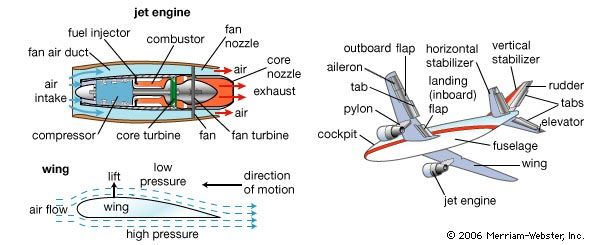
### Multilingual Search
Now run the same query in Italian, one of the 30+ languages Cohere Embed 4.0 supports, and compare the results:
```python
with headers({"cohere-api-key": cohere_api_key}):
payload = client.query_points(
collection_name=COLLECTION_NAME,
query=models.Document(
text="Componenti di un aereo",
model="cohere/embed-v4.0",
options={"output_dimension": 512},
),
using="image",
with_payload=["image"],
limit=1
).points[0].payload
Image.open(payload["image"])
```
```typescript
const multilingualResults = await withHeaders({ "cohere-api-key": cohereApiKey }, () =>
client.query(collectionName, {
query: { text: "Componenti di un aereo", model: "cohere/embed-v4.0", options: { output_dimension: 512 } },
using: "image",
with_payload: ["image"],
limit: 1,
})
);
console.log(multilingualResults.points[0].payload!.image);
```
```rust
let results = client
.with_header("cohere-api-key", &cohere_api_key)
.query(
QueryPointsBuilder::new(collection_name)
.query(Query::new_nearest(
DocumentBuilder::new("Componenti di un aereo", "cohere/embed-v4.0")
.options(options.clone())
.build(),
))
.using("image")
.with_payload(true)
.limit(1),
)
.await?;
println!("{:?}", results.result[0].payload.get("image"));
```
```java
results = ctx.call(() -> client.queryAsync(
QueryPoints.newBuilder()
.setCollectionName(collectionName)
.setQuery(
nearest(
Document.newBuilder()
.setText("Componenti di un aereo")
.setModel("cohere/embed-v4.0")
.putOptions("output_dimension", value(512))
.build()))
.setUsing("image")
.setWithPayload(enable(true))
.setLimit(1)
.build()
).get());
System.out.println(results.get(0).getPayloadMap().get("image"));
```
```csharp
using (RequestHeaders.Use("cohere-api-key", cohereApiKey))
results = await client.QueryAsync(
collectionName: collectionName,
query: new Document
{
Text = "Componenti di un aereo",
Model = "cohere/embed-v4.0",
Options = { ["output_dimension"] = 512 },
},
usingVector: "image",
payloadSelector: true,
limit: 1
);
Console.WriteLine(results[0].Payload["image"]);
```
```go
results, err = client.Query(ctx, &qdrant.QueryPoints{
CollectionName: collectionName,
Query: qdrant.NewQueryNearest(
qdrant.NewVectorInputDocument(&qdrant.Document{
Text: "Componenti di un aereo",
Model: "cohere/embed-v4.0",
Options: qdrant.NewValueMap(map[string]any{
"output_dimension": 512,
}),
}),
),
Using: qdrant.PtrOf("image"),
WithPayload: qdrant.NewWithPayloadInclude("image"),
Limit: qdrant.PtrOf(uint64(1)),
})
fmt.Println(results[0].Payload["image"])
```
**Response:**

### Image-to-Text
Now run a reverse search, starting from this image:

Embed the image with `models.Image`, and search only among the text vectors:
```python
with headers({"cohere-api-key": cohere_api_key}):
payload = client.query_points(
collection_name=COLLECTION_NAME,
query=models.Image(
image=image_to_base64_url("images/image-2.png"),
model="cohere/embed-v4.0",
options={"output_dimension": 512},
),
using="text",
with_payload=["caption"],
limit=1
).points[0].payload
print(payload["caption"])
```
```typescript
const imageToTextResults = await withHeaders({ "cohere-api-key": cohereApiKey }, () =>
client.query(collectionName, {
query: { image: imageToBase64Url("images/image-2.png"), model: "cohere/embed-v4.0", options: { output_dimension: 512 } },
using: "text",
with_payload: ["caption"],
limit: 1,
})
);
console.log(imageToTextResults.points[0].payload!.caption);
```
```rust
let results = client
.with_header("cohere-api-key", &cohere_api_key)
.query(
QueryPointsBuilder::new(collection_name)
.query(Query::new_nearest(
ImageBuilder::new_from_base64(
image_to_base64_url("images/image-2.png")?,
"cohere/embed-v4.0",
)
.options(options.clone())
.build(),
))
.using("text")
.with_payload(true)
.limit(1),
)
.await?;
println!("{:?}", results.result[0].payload.get("caption"));
```
```java
results = ctx.call(() -> client.queryAsync(
QueryPoints.newBuilder()
.setCollectionName(collectionName)
.setQuery(
nearest(
Image.newBuilder()
.setImage(value(imageToBase64Url("images/image-2.png")))
.setModel("cohere/embed-v4.0")
.putOptions("output_dimension", value(512))
.build()))
.setUsing("text")
.setWithPayload(enable(true))
.setLimit(1)
.build()
).get());
System.out.println(results.get(0).getPayloadMap().get("caption"));
```
```csharp
using (RequestHeaders.Use("cohere-api-key", cohereApiKey))
results = await client.QueryAsync(
collectionName: collectionName,
query: new Image
{
Image_ = ImageToBase64Url("images/image-2.png"),
Model = "cohere/embed-v4.0",
Options = { ["output_dimension"] = 512 },
},
usingVector: "text",
payloadSelector: true,
limit: 1
);
Console.WriteLine(results[0].Payload["caption"]);
```
```go
queryImageUrl, err := imageToBase64Url("images/image-2.png")
results, err = client.Query(ctx, &qdrant.QueryPoints{
CollectionName: collectionName,
Query: qdrant.NewQueryNearest(
qdrant.NewVectorInputImage(&qdrant.Image{
Image: qdrant.NewValueString(queryImageUrl),
Model: "cohere/embed-v4.0",
Options: qdrant.NewValueMap(map[string]any{
"output_dimension": 512,
}),
}),
),
Using: qdrant.PtrOf("text"),
WithPayload: qdrant.NewWithPayloadInclude("caption"),
Limit: qdrant.PtrOf(uint64(1)),
})
fmt.Println(results[0].Payload["caption"])
```
**Response:**
```text
'An image about airplane components.'
```
## Next Steps
Even image and text multimodal search alone supports many use cases: e-commerce, media management, content recommendation, emotion recognition, biomedical image retrieval, and spoken sign language transcription, among others.
Consider a shopper who has a picture of a product they want, plus a specific textual requirement, like "*in beige color*". You can search using text or images alone, or combine their embeddings through **late fusion** (summing and weighting the vectors can work surprisingly well).
Combining both modalities with [Discovery Search](https://qdrant.tech/articles/discovery-search/index.md) can also surface results that neither modality would find on its own.
Join our [Discord community](https://qdrant.to/discord), where we talk about vector search and similarity learning, experiment, and have fun!