
Agentic RAG with LangGraph and Qdrant
| Time: 45 min | Level: Intermediate | Output: Python agent |
|---|
Traditional Retrieval-Augmented Generation (RAG) systems follow a straightforward path: query → retrieve → generate. Sure, this works well for many scenarios. But let’s face it—this linear approach often struggles when you’re dealing with complex queries that demand multiple steps or pulling together diverse types of information.
Agentic RAG takes things up a notch by introducing AI agents that can orchestrate multiple retrieval steps and smartly decide how to gather and use the information you need. Think of it this way: in an Agentic RAG workflow, RAG becomes just one powerful tool in a much bigger and more versatile toolkit.
By combining LangGraph’s robust state management with Qdrant’s cutting-edge vector search, we’ll build a system that doesn’t just answer questions—it tackles complex, multi-step information retrieval tasks with finesse.
What We’ll Build
We’re building an AI agent to answer questions about Hugging Face and Transformers documentation using LangGraph. At the heart of our AI agent lies LangGraph, which acts like a conductor in an orchestra. It directs the flow between various components—deciding when to retrieve information, when to perform a web search, and when to generate responses.
The system uses two Qdrant collections for documentation retrieval and Brave Search for web results. The agent evaluates each query and chooses which documentation collection to search or whether to search the web.
This selective approach gives your system the flexibility to choose the best data source for the job, rather than being locked into the same retrieval process every time, like traditional RAG. While we won’t dive into query refinement in this tutorial, the concepts you’ll learn here are a solid foundation for adding that functionality down the line.
Workflow
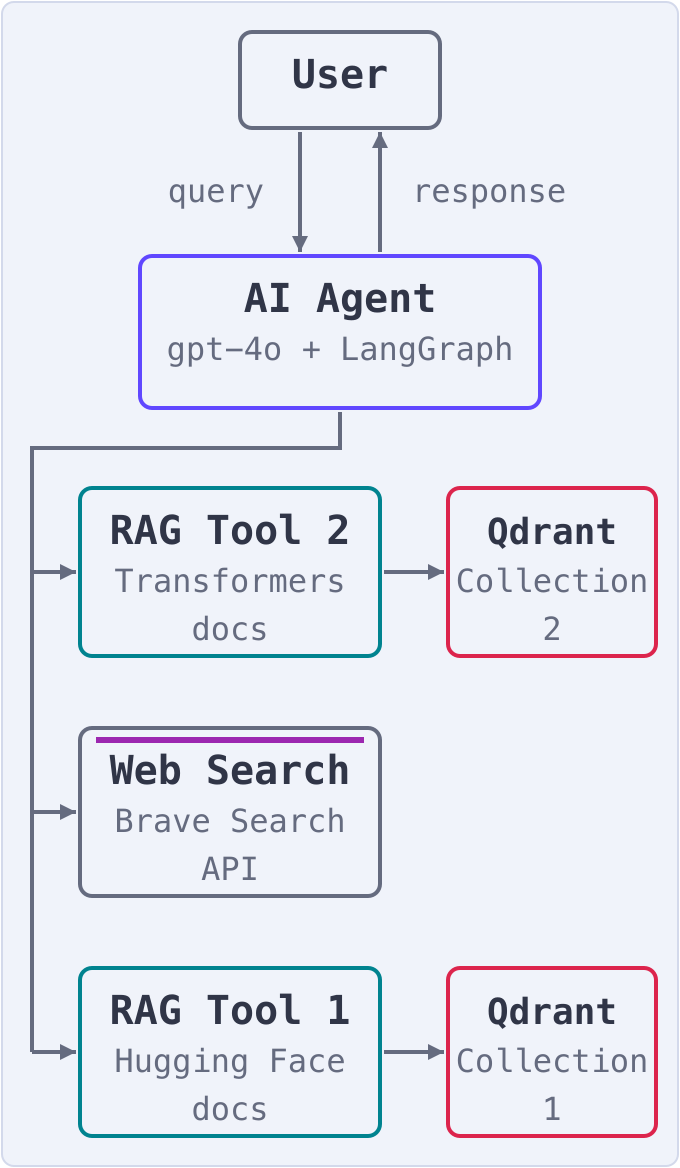
| Step | Description |
|---|---|
| 1. User Input | You start by entering a query or request through an interface, like a chatbot or a web form. This query is sent straight to the AI Agent, the brain of the operation. |
| 2. AI Agent Processes the Query | The AI Agent analyzes your query, figuring out what you’re asking and which tools or data sources will best answer your question. |
| 3. Tool Selection | Based on its analysis, the AI Agent picks the right tool for the job. The documentation is stored in two Qdrant collections, and the agent chooses which collection to search based on the query. For queries needing real-time or external web data, the agent taps into a web search tool powered by BraveSearchAPI. |
| 4. Query Execution | The AI Agent then puts its chosen tool to work: - RAG Tool 1 queries Qdrant Collection 1. - RAG Tool 2 queries Qdrant Collection 2. - Web Search Tool dives into the internet using the search API. |
| 5. Data Retrieval | The results roll in: - The two Qdrant collections return relevant documentation chunks for your query. - The Web Search Tool provides up-to-date or external information. |
| 6. Response Generation | Using a text generation model (like GPT), the AI Agent crafts a detailed and accurate response tailored to your query. |
| 7. User Response | The polished response is sent back to you through the interface, ready to use. |
The Stack
The architecture taps into cutting-edge tools to power efficient Agentic RAG workflows. Here’s a quick overview of its components and the technologies you’ll need:
- AI Agent: The mastermind of the system, this agent parses your queries, picks the right tools, and integrates the responses. We’ll use OpenAI’s gpt-4o as the reasoning engine, managed seamlessly by LangGraph.
- Embedding: Queries are transformed into vector embeddings using OpenAI’s text-embedding-3-small model.
- Vector Search: Qdrant is the vector search engine that stores document embeddings and retrieves relevant chunks using similarity search.
- LLM: Responses are generated using OpenAI’s gpt-4o, ensuring answers are accurate and contextually grounded.
- Search Tools: To extend RAG’s capabilities, we’ve added a web search component powered by BraveSearchAPI, perfect for real-time and external data retrieval.
- Workflow Management: The entire orchestration and decision-making flow is built with LangGraph, providing the flexibility and intelligence needed to handle complex workflows.
Ready to start building this system from the ground up? Let’s get to it!
Implementation
Before we dive into building our agent, let’s get everything set up.
Imports
Install the dependencies first. The tutorial was verified with langgraph 1.2, langchain 1.4, langchain-openai 1.6, langchain-community 0.4, and langchain-qdrant 1.1 on Python 3.12.
pip install langgraph langchain langchain-openai langchain-community langchain-qdrant langchain-text-splitters qdrant-client datasets tiktoken python-dotenv
Here’s a list of key imports required. Each LangChain integration now lives in its own package, and LangGraph exposes the graph classes from langgraph.graph and the prebuilt ToolNode from langgraph.prebuilt:
import os
from typing import Annotated, TypedDict

from dotenv import load_dotenv
from langchain_community.document_loaders import HuggingFaceDatasetLoader
from langchain_community.tools import BraveSearch
from langchain_core.tools import tool
from langchain_core.tools.retriever import create_retriever_tool
from langchain_openai import ChatOpenAI, OpenAIEmbeddings
from langchain_qdrant import QdrantVectorStore
from langchain_text_splitters import RecursiveCharacterTextSplitter
from langgraph.graph import END, START, StateGraph
from langgraph.graph.message import add_messages
from langgraph.prebuilt import ToolNode
from qdrant_client import QdrantClient
The dataset loader and the Brave Search tool come from langchain-community, which prints a warning that the package is being sunset. It still installs and works with the versions above.
Qdrant Cloud Setup
We’ll use Qdrant Cloud to store and search document embeddings. Here’s how to set it up:
| Step | Description |
|---|---|
| 1. Create an Account | If you don’t already have one, head to Qdrant Cloud and sign up. |
| 2. Set Up a Cluster | Log in to your account and find the Create New Cluster button on the dashboard. Follow the prompts to configure: - Select your preferred region. - Choose the free tier for testing. |
| 3. Secure Your Details | Once your cluster is ready, note these details: - Cluster URL (e.g., https://xxx-xxx-xxx.aws.cloud.qdrant.io) - API Key |
Save these securely for future use!
OpenAI API Configuration
Your OpenAI API key will power both embedding generation and language model interactions. Visit OpenAI’s platform and sign up for an account. In the API section of your dashboard, create a new API key. We’ll use the text-embedding-3-small model for embeddings and gpt-4o as the language model.
Brave Search
To enhance search capabilities, we’ll integrate Brave Search. Visit the Brave API and complete their API access request process to obtain an API key. This key will enable web search functionality for our agent.
For added security, store all API keys in a .env file.
OPENAI_API_KEY = <your-openai-api-key>
QDRANT_KEY = <your-qdrant-api-key>
QDRANT_URL = <your-qdrant-url>
BRAVE_API_KEY = <your-brave-api-key>
Then load the environment variables:
load_dotenv()
qdrant_key = os.getenv("QDRANT_KEY")
qdrant_url = os.getenv("QDRANT_URL")
brave_key = os.getenv("BRAVE_API_KEY")
Document Processing
Before we can create our agent, we need to process and store the documentation. We’ll be working with two datasets from Hugging Face: their general documentation and Transformers-specific documentation.
Here’s our document preprocessing function:
def preprocess_dataset(docs_list):
    text_splitter = RecursiveCharacterTextSplitter.from_tiktoken_encoder(
        chunk_size=700,
        chunk_overlap=50,
        disallowed_special=()
    )
    doc_splits = text_splitter.split_documents(docs_list)
    return doc_splits
This function processes our documents by splitting them into manageable chunks, ensuring important context is preserved at the chunk boundaries through overlap. We’ll use the HuggingFaceDatasetLoader to load the datasets into Hugging Face documents.
hugging_face_doc = HuggingFaceDatasetLoader("m-ric/huggingface_doc","text")
transformers_doc = HuggingFaceDatasetLoader("m-ric/transformers_documentation_en","text")
In this demo, we are selecting the first 50 documents from the dataset and passing them to the processing function.
number_of_docs = 50

hf_splits = preprocess_dataset(hugging_face_doc.load()[:number_of_docs])
transformer_splits = preprocess_dataset(transformers_doc.load()[:number_of_docs])
Our splits are ready. Let’s create a collection in Qdrant to store them.
Defining the State
In LangGraph, a state refers to the data or information stored and maintained at a specific point during the execution of a process or a series of operations. States capture the intermediate or final results that the system needs to keep track of to manage and control the flow of tasks,
LangGraph works with a state-based system. We define our state like this:
class State(TypedDict):
    messages: Annotated[list, add_messages]
Let’s build our tools.
Building the Tools
Our agent is equipped with three powerful tools:
- Hugging Face Documentation Retriever
- Transformers Documentation Retriever
- Web Search Tool
Let’s start by defining a retriever that takes documents and a collection name, then returns a retriever. The query is transformed into vectors using OpenAIEmbeddings.
embeddings = OpenAIEmbeddings(model="text-embedding-3-small")
qdrant_client = QdrantClient(url=qdrant_url, api_key=qdrant_key)


def create_retriever(collection_name, doc_splits):
    # Reuse the collection on later runs so documents are embedded only once
    if qdrant_client.collection_exists(collection_name):
        vectorstore = QdrantVectorStore.from_existing_collection(
            embedding=embeddings,
            url=qdrant_url,
            api_key=qdrant_key,
            collection_name=collection_name,
        )
    else:
        vectorstore = QdrantVectorStore.from_documents(
            doc_splits,
            embeddings,
            url=qdrant_url,
            api_key=qdrant_key,
            collection_name=collection_name,
        )
    return vectorstore.as_retriever()
Both the Hugging Face documentation retriever and the Transformers documentation retriever use this same function.
hf_retriever = create_retriever("hugging_face_documentation", hf_splits)
transformer_retriever = create_retriever("transformers_documentation", transformer_splits)
With this setup, it’s incredibly simple to create separate tools for each.
hf_retriever_tool = create_retriever_tool(
    hf_retriever,
    "retriever_hugging_face_documentation",
    "Search and return information about hugging face documentation, it includes the guide and Python code.",
)

transformer_retriever_tool = create_retriever_tool(
    transformer_retriever,
    "retriever_transformer",
    "Search and return information specifically about transformers library",
)
For web search, we create a simple yet effective tool using Brave Search:
@tool("web_search_tool")
def search_tool(query: str) -> str:
    """Search the web with Brave Search and return the top results."""
    search = BraveSearch.from_api_key(api_key=brave_key, search_kwargs={"count": 3})
    return search.run(query)
The search_tool function leverages the BraveSearch API to perform a search. It takes a query, retrieves the top 3 search results using the API key, and returns the results.
Next, we’ll set up and integrate our tools with a language model:
tools = [hf_retriever_tool, transformer_retriever_tool, search_tool]

tool_node = ToolNode(tools=tools)

llm = ChatOpenAI(model="gpt-4o", temperature=0)

llm_with_tools = llm.bind_tools(tools)
Here, ToolNode from langgraph.prebuilt handles and orchestrates our tools. It maps tool names to their functions, reads the tool_calls on the last AI message in the state, invokes each tool, and returns the results as ToolMessage objects. Earlier versions of this tutorial defined a class with the same name by hand; the prebuilt node does the same job and also handles errors and parallel tool calls.
The agent node itself is a single function that sends the conversation to the model:
def agent(state: State):
    return {"messages": [llm_with_tools.invoke(state["messages"])]}
Routing and Decision Making
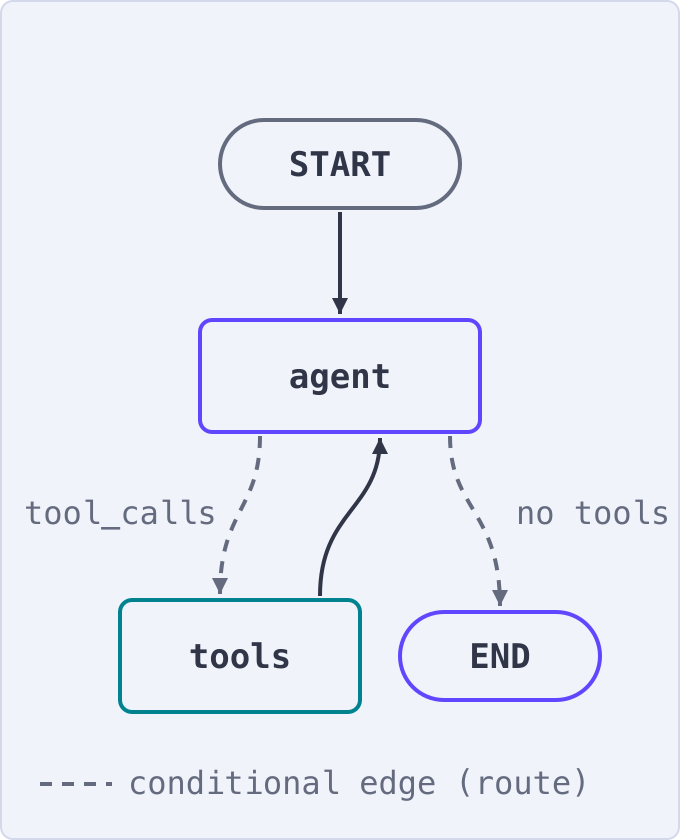
Our agent needs to determine when to use tools and when to end the cycle. This decision is managed by the routing function:
def route(state: State):
    if isinstance(state, list):
        ai_message = state[-1]
    elif messages := state.get("messages", []):
        ai_message = messages[-1]
    else:
        raise ValueError(f"No messages found in input state to tool_edge: {state}")

    if hasattr(ai_message, "tool_calls") and len(ai_message.tool_calls) > 0:
        return "tools"

    return END
Putting It All Together: The Graph
Finally, we’ll construct the graph that ties everything together:
graph_builder = StateGraph(State)

graph_builder.add_node("agent", agent)
graph_builder.add_node("tools", tool_node)

graph_builder.add_conditional_edges(
    "agent",
    route,
    {"tools": "tools", END: END},
)

graph_builder.add_edge("tools", "agent")
graph_builder.add_edge(START, "agent")

graph = graph_builder.compile()
This is what the graph looks like:
Running the Agent
With everything set up, we can run our agent using a simple function:
def run_agent(user_input: str):
    for event in graph.stream({"messages": [("user", user_input)]}):
        for value in event.values():
            print("Assistant:", value["messages"][-1].content)
Now, you’re ready to ask questions about Hugging Face and Transformers! Our agent will intelligently combine information from the documentation with web search results when needed.
For example, you can ask:
In the Transformers library, are there any multilingual models?
The agent will dive into the Transformers documentation, extract relevant details about multilingual models, and deliver a clear, comprehensive answer.
Here’s what the response might look like:
Yes, the Transformers library includes several multilingual models. Here are some examples:

BERT Multilingual:
Models like `bert-base-multilingual-uncased` can be used just like monolingual models.

XLM (Cross-lingual Language Model):
Models like `xlm-mlm-ende-1024` (English-German), `xlm-mlm-enfr-1024` (English-French), and others use language embeddings to specify the language used at inference.

M2M100:
Models like `facebook/m2m100_418M` and `facebook/m2m100_1.2B` are used for multilingual translation.

MBart:
Models like `facebook/mbart-large-50-one-to-many-mmt` and `facebook/mbart-large-50-many-to-many-mmt` are used for multilingual machine translation across 50 languages.

These models are designed to handle multiple languages and can be used for tasks like translation, classification, and more.
Complete Script
Save the complete Python code as agentic_rag_langgraph.py in the same directory as your .env file. Install the dependencies listed in Imports and configure the API keys described in Implementation. The web search tool is added only when BRAVE_API_KEY is set.
"""Agentic RAG with LangGraph and Qdrant.

Builds an agent that answers questions about the Hugging Face and
Transformers documentation. The agent chooses between two Qdrant
retrievers and a Brave web search tool, and loops until it has an answer.
"""

import os
import sys
from typing import Annotated, TypedDict

from dotenv import load_dotenv
from langchain_community.document_loaders import HuggingFaceDatasetLoader
from langchain_community.tools import BraveSearch
from langchain_core.tools import tool
from langchain_core.tools.retriever import create_retriever_tool
from langchain_openai import ChatOpenAI, OpenAIEmbeddings
from langchain_qdrant import QdrantVectorStore
from langchain_text_splitters import RecursiveCharacterTextSplitter
from langgraph.graph import END, START, StateGraph
from langgraph.graph.message import add_messages
from langgraph.prebuilt import ToolNode
from qdrant_client import QdrantClient

# --- Configuration ---------------------------------------------------------

load_dotenv()
qdrant_key = os.getenv("QDRANT_KEY")
qdrant_url = os.getenv("QDRANT_URL")
brave_key = os.getenv("BRAVE_API_KEY")

if not os.getenv("OPENAI_API_KEY"):
    sys.exit("OPENAI_API_KEY is not set. Add it to your .env file.")
if not qdrant_url:
    sys.exit("QDRANT_URL is not set. Add it to your .env file.")

number_of_docs = 50

# --- Document processing ---------------------------------------------------


def preprocess_dataset(docs_list):
    text_splitter = RecursiveCharacterTextSplitter.from_tiktoken_encoder(
        chunk_size=700,
        chunk_overlap=50,
        disallowed_special=(),
    )
    return text_splitter.split_documents(docs_list)


hugging_face_doc = HuggingFaceDatasetLoader("m-ric/huggingface_doc", "text")
transformers_doc = HuggingFaceDatasetLoader("m-ric/transformers_documentation_en", "text")

hf_splits = preprocess_dataset(hugging_face_doc.load()[:number_of_docs])
transformer_splits = preprocess_dataset(transformers_doc.load()[:number_of_docs])

# --- Retrievers backed by Qdrant -------------------------------------------


embeddings = OpenAIEmbeddings(model="text-embedding-3-small")
qdrant_client = QdrantClient(url=qdrant_url, api_key=qdrant_key)


def create_retriever(collection_name, doc_splits):
    # Reuse the collection on later runs so documents are embedded only once
    if qdrant_client.collection_exists(collection_name):
        vectorstore = QdrantVectorStore.from_existing_collection(
            embedding=embeddings,
            url=qdrant_url,
            api_key=qdrant_key,
            collection_name=collection_name,
        )
    else:
        vectorstore = QdrantVectorStore.from_documents(
            doc_splits,
            embeddings,
            url=qdrant_url,
            api_key=qdrant_key,
            collection_name=collection_name,
        )
    return vectorstore.as_retriever()


hf_retriever = create_retriever("hugging_face_documentation", hf_splits)
transformer_retriever = create_retriever("transformers_documentation", transformer_splits)

# --- Tools -----------------------------------------------------------------

hf_retriever_tool = create_retriever_tool(
    hf_retriever,
    "retriever_hugging_face_documentation",
    "Search and return information about hugging face documentation, it includes the guide and Python code.",
)

transformer_retriever_tool = create_retriever_tool(
    transformer_retriever,
    "retriever_transformer",
    "Search and return information specifically about transformers library",
)


@tool("web_search_tool")
def search_tool(query: str) -> str:
    """Search the web with Brave Search and return the top results."""
    search = BraveSearch.from_api_key(api_key=brave_key, search_kwargs={"count": 3})
    return search.run(query)


tools = [hf_retriever_tool, transformer_retriever_tool]
if brave_key:
    tools.append(search_tool)
else:
    print("BRAVE_API_KEY is not set; running without the web search tool.")

# --- Model and graph -------------------------------------------------------


class State(TypedDict):
    messages: Annotated[list, add_messages]


llm = ChatOpenAI(model="gpt-4o", temperature=0)
llm_with_tools = llm.bind_tools(tools)

# ToolNode from langgraph.prebuilt executes every tool call in the last
# AI message and returns the results as ToolMessages.
tool_node = ToolNode(tools=tools)


def agent(state: State):
    return {"messages": [llm_with_tools.invoke(state["messages"])]}


def route(state: State):
    if isinstance(state, list):
        ai_message = state[-1]
    elif messages := state.get("messages", []):
        ai_message = messages[-1]
    else:
        raise ValueError(f"No messages found in input state to tool_edge: {state}")

    if hasattr(ai_message, "tool_calls") and len(ai_message.tool_calls) > 0:
        return "tools"

    return END


graph_builder = StateGraph(State)

graph_builder.add_node("agent", agent)
graph_builder.add_node("tools", tool_node)

graph_builder.add_conditional_edges(
    "agent",
    route,
    {"tools": "tools", END: END},
)

graph_builder.add_edge("tools", "agent")
graph_builder.add_edge(START, "agent")

graph = graph_builder.compile()

# --- Run -------------------------------------------------------------------


def run_agent(user_input: str):
    for event in graph.stream({"messages": [("user", user_input)]}):
        for value in event.values():
            print("Assistant:", value["messages"][-1].content)


if __name__ == "__main__":
    question = " ".join(sys.argv[1:]) or "In the Transformers library, are there any multilingual models?"
    run_agent(question)
Run the script with a question:
python agentic_rag_langgraph.py "In the Transformers library, are there any multilingual models?"
Conclusion
We’ve successfully implemented Agentic RAG. But this is just the beginning—there’s plenty more you can explore to take your system to the next level.
Agentic RAG is transforming how businesses connect data sources with AI, enabling smarter and more dynamic interactions. In this tutorial, you’ve learned how to build an Agentic RAG system that combines the power of LangGraph, Qdrant, and web search into one seamless workflow.
The agent can retrieve information from the Hugging Face and Transformers documentation and use web search when needed. Qdrant serves as the vector search engine for the documentation collections.
To truly grasp the potential of this approach, why not apply these concepts to your own projects? Customize the template we’ve shared to fit your unique use case, and unlock the full potential of Agentic RAG for your business needs. The possibilities are endless.
 Ready to try Qdrant?