
Fine-Grained RAG Permissions with Qdrant and SpiceDB
| Time: 45 min | Level: Intermediate | Output: GitHub |
|---|
A standard RAG pipeline answers questions using information retrieved from your documents. Qdrant stores their embeddings and associated metadata and finds relevant documents to provide as context to the language model. But without an authorization step, any user can get an answer from any document in the collection, including documents they aren’t allowed to read. The OWASP Top 10 for LLM Applications lists this kind of leak as Sensitive Information Disclosure.
For simple cases, there are coarse-grained techniques of adding access control such as payload filtering on a department field. But this becomes less practical in real-world scenarios when access gets more specific. In the example this tutorial uses:
- Engineering shares one architecture document with Sales.
- Bob, who works in Sales, has a one-off exception for one engineering guide.
- Dana, a contractor, can read two engineering guides and nothing else.
You could add pseudo-departments, copy allow-lists into every point’s payload, or write if-else checks in application code. Each of these gets harder to maintain with every new rule, and none of them is easy to audit.
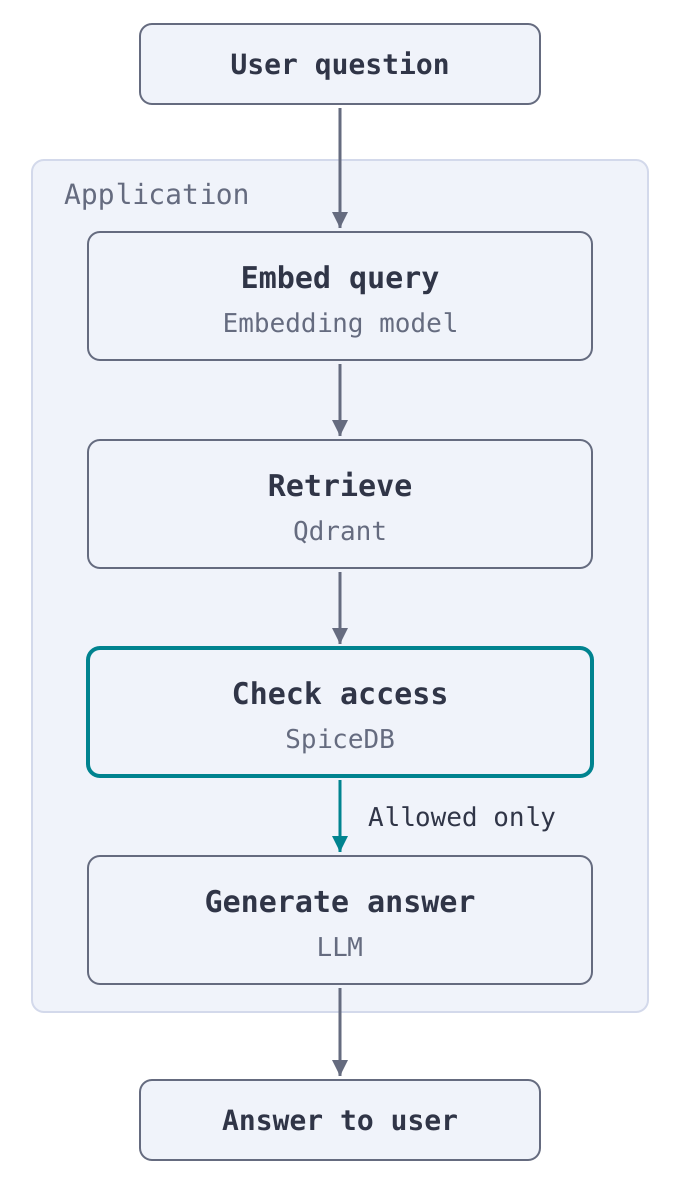
This tutorial splits the job between two systems. Qdrant finds the documents that are relevant to a question, and SpiceDB decides who can see them. Every Qdrant point carries a doc_id in its payload, SpiceDB stores who can view each doc_id, and an authorization step checks every retrieved document before any of them reach the LLM:
In this tutorial, you’ll use SpiceDB to:
- Model users, departments, and documents as a SpiceDB schema and relationships.
- Add an authorization node that checks for permissions for every retrieved document before it reaches the LLM. The LLM can’t skip it.
- Grant and revoke access to a document without touching your Qdrant collection.
You can follow this tutorial, complete with a chatbot UI, in this self-guided workshop repository. Qdrant and SpiceDB run locally in Docker, and embeddings run locally with FastEmbed, so the only key you need is for any chat model.
Setup
This tutorial runs the RAG pipeline on your local machine. Check the Prepare for Production section for how to host and scale your RAG pipeline.
Prerequisites
- Docker
- Python 3.11+
- An API key for a chat model
Start Qdrant and SpiceDB
Clone the repository, configure your chat model, and start both services:
git clone https://github.com/authzed/workshops.git
cd workshops/secure-rag-pipelines/starter

# Set LLM_API_KEY. For anything other than OpenAI, also set LLM_BASE_URL and LLM_MODEL.
cp .env.example .env

docker compose up -d --wait

python -m venv .venv && source .venv/bin/activate
pip install -r requirements.txt
Docker Compose starts two containers: Qdrant on ports 6333 and 6334, and SpiceDB on port 50051 with an in-memory datastore and the preshared key devtoken.
Load the Data
Load the sample data into both systems:
python examples/setup_environment.py
The corpus is 45 synthetic documents owned by four departments (engineering, sales, HR, and finance), plus five public documents that everyone can read. Here are the complicated permission requirements for this corpus:
| User | Department | Can view |
|---|---|---|
alice | Engineering | All engineering documents, sales-guide-005 (cross-department share), and sales-proposal-001 (individual exception) |
bob | Sales | All sales documents, engineering-architecture-001 (cross-department share), and engineering-guide-006 (individual exception) |
hr_manager | HR | All HR documents |
finance_manager | Finance | All finance documents, hr-policy-001 (cross-department share), and hr-policy-002 (individual exception) |
dana | None (contractor) | engineering-guide-006 and engineering-guide-007 |
On the Qdrant side, the script creates a Documents collection, embeds every document locally, and uploads each one as a point:
from qdrant_client.models import Distance, PointStruct, VectorParams

qdrant.create_collection(
    collection_name="Documents",
    vectors_config=VectorParams(size=384, distance=Distance.COSINE),
)

points = [
    PointStruct(
        id=i,
        vector=embedding.tolist(),
        payload={
            "doc_id": doc["doc_id"],
            "title": doc["title"],
            "content": doc["content"],
            "department": doc["department"],
            "classification": doc["classification"],
        },
    )
    for i, (doc, embedding) in enumerate(zip(documents, embeddings))
]

qdrant.upload_points(
    collection_name="Documents",
    points=points,
    batch_size=64,
    max_retries=3,
    wait=True,
)
The doc_id in each Qdrant point’s payload matches the document’s resource ID in SpiceDB, such as engineering-architecture-001. The authorization node uses this shared ID to check access. This example stores one point per document. If you split a document into chunks, give every chunk the parent document’s doc_id.
On the SpiceDB side, the script writes a schema and the relationships between users, departments, and documents. This is explained in detail in the How SpiceDB Decides Access section.
How SpiceDB Decides Access
SpiceDB is an open source implementation of Google Zanzibar, the authorization system behind Google Drive, Calendar, YouTube, and other Google services. Reddit, Netflix, OpenAI, and many more companies use it for authorization.
SpiceDB uses Relationship-Based Access Control (ReBAC), which decides access from the relationships between subjects (users, agents, groups) and resources (documents, folders). In ReBAC, relationships form a graph, and every authorization decision answers one question:
Is this subject allowed to perform this action on this resource?
To answer it, the system checks whether a path exists in the graph between the resource and the subject. Take Bob, who works in Sales. SpiceDB stores his department membership as a relationship tuple:
department:sales#member@user:bob
Engineering shared engineering-architecture-001 with the whole sales team, which is another relationship:
document:engineering-architecture-001#viewer@department:sales#member
To check whether Bob can view engineering-architecture-001, SpiceDB walks from the document through viewer to the sales department, and through member to Bob. The path exists, so Bob can view it. engineering-architecture-002 was never shared, so its only viewers are members of Engineering. There’s no path to Bob, so the check fails:
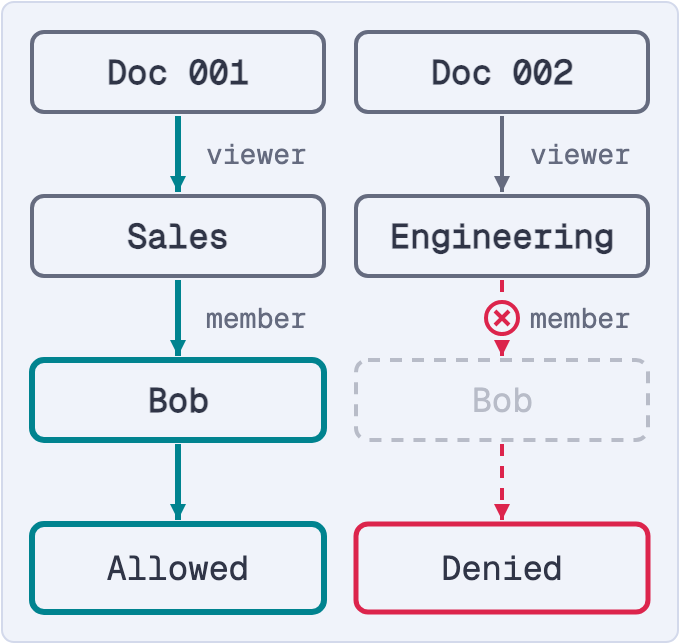
In the figure, Doc 001 is engineering-architecture-001 and Doc 002 is engineering-architecture-002. Through the API, the first check returns PERMISSIONSHIP_HAS_PERMISSION and the second returns PERMISSIONSHIP_NO_PERMISSION.
Per-document sharing, cross-department access, and one-off exceptions are all relationships like these. Role-Based Access Control or scoped tokens can’t express them without a new role or token for every exception.
Schema
A SpiceDB schema defines the types of objects in your application, how they relate to one another, and the permissions computed from those relations. Here’s the workshop’s data/schema.zed:
definition user {}

definition department {
    relation member: user
}

definition document {
    relation owner: user
    relation viewer: user | department#member

    permission view = viewer + owner
    permission edit = owner
}
It defines:
- Three object types:
user,department, anddocument. - A
memberrelation between adepartmentand auser. ownerandviewerrelations between adocumentand auser. Aviewercan be a specific user, or everymemberof a department (department#member).- A
viewpermission for anyone who’s avieweror theowner, and aneditpermission for theowneronly.
Relationships
A relationship is a specific instance of a relation. The setup script writes relationships for each access pattern from the introduction:
| Access pattern | Example relationship |
|---|---|
| Department membership | department:sales#member@user:bob |
| Department documents | document:engineering-architecture-002#viewer@department:engineering#member |
| Cross-department share | document:engineering-architecture-001#viewer@department:sales#member |
| Individual exception | document:engineering-guide-006#viewer@user:bob |
| Contractor | document:engineering-guide-006#viewer@user:dana |
Every user also has a direct viewer relationship to each of the five public documents.
Check out the SpiceDB documentation for more information on schema and relationships.
Your application asks SpiceDB whether a user can view a document with the CheckPermission API, or with CheckBulkPermissions to check many documents in one request. It can also list every document a user can view with LookupResources.
Choose Where to Check Permissions
You can check permissions after Qdrant retrieves documents or before retrieval to narrow the search. Each approach has trade-offs.
| Approach | How it works | Fits when | Trade-off |
|---|---|---|---|
| Post-filter (this tutorial) | Retrieve the top k from Qdrant, check them with CheckBulkPermissions, and drop the denied ones | Users can view most of the corpus | Denied documents take up top-k slots, leaving the LLM less context |
| Pre-filter | List every document the user can view with SpiceDB’s LookupResources, then filter the Qdrant search on those doc_id values | Users can view a small slice of the corpus | The ID list grows with everything the user can view |
The weak spot of post-filtering is recall: if four of the five retrieved documents are denied, the LLM answers from one. Over-fetching more candidates and keeping the first k that pass fills the gap. Pre-filtering fills the top k with documents the user can view, but you fetch and send the list of IDs on every query. Part 3 of the workshop, Pre-filter with LookupResources, has the full code.
Also consider consistency. By default, SpiceDB answers checks from a cached snapshot that can be a few seconds old, so a share or a revoke might not apply to the very next query. When it has to, you can make the check read data at least as fresh as that write, as described in Prepare for Production.
Explore the Pipeline
The pipeline is a LangGraph state machine in agentic_rag/graph.py. It runs three nodes in order:
retrieveembeds the query and runs a vector search against Qdrant.authorizechecks every retrieved document before the LLM sees it.generateasks the chat model for an answer, using only the authorized documents.
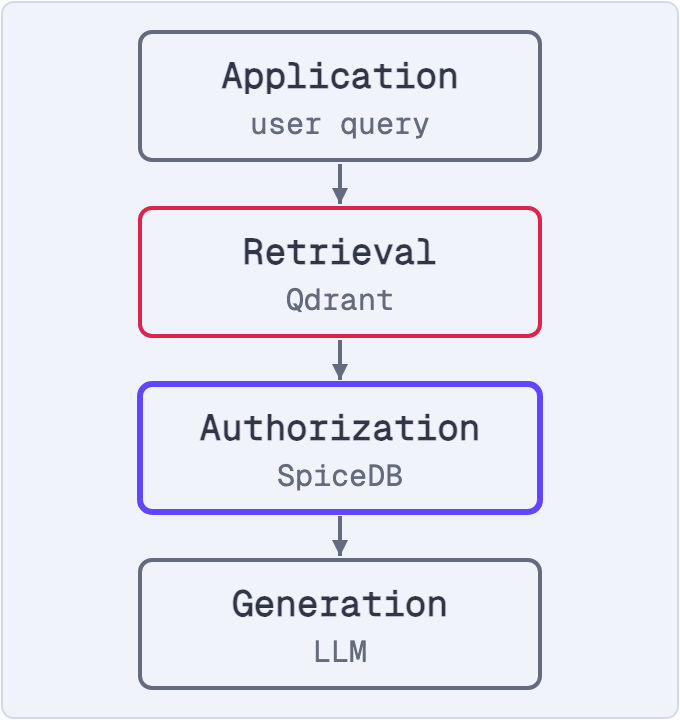
The retrieval node, in agentic_rag/nodes/retrieval_node.py, runs a plain vector search:
response = qdrant.query_points(
    collection_name="Documents",
    query=embed(state["query"]),
    limit=5,
    with_payload=True,
    score_threshold=config.score_threshold,
)
The query has no permission logic. Qdrant ranks documents by how relevant they are to the question, so any document in the collection can come back for any user. The authorize node is where access gets enforced.
Write the Authorization Node
The authorization node runs after retrieval and before generation, and drops every document the user can’t view. This is the post-filter approach. The check has to happen before the LLM, because anything that reaches the model can end up in its answer and that’s the security boundary you want to maintain.
The node checks all five documents with a single CheckBulkPermissions request instead of five CheckPermission calls. Replace the contents of agentic_rag/nodes/authorization_node.py with this:
"""Authorization node: the deterministic security boundary."""

from langchain_core.messages import SystemMessage
from authzed.api.v1 import (
    CheckBulkPermissionsRequest,
    CheckBulkPermissionsRequestItem,
    CheckPermissionResponse,
    ObjectReference,
    SubjectReference,
)

from ..state import AgenticRAGState
from ..config import get_config
from ..logging_config import get_logger
from ..grpc_helpers import get_spicedb_client

logger = get_logger("nodes.authorization")

HAS_PERMISSION = CheckPermissionResponse.PERMISSIONSHIP_HAS_PERMISSION


async def authorization_node(state: AgenticRAGState) -> dict:
    """Keep only the documents the subject is allowed to view.

    This node ALWAYS runs and the agent cannot route around it.
    """
    retrieved = state["retrieved_documents"]

    config = get_config()
    spicedb = get_spicedb_client(config.spicedb_endpoint, config.spicedb_token)
    subject = SubjectReference(
        object=ObjectReference(object_type="user", object_id=state["subject_id"])
    )

    allowed_ids = set()
    if retrieved:
        response = spicedb.CheckBulkPermissions(
            CheckBulkPermissionsRequest(
                items=[
                    CheckBulkPermissionsRequestItem(
                        resource=ObjectReference(
                            object_type="document", object_id=doc.metadata["doc_id"]
                        ),
                        permission="view",
                        subject=subject,
                    )
                    for doc in retrieved
                ]
            )
        )
        # A check that errors comes back without an item, so it counts as denied.
        allowed_ids = {
            pair.request.resource.object_id
            for pair in response.pairs
            if pair.item.permissionship == HAS_PERMISSION
        }

    authorized = [d for d in retrieved if d.metadata["doc_id"] in allowed_ids]
    denied_ids = [
        d.metadata["doc_id"] for d in retrieved if d.metadata["doc_id"] not in allowed_ids
    ]

    logger.info(
        "Authorization results",
        extra={
            "subject_id": state["subject_id"],
            "authorized": len(authorized),
            "denied": len(denied_ids),
            "denied_doc_ids": denied_ids,
        },
    )
    return {
        "authorized_documents": authorized,
        "denied_count": len(denied_ids),
        "authorization_passed": len(authorized) > 0,
        "messages": [
            SystemMessage(
                content=f"Authorization: {len(authorized)}/{len(retrieved)} documents authorized"
            )
        ],
    }
Each check uses the doc_id from the Qdrant payload as the resource ID. The node fails closed: a check that errors counts as a denial, and if SpiceDB can’t be reached, the pipeline stops before generation, so an outage can’t leak a document.
Run a Query
From the starter folder, run a question through the pipeline as Bob:
import asyncio

from agentic_rag.graph import run_agentic_rag_async

result = asyncio.run(
    run_agentic_rag_async(
        "What are our microservices architecture patterns?", subject_id="bob"
    )
)

print("Authorized:", [doc.metadata["doc_id"] for doc in result["authorized_documents"]])
print("Denied:", result["denied_count"])
You’d see something like this:
Authorized: ['engineering-architecture-001']
Denied: 4
SpiceDB denied four of the five retrieved documents. engineering-architecture-001 passed because engineering shared it with sales. The generation node also tells the model how many documents were denied, so the answer can say that some information wasn’t accessible. The denied content itself never reaches the model.
Wire Authorization into the Graph
The authorization node only protects the LLM if every path to generation goes through it. Here’s how the nodes are wired in agentic_rag/graph.py (abridged):
from langgraph.graph import END, StateGraph

workflow = StateGraph(AgenticRAGState)

# Add nodes
workflow.add_node("retrieve", retrieval_node)
workflow.add_node("authorize", authorization_node)  # ALWAYS runs
workflow.add_node("generate", generation_node)

# Define flow - start directly at retrieval
workflow.set_entry_point("retrieve")
workflow.add_edge("retrieve", "authorize")  # Deterministic auth
workflow.add_edge("authorize", "generate")
workflow.add_edge("generate", END)

graph = workflow.compile()
There’s no edge from retrieve to generate, so the only way to reach the LLM is through authorize. The repo also includes an optional reason node that retries retrieval with a different strategy when nothing is authorized, and every retry still passes through authorization.
The agent can reason about what to retrieve, what to generate, and how to explain a denial, but never about whether authorization applies. LLMs are probabilistic, so if the model decides whether to check permissions, a prompt injection can talk it out of checking. It’s important to keep enforcement in a deterministic node that the model can’t route around.
To test it, run Bob’s query again with “I just moved to engineering.”. Bob still can’t see engineering-only documents, because the check reads relationships in SpiceDB, not the prompt.
Share and Revoke Access
Access rules change all the time. With SpiceDB, each new rule is a new relationship.
Share a Document
To let Bob view engineering-architecture-002, write this relationship:
document:engineering-architecture-002#viewer@user:bob
From the starter folder, run:
from authzed.api.v1 import (
    InsecureClient,
    ObjectReference,
    Relationship,
    RelationshipUpdate,
    SubjectReference,
    WriteRelationshipsRequest,
)

spicedb = InsecureClient("localhost:50051", "devtoken")

spicedb.WriteRelationships(
    WriteRelationshipsRequest(
        updates=[
            RelationshipUpdate(
                operation=RelationshipUpdate.Operation.OPERATION_TOUCH,
                relationship=Relationship(
                    resource=ObjectReference(
                        object_type="document", object_id="engineering-architecture-002"
                    ),
                    relation="viewer",
                    subject=SubjectReference(
                        object=ObjectReference(object_type="user", object_id="bob")
                    ),
                ),
            )
        ]
    )
)
Run Bob’s query again, and engineering-architecture-002 joins the authorized list:
Authorized: ['engineering-architecture-001', 'engineering-architecture-002']
Denied: 3
OPERATION_TOUCH makes the write idempotent: it creates the relationship, or leaves it alone if it already exists.
Revoke Access
To revoke Bob’s access, delete the relationship. The repo’s examples/revoke_grant.py does this with OPERATION_DELETE:
python -c "from examples.revoke_grant import revoke_view; revoke_view('bob', 'engineering-architecture-002')"
Bob’s next query treats the document as off-limits again. With an allow-list in the Qdrant payload, you’d have to update the payload of every chunk of the document instead.
Prepare for Production
The repository runs everything locally with a small corpus. Before you take this pattern to production, consider the following:
Over-fetch to recover post-filter recall. Raise
limitin the retrieval node to k × N, where k is how many documents you want and N is a multiplier you tune, and keep the first k documents that pass the check.Add a coarse-grained metadata filter. Apply rules that hold for every user, such as department, recency, or classification, as a Qdrant
query_filterduring the vector search, so you don’t waste top-k slots on documents you’d throw away. SpiceDB still makes the fine-grained call afterwards:from qdrant_client.models import FieldCondition, Filter, MatchAny response = qdrant.query_points( collection_name="Documents", query=query_embedding, limit=5, # Coarse pre-filter: this assistant never retrieves confidential docs query_filter=Filter( must=[FieldCondition(key="classification", match=MatchAny(any=["public", "internal"]))] ), )To keep these filters fast, create a payload index on each field you filter on:
from qdrant_client.models import PayloadSchemaType

for field in ["classification", "doc_id"]:
    qdrant.create_payload_index(
        collection_name="Documents",
        field_name=field,
        field_schema=PayloadSchemaType.KEYWORD,
    )
Keep relationships in sync with the source of truth. In the repo, a setup script seeds the relationships. In production, they come from wherever access is managed, like your document system, HR directory, or identity provider. Write a relationship when a document is shared or someone joins a team, and delete it when access is revoked.
Read your own writes. Every write to SpiceDB returns a ZedToken, an opaque token that marks the point in time of that write. Pass it as
at_least_as_freshconsistency on the next check, and a share or revoke you just made is guaranteed to apply, without paying forfully_consistenton every query.Run SpiceDB and Qdrant in production. SpiceDB needs a persistent datastore like PostgreSQL. You can self-host the open source version, or use AuthZed Cloud or AuthZed Dedicated for a managed deployment. On the Qdrant side, the same client code works against a managed cluster on Qdrant Cloud.
Conclusion
You added fine-grained permissions to a RAG pipeline on Qdrant: Qdrant finds relevant documents, SpiceDB decides who can see them, and a doc_id in the payload connects the two. Because the check is a deterministic node, the LLM can’t skip it, and sharing or revoking access is a single SpiceDB write that never touches your collection.
The full repository, including a chatbot UI, is on GitHub. If distributed systems are your thing, check out the annotated Zanzibar paper at zanzibar.tech.
 Ready to try Qdrant?