
RAG in 5 Minutes with DeepSeek and Qdrant
| Time: 5 min | Level: Beginner |
|---|
This tutorial demonstrates how to build a Retrieval-Augmented Generation (RAG) pipeline using FastEmbed for embeddings, Qdrant for vector search, and DeepSeek to answer questions with retrieved context. RAG pipelines enhance Large Language Model (LLM) responses by providing contextually relevant data.
Overview
In this tutorial, we will:
- Take sample text and turn it into vectors with FastEmbed.
- Send the vectors to a Qdrant collection.
- Connect Qdrant and DeepSeek into a minimal RAG pipeline.
- Ask DeepSeek different questions and test answer accuracy.
- Enrich DeepSeek prompts with content retrieved from Qdrant.
- Evaluate answer accuracy before and after.
Architecture
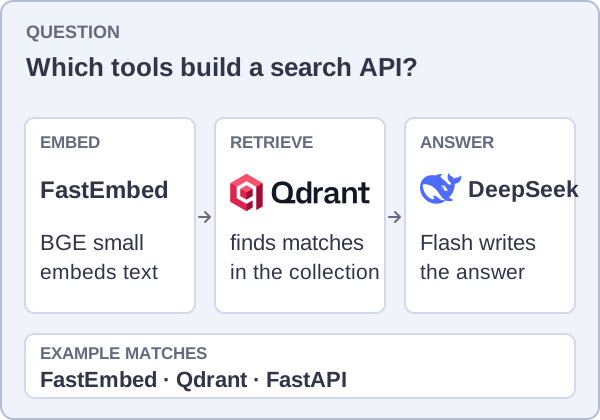
The two example questions show how retrieved context changes the answer. The grocery-store question has no location in the source data, so its grounded answer is “I don’t know.” The displayed matches and answers are deterministic illustrations based on a local run, not live API calls. FastEmbed uses BGE small for stored descriptions and the question, Qdrant returns matches, and DeepSeek writes an answer from the question and those matches.
Prerequisites
Ensure you have the following:
- Python environment (3.10+)
- Access to Qdrant Cloud
- A DeepSeek API key from DeepSeek Platform
The Qdrant retrieval steps were checked with Qdrant 1.19.1 and qdrant-client 1.19.1 on October 1, 2026. Use a Qdrant Cloud cluster on the 1.19 release line to match the client. DeepSeek API calls are billed according to its current pricing.
Setup Qdrant
python -m pip install "qdrant-client[fastembed]==1.19.1" requests
Qdrant will act as a knowledge base providing the context information for the prompts we’ll be sending to the LLM.
You can get a free-forever Qdrant Cloud instance at https://cloud.qdrant.io. Learn about setting up your instance from the Quickstart.
QDRANT_URL = "https://xyz-example.eu-central.aws.cloud.qdrant.io:6333"
QDRANT_API_KEY = "<your-api-key>"
Instantiating Qdrant Client
from qdrant_client import QdrantClient, models

client = QdrantClient(url=QDRANT_URL, api_key=QDRANT_API_KEY)
Building the knowledge base
Qdrant will use vector embeddings of our facts to enrich the original prompt with some context. Thus, we need to store the vector embeddings and the facts used to generate them.
We’ll use BAAI/bge-small-en-v1.5 through FastEmbed, a lightweight Python library for generating embeddings. DeepSeek generates answers; BGE creates the vectors used to find relevant descriptions. BGE produces 384-dimensional vectors, matching the collection configuration in the code.
The Qdrant client provides a handy integration with FastEmbed that makes building a knowledge base very straightforward.
First, we need to create a collection, so Qdrant would know what vectors it will be dealing with, and then, we just pass our raw documents
wrapped into models.Document to compute and upload the embeddings.
collection_name = "knowledge_base"
model_name = "BAAI/bge-small-en-v1.5"
client.create_collection(
    collection_name=collection_name,
    vectors_config=models.VectorParams(size=384, distance=models.Distance.COSINE)
)
documents = [
    "Qdrant is a vector database & vector similarity search engine. It deploys as an API service providing search for the nearest high-dimensional vectors. With Qdrant, embeddings or neural network encoders can be turned into full-fledged applications for matching, searching, recommending, and much more!",
    "Docker helps developers build, share, and run applications anywhere — without tedious environment configuration or management.",
    "PyTorch is a machine learning framework based on the Torch library, used for applications such as computer vision and natural language processing.",
    "MySQL is an open-source relational database management system (RDBMS). A relational database organizes data into one or more data tables in which data may be related to each other; these relations help structure the data. SQL is a language that programmers use to create, modify and extract data from the relational database, as well as control user access to the database.",
    "NGINX is a free, open-source, high-performance HTTP server and reverse proxy, as well as an IMAP/POP3 proxy server. NGINX is known for its high performance, stability, rich feature set, simple configuration, and low resource consumption.",
    "FastAPI is a modern, fast (high-performance), web framework for building APIs with Python 3.7+ based on standard Python type hints.",
    "FastEmbed generates 384-dimensional text embeddings with the BAAI/bge-small-en-v1.5 model. The Qdrant Python client uses it to embed documents and queries.",
    "The cron command-line utility is a job scheduler on Unix-like operating systems. Users who set up and maintain software environments use cron to schedule jobs (commands or shell scripts), also known as cron jobs, to run periodically at fixed times, dates, or intervals.",
]
client.upsert(
    collection_name=collection_name,
    points=[
        models.PointStruct(
            id=idx,
            vector=models.Document(text=document, model=model_name),
            payload={"document": document},
        )
        for idx, document in enumerate(documents)
    ],
)
Setup DeepSeek
RAG changes the way we interact with Large Language Models. We’re converting a knowledge-oriented task, in which the model may create a counterfactual answer, into a language-oriented task. The latter expects the model to extract meaningful information and generate an answer. LLMs, when implemented correctly, are supposed to be carrying out language-oriented tasks.
The task starts with the original prompt sent by the user. The same prompt is then vectorized and used as a search query for the most relevant facts. Those facts are combined with the original prompt to build a longer prompt containing more information.
But let’s start simply by asking our question directly.
prompt = """
What tools should I need to use to build a web service using vector embeddings for search?
"""
Using the DeepSeek API requires providing the API key. You can obtain it from the DeepSeek platform.
Replace the placeholder API_KEY value in the Python code with your DeepSeek API key.
Now we can call the completion API with deepseek-flash, the current DeepSeek Flash inference model. We disable thinking mode so the example returns just the final answer. Model responses are generated text, so their wording and suggested tools can vary between runs.
import requests
import json
API_KEY = "<YOUR_DEEPSEEK_KEY>"

HEADERS = {
    "Authorization": f"Bearer {API_KEY}",
    "Content-Type": "application/json",
}


def query_deepseek(prompt):
    data = {
        "model": "deepseek-flash",
        "messages": [{"role": "user", "content": prompt}],
        "thinking": {"type": "disabled"},
        "stream": False,
    }

    response = requests.post(
        "https://api.deepseek.com/chat/completions",
        headers=HEADERS,
        data=json.dumps(data),
        timeout=30,
    )

    if response.ok:
        result = response.json()
        return result["choices"][0]["message"]["content"]
    else:
        raise Exception(f"Error {response.status_code}: {response.text}")
and also the query
query_deepseek(prompt)
A direct response should suggest a general set of components for generating embeddings, storing and searching vectors, and serving an API. Because the question was sent without retrieved context, the model may mention tools that are not in our knowledge base. The exact answer varies between runs.
Extending the prompt
Even though the original answer sounds credible, it didn’t answer our question correctly. Instead, it gave us a generic description of an application stack. To improve the results, enriching the original prompt with the descriptions of the tools available seems like one of the possibilities. Let’s use a semantic knowledge base to augment the prompt with the descriptions of different technologies!
results = client.query_points(
    collection_name=collection_name,
    query=models.Document(text=prompt, model=model_name),
    limit=3,
)
results
In a local run with BAAI/bge-small-en-v1.5, the top matches were FastEmbed, Qdrant, and FastAPI. Scores may vary slightly by model or client version.
We used the original prompt to perform a semantic search over the set of tool descriptions. Now we can use these descriptions to augment the prompt and create more context.
context = "\n".join(r.payload['document'] for r in results.points)
context
The context now contains the FastEmbed, Qdrant, and FastAPI descriptions in that order.
Finally, let’s build a metaprompt that combines the LLM’s role, the original question, and the search results. It asks the model to use only the provided context.
By doing this, we effectively convert the knowledge-oriented task into a language task and hopefully reduce the chances of hallucinations. It also should make the response sound more relevant.
metaprompt = f"""
You are a software architect.
Answer the following question using only the provided context.
If the context does not contain the answer, answer exactly "I don't know".

Question: {prompt.strip()}

Context:
{context.strip()}

Answer:
"""

# Look at the full metaprompt
print(metaprompt)
The printed prompt includes the question and the retrieved document descriptions in their search order. Check that the context names the same tools shown in results.points.
Our current prompt is much longer, and we also used a couple of strategies to make the responses even better:
- The LLM has the role of software architect.
- We provide more context to answer the question.
- If the context contains no meaningful information, the model shouldn’t make up an answer.
Now ask the model to answer with the retrieved context.
Question:
query_deepseek(metaprompt)
Expected answer: The retrieved context supports FastEmbed for embeddings, Qdrant for vector search, and FastAPI for the web API. A grounded answer should describe those roles; its wording will vary with the model response.
Testing out the RAG pipeline
By leveraging the semantic context we provided our model is doing a better job answering the question. Let’s enclose the RAG as a function, so we can call it more easily for different prompts.
def rag(question: str, n_points: int = 3) -> str:
    results = client.query_points(
        collection_name=collection_name,
        query=models.Document(text=question, model=model_name),
        limit=n_points,
    )

    context = "\n".join(r.payload["document"] for r in results.points)

    metaprompt = f"""
    You are a software architect.
    Answer the following question using only the provided context.
    If the context does not contain the answer, answer exactly "I don't know".

    Question: {question.strip()}

    Context:
    {context.strip()}

    Answer:
    """

    return query_deepseek(metaprompt)
Now it’s easier to ask a broad range of questions.
Question:
rag("What can the stack for a web api look like?")
Expected answer: In a local run, the three retrieved descriptions are FastAPI, NGINX, and FastEmbed. A grounded response can use FastAPI for the API, NGINX as a reverse proxy, and FastEmbed for embeddings. The exact wording will vary.
Question:
rag("Where is the nearest grocery store?")
Expected answer: “I don’t know.” None of the documents in this example contains a store location. If the model names a store, it has not followed the grounding instruction.
This pipeline is designed to:
- Take advantage of the knowledge in our vector datastore.
- Say “I don’t know” when the provided context cannot answer the question.
Grounding the prompt in retrieved context can reduce unsupported answers, but you should still check the generated response.
 Ready to try Qdrant?