
Video Anomaly Detection: Scoring, Governance, and Deployment
| Time: 90 min | Level: Advanced | Output: GitHub |
|---|
This is Part 3 of a 3-part series on building real-time video anomaly detection from edge to cloud.
Series:
- Part 1 | Architecture, Twelve Labs, and NVIDIA VSS
- Part 2 | Edge-to-Cloud Pipeline
- Part 3 | Scoring, Governance, and Deployment (here)
In Part 1, we set up the architecture, Twelve Labs integration, and NVIDIA VSS connection. In Part 2, we built Qdrant Edge’s two-shard architecture and the escalation pipeline. Now we turn raw scores into incidents, protect the baseline, and deploy.
Getting Started
Before continuing, make sure you have completed Parts 1 and 2 and have the following running:
- Docker stack up (
docker compose up) - Qdrant Cloud collection populated with baseline embeddings
- At least one edge device registered and synced
- Twelve Labs indexes created (Marengo and Pegasus)
If you’re starting fresh, return to Part 1 for setup instructions.
Anomaly Scoring and Incident Formation
Raw kNN scores are noisy. A single unusual frame does not constitute an incident. The scoring pipeline applies three layers of processing.
1. Temporal Smoothing
An exponential moving average (EMA) dampens score jitter:
smoothed = alpha * raw_score + (1 - alpha) * prev_smoothed # alpha = 0.3
2. Hysteresis Thresholding
Two thresholds prevent flickering between “incident” and “normal” states:
- t_high = 0.045: Smoothed score must exceed this to start an incident
- t_low = 0.025: Score must drop below this to end an incident
3. Incident Formation
Contiguous windows above threshold are grouped into incidents:
@dataclass
class Incident:
    incident_id: str
    start_time: float   # seconds
    end_time: float     # seconds
    peak_score: float   # Maximum smoothed score
    mean_score: float   # Average smoothed score
    severity: int       # 0-100 scale
    window_count: int   # Number of clips in incident
    duration_ms: int    # End - start in milliseconds
Incidents within a 20-second cooldown window are merged to prevent fragmentation.
Baseline Governance
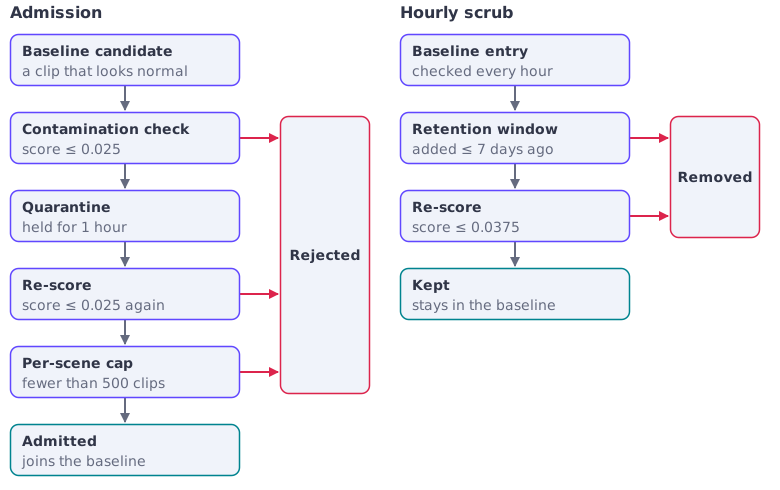
The baseline is the system’s ground truth for “normal.” If contaminated with anomalous clips, detection quality degrades silently. The memory governor implements three defenses.
Quarantine
New baseline candidates must survive a quarantine period before admission:
- Contamination check: Reject if the clip’s anomaly score exceeds 0.025
- Aging: Hold for 1 hour in quarantine
- Re-scoring: After aging, re-score against the current baseline
- Per-scene cap: Reject if the scene already has 500+ clips
Baseline Scrubbing
Every hour, the governor re-evaluates existing baseline entries:
- Remove clips older than 7 days (retention window)
- Re-score all clips against the current baseline
- Remove any clip scoring above 1.5x the contamination threshold (0.0375)
Poisoning Prevention
The per-scene cap and contamination threshold together prevent an attacker from flooding the baseline. Even if an attacker controls a camera feed, they can insert at most 500 clips per scene, and each must score below 0.025. Injecting true anomalies that score as normal is difficult because it requires them to be genuinely similar to existing normal footage.
Batch Embedding with Twelve Labs
For initial baseline construction or dataset evaluation, we provide a batch embedding script that uploads clips via Twelve Labs and indexes the resulting embeddings into Qdrant:
/scripts/embed_twelvelabs.py
# Dry run: list clips without uploading
uv run python scripts/embed_twelvelabs.py --input-dir data/clips --dry-run

# Full run: embed and index
uv run python scripts/embed_twelvelabs.py \
    --input-dir data/clips \
    --collection anomaly_baseline \
    --qdrant-url http://localhost:6333
The script uploads each clip to Twelve Labs Marengo, retrieves the embedding, and upserts into Qdrant with metadata:
for clip_path in clips:
    result = twelvelabs_client.upload_video(str(clip_path), index_type="marengo")
    video_id = result.get("marengo_video_id")
    embedding = twelvelabs_client.get_video_embedding(video_id)

    points.append(PointStruct(
        id=str(uuid.uuid4()),
        vector=embedding,
        payload={
            "source_video": clip_path.stem,
            "twelvelabs_video_id": video_id,
            "clip_filename": clip_path.name,
        },
    ))

qdrant.upsert(collection_name=collection, points=points)
Unified Retrieval: Querying Across Time, Cameras, and Sites
The centralized Qdrant cluster is not just a scoring backend. It is a retrieval layer that indexes every embedding the system produces. Each vector carries payload metadata: source_video, scene_id, time_bucket, anomaly_type, and device origin. This enables filterable vector search across the entire deployment.
“Find similar incidents.” After an incident is confirmed, an operator queries Qdrant with the incident’s embedding and filters by date range or severity. Results surface visually similar events from any camera, any site, any time period.
“Trace patterns across locations.” Filter searches by scene_id or device group to find recurring patterns. If an anomaly appears at one entrance on Monday and a different entrance on Tuesday, the vector similarity connects them.
“Review the lead-up to an event.” Query embeddings from the same camera in the time window preceding an incident. The kNN scores form a timeline showing how the scene drifted from normal.
The NVIDIA VSS pipeline enriches these workflows further with Graph-RAG, a knowledge graph capturing entity relationships across all ingested video. Combined with CA-RAG (Context-Aware RAG), operators can ask natural-language questions like “What happened at the north entrance between 2am and 4am last week?” and get answers grounded in both vector similarity and structured graph traversal.
API Endpoints
The backend exposes all functionality through REST endpoints:
# Core anomaly detection
POST /api/embed             Upload video, get embedding
POST /api/score             Score embedding against baseline
POST /api/detect            End-to-end: upload, embed, score
POST /api/escalate          Receive escalated clip from edge

# Twelve Labs integration
POST /api/search            Semantic video search via Marengo
POST /api/analyze           Video Q&A via Pegasus
POST /api/twelvelabs/upload Upload to Twelve Labs indexes
GET  /api/twelvelabs/status Check Twelve Labs config

# NVIDIA VSS
POST /api/vss/upload        Upload to VSS (chunk + ingest)
GET  /api/vss/health        Check VSS health

# Edge sync
POST /api/upsert            Receive edge points for cloud baseline sync
POST /api/snapshots/full    Full shard snapshot for edge immutable shard
POST /api/snapshots/partial Incremental shard snapshot for edge sync
POST /edge/metrics          Receive metrics from edge devices

# Operations
GET  /api/escalations/stats            Escalation tracker summary
GET  /api/edges                        List edge devices
POST /api/edges/register               Register new edge device
POST /api/edges/{device_id}/sync-baseline Trigger baseline sync to device
GET  /api/edges/{device_id}/stats      Per-device analytics
GET  /api/memory/stats                 Baseline governance stats
GET  /api/qdrant/stats                 Collection point count and status
GET  /api/incidents                    List detected incidents
GET  /health                           Service health check
Results
We evaluated on the UCF-Crime dataset (Sultani et al., 2018). It contains 1,900 untrimmed surveillance videos, split into 1,610 training videos (800 normal, 810 anomalous) and 290 test videos (150 normal, 140 anomalous). The anomalous videos cover 13 categories: abuse, arrest, arson, assault, burglary, explosion, fighting, road accidents, robbery, shooting, shoplifting, stealing, and vandalism.
How the scores are computed
The numbers below depend on choices that are easy to miss, so here is exactly what is measured:
- Baseline. Only normal training footage, cut into 10-second clips and embedded. No anomalous clip is used, which is why categories that never appear in the baseline can still be scored.
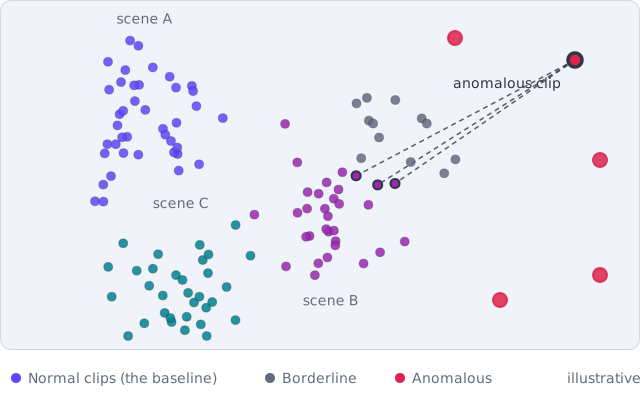
- Scoring level. Every 10-second clip of the test split is scored on its own as
1 - mean(cosine similarity to its k nearest baseline clips). The metrics are computed over clips, not over videos or frames. - Labels. A clip takes the label of its video. Clips of an anomalous video count as anomalous even when the event covers only part of the video. Most published UCF-Crime results use frame-level labels, so these numbers are not directly comparable with them.
- Threshold. The F1-optimal threshold is picked on the test scores themselves. F1 and the recall at that threshold are therefore optimistic: a threshold chosen on a separate validation set would give lower figures.
- False positives per hour. The false positive rate on normal test clips is converted to hours by assuming that a camera produces 360 clips per hour (one every 10 seconds). It is an extrapolation from UCF-Crime’s normal footage, not a measurement on live cameras.
- Average precision. It depends on the share of anomalous clips in the test set, which is not recorded with these results.
Reported cloud tier results (Twelve Labs Marengo, k=3):
| Metric | Score |
|---|---|
| AUC-ROC | 0.9696 |
| Average Precision | 0.9987 |
| F1 (threshold chosen on the test set) | 0.9778 |
At the operating point where the false positive rate on normal test clips equals 2 per 360 clips (about 0.56%), recall was 94.2%. If a camera produced 360 normal clips an hour with that same false positive rate, that would be about 2 false alarms per hour.
scripts/evaluate.py also reports per-category detection rates, so you can see which categories your model separates well. We do not publish per-category figures here, so this tutorial makes no claim about which categories are easier. The design explains why none is excluded: the baseline holds only normal footage, so every category is scored by its distance from normal, whether or not the model has ever seen an example of it.
Deploying on Vultr Cloud GPUs
Vultr Cloud GPUs serve as the compute backbone for the entire cloud tier. NVIDIA Metropolis VSS supports deployment on A100, H100, H200, and L40S GPUs, all available through Vultr’s on-demand instances.
- Twelve Labs via VSS: Video embeddings for kNN scoring and semantic understanding. One call per escalated clip handles both anomaly detection and incident enrichment.
- Full VSS stack: Stream handler, VLM captioning, audio transcription, and CV pipeline, all GPU-accelerated on Vultr.
- Batch embedding: Processing the full UCF-Crime dataset (19,380 clips) for baseline construction. Spin up, embed, tear down.
Vultr’s GPU instances run alongside the Qdrant cloud cluster, minimizing network hops between embedding and indexing. The cost model is efficient: GPU compute scales with escalation volume (5-15% of footage), not total camera count.
Streaming Backpressure
In production, the cloud tier must handle bursts of escalations from multiple edge devices. The streaming pipeline implements adaptive degradation:
| Queue Utilization | Mode | Behavior |
|---|---|---|
| < 80% | NORMAL | Full pipeline (embed + score + incident) |
| 80-90% | SCORE_ONLY | Skip VSS caption generation |
| 90-95% | PASSTHROUGH | Use edge embedding, skip re-embed |
| > 95% | SHED_LOAD | Drop request (503) |
This ensures the system degrades gracefully under load rather than queuing unboundedly.
Deployment
# Clone and install
git clone https://github.com/qdrant/video-anomaly-edge.git
cd video-anomaly-edge
uv sync

# Configure
cp .env.example .env
# Edit .env with your Qdrant URL, Twelve Labs API key, etc.

# Option 1: Run with Docker (recommended)
docker compose up

# Option 2: Run services individually
uv run uvicorn backend.main:app --port 9876    # Backend API
uv run python -m edge.main                      # Edge detector
cd frontend && pnpm dev                          # Dashboard

# Batch embed a dataset via Twelve Labs
uv run python scripts/embed_twelvelabs.py --input-dir data/clips --collection anomaly_baseline
Conclusion
Thanks for following along through all three parts. You’ve built an end-to-end real-time video anomaly detection platform and learned how Qdrant vector search, Twelve Labs video understanding, NVIDIA Metropolis VSS, and Vultr Cloud GPUs come together to solve a problem that traditional classifiers cannot: detecting anomalies you’ve never seen before.
The key takeaways:
- kNN over classifiers: Detects novel anomalies without per-category training. The anomaly score is simply “how far from normal,” no labels needed.
- Qdrant two-shard edge: Sub-millisecond kNN lookups on Jetson with a mutable shard for live context and an immutable shard synced from cloud.
- Twelve Labs for both scoring and understanding: Marengo embeddings power the kNN detector and semantic search. Pegasus adds conversational Q&A. One platform, both jobs.
- Edge triage reduces cost ~6x: A deliberately imperfect edge filter catches ~95% of anomalies while processing only ~15% of footage in the cloud.
- NVIDIA VSS orchestrates the cloud pipeline: Stream handling, VLM captioning, audio transcription, and CV pipeline, all tied together with the Twelve Labs integration.
- Baseline governance prevents silent degradation: Quarantine, scrubbing, and per-scene caps keep the normal baseline clean over time.
Check out the full series and additional resources:
- Part 1: Architecture, Twelve Labs, and NVIDIA VSS
- Part 2: Edge-to-Cloud Pipeline
- Project Repository: qdrant/video-anomaly-edge
- Live Demo: qdrant-edge-video-anomaly.vercel.app
- NVIDIA VSS Twelve Labs Integration: qdrant/twelvelabs-nvidia-vss
- Twelve Labs Documentation: docs.twelvelabs.io
- Qdrant Documentation: qdrant.tech/documentation
- Vultr Cloud GPUs: vultr.com/products/cloud-gpu
 Ready to try Qdrant?