
Build Search-as-You-Type with Qdrant
| Time: 30 min | Level: Intermediate | Output: GitHub |
|---|
A search-as-you-type box sends a request on almost every keystroke, so it puts a vector search engine under steady load and makes every millisecond of latency visible. This tutorial shows how to build one on Qdrant with a fully semantic backend, and three techniques that keep it fast and relevant:
- A prefix cache: embeddings precomputed for short prefixes, so a short query needs no embedding model at all.
- Prioritized batch queries: one batch request with four queries, so exact matches and headings come first.
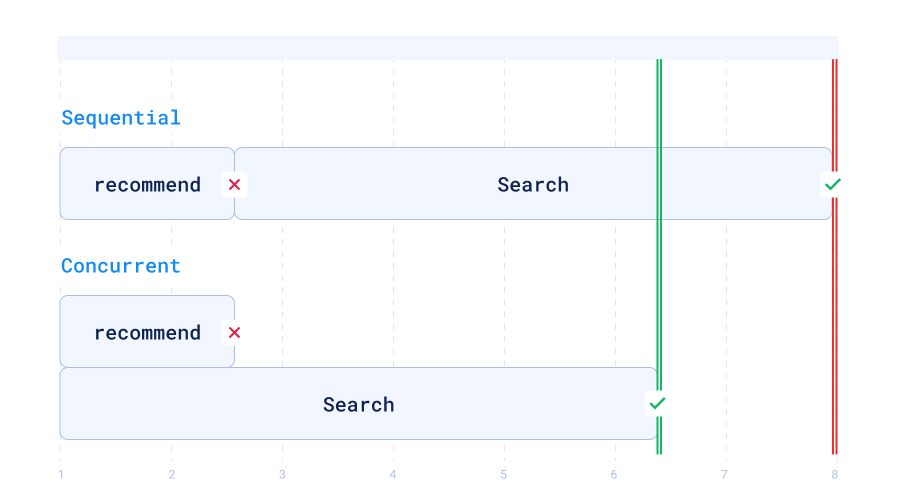
- Concurrent fallbacks: both paths start together, so a cache miss costs no extra round trip.
Background
The techniques come from the 2023 rebuild of the Qdrant documentation’s page search. We already had a semantic and keyword hybrid search on the website, written in Python, which had some interpreter overhead. Andre Bogus, who wrote the first version of this article, wanted to see how fast a Rust service could go, and the Rust code is on GitHub. This tutorial teaches the same ideas in Python with the current Query API, so you can run them without a Rust toolchain.
How It Works
The search service answers each keystroke in one of three ways. A longer query is embedded and sent to Qdrant. A short prefix that is in the cache skips the embedding model: Qdrant reads the stored embedding of the prefix with a recommend query and lookup_from. A short prefix that is not in the cache starts both paths at once and keeps the first non-empty result.
Prerequisites
You need Python 3.10 or later and a running Qdrant. The code uses the async Python client and FastEmbed for embeddings.
pip install "qdrant-client[fastembed]"
Start Qdrant locally with Docker, and leave it running:
docker run -p 6333:6333 qdrant/qdrant
Step 1: Choose an Embedding Model
Clusters on Qdrant Managed Cloud can embed text on the server with Cloud Inference. On a self-hosted deployment, Hybrid Cloud, or Private Cloud, Qdrant does not embed text, so you run an embedding model yourself. This tutorial embeds in your own process, so it works on any deployment. For a search box, a small model that is quick on a CPU is a good fit. The original service used All-MiniLM-L6-V2, a battle-tested BERT-based model with 384 dimensions. FastEmbed runs it as an ONNX model with ONNX Runtime, which keeps the install lightweight and the model easy to run on a CPU.
from fastembed import TextEmbedding

model = TextEmbedding("sentence-transformers/all-MiniLM-L6-v2")
VECTOR_SIZE = 384


def embed(text: str) -> list[float]:
    return next(iter(model.embed([text]))).tolist()
Step 2: Create the Collections and Index the Documents
You need two collections with the same vector size. site holds the content you search, and prefix_cache holds embeddings of short prefixes. In site, each point is a heading or a paragraph, with a tag that says which.
The text field gets a full-text index with the prefix tokenizer. That is what lets a partial word like quan match quantization in the text-match queries. The tag field gets a keyword index for the heading filter.
import asyncio

from qdrant_client import AsyncQdrantClient, models

client = AsyncQdrantClient("http://localhost:6333")

# Each point is a heading or a paragraph: (text, tag, page).
DOCS = [
    ("Quantization", "h1", "quantization"),
    (
        "Scalar quantization compresses each vector component to one byte.",
        "p",
        "quantization",
    ),
    ("Binary quantization stores one bit per vector component.", "p", "quantization"),
    ("Filtering", "h1", "filtering"),
    ("Payload filters narrow a search to the points that match.", "p", "filtering"),
    ("Create a payload index for every field you filter on.", "p", "filtering"),
    ("Snapshots", "h1", "snapshots"),
    (
        "A snapshot is a tar archive of a collection that you can restore.",
        "p",
        "snapshots",
    ),
    ("Sharding", "h1", "sharding"),
    ("Sharding splits a collection across the nodes of a cluster.", "p", "sharding"),
    ("Multitenancy", "h1", "multitenancy"),
    (
        "Keep all tenants in one collection and filter by a tenant field.",
        "p",
        "multitenancy",
    ),
]


async def create_collections() -> None:
    vectors = models.VectorParams(size=VECTOR_SIZE, distance=models.Distance.COSINE)
    for name in ("site", "prefix_cache"):
        if await client.collection_exists(name):
            await client.delete_collection(name)
        await client.create_collection(name, vectors_config=vectors)

    # Partial words have to match, so index the text with the prefix tokenizer.
    await client.create_payload_index(
        "site",
        "text",
        models.TextIndexParams(
            type=models.TextIndexType.TEXT,
            tokenizer=models.TokenizerType.PREFIX,
            min_token_len=1,
            max_token_len=15,
            lowercase=True,
        ),
    )
    await client.create_payload_index("site", "tag", models.PayloadSchemaType.KEYWORD)


async def index_documents() -> None:
    points = [
        models.PointStruct(
            id=i,
            vector=embed(text),
            payload={"text": text, "tag": tag, "page": page},
        )
        for i, (text, tag, page) in enumerate(DOCS)
    ]
    await client.upsert("site", points, wait=True)
Step 3: Build the Prefix Cache
Even with a small model, embedding takes time. As in any optimization, if you cannot do the work faster, avoid doing it. Precompute embeddings for common short prefixes, and store them in prefix_cache. Then a recommend query can find the best matches without embedding anything. This tutorial caches every prefix of up to five letters of every word in the documents. A real service could also read its logs and cache the most common search terms.
The point ID of a cached prefix is the prefix itself: its UTF-8 bytes, read as a number. Qdrant point IDs can be unsigned 64-bit integers, which hold eight bytes, enough for these short prefixes. That lets you look up the embedding by ID, with no search and no index. If you needed longer prefixes, you could hash them into a UUID instead.
MAX_PREFIX_LENGTH = 5


def prefix_to_id(prefix: str) -> int | None:
    """A prefix of up to eight bytes fits into an unsigned 64-bit point ID."""
    data = prefix.encode("utf-8")
    return int.from_bytes(data, "big") if len(data) <= 8 else None


async def build_prefix_cache() -> None:
    prefixes = sorted(
        {
            word[:length]
            for text, _, _ in DOCS
            for word in text.lower().split()
            for length in range(1, min(len(word), MAX_PREFIX_LENGTH) + 1)
        }
    )
    vectors = list(model.embed(prefixes))
    points = [
        models.PointStruct(id=prefix_to_id(prefix), vector=vector.tolist())
        for prefix, vector in zip(prefixes, vectors)
        if prefix_to_id(prefix) is not None
    ]
    await client.upsert("prefix_cache", points, wait=True)
Step 4: Prioritize the Results
To improve the quality of the results, send four queries in one batch, and put the results together in this order:
- Text matches in titles
- Text matches in the body (paragraphs and lists)
- Semantic matches in titles
- Any semantic matches
Every query uses the same vector, so the text-match queries return only points that contain the typed text, ordered by similarity. The service then flattens the four lists in order, skips points it already has, and keeps the first five:
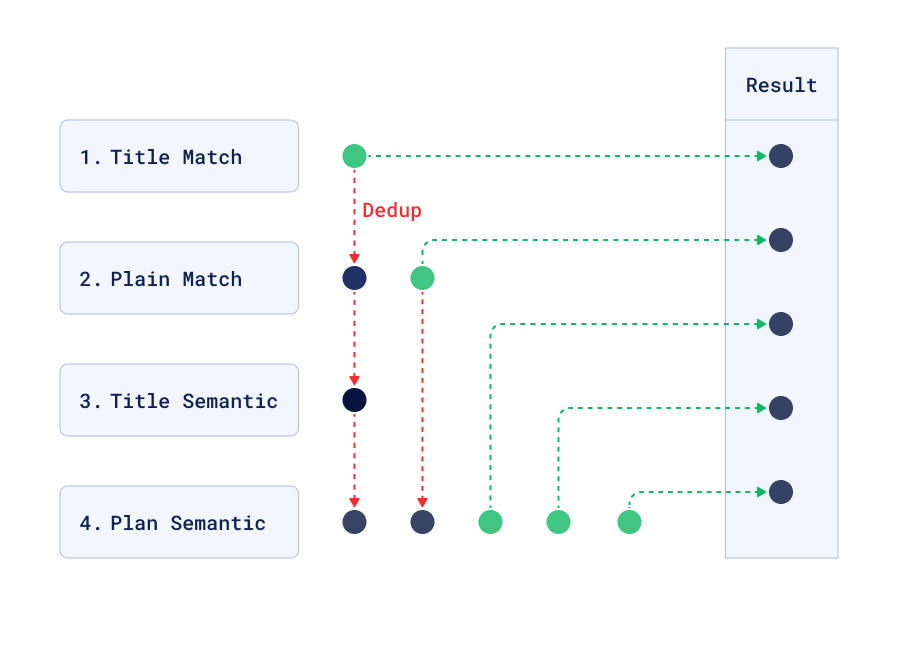
Because the queries run in a batch request, there is no extra network overhead and only a small computation overhead, yet the results are better in many cases.
LIMIT = 5
HEADINGS = models.FieldCondition(
    key="tag", match=models.MatchAny(any=["h1", "h2", "h3"])
)


def prioritized_requests(
    text: str, query: models.Query | list[float], lookup_from=None
) -> list[models.QueryRequest]:
    match = models.FieldCondition(key="text", match=models.MatchText(text=text))
    filters = [
        models.Filter(must=[match, HEADINGS]),  # 1. text matches in titles
        models.Filter(
            must=[match], must_not=[HEADINGS]
        ),  # 2. text matches in the body
        models.Filter(must=[HEADINGS]),  # 3. semantic matches in titles
        None,  # 4. any semantic match
    ]
    return [
        models.QueryRequest(
            query=query,
            filter=query_filter,
            limit=LIMIT,
            with_payload=True,
            lookup_from=lookup_from,
        )
        for query_filter in filters
    ]


def merge(responses: list[models.QueryResponse]) -> list[models.ScoredPoint]:
    seen: set[int | str] = set()
    merged = []
    for response in responses:
        for point in response.points:
            if point.id not in seen:
                seen.add(point.id)
                merged.append(point)
    return merged[:LIMIT]
Step 5: Add the Two Paths
The embedding path embeds the query and sends the four queries with the resulting vector. The cache path sends the same four queries as recommend queries. The positive example is the point ID of the prefix, and lookup_from points to prefix_cache, so Qdrant takes the stored vector from there and searches the site collection with it. In lookup_from, the example point is looked up in a different collection than the one you search, which keeps the cache separate from the site data.
A query can be short enough for the cache path and still not be in the cache. Qdrant then answers the recommend request with a 404, because the prefix has no point. Doing the cache path first and the embedding path after would cost two round trips. Instead, start both paths at once and take the first non-empty result. Starting both means more load on Qdrant, but that is not the limiting factor, because the relevant data is often already in memory, and a cache miss costs only the embedding path.
async def search_by_embedding(text: str) -> list[models.ScoredPoint]:
    vector = await asyncio.to_thread(embed, text)
    requests = prioritized_requests(text, vector)
    return merge(await client.query_batch_points("site", requests=requests))


async def search_from_cache(text: str) -> list[models.ScoredPoint]:
    prefix_id = prefix_to_id(text)
    if prefix_id is None:
        return []
    query = models.RecommendQuery(
        recommend=models.RecommendInput(positive=[prefix_id])
    )
    lookup_from = models.LookupLocation(collection="prefix_cache")
    requests = prioritized_requests(text, query, lookup_from)
    return merge(await client.query_batch_points("site", requests=requests))


async def search_as_you_type(text: str) -> list[models.ScoredPoint]:
    text = text.strip().lower()
    tasks = [asyncio.create_task(search_by_embedding(text))]
    if len(text) <= MAX_PREFIX_LENGTH:
        tasks.append(asyncio.create_task(search_from_cache(text)))
    try:
        for finished in asyncio.as_completed(tasks):
            try:
                points = await finished
            except Exception:  # for example, the 404 for a prefix that is not cached
                continue
            if points:
                return points
    finally:
        for task in tasks:
            task.cancel()
    return []
Step 6: Try It
Add the following to run the whole flow and print the results for three queries. The first run downloads the embedding model.
async def main() -> None:
    await create_collections()
    await index_documents()
    await build_prefix_cache()
    for text in ["quan", "snap", "how to filter"]:
        print(text)
        for point in await search_as_you_type(text):
            print("  ", point.payload["tag"], point.payload["text"])
    await client.close()


asyncio.run(main())
The output looks like this. The text matches in titles come first, then the text matches in the body, and the semantic matches fill the remaining slots:
quan
   h1 Quantization
   p Binary quantization stores one bit per vector component.
   p Scalar quantization compresses each vector component to one byte.
   h1 Sharding
   h1 Filtering
snap
   h1 Snapshots
   p A snapshot is a tar archive of a collection that you can restore.
   h1 Sharding
   h1 Filtering
   h1 Multitenancy
how to filter
   h1 Filtering
   h1 Quantization
   h1 Multitenancy
   h1 Snapshots
   h1 Sharding
The last query is longer than the cached prefixes and none of the paragraphs contain all of its words, so only the semantic queries return results.
You can also send the cache lookup yourself. This request is the cache path for the prefix quan, whose point ID is 1903518062:
POST /collections/site/points/query
{
  "query": { "recommend": { "positive": [1903518062] } },
  "lookup_from": { "collection": "prefix_cache" },
  "limit": 5,
  "with_payload": true
}
Performance
The original service was benchmarked in 2023 on a local AMD Ryzen 9 5900HX with 16GB of RAM, comparing the previous Python service (FastAPI, SentenceTransformers) with the Rust service (Actix Web, ONNX Runtime). The table shows the average time and error bound, for up to a thousand concurrent requests.
| Query length | Short (prefix cache hit) | Long |
|---|---|---|
| Python | 16 ± 4 ms | 16 ± 4 ms |
| Rust | 1½ ± ½ ms | 5 ± 1 ms |
These are 2023 numbers for two different services, not a Qdrant benchmark, and they were not measured again. What they show is the cache: the Rust service answered a cache hit (1½ ms) faster than a longer query (5 ms), because the hit skipped the embedding step.
For users, the network usually dominates latency, so a few milliseconds may mean little. While typing, though, every millisecond can change how the box feels. Search-as-you-type also generates more load than a plain search: in this service, it was between three and five times as much. Less time per request means the service can handle more of them. You can also reduce the load from the client, for example by waiting a short moment after the last keystroke before sending a request.
To sum up: a prefix cache lets a short query skip the embedding model, lookup_from makes that a single request, batch queries give exact matches and headings priority, and starting both paths together keeps a cache miss cheap.
 Ready to try Qdrant?