
Build a Serverless Semantic Search Service with Rust, AWS Lambda, and Qdrant
| Time: 45 min | Level: Intermediate |
|---|
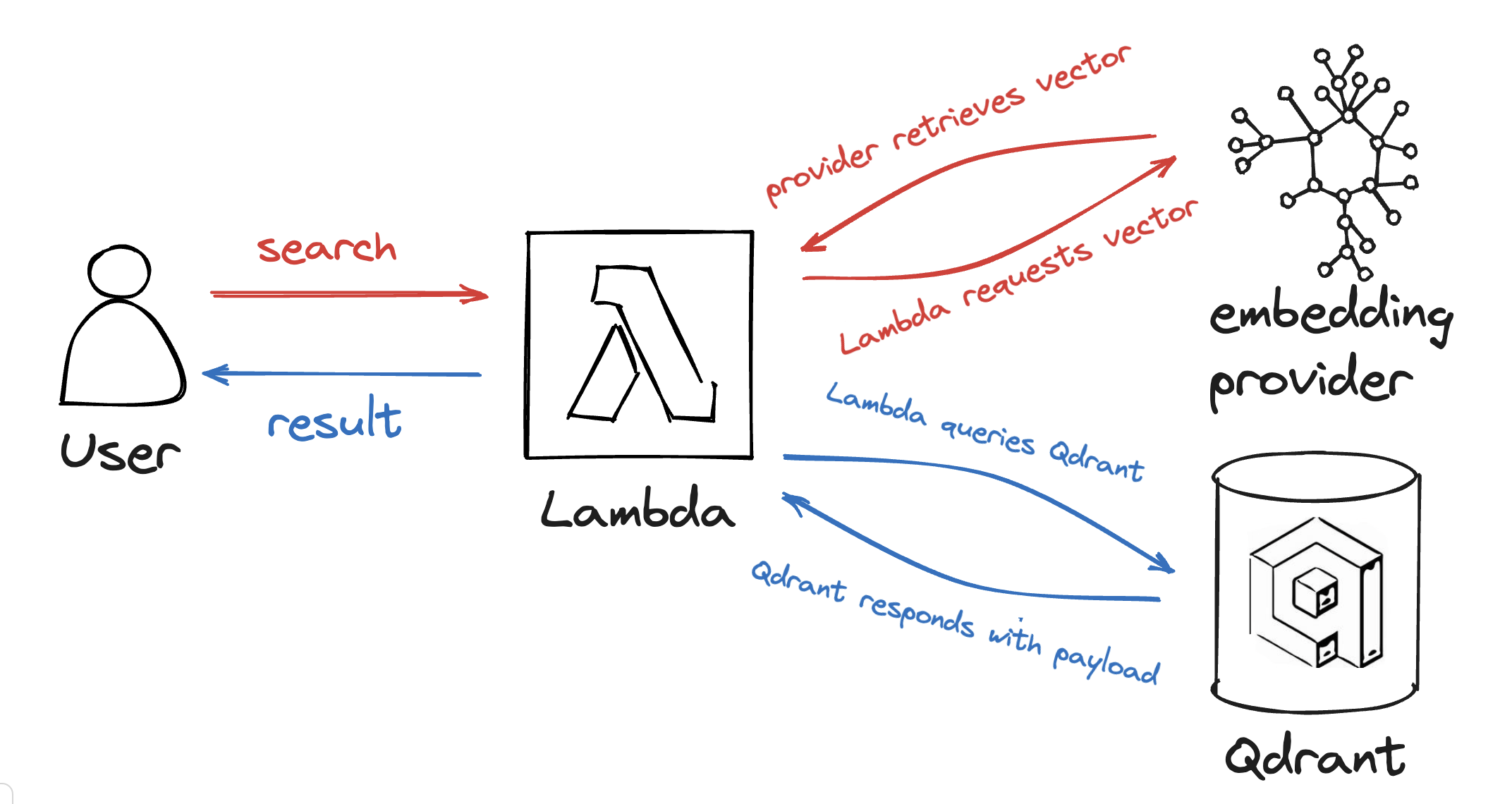
Do you want to add semantic search to your website or online app without running a server? In this tutorial, you build a small search service in Rust on AWS Lambda. For each query, the function embeds the text with Cohere, searches it in Qdrant, and returns the closest texts as JSON. Everything fits in free tiers, so it works as a prototype for your own non-commercial purposes.
What You Need
- A Rust toolchain.
- Cargo Lambda, which builds and deploys Rust functions to Lambda. Install it with a package manager, from a downloaded binary, or with
cargo install cargo-lambda. - An AWS account with credentials set up for the AWS CLI. Cargo Lambda uses the same credentials.
- A Qdrant instance. A free Qdrant Cloud cluster works. Note its URL and create an API key.
- A Cohere account with a trial API key. To use another provider, see our Embeddings docs.
This tutorial was written with Rust 1.98, Cargo Lambda 1.9, lambda_http 1.3, qdrant-client 1.19, and reqwest 0.13.
Costs and Cleanup
- AWS. New accounts on the AWS Free plan get 100 dollars in credits, and up to 100 dollars more for exploring services, for six months. Lambda also has an always-free monthly allowance of one million requests and 400,000 GB-seconds of compute, which this function stays far below.
- Cohere. A trial key is free but limited to 1,000 API calls a month, and it is meant for non-commercial use. Every search makes one Cohere call, so heavy traffic exhausts it.
- Qdrant Cloud. A free cluster has one node with 1 GB of RAM and needs no credit card. Qdrant suspends it after a week without use and deletes it after four weeks of inactivity.
- Open function URL. This tutorial creates a function URL without authentication, so anyone who has the URL can trigger Lambda invocations and Cohere calls. Do not share it, and delete the function when you are done. The last section lists the cleanup steps.
What You’re Going to Build
You combine the embedding provider and the Qdrant instance into a semantic search, calling both services from a small Lambda function. The function reads the search text from the q query parameter of its URL.
Create the Project
Create a Rust library project, and replace the generated Cargo.toml with the following. Cargo builds every file in src/bin as a binary. You will add two: setup stores your documents, and search is the Lambda function.
cargo new semantic-search --lib
cd semantic-search
mkdir -p src/bin
[package]
name = "semantic-search"
version = "0.1.0"
edition = "2021"

[dependencies]
anyhow = "1"
lambda_http = "1"
qdrant-client = "1.19"
serde = { version = "1", features = ["derive"] }
serde_json = "1"
tokio = { version = "1", features = ["macros", "rt-multi-thread"] }

[dependencies.reqwest]
version = "0.13"
default-features = false
features = ["json", "rustls"]
Embedding
Cohere’s embed endpoint takes a list of texts and returns one vector per text. Its embed-english-v3.0 model returns 1024 dimensions, which you will need for the collection. The input_type tells the model how the text is used: search_document for the texts you store, and search_query for the text you search with.
Create an API key in the Cohere dashboard. Don’t put your API key in the code! The code reads it from an environment variable, so it never ends up in a public repository.
Put the following into src/lib.rs:
use anyhow::Result;
use reqwest::Client;
use serde::Deserialize;
use serde_json::json;

/// Output dimensions of Cohere's `embed-english-v3.0` model.
pub const EMBEDDING_SIZE: u64 = 1024;

#[derive(Deserialize)]
struct EmbedResponse {
    embeddings: Embeddings,
}

#[derive(Deserialize)]
struct Embeddings {
    float: Vec<Vec<f32>>,
}

/// Embeds `texts` and returns one vector per text, in the same order.
/// Use `input_type` `search_document` for the texts you store and
/// `search_query` for the text you search with.
pub async fn embed(
    client: &Client,
    texts: &[&str],
    input_type: &str,
    api_key: &str,
) -> Result<Vec<Vec<f32>>> {
    let response: EmbedResponse = client
        .post("https://api.cohere.com/v2/embed")
        .bearer_auth(api_key)
        .json(&json!({
            "model": "embed-english-v3.0",
            "texts": texts,
            "input_type": input_type,
            "embedding_types": ["float"],
        }))
        .send()
        .await?
        .error_for_status()?
        .json()
        .await?;
    Ok(response.embeddings.float)
}
Other providers have similar interfaces. See how little code it took to get the embedding?
While you are at it, it is a good idea to write a small test that checks the vectors have the expected size. The test does nothing unless COHERE_API_KEY is set. Add it at the end of src/lib.rs:
#[tokio::test]
async fn check_embedding() {
    // Skip this test unless a Cohere key is set.
    let Ok(api_key) = std::env::var("COHERE_API_KEY") else {
        return;
    };
    let vectors = embed(
        &Client::new(),
        &["What is semantic search?"],
        "search_query",
        &api_key,
    )
    .await
    .unwrap();
    assert_eq!(EMBEDDING_SIZE as usize, vectors[0].len());
}
Run COHERE_API_KEY=<your Cohere API key> cargo test to check that embedding works.
Qdrant Search
Now that you have embeddings, it is time to put them into Qdrant. You could use curl or Python to set up the collection and upload the points, but as you already have Rust code to obtain the embeddings, you can stay in Rust with the qdrant-client crate.
The Rust client talks to Qdrant over gRPC, so the URL needs the gRPC port. On Qdrant Cloud, that is the cluster URL with port 6334, for example https://xyz-example.eu-central.aws.cloud.qdrant.io:6334.
Put the following into src/bin/setup.rs. It embeds a few example documents, creates the collection if it does not exist, and uploads the points in chunks, so a large input does not hit request size limits. Replace the documents with your own data.
use anyhow::Result;
use qdrant_client::qdrant::{
    CreateCollectionBuilder, Distance, PointStruct, UpsertPointsBuilder,
    VectorParamsBuilder,
};
use qdrant_client::{Payload, Qdrant};
use reqwest::Client;
use semantic_search::{embed, EMBEDDING_SIZE};
use serde_json::json;

#[tokio::main]
async fn main() -> Result<()> {
    let qdrant_url = std::env::var("QDRANT_URL")?;
    let qdrant_api_key = std::env::var("QDRANT_API_KEY")?;
    let cohere_api_key = std::env::var("COHERE_API_KEY")?;
    let collection_name = std::env::var("COLLECTION_NAME")?;

    let qdrant = Qdrant::from_url(&qdrant_url)
        .api_key(qdrant_api_key)
        .build()?;

    // Replace these with your own documents.
    let texts = [
        "Qdrant is a vector search engine.",
        "AWS Lambda runs your code without servers to manage.",
        "Rust compiles to small, fast binaries.",
    ];
    let vectors =
        embed(&Client::new(), &texts, "search_document", &cohere_api_key).await?;

    if !qdrant.collection_exists(&collection_name).await? {
        qdrant
            .create_collection(
                CreateCollectionBuilder::new(&collection_name).vectors_config(
                    VectorParamsBuilder::new(EMBEDDING_SIZE, Distance::Cosine),
                ),
            )
            .await?;
    }

    let points = texts
        .iter()
        .zip(vectors)
        .enumerate()
        .map(|(id, (text, vector))| {
            let payload = Payload::try_from(json!({ "text": text }))?;
            Ok(PointStruct::new(id as u64, vector, payload))
        })
        .collect::<Result<Vec<_>>>()?;

    // Upload in chunks of 100 points, so large inputs do not hit request size limits.
    qdrant
        .upsert_points_chunked(
            UpsertPointsBuilder::new(&collection_name, points).wait(true),
            100,
        )
        .await?;
    println!("Stored {} points in {collection_name}", texts.len());
    Ok(())
}
Depending on whether you want to filter the data efficiently, you can also add payload indexes. This tutorial leaves them out for brevity.
Searching is the same in reverse: embed the query as a search_query, and ask Qdrant for the closest points together with their payload. Add the following function to src/lib.rs, after embed:
/// Embeds `text` as a query and returns the closest points with their payload.
pub async fn search(
    http: &Client,
    qdrant: &qdrant_client::Qdrant,
    collection_name: &str,
    cohere_api_key: &str,
    text: &str,
) -> Result<Vec<qdrant_client::qdrant::ScoredPoint>> {
    use qdrant_client::qdrant::QueryPointsBuilder;

    let vector = embed(http, &[text], "search_query", cohere_api_key)
        .await?
        .remove(0);
    let response = qdrant
        .query(
            QueryPointsBuilder::new(collection_name)
                .query(vector)
                .limit(5) // use what fits your use case here
                .with_payload(true),
        )
        .await?;
    Ok(response.result)
}
You can also filter the results by adding a filter to the query. Which result fields you return is up to your use case.
The Lambda Function
Now join the parts into the Lambda function. The function creates its clients once per execution environment, so later invocations reuse them. It reads its configuration from environment variables, which you set when you deploy. Put the following into src/bin/search.rs:
use lambda_http::{
    run, service_fn, tracing, Body, Error, Request, RequestExt, Response,
};
use qdrant_client::Qdrant;
use reqwest::Client;
use semantic_search::search;
use serde_json::json;
use std::sync::Arc;

struct State {
    http: Client,
    qdrant: Qdrant,
    collection_name: String,
    cohere_api_key: String,
}

async fn handler(state: &State, event: Request) -> Result<Response<Body>, Error> {
    let Some(text) = event
        .query_string_parameters_ref()
        .and_then(|params| params.first("q"))
    else {
        return Ok(Response::builder()
            .status(400)
            .header("content-type", "application/json")
            .body(
                json!({ "error": "missing query parameter q" })
                    .to_string()
                    .into(),
            )?);
    };

    let points = search(
        &state.http,
        &state.qdrant,
        &state.collection_name,
        &state.cohere_api_key,
        text,
    )
    .await?;

    let results: Vec<_> = points
        .iter()
        .map(|point| {
            json!({
                "score": point.score,
                "text": point.payload.get("text").and_then(|value| value.as_str()),
            })
        })
        .collect();

    Ok(Response::builder()
        .status(200)
        .header("content-type", "application/json")
        .body(json!({ "results": results }).to_string().into())?)
}

#[tokio::main]
async fn main() -> Result<(), Error> {
    tracing::init_default_subscriber();

    // Built once per execution environment and reused across invocations.
    let state = Arc::new(State {
        http: Client::new(),
        qdrant: Qdrant::from_url(&std::env::var("QDRANT_URL")?)
            .api_key(std::env::var("QDRANT_API_KEY")?)
            .build()?,
        collection_name: std::env::var("COLLECTION_NAME")?,
        cohere_api_key: std::env::var("COHERE_API_KEY")?,
    });

    run(service_fn(move |event| {
        let state = state.clone();
        async move { handler(&state, event).await }
    }))
    .await
}
The lambda_http crate gives you the request, including its query string parameters, and turns your Response into what Lambda expects. If the q parameter is missing, the function answers with status 400.
Store the Documents
Put your configuration into a .env file next to Cargo.toml, and add .env to your .gitignore:
QDRANT_URL=https://xyz-example.eu-central.aws.cloud.qdrant.io:6334
QDRANT_API_KEY=<your Qdrant API key>
COHERE_API_KEY=<your Cohere API key>
COLLECTION_NAME=site-cohere
Load the file into your shell, and run the setup binary once:
set -a; source .env; set +a
cargo run --release --bin setup
The program prints how many points it stored.
Deploy
Build the function for Lambda’s Arm (Graviton) architecture, then deploy it with its function URL and your configuration. Cargo Lambda uses the provided.al2023 runtime by default, and creates an execution role the first time you deploy.
cargo lambda build --release --arm64 --bin search
cargo lambda deploy --binary-name search --enable-function-url --env-file .env search
The deploy command prints the function URL. This URL accepts calls without any authentication. Call it with a search text:
curl "<function URL>?q=what+runs+code+without+servers"
The response is JSON with a results list. Each entry has a score and the stored text. The scores depend on your documents, so yours will differ.
{
  "results": [
    {
      "score": 0.0,
      "text": "AWS Lambda runs your code without servers to manage."
    }
  ]
}
Clean Up
When you are done, delete the function, which also removes its function URL:
aws lambda delete-function --function-name search
Cargo Lambda created an execution role when you first deployed. Delete it in the IAM console if you do not need it. Delete the collection or the free cluster in Qdrant Cloud, and revoke the Cohere API key if you no longer use it.
Discussion
Lambda starts your function when its URL is called, so no compute stays on hand while it is idle. The first call after an idle period needs extra time to start a new execution environment, and later calls reuse it. Every call also includes the latency of the embedding provider and of Qdrant. For many use cases, a result within a second or two is acceptable.
Rust keeps the overhead of the function low, both in file size and at runtime. Using an embedding service means you do not need to care about the details of the model: knowing the URL, the API key, and the embedding size is enough. With free tiers for Lambda, Qdrant, and the embedding provider, the main cost is the time to set everything up.
 Ready to try Qdrant?