
Migrate to a New Embedding Model with Zero Downtime in Qdrant
| Time: 40 min | Level: Intermediate |
|---|
When building a semantic search application, you need to choose an embedding model. Over time, you may want to switch to a different model for better quality or cost-effectiveness. If your application is in production, this must be done with zero downtime to avoid disrupting users. Switching models requires re-embedding all vectors in your collection, which can take time.
This tutorial will guide you step-by-step through the two options for migrating to a new model with zero downtime, and shows how to compare retrieval quality on your own queries before you switch any traffic.
Re-embedding requires access to the original data used to create the embeddings. This data can come from a primary database, or it may be stored in the payloads of the points in Qdrant. This tutorial assumes that the necessary data is stored in the payloads. This is usually the case, as the payload often contains the text or other data that was used to generate the embeddings.
The code examples in this tutorial use Qdrant Cloud Inference to generate vector embeddings. If you manage your own embedding infrastructure, you can apply the same principles, but you’ll need to adapt the code examples for your embedding service.
Two Options
The best approach to migrating to a new embedding model depends on how your collection has been configured. A blue-green migration (option 1) works with any collection type. Alternatively, if you use named vectors and your deployment is running version 1.18 or later, option 2 is easier, faster, and uses fewer resources.
Option 1: Blue-Green Migration
The blue-green migration approach uses two parallel collections. Start by creating a new collection configured for the new embedding model. Then, enable dual writes such that every incoming upsert is written to both collections simultaneously. Use a background scroll to re-embed each point using the new model, and write it to the new collection. Once migration is complete, switch search traffic to the new collection (flipping the alias, if applicable) and disable dual writes. This option works with any collection type, regardless of whether you use unnamed or named vectors.
This approach has a couple of downsides:
- It duplicates payloads across both collections. For text-heavy collections where the payload is large, this can have a significant impact.
- Deletes or partial updates need to be paused during the migration or you need to implement additional logic to handle them.
Option 2: Named Vectors
The named vectors approach keeps everything in a single collection. Start by adding the new model as an additional named vector: a schema-only operation that doesn’t affect existing data. Next, enable dual writes so that every incoming upsert embeds with both models. Then, use a background scroll to update the new named vector on each existing point, leaving the old vector and payload intact. Once all points are re-embedded, you switch the using parameter in your search queries to the new vector, and then delete the old named vector.
The downside of this approach is that it only works for collections that were created with named vectors.
Compared to a blue-green migration, this approach:
- Doesn’t require a second collection or any data copying.
- Keeps all point IDs, payloads, and other named vectors intact throughout the migration.
- Makes rollback trivial: the old named vector stays in the collection until you explicitly delete it.
When updating a point, make sure your dual-write logic also updates the new named vector at the same time. Updating only one will cause the two vectors to diverge. During backfill, searches and new inserts can continue, but updates and deletes to existing points must be paused.
Blue-Green Migration
A blue-green migration uses two collections: the first collection contains the old embeddings, and the second one is used to store the new embeddings. A migration process copies the data from the old collection to the new one, re-embedding vectors using the new model. During the migration, you keep searching the old collection while writing any data updates to both collections. Once all vectors are re-embedded, switch the search to use the new collection.
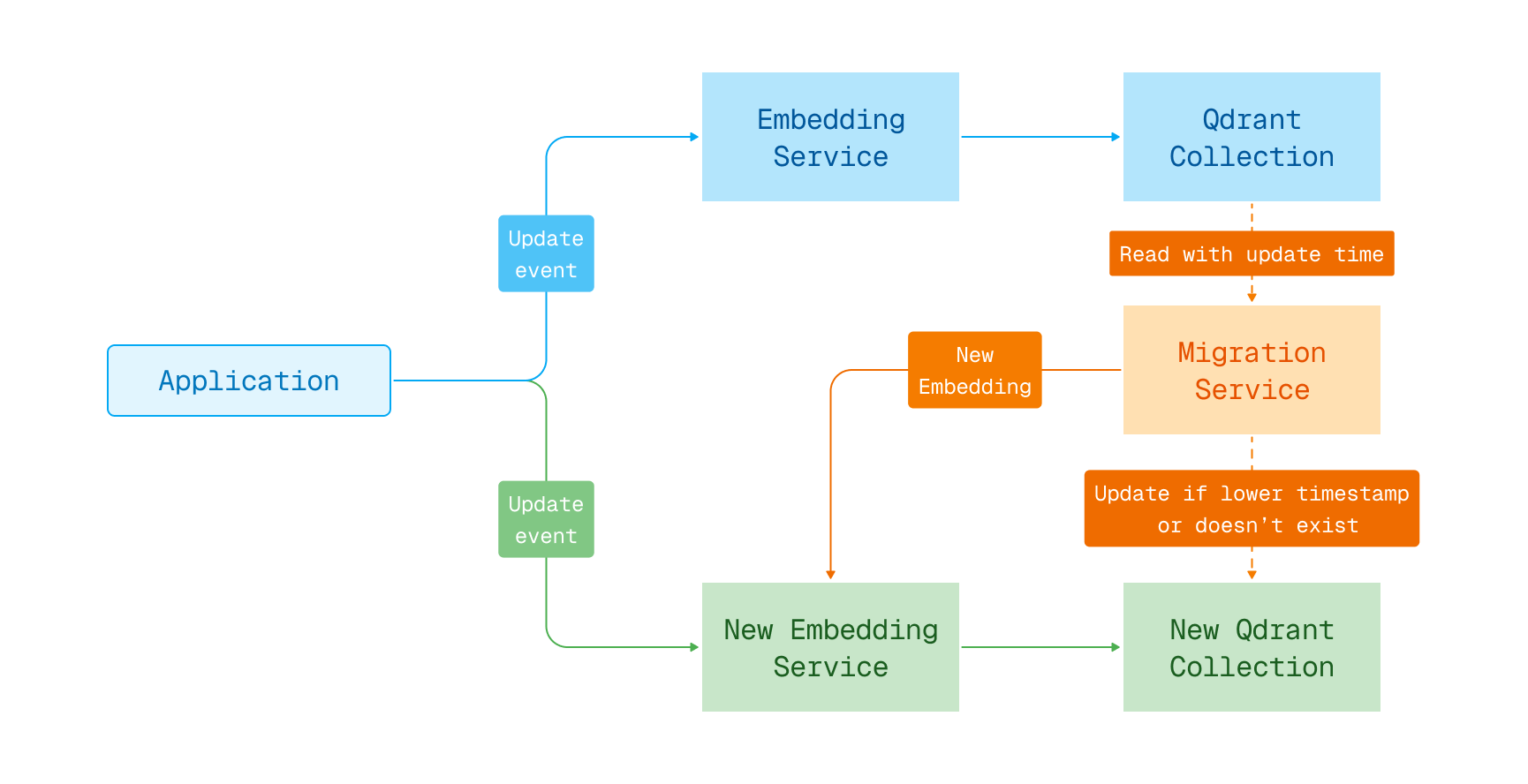
The solution outlined here only works as-is for upsert operations. If you use deletes or partial updates, it is necessary to pause those operations during the migration or implement additional logic to handle them.
Step 1: Create a New Collection
The first step is to create a new collection that will be used to store the new embeddings, compatible with the new model in terms of vector size and similarity function.
client.create_collection(
    collection_name=NEW_COLLECTION,
    vectors_config=(
        models.VectorParams(
            size=512,  # Size of the new embedding vectors
            distance=models.Distance.COSINE  # Similarity function for the new model
        )
    )
)
await client.createCollection(NEW_COLLECTION, {
    vectors: {
        size: 512, // Size of the new embedding vectors
        distance: "Cosine", // Similarity function for the new model
    },
});
client
    .create_collection(
        CreateCollectionBuilder::new(new_collection)
            .vectors_config(VectorParamsBuilder::new(512, Distance::Cosine)), // Size of the new embedding vectors
    )
    .await?;
client.createCollectionAsync(NEW_COLLECTION,
        VectorParams.newBuilder()
            .setSize(512) // Size of the new embedding vectors
            .setDistance(Distance.Cosine) // Similarity function for the new model
            .build()).get();
await client.CreateCollectionAsync(
	collectionName: NEW_COLLECTION,
	vectorsConfig: new VectorParams { Size = 512, Distance = Distance.Cosine }
);
client.CreateCollection(context.Background(), &qdrant.CreateCollection{
	CollectionName: NEW_COLLECTION,
	VectorsConfig: qdrant.NewVectorsConfig(&qdrant.VectorParams{
		Size:     512, // Size of the new embedding vectors
		Distance: qdrant.Distance_Cosine,
	}),
})
Now is also a good moment to consider changing any other settings for the collection, like custom sharding, replication factor, etc. Switching the model may be a good opportunity to improve the performance of your search.
The newly created collection is empty and ready to be used for storing the new embeddings.
Step 2: Enable Dual Writes
To ensure that both collections are kept up-to-date during the migration, write any changes to both collections simultaneously. This way, any new data or updates to existing data are reflected in both collections.
Ideally, the data in Qdrant is updated by an update service reading from an update queue. This service is responsible for embedding the documents and writing them to Qdrant. It uses code similar to this:
client.upsert(
    collection_name=OLD_COLLECTION,
    points=[
        models.PointStruct(
            id=1,
            vector=models.Document(
                text="Example document",
                model=OLD_MODEL,
            ),
            payload={"text": "Example document"}
        )
    ]
)
await client.upsert(OLD_COLLECTION, {
    points: [
        {
            id: 1,
            vector: {
                text: "Example document",
                model: OLD_MODEL,
            },
            payload: { text: "Example document" },
        },
    ],
});
client
    .upsert_points(UpsertPointsBuilder::new(
        old_collection,
        vec![PointStruct::new(
            1,
            Document::new("Example document", old_model),
            [("text", "Example document".into())],
        )],
    ))
    .await?;
client.upsertAsync(OLD_COLLECTION, List.of(
        PointStruct.newBuilder()
            .setId(id(1))
            .setVectors(
                vectors(
                    vector(
                        Document.newBuilder()
                            .setText("Example document")
                            .setModel(OLD_MODEL)
                            .build())))
            .putAllPayload(Map.of("text", value("Example document")))
            .build())).get();
await client.UpsertAsync(
	collectionName: OLD_COLLECTION,
	points: new List<PointStruct>
	{
		new()
		{
			Id = 1,
			Vectors = new Document
			{
				Text = "Example document",
				Model = OLD_MODEL
			},
			Payload = { ["text"] = "Example document" }
		}
	}
);
client.Upsert(context.Background(), &qdrant.UpsertPoints{
	CollectionName: OLD_COLLECTION,
	Points: []*qdrant.PointStruct{
		{
			Id: qdrant.NewIDNum(1),
			Vectors: qdrant.NewVectorsDocument(&qdrant.Document{
				Text:  "Example document",
				Model: OLD_MODEL,
			}),
			Payload: qdrant.NewValueMap(map[string]any{"text": "Example document"}),
		},
	},
})
To update the new collection, deploy a second service that updates the new collection in parallel with the existing one. This service uses the new embedding model to encode the documents and writes them to the new collection:
client.upsert(
    collection_name=NEW_COLLECTION,
    points=[
        models.PointStruct(
            id=1,
            # Use the new embedding model to encode the document
            vector=models.Document(
                text="Example document",
                model=NEW_MODEL,
            ),
            payload={"text": "Example document"}
        )
    ]
)
await client.upsert(NEW_COLLECTION, {
    points: [
        {
            id: 1,
            // Use the new embedding model to encode the document
            vector: {
                text: "Example document",
                model: NEW_MODEL,
            },
            payload: { text: "Example document" },
        },
    ],
});
client
    .upsert_points(UpsertPointsBuilder::new(
        new_collection,
        vec![PointStruct::new(
            1,
            // Use the new embedding model to encode the document
            Document::new("Example document", new_model),
            [("text", "Example document".into())],
        )],
    ))
    .await?;
client.upsertAsync(NEW_COLLECTION, List.of(
        PointStruct.newBuilder()
            .setId(id(1))
            // Use the new embedding model to encode the document
            .setVectors(
                vectors(
                    vector(
                        Document.newBuilder()
                            .setText("Example document")
                            .setModel(NEW_MODEL)
                            .build())))
            .putAllPayload(Map.of("text", value("Example document")))
            .build())).get();
await client.UpsertAsync(
	collectionName: NEW_COLLECTION,
	points: new List<PointStruct>
	{
		new()
		{
			Id = 1,
			// Use the new embedding model to encode the document
			Vectors = new Document
			{
				Text = "Example document",
				Model = NEW_MODEL
			},
			Payload = { ["text"] = "Example document" }
		}
	}
);
client.Upsert(context.Background(), &qdrant.UpsertPoints{
	CollectionName: NEW_COLLECTION,
	Points: []*qdrant.PointStruct{
		{
			Id: qdrant.NewIDNum(1),
			// Use the new embedding model to encode the document
			Vectors: qdrant.NewVectorsDocument(&qdrant.Document{
				Text:  "Example document",
				Model: NEW_MODEL,
			}),
			Payload: qdrant.NewValueMap(map[string]any{"text": "Example document"}),
		},
	},
})
A good practice is to always ensure that both operations succeed. Any errors need to be handled on the client side. You could store errors in a log or “dead letter queue” for later processing. Transient errors can be retried at a later time. Other errors need to be analyzed and addressed accordingly.
If you have a monolithic application instead of update services, you need to modify your application code to write to both collections simultaneously during the transition period. In your code, where you handle the embedding of the documents, you should add the logic to write to both collections.
Note that the method outlined in this tutorial only works for upsert operations. For example, a delete operation would fail on the new collection if a point does not exist yet, and that point would later be erroneously added by the migration process. If you use one of the following methods to modify points in your collection, you will need to pause those operations during the migration or implement additional logic to handle them:
.delete- removing specified points from the collection.update_vectors- updating specified vectors on points.delete_vectors- deleting specified vectors from points.set_payload- setting payload values for specified points.overwrite_payload- overwriting the entire payload of a specified point with a new payload.delete_payload- deleting a specified key payload for points.clear_payload- removing the entire payload for specified points.batch_update_points- making batch updates to points, including their respective vectors and payloads
Refer to the documentation of the SDK you are using, or the HTTP/gRPC definitions, for the exact method names, as they may vary between languages.
After making these changes, you will be in a dual-write mode, where any change is written to both the old and new collection. This allows you to keep both collections up-to-date during the migration process.
Step 3: Migrate the Existing Points into the New Collection
Now that you’re in dual-write mode, it is time to migrate the existing points from the old collection to the new one. This can be done in a separate process that runs in parallel with the regular upsert services.
The migration process reads the points from the old collection, re-embeds them using the new model, and writes them to the new collection, making sure not to overwrite existing points inserted by the update service. Here’s an example of what the code for such a migration process could look like:
last_offset = None
batch_size = 100  # Number of points to read in each batch
reached_end = False

while not reached_end:
    # Get the next batch of points from the old collection
    records, last_offset = client.scroll(
        collection_name=OLD_COLLECTION,
        limit=batch_size,
        offset=last_offset,
        # Include payloads in the response, as we need them to re-embed the vectors
        with_payload=True,
        # We don't need the old vectors, so let's save on the bandwidth
        with_vectors=False,
    )

    # Re-embed the points using the new model
    points = [
        models.PointStruct(
            # Keep the original ID to ensure consistency
            id=record.id,
            # Use the new embedding model to encode the text from the payload,
            # assuming that was the original source of the embedding
            vector=models.Document(
                text=(record.payload or {}).get("text", ""),
                model=NEW_MODEL,
            ),
            # Keep the original payload
            payload=record.payload
        )
        for record in records
    ]

    # Upsert the re-embedded points into the new collection
    client.upsert(
        collection_name=NEW_COLLECTION,
        points=points,
        # Only insert the point if a point with this ID does not already exist.
        update_mode=models.UpdateMode.INSERT_ONLY
    )

    # Check if we reached the end of the collection
    reached_end = (last_offset == None)
let lastOffset: number | string | undefined = undefined;
const batchSize = 100; // Number of points to read in each batch
let reachedEnd = false;

while (!reachedEnd) {
    // Get the next batch of points from the old collection
    const scrollResult = await client.scroll(OLD_COLLECTION, {
        limit: batchSize,
        offset: lastOffset,
        // Include payloads in the response, as we need them to re-embed the vectors
        with_payload: true,
        // We don't need the old vectors, so let's save on the bandwidth
        with_vector: false,
    });

    const records = scrollResult.points;
    lastOffset = scrollResult.next_page_offset as number | string | undefined;

    // Re-embed the points using the new model
    const points = records.map((record) => ({
        // Keep the original ID to ensure consistency
        id: record.id,
        // Use the new embedding model to encode the text from the payload,
        // assuming that was the original source of the embedding
        vector: {
            text: ((record.payload?.text as string) ?? ""),
            model: NEW_MODEL,
        },
        // Keep the original payload
        payload: record.payload,
    }));

    // Upsert the re-embedded points into the new collection
    await client.upsert(NEW_COLLECTION, {
        points,
        // Only insert the point if a point with this ID does not already exist.
        update_mode: "insert_only" as const,
    });

    // Check if we reached the end of the collection
    reachedEnd = lastOffset == null;
}
let mut last_offset = None;
let batch_size = 100; // Number of points to read in each batch

loop {
    // Get the next batch of points from the old collection
    let mut scroll_builder = ScrollPointsBuilder::new(old_collection)
        .limit(batch_size)
        // Include payloads in the response, as we need them to re-embed the vectors
        .with_payload(true)
        // We don't need the old vectors, so let's save on the bandwidth
        .with_vectors(false);

    if let Some(offset) = last_offset {
        scroll_builder = scroll_builder.offset(offset);
    }

    let scroll_result = client.scroll(scroll_builder).await?;

    let records = scroll_result.result;
    last_offset = scroll_result.next_page_offset;

    // Re-embed the points using the new model
    let points: Vec<PointStruct> = records
        .iter()
        .map(|record| {
            PointStruct::new(
                // Keep the original ID to ensure consistency
                record.id.clone().unwrap(),
                // Use the new embedding model to encode the text from the payload,
                // assuming that was the original source of the embedding
                Document::new(
                    record.payload.get("text")
                        .and_then(|v| v.as_str())
                        .map_or("", |v| v),
                    new_model,
                ),
                // Keep the original payload
                record.payload.clone(),
            )
        })
        .collect();

    // Upsert the re-embedded points into the new collection
    client
        .upsert_points(
            // Only insert the point if a point with this ID does not already exist.
            UpsertPointsBuilder::new(new_collection, points)
                .update_mode(UpdateMode::InsertOnly),
        )
        .await?;

    // Check if we reached the end of the collection
    if last_offset.is_none() {
        break;
    }
}
int batchSize = 100; // Number of points to read in each batch
boolean reachedEnd = false;

// Get the next batch of points from the old collection
var scrollBuilder = ScrollPoints.newBuilder()
    .setCollectionName(OLD_COLLECTION)
    .setLimit(batchSize)
    // Include payloads in the response, as we need them to re-embed the vectors
    .setWithPayload(WithPayloadSelectorFactory.enable(true))
    // We don't need the old vectors, so let's save on the bandwidth
    .setWithVectors(WithVectorsSelectorFactory.enable(false));

while (!reachedEnd) {
    var scrollResult = client.scrollAsync(scrollBuilder.build()).get();

    var records = scrollResult.getResultList();

    // Re-embed the points using the new model
    List<PointStruct> points = new ArrayList<>();
    for (var record : records) {
        String text = record.getPayloadMap().containsKey("text")
            ? record.getPayloadMap().get("text").getStringValue()
            : "";

        points.add(
            PointStruct.newBuilder()
                // Keep the original ID to ensure consistency
                .setId(record.getId())
                // Use the new embedding model to encode the text from the payload,
                // assuming that was the original source of the embedding
                .setVectors(
                    vectors(
                        vector(
                            Document.newBuilder()
                                .setText(text)
                                .setModel(NEW_MODEL)
                                .build())))
                // Keep the original payload
                .putAllPayload(record.getPayloadMap())
                .build());
    }

    // Upsert the re-embedded points into the new collection
    client.upsertAsync(
        UpsertPoints.newBuilder()
            .setCollectionName(NEW_COLLECTION)
            .addAllPoints(points)
            // Only insert the point if a point with this ID does not already exist.
            .setUpdateMode(UpdateMode.InsertOnly)
            .build()).get();

    // Check if we reached the end of the collection
    if (scrollResult.hasNextPageOffset()) {
        scrollBuilder.setOffset(scrollResult.getNextPageOffset());
    } else {
        reachedEnd = true;
    }
}
PointId? lastOffset = null;
uint limit = 100; // Number of points to read in each batch
bool reachedEnd = false;

while (!reachedEnd)
{
	// Get the next batch of points from the old collection
	var scrollResult = await client.ScrollAsync(
		collectionName: OLD_COLLECTION,
		limit: limit,
		offset: lastOffset,
		// Include payloads in the response, as we need them to re-embed the vectors
		payloadSelector: true,
		// We don't need the old vectors, so let's save on the bandwidth
		vectorsSelector: false
	);

	var records = scrollResult.Result;
	lastOffset = scrollResult.NextPageOffset;

	// Re-embed the points using the new model
	var points = new List<PointStruct>();
	foreach (var record in records)
	{
		var text = record.Payload.ContainsKey("text")
			? record.Payload["text"].StringValue
			: "";

		points.Add(new PointStruct
		{
			// Keep the original ID to ensure consistency
			Id = record.Id,
			// Use the new embedding model to encode the text from the payload,
			// assuming that was the original source of the embedding
			Vectors = new Document
			{
				Text = text,
				Model = NEW_MODEL
			},
			// Keep the original payload
			Payload = { record.Payload }
		});
	}

	// Upsert the re-embedded points into the new collection
	await client.UpsertAsync(
		new()
		{
			CollectionName = NEW_COLLECTION,
			Points = { points },
			// Only insert the point if a point with this ID does not already exist.
			UpdateMode = UpdateMode.InsertOnly
		}
	);

	// Check if we reached the end of the collection
	reachedEnd = (lastOffset == null);
}
var lastOffset *qdrant.PointId
batchSize := uint32(100) // Number of points to read in each batch
reachedEnd := false

for !reachedEnd {
	// Get the next batch of points from the old collection
	scrollResult, err := client.Scroll(context.Background(), &qdrant.ScrollPoints{
		CollectionName: OLD_COLLECTION,
		Limit:          qdrant.PtrOf(batchSize),
		Offset:         lastOffset,
		// Include payloads in the response, as we need them to re-embed the vectors
		WithPayload: qdrant.NewWithPayload(true),
		// We don't need the old vectors, so let's save on the bandwidth
		WithVectors: qdrant.NewWithVectors(false),
	})

	records := scrollResult

	// Re-embed the points using the new model
	points := make([]*qdrant.PointStruct, len(records))
	for idx, record := range records {
		text := ""
		if val, ok := record.Payload["text"]; ok {
			text = val.GetStringValue()
		}

		points[idx] = &qdrant.PointStruct{
			// Keep the original ID to ensure consistency
			Id: record.Id,
			// Use the new embedding model to encode the text from the payload,
			// assuming that was the original source of the embedding
			Vectors: qdrant.NewVectorsDocument(&qdrant.Document{
				Text:  text,
				Model: NEW_MODEL,
			}),
			// Keep the original payload
			Payload: record.Payload,
		}
	}

	// Upsert the re-embedded points into the new collection
	client.Upsert(context.Background(), &qdrant.UpsertPoints{
		CollectionName: NEW_COLLECTION,
		Points:         points,
		// Only insert the point if a point with this ID does not already exist.
		UpdateMode: qdrant.UpdateMode_InsertOnly.Enum(),
	})

	// Check if we reached the end of the collection
	reachedEnd = (lastOffset == nil)
}
Breaking down this code step by step:
- Data is read from the old collection in batches of 100 points using a scroll.
- For each batch of points, the process re-embeds the vectors using the new embedding model. It assumes that the original text used for embedding is stored in the payload under the key
text. - With the re-embedded vectors, it upserts the points into the new collection, keeping the original IDs and payloads. The upserts use insert-only mode to ensure that a point is only inserted if it does not already exist in the new collection (available in version 1.16 or later). This prevents overwriting newer updates from the regular update service.
The migration process can take some time, and the offset can be stored in a persistent way so you can resume the migration process in case of a failure. You can use a database, a file, or any other persistent storage to keep track of the last offset. Having said that, because the conditional upserts would not overwrite any points in the new collection, you could safely restart the migration process from the beginning if needed.
Step 4: Change the Collection and Embedding Model for Searches
Once the migration process is complete and all the points from the old collection are re-embedded and stored in the new collection, compare retrieval quality between the two collections on your own queries. If you have not deleted any points since the migration started, count on both collections returns the same number, which is a quick completeness check. When the new collection performs at least as well, you can roll out a configuration change of the backend application. There are two key changes you have to make:
- The collection name. Switch this from the old collection to the new collection. If you’re using a collection alias, switch the alias to point to the new collection. Deleting and recreating the alias in a single request makes the switch atomic:
client.update_collection_aliases(
    change_aliases_operations=[
        models.DeleteAliasOperation(
            delete_alias=models.DeleteAlias(alias_name="prod")
        ),
        models.CreateAliasOperation(
            create_alias=models.CreateAlias(
                collection_name=NEW_COLLECTION, alias_name="prod"
            )
        ),
    ]
)
await client.updateCollectionAliases({
  actions: [
    {
      delete_alias: {
        alias_name: "prod",
      },
    },
    {
      create_alias: {
        collection_name: NEW_COLLECTION,
        alias_name: "prod",
      },
    },
  ],
});
// Use the HTTP API to submit both alias operations in one atomic request.
// The REST endpoint uses port 6333, unlike the gRPC client's port 6334.
let qdrant_rest_url = "https://your-cluster.cloud.qdrant.io:6333";
ureq::post(format!("{qdrant_rest_url}/collections/aliases"))
    .header("api-key", QDRANT_API_KEY)
    .send_json(serde_json::json!({
        "actions": [
            {"delete_alias": {"alias_name": "prod"}},
            {"create_alias": {
                "alias_name": "prod",
                "collection_name": new_collection
            }}
        ]
    }))?;
client.updateAliasesAsync(List.of(
    AliasOperations.newBuilder()
        .setDeleteAlias(DeleteAlias.newBuilder().setAliasName("prod").build())
        .build(),
    AliasOperations.newBuilder()
        .setCreateAlias(CreateAlias.newBuilder()
            .setAliasName("prod")
            .setCollectionName(NEW_COLLECTION)
            .build())
        .build()
)).get();
await client.UpdateAliasesAsync(new AliasOperations[]
{
	new() { DeleteAlias = new DeleteAlias { AliasName = "prod" } },
	new()
	{
		CreateAlias = new CreateAlias
		{
			AliasName = "prod",
			CollectionName = NEW_COLLECTION
		}
	}
});
err = client.UpdateAliases(context.Background(), []*qdrant.AliasOperations{
	qdrant.NewAliasDelete("prod"),
	qdrant.NewAliasCreate("prod", NEW_COLLECTION),
})
- The embedding model. Switch this from the old embedding model to the new embedding model.
If these values are hardcoded in your application, you will need to change them directly in the code and deploy a new version of your application. For example, if your current search code looks like this:
results = client.query_points(
    collection_name=OLD_COLLECTION,
    query=models.Document(text="my query", model=OLD_MODEL),
    limit=10,
)
const results = await client.query(OLD_COLLECTION, {
    query: {
        text: "my query",
        model: OLD_MODEL,
    },
    limit: 10,
});
let results = client
    .query(
        QueryPointsBuilder::new(old_collection)
            .query(Query::new_nearest(Document::new("my query", old_model)))
            .limit(10),
    )
    .await?;
QueryPoints oldRequest =
    QueryPoints.newBuilder()
        .setCollectionName(OLD_COLLECTION)
        .setQuery(
            nearest(
                Document.newBuilder()
                    .setText("my query")
                    .setModel(OLD_MODEL)
                    .build()))
        .setLimit(10)
        .build();

var results = client.queryAsync(oldRequest).get();
var results = await client.QueryAsync(
	collectionName: OLD_COLLECTION,
	query: new Document
	{
		Text = "my query",
		Model = OLD_MODEL
	},
	limit: 10
);
results, err := client.Query(context.Background(), &qdrant.QueryPoints{
	CollectionName: OLD_COLLECTION,
	Query: qdrant.NewQueryDocument(&qdrant.Document{
		Text:  "my query",
		Model: OLD_MODEL,
	}),
	Limit: qdrant.PtrOf(uint64(10)),
})
You need to change it in the following way:
results = client.query_points(
    collection_name=NEW_COLLECTION,
    query=models.Document(text="my query", model=NEW_MODEL),
    limit=10,
)
const resultsNew = await client.query(NEW_COLLECTION, {
    query: {
        text: "my query",
        model: NEW_MODEL,
    },
    limit: 10,
});
let results = client
    .query(
        QueryPointsBuilder::new(new_collection)
            .query(Query::new_nearest(Document::new("my query", new_model)))
            .limit(10),
    )
    .await?;
QueryPoints newRequest =
    QueryPoints.newBuilder()
        .setCollectionName(NEW_COLLECTION)
        .setQuery(
            nearest(
                Document.newBuilder()
                    .setText("my query")
                    .setModel(NEW_MODEL)
                    .build()))
        .setLimit(10)
        .build();

results = client.queryAsync(newRequest).get();
results = await client.QueryAsync(
	collectionName: NEW_COLLECTION,
	query: new Document
	{
		Text = "my query",
		Model = NEW_MODEL
	},
	limit: 10
);
results, err = client.Query(context.Background(), &qdrant.QueryPoints{
	CollectionName: NEW_COLLECTION,
	Query: qdrant.NewQueryDocument(&qdrant.Document{
		Text:  "my query",
		Model: NEW_MODEL,
	}),
	Limit: qdrant.PtrOf(uint64(10)),
})
Step 5: Wrapping Up
Once your application has switched to the new collection, keep the dual-write mode from Step 2 running for an observation period. While the old collection still receives every write, you can roll back at any time by pointing the alias (or the collection name) back at the old collection and switching the embedding model back. Run the same call as in Step 4 with OLD_COLLECTION.
When you are confident in the new model, disable dual writes. From now on, the application should only write to the new collection. Rolling back after this point means losing every write since, because the old collection no longer receives updates.
All searches are now performed using the new embeddings. If the old collection is no longer needed, you can safely delete it. To keep the option of restoring it, take a snapshot of the old collection first.
Migrate Using Named Vectors
If your collection uses named vectors and your deployment is running version 1.18 or later, you can migrate to a new embedding model without creating a second collection. Instead, add the new model as an additional named vector to the existing collection’s schema, re-embed points in the background, switch the using parameter in your search queries, and then delete the old named vector.
This approach only works when your collection was created with named vectors and your deployment is running version 1.18 or later. If not, use a blue-green migration instead.
Step 1: Add the New Named Vector
Add the new model’s vector schema to the existing collection. This is a schema-only operation: no segments are rebuilt and no existing point data is modified. The new vector is queryable immediately, but queries return no results until points are populated with values for it.
client.create_vector_name(
    collection_name=COLLECTION,
    vector_name=NEW_VECTOR,
    vector_name_config=models.DenseVectorNameConfig(
        dense=models.DenseVectorConfig(
            size=512,  # Size of the new embedding vectors
            distance=models.Distance.COSINE  # Similarity function for the new model
        )
    ),
)
await client.createVectorName(COLLECTION, NEW_VECTOR, {
    dense: {
        size: 512, // Size of the new embedding vectors
        distance: "Cosine", // Similarity function for the new model
    },
});
client
    .create_vector_name(
        CreateVectorNameRequestBuilder::new(
            collection,
            new_vector,
            DenseVectorCreationConfigBuilder::new(512, Distance::Cosine), // Size of the new embedding vectors
        ),
    )
    .await?;
client
    .createVectorNameAsync(
        CreateVectorNameRequest.newBuilder()
            .setCollectionName(COLLECTION)
            .setVectorName(NEW_VECTOR)
            .setDenseConfig(
                DenseVectorCreationConfig.newBuilder()
                    .setSize(512) // Size of the new embedding vectors
                    .setDistance(Distance.Cosine) // Similarity function for the new model
                    .build())
            .build())
    .get();
await client.CreateVectorNameAsync(new()
{
	CollectionName = COLLECTION,
	VectorName = NEW_VECTOR,
	DenseConfig = new() { Size = 512, Distance = Distance.Cosine }
});
client.CreateVectorName(context.Background(), &qdrant.CreateVectorNameRequest{
	CollectionName: COLLECTION,
	VectorName:     NEW_VECTOR,
	VectorConfig: &qdrant.CreateVectorNameRequest_DenseConfig{
		DenseConfig: &qdrant.DenseVectorCreationConfig{
			Size:     512, // Size of the new embedding vectors
			Distance: qdrant.Distance_Cosine,
		},
	},
})
Step 2: Enable Dual Writes
Update your upsert service to embed each document with both models and write both named vectors on every upsert:
client.upsert(
    collection_name=COLLECTION,
    points=[
        models.PointStruct(
            id=1,
            vector={
                OLD_VECTOR: models.Document(
                    text="Example document",
                    model=OLD_MODEL,
                ),
                NEW_VECTOR: models.Document(
                    text="Example document",
                    model=NEW_MODEL,
                ),
            },
            payload={"text": "Example document"}
        )
    ]
)
await client.upsert(COLLECTION, {
    points: [
        {
            id: 1,
            vector: {
                [OLD_VECTOR]: {
                    text: "Example document",
                    model: OLD_MODEL,
                },
                [NEW_VECTOR]: {
                    text: "Example document",
                    model: NEW_MODEL,
                },
            },
            payload: { text: "Example document" },
        },
    ],
});
client
    .upsert_points(UpsertPointsBuilder::new(
        collection,
        vec![PointStruct::new(
            1,
            NamedVectors::default()
                .add_vector(
                    old_vector,
                    Document {
                        text: "Example document".into(),
                        model: old_model.into(),
                        ..Default::default()
                    },
                )
                .add_vector(
                    new_vector,
                    Document {
                        text: "Example document".into(),
                        model: new_model.into(),
                        ..Default::default()
                    },
                ),
            [("text", "Example document".into())],
        )],
    ))
    .await?;
client.upsertAsync(COLLECTION, List.of(
    PointStruct.newBuilder()
        .setId(id(1))
        .setVectors(
            namedVectors(
                Map.of(
                    OLD_VECTOR, vector(
                        Document.newBuilder()
                            .setText("Example document")
                            .setModel(OLD_MODEL)
                            .build()),
                    NEW_VECTOR, vector(
                        Document.newBuilder()
                            .setText("Example document")
                            .setModel(NEW_MODEL)
                            .build()))))
        .putAllPayload(Map.of("text", value("Example document")))
        .build())).get();
await client.UpsertAsync(
	collectionName: COLLECTION,
	points: new List<PointStruct>
	{
		new()
		{
			Id = 1,
			Vectors = new Dictionary<string, Vector>
			{
				[OLD_VECTOR] = new Document { Text = "Example document", Model = OLD_MODEL },
				[NEW_VECTOR] = new Document { Text = "Example document", Model = NEW_MODEL },
			},
			Payload = { ["text"] = "Example document" }
		}
	}
);
client.Upsert(context.Background(), &qdrant.UpsertPoints{
	CollectionName: COLLECTION,
	Points: []*qdrant.PointStruct{
		{
			Id: qdrant.NewIDNum(1),
			Vectors: qdrant.NewVectorsMap(map[string]*qdrant.Vector{
				OLD_VECTOR: qdrant.NewVectorDocument(&qdrant.Document{
					Text:  "Example document",
					Model: OLD_MODEL,
				}),
				NEW_VECTOR: qdrant.NewVectorDocument(&qdrant.Document{
					Text:  "Example document",
					Model: NEW_MODEL,
				}),
			}),
			Payload: qdrant.NewValueMap(map[string]any{"text": "Example document"}),
		},
	},
})
From this point on, every new or updated point carries both embeddings.
Step 3: Re-Embed Existing Points
Run a background process that scrolls through the collection and updates only the new named vector on each existing point. Because update_vectors is used rather than upsert, the old named vector and the payload on each point remain unchanged.
last_offset = None
batch_size = 100
reached_end = False

while not reached_end:
    records, last_offset = client.scroll(
        collection_name=COLLECTION,
        limit=batch_size,
        offset=last_offset,
        with_payload=True,
        with_vectors=False,
    )

    # Update only the new vector on each point; the old vector and payload are untouched
    client.update_vectors(
        collection_name=COLLECTION,
        points=[
            models.PointVectors(
                id=record.id,
                vector={
                    NEW_VECTOR: models.Document(
                        text=(record.payload or {}).get("text", ""),
                        model=NEW_MODEL,
                    )
                },
            )
            for record in records
        ],
    )

    reached_end = last_offset is None
let reEmbedLastOffset: number | string | undefined = undefined;
const reEmbedBatchSize = 100;
let reEmbedReachedEnd = false;

while (!reEmbedReachedEnd) {
    const reEmbedScrollResult = await client.scroll(COLLECTION, {
        limit: reEmbedBatchSize,
        offset: reEmbedLastOffset,
        with_payload: true,
        with_vector: false,
    });

    const records = reEmbedScrollResult.points;
    reEmbedLastOffset = reEmbedScrollResult.next_page_offset as number | string | undefined;

    // Update only the new vector on each point; the old vector and payload are untouched
    await client.updateVectors(COLLECTION, {
        points: records.map((record) => ({
            id: record.id,
            vector: {
                [NEW_VECTOR]: {
                    text: ((record.payload?.text as string) ?? ""),
                    model: NEW_MODEL,
                },
            },
        })),
    });

    reEmbedReachedEnd = reEmbedLastOffset == null;
}
let mut last_offset = None;
let batch_size = 100;

loop {
    let mut scroll_builder = ScrollPointsBuilder::new(collection)
        .limit(batch_size)
        .with_payload(true)
        .with_vectors(false);

    if let Some(offset) = last_offset {
        scroll_builder = scroll_builder.offset(offset);
    }

    let scroll_result = client.scroll(scroll_builder).await?;
    let records = scroll_result.result;
    last_offset = scroll_result.next_page_offset;

    // Update only the new vector on each point; the old vector and payload are untouched
    let point_vectors: Vec<PointVectors> = records
        .iter()
        .map(|record| PointVectors {
            id: record.id.clone(),
            vectors: Some(
                HashMap::<String, Document>::from([(
                    new_vector.to_string(),
                    Document::new(
                        record.payload.get("text")
                            .and_then(|v| v.as_str())
                            .map_or("", |v| v),
                        new_model,
                    ),
                )])
                .into(),
            ),
        })
        .collect();

    client
        .update_vectors(UpdatePointVectorsBuilder::new(collection, point_vectors))
        .await?;

    if last_offset.is_none() {
        break;
    }
}
int reEmbedBatchSize = 100;
boolean reEmbedReachedEnd = false;

var reEmbedScrollBuilder = ScrollPoints.newBuilder()
    .setCollectionName(COLLECTION)
    .setLimit(reEmbedBatchSize)
    .setWithPayload(WithPayloadSelectorFactory.enable(true))
    .setWithVectors(WithVectorsSelectorFactory.enable(false));

while (!reEmbedReachedEnd) {
    var reEmbedScrollResult = client.scrollAsync(reEmbedScrollBuilder.build()).get();
    var reEmbedRecords = reEmbedScrollResult.getResultList();

    List<PointVectors> pointVectors = new ArrayList<>();
    for (var record : reEmbedRecords) {
        String text = record.getPayloadMap().containsKey("text")
            ? record.getPayloadMap().get("text").getStringValue()
            : "";

        // Update only the new vector on each point; the old vector and payload are untouched
        pointVectors.add(
            PointVectors.newBuilder()
                .setId(record.getId())
                .setVectors(
                    namedVectors(
                        Map.of(
                            NEW_VECTOR, vector(
                                Document.newBuilder()
                                    .setText(text)
                                    .setModel(NEW_MODEL)
                                    .build()))))
                .build());
    }

    client.updateVectorsAsync(COLLECTION, pointVectors).get();

    if (reEmbedScrollResult.hasNextPageOffset()) {
        reEmbedScrollBuilder.setOffset(reEmbedScrollResult.getNextPageOffset());
    } else {
        reEmbedReachedEnd = true;
    }
}
PointId? reEmbedLastOffset = null;
uint reEmbedBatchSize = 100;
bool reEmbedReachedEnd = false;

while (!reEmbedReachedEnd)
{
	var reEmbedScrollResult = await client.ScrollAsync(
		collectionName: COLLECTION,
		limit: reEmbedBatchSize,
		offset: reEmbedLastOffset,
		payloadSelector: true,
		vectorsSelector: false
	);

	var reEmbedRecords = reEmbedScrollResult.Result;
	reEmbedLastOffset = reEmbedScrollResult.NextPageOffset;

	var pointVectors = new List<PointVectors>();
	foreach (var record in reEmbedRecords)
	{
		var text = record.Payload.ContainsKey("text")
			? record.Payload["text"].StringValue
			: "";

		// Update only the new vector on each point; the old vector and payload are untouched
		pointVectors.Add(new PointVectors
		{
			Id = record.Id,
			Vectors = new Dictionary<string, Vector>
			{
				[NEW_VECTOR] = new Document { Text = text, Model = NEW_MODEL }
			}
		});
	}

	await client.UpdateVectorsAsync(collectionName: COLLECTION, points: pointVectors);

	reEmbedReachedEnd = (reEmbedLastOffset == null);
}
var reEmbedLastOffset *qdrant.PointId
reEmbedBatchSize := uint32(100)
reEmbedReachedEnd := false

for !reEmbedReachedEnd {
	reEmbedScrollResult, err := client.Scroll(context.Background(), &qdrant.ScrollPoints{
		CollectionName: COLLECTION,
		Limit:          qdrant.PtrOf(reEmbedBatchSize),
		Offset:         reEmbedLastOffset,
		WithPayload:    qdrant.NewWithPayload(true),
		WithVectors:    qdrant.NewWithVectors(false),
	})

	reEmbedRecords := reEmbedScrollResult

	pointVectors := make([]*qdrant.PointVectors, len(reEmbedRecords))
	for idx, record := range reEmbedRecords {
		text := ""
		if val, ok := record.Payload["text"]; ok {
			text = val.GetStringValue()
		}

		// Update only the new vector on each point; the old vector and payload are untouched
		pointVectors[idx] = &qdrant.PointVectors{
			Id: record.Id,
			Vectors: qdrant.NewVectorsMap(map[string]*qdrant.Vector{
				NEW_VECTOR: qdrant.NewVectorDocument(&qdrant.Document{
					Text:  text,
					Model: NEW_MODEL,
				}),
			}),
		}
	}

	client.UpdateVectors(context.Background(), &qdrant.UpdatePointVectors{
		CollectionName: COLLECTION,
		Points:         pointVectors,
	})

	reEmbedReachedEnd = (reEmbedLastOffset == nil)
}
Once the backfill has completed successfully, resume updates and deletes with dual writes enabled so every new or updated point continues to receive both embeddings.
Step 4: Switch Search to the New Vector
Before switching, check that no point is missing the new vector, then compare retrieval quality between the two vectors on your own queries. This count returns 0 when the re-embedding is complete:
missing = client.count(
    collection_name=COLLECTION,
    count_filter=models.Filter(
        must_not=[models.HasVectorCondition(has_vector=NEW_VECTOR)]
    ),
    exact=True,
).count
await client.count(COLLECTION, {
    filter: {
        must_not: [
            {
                has_vector: NEW_VECTOR,
            },
        ],
    },
    exact: true,
});
client
    .count(
        CountPointsBuilder::new(collection)
            .filter(Filter::must_not([Condition::has_vector(new_vector)]))
            .exact(true),
    )
    .await?;
client
    .countAsync(
        COLLECTION,
        Filter.newBuilder().addMustNot(hasVector(NEW_VECTOR)).build(),
        true)
    .get();
		await client.CountAsync(
            collectionName: COLLECTION,
            filter: new Filter { MustNot = { HasVector(NEW_VECTOR) } },
            exact: true
		);
count, err := client.Count(context.Background(), &qdrant.CountPoints{
	CollectionName: COLLECTION,
	Exact: qdrant.PtrOf(true),
	Filter: &qdrant.Filter{
		MustNot: []*qdrant.Condition{
			qdrant.NewHasVector(NEW_VECTOR),
		},
	},
})
When every point has the new vector and it performs at least as well, change the query logic:
- switch the
usingparameter from the old vector to the new vector. - switch the embedding model from the old model to the new model.
Before:
results = client.query_points(
    collection_name=COLLECTION,
    query=models.Document(text="my query", model=OLD_MODEL),
    using=OLD_VECTOR,
    limit=10,
)
const oldVectorResults = await client.query(COLLECTION, {
    query: {
        text: "my query",
        model: OLD_MODEL,
    },
    using: OLD_VECTOR,
    limit: 10,
});
let old_vector_results = client
    .query(
        QueryPointsBuilder::new(collection)
            .query(Query::new_nearest(Document::new("my query", old_model)))
            .using(old_vector)
            .limit(10),
    )
    .await?;
var oldVectorResults = client.queryAsync(
    QueryPoints.newBuilder()
        .setCollectionName(COLLECTION)
        .setQuery(
            nearest(
                Document.newBuilder()
                    .setText("my query")
                    .setModel(OLD_MODEL)
                    .build()))
        .setUsing(OLD_VECTOR)
        .setLimit(10)
        .build()).get();
var oldVectorResults = await client.QueryAsync(
	collectionName: COLLECTION,
	query: new Document { Text = "my query", Model = OLD_MODEL },
	usingVector: OLD_VECTOR,
	limit: 10
);
oldVectorResults, err := client.Query(context.Background(), &qdrant.QueryPoints{
	CollectionName: COLLECTION,
	Query: qdrant.NewQueryDocument(&qdrant.Document{
		Text:  "my query",
		Model: OLD_MODEL,
	}),
	Using: qdrant.PtrOf(OLD_VECTOR),
	Limit: qdrant.PtrOf(uint64(10)),
})
After:
results = client.query_points(
    collection_name=COLLECTION,
    query=models.Document(text="my query", model=NEW_MODEL),
    using=NEW_VECTOR,
    limit=10,
)
const newVectorResults = await client.query(COLLECTION, {
    query: {
        text: "my query",
        model: NEW_MODEL,
    },
    using: NEW_VECTOR,
    limit: 10,
});
let new_vector_results = client
    .query(
        QueryPointsBuilder::new(collection)
            .query(Query::new_nearest(Document::new("my query", new_model)))
            .using(new_vector)
            .limit(10),
    )
    .await?;
var newVectorResults = client.queryAsync(
    QueryPoints.newBuilder()
        .setCollectionName(COLLECTION)
        .setQuery(
            nearest(
                Document.newBuilder()
                    .setText("my query")
                    .setModel(NEW_MODEL)
                    .build()))
        .setUsing(NEW_VECTOR)
        .setLimit(10)
        .build()).get();
var newVectorResults = await client.QueryAsync(
	collectionName: COLLECTION,
	query: new Document { Text = "my query", Model = NEW_MODEL },
	usingVector: NEW_VECTOR,
	limit: 10
);
newVectorResults, err := client.Query(context.Background(), &qdrant.QueryPoints{
	CollectionName: COLLECTION,
	Query: qdrant.NewQueryDocument(&qdrant.Document{
		Text:  "my query",
		Model: NEW_MODEL,
	}),
	Using: qdrant.PtrOf(NEW_VECTOR),
	Limit: qdrant.PtrOf(uint64(10)),
})
Step 5: Disable Dual Writes and Delete the Old Named Vector
Once all search traffic uses the new vector, keep dual writes running for an observation period. Until you delete the old vector, you can roll back by switching the using parameter and the embedding model back to the old values.
When you are confident in the new model, change your upsert service to write only to the new vector going forward. Next, delete the old named vector from the collection. Deleting it is the point of no return: queries that use the old vector name fail afterwards, and the old embeddings can only be restored by re-embedding.
client.delete_vector_name(
    collection_name=COLLECTION,
    vector_name=OLD_VECTOR,
)
await client.deleteVectorName(COLLECTION, OLD_VECTOR);
client
    .delete_vector_name(DeleteVectorNameRequestBuilder::new(
        collection,
        old_vector,
    ))
    .await?;
client
    .deleteVectorNameAsync(
        DeleteVectorNameRequest.newBuilder()
            .setCollectionName(COLLECTION)
            .setVectorName(OLD_VECTOR)
            .build())
    .get();
await client.DeleteVectorNameAsync(new()
{
	CollectionName = COLLECTION,
	VectorName = OLD_VECTOR
});
client.DeleteVectorName(context.Background(), &qdrant.DeleteVectorNameRequest{
	CollectionName: COLLECTION,
	VectorName:     OLD_VECTOR,
})
The old vector’s storage is reclaimed after the next optimizer run. All point IDs, payloads, and the new named vector remain intact.
Check Retrieval Quality Before Switching
A new embedding model is not automatically better on your data, so measure it before you move traffic. Both embeddings exist side by side at this point (two collections in a blue-green migration, two named vectors in the other option), which makes it possible to run identical queries against each and compare the results.
Start from a labeled set of queries, with the documents that should be returned for each one. Measuring Retrieval Relevance explains how to build it from logs, human annotation, or synthetic queries, and how to choose metrics. Use real queries from your application where you can, because a model that wins on generic benchmarks can still lose on your domain.
To score both setups, follow these steps:
- Query each setup with the same inputs. For every query in the labeled set, ask the old setup and the new setup for the top
kresults. Use the samekfor both. In a blue-green migration, that means querying the old and new collections, each with its own model. With named vectors, query the one collection twice and select the old or new vector each time, again with the matching model. - Collect the ranked results per query. Record the document IDs in the order returned, along with their scores. Make sure the IDs use the same format as the IDs in your labeled set (for example, strings on both sides), or nothing will match.
- Compute the metrics against the labels. Use an evaluation library such as ranx for Python, or implement the metrics yourself in other languages. Three metrics cover most cases:
- Recall@10: the share of the relevant documents that appear in the top 10.
- MRR: the average of 1 divided by the rank of the first relevant result, which rewards putting a correct answer near the top.
- nDCG@10: a score that rewards relevant documents appearing higher in the list, and handles graded relevance.
- Compare the two score sets.
Read the comparison with these points in mind:
- Decide the bar first. Pick what metric to look at, and how big the gains have to be to justify the switch to a new embedding model. Different metrics can rank the two models differently.
- Look at individual queries. Average can often hide a group of queries that got worse on the new embedding model. Sort the query by score and read the biggest regression.
- Weigh the costs. A model with larger vectors needs more memory and disk, and may change search latency. Compare these on the new collection as well as the quality scores.
- Without labels, you can only measure difference. The overlap between the top results of both models tells you how much the switch changes what users see, not which results are better. Review the queries with the lowest overlap by hand.
If the new model does not clear the bar, stop here. Production still serves the old embeddings, so the only cleanup is deleting the new collection, or the new named vector with delete_vector_name.
 Ready to try Qdrant?