
Secure a Self-Hosted Qdrant Instance
| Time: 45 min | Level: Intermediate |
|---|
Qdrant offers a comprehensive set of security and access control features that enable you to protect your data and control access at multiple levels. By default, these features are enabled on Qdrant Cloud deployments. However, self-hosted Qdrant deployments default to no authentication and no encryption: every interface on the host is reachable without a key or password. For self-hosted instances, it is crucial to secure your instance before connecting it to any network.
This tutorial walks through securing a self-hosted Qdrant instance step by step. You will:
- Enable TLS to encrypt traffic between clients and your Qdrant instance.
- Set up an admin API key to require authentication for all requests.
- Restrict consumers with a read-only key to prevent unintended writes.
- Issue granular access API keys to scope permissions to specific collections.
Qdrant Cloud deployments are always secure by default. This tutorial covers self-hosted deployments only. While this tutorial uses Docker Compose, the same security features and configurations apply to any self-hosted deployment method.
Prerequisites
- Docker and Docker Compose installed
curlavailable in your terminal- mkcert for generating a local self-signed certificate (installation instructions)
- TLS requires Qdrant 1.2 or later, API key authentication requires Qdrant 1.2 or later, and granular access API keys (JWT) require Qdrant 1.9 or later. This tutorial uses the latest Qdrant image, which includes all these features.
Step 1: Start an Unsecured Instance
Start Qdrant using the standard Docker Compose setup. Create a docker-compose.yml file:
services:
  qdrant:
    image: qdrant/qdrant
    ports:
      - "6333:6333"
      - "6334:6334"
    volumes:
      - qdrant_storage:/qdrant/storage:z

volumes:
  qdrant_storage:
Start the instance:
docker compose up -d
Confirm that no credentials are required when connecting to the REST API port with curl:
curl http://localhost:6333
Expected response:
{"title":"qdrant - vector search engine","version":"...","commit":"..."}
Step 2: Enable TLS
Unencrypted connections allow anyone on the network to read your API key and data in transit. Enable TLS to encrypt all traffic.
First, add a local certificate authority to your system trust store, so curl and your browser will accept the certificate without extra flags.
mkcert -install
Next, generate a locally trusted certificate with mkcert:
mkdir tls && mkcert -cert-file tls/cert.pem -key-file tls/key.pem localhost 127.0.0.1
If you’re using the Python or TypeScript clients, set the following environment variables to allow the clients to find the certificate:
export SSL_CERT_FILE=$(mkcert -CAROOT)/rootCA.pem
export NODE_EXTRA_CA_CERTS=$(mkcert -CAROOT)/rootCA.pem
If you’re using the Java client, add the certificate to the Java trust store:
keytool -importcert \
  -file $(mkcert -CAROOT)/rootCA.pem \
  -alias mkcert-local \
  -keystore $JAVA_HOME/lib/security/cacerts \
  -storepass changeit -noprompt
Next, update docker-compose.yml to enable TLS and mount the certificate files:
services:
  qdrant:
    image: qdrant/qdrant
    ports:
      - "6333:6333"
      - "6334:6334"
    environment:
      QDRANT__SERVICE__ENABLE_TLS: "true"
      QDRANT__TLS__CERT: /qdrant/tls/cert.pem
      QDRANT__TLS__KEY: /qdrant/tls/key.pem
    volumes:
      - ./tls:/qdrant/tls:ro
      - qdrant_storage:/qdrant/storage:z

volumes:
  qdrant_storage:
Restart Qdrant to apply the changes:
docker compose down && docker compose up -d
Now, unencrypted HTTP requests are rejected:
curl http://localhost:6333
However, HTTPS requests succeed:
curl https://localhost:6333
Refer to Security > TLS to learn more about TLS configuration.
Step 3: Enable an Admin API Key
Without enabling authentication, anyone with network access to a Qdrant instance can read, write, or delete all its data. Set an admin API key to require credentials on every request.
Set the QDRANT__SERVICE__API_KEY environment variable to the API key in docker-compose.yml:
    environment:
      QDRANT__SERVICE__ENABLE_TLS: "true"
      QDRANT__TLS__CERT: /qdrant/tls/cert.pem
      QDRANT__TLS__KEY: /qdrant/tls/key.pem
      QDRANT__SERVICE__API_KEY: "my-admin-key"
Restart Qdrant to apply the changes:
docker compose down && docker compose up -d
Verify that unauthenticated requests are now rejected:
curl https://localhost:6333/collections
The same behavior applies to the clients. Ingesting a point without an API key is blocked:
from qdrant_client import QdrantClient, models

client = QdrantClient(url="https://localhost:6333")

try:
    client.create_collection(
        collection_name="my_collection",
        vectors_config=models.VectorParams(size=4, distance=models.Distance.COSINE),
    )

    client.upsert(
        collection_name="my_collection",
        points=[models.PointStruct(id=1, vector=[0.1, 0.2, 0.3, 0.4])],
    )
except Exception as e:
    print(e)  # 401 Unauthorized
import { QdrantClient } from "@qdrant/js-client-rest";

client = new QdrantClient({ url: "https://localhost:6333" });

try {
    await client.createCollection("my_collection", {
        vectors: { size: 4, distance: "Cosine" },
    });

    await client.upsert("my_collection", {
        points: [{ id: 1, vector: [0.1, 0.2, 0.3, 0.4] }],
    });
} catch (e: any) {
    console.error(e.message); // 401 Unauthorized
}
let client = Qdrant::from_url("https://localhost:6334").build()?;

let result = client
    .create_collection(
        CreateCollectionBuilder::new("my_collection")
            .vectors_config(VectorParamsBuilder::new(4, Distance::Cosine)),
    )
    .await;
if let Err(e) = result {
    println!("{}", e); // Unauthorized
}

let result = client
    .upsert_points(UpsertPointsBuilder::new(
        "my_collection",
        vec![PointStruct::new(1, vec![0.1_f32, 0.2, 0.3, 0.4], [("source", "tutorial".into())])],
    ))
    .await;
if let Err(e) = result {
    println!("{}", e); // Unauthorized
}
import static io.qdrant.client.PointIdFactory.id;
import static io.qdrant.client.VectorsFactory.vectors;

import io.qdrant.client.QdrantClient;
import io.qdrant.client.QdrantGrpcClient;
import io.qdrant.client.grpc.Collections.Distance;
import io.qdrant.client.grpc.Collections.VectorParams;
import io.qdrant.client.grpc.Points.PointStruct;
import java.util.List;

client = new QdrantClient(
    QdrantGrpcClient.newBuilder("localhost", 6334, true).build());

try {
    client.createCollectionAsync("my_collection",
        VectorParams.newBuilder()
            .setSize(4)
            .setDistance(Distance.Cosine)
            .build()).get();

    client.upsertAsync("my_collection", List.of(
        PointStruct.newBuilder()
            .setId(id(1))
            .setVectors(vectors(0.1f, 0.2f, 0.3f, 0.4f))
            .build()
    )).get();
} catch (Exception e) {
    System.out.println(e.getMessage()); // UNAUTHENTICATED
}
using Qdrant.Client;
using Qdrant.Client.Grpc;

var client = new QdrantClient(host: "localhost", port: 6334, https: true);

try
{
	await client.CreateCollectionAsync(
		collectionName: "my_collection",
		vectorsConfig: new VectorParams { Size = 4, Distance = Distance.Cosine }
	);

	await client.UpsertAsync(
		collectionName: "my_collection",
		points: new List<PointStruct>
		{
			new() { Id = 1, Vectors = new[] { 0.1f, 0.2f, 0.3f, 0.4f } }
		}
	);
}
catch (Exception e)
{
	Console.WriteLine(e.Message); // Unauthenticated
}
import (
	"context"
	"fmt"

	"github.com/qdrant/go-client/qdrant"
)

client, err = qdrant.NewClient(&qdrant.Config{
	Host:   "localhost",
	Port:   6334,
	UseTLS: true,
})
if err != nil {
	panic(err)
}

client.CreateCollection(context.Background(), &qdrant.CreateCollection{
	CollectionName: "my_collection",
	VectorsConfig: qdrant.NewVectorsConfig(&qdrant.VectorParams{
		Size:     4,
		Distance: qdrant.Distance_Cosine,
	}),
})

_, err = client.Upsert(context.Background(), &qdrant.UpsertPoints{
	CollectionName: "my_collection",
	Points: []*qdrant.PointStruct{
		{
			Id:      qdrant.NewIDNum(1),
			Vectors: qdrant.NewVectors(0.1, 0.2, 0.3, 0.4),
		},
	},
})
if err != nil {
	fmt.Println(err) // Unauthenticated
}
With the admin API key, the request succeeds:
curl -X PUT 'https://localhost:6333/collections/my_collection' \
  -H 'Content-Type: application/json' \
  -H 'api-key: my-admin-key' \
  -d '{
    "vectors": {
      "size": 4,
      "distance": "Cosine"
    }
  }'

curl -X PUT 'https://localhost:6333/collections/my_collection/points' \
  -H 'Content-Type: application/json' \
  -H 'api-key: my-admin-key' \
  -d '{
    "points": [
      {"id": 1, "vector": [0.1, 0.2, 0.3, 0.4]}
    ]
  }'
client = QdrantClient(url="https://localhost:6333", api_key="my-admin-key")

client.create_collection(
    collection_name="my_collection",
    vectors_config=models.VectorParams(size=4, distance=models.Distance.COSINE),
)

client.upsert(
    collection_name="my_collection",
    points=[models.PointStruct(id=1, vector=[0.1, 0.2, 0.3, 0.4])],
)
client = new QdrantClient({ url: "https://localhost:6333", apiKey: "my-admin-key" });

await client.createCollection("my_collection", {
    vectors: { size: 4, distance: "Cosine" },
});

await client.upsert("my_collection", {
    points: [{ id: 1, vector: [0.1, 0.2, 0.3, 0.4] }],
});
let client = Qdrant::from_url("https://localhost:6334")
    .api_key("my-admin-key")
    .build()?;

client
    .create_collection(
        CreateCollectionBuilder::new("my_collection")
            .vectors_config(VectorParamsBuilder::new(4, Distance::Cosine)),
    )
    .await?;

client
    .upsert_points(UpsertPointsBuilder::new(
        "my_collection",
        vec![PointStruct::new(1, vec![0.1_f32, 0.2, 0.3, 0.4], [("source", "tutorial".into())])],
    ))
    .await?;
client = new QdrantClient(
    QdrantGrpcClient.newBuilder("localhost", 6334, true)
        .withApiKey("my-admin-key")
        .build());

client.createCollectionAsync("my_collection",
    VectorParams.newBuilder()
        .setSize(4)
        .setDistance(Distance.Cosine)
        .build()).get();

client.upsertAsync("my_collection", List.of(
    PointStruct.newBuilder()
        .setId(id(1))
        .setVectors(vectors(0.1f, 0.2f, 0.3f, 0.4f))
        .build()
)).get();
client = new QdrantClient(host: "localhost", port: 6334, https: true, apiKey: "my-admin-key");

await client.CreateCollectionAsync(
	collectionName: "my_collection",
	vectorsConfig: new VectorParams { Size = 4, Distance = Distance.Cosine }
);

await client.UpsertAsync(
	collectionName: "my_collection",
	points: new List<PointStruct>
	{
		new() { Id = 1, Vectors = new[] { 0.1f, 0.2f, 0.3f, 0.4f } }
	}
);
client, err = qdrant.NewClient(&qdrant.Config{
	Host:   "localhost",
	Port:   6334,
	APIKey: "my-admin-key",
	UseTLS: true,
})
if err != nil {
	panic(err)
}

client.CreateCollection(context.Background(), &qdrant.CreateCollection{
	CollectionName: "my_collection",
	VectorsConfig: qdrant.NewVectorsConfig(&qdrant.VectorParams{
		Size:     4,
		Distance: qdrant.Distance_Cosine,
	}),
})

client.Upsert(context.Background(), &qdrant.UpsertPoints{
	CollectionName: "my_collection",
	Points: []*qdrant.PointStruct{
		{
			Id:      qdrant.NewIDNum(1),
			Vectors: qdrant.NewVectors(0.1, 0.2, 0.3, 0.4),
		},
	},
})
Refer to Security > Authentication to learn more about admin API keys, including API key rotation.
Step 4: Enable a Read-Only API Key
Issue a separate read-only API key for services that only need to read data. With this key, a client application can search and read but cannot upsert, delete, or modify data.
Set the QDRANT__SERVICE__READ_ONLY_API_KEY environment variable to the read-only key in docker-compose.yml:
    environment:
      QDRANT__SERVICE__ENABLE_TLS: "true"
      QDRANT__TLS__CERT: /qdrant/tls/cert.pem
      QDRANT__TLS__KEY: /qdrant/tls/key.pem
      QDRANT__SERVICE__API_KEY: "my-admin-key"
      QDRANT__SERVICE__READ_ONLY_API_KEY: "my-read-only-key"
Restart Qdrant:
docker compose down && docker compose up -d
Verify that a delete attempt with the read-only key is rejected:
curl -X POST https://localhost:6333/collections/my_collection/points/delete \
  -H "api-key: my-read-only-key" \
  -H "Content-Type: application/json" \
  -d '{"points": [1]}'
Or with a client:
client = QdrantClient(url="https://localhost:6333", api_key="my-read-only-key")

try:
    client.delete(
        collection_name="my_collection",
        points_selector=models.PointIdsList(points=[1]),
    )
except Exception as e:
    print(e)  # 403 Forbidden
client = new QdrantClient({ url: "https://localhost:6333", apiKey: "my-read-only-key" });

try {
    await client.delete("my_collection", { points: [1] });
} catch (e: any) {
    console.error(e.message); // 403 Forbidden
}
let client = Qdrant::from_url("https://localhost:6334")
    .api_key("my-read-only-key")
    .build()?;

let result = client
    .delete_points(
        DeletePointsBuilder::new("my_collection").points(PointsIdsList {
            ids: vec![1.into()],
        }),
    )
    .await;
if let Err(e) = result {
    println!("{}", e); // PermissionDenied
}
client = new QdrantClient(
    QdrantGrpcClient.newBuilder("localhost", 6334, true)
        .withApiKey("my-read-only-key")
        .build());

try {
    client.deleteAsync("my_collection", List.of(id(1))).get();
} catch (Exception e) {
    System.out.println(e.getMessage()); // PERMISSION_DENIED
}
client = new QdrantClient(host: "localhost", port: 6334, https: true, apiKey: "my-read-only-key");

try
{
	await client.DeleteAsync(collectionName: "my_collection", ids: (ulong[])[1]);
}
catch (Exception e)
{
	Console.WriteLine(e.Message); // PermissionDenied
}
client, err = qdrant.NewClient(&qdrant.Config{
	Host:   "localhost",
	Port:   6334,
	APIKey: "my-read-only-key",
	UseTLS: true,
})
if err != nil {
	panic(err)
}

_, err = client.Delete(context.Background(), &qdrant.DeletePoints{
	CollectionName: "my_collection",
	Points:         qdrant.NewPointsSelector(qdrant.NewIDNum(1)),
})
if err != nil {
	fmt.Println(err) // PermissionDenied
}
Reads still succeed with the read-only key:
curl https://localhost:6333/collections/my_collection \
  -H "api-key: my-read-only-key"
Both keys can be used simultaneously. See Security > Read-Only API Key.
Step 5: Set Up Granular Access API Keys (JWT)
The admin and read-only keys apply globally. For finer control, use granular access API Keys (JSON Web Tokens, JWT). For example, you can use JWT to provide read-write access to one collection and read-only access to another.
Enable JWT RBAC in docker-compose.yml:
    environment:
      QDRANT__SERVICE__ENABLE_TLS: "true"
      QDRANT__TLS__CERT: /qdrant/tls/cert.pem
      QDRANT__TLS__KEY: /qdrant/tls/key.pem
      QDRANT__SERVICE__API_KEY: "my-admin-key"
      QDRANT__SERVICE__READ_ONLY_API_KEY: "my-read-only-key"
      QDRANT__SERVICE__JWT_RBAC: "true"
Restart:
docker compose down && docker compose up -d
Create a second collection other_collection using the admin API key:
curl -X PUT https://localhost:6333/collections/other_collection \
  -H "api-key: my-admin-key" \
  -H "Content-Type: application/json" \
  -d '{"vectors": {"size": 4, "distance": "Cosine"}}'
Generate a JWT in the Web UI:
Open
https://localhost:6333/dashboard#/jwt.If you get a warning about the connection not being private, this is because the certificate is self-signed. If so, restart the browser, and it should recognize the certificate as trusted.
Select Collection Access.
For
my_collection, select Read and Write.For
other_collection, select Read only.Copy the generated JWT Token.
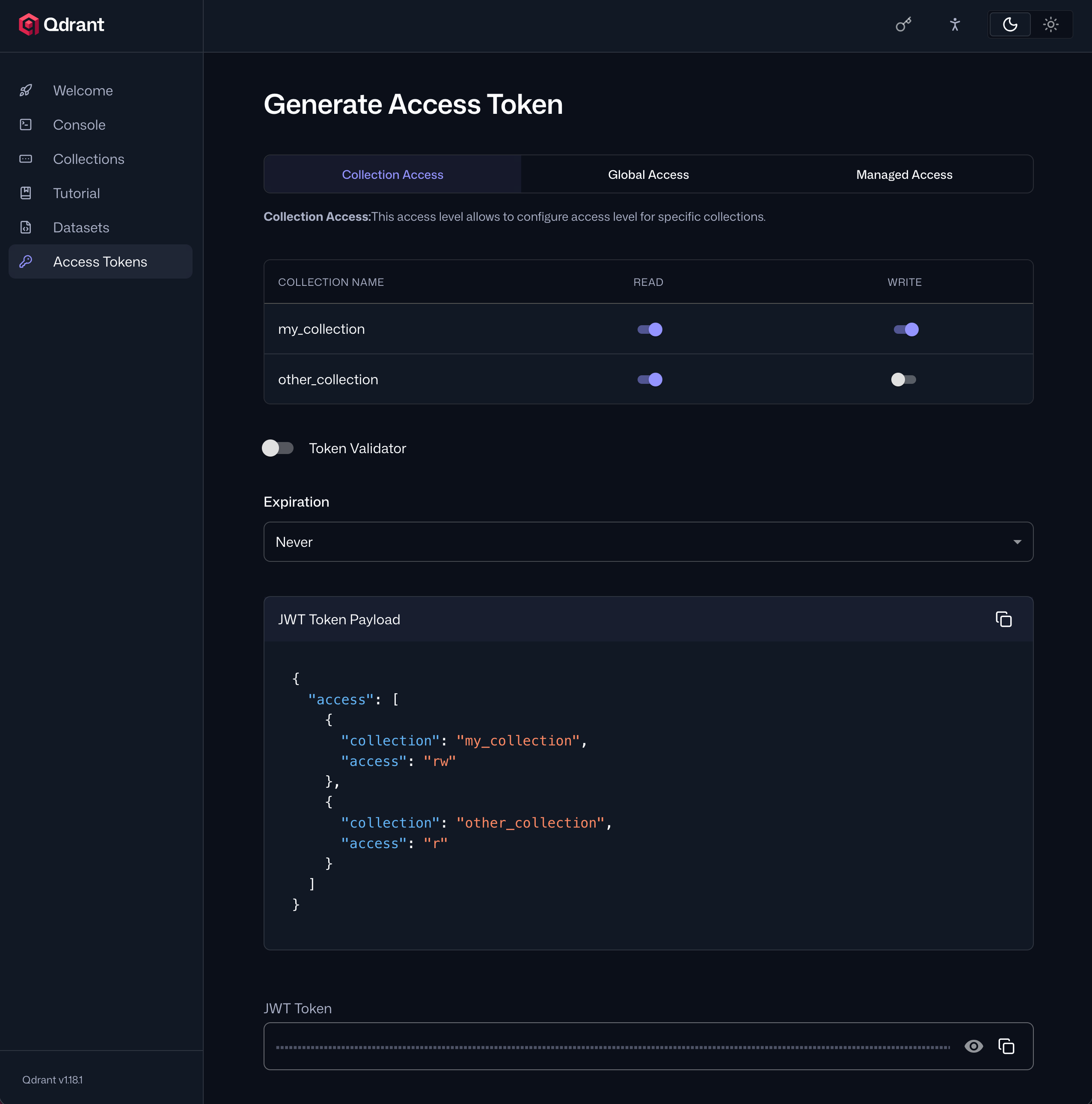
JWT tokens can also be generated programmatically. See Security > Granular Access API Keys for a list of libraries that can be used to generate JWT tokens.
Using the JWT token, writing to my_collection (rw scope) should succeed:
curl -X PUT https://localhost:6333/collections/my_collection/points \
  -H "api-key: <your-jwt>" \
  -H "Content-Type: application/json" \
  -d '{"points": [{"id": 2, "vector": [0.5, 0.6, 0.7, 0.8]}]}'
With a client too:
client = QdrantClient(url="https://localhost:6333", api_key="<your-jwt>")

client.upsert(
    collection_name="my_collection",
    points=[models.PointStruct(id=2, vector=[0.5, 0.6, 0.7, 0.8])],
)
client = new QdrantClient({ url: "https://localhost:6333", apiKey: "<your-jwt>" });

await client.upsert("my_collection", {
    points: [{ id: 2, vector: [0.5, 0.6, 0.7, 0.8] }],
});
let client = Qdrant::from_url("https://localhost:6334")
    .api_key("<your-jwt>")
    .build()?;

client
    .upsert_points(UpsertPointsBuilder::new(
        "my_collection",
        vec![PointStruct::new(2, vec![0.5_f32, 0.6, 0.7, 0.8], [("source", "tutorial".into())])],
    ))
    .await?;
client = new QdrantClient(
    QdrantGrpcClient.newBuilder("localhost", 6334, true)
        .withApiKey("<your-jwt>")
        .build());

client.upsertAsync("my_collection", List.of(
    PointStruct.newBuilder()
        .setId(id(2))
        .setVectors(vectors(0.5f, 0.6f, 0.7f, 0.8f))
        .build()
)).get();
client = new QdrantClient(host: "localhost", port: 6334, https: true, apiKey: "<your-jwt>");

await client.UpsertAsync(
	collectionName: "my_collection",
	points: new List<PointStruct>
	{
		new() { Id = 2, Vectors = new[] { 0.5f, 0.6f, 0.7f, 0.8f } }
	}
);
client, err = qdrant.NewClient(&qdrant.Config{
	Host:   "localhost",
	Port:   6334,
	APIKey: "<your-jwt>",
	UseTLS: true,
})
if err != nil {
	panic(err)
}

client.Upsert(context.Background(), &qdrant.UpsertPoints{
	CollectionName: "my_collection",
	Points: []*qdrant.PointStruct{
		{
			Id:      qdrant.NewIDNum(2),
			Vectors: qdrant.NewVectors(0.5, 0.6, 0.7, 0.8),
		},
	},
})
However, writing to other_collection (r scope) is blocked:
curl -X PUT https://localhost:6333/collections/other_collection/points \
  -H "api-key: <your-jwt>" \
  -H "Content-Type: application/json" \
  -d '{"points": [{"id": 2, "vector": [0.5, 0.6, 0.7, 0.8]}]}'
With a client too:
client = QdrantClient(url="https://localhost:6333", api_key="<your-jwt>")

try:
    client.upsert(
        collection_name="other_collection",
        points=[models.PointStruct(id=2, vector=[0.5, 0.6, 0.7, 0.8])],
    )
except Exception as e:
    print(e)  # 403 Forbidden
client = new QdrantClient({ url: "https://localhost:6333", apiKey: "<your-jwt>" });

try {
    await client.upsert("other_collection", {
        points: [{ id: 2, vector: [0.5, 0.6, 0.7, 0.8] }],
    });
} catch (e: any) {
    console.error(e.message); // 403 Forbidden
}
let client = Qdrant::from_url("https://localhost:6334")
    .api_key("<your-jwt>")
    .build()?;

let result = client
    .upsert_points(UpsertPointsBuilder::new(
        "other_collection",
        vec![PointStruct::new(2, vec![0.5_f32, 0.6, 0.7, 0.8], [("source", "tutorial".into())])],
    ))
    .await;
if let Err(e) = result {
    println!("{}", e); // PermissionDenied
}
client = new QdrantClient(
    QdrantGrpcClient.newBuilder("localhost", 6334, true)
        .withApiKey("<your-jwt>")
        .build());

try {
    client.upsertAsync("other_collection", List.of(
        PointStruct.newBuilder()
            .setId(id(2))
            .setVectors(vectors(0.5f, 0.6f, 0.7f, 0.8f))
            .build()
    )).get();
} catch (Exception e) {
    System.out.println(e.getMessage()); // PERMISSION_DENIED
}
client = new QdrantClient(host: "localhost", port: 6334, https: true, apiKey: "<your-jwt>");

try
{
	await client.UpsertAsync(
		collectionName: "other_collection",
		points: new List<PointStruct>
		{
			new() { Id = 2, Vectors = new[] { 0.5f, 0.6f, 0.7f, 0.8f } }
		}
	);
}
catch (Exception e)
{
	Console.WriteLine(e.Message); // PermissionDenied
}
client, err = qdrant.NewClient(&qdrant.Config{
	Host:   "localhost",
	Port:   6334,
	APIKey: "<your-jwt>",
	UseTLS: true,
})
if err != nil {
	panic(err)
}

_, err = client.Upsert(context.Background(), &qdrant.UpsertPoints{
	CollectionName: "other_collection",
	Points: []*qdrant.PointStruct{
		{
			Id:      qdrant.NewIDNum(2),
			Vectors: qdrant.NewVectors(0.5, 0.6, 0.7, 0.8),
		},
	},
})
if err != nil {
	fmt.Println(err) // PermissionDenied
}
See Security > Granular Access Control with JWT for the full list of available JWT claims and the complete access-level table.
What’s Next
Your instance now has TLS encryption, API key authentication, a read-only key for query consumers, and collection-scoped JWT tokens. For production deployments, also consider:
- Network Bind — restrict which network interfaces Qdrant listens on.
- API Key Rotation — rotate admin API keys in a distributed deployment without downtime.
- Production Checklist — a full checklist of security and reliability settings for production.
 Ready to try Qdrant?