# Time-Based Sharding
# Time-Based Sharding in Qdrant
When working with massive, fast-moving datasets, like social media or image/video streams, efficient storage and retrieval are critical. Often, only the most recent data is relevant, while older data can be archived or deleted. For instance, in sentiment analysis of social media posts, you might only need the last 7 days of data to capture current trends, with most queries focusing on the last 24 hours.
Storing everything in Qdrant collection with default sharding can lead to expensive re-indexing across the entire dataset when deleting old points, impacting performance. A better solution is **time-based sharding**, where points are routed to a specific [shard (or shards)](/documentation/operations/distributed_deployment/index.md#sharding) based on timestamp. For use cases with a natural time-to-live (TTL) segmentation, sharding by a timestamp-based key enables efficient querying of recent data and allows users to seamlessly drop the old.
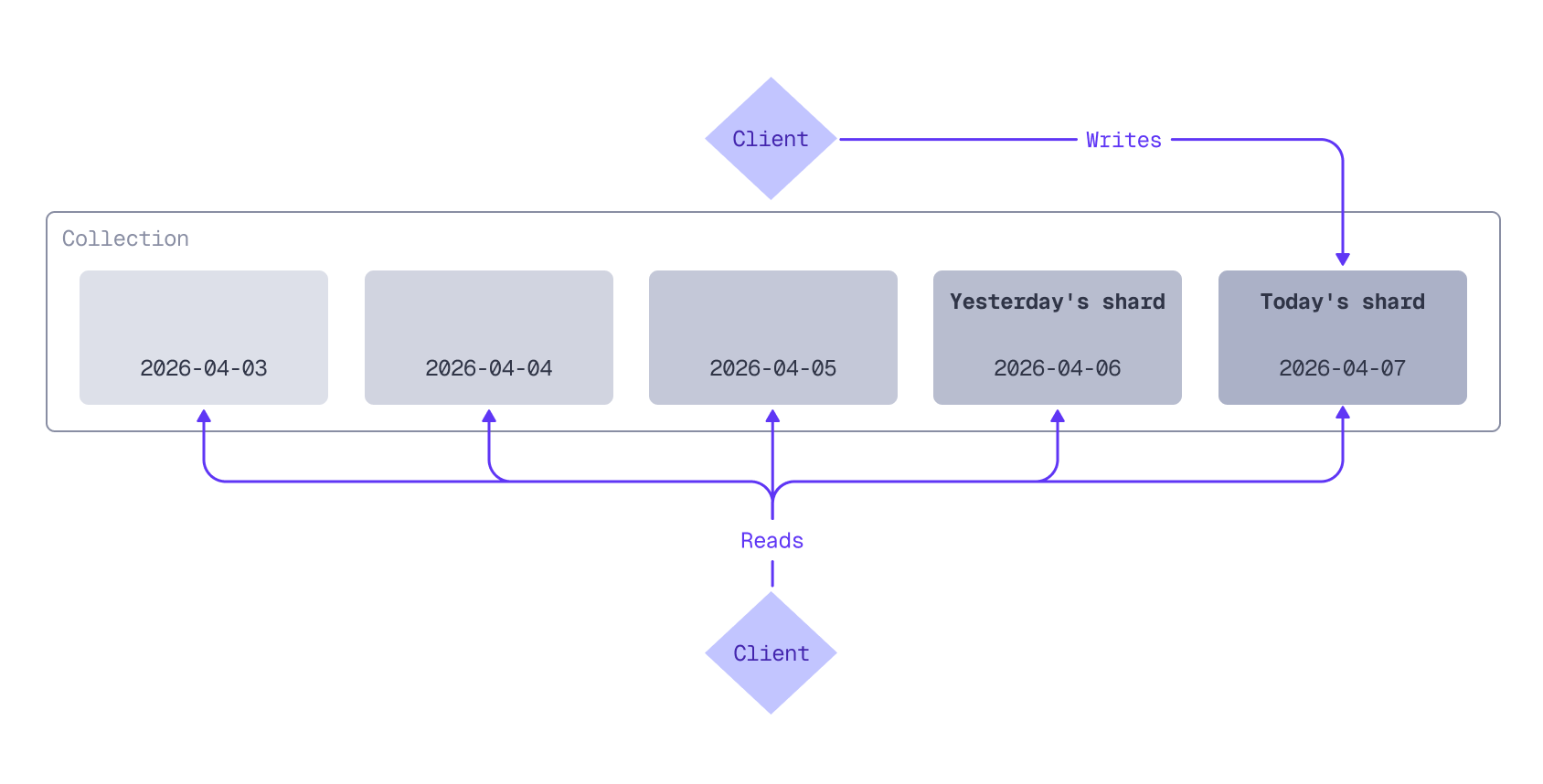
For example, with daily shards, today's data is stored in today's shard, yesterday's data in yesterday's shard, and so on. Queries can target specific shards (today's shard, for example) or multiple shards to cover a date range.
Time-based sharding routes data to different shards based on timestamp. Typically, all writes go to the newest shard, while queries can target one or more shards. Older shards can be pruned in the background without affecting performance.
Depending on your data volume and retention needs, you could shard by hour, week, month, or any other time interval that suits your use case.
This tutorial guides you through implementing time-based sharding and covers:
* Creating a Qdrant collection with user-defined sharding
* Batch-ingesting historical data into the correct shards based on timestamps
* Assigning new data to the most recent shard
* Querying one or more shards
* Pruning older shards
## Install and Initialize the Qdrant Client
First, install the Qdrant client:
```bash
!pip install qdrant-client
```
Next, initialize the client:
```python
from qdrant_client import QdrantClient, models
client = QdrantClient(
url=QDRANT_URL,
api_key=QDRANT_API_KEY,
cloud_inference=True
)
```
```typescript
const client = new QdrantClient({
url: QDRANT_URL,
apiKey: QDRANT_API_KEY,
});
```
```rust
let client = Qdrant::from_url(QDRANT_URL)
.api_key(QDRANT_API_KEY)
.build()?;
```
```java
QdrantClient client =
new QdrantClient(
QdrantGrpcClient.newBuilder(QDRANT_URL, 6334, true)
.withApiKey(QDRANT_API_KEY)
.build());
```
```csharp
var client = new QdrantClient(
host: QDRANT_URL,
https: true,
apiKey: QDRANT_API_KEY
);
```
```go
client, err := qdrant.NewClient(&qdrant.Config{
Host: QDRANT_URL,
APIKey: QDRANT_API_KEY,
UseTLS: true,
})
```
This tutorial assumes you are using [Qdrant Cloud Inference](/documentation/inference/index.md#qdrant-cloud-inference) to generate vector embeddings. If you manage your own embedding infrastructure, you can apply the same principles, but you will need to adapt the code examples to use your embedding service.
## Create Collection
Create a collection with [user-defined sharding](/documentation/operations/distributed_deployment/index.md#user-defined-sharding) by setting the sharding method to custom.
```python
from qdrant_client import models
collection_name = "my_collection"
if client.collection_exists(collection_name=collection_name):
client.delete_collection(collection_name=collection_name)
client.create_collection(
collection_name=collection_name,
vectors_config={
"dense_vector": models.VectorParams(
size=384, distance=models.Distance.COSINE
)
},
sharding_method=models.ShardingMethod.CUSTOM
)
```
```typescript
const collectionName = "my_collection";
if (await client.collectionExists(collectionName)) {
await client.deleteCollection(collectionName);
}
await client.createCollection(collectionName, {
vectors: {
dense_vector: {
size: 384,
distance: "Cosine",
},
},
sharding_method: "custom",
});
```
```rust
let collection_name = "my_collection";
if client.collection_exists(collection_name).await? {
client.delete_collection(collection_name).await?;
}
let mut vectors_config = VectorsConfigBuilder::default();
vectors_config.add_named_vector_params(
"dense_vector",
VectorParamsBuilder::new(384, Distance::Cosine),
);
client
.create_collection(
CreateCollectionBuilder::new(collection_name)
.vectors_config(vectors_config)
.sharding_method(ShardingMethod::Custom.into()),
)
.await?;
```
```java
String collectionName = "my_collection";
if (client.collectionExistsAsync(collectionName).get()) {
client.deleteCollectionAsync(collectionName).get();
}
client.createCollectionAsync(
CreateCollection.newBuilder()
.setCollectionName(collectionName)
.setVectorsConfig(VectorsConfig.newBuilder().setParamsMap(
VectorParamsMap.newBuilder().putAllMap(Map.of(
"dense_vector",
VectorParams.newBuilder()
.setSize(384)
.setDistance(Distance.Cosine)
.build()))))
.setShardingMethod(ShardingMethod.Custom)
.build()
).get();
```
```csharp
string collectionName = "my_collection";
if (await client.CollectionExistsAsync(collectionName))
await client.DeleteCollectionAsync(collectionName);
await client.CreateCollectionAsync(
collectionName: collectionName,
vectorsConfig: new VectorParamsMap
{
Map = {
["dense_vector"] = new VectorParams { Size = 384, Distance = Distance.Cosine }
}
},
shardingMethod: ShardingMethod.Custom
);
```
```go
collectionName := "my_collection"
exists, err := client.CollectionExists(context.Background(), collectionName)
if exists {
client.DeleteCollection(context.Background(), collectionName)
}
client.CreateCollection(context.Background(), &qdrant.CreateCollection{
CollectionName: collectionName,
VectorsConfig: qdrant.NewVectorsConfigMap(
map[string]*qdrant.VectorParams{
"dense_vector": {
Size: 384,
Distance: qdrant.Distance_Cosine,
},
},
),
ShardingMethod: qdrant.ShardingMethod_Custom.Enum(),
})
```
Custom shards can be accessed by their shard key. In this tutorial, the shard keys are the dates in `YYYY-MM-DD` format, extracted from the timestamp of each data point.
This collection will have a single shard for each shard key (a separate shard for each day of data). For very large datasets, you can improve write throughput by configuring a `shard_number` for the collection. `shard_number` defaults to 1. Set it to a higher value to create multiple shards per shard key to distribute the write load across multiple peers in the cluster. However, avoid creating too many shards, as each shard consumes resources and adds overhead, which can lead to performance degradation. Test what the optimal number of shards is for your dataset and cluster configuration.
Two things to note about collections that use user-defined sharding versus regular collections using auto sharding:
- For regular collections using auto sharding, `shard_number` determines the total number of shards for the collection. However, with user-defined sharding, `shard_number` determines the number of shards **per shard key**: the total number of shards for a collection equals the number of shard keys (days) multiplied by the `shard_number`.
- Collection-level configuration changes that you can apply to a regular collection (for example, HNSW parameters) can also be applied to a collection with user-defined sharding. These changes are applied retroactively to existing shards and to new shards created in the future.
## Ingest Historical Data
Time series data often arrives in streams, with new data points continuously being added. Each data point may include a timestamp indicating when it was created. You can use this timestamp to determine which shard a data point belongs to. If your data does not have timestamps, you can use the current time.
This tutorial uses a [sample dataset of social media posts](https://github.com/qdrant/examples/blob/master/time-based-sharding/social-media-posts.csv) with timestamps. Let's assume today is April 7th, 2026. You'll start by ingesting some historical data from this week (April 1-7). Here are a few sample rows from the dataset:
| datetime | text
|---|---|
| 2026-04-06T09:04:28 | April sunshine through the office window makes everything better.
| 2026-04-06T09:04:32 | Morning stretch, good coffee, clear intentions. Monday: sorted.
| 2026-04-06T09:05:52 | Grateful for a productive first day of the week.
Upload the dataset and store each day of data in its own shard:
```python
from qdrant_client.http.models import PointStruct, Document
import uuid
csv_url = 'https://raw.githubusercontent.com/qdrant/examples/refs/heads/master/time-based-sharding/social-media-posts.csv'
# Retrieve a list of existing shard keys in the collection
existing_shard_keys = list(client.list_shard_keys(collection_name=collection_name).shard_keys)
dense_model = "sentence-transformers/all-MiniLM-L6-v2"
batch_size = 100
current_date = None
buffer: list[PointStruct] = []
for row in parse_csv(csv_url):
shard_date = row['datetime'][:10] # Extract YYYY-MM-DD
if shard_date != current_date:
# Flush buffer for the previous date before switching
if buffer:
client.upload_points(
collection_name=collection_name,
points=buffer,
shard_key_selector=current_date,
)
buffer = []
# Create shard for the new date if it doesn't exist yet
if shard_date not in existing_shard_keys:
client.create_shard_key(collection_name, shard_date)
existing_shard_keys.append(shard_date)
current_date = shard_date
# Add point to buffer
buffer.append(PointStruct(
id=uuid.uuid4().hex,
payload={"text": row['text'], "datetime": row['datetime']},
vector={"dense_vector": Document(text=row["text"], model=dense_model)}
))
# Flush batch if buffer size exceeds batch size
if len(buffer) >= batch_size:
client.upload_points(
collection_name=collection_name,
points=buffer,
shard_key_selector=current_date,
)
buffer = []
# Flush remaining partial batch
if buffer:
client.upload_points(
collection_name=collection_name,
points=buffer,
shard_key_selector=current_date,
)
```
```typescript
const csvUrl = "https://raw.githubusercontent.com/qdrant/examples/refs/heads/master/time-based-sharding/social-media-posts.csv";
// Retrieve a list of existing shard keys in the collection
const shardKeysResult = await client.listShardKeys(collectionName);
const existingShardKeys = new Set((shardKeysResult.shard_keys ?? []).map((d) => String(d.key)));
const denseModel = "sentence-transformers/all-MiniLM-L6-v2";
const batchSize = 100;
let currentDate = "";
let buffer: Extract[1], { points: unknown }>['points'] = [];
for await (const { text: postText, datetime } of parseCSV(csvUrl)) {
const shardDate = datetime.slice(0, 10); // Extract YYYY-MM-DD
if (shardDate !== currentDate) {
// Flush buffer for the previous date before switching
if (buffer.length > 0) {
await client.upsert(collectionName, { points: buffer, shard_key: currentDate });
buffer = [];
}
// Create shard for the new date if it doesn't exist yet
if (!existingShardKeys.has(shardDate)) {
await client.createShardKey(collectionName, { shard_key: shardDate });
existingShardKeys.add(shardDate);
}
currentDate = shardDate;
}
// Add point to buffer
buffer.push({
id: crypto.randomUUID(),
vector: { dense_vector: { text: postText, model: denseModel } },
payload: { text: postText, datetime },
});
// Flush batch if buffer size exceeds batch size
if (buffer.length >= batchSize) {
await client.upsert(collectionName, { points: buffer, shard_key: currentDate });
buffer = [];
}
}
// Flush remaining partial batch
if (buffer.length > 0) {
await client.upsert(collectionName, { points: buffer, shard_key: currentDate });
}
```
```rust
let csv_url = "https://raw.githubusercontent.com/qdrant/examples/refs/heads/master/time-based-sharding/social-media-posts.csv";
// Retrieve a list of existing shard keys in the collection
let response = client.list_shard_keys(collection_name).await?;
let mut existing_shard_keys: HashSet = response
.shard_keys
.into_iter()
.filter_map(|d| {
d.key?.key.and_then(|k| match k {
shard_key::Key::Keyword(s) => Some(s),
_ => None,
})
})
.collect();
let dense_model = "sentence-transformers/all-MiniLM-L6-v2";
let batch_size = 100;
let mut current_date = String::new();
let mut buffer: Vec = Vec::new();
for row in parse_csv(csv_url)? {
let row = row?;
let text = row.text;
let datetime = row.datetime;
let shard_date = datetime[..10].to_string(); // Extract YYYY-MM-DD
if shard_date != current_date {
// Flush buffer for the previous date before switching
if !buffer.is_empty() {
client
.upsert_points(
UpsertPointsBuilder::new(
collection_name,
std::mem::take(&mut buffer),
)
.shard_key_selector(current_date.clone()),
)
.await?;
}
// Create shard for the new date if it doesn't exist yet
if !existing_shard_keys.contains(&shard_date) {
client
.create_shard_key(
CreateShardKeyRequestBuilder::new(collection_name).request(
CreateShardKeyBuilder::default().shard_key(shard_date.clone()),
),
)
.await?;
existing_shard_keys.insert(shard_date.clone());
}
current_date = shard_date;
}
// Add point to buffer
buffer.push(PointStruct::new(
uuid::Uuid::new_v4().to_string(),
HashMap::from([(
"dense_vector".to_string(),
DocumentBuilder::new(&text, dense_model).build(),
)]),
[("text", text.into()), ("datetime", datetime.into())],
));
// Flush batch if buffer size exceeds batch size
if buffer.len() >= batch_size {
client
.upsert_points(
UpsertPointsBuilder::new(collection_name, std::mem::take(&mut buffer))
.shard_key_selector(current_date.clone()),
)
.await?;
}
}
// Flush remaining partial batch
if !buffer.is_empty() {
client
.upsert_points(
UpsertPointsBuilder::new(collection_name, buffer)
.shard_key_selector(current_date.clone()),
)
.await?;
}
```
```java
String csvUrl = "https://raw.githubusercontent.com/qdrant/examples/refs/heads/master/time-based-sharding/social-media-posts.csv";
// Retrieve a list of existing shard keys in the collection
var shardKeyDescriptions = client.listShardKeysAsync(collectionName).get();
Set existingShardKeys = new HashSet<>();
for (var desc : shardKeyDescriptions) {
existingShardKeys.add(desc.getKey().getKeyword());
}
String denseModel = "sentence-transformers/all-MiniLM-L6-v2";
int batchSize = 100;
String currentDate = null;
List buffer = new ArrayList<>();
try (var stream = parseCSV(csvUrl)) {
for (var row : (Iterable) stream::iterator) {
String text = row.text;
String datetime = row.datetime;
String shardDate = datetime.substring(0, 10); // Extract YYYY-MM-DD
if (!shardDate.equals(currentDate)) {
// Flush buffer for the previous date before switching
if (!buffer.isEmpty()) {
client.upsertAsync(
UpsertPoints.newBuilder()
.setCollectionName(collectionName)
.addAllPoints(buffer)
.setShardKeySelector(shardKeySelector(currentDate))
.build()
).get();
buffer.clear();
}
// Create shard for the new date if it doesn't exist yet
if (!existingShardKeys.contains(shardDate)) {
client.createShardKeyAsync(
CreateShardKeyRequest.newBuilder()
.setCollectionName(collectionName)
.setRequest(CreateShardKey.newBuilder()
.setShardKey(shardKey(shardDate))
.build())
.build()
).get();
existingShardKeys.add(shardDate);
}
currentDate = shardDate;
}
// Add point to buffer
buffer.add(
PointStruct.newBuilder()
.setId(id(UUID.randomUUID()))
.setVectors(namedVectors(Map.of(
"dense_vector",
vector(Document.newBuilder()
.setText(text)
.setModel(denseModel)
.build()))))
.putAllPayload(Map.of("text", value(text), "datetime", value(datetime)))
.build());
// Flush batch if buffer size exceeds batch size
if (buffer.size() >= batchSize) {
client.upsertAsync(
UpsertPoints.newBuilder()
.setCollectionName(collectionName)
.addAllPoints(buffer)
.setShardKeySelector(shardKeySelector(currentDate))
.build()
).get();
buffer.clear();
}
}
}
// Flush remaining partial batch
if (!buffer.isEmpty()) {
client.upsertAsync(
UpsertPoints.newBuilder()
.setCollectionName(collectionName)
.addAllPoints(buffer)
.setShardKeySelector(shardKeySelector(currentDate))
.build()
).get();
}
```
```csharp
string csvUrl = "https://raw.githubusercontent.com/qdrant/examples/refs/heads/master/time-based-sharding/social-media-posts.csv";
// Retrieve a list of existing shard keys in the collection
var existingShardKeys = (await client.ListShardKeysAsync(collectionName))
.Select(sk => sk.Key.Keyword)
.ToHashSet();
string denseModel = "sentence-transformers/all-MiniLM-L6-v2";
int batchSize = 100;
string? currentDate = null;
var buffer = new List();
await foreach (var (text, datetime) in ParseCsv(csvUrl))
{
string shardDate = datetime[..10]; // Extract YYYY-MM-DD
if (shardDate != currentDate)
{
// Flush buffer for the previous date before switching
if (buffer.Count > 0)
{
await client.UpsertAsync(
collectionName: collectionName,
points: buffer,
shardKeySelector: new ShardKeySelector
{
ShardKeys = { new List { currentDate! } }
}
);
buffer.Clear();
}
// Create shard for the new date if it doesn't exist yet
if (!existingShardKeys.Contains(shardDate))
{
await client.CreateShardKeyAsync(
collectionName,
new CreateShardKey { ShardKey = new ShardKey { Keyword = shardDate } }
);
existingShardKeys.Add(shardDate);
}
currentDate = shardDate;
}
// Add point to buffer
buffer.Add(new PointStruct
{
Id = Guid.NewGuid(),
Vectors = new Dictionary
{
["dense_vector"] = new Document { Text = text, Model = denseModel }
},
Payload = { ["text"] = text, ["datetime"] = datetime }
});
// Flush batch if buffer size exceeds batch size
if (buffer.Count >= batchSize)
{
await client.UpsertAsync(
collectionName: collectionName,
points: buffer,
shardKeySelector: new ShardKeySelector
{
ShardKeys = { new List { currentDate! } }
}
);
buffer.Clear();
}
}
// Flush remaining partial batch
if (buffer.Count > 0)
{
await client.UpsertAsync(
collectionName: collectionName,
points: buffer,
shardKeySelector: new ShardKeySelector
{
ShardKeys = { new List { currentDate! } }
}
);
}
```
```go
csvUrl := "https://raw.githubusercontent.com/qdrant/examples/refs/heads/master/time-based-sharding/social-media-posts.csv"
shardKeyDescriptions, err := client.ListShardKeys(context.Background(), collectionName)
// Retrieve a list of existing shard keys in the collection
existingShardKeys := make(map[string]bool)
for _, desc := range shardKeyDescriptions {
existingShardKeys[desc.Key.GetKeyword()] = true
}
denseModel := "sentence-transformers/all-MiniLM-L6-v2"
batchSize := 100
var currentDate string
var buffer []*qdrant.PointStruct
err = parseCSV(csvUrl, func(row CSVRow) {
text := row.Text
datetime := row.Datetime
shardDate := datetime[:10] // Extract YYYY-MM-DD
if shardDate != currentDate {
// Flush buffer for the previous date before switching
if len(buffer) > 0 {
client.Upsert(context.Background(), &qdrant.UpsertPoints{
CollectionName: collectionName,
Points: buffer,
ShardKeySelector: &qdrant.ShardKeySelector{
ShardKeys: []*qdrant.ShardKey{qdrant.NewShardKey(currentDate)},
},
})
buffer = nil
}
// Create shard for the new date if it doesn't exist yet
if !existingShardKeys[shardDate] {
client.CreateShardKey(context.Background(), collectionName, &qdrant.CreateShardKey{
ShardKey: qdrant.NewShardKey(shardDate),
})
existingShardKeys[shardDate] = true
}
currentDate = shardDate
}
// Add point to buffer
buffer = append(buffer, &qdrant.PointStruct{
Id: qdrant.NewID(uuid.New().String()),
Vectors: qdrant.NewVectorsMap(map[string]*qdrant.Vector{
"dense_vector": qdrant.NewVectorDocument(&qdrant.Document{
Text: text,
Model: denseModel,
}),
}),
Payload: qdrant.NewValueMap(map[string]any{
"text": text,
"datetime": datetime,
}),
})
// Flush batch if buffer size exceeds batch size
if len(buffer) >= batchSize {
client.Upsert(context.Background(), &qdrant.UpsertPoints{
CollectionName: collectionName,
Points: buffer,
ShardKeySelector: &qdrant.ShardKeySelector{
ShardKeys: []*qdrant.ShardKey{qdrant.NewShardKey(currentDate)},
},
})
buffer = nil
}
})
// Flush remaining partial batch
if len(buffer) > 0 {
client.Upsert(context.Background(), &qdrant.UpsertPoints{
CollectionName: collectionName,
Points: buffer,
ShardKeySelector: &qdrant.ShardKeySelector{
ShardKeys: []*qdrant.ShardKey{qdrant.NewShardKey(currentDate)},
},
})
}
```
Let's break down the code:
- First, a list of existing shard keys in the collection is retrieved. There should be none because you just created the collection, but in production, this ensures you take into account any existing data.
- Next, a CSV file is streamed from a URL using a helper function to parse the CSV.
Details
```python
import csv
import urllib.request
def parse_csv(url):
with urllib.request.urlopen(url) as response:
reader = csv.DictReader(line.decode('utf-8') for line in response)
yield from reader
```
```typescript
function parseCsvLine(line: string): string[] {
const fields: string[] = [];
let i = 0;
while (i < line.length) {
if (line[i] === '"') {
i++;
let field = "";
while (i < line.length) {
if (line[i] === '"' && line[i + 1] === '"') { field += '"'; i += 2; }
else if (line[i] === '"') { i++; break; }
else { field += line[i++]; }
}
fields.push(field);
if (line[i] === ",") i++;
} else {
const start = i;
while (i < line.length && line[i] !== ",") i++;
fields.push(line.slice(start, i));
if (i < line.length) i++;
}
}
return fields;
}
async function* parseCSV(url: string): AsyncGenerator<{ text: string; datetime: string }> {
const response = await fetch(url);
const reader = response.body!.getReader();
const decoder = new TextDecoder();
let remainder = "";
let headers: string[] | null = null;
let textIdx = -1;
let datetimeIdx = -1;
while (true) {
const { done, value } = await reader.read();
const chunk = done ? "" : decoder.decode(value, { stream: true });
const lines = (remainder + chunk).split("\n");
remainder = done ? "" : lines.pop()!;
for (const line of lines) {
if (!line.trim()) continue;
if (headers === null) {
headers = line.split(",");
textIdx = headers.indexOf("text");
datetimeIdx = headers.indexOf("datetime");
continue;
}
const fields = parseCsvLine(line);
yield { text: fields[textIdx], datetime: fields[datetimeIdx] };
}
if (done) break;
}
}
```
```rust
struct CsvRow {
text: String,
datetime: String,
}
fn parse_csv(url: &str) -> anyhow::Result>> {
let reader = ureq::get(url).call()?.into_body().into_reader();
let mut rdr = csv::Reader::from_reader(reader);
let headers = rdr.headers()?.clone();
let text_idx = headers.iter().position(|h| h == "text").unwrap();
let datetime_idx = headers.iter().position(|h| h == "datetime").unwrap();
let iter = rdr.into_records().map(move |result| {
let record = result?;
Ok(CsvRow {
text: record[text_idx].to_string(),
datetime: record[datetime_idx].to_string(),
})
});
Ok(iter)
}
```
```java
static class CsvRow {
final String text;
final String datetime;
CsvRow(String text, String datetime) { this.text = text; this.datetime = datetime; }
}
static Stream parseCSV(String url) throws Exception {
Function> parseCsvLine = line -> {
List fields = new ArrayList<>();
boolean inQuotes = false;
var sb = new StringBuilder();
for (char c : line.toCharArray()) {
if (c == '"') {
inQuotes = !inQuotes;
} else if (c == ',' && !inQuotes) {
fields.add(sb.toString());
sb.setLength(0);
} else {
sb.append(c);
}
}
fields.add(sb.toString());
return fields;
};
var reader = new BufferedReader(new InputStreamReader(new URL(url).openStream()));
String headerLine = reader.readLine();
List headers = List.of(headerLine.split(","));
int textIdx = headers.indexOf("text");
int datetimeIdx = headers.indexOf("datetime");
return reader.lines()
.map(line -> {
List fields = parseCsvLine.apply(line);
return new CsvRow(fields.get(textIdx), fields.get(datetimeIdx));
})
.onClose(() -> { try { reader.close(); } catch (Exception ignored) {} });
}
```
```csharp
async IAsyncEnumerable<(string text, string datetime)> ParseCsv(string url)
{
using var httpClient = new HttpClient();
using var stream = await httpClient.GetStreamAsync(url);
using var parser = new TextFieldParser(new StreamReader(stream));
parser.TextFieldType = Microsoft.VisualBasic.FileIO.FieldType.Delimited;
parser.SetDelimiters(",");
string[]? headers = parser.ReadFields();
int textIdx = Array.IndexOf(headers!, "text");
int datetimeIdx = Array.IndexOf(headers!, "datetime");
while (!parser.EndOfData)
{
var fields = parser.ReadFields()!;
yield return (fields[textIdx], fields[datetimeIdx]);
}
}
```
```go
type CSVRow struct {
Text string
Datetime string
}
func parseCSV(url string, fn func(CSVRow)) error {
resp, err := http.Get(url)
if err != nil {
return err
}
defer resp.Body.Close()
csvReader := csv.NewReader(resp.Body)
headers, err := csvReader.Read()
if err != nil {
return err
}
textIdx, datetimeIdx := -1, -1
for i, h := range headers {
switch h {
case "text":
textIdx = i
case "datetime":
datetimeIdx = i
}
}
for {
row, err := csvReader.Read()
if err == io.EOF {
break
}
if err != nil {
return err
}
fn(CSVRow{Text: row[textIdx], Datetime: row[datetimeIdx]})
}
return nil
}
```
- The CSV file is streamed row by row, buffering points in batches of 100 for efficient uploading. The optimal batch size depends on your data and cluster, so you may want to experiment with different sizes for best performance.
- The date (`YYYY-MM-DD`) is extracted from each row's datetime field. This date is used as the shard key to route the data to the correct shard.
- A new shard is created for each new date encountered if it doesn't already exist.
- The buffer is flushed to the previous date's shard whenever the date changes mid-stream, ensuring posts don't get written to the wrong shard.
- Data is written, where each point gets:
- A random UUID as the point ID
- The post `text` and `datetime` as the payload
- A dense vector embedding generated from the post text using `sentence-transformers/all-MiniLM-L6-v2`
- Each full batch of 100 points is uploaded to Qdrant, targeting the correct date-based shard via the shard key selector parameter.
- Any remaining points are uploaded in a partial final batch after the loop ends.
## Query the Data
### Query Today's Data
Now you can run a semantic query on the posts. Setting the shard key selector to `2026-04-07` (assuming today is April 7th, 2026) limits the query to the shard that stores today's data:
```python
query_text = "coffee"
resp = client.query_points(
collection_name=collection_name,
query=Document(text=query_text, model=dense_model),
using="dense_vector",
limit=5,
shard_key_selector="2026-04-07"
)
print(resp)
```
```typescript
const queryText = "coffee";
const singleShardResult = await client.query(collectionName, {
query: { text: queryText, model: denseModel },
using: "dense_vector",
limit: 5,
shard_key: "2026-04-07",
});
for (const hit of singleShardResult.points) {
console.log(hit);
}
```
```rust
let query_text = "coffee";
let result = client
.query(
QueryPointsBuilder::new(collection_name)
.query(Query::new_nearest(Document::new(query_text, dense_model)))
.using("dense_vector")
.limit(5)
.shard_key_selector("2026-04-07".to_string()),
)
.await?;
for hit in result.result {
println!("{:?}", hit);
}
```
```java
String queryText = "coffee";
var result = client.queryAsync(
QueryPoints.newBuilder()
.setCollectionName(collectionName)
.setQuery(nearest(Document.newBuilder().setText(queryText).setModel(denseModel).build()))
.setUsing("dense_vector")
.setLimit(5)
.setShardKeySelector(shardKeySelector("2026-04-07"))
.build()
).get();
for (var hit : result) {
System.out.println(hit);
}
```
```csharp
string queryText = "coffee";
var result = await client.QueryAsync(
collectionName: collectionName,
query: new Document { Text = queryText, Model = denseModel },
usingVector: "dense_vector",
limit: 5,
shardKeySelector: new ShardKeySelector
{
ShardKeys = { new List { "2026-04-07" } }
}
);
foreach (var hit in result)
Console.WriteLine(hit);
```
```go
queryText := "coffee"
result, err := client.Query(context.Background(), &qdrant.QueryPoints{
CollectionName: collectionName,
Query: qdrant.NewQueryDocument(&qdrant.Document{Text: queryText, Model: denseModel}),
Using: qdrant.PtrOf("dense_vector"),
Limit: qdrant.PtrOf(uint64(5)),
ShardKeySelector: &qdrant.ShardKeySelector{
ShardKeys: []*qdrant.ShardKey{qdrant.NewShardKey("2026-04-07")},
},
})
for _, hit := range result {
fmt.Println(hit)
}
```
### Query Multiple Days of Data
To query multiple shards, set the shard key selector to a list of shard keys. For example, to query the last 2 days of data (April 6-7):
```python
resp = client.query_points(
collection_name=collection_name,
query=Document(text=query_text, model=dense_model),
using="dense_vector",
limit=5,
shard_key_selector=["2026-04-06","2026-04-07"]
)
print(resp)
```
```typescript
const multiShardResult = await client.query(collectionName, {
query: { text: queryText, model: denseModel },
using: "dense_vector",
limit: 5,
shard_key: ["2026-04-06", "2026-04-07"],
});
for (const hit of multiShardResult.points) {
console.log(hit);
}
```
```rust
let result = client
.query(
QueryPointsBuilder::new(collection_name)
.query(Query::new_nearest(Document::new(query_text, dense_model)))
.using("dense_vector")
.limit(5)
.shard_key_selector(ShardKeySelector {
shard_keys: vec![
"2026-04-06".to_string().into(),
"2026-04-07".to_string().into(),
],
fallback: None,
}),
)
.await?;
for hit in result.result {
println!("{:?}", hit);
}
```
```java
result = client.queryAsync(
QueryPoints.newBuilder()
.setCollectionName(collectionName)
.setQuery(nearest(Document.newBuilder().setText(queryText).setModel(denseModel).build()))
.setUsing("dense_vector")
.setLimit(5)
.setShardKeySelector(ShardKeySelector.newBuilder()
.addShardKeys(shardKey("2026-04-06"))
.addShardKeys(shardKey("2026-04-07"))
.build())
.build()
).get();
for (var hit : result) {
System.out.println(hit);
}
```
```csharp
result = await client.QueryAsync(
collectionName: collectionName,
query: new Document { Text = queryText, Model = denseModel },
usingVector: "dense_vector",
limit: 5,
shardKeySelector: new ShardKeySelector
{
ShardKeys = { new List { "2026-04-06", "2026-04-07" } }
}
);
foreach (var hit in result)
Console.WriteLine(hit);
```
```go
result, err = client.Query(context.Background(), &qdrant.QueryPoints{
CollectionName: collectionName,
Query: qdrant.NewQueryDocument(&qdrant.Document{Text: queryText, Model: denseModel}),
Using: qdrant.PtrOf("dense_vector"),
Limit: qdrant.PtrOf(uint64(5)),
ShardKeySelector: &qdrant.ShardKeySelector{
ShardKeys: []*qdrant.ShardKey{
qdrant.NewShardKey("2026-04-06"),
qdrant.NewShardKey("2026-04-07"),
},
},
})
for _, hit := range result {
fmt.Println(hit)
}
```
### Query the Full Dataset
To query the entire dataset (all shards), omit the shard key selector parameter:
```python
resp = client.query_points(
collection_name=collection_name,
query=Document(text=query_text, model=dense_model),
using="dense_vector",
limit=5,
)
print(resp)
```
```typescript
const allShardsResult = await client.query(collectionName, {
query: { text: queryText, model: denseModel },
using: "dense_vector",
limit: 5,
});
for (const hit of allShardsResult.points) {
console.log(hit);
}
```
```rust
let result = client
.query(
QueryPointsBuilder::new(collection_name)
.query(Query::new_nearest(Document::new(query_text, dense_model)))
.using("dense_vector")
.limit(5),
)
.await?;
for hit in result.result {
println!("{:?}", hit);
}
```
```java
result = client.queryAsync(
QueryPoints.newBuilder()
.setCollectionName(collectionName)
.setQuery(nearest(Document.newBuilder().setText(queryText).setModel(denseModel).build()))
.setUsing("dense_vector")
.setLimit(5)
.build()
).get();
for (var hit : result) {
System.out.println(hit);
}
```
```csharp
result = await client.QueryAsync(
collectionName: collectionName,
query: new Document { Text = queryText, Model = denseModel },
usingVector: "dense_vector",
limit: 5
);
foreach (var hit in result)
Console.WriteLine(hit);
```
```go
result, err = client.Query(context.Background(), &qdrant.QueryPoints{
CollectionName: collectionName,
Query: qdrant.NewQueryDocument(&qdrant.Document{Text: queryText, Model: denseModel}),
Using: qdrant.PtrOf("dense_vector"),
Limit: qdrant.PtrOf(uint64(5)),
})
for _, hit := range result {
fmt.Println(hit)
}
```
## Pruning Shards
Every night at midnight, create a new shard for the new data that will be ingested that day. If you only query the last 7 days of data, you can also delete the oldest shard. You can automate this with a cron job.
```python
from datetime import date, timedelta
today = "2026-04-08"
oldest_shard_key = (date.fromisoformat(today) - timedelta(days=7)).isoformat()
client.create_shard_key(collection_name, today)
client.delete_shard_key(collection_name, oldest_shard_key)
```
```typescript
const today = "2026-04-08";
const oldestDate = new Date(today);
oldestDate.setDate(oldestDate.getDate() - 7);
const oldestShardKey = oldestDate.toISOString().slice(0, 10);
await client.createShardKey(collectionName, { shard_key: today });
await client.deleteShardKey(collectionName, { shard_key: oldestShardKey });
```
```rust
let today = "2026-04-08";
let oldest_shard_key = (NaiveDate::parse_from_str(today, "%Y-%m-%d")?
- chrono::Duration::days(7))
.to_string();
client
.create_shard_key(
CreateShardKeyRequestBuilder::new(collection_name)
.request(CreateShardKeyBuilder::default().shard_key(today.to_string())),
)
.await?;
client
.delete_shard_key(
DeleteShardKeyRequestBuilder::new(collection_name)
.key(shard_key::Key::Keyword(oldest_shard_key)),
)
.await?;
```
```java
String today = "2026-04-08";
String oldestShardKey = LocalDate.parse(today).minusDays(7).toString();
client.createShardKeyAsync(
CreateShardKeyRequest.newBuilder()
.setCollectionName(collectionName)
.setRequest(CreateShardKey.newBuilder()
.setShardKey(shardKey(today))
.build())
.build()
).get();
client.deleteShardKeyAsync(
DeleteShardKeyRequest.newBuilder()
.setCollectionName(collectionName)
.setRequest(DeleteShardKey.newBuilder()
.setShardKey(shardKey(oldestShardKey))
.build())
.build()
).get();
```
```csharp
string today = "2026-04-08";
string oldestShardKey = DateOnly.ParseExact(today, "yyyy-MM-dd")
.AddDays(-7)
.ToString("yyyy-MM-dd");
await client.CreateShardKeyAsync(
collectionName,
new CreateShardKey { ShardKey = new ShardKey { Keyword = today } }
);
await client.DeleteShardKeyAsync(
collectionName,
new DeleteShardKey { ShardKey = new ShardKey { Keyword = oldestShardKey } }
);
```
```go
today := "2026-04-08"
t, _ := time.Parse("2006-01-02", today)
oldestShardKey := t.AddDate(0, 0, -7).Format("2006-01-02")
client.CreateShardKey(context.Background(), collectionName, &qdrant.CreateShardKey{
ShardKey: qdrant.NewShardKey(today),
})
client.DeleteShardKey(context.Background(), collectionName, &qdrant.DeleteShardKey{
ShardKey: qdrant.NewShardKey(oldestShardKey),
})
```
## Ingest New Data
When ingesting new data, set the `shard_key_selector` to today's date so the data goes to the correct shard:
```python
client.upsert(
collection_name=collection_name,
points=[PointStruct(
id=uuid.uuid4().hex,
payload={"text": "The best way to start a Wednesday is with a cup of coffee", "datetime": "2026-04-08T07:57:47"},
vector={
"dense_vector": Document(text="The best way to start a Wednesday is with a cup of coffee", model=dense_model)
})],
shard_key_selector=today
)
```
```typescript
await client.upsert(collectionName, {
points: [
{
id: crypto.randomUUID(),
vector: {
dense_vector: {
text: "The best way to start a Wednesday is with a cup of coffee",
model: denseModel,
},
},
payload: {
text: "The best way to start a Wednesday is with a cup of coffee",
datetime: "2026-04-08T07:57:47",
},
},
],
shard_key: today,
});
```
```rust
client
.upsert_points(
UpsertPointsBuilder::new(
collection_name,
vec![PointStruct::new(
uuid::Uuid::new_v4().to_string(),
HashMap::from([(
"dense_vector".to_string(),
DocumentBuilder::new(
"The best way to start a Wednesday is with a cup of coffee",
dense_model,
)
.build(),
)]),
[
("text", "The best way to start a Wednesday is with a cup of coffee".into()),
("datetime", "2026-04-08T07:57:47".into()),
],
)],
)
.shard_key_selector(today.to_string()),
)
.await?;
```
```java
client.upsertAsync(
UpsertPoints.newBuilder()
.setCollectionName(collectionName)
.addAllPoints(List.of(
PointStruct.newBuilder()
.setId(id(UUID.randomUUID()))
.setVectors(namedVectors(Map.of(
"dense_vector",
vector(Document.newBuilder()
.setText("The best way to start a Wednesday is with a cup of coffee")
.setModel(denseModel)
.build()))))
.putAllPayload(Map.of(
"text", value("The best way to start a Wednesday is with a cup of coffee"),
"datetime", value("2026-04-08T07:57:47")))
.build()))
.setShardKeySelector(shardKeySelector(today))
.build()
).get();
```
```csharp
await client.UpsertAsync(
collectionName: collectionName,
points: new List
{
new()
{
Id = Guid.NewGuid(),
Vectors = new Dictionary
{
["dense_vector"] = new Document
{
Text = "The best way to start a Wednesday is with a cup of coffee",
Model = denseModel
}
},
Payload =
{
["text"] = "The best way to start a Wednesday is with a cup of coffee",
["datetime"] = "2026-04-08T07:57:47"
}
}
},
shardKeySelector: new ShardKeySelector
{
ShardKeys = { new List { today } }
}
);
```
```go
client.Upsert(context.Background(), &qdrant.UpsertPoints{
CollectionName: collectionName,
Points: []*qdrant.PointStruct{
{
Id: qdrant.NewID(uuid.New().String()),
Vectors: qdrant.NewVectorsMap(map[string]*qdrant.Vector{
"dense_vector": qdrant.NewVectorDocument(&qdrant.Document{
Text: "The best way to start a Wednesday is with a cup of coffee",
Model: denseModel,
}),
}),
Payload: qdrant.NewValueMap(map[string]any{
"text": "The best way to start a Wednesday is with a cup of coffee",
"datetime": "2026-04-08T07:57:47",
}),
},
},
ShardKeySelector: &qdrant.ShardKeySelector{
ShardKeys: []*qdrant.ShardKey{qdrant.NewShardKey(today)},
},
})
```
## Conclusion
Time-based sharding is a powerful technique for managing large, time-series datasets in Qdrant. By routing data to different shards based on timestamps, you can efficiently store and query recent data while easily pruning older data without impacting performance. This approach is ideal for use cases like social media analysis, where data relevance decreases over time.