> Explore Qdrant's agent skills catalog at https://skills.qdrant.tech/
> Search the documentation at https://skills.qdrant.tech/search?query=your+query+here
> Use this file to discover all available pages: https://qdrant.tech/llms.txt
# Deterministic Collection Slicing
| Time: 20 min | Level: Intermediate | Stack: Python | Output: [GitHub](https://github.com/qdrant/examples/blob/master/slicing-filter/Slicing_Filter.ipynb) | [](https://githubtocolab.com/qdrant/examples/blob/master/slicing-filter/Slicing_Filter.ipynb) |
| --- | ----------- | ----------- | ----------- | ----------- |
Getting all the points of a large collection with a single call to the [Scroll API](https://qdrant.tech/documentation/manage-data/points/index.md#scroll-points) is slow, and splitting the work across worker processes usually means paging through the collection and dividing IDs by hand.
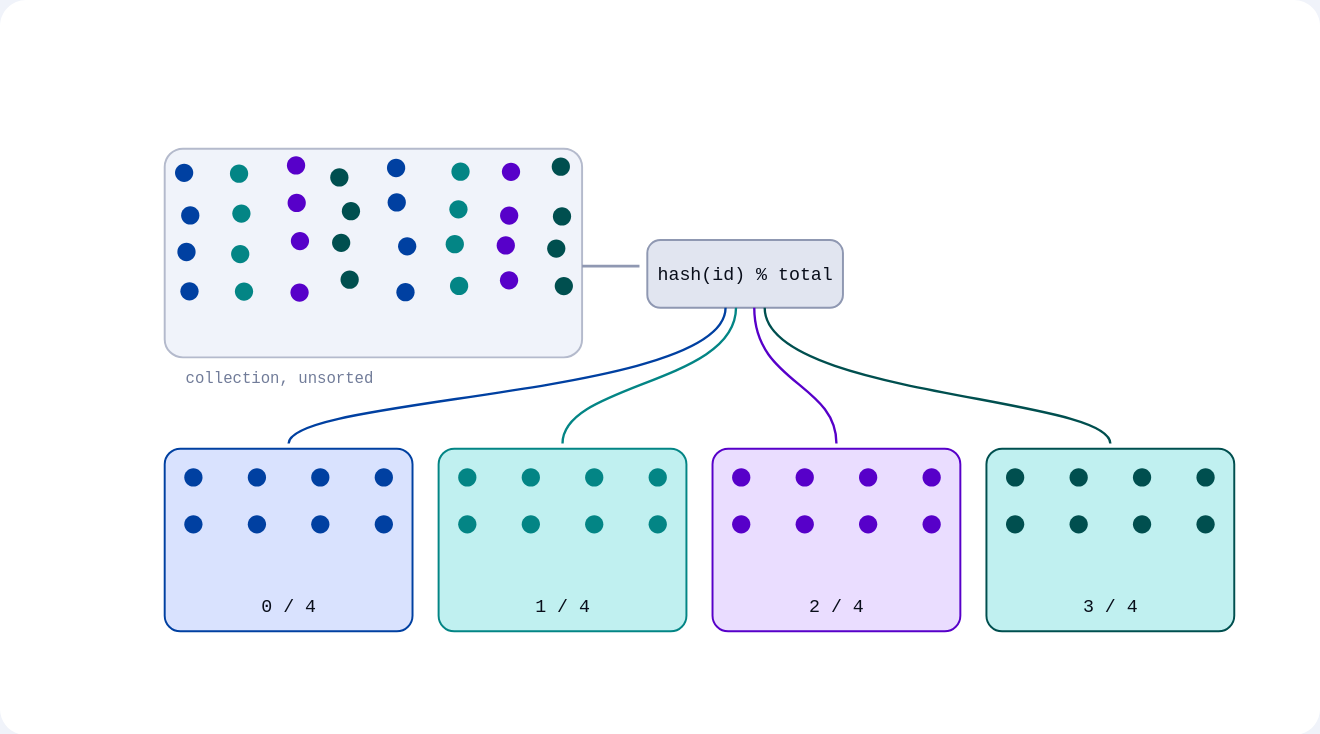
Qdrant's [`slice` filter condition](https://qdrant.tech/documentation/search/filtering/index.md#slice), available as of v1.19.0, addresses this pain point: it divides a collection into a fixed number of deterministic, disjoint subsets, so a fixed number of workers can each claim one subset with no coordination, and a single subset makes a reproducible sample for evaluation or a train/test split.
Qdrant assigns every point to one slice by hashing its ID. For a fixed `total`, slices `0` through `total - 1` never overlap and together cover the entire collection. Unlike [random sampling](https://qdrant.tech/documentation/search/search/index.md#random-sampling), the same slice always returns the same set of points. You can also combine `slice` with any other filter condition, including payload filters. Because slicing is based on the point ID hash rather than payload data, it does not require a payload index. Like `has_id`, the slice condition is checked against each candidate point within every shard that receives the query.
This tutorial covers three uses: parallel `scroll` across workers, reproducible sampling for evaluation, and stratified sampling by combining `slice` with a payload filter.
## Setup
We first need to install the [Qdrant Python Client](https://github.com/qdrant/qdrant-client):
```bash
pip install qdrant-client
```
While the installation completes, follow the [Cloud Quickstart](https://qdrant.tech/documentation/cloud-quickstart/index.md) to create a free cluster and retrieve the credentials to connect the client to it. This tutorial uses [Qdrant Cloud Inference](https://qdrant.tech/documentation/inference/cloud-inference/index.md) to embed the sample data server-side, with the free model `sentence-transformers/all-MiniLM-L6-v2`.
```python
from qdrant_client import AsyncQdrantClient, models
client = AsyncQdrantClient(
url="https://your-endpoint.cloud.qdrant.io:6333",
api_key="",
cloud_inference=True,
)
collection_name = "slicing-demo"
embedding_model = "sentence-transformers/all-MiniLM-L6-v2"
await client.create_collection(
collection_name=collection_name,
vectors_config=models.VectorParams(size=384, distance=models.Distance.COSINE),
)
```
Upload a small catalog of product descriptions. Each point's vector is a `Document` object, embedded server-side:
```python
import random
random.seed(0)
products = {
"electronics": [
"wireless earbuds",
"4K monitor",
"mechanical keyboard",
"USB-C hub",
"smartwatch",
],
"books": [
"science fiction novel",
"cookbook", "history book",
"graphic novel",
"poetry collection",
],
"clothing": [
"running shoes",
"wool sweater",
"denim jacket",
"rain jacket",
"cotton t-shirt",
],
"home": [
"cast iron pan",
"ceramic mug",
"throw blanket",
"desk lamp",
"storage basket",
],
}
categories = list(products)
points = []
for i in range(500):
category = random.choice(categories)
description = random.choice(products[category])
points.append(
models.PointStruct(
id=i,
payload={"category": category},
vector=models.Document(text=description, model=embedding_model),
)
)
client.upload_points(collection_name=collection_name, points=points, wait=True)
```
## Scrolling a Single Slice
A `SliceCondition` takes an `index` and a `total`. A single `scroll` call only returns up to `limit` points, so to fetch a whole slice you page through it: keep calling `scroll` with the `next_page_offset` from the previous response until it comes back `None`. This pages through slice `3` of `8`, one eighth of the collection:
```python
next_page_offset = None
records = []
while True:
result, next_page_offset = await client.scroll(
collection_name=collection_name,
scroll_filter=models.Filter(
must=[models.SliceCondition(slice=models.Slice(index=3, total=8))],
),
limit=500,
with_payload=False,
with_vectors=False,
offset=next_page_offset,
)
records.extend(result)
if next_page_offset is None:
break
print(f"slice 3 of 8: {len(records)} points")
# slice 3 of 8: 61 points
```
With `total: 8` and 500 points, each slice holds roughly 60 points, close to `500 / 8`.
## Concurrent Scrolling Across Workers
The main use case is splitting a full scroll into `N` independent, non-overlapping scrolls, one per worker. Each worker only needs its own `index`, and since the slices don't overlap, the requests have nothing to coordinate on and can run concurrently. Use `AsyncQdrantClient` with `asyncio.gather` to fire all requests at once instead of waiting on them one at a time.
```python
import asyncio
async def scroll_slice(index: int, total: int) -> list[models.Record]:
next_page_offset = None
records = []
while True:
result, next_page_offset = await client.scroll(
collection_name=collection_name,
scroll_filter=models.Filter(
must=[models.SliceCondition(
slice=models.Slice(index=index,
total=total)
)],
),
limit=500,
with_payload=True,
with_vectors=False,
offset=next_page_offset,
)
records.extend(result)
if next_page_offset is None:
break
return records
total_slices = 10
slices = await asyncio.gather(*(
scroll_slice(i, total_slices)
for i in range(total_slices)
))
for i, s in enumerate(slices):
print(f"worker {i}: {len(s)} points")
print(f"sum across workers: {sum(len(s) for s in slices)}")
# worker 0: 47 points
# worker 1: 56 points
# worker 2: 54 points
# worker 3: 52 points
# worker 4: 41 points
# worker 5: 65 points
# worker 6: 45 points
# worker 7: 45 points
# worker 8: 46 points
# worker 9: 49 points
# sum across workers: 500
```
Every point appears in exactly one slice, so the counts add up to the full collection with no overlap and no gaps.
## Reproducible Sampling
Because the hash is stable across runs and Qdrant versions, a single slice makes a reproducible sample: requesting slice `0` of `total: 10` always returns the same 10% of the collection. [Random sampling](https://qdrant.tech/documentation/search/search/index.md#random-sampling) cannot make this guarantee, since it draws a fresh random subset on every call, which is why `slice` is the right tool for a recall benchmark or a train/test split that has to be repeatable.
A small helper turns a slice into a set of IDs, so the point can be made in a few lines: calling it twice with the same `index` and `total` returns the exact same IDs.
```python
async def slice_ids(index: int, total: int) -> set[int]:
next_page_offset = None
ids = set()
while True:
records, next_page_offset = await client.scroll(
collection_name=collection_name,
scroll_filter=models.Filter(
must=[models.SliceCondition(
slice=models.Slice(index=index, total=total)
)]
),
limit=10000,
with_payload=False,
with_vectors=False,
)
for p in records:
ids.add(p.id)
if next_page_offset is None:
break
return ids
first_run = await slice_ids(index=0, total=10)
second_run = await slice_ids(index=0, total=10)
print(f"sample size: {len(first_run)}")
print(f"identical on repeat: {first_run == second_run}")
# sample size: 47
# identical on repeat: True
```
Slices with different `total` values are also correlated: slice `0` of `total: 4` is always a subset of slice `0` of `total: 2`. This means you can go from `total: 2` to `total: 4` to halve your sample, and every point in the smaller sample was already in the bigger one, so nothing you have already evaluated drops out.
## Stratified Sampling with Payload Filters
`slice` is a normal filter condition, so it combines with any other condition. This gives a reproducible sample restricted to one category, useful for a canary rollout or for evaluating a change against a single segment of the data.
```python
await client.create_payload_index(
collection_name=collection_name,
field_name="category",
field_schema=models.PayloadSchemaType.KEYWORD,
)
next_page_offset = None
stratified_results = []
while True:
stratified, next_page_offset = await client.scroll(
collection_name=collection_name,
scroll_filter=models.Filter(
must=[
models.SliceCondition(slice=models.Slice(index=0, total=5)),
models.FieldCondition(
key="category",
match=models.MatchValue(value="electronics")),
],
),
limit=10000,
with_payload=True,
with_vectors=False,
)
if next_page_offset is None:
break
stratified_results.extend(stratified)
print(f"electronics points in slice 0/5: {len(stratified_results)}")
all_match = all(
p.payload['category'] == 'electronics'
for p in stratified_results
)
print(f"all match the category: {all_match}")
# electronics points in slice 0/5: 28
# all match the category: True
```
## Related Reading
- [Filtering](https://qdrant.tech/documentation/search/filtering/index.md) for the full set of filter clauses `slice` combines with.
- [Scroll Points](https://qdrant.tech/documentation/manage-data/points/index.md#scroll-points) for paging through a collection.
- [Random Sampling](https://qdrant.tech/documentation/search/search/index.md#random-sampling) for a non-deterministic alternative when reproducibility doesn't matter.
- [Qdrant Cloud Inference](https://qdrant.tech/documentation/inference/cloud-inference/index.md) for generating the dense embeddings server-side.