# Apache Spark
# Apache Spark
[Spark](https://spark.apache.org/) is a distributed computing framework designed for big data processing and analytics. The [Qdrant-Spark connector](https://github.com/qdrant/qdrant-spark) enables Qdrant to be a storage destination in Spark.
## Installation
To integrate the connector into your Spark environment, get the JAR file from one of the sources listed below.
- GitHub Releases
The packaged `jar` file with all the required dependencies can be found [here](https://github.com/qdrant/qdrant-spark/releases).
- Building from Source
To build the `jar` from source, you need [JDK@8](https://www.azul.com/downloads/#zulu) and [Maven](https://maven.apache.org/) installed. Once the requirements have been satisfied, run the following command in the [project root](https://github.com/qdrant/qdrant-spark).
```bash
mvn package -DskipTests
```
The JAR file will be written into the `target` directory by default.
- Maven Central
Find the project on Maven Central [here](https://central.sonatype.com/artifact/io.qdrant/spark).
## Usage
### Creating a Spark session with Qdrant support
```python
from pyspark.sql import SparkSession
spark = SparkSession.builder.config(
"spark.jars",
"path/to/file/spark-VERSION.jar", # Specify the path to the downloaded JAR file
)
.master("local[*]")
.appName("qdrant")
.getOrCreate()
```
```scala
import org.apache.spark.sql.SparkSession
val spark = SparkSession.builder
.config("spark.jars", "path/to/file/spark-VERSION.jar") // Specify the path to the downloaded JAR file
.master("local[*]")
.appName("qdrant")
.getOrCreate()
```
```java
import org.apache.spark.sql.SparkSession;
public class QdrantSparkJavaExample {
public static void main(String[] args) {
SparkSession spark = SparkSession.builder()
.config("spark.jars", "path/to/file/spark-VERSION.jar") // Specify the path to the downloaded JAR file
.master("local[*]")
.appName("qdrant")
.getOrCreate();
}
}
```
### Loading data
Before loading the data using this connector, a collection has to be [created](/documentation/manage-data/collections/index.md#create-a-collection) in advance with the appropriate vector dimensions and configurations.
The connector supports ingesting multiple named/unnamed, dense/sparse vectors.
_Click each to expand._
Unnamed/Default vector
```python
.write
.format("io.qdrant.spark.Qdrant")
.option("qdrant_url", )
.option("collection_name", )
.option("embedding_field", ) # Expected to be a field of type ArrayType(FloatType)
.option("schema", .schema.json())
.mode("append")
.save()
```
Named vector
```python
.write
.format("io.qdrant.spark.Qdrant")
.option("qdrant_url", )
.option("collection_name", )
.option("embedding_field", ) # Expected to be a field of type ArrayType(FloatType)
.option("vector_name", )
.option("schema", .schema.json())
.mode("append")
.save()
```
> #### NOTE
>
> The `embedding_field` and `vector_name` options are maintained for backward compatibility. It is recommended to use `vector_fields` and `vector_names` for named vectors as shown below.
Multiple named vectors
```python
.write
.format("io.qdrant.spark.Qdrant")
.option("qdrant_url", "")
.option("collection_name", "")
.option("vector_fields", ",")
.option("vector_names", ",")
.option("schema", .schema.json())
.mode("append")
.save()
```
Sparse vectors
```python
.write
.format("io.qdrant.spark.Qdrant")
.option("qdrant_url", "")
.option("collection_name", "")
.option("sparse_vector_value_fields", "")
.option("sparse_vector_index_fields", "")
.option("sparse_vector_names", "")
.option("schema", .schema.json())
.mode("append")
.save()
```
Multiple sparse vectors
```python
.write
.format("io.qdrant.spark.Qdrant")
.option("qdrant_url", "")
.option("collection_name", "")
.option("sparse_vector_value_fields", ",")
.option("sparse_vector_index_fields", ",")
.option("sparse_vector_names", ",")
.option("schema", .schema.json())
.mode("append")
.save()
```
Combination of named dense and sparse vectors
```python
.write
.format("io.qdrant.spark.Qdrant")
.option("qdrant_url", "")
.option("collection_name", "")
.option("vector_fields", ",")
.option("vector_names", ",")
.option("sparse_vector_value_fields", ",")
.option("sparse_vector_index_fields", ",")
.option("sparse_vector_names", ",")
.option("schema", .schema.json())
.mode("append")
.save()
```
Multi-vectors
```python
.write
.format("io.qdrant.spark.Qdrant")
.option("qdrant_url", "")
.option("collection_name", "")
.option("multi_vector_fields", "")
.option("multi_vector_names", "")
.option("schema", .schema.json())
.mode("append")
.save()
```
Multiple Multi-vectors
```python
.write
.format("io.qdrant.spark.Qdrant")
.option("qdrant_url", "")
.option("collection_name", "")
.option("multi_vector_fields", ",")
.option("multi_vector_names", ",")
.option("schema", .schema.json())
.mode("append")
.save()
```
No vectors - Entire dataframe is stored as payload
```python
.write
.format("io.qdrant.spark.Qdrant")
.option("qdrant_url", "")
.option("collection_name", "")
.option("schema", .schema.json())
.mode("append")
.save()
```
## Databricks
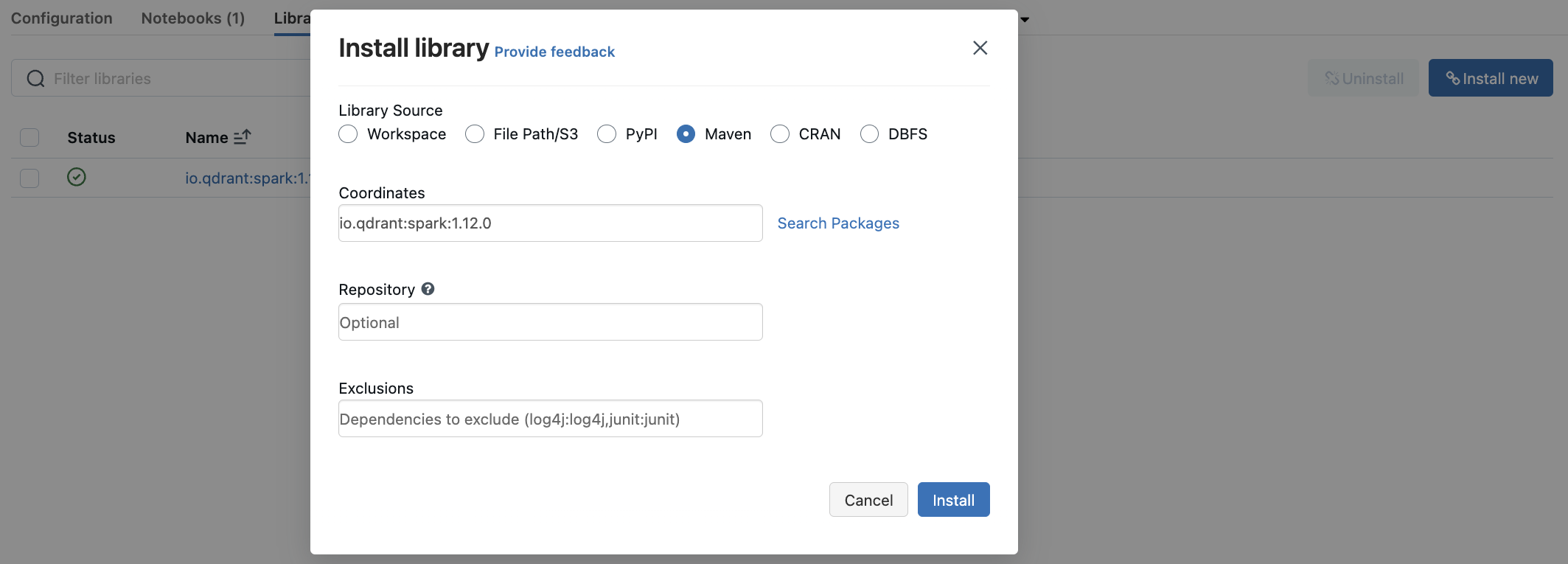
You can use the `qdrant-spark` connector as a library in [Databricks](https://www.databricks.com/).
- Go to the `Libraries` section in your Databricks cluster dashboard.
- Select `Install New` to open the library installation modal.
- Search for `io.qdrant:spark:VERSION` in the Maven packages and click `Install`.
## Datatype support
The appropriate Spark data types are mapped to the Qdrant payload based on the provided `schema`.
## Options and Spark types
| Option | Description | Column DataType | Required |
| :--------------------------- | :----------------------------------------------------------------------------------- | :-------------------------------- | :------- |
| `qdrant_url` | gRPC URL of the Qdrant instance. Eg: | - | ✅ |
| `collection_name` | Name of the collection to write data into | - | ✅ |
| `schema` | JSON string of the dataframe schema | - | ✅ |
| `embedding_field` | Name of the column holding the embeddings (Deprecated - Use `vector_fields` instead) | `ArrayType(FloatType)` | ❌ |
| `id_field` | Name of the column holding the point IDs. Default: Random UUID | `StringType` or `IntegerType` | ❌ |
| `batch_size` | Max size of the upload batch. Default: 64 | - | ❌ |
| `retries` | Number of upload retries. Default: 3 | - | ❌ |
| `api_key` | Qdrant API key for authentication | - | ❌ |
| `vector_name` | Name of the vector in the collection. | - | ❌ |
| `vector_fields` | Comma-separated names of columns holding the vectors. | `ArrayType(FloatType)` | ❌ |
| `vector_names` | Comma-separated names of vectors in the collection. | - | ❌ |
| `sparse_vector_index_fields` | Comma-separated names of columns holding the sparse vector indices. | `ArrayType(IntegerType)` | ❌ |
| `sparse_vector_value_fields` | Comma-separated names of columns holding the sparse vector values. | `ArrayType(FloatType)` | ❌ |
| `sparse_vector_names` | Comma-separated names of the sparse vectors in the collection. | - | ❌ |
| `multi_vector_fields` | Comma-separated names of columns holding the multi-vector values. | `ArrayType(ArrayType(FloatType))` | ❌ |
| `multi_vector_names` | Comma-separated names of the multi-vectors in the collection. | - | ❌ |
| `shard_key_selector` | Comma-separated names of custom shard keys to use during upsert. | - | ❌ |
| `wait` | Wait for each batch upsert to complete. `true` or `false`. Defaults to `true`. | - | ❌ |
For more information, be sure to check out the [Qdrant-Spark GitHub repository](https://github.com/qdrant/qdrant-spark). The Apache Spark guide is available [here](https://spark.apache.org/docs/latest/quick-start.html). Happy data processing!