# Text Filtering
Qdrant supports [filtering](https://qdrant.tech/documentation/search/filtering/index.md) on a wide range of datatypes: numbers, dates, booleans, geolocations, and strings. In Qdrant, a filter is typically combined with a vector query. The vector query is used to score and rank the results, while the filter is used to narrow down the results based on specific criteria.
## Text and Keyword Strings
When it comes to filtering on strings, it is important to understand the difference between the two types of strings in Qdrant: text and keyword. These two string types are designed for different use cases: filtering on exact string values or filtering on individual search terms. To filter on exact string values, Qdrant uses **keyword** strings. Keyword strings are ideal for filtering on strings like IDs, categories, or tags. To filter on individual terms or phrases within a larger body of text, Qdrant uses **text** strings.
For example, take a string like "United States". If you want to filter on all points with this exact string in the payload, use a keyword filter. On the other hand, if you want to filter on all points that contain the word "united" (matching "United States" as well as "United Kingdom"), use a text filter.
| Keyword | Text |
|---|---|
| Used for exact string matches | Used for filtering on individual terms |
| Ideal for IDs, categories, tags | Ideal for larger text fields |
| Not tokenized | [Tokenized](https://qdrant.tech/documentation/manage-data/indexing/index.md#tokenizers) into individual terms |
| Case-sensitive | Case-insensitive by default |
## Filtering on an Exact String
To filter on exact strings, first create a [payload index](https://qdrant.tech/documentation/manage-data/indexing/index.md#payload-index) of type `keyword`for the field you want to filter on. A payload index makes filtering faster and reduces the load on the system.
For example, to filter books by author name, create a keyword index on the "author" field:
```http
PUT /collections/books/index?wait=true
{
"field_name": "author",
"field_schema": "keyword"
}
```
```python
from qdrant_client import QdrantClient, models
client = QdrantClient(
url="https://xyz-example.qdrant.io:6333",
api_key="",
cloud_inference=True,
)
client.create_payload_index(
collection_name="books",
field_name="author",
field_schema=models.PayloadSchemaType.KEYWORD
)
```
```typescript
client.createPayloadIndex("books", {
field_name: "author",
field_schema: "keyword",
});
```
```rust
use qdrant_client::Qdrant;
use qdrant_client::qdrant::{CreateFieldIndexCollectionBuilder, FieldType};
client
.create_field_index(CreateFieldIndexCollectionBuilder::new(
"books",
"author",
FieldType::Keyword,
))
.await?;
```
```java
import io.qdrant.client.QdrantClient;
import io.qdrant.client.QdrantGrpcClient;
import io.qdrant.client.grpc.Collections.PayloadSchemaType;
QdrantClient client =
client
.createPayloadIndexAsync(
"books", "author", PayloadSchemaType.Keyword, null, null, null, null)
.get();
```
```csharp
using Qdrant.Client;
using Qdrant.Client.Grpc;
await client.CreatePayloadIndexAsync(
collectionName: "books",
fieldName: "author",
schemaType: PayloadSchemaType.Keyword
);
```
```go
client.CreateFieldIndex(context.Background(), &qdrant.CreateFieldIndexCollection{
CollectionName: "books",
FieldName: "author",
FieldType: qdrant.FieldType_FieldTypeKeyword.Enum(),
})
```
Next, when querying the data, you also add a filter clause to the request. The following example searches for books related to "time travel" but only returns books written by H.G. Wells:
```http
POST /collections/books/points/query
{
"query": {
"text": "time travel",
"model": "sentence-transformers/all-minilm-l6-v2"
},
"using": "description-dense",
"with_payload": true,
"filter": {
"must": [
{
"key": "author",
"match": {
"value": "H.G. Wells"
}
}
]
}
}
```
```python
from qdrant_client import QdrantClient, models
client = QdrantClient(
url="https://xyz-example.qdrant.io:6333",
api_key="",
cloud_inference=True,
)
client.query_points(
collection_name="books",
query=models.Document(text="time travel", model="sentence-transformers/all-minilm-l6-v2"),
using="description-dense",
with_payload=True,
query_filter=models.Filter(
must=[models.FieldCondition(key="author", match=models.MatchValue(value="H.G. Wells"))]
),
)
```
```typescript
client.query("books", {
query: {
text: "time travel",
model: "sentence-transformers/all-minilm-l6-v2",
},
using: "description-dense",
with_payload: true,
filter: {
must: [
{
key: "author",
match: {
value: "H.G. Wells",
},
},
],
},
});
```
```rust
use qdrant_client::Qdrant;
use qdrant_client::qdrant::{Condition, Document, Filter, Query, QueryPointsBuilder};
let filter = Filter::must([Condition::matches("author", "H.G. Wells".to_string())]);
client
.query(
QueryPointsBuilder::new("books")
.query(Query::new_nearest(Document::new(
"time travel",
"sentence-transformers/all-minilm-l6-v2",
)))
.using("description-dense")
.filter(filter)
.with_payload(true)
.build(),
)
.await?;
```
```java
import static io.qdrant.client.ConditionFactory.*;
import static io.qdrant.client.QueryFactory.nearest;
import static io.qdrant.client.WithPayloadSelectorFactory.enable;
import io.qdrant.client.QdrantClient;
import io.qdrant.client.QdrantGrpcClient;
import io.qdrant.client.grpc.Common.Filter;
import io.qdrant.client.grpc.Points.*;
QdrantClient client =
Filter filter = Filter.newBuilder().addMust(matchKeyword("author", "H.G. Wells")).build();
client
.queryAsync(
QueryPoints.newBuilder()
.setCollectionName("books")
.setQuery(
nearest(
Document.newBuilder()
.setText("time travel")
.setModel("sentence-transformers/all-minilm-l6-v2")
.build()))
.setUsing("description-dense")
.setFilter(filter)
.setWithPayload(enable(true))
.build())
.get();
```
```csharp
using Qdrant.Client;
using Qdrant.Client.Grpc;
using static Qdrant.Client.Grpc.Conditions;
await client.QueryAsync(
collectionName: "books",
query: new Document
{
Text = "time travel",
Model = "sentence-transformers/all-minilm-l6-v2",
},
usingVector: "description-dense",
filter: MatchKeyword("author", "H.G. Wells"),
payloadSelector: true
);
```
```go
client.Query(context.Background(), &qdrant.QueryPoints{
CollectionName: "books",
Query: qdrant.NewQueryNearest(
qdrant.NewVectorInputDocument(&qdrant.Document{
Model: "sentence-transformers/all-minilm-l6-v2",
Text: "time travel",
}),
),
Using: qdrant.PtrOf("description-dense"),
WithPayload: qdrant.NewWithPayload(true),
Filter: &qdrant.Filter{
Must: []*qdrant.Condition{
qdrant.NewMatch("author", "H.G. Wells"),
},
},
})
```
The ranking of the results of this request is based on the vector similarity of the query. The filter only narrows down the results to those points where the `author` field exactly matches `H.G. Wells`. Furthermore, the filter is case-sensitive. Filtering for the lowercase value `h.g. wells` would not return any results.
The previous example only returns points that match the filter value. If you want the opposite: exclude points with a specific value, use a `must_not` clause instead of `must`. The following example only returns books *not* written by H.G. Wells:
```http
POST /collections/books/points/query
{
"query": {
"text": "time travel",
"model": "sentence-transformers/all-minilm-l6-v2"
},
"using": "description-dense",
"with_payload": true,
"filter": {
"must_not": [
{
"key": "author",
"match": {
"value": "H.G. Wells"
}
}
]
}
}
```
```python
from qdrant_client import QdrantClient, models
client = QdrantClient(
url="https://xyz-example.qdrant.io:6333",
api_key="",
cloud_inference=True,
)
client.query_points(
collection_name="books",
query=models.Document(text="time travel", model="sentence-transformers/all-minilm-l6-v2"),
using="description-dense",
with_payload=True,
query_filter=models.Filter(
must_not=[models.FieldCondition(key="author", match=models.MatchValue(value="H.G. Wells"))]
),
)
```
```typescript
client.query("books", {
query: {
text: "time travel",
model: "sentence-transformers/all-minilm-l6-v2",
},
using: "description-dense",
with_payload: true,
filter: {
must_not: [
{ key: "author", match: { value: "H.G. Wells" } },
],
},
});
```
```rust
use qdrant_client::Qdrant;
use qdrant_client::qdrant::{Condition, Document, Filter, Query, QueryPointsBuilder};
let filter = Filter::must_not([Condition::matches("author", "H.G. Wells".to_string())]);
client
.query(
QueryPointsBuilder::new("books")
.query(Query::new_nearest(Document::new(
"time travel",
"sentence-transformers/all-minilm-l6-v2",
)))
.using("description-dense")
.filter(filter)
.with_payload(true)
.build(),
)
.await?;
```
```java
import static io.qdrant.client.ConditionFactory.*;
import static io.qdrant.client.QueryFactory.nearest;
import static io.qdrant.client.WithPayloadSelectorFactory.enable;
import io.qdrant.client.QdrantClient;
import io.qdrant.client.QdrantGrpcClient;
import io.qdrant.client.grpc.Common.Filter;
import io.qdrant.client.grpc.Points.*;
QdrantClient client =
Filter filter = Filter.newBuilder().addMustNot(matchKeyword("author", "H.G. Wells")).build();
client
.queryAsync(
QueryPoints.newBuilder()
.setCollectionName("books")
.setQuery(
nearest(
Document.newBuilder()
.setText("time travel")
.setModel("sentence-transformers/all-minilm-l6-v2")
.build()))
.setUsing("description-dense")
.setFilter(filter)
.setWithPayload(enable(true))
.build())
.get();
```
```csharp
using Qdrant.Client;
using Qdrant.Client.Grpc;
using static Qdrant.Client.Grpc.Conditions;
var excludeFilter = new Filter { MustNot = { MatchKeyword("author", "H.G. Wells") } };
await client.QueryAsync(
collectionName: "books",
query: new Document
{
Text = "time travel",
Model = "sentence-transformers/all-minilm-l6-v2",
},
usingVector: "description-dense",
filter: excludeFilter,
payloadSelector: true
);
```
```go
excludeFilter := qdrant.Filter{
MustNot: []*qdrant.Condition{
qdrant.NewMatch("author", "H.G. Wells"),
},
}
client.Query(context.Background(), &qdrant.QueryPoints{
CollectionName: "books",
Query: qdrant.NewQueryNearest(
qdrant.NewVectorInputDocument(&qdrant.Document{
Model: "sentence-transformers/all-minilm-l6-v2",
Text: "time travel",
}),
),
Using: qdrant.PtrOf("description-dense"),
WithPayload: qdrant.NewWithPayload(true),
Filter: &excludeFilter,
})
```
## Filtering on Multiple Exact Strings
You can provide multiple filter clauses. For example, to find all books co-authored by Larry Niven and Jerry Pournelle, use the following filter:
```http
POST /collections/books/points/query
{
"query": {
"text": "space opera",
"model": "sentence-transformers/all-minilm-l6-v2"
},
"using": "description-dense",
"with_payload": true,
"filter": {
"must": [
{
"key": "author",
"match": {
"value": "Larry Niven"
}
},
{
"key": "author",
"match": {
"value": "Jerry Pournelle"
}
}
]
}
}
```
```python
from qdrant_client import QdrantClient, models
client = QdrantClient(
url="https://xyz-example.qdrant.io:6333",
api_key="",
cloud_inference=True,
)
client.query_points(
collection_name="books",
query=models.Document(text="space opera", model="sentence-transformers/all-minilm-l6-v2"),
using="description-dense",
with_payload=True,
query_filter=models.Filter(
must=[
models.FieldCondition(key="author", match=models.MatchValue(value="Larry Niven")),
models.FieldCondition(key="author", match=models.MatchValue(value="Jerry Pournelle")),
]
),
)
```
```typescript
client.query("books", {
query: {
text: "space opera",
model: "sentence-transformers/all-minilm-l6-v2",
},
using: "description-dense",
with_payload: true,
filter: {
must: [
{ key: "author", match: { value: "Larry Niven" } },
{ key: "author", match: { value: "Jerry Pournelle" } },
],
},
});
```
```rust
use qdrant_client::Qdrant;
use qdrant_client::qdrant::{Condition, Document, Filter, Query, QueryPointsBuilder};
let filter = Filter::must([
Condition::matches("author", "Larry Niven".to_string()),
Condition::matches("author", "Jerry Pournelle".to_string()),
]);
client
.query(
QueryPointsBuilder::new("books")
.query(Query::new_nearest(Document::new(
"space opera",
"sentence-transformers/all-minilm-l6-v2",
)))
.using("description-dense")
.filter(filter)
.with_payload(true)
.build(),
)
.await?;
```
```java
import static io.qdrant.client.ConditionFactory.*;
import static io.qdrant.client.QueryFactory.nearest;
import static io.qdrant.client.WithPayloadSelectorFactory.enable;
import io.qdrant.client.QdrantClient;
import io.qdrant.client.QdrantGrpcClient;
import io.qdrant.client.grpc.Common.Filter;
import io.qdrant.client.grpc.Points.*;
QdrantClient client =
Filter filter =
Filter.newBuilder()
.addMust(matchKeyword("author", "Larry Niven"))
.addMust(matchKeyword("author", "Jerry Pournelle"))
.build();
client
.queryAsync(
QueryPoints.newBuilder()
.setCollectionName("books")
.setQuery(
nearest(
Document.newBuilder()
.setText("space opera")
.setModel("sentence-transformers/all-minilm-l6-v2")
.build()))
.setUsing("description-dense")
.setFilter(filter)
.setWithPayload(enable(true))
.build())
.get();
```
```csharp
using Qdrant.Client;
using Qdrant.Client.Grpc;
using static Qdrant.Client.Grpc.Conditions;
var andFilter = new Filter
{
Must =
{
MatchKeyword("author", "Larry Niven"),
MatchKeyword("author", "Jerry Pournelle"),
},
};
await client.QueryAsync(
collectionName: "books",
query: new Document
{
Text = "space opera",
Model = "sentence-transformers/all-minilm-l6-v2",
},
usingVector: "description-dense",
filter: andFilter,
payloadSelector: true
);
```
```go
andFilter := qdrant.Filter{
Must: []*qdrant.Condition{
qdrant.NewMatch("author", "Larry Niven"),
qdrant.NewMatch("author", "Jerry Pournelle"),
},
}
client.Query(context.Background(), &qdrant.QueryPoints{
CollectionName: "books",
Query: qdrant.NewQueryNearest(
qdrant.NewVectorInputDocument(&qdrant.Document{
Model: "sentence-transformers/all-minilm-l6-v2",
Text: "space opera",
}),
),
Using: qdrant.PtrOf("description-dense"),
WithPayload: qdrant.NewWithPayload(true),
Filter: &andFilter,
})
```
Note that both filter clauses must be true for a point to be included in the results, because a `must` clause operates like a logical `AND`. If you want to find books written by either author (as well as both), use a `should` clause, which operates like a logical `OR`:
```http
POST /collections/books/points/query
{
"query": {
"text": "space opera",
"model": "sentence-transformers/all-minilm-l6-v2"
},
"using": "description-dense",
"with_payload": true,
"filter": {
"should": [
{
"key": "author",
"match": {
"value": "Larry Niven"
}
},
{
"key": "author",
"match": {
"value": "Jerry Pournelle"
}
}
]
}
}
```
```python
from qdrant_client import QdrantClient, models
client = QdrantClient(
url="https://xyz-example.qdrant.io:6333",
api_key="",
cloud_inference=True,
)
client.query_points(
collection_name="books",
query=models.Document(text="space opera", model="sentence-transformers/all-minilm-l6-v2"),
using="description-dense",
with_payload=True,
query_filter=models.Filter(
should=[
models.FieldCondition(key="author", match=models.MatchValue(value="Larry Niven")),
models.FieldCondition(key="author", match=models.MatchValue(value="Jerry Pournelle")),
]
),
)
```
```typescript
client.query("books", {
query: {
text: "space opera",
model: "sentence-transformers/all-minilm-l6-v2",
},
using: "description-dense",
with_payload: true,
filter: {
should: [
{ key: "author", match: { value: "Larry Niven" } },
{ key: "author", match: { value: "Jerry Pournelle" } },
],
},
});
```
```rust
use qdrant_client::Qdrant;
use qdrant_client::qdrant::{Condition, Document, Filter, Query, QueryPointsBuilder};
let filter = Filter::should([
Condition::matches("author", "Larry Niven".to_string()),
Condition::matches("author", "Jerry Pournelle".to_string()),
]);
client
.query(
QueryPointsBuilder::new("books")
.query(Query::new_nearest(Document::new(
"space opera",
"sentence-transformers/all-minilm-l6-v2",
)))
.using("description-dense")
.filter(filter)
.with_payload(true)
.build(),
)
.await?;
```
```java
import static io.qdrant.client.ConditionFactory.*;
import static io.qdrant.client.QueryFactory.nearest;
import static io.qdrant.client.WithPayloadSelectorFactory.enable;
import io.qdrant.client.QdrantClient;
import io.qdrant.client.QdrantGrpcClient;
import io.qdrant.client.grpc.Common.Filter;
import io.qdrant.client.grpc.Points.*;
QdrantClient client =
Filter filter =
Filter.newBuilder()
.addShould(matchKeyword("author", "Larry Niven"))
.addShould(matchKeyword("author", "Jerry Pournelle"))
.build();
client
.queryAsync(
QueryPoints.newBuilder()
.setCollectionName("books")
.setQuery(
nearest(
Document.newBuilder()
.setText("space opera")
.setModel("sentence-transformers/all-minilm-l6-v2")
.build()))
.setUsing("description-dense")
.setFilter(filter)
.setWithPayload(enable(true))
.build())
.get();
```
```csharp
using Qdrant.Client;
using Qdrant.Client.Grpc;
using static Qdrant.Client.Grpc.Conditions;
var orFilter = new Filter
{
Should =
{
MatchKeyword("author", "Larry Niven"),
MatchKeyword("author", "Jerry Pournelle"),
},
};
await client.QueryAsync(
collectionName: "books",
query: new Document
{
Text = "space opera",
Model = "sentence-transformers/all-minilm-l6-v2",
},
usingVector: "description-dense",
filter: orFilter,
payloadSelector: true
);
```
```go
orFilter := qdrant.Filter{
Should: []*qdrant.Condition{
qdrant.NewMatch("author", "Larry Niven"),
qdrant.NewMatch("author", "Jerry Pournelle"),
},
}
client.Query(context.Background(), &qdrant.QueryPoints{
CollectionName: "books",
Query: qdrant.NewQueryNearest(
qdrant.NewVectorInputDocument(&qdrant.Document{
Model: "sentence-transformers/all-minilm-l6-v2",
Text: "space opera",
}),
),
Using: qdrant.PtrOf("description-dense"),
WithPayload: qdrant.NewWithPayload(true),
Filter: &orFilter,
})
```
Alternatively, when you want to filter on one or more values of a single key, you can use the `any` condition:
```http
POST /collections/books/points/query
{
"query": {
"text": "space opera",
"model": "sentence-transformers/all-minilm-l6-v2"
},
"using": "description-dense",
"with_payload": true,
"filter": {
"must": [
{
"key": "author",
"match": {
"any": ["Larry Niven", "Jerry Pournelle"]
}
}
]
}
}
```
```python
from qdrant_client import QdrantClient, models
client = QdrantClient(
url="https://xyz-example.qdrant.io:6333",
api_key="",
cloud_inference=True,
)
client.query_points(
collection_name="books",
query=models.Document(text="space opera", model="sentence-transformers/all-minilm-l6-v2"),
using="description-dense",
with_payload=True,
query_filter=models.Filter(
must=[
models.FieldCondition(
key="author",
match=models.MatchAny(any=["Larry Niven", "Jerry Pournelle"]),
)
]
),
)
```
```typescript
client.query("books", {
query: {
text: "space opera",
model: "sentence-transformers/all-minilm-l6-v2",
},
using: "description-dense",
with_payload: true,
filter: {
must: [
{
key: "author",
match: { any: ["Larry Niven", "Jerry Pournelle"] },
},
],
},
});
```
```rust
use qdrant_client::Qdrant;
use qdrant_client::qdrant::{Condition, Document, Filter, Query, QueryPointsBuilder};
let filter = Filter::should([
Condition::matches("author", "Larry Niven".to_string()),
Condition::matches("author", "Jerry Pournelle".to_string()),
]);
client
.query(
QueryPointsBuilder::new("books")
.query(Query::new_nearest(Document::new(
"space opera",
"sentence-transformers/all-minilm-l6-v2",
)))
.using("description-dense")
.filter(filter)
.with_payload(true)
.build(),
)
.await?;
```
```java
import static io.qdrant.client.ConditionFactory.*;
import static io.qdrant.client.QueryFactory.nearest;
import static io.qdrant.client.WithPayloadSelectorFactory.enable;
import io.qdrant.client.QdrantClient;
import io.qdrant.client.QdrantGrpcClient;
import io.qdrant.client.grpc.Common.Filter;
import io.qdrant.client.grpc.Points.*;
QdrantClient client =
Filter filter =
Filter.newBuilder()
.addShould(matchKeyword("author", "Larry Niven"))
.addShould(matchKeyword("author", "Jerry Pournelle"))
.build();
client
.queryAsync(
QueryPoints.newBuilder()
.setCollectionName("books")
.setQuery(
nearest(
Document.newBuilder()
.setText("space opera")
.setModel("sentence-transformers/all-minilm-l6-v2")
.build()))
.setUsing("description-dense")
.setFilter(filter)
.setWithPayload(enable(true))
.build())
.get();
```
```csharp
using Qdrant.Client;
using Qdrant.Client.Grpc;
using static Qdrant.Client.Grpc.Conditions;
var anyFilter = new Filter
{
Should =
{
MatchKeyword("author", "Larry Niven"),
MatchKeyword("author", "Jerry Pournelle"),
},
};
await client.QueryAsync(
collectionName: "books",
query: new Document
{
Text = "space opera",
Model = "sentence-transformers/all-minilm-l6-v2",
},
usingVector: "description-dense",
filter: anyFilter,
payloadSelector: true
);
```
```go
anyFilter := qdrant.Filter{
Should: []*qdrant.Condition{
qdrant.NewMatch("author", "Larry Niven"),
qdrant.NewMatch("author", "Jerry Pournelle"),
},
}
client.Query(context.Background(), &qdrant.QueryPoints{
CollectionName: "books",
Query: qdrant.NewQueryNearest(
qdrant.NewVectorInputDocument(&qdrant.Document{
Model: "sentence-transformers/all-minilm-l6-v2",
Text: "space opera",
}),
),
Using: qdrant.PtrOf("description-dense"),
WithPayload: qdrant.NewWithPayload(true),
Filter: &anyFilter,
})
```
## Full-Text Filtering
In contrast to keyword filtering, filtering on text strings enables you to filter on individual words within a larger text field in a case-insensitive manner. To understand how this works, it's important to understand how text strings are processed at index time and query time.
### Text Processing
To enable efficient full-text filtering, Qdrant processes text strings by breaking them down into individual tokens (words) and applying several normalization steps. This process ensures that searches are more flexible and can match variations of words. At query time, Qdrant applies the same processing steps to the filter string, ensuring that the filter matches the indexed tokens correctly.
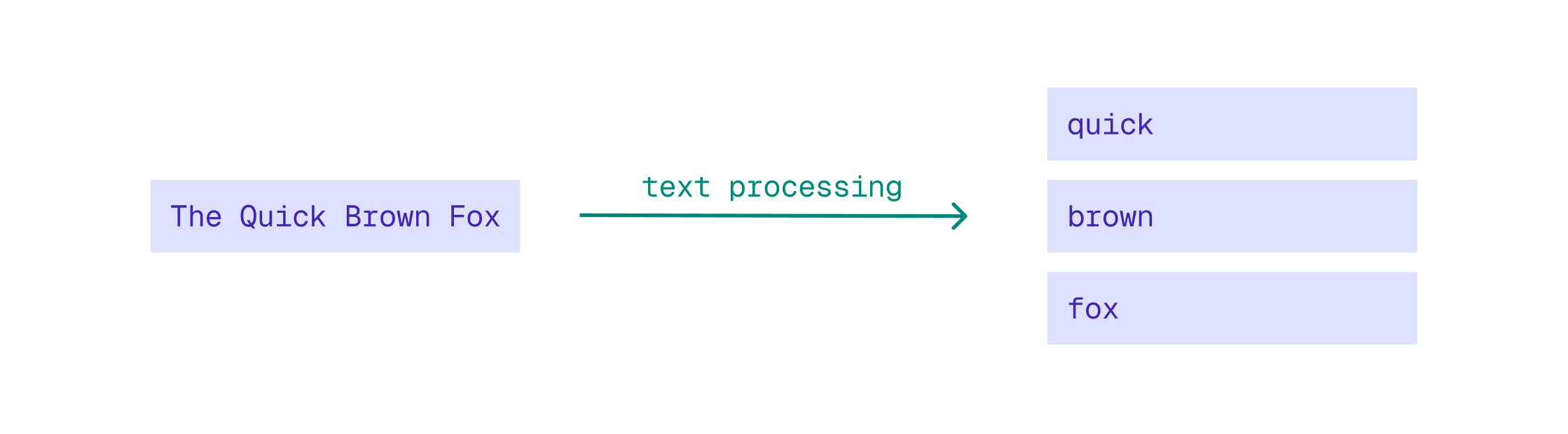
The following text processing steps are applied to text strings:
- The string is broken down into individual tokens (words) using a process called [tokenization](https://qdrant.tech/documentation/manage-data/indexing/index.md#tokenizers). By default, Qdrant uses the `word` tokenizer, which splits the string using word boundaries, discarding spaces, punctuation marks, and special characters.
- By default, each word is then [converted to lowercase](https://qdrant.tech/documentation/manage-data/indexing/index.md#lowercasing). Lowercasing the tokens allows Qdrant to ignore capitalization, making full-text filters case-insensitive.
- Optionally, Qdrant can remove diacritics (accents) from characters using a process called [ASCII folding](https://qdrant.tech/documentation/manage-data/indexing/index.md#ascii-folding). This ensures that diacritics are ignored. As a result, filtering for the word "cafe" matches "café".
- Optionally, tokens can be reduced to their root form using a [stemmer](https://qdrant.tech/documentation/manage-data/indexing/index.md#stemmer). This ensures that filtering for "running" also matches "run" and "ran". Because stemming is language-specific, if enabled, it must be configured for a specific language.
- Certain words like "the", "is", and "and" are very common in text and do not contribute much to the meaning of text. These words are called [stopwords](https://qdrant.tech/documentation/manage-data/indexing/index.md#stopwords) and can optionally be removed during indexing. Like stemming, stopword removal is language-specific. You can configure specific languages for stopword removal and/or provide a custom list of stopwords to remove.
- Optionally, you can enable [phrase matching](https://qdrant.tech/documentation/manage-data/indexing/index.md#phrase-search) to allow filtering for multiple words in the exact same order as they appear in the original text.
These text processing steps can be configured when creating a [full-text index](https://qdrant.tech/documentation/manage-data/indexing/index.md#full-text-index). For example, to create a text index on the `title` field with ASCII folding enabled:
```http
PUT /collections/books/index?wait=true
{
"field_name": "title",
"field_schema": {
"type": "text",
"ascii_folding": true
}
}
```
```python
from qdrant_client import QdrantClient, models
client = QdrantClient(
url="https://xyz-example.qdrant.io:6333",
api_key="",
cloud_inference=True,
)
client.create_payload_index(
collection_name="books",
field_name="title",
field_schema=models.TextIndexParams(type=models.TextIndexType.TEXT, ascii_folding=True),
)
```
```typescript
client.createPayloadIndex("books", {
field_name: "title",
field_schema: {
type: "text",
ascii_folding: true,
},
});
```
```rust
use qdrant_client::Qdrant;
use qdrant_client::qdrant::{
CreateFieldIndexCollectionBuilder, FieldType, TextIndexParamsBuilder, TokenizerType,
};
let params = TextIndexParamsBuilder::new(TokenizerType::Word)
.ascii_folding(true)
.lowercase(true)
.build();
client
.create_field_index(
CreateFieldIndexCollectionBuilder::new("books", "title", FieldType::Text)
.field_index_params(params),
)
.await?;
```
```java
import io.qdrant.client.QdrantClient;
import io.qdrant.client.QdrantGrpcClient;
import io.qdrant.client.grpc.Collections.PayloadIndexParams;
import io.qdrant.client.grpc.Collections.PayloadSchemaType;
import io.qdrant.client.grpc.Collections.TextIndexParams;
import io.qdrant.client.grpc.Collections.TokenizerType;
QdrantClient client =
client
.createPayloadIndexAsync(
"books",
"title",
PayloadSchemaType.Text,
PayloadIndexParams.newBuilder()
.setTextIndexParams(
TextIndexParams.newBuilder()
.setTokenizer(TokenizerType.Word)
.setAsciiFolding(true)
.setLowercase(true)
.build())
.build(),
null,
null,
null)
.get();
```
```csharp
using Qdrant.Client;
using Qdrant.Client.Grpc;
await client.CreatePayloadIndexAsync(
collectionName: "books",
fieldName: "title",
schemaType: PayloadSchemaType.Text,
indexParams: new PayloadIndexParams
{
TextIndexParams = new TextIndexParams
{
Tokenizer = TokenizerType.Word,
AsciiFolding = true,
Lowercase = true,
},
}
);
```
```go
client.CreateFieldIndex(context.Background(), &qdrant.CreateFieldIndexCollection{
CollectionName: "books",
FieldName: "title",
FieldType: qdrant.FieldType_FieldTypeText.Enum(),
FieldIndexParams: qdrant.NewPayloadIndexParamsText(
&qdrant.TextIndexParams{
Tokenizer: qdrant.TokenizerType_Word,
Lowercase: qdrant.PtrOf(true),
AsciiFolding: qdrant.PtrOf(true),
}),
})
```
When filtering using this index, Qdrant automatically applies the same text processing steps to the filter string before matching it against the indexed tokens.
## Filter on Text Strings
To filter on text values in a payload field, first create a [full-text index](https://qdrant.tech/documentation/manage-data/indexing/index.md#full-text-index) for that field. Next, you can use a `text` condition to query the collection with a filter for titles that contain the word "space":
```http
POST /collections/books/points/query
{
"query": {
"text": "space opera",
"model": "sentence-transformers/all-minilm-l6-v2"
},
"using": "description-dense",
"with_payload": true,
"filter": {
"must": [
{
"key": "title",
"match": {
"text": "space"
}
}
]
}
}
```
```python
from qdrant_client import QdrantClient, models
client = QdrantClient(
url="https://xyz-example.qdrant.io:6333",
api_key="",
cloud_inference=True,
)
client.query_points(
collection_name="books",
query=models.Document(text="space opera", model="sentence-transformers/all-minilm-l6-v2"),
using="description-dense",
with_payload=True,
query_filter=models.Filter(
must=[models.FieldCondition(key="title", match=models.MatchText(text="space"))]
),
)
```
```typescript
client.query("books", {
query: {
text: "space opera",
model: "sentence-transformers/all-minilm-l6-v2",
},
using: "description-dense",
with_payload: true,
filter: {
must: [
{ key: "title", match: { text: "space" } },
],
},
});
```
```rust
use qdrant_client::Qdrant;
use qdrant_client::qdrant::{Condition, Document, Filter, Query, QueryPointsBuilder};
let filter = Filter::must([Condition::matches("title", "space".to_string())]);
client
.query(
QueryPointsBuilder::new("books")
.query(Query::new_nearest(Document::new(
"space opera",
"sentence-transformers/all-minilm-l6-v2",
)))
.using("description-dense")
.filter(filter)
.with_payload(true)
.build(),
)
.await?;
```
```java
import static io.qdrant.client.ConditionFactory.*;
import static io.qdrant.client.QueryFactory.nearest;
import static io.qdrant.client.WithPayloadSelectorFactory.enable;
import io.qdrant.client.QdrantClient;
import io.qdrant.client.QdrantGrpcClient;
import io.qdrant.client.grpc.Common.Filter;
import io.qdrant.client.grpc.Points.*;
QdrantClient client =
Filter filter = Filter.newBuilder().addMust(matchText("title", "space")).build();
client
.queryAsync(
QueryPoints.newBuilder()
.setCollectionName("books")
.setQuery(
nearest(
Document.newBuilder()
.setText("space opera")
.setModel("sentence-transformers/all-minilm-l6-v2")
.build()))
.setUsing("description-dense")
.setFilter(filter)
.setWithPayload(enable(true))
.build())
.get();
```
```csharp
using Qdrant.Client;
using Qdrant.Client.Grpc;
using static Qdrant.Client.Grpc.Conditions;
await client.QueryAsync(
collectionName: "books",
query: new Document
{
Text = "space opera",
Model = "sentence-transformers/all-minilm-l6-v2",
},
usingVector: "description-dense",
filter: MatchText("title", "space"),
payloadSelector: true
);
```
```go
client.Query(context.Background(), &qdrant.QueryPoints{
CollectionName: "books",
Query: qdrant.NewQueryNearest(
qdrant.NewVectorInputDocument(&qdrant.Document{
Model: "sentence-transformers/all-minilm-l6-v2",
Text: "space opera",
}),
),
Using: qdrant.PtrOf("description-dense"),
WithPayload: qdrant.NewWithPayload(true),
Filter: &qdrant.Filter{
Must: []*qdrant.Condition{qdrant.NewMatchText("title", "space")},
},
})
```
When filtering on more than one term, a `text` filter only matches fields that contain *all* the specified terms (logical `AND`). To match fields that contain *any* of the specified terms (logical `OR`), use the `text_any` condition:
```http
POST /collections/books/points/query
{
"query": {
"text": "space opera",
"model": "sentence-transformers/all-minilm-l6-v2"
},
"using": "description-dense",
"with_payload": true,
"filter": {
"must": [
{
"key": "title",
"match": {
"text_any": "space war"
}
}
]
}
}
```
```python
from qdrant_client import QdrantClient, models
client = QdrantClient(
url="https://xyz-example.qdrant.io:6333",
api_key="",
cloud_inference=True,
)
client.query_points(
collection_name="books",
query=models.Document(text="space opera", model="sentence-transformers/all-minilm-l6-v2"),
using="description-dense",
with_payload=True,
query_filter=models.Filter(
must=[models.FieldCondition(key="title", match=models.MatchTextAny(text_any="space war"))]
),
)
```
```typescript
client.query("books", {
query: {
text: "space opera",
model: "sentence-transformers/all-minilm-l6-v2",
},
using: "description-dense",
with_payload: true,
filter: {
must: [
{ key: "title", match: { text_any: "space war" } },
],
},
});
```
```rust
use qdrant_client::Qdrant;
use qdrant_client::qdrant::{Condition, Document, Filter, Query, QueryPointsBuilder};
let filter = Filter::must([Condition::matches("title", "space war".to_string())]);
client
.query(
QueryPointsBuilder::new("books")
.query(Query::new_nearest(Document::new(
"space opera",
"sentence-transformers/all-minilm-l6-v2",
)))
.using("description-dense")
.filter(filter)
.with_payload(true)
.build(),
)
.await?;
```
```java
import static io.qdrant.client.ConditionFactory.*;
import static io.qdrant.client.QueryFactory.nearest;
import static io.qdrant.client.WithPayloadSelectorFactory.enable;
import io.qdrant.client.QdrantClient;
import io.qdrant.client.QdrantGrpcClient;
import io.qdrant.client.grpc.Common.Filter;
import io.qdrant.client.grpc.Points.*;
QdrantClient client =
Filter filter = Filter.newBuilder().addMust(matchTextAny("title", "space war")).build();
client
.queryAsync(
QueryPoints.newBuilder()
.setCollectionName("books")
.setQuery(
nearest(
Document.newBuilder()
.setText("space opera")
.setModel("sentence-transformers/all-minilm-l6-v2")
.build()))
.setUsing("description-dense")
.setFilter(filter)
.setWithPayload(enable(true))
.build())
.get();
```
```csharp
using Qdrant.Client;
using Qdrant.Client.Grpc;
using static Qdrant.Client.Grpc.Conditions;
await client.QueryAsync(
collectionName: "books",
query: new Document
{
Text = "space opera",
Model = "sentence-transformers/all-minilm-l6-v2",
},
usingVector: "description-dense",
filter: MatchTextAny("title", "space war"),
payloadSelector: true
);
```
```go
client.Query(context.Background(), &qdrant.QueryPoints{
CollectionName: "books",
Query: qdrant.NewQueryNearest(
qdrant.NewVectorInputDocument(&qdrant.Document{
Model: "sentence-transformers/all-minilm-l6-v2",
Text: "space opera",
}),
),
Using: qdrant.PtrOf("description-dense"),
WithPayload: qdrant.NewWithPayload(true),
Filter: &qdrant.Filter{
Must: []*qdrant.Condition{qdrant.NewMatchTextAny("title", "space war")},
},
})
```
Qdrant also supports phrase filtering, enabling you to search for multiple words in the exact order they appear in the original text, with no other words in between. For example, a phrase filter for "time machine" matches against the title "The Time Machine" but would not match "The Time Travel Machine" (there's a word between "time" and "machine") nor "Machine Time" (the word order is incorrect).
The difference between phrase filtering and keyword filtering is that phrase filtering applies text processing and, as a result, is case-insensitive, while keyword filtering is case-sensitive and only matches the exact string. Additionally, keyword filtering has to match the entire string, whereas phrase filtering can match part of a larger string. So a keyword filter for "Space War" would not match "The Space War" because it doesn't match "The," but a phrase filter for "Space War" would.
Summarizing the differences between the four filtering methods for a multi-term filter on "Space War":
| Method | Actual⠀query⠀⠀⠀ | Matches `Space War`? | Matches `The Space War`? | Matches `War in Space`? | Matches `War of the Worlds`? |
|---|---|---|---|---|---|
| text_any | `space` OR `war` | Yes | Yes | Yes | Yes |
| text | `space` AND `war` | Yes | Yes | Yes | No |
| phrase | `"space war"` | Yes | Yes | No | No |
| keyword | `"Space War"` | Yes | No | No | No |
To filter on phrases, use a `phrase` condition. This requires enabling [phrase searching](https://qdrant.tech/documentation/manage-data/indexing/index.md#phrase-search) when creating the full-text index:
```http
PUT /collections/books/index?wait=true
{
"field_name": "title",
"field_schema": {
"type": "text",
"ascii_folding": true,
"phrase_matching": true
}
}
```
```python
from qdrant_client import QdrantClient, models
client = QdrantClient(
url="https://xyz-example.qdrant.io:6333",
api_key="",
cloud_inference=True,
)
client.create_payload_index(
collection_name="books",
field_name="title",
field_schema=models.TextIndexParams(type=models.TextIndexType.TEXT, ascii_folding=True, phrase_matching=True),
)
```
```typescript
client.createPayloadIndex("books", {
field_name: "title",
field_schema: {
type: "text",
ascii_folding: true,
phrase_matching: true,
},
});
```
```rust
use qdrant_client::Qdrant;
use qdrant_client::qdrant::{
CreateFieldIndexCollectionBuilder, FieldType, TextIndexParamsBuilder, TokenizerType,
};
let params = TextIndexParamsBuilder::new(TokenizerType::Word)
.ascii_folding(true)
.phrase_matching(true)
.lowercase(true)
.build();
client
.create_field_index(
CreateFieldIndexCollectionBuilder::new("books", "title", FieldType::Text)
.field_index_params(params),
)
.await?;
```
```java
import io.qdrant.client.QdrantClient;
import io.qdrant.client.QdrantGrpcClient;
import io.qdrant.client.grpc.Collections.PayloadIndexParams;
import io.qdrant.client.grpc.Collections.PayloadSchemaType;
import io.qdrant.client.grpc.Collections.TextIndexParams;
import io.qdrant.client.grpc.Collections.TokenizerType;
QdrantClient client =
client
.createPayloadIndexAsync(
"books",
"title",
PayloadSchemaType.Text,
PayloadIndexParams.newBuilder()
.setTextIndexParams(
TextIndexParams.newBuilder()
.setTokenizer(TokenizerType.Word)
.setAsciiFolding(true)
.setPhraseMatching(true)
.setLowercase(true)
.build())
.build(),
null,
null,
null)
.get();
```
```csharp
using Qdrant.Client;
using Qdrant.Client.Grpc;
await client.CreatePayloadIndexAsync(
collectionName: "books",
fieldName: "title",
schemaType: PayloadSchemaType.Text,
indexParams: new PayloadIndexParams
{
TextIndexParams = new TextIndexParams
{
Tokenizer = TokenizerType.Word,
AsciiFolding = true,
PhraseMatching = true,
Lowercase = true,
},
}
);
```
```go
client.CreateFieldIndex(context.Background(), &qdrant.CreateFieldIndexCollection{
CollectionName: "books",
FieldName: "title",
FieldType: qdrant.FieldType_FieldTypeText.Enum(),
FieldIndexParams: qdrant.NewPayloadIndexParamsText(
&qdrant.TextIndexParams{
Tokenizer: qdrant.TokenizerType_Word,
Lowercase: qdrant.PtrOf(true),
AsciiFolding: qdrant.PtrOf(true),
PhraseMatching: qdrant.PtrOf(true),
}),
})
```
Next, you can use a `phrase` condition to filter for titles that contain the exact phrase "time machine":
```http
POST /collections/books/points/query
{
"query": {
"text": "time travel",
"model": "sentence-transformers/all-minilm-l6-v2"
},
"using": "description-dense",
"with_payload": true,
"filter": {
"must": [
{
"key": "title",
"match": {
"phrase": "time machine"
}
}
]
}
}
```
```python
from qdrant_client import QdrantClient, models
client = QdrantClient(
url="https://xyz-example.qdrant.io:6333",
api_key="",
cloud_inference=True,
)
client.query_points(
collection_name="books",
query=models.Document(text="time travel", model="sentence-transformers/all-minilm-l6-v2"),
using="description-dense",
with_payload=True,
query_filter=models.Filter(
must=[models.FieldCondition(key="title", match=models.MatchPhrase(phrase="time machine"))]
),
)
```
```typescript
client.query("books", {
query: {
text: "time travel",
model: "sentence-transformers/all-minilm-l6-v2",
},
using: "description-dense",
with_payload: true,
filter: {
must: [
{ key: "title", match: { phrase: "time machine" } },
],
},
});
```
```rust
use qdrant_client::Qdrant;
use qdrant_client::qdrant::{Condition, Document, Filter, Query, QueryPointsBuilder};
let filter = Filter::must([Condition::matches("title", "time machine".to_string())]);
client
.query(
QueryPointsBuilder::new("books")
.query(Query::new_nearest(Document::new(
"time travel",
"sentence-transformers/all-minilm-l6-v2",
)))
.using("description-dense")
.filter(filter)
.with_payload(true)
.build(),
)
.await?;
```
```java
import static io.qdrant.client.ConditionFactory.*;
import static io.qdrant.client.QueryFactory.nearest;
import static io.qdrant.client.WithPayloadSelectorFactory.enable;
import io.qdrant.client.QdrantClient;
import io.qdrant.client.QdrantGrpcClient;
import io.qdrant.client.grpc.Collections.*;
import io.qdrant.client.grpc.Common.Filter;
import io.qdrant.client.grpc.Points.*;
import java.util.*;
QdrantClient client =
Filter filter = Filter.newBuilder().addMust(matchPhrase("title", "time machine")).build();
client
.queryAsync(
QueryPoints.newBuilder()
.setCollectionName("books")
.setQuery(
nearest(
Document.newBuilder()
.setText("time travel")
.setModel("sentence-transformers/all-minilm-l6-v2")
.build()))
.setUsing("description-dense")
.setFilter(filter)
.setWithPayload(enable(true))
.build())
.get();
```
```csharp
using Qdrant.Client;
using Qdrant.Client.Grpc;
using static Qdrant.Client.Grpc.Conditions;
await client.QueryAsync(
collectionName: "books",
query: new Document
{
Text = "time travel",
Model = "sentence-transformers/all-minilm-l6-v2",
},
usingVector: "description-dense",
filter: MatchPhrase("title", "time machine"),
payloadSelector: true
);
```
```go
client.Query(context.Background(), &qdrant.QueryPoints{
CollectionName: "books",
Query: qdrant.NewQueryNearest(
qdrant.NewVectorInputDocument(&qdrant.Document{
Model: "sentence-transformers/all-minilm-l6-v2",
Text: "time travel",
}),
),
Using: qdrant.PtrOf("description-dense"),
WithPayload: qdrant.NewWithPayload(true),
Filter: &qdrant.Filter{
Must: []*qdrant.Condition{qdrant.NewMatchPhrase("title", "time machine")},
},
})
```
## Progressive Filtering with the Batch Search API
Even though filters are not used to rank results, you can use the [batch search API](https://qdrant.tech/documentation/search/search/index.md#batch-search-api) to progressively relax filters. This is useful when you have strict filtering criteria that may not return results. Batching multiple search requests with progressively relaxed filters enables you to get results even when the strictest filter returns no results.
For example, the following batch search request first tries to find books that match all search terms in the title. The second search request relaxes the filter to match any of the search terms. The third search request removes the filter altogether:
```http
POST /collections/books/points/query/batch
{
"searches": [
{
"query": {
"text": "time travel",
"model": "sentence-transformers/all-minilm-l6-v2"
},
"using": "description-dense",
"with_payload": true,
"filter": {
"must": [
{
"key": "title",
"match": {
"text": "time travel"
}
}
]
}
},
{
"query": {
"text": "time travel",
"model": "sentence-transformers/all-minilm-l6-v2"
},
"using": "description-dense",
"with_payload": true,
"filter": {
"must": [
{
"key": "title",
"match": {
"text_any": "time travel"
}
}
]
}
},
{
"query": {
"text": "time travel",
"model": "sentence-transformers/all-minilm-l6-v2"
},
"using": "description-dense",
"with_payload": true
}
]
}
```
```python
from qdrant_client import QdrantClient, models
client = QdrantClient(
url="https://xyz-example.qdrant.io:6333",
api_key="",
cloud_inference=True,
)
client.query_batch_points(
collection_name="books",
requests=[
models.QueryRequest(
query=models.Document(text="time travel", model="sentence-transformers/all-minilm-l6-v2"),
using="description-dense",
with_payload=True,
filter=models.Filter(
must=[models.FieldCondition(key="title", match=models.MatchText(text="time travel"))]
),
),
models.QueryRequest(
query=models.Document(text="time travel", model="sentence-transformers/all-minilm-l6-v2"),
using="description-dense",
with_payload=True,
filter=models.Filter(
must=[models.FieldCondition(key="title", match=models.MatchTextAny(text_any="time travel"))]
),
),
models.QueryRequest(
query=models.Document(text="time travel", model="sentence-transformers/all-minilm-l6-v2"),
using="description-dense",
with_payload=True,
),
],
)
```
```typescript
client.queryBatch("books", {
searches: [
{
query: { text: "time travel", model: "sentence-transformers/all-minilm-l6-v2" },
using: "description-dense",
with_payload: true,
filter: {
must: [{ key: "title", match: { text: "time travel" } }],
},
},
{
query: { text: "time travel", model: "sentence-transformers/all-minilm-l6-v2" },
using: "description-dense",
with_payload: true,
filter: {
must: [{ key: "title", match: { text_any: "time travel" } }],
},
},
{
query: { text: "time travel", model: "sentence-transformers/all-minilm-l6-v2" },
using: "description-dense",
with_payload: true,
},
],
});
```
```rust
use qdrant_client::Qdrant;
use qdrant_client::qdrant::{
Condition, Document, Filter, Query, QueryBatchPointsBuilder, QueryPointsBuilder,
};
let strict_filter = Filter::must([Condition::matches("title", "time travel".to_string())]);
let relaxed_filter = Filter::must([Condition::matches("title", "time travel".to_string())]);
let searches = vec![
QueryPointsBuilder::new("books")
.query(Query::new_nearest(Document::new(
"time travel",
"sentence-transformers/all-minilm-l6-v2",
)))
.using("description-dense")
.filter(strict_filter)
.with_payload(true)
.build(),
QueryPointsBuilder::new("books")
.query(Query::new_nearest(Document::new(
"time travel",
"sentence-transformers/all-minilm-l6-v2",
)))
.using("description-dense")
.filter(relaxed_filter)
.with_payload(true)
.build(),
QueryPointsBuilder::new("books")
.query(Query::new_nearest(Document::new(
"time travel",
"sentence-transformers/all-minilm-l6-v2",
)))
.using("description-dense")
.with_payload(true)
.build(),
];
client
.query_batch(QueryBatchPointsBuilder::new("books", searches))
.await?;
```
```java
import static io.qdrant.client.ConditionFactory.*;
import static io.qdrant.client.QueryFactory.nearest;
import static io.qdrant.client.WithPayloadSelectorFactory.enable;
import io.qdrant.client.QdrantClient;
import io.qdrant.client.QdrantGrpcClient;
import io.qdrant.client.grpc.Common.Filter;
import io.qdrant.client.grpc.Points.*;
import java.util.*;
QdrantClient client =
QueryPoints searchStrict =
QueryPoints.newBuilder()
.setCollectionName("books")
.setQuery(
nearest(
Document.newBuilder()
.setText("time travel")
.setModel("sentence-transformers/all-minilm-l6-v2")
.build()))
.setUsing("description-dense")
.setFilter(Filter.newBuilder().addMust(matchText("title", "time travel")).build())
.setWithPayload(enable(true))
.build();
QueryPoints searchRelaxed =
QueryPoints.newBuilder()
.setCollectionName("books")
.setQuery(
nearest(
Document.newBuilder()
.setText("time travel")
.setModel("sentence-transformers/all-minilm-l6-v2")
.build()))
.setUsing("description-dense")
.setFilter(Filter.newBuilder().addMust(matchTextAny("title", "time travel")).build())
.setWithPayload(enable(true))
.build();
QueryPoints searchVectorOnly =
QueryPoints.newBuilder()
.setCollectionName("books")
.setQuery(
nearest(
Document.newBuilder()
.setText("time travel")
.setModel("sentence-transformers/all-minilm-l6-v2")
.build()))
.setUsing("description-dense")
.setWithPayload(enable(true))
.build();
client.queryBatchAsync("books", List.of(searchStrict, searchRelaxed, searchVectorOnly)).get();
```
```csharp
using Qdrant.Client;
using Qdrant.Client.Grpc;
using static Qdrant.Client.Grpc.Conditions;
var searchStrict = new QueryPoints
{
CollectionName = "books",
Query = new Document
{
Text = "time travel",
Model = "sentence-transformers/all-minilm-l6-v2",
},
Using = "description-dense",
Filter = new Filter { Must = { MatchText("title", "time travel") } },
};
var searchRelaxed = new QueryPoints
{
CollectionName = "books",
Query = new Document
{
Text = "time travel",
Model = "sentence-transformers/all-minilm-l6-v2",
},
Using = "description-dense",
Filter = new Filter { Must = { MatchTextAny("title", "time travel") } },
};
var searchVectorOnly = new QueryPoints
{
CollectionName = "books",
Query = new Document
{
Text = "time travel",
Model = "sentence-transformers/all-minilm-l6-v2",
},
Using = "description-dense",
};
await client.QueryBatchAsync(
collectionName: "books",
queries: new List { searchStrict, searchRelaxed, searchVectorOnly }
);
```
```go
strict := &qdrant.QueryPoints{
CollectionName: "books",
Query: qdrant.NewQueryNearest(
qdrant.NewVectorInputDocument(&qdrant.Document{Model: "sentence-transformers/all-minilm-l6-v2", Text: "time travel"}),
),
Using: qdrant.PtrOf("description-dense"),
Filter: &qdrant.Filter{Must: []*qdrant.Condition{qdrant.NewMatchText("title", "time travel")}},
}
relaxed := &qdrant.QueryPoints{
CollectionName: "books",
Query: qdrant.NewQueryNearest(
qdrant.NewVectorInputDocument(&qdrant.Document{Model: "sentence-transformers/all-minilm-l6-v2", Text: "time travel"}),
),
Using: qdrant.PtrOf("description-dense"),
Filter: &qdrant.Filter{Must: []*qdrant.Condition{qdrant.NewMatchTextAny("title", "time travel")}},
}
vectorOnly := &qdrant.QueryPoints{
CollectionName: "books",
Query: qdrant.NewQueryNearest(
qdrant.NewVectorInputDocument(&qdrant.Document{Model: "sentence-transformers/all-minilm-l6-v2", Text: "time travel"}),
),
Using: qdrant.PtrOf("description-dense"),
}
client.QueryBatch(context.Background(), &qdrant.QueryBatchPoints{
CollectionName: "books",
QueryPoints: []*qdrant.QueryPoints{strict, relaxed, vectorOnly},
})
```
The response contains three separate result sets. You can return the first non-empty result set to the user, or you can use the three sets to assemble a single ranked list.