
Vector Similarity: Going Beyond Full-Text Search
Luis Cossío
·August 08, 2023

When making use of unstructured data, there are traditional go-to solutions that are well-known for developers:
- Full-text search when you need to find documents that contain a particular word or phrase.
- Vector search when you need to find documents that are semantically similar to a given query.
Today, the two usually run together: hybrid search fuses keyword and vector results into one ranking. That makes it easy to see vector similarity as just an extension of full-text search.
However, this article explores techniques that expand the use cases of unstructured data, shows that vector similarity creates its own stack of data exploration tools, and points to the Qdrant API that implements each one.
Vector Search vs. Full-Text Search
While there is an intersection in the functionality of these two approaches, there is also a vast area of functions that is unique to each of them. For example, the exact phrase matching and counting of results are native to full-text search, while vector similarity support for this type of operation is limited. On the other hand, vector similarity easily allows cross-modal retrieval of images by text or vice versa, which is impossible with full-text search.
This mismatch in expectations might sometimes lead to confusion. Attempting to use vector similarity as a full-text search can result in a range of frustrations, from slow response times to poor search results, to limited functionality. Teams that do this get only a fraction of the benefits of vector similarity.
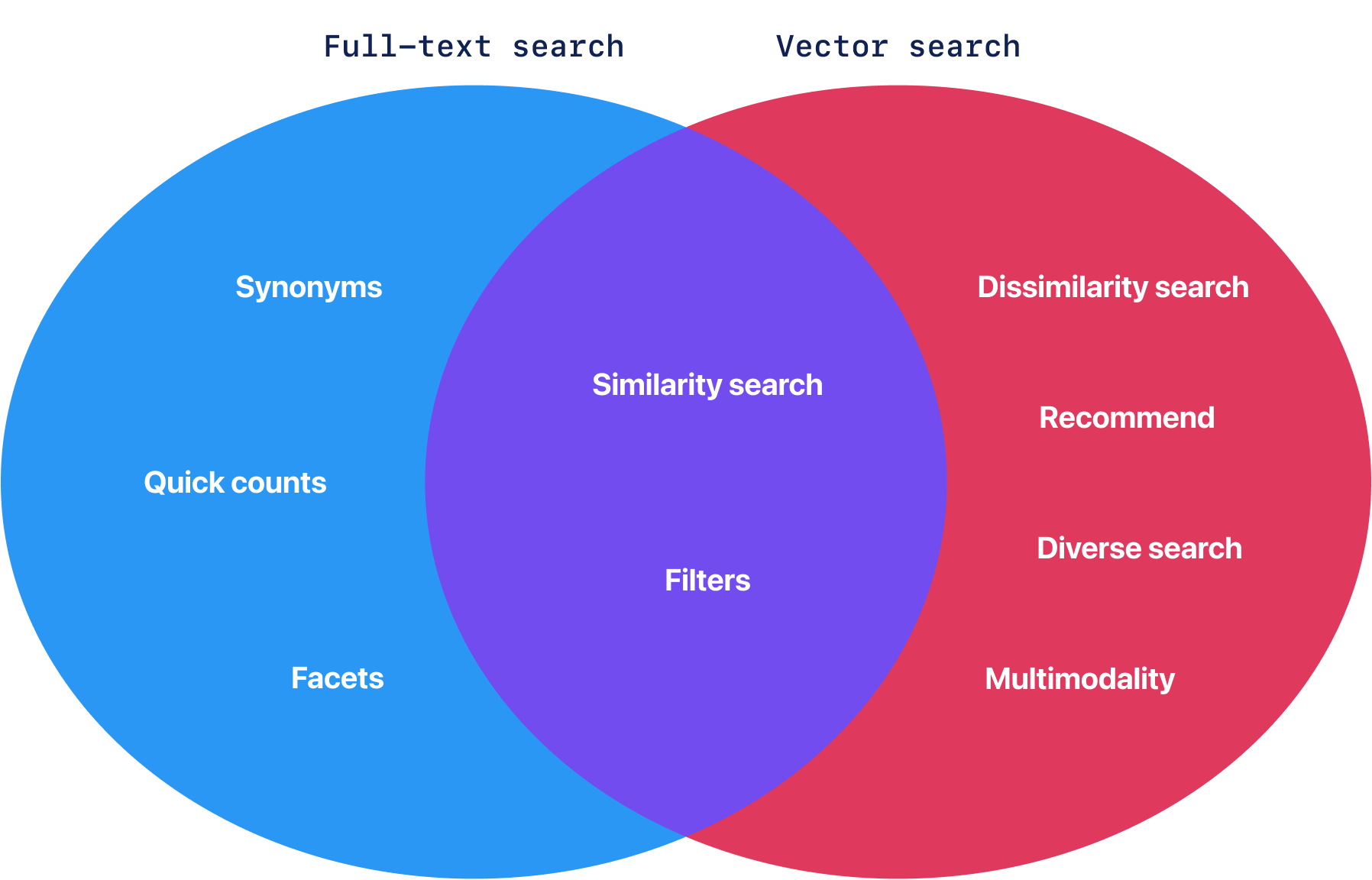
The rest of this article covers the techniques that need their own interfaces, and the Qdrant query for each.
Beyond Nearest-Neighbor Search
Having a vector representation of unstructured data unlocks new ways of interacting with it. For example, it can be used to measure semantic similarity between words, to cluster words or documents based on their meaning, to find related images, or even to generate new text. Vector representations also support techniques beyond nearest-neighbor (kNN) search: dissimilarity search, diversity search, recommendations, and discovery.
Dissimilarity Search
Dissimilarity search, or farthest search, is the simplest step beyond nearest-neighbor search, and full-text search can’t reproduce it. It aims to find the most dissimilar or distant documents across the collection.
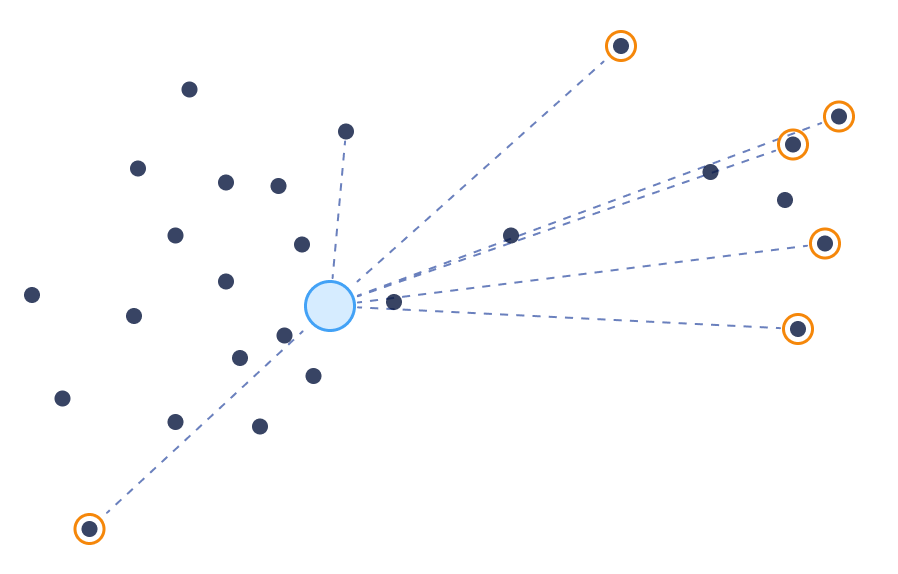
Unlike full-text match, vector similarity can compare any pair of documents (or points) and assign a similarity score.
It doesn’t rely on keywords or other metadata.
With vector similarity, we can easily achieve a dissimilarity search by inverting the search objective from maximizing similarity to minimizing it.
In Qdrant, dissimilarity search is the same Recommend query that powers recommendations, used for a different purpose: pass only negative examples with the best_score strategy, and the points farthest from those examples rank first.
The dissimilarity search can find items in areas where previously no other search could be used. Let’s look at a few examples.
Detecting Mislabeled Items
For example, we have a dataset of furniture in which we have classified our items into what kind of furniture they are: tables, chairs, and lamps. To ensure our catalog is accurate, we can use a dissimilarity search to highlight items that are most likely mislabeled.
To do this, we only need to search for the most dissimilar items using the embedding of the category title itself as the only negative example. This can be too broad, so we combine it with a filter to narrow the search down to a specific category.
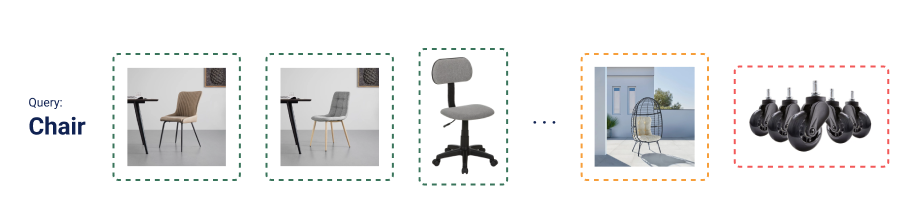
On a small furniture catalog, this query uses the same category twice: as the only negative example and as the filter.
from qdrant_client import QdrantClient, models

client = QdrantClient(":memory:")

category = "chair"

result = client.query_points(
    collection_name="furniture",
    query=models.RecommendQuery(
        recommend=models.RecommendInput(
            # The category title is the only negative example
            negative=[
                models.Document(
                    text=category,
                    model="sentence-transformers/all-MiniLM-L6-v2",
                )
            ],
            strategy=models.RecommendStrategy.BEST_SCORE,
        )
    ),
    # The filter keeps the search inside that same category
    query_filter=models.Filter(
        must=[
            models.FieldCondition(
                key="category",
                match=models.MatchValue(value=category),
            )
        ]
    ),
    limit=3,
)
It returns the three items labeled as chairs that look least like a chair:
-0.584  set of five rubber caster wheels
-0.662  rattan hanging egg chair
-0.698  velvet armchair
The mislabeled wheels come first, and the egg chair is the review candidate. Scores are negative, and the least similar item scores highest. The output of this search can be further processed with heavier models or human supervision to detect actual mislabeling.
Detecting Outliers
In some cases, we might not even have labels, but it is still possible to try to detect anomalies in our dataset. Dissimilarity search can be used for this purpose as well.
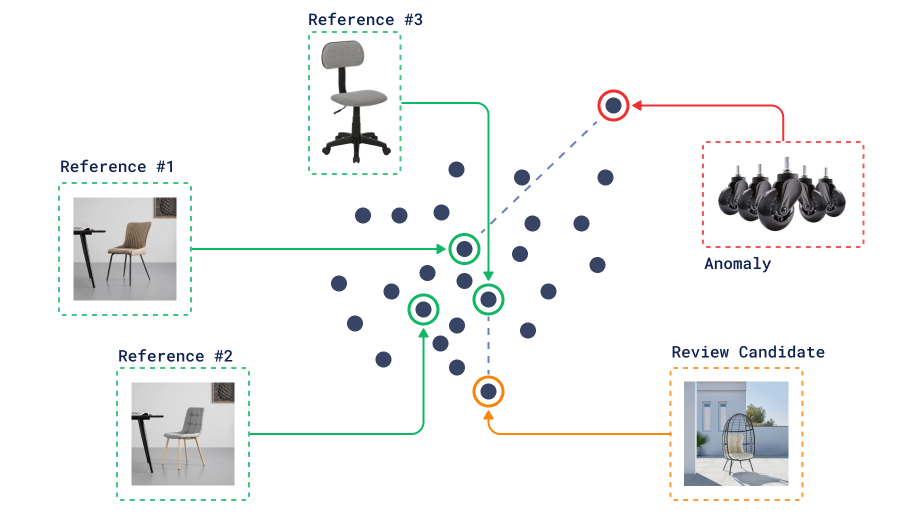
The only thing we need is a bunch of reference points that we consider “normal”.
Then we can search for the most dissimilar points to this reference set and use them as candidates for further analysis.
In Qdrant, pass the IDs of the reference points as negative examples.
Keep the reference set to a few representative points, because the cost of best_score grows linearly with the number of examples.
This query uses one reference item per category. In the examples, item_id looks up an item’s point ID by its name:
result = client.query_points(
    collection_name="furniture",
    query=models.RecommendQuery(
        recommend=models.RecommendInput(
            # One reference item per category
            negative=[
                item_id["wooden dining chair"],
                item_id["oak dining table"],
                item_id["brass floor lamp"],
                item_id["leather sofa"],
                item_id["walnut bookshelf"],
            ],
            strategy=models.RecommendStrategy.BEST_SCORE,
        )
    ),
    limit=3,
)
It returns:
-0.616  set of five rubber caster wheels
-0.625  metal filing cabinet
-0.651  metal standing desk
The wheels come first. The two metal items follow because every reference is made of wood, brass, or leather, so choose references that cover what “normal” looks like in your data.
Use best_score rather than sum_scores here: sum_scores adds up the similarity to every reference, so on this catalog it flags the bedside reading lamp, a normal lamp that is simply far from the chair, table, sofa, and bookshelf references.
Diversity Search
Even without a query vector, similarity between the stored points can improve an overall selection of items from the dataset.
The naive approach is to do random sampling. However, unless our dataset has a uniform distribution, the results of such sampling might be biased toward more frequent types of items.
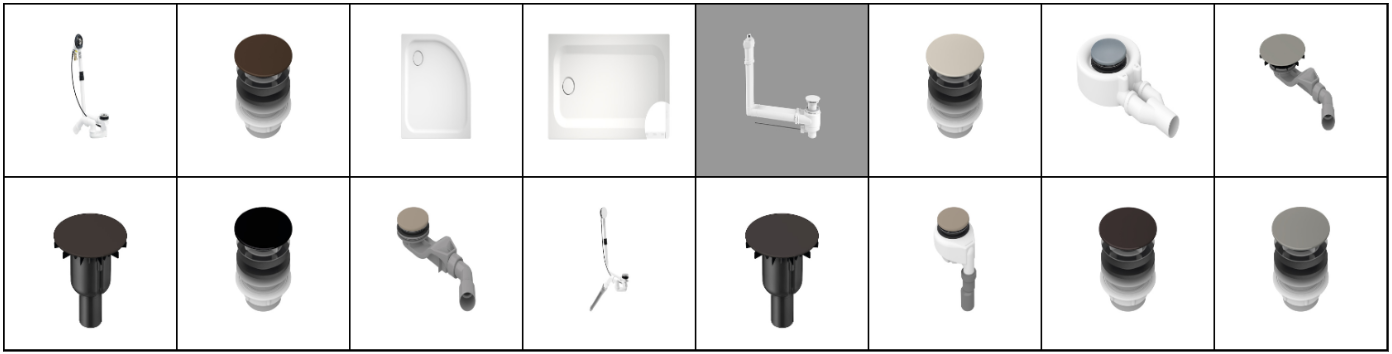
Example of Random Sampling
The similarity information can increase the diversity of those results and make the first overview more interesting. That is especially useful when users do not yet know what they are looking for and want to explore the dataset.

Example of Similarity-Based Sampling
Because vector similarity can compare any two points, it can build a diverse selection without labels.
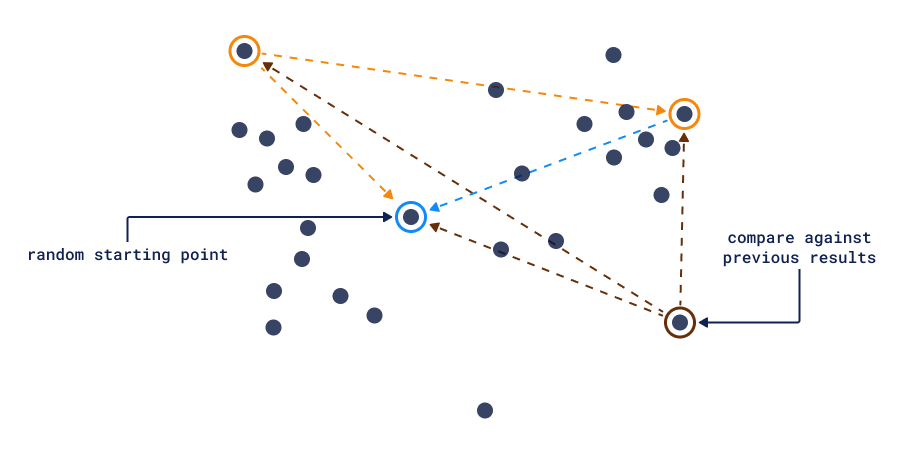
The method in the diagram is farthest-first selection: start from a random point, then keep adding the point farthest from all points picked so far.
In Qdrant, the Distance Matrix API provides the pairwise scores it needs. Request a matrix with limit set to the sample size minus one, so every sampled point is scored against every other, and run the selection on the client:
import random

matrix = client.search_matrix_pairs(
    collection_name="furniture",
    # Sample the whole catalog of 17 items
    sample=17,
    # Score every sampled item against the 16 others
    limit=16,
)

similarity = {}
for pair in matrix.pairs:
    similarity[pair.a, pair.b] = similarity[pair.b, pair.a] = pair.score
ids = {pair.a for pair in matrix.pairs}

picked = [random.choice(sorted(ids))]
while len(picked) < 4:
    # Add the item least similar to its closest picked item
    farthest = min(
        ids - set(picked),
        key=lambda i: max(similarity[i, j] for j in picked),
    )
    picked.append(farthest)
It returns four items that have little in common:
wooden dining chair
bedside reading lamp
metal filing cabinet
set of five rubber caster wheels
The first pick is random, so the list changes between runs.
When you have a query, the related approach is Maximal Marginal Relevance (MMR). It balances relevance to the query against diversity among the selected results.
Qdrant has supported it since v1.15 as an mmr parameter of a nearest-neighbor query, where diversity sets the balance between relevance (0.0) and diversity (1.0).
This query asks for three chairs:
result = client.query_points(
    collection_name="furniture",
    query=models.NearestQuery(
        nearest=models.Document(
            text="chair",
            model="sentence-transformers/all-MiniLM-L6-v2",
        ),
        mmr=models.Mmr(
            # 0.0 is pure relevance, 1.0 is pure diversity
            diversity=0.7,
            # Select from the 5 items nearest to the query
            candidates_limit=5,
        ),
    ),
    limit=3,
)
It returns:
0.722  wooden dining chair
0.481  rattan hanging egg chair
0.664  ergonomic office chair
A plain nearest-neighbor search returns the velvet armchair instead of the egg chair. Results come in the order MMR selects them, so the scores aren’t sorted.
Recommendations
Vector similarity can go above a single query vector. It can combine multiple positive and negative examples for a more accurate retrieval. This is the Recommend query from the dissimilarity examples, now used for its main purpose: positive examples pull the results toward what a user liked, and negative examples push them away. Qdrant’s Recommend query takes stored points as examples by their point IDs, and also accepts raw vectors. With point IDs, we skip query-time neural network inference, which makes the recommendation search faster.
There are multiple ways to implement recommendations with vectors.
Feature-Based Recommendations
The first approach is to take all positive and negative examples and average them to create a single query vector.
Qdrant averages the positive and the negative examples separately and combines the two averages into one query vector, avg_positive + avg_positive - avg_negative.
The query moves toward the positive examples and away from the negative ones, and how useful the results are depends on the embedding space.
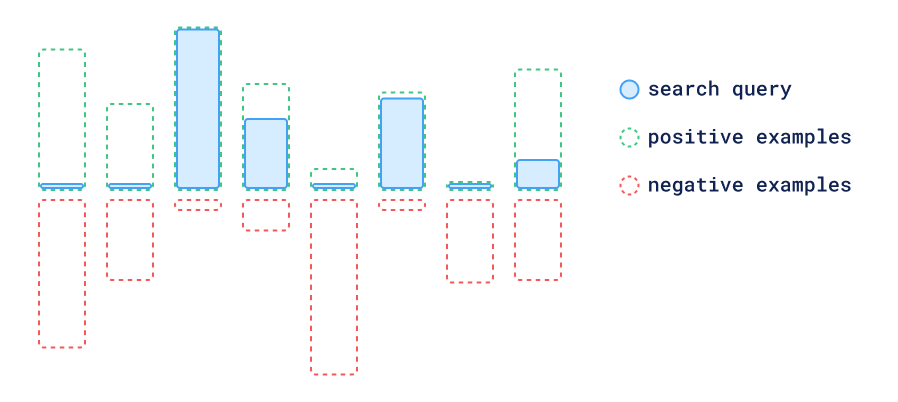
Qdrant implements this approach as the default average_vector strategy of the Recommend query.
Because it runs a single search, it’s as fast as a regular query. It works when averaging vectors also averages their meaning. In embedding spaces where that fails, distances to each example are a better tool to judge positive and negative examples.
For a shopper who liked the wooden dining chair and the oak dining table, but not the metal standing desk:
result = client.query_points(
    collection_name="furniture",
    query=models.RecommendQuery(
        recommend=models.RecommendInput(
            positive=[
                item_id["wooden dining chair"],
                item_id["oak dining table"],
            ],
            negative=[item_id["metal standing desk"]],
            strategy=models.RecommendStrategy.AVERAGE_VECTOR,
        )
    ),
    limit=4,
)
It returns:
0.483  walnut bookshelf
0.465  oak chest of drawers
0.423  velvet armchair
0.414  pine bedside table
Three of the four results are wooden, and none is metal.
Distance-Based Recommendations
Another approach uses the distances from each candidate to the positive and negative examples to create exclusion areas. In this technique, we perform searches near the positive examples while excluding the points that are closer to a negative example than to a positive one.
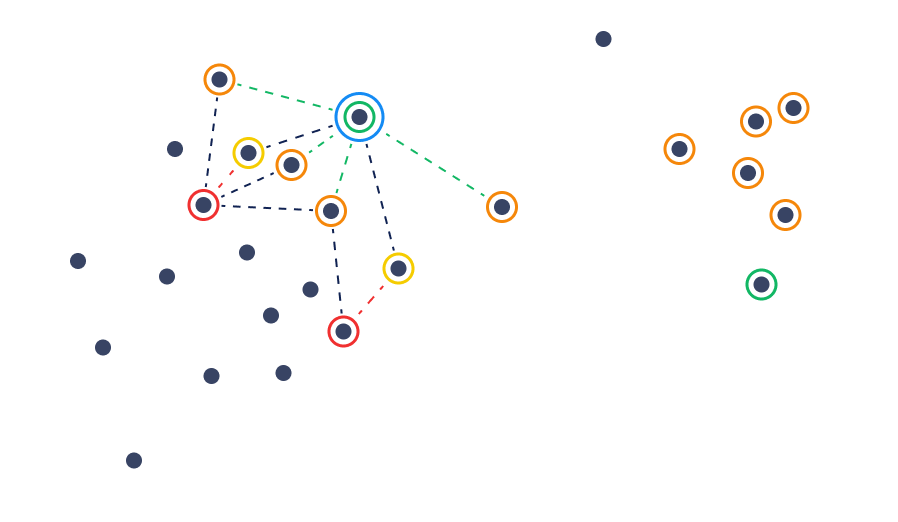
Qdrant implements this approach as the best_score strategy, available since v1.6.
A candidate that is closer to a negative example than to any positive one gets a negative score, so it ranks below every candidate that is closer to a positive example.
With no positive examples, every candidate falls into that negative branch, which is why the same strategy returns the farthest points in dissimilarity search.
Deliver Better Recommendations with Qdrant’s New API compares it with average_vector.
The same examples with the best_score strategy:
result = client.query_points(
    collection_name="furniture",
    query=models.RecommendQuery(
        recommend=models.RecommendInput(
            positive=[
                item_id["wooden dining chair"],
                item_id["oak dining table"],
            ],
            negative=[item_id["metal standing desk"]],
            strategy=models.RecommendStrategy.BEST_SCORE,
        )
    ),
    limit=4,
)
It returns:
0.699  oak chest of drawers
0.695  velvet armchair
0.689  ergonomic office chair
0.683  pine bedside table
Each result is closer to one of the positive examples than to the desk. The ergonomic office chair, a close neighbor of the dining chair, now makes the list.
The main use case of both approaches is to take some history of user interactions and recommend new items based on it.
Discovery and Context Search
In many exploration scenarios, the desired destination is not known in advance. The search process in this case can consist of multiple steps, where each step would provide a little more information to guide the search in the right direction.
To get more intuition about the possible ways to implement this approach, let’s take a look at how similarity models are trained in the first place:
The most well-known loss function used to train similarity models is a triplet loss. In this loss, the model is trained by fitting the information of relative similarity of three objects: the Anchor, Positive, and Negative examples.
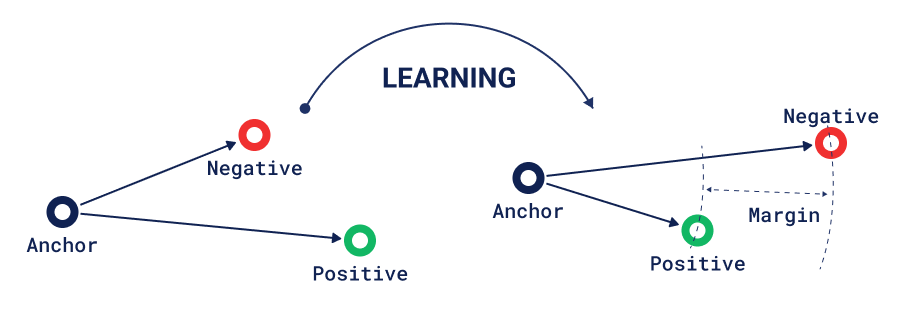
Using the same mechanics, we can look at the training process from the other side. Given a trained model, the user can provide positive and negative examples, and the goal of the discovery process is then to find suitable anchors across the stored collection of vectors.
Multiple positive-negative pairs can be provided to make the discovery process more accurate. As in model training, the pairs can be noisy or contradict each other, so the discovery process has to tolerate that.
The important difference between this and the recommendation method is that the positive-negative pairs in the discovery method don’t assume that the final result should be close to the positive example; they only require it to be closer to the positive than to the negative.
Qdrant implements both ideas in the Discovery API, available since v1.7. Discovery search takes a target and context pairs. Points that satisfy more pairs always rank higher, and similarity to the target orders points that satisfy the same number. This query looks for a seat on the velvet armchair’s side of the pair, away from the wooden dining chair:
result = client.query_points(
    collection_name="furniture",
    query=models.DiscoverQuery(
        discover=models.DiscoverInput(
            target=models.Document(
                text="seat",
                model="sentence-transformers/all-MiniLM-L6-v2",
            ),
            context=[
                models.ContextPair(
                    positive=item_id["velvet armchair"],
                    negative=item_id["wooden dining chair"],
                ),
            ],
        )
    ),
    limit=2,
)
It returns:
1.654  leather sofa
1.621  velvet corner sofa
Being on the positive side of the pair adds 1 to the score, and the rest is the similarity to “seat”, scaled to between 0 and 1.
Context search takes only the pairs and returns points from the zones where the loss is lowest, which gives a constrained but diverse result. These two pairs prefer velvet over metal and wicker over brass:
result = client.query_points(
    collection_name="furniture",
    query=models.ContextQuery(
        context=[
            models.ContextPair(
                positive=item_id["velvet armchair"],
                negative=item_id["metal filing cabinet"],
            ),
            models.ContextPair(
                positive=item_id["wicker pendant lamp"],
                negative=item_id["brass floor lamp"],
            ),
        ]
    ),
    limit=4,
)
It returns:
0.000  wooden dining chair
0.000  walnut bookshelf
0.000  velvet corner sofa
0.000  leather sofa
A score of 0 is the best possible. It means the point is on the positive side of every pair, so many points tie. Discovery Search in Qdrant walks through both.
Exploration APIs in Qdrant
Vector similarity as a concept is much broader than task-specific implementations of full-text search, so the techniques in this article need their own query types. Qdrant exposes them through the Query API, available since v1.10, where they accept the same filters as a regular search. The Distance Matrix API has its own endpoint.
| Technique | Qdrant query | Since |
|---|---|---|
| Dissimilarity search, mislabeling, and outlier detection | Recommend with only negative examples | v1.6 |
| Diversity search without a query | Distance Matrix API, plus farthest-first selection on the client | v1.12 |
| Diversity search with a query | mmr on a nearest-neighbor query | v1.15 |
| Random sampling | sample: random | v1.11 |
| Feature-based recommendations | Recommend, average_vector strategy | Default strategy |
| Distance-based recommendations | Recommend, best_score strategy | v1.6 |
| Discovery and context search | Discover and context queries | v1.7 |
Full-text search runs in the same API: Qdrant scores BM25 on sparse vectors and combines it with dense vectors in hybrid queries.
To try these queries, start with the runnable examples in Explore the Data.