
 Module 3
Multi-Stage Retrieval with Universal Query API
The most effective production deployments combine multiple optimization techniques in multi-stage pipelines. Fast approximate methods retrieve candidates, which are then reranked with higher-quality methods.
Qdrant’s Universal Query API makes it easy to build sophisticated multi-stage retrieval systems.
Follow along in Colab: 
Why Multi-Stage Retrieval?
You’ve learned that multi-vector representations like ColBERT provide superior search quality compared to single-vector embeddings. But there’s a challenge: computing MaxSim for every document in a large collection is expensive.
Here’s the dilemma: single-vector models are fast but less accurate, while multi-vector models are accurate but computationally intensive. What if you could combine the strengths of both?
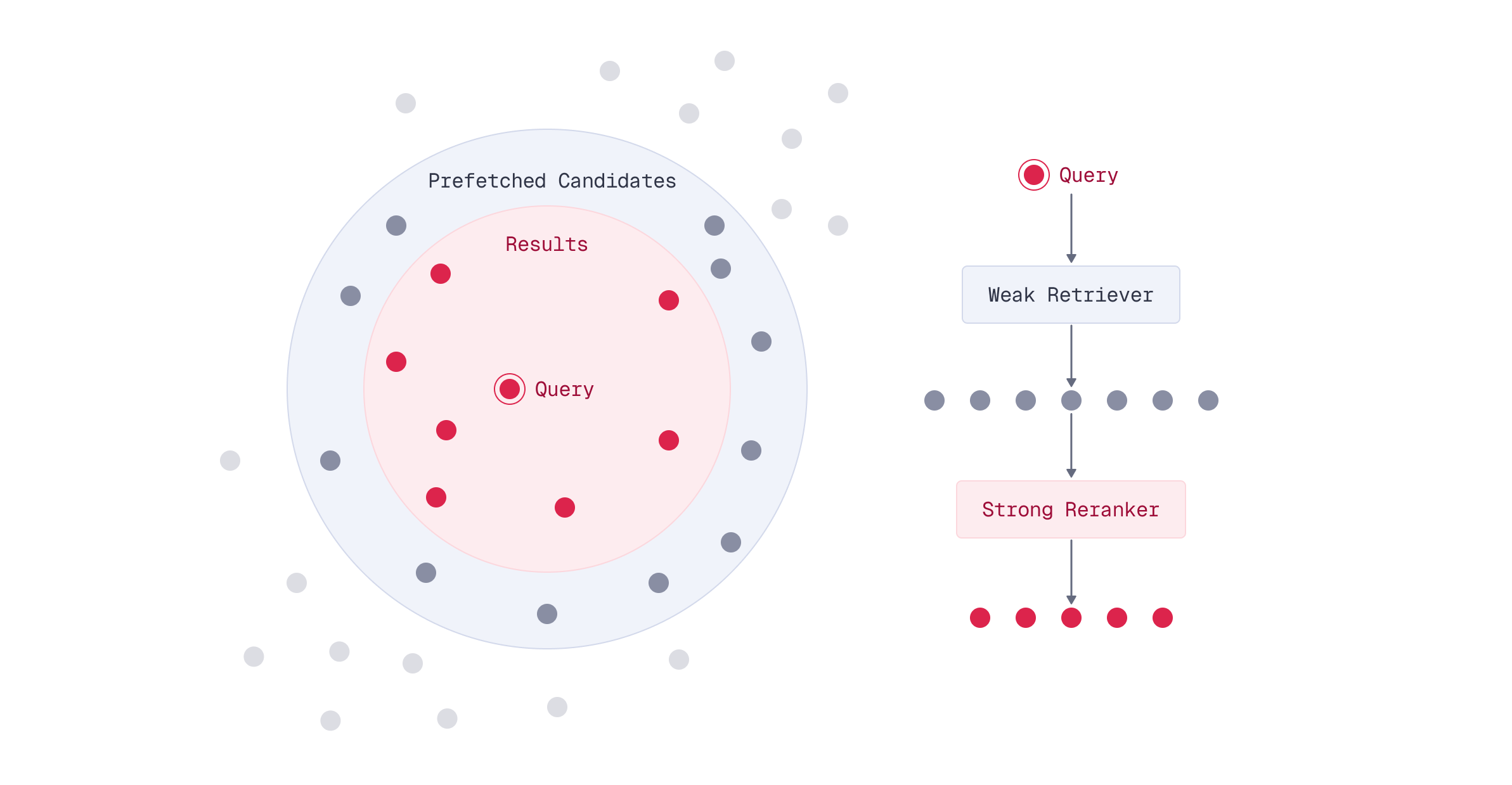
Multi-stage retrieval offers an elegant solution: use a fast method to narrow down candidates, then apply a high-quality method to rerank only those candidates.
The Multi-Stage Retrieval Pattern
The key insight is that you don’t need to use your most expensive model on every document in your collection. Instead, you can split the search into stages:
- Stage 1 (Prefetch): Use a fast single-vector embedding model to retrieve a large set of candidates
- Stage 2 (Rerank): Use ColBERT’s multi-vector representations to rerank only those candidates
This pattern dramatically reduces computational cost while maintaining high search quality.
The Critical Role of Oversampling
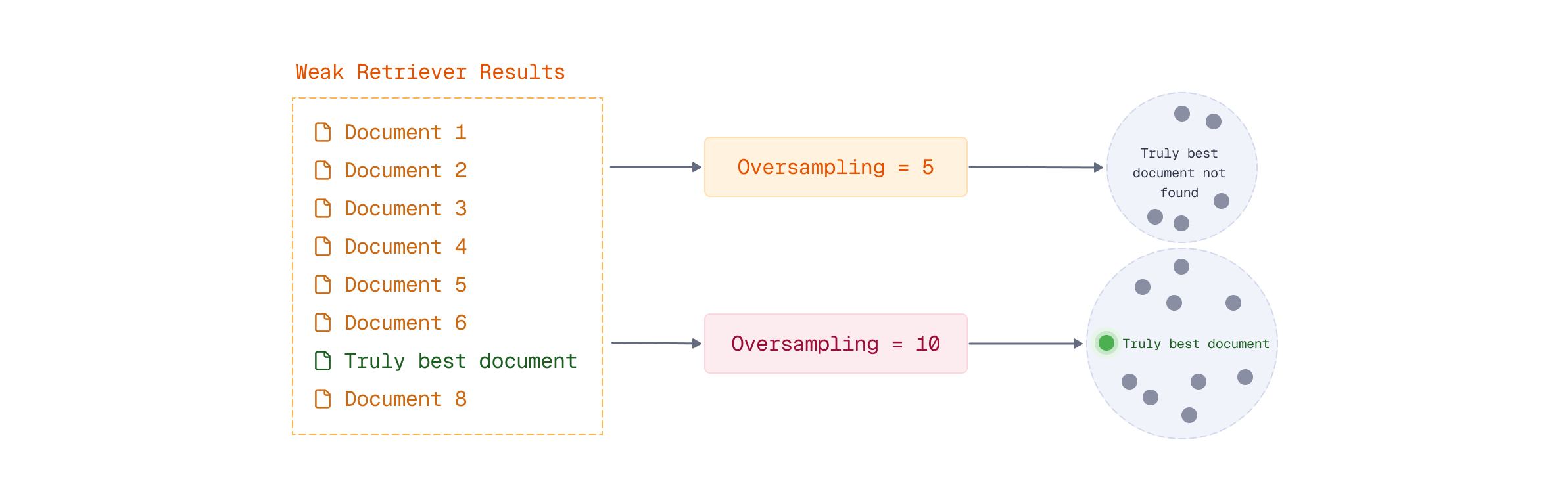
Here’s the most important concept in multi-stage retrieval: you must retrieve more candidates in the prefetch stage than you want in your final results.
This is called oversampling, and it’s essential for maintaining search quality.
Why Oversample?
Consider what happens if you retrieve exactly 10 results in both stages:
- Stage 1: Single-vector model retrieves its “top 10” documents
- Stage 2: ColBERT reranks those same 10 documents
The problem? You’re limited to ColBERT reranking only the 10 documents the single-vector model selected. If the truly best document is ranked 11th by the single-vector model, ColBERT will never see it.
By oversampling - retrieving 100, 500, or even 1000 candidates in the prefetch stage - you give ColBERT a much larger pool to work with. This dramatically increases the chance that the truly best documents are in the candidate set.
Choosing the Oversampling Factor
The oversampling factor (how many candidates to retrieve vs. how many final results you want) is a trade-off:
Higher oversampling (e.g., retrieve 1000 to return 10):
- Better final search quality
- Higher computational cost in Stage 2
Lower oversampling (e.g., retrieve 50 to return 10):
- Faster overall query time
- Lower computational cost
- Risk of missing relevant documents
Implementing Multi-Stage Retrieval in Qdrant
Qdrant’s Universal Query API makes multi-stage retrieval straightforward using the prefetch parameter. The pattern is simple: whenever a query has at least one prefetch, Qdrant:
- Performs the prefetch query (or queries)
- Applies the main query over the results of the prefetch
Basic Example: Single-Vector to ColBERT
Let’s say you want to search for documents about “quantum computing applications” and return the top 10 results.
First, create a collection with both single-vector and multi-vector representations. We’ll also add sparse vectors for BM25 to enable hybrid search later:
from qdrant_client import QdrantClient, models

client = QdrantClient("http://localhost:6333")

# Create collection with both single-vector and multi-vector representations
client.create_collection(
    collection_name="hybrid-search",
    vectors_config={
        # Fast single-vector for prefetch stage
        "bge-small-en-v1.5": models.VectorParams(
            size=384,
            distance=models.Distance.COSINE,
        ),
        # High-quality multi-vector for reranking stage
        "colbert": models.VectorParams(
            size=128,
            distance=models.Distance.DOT,
            multivector_config=models.MultiVectorConfig(
                comparator=models.MultiVectorComparator.MAX_SIM,
            ),
            hnsw_config=models.HnswConfigDiff(m=0),
        ),
    },
    sparse_vectors_config={
        "bm25": models.SparseVectorParams(
            modifier=models.Modifier.IDF,
        ),
    },
)
Next, ingest your documents. Using models.Document, Qdrant handles the embedding automatically on the server side:
documents = [
    ("research", "Quantum computing applications are emerging in cryptography..."),
    ("research", "Researchers are exploring quantum computing applications in drug discovery..."),
    ("finance", "Quantum computing applications in finance include portfolio optimization..."),
    # ... more documents
]

# Ingest data to the collection - Qdrant embeds automatically
client.upsert(
    collection_name="hybrid-search",
    points=[
        models.PointStruct(
            id=i,
            vector={
                "bge-small-en-v1.5": models.Document(
                    text=doc,
                    model="BAAI/bge-small-en-v1.5",
                ),
                "colbert": models.Document(
                    text=doc,
                    model="colbert-ir/colbertv2.0",
                ),
                "bm25": models.Document(
                    text=doc,
                    model="Qdrant/bm25",
                ),
            },
            payload={
                "text": doc,
                "category": category,
            },
        )
        for i, (category, doc) in enumerate(documents)
    ]
)
Now, here’s how you structure the multi-stage query. Notice that we use models.Document for the query as well - Qdrant embeds it server-side using the appropriate model for each stage:
query = "quantum computing applications"

# Multi-stage query: prefetch with single-vector, rerank with ColBERT
results = client.query_points(
    collection_name="hybrid-search",
    prefetch=[
        models.Prefetch(
            query=models.Document(
                text=query,
                model="BAAI/bge-small-en-v1.5",
            ),
            using="bge-small-en-v1.5",
            limit=500,  # Retrieve 500 candidates for reranking
        ),
    ],
    query=models.Document(
        text=query,
        model="colbert-ir/colbertv2.0",
    ),
    using="colbert",
    limit=10,  # Return top 10 after reranking
)
Understanding the Query Structure
The key parts of a multi-stage query:
prefetch: Defines the first stage search- Uses
models.Documentto specify the text and embedding model - The
usingparameter specifies which named vector to search - Has its own
limitparameter (this is your oversampling size) - Quickly narrows down the candidate set
- Uses
Main query: Defines the reranking stage
- Uses
models.Documentwith the ColBERT model for multi-vector embedding - The
usingparameter specifies the multi-vector named vector (e.g.,"colbert") - Its
limitparameter determines final result count - Only runs on the candidates from prefetch
- Uses
Using models.Document lets Qdrant handle all embedding with FastEmbed, simplifying your client code and ensuring consistency between indexing and querying.
Advanced Multi-Stage Patterns
Multi-stage retrieval isn’t limited to just two stages. You can chain multiple prefetch operations for three or more stages by nesting prefetch operations.
Combining Multiple Weak Retrievers
You can also use multiple retrieval methods in the prefetch stage. For example, you might combine both dense and sparse vectors using query fusion to create a stronger initial candidate set, then rerank with ColBERT.
This hybrid approach in the prefetch stage can improve recall - ensuring that the candidate pool contains relevant documents that might be missed by either dense or sparse search alone. Since we configured BM25 sparse vectors when creating the collection, we can use them directly in the prefetch:
# Multi-stage with hybrid prefetch: combine dense and sparse retrieval
results = client.query_points(
    collection_name="hybrid-search",
    prefetch=[
        # Dense retrieval using single-vector embeddings
        models.Prefetch(
            query=models.Document(
                text=query,
                model="BAAI/bge-small-en-v1.5",
            ),
            using="bge-small-en-v1.5",
            limit=500,
        ),
        # Sparse retrieval using BM25
        models.Prefetch(
            query=models.Document(
                text=query,
                model="Qdrant/bm25",
            ),
            using="bm25",
            limit=500,
        ),
    ],
    # Results from both prefetch queries are combined, then reranked
    query=models.Document(
        text=query,
        model="colbert-ir/colbertv2.0",
    ),
    using="colbert",
    limit=10,
)
Multi-stage retrieval works seamlessly with filters. An important behavior to understand: filters in the main query are automatically propagated to all prefetch stages. This means when you add a filter to your main query, it applies to the entire multi-stage pipeline. This is efficient because it narrows the candidate pool early in the prefetch stage, reducing computational cost throughout.
# Filters in the main query automatically propagate to prefetch stages
results = client.query_points(
    collection_name="hybrid-search",
    prefetch=[
        models.Prefetch(
            query=models.Document(
                text=query,
                model="BAAI/bge-small-en-v1.5",
            ),
            using="bge-small-en-v1.5",
            limit=500,
        ),
    ],
    query=models.Document(
        text=query,
        model="colbert-ir/colbertv2.0",
    ),
    using="colbert",
    limit=10,
    # This filter applies to BOTH prefetch and reranking stages
    query_filter=models.Filter(
        must=[
            models.FieldCondition(
                key="category",
                match=models.MatchValue(value="research"),
            ),
        ],
    ),
)
When to Use Multi-Stage Retrieval
Multi-stage retrieval is valuable for large collections (100K+ documents) where you need fast queries while maintaining multi-vector quality. It’s particularly effective when combining different embedding models or optimizing compute costs.
Skip multi-stage retrieval for small collections (< 10K documents), scenarios where single-vector embeddings suffice, or real-time indexing where maintaining dual embeddings adds excessive overhead.
Performance Characteristics
Multi-stage retrieval’s key advantage is reducing the number of documents the multi-vector model scans. Since late interaction performs full scans, limiting candidates dramatically improves performance.
Direct late interaction: 1M documents = 1M MaxSim calculations Multi-stage: 1M documents -> prefetch 500 candidates = 500 MaxSim calculations
Speedup is roughly size of the collection / number of candidates:
- 1M documents, prefetch 1000 -> ~1000x fewer calculations
- 100K documents, prefetch 500 -> ~200x fewer calculations
Higher oversampling improves quality but increases Stage 2 cost
Bringing It All Together
Multi-stage retrieval is a powerful optimization technique, but it’s just one tool in your arsenal. Real-world production systems often combine multiple techniques:
- Multi-stage retrieval for computational efficiency
- Score boosting to adjust relevance based on metadata
- Diversification to reduce redundancy in results
- Filtering to narrow results by business rules
- Query fusion to combine multiple search strategies
The beauty of Qdrant’s Universal Query API is that all these techniques can be composed together in a single query. You might use multi-stage retrieval with oversampling, apply filters at each stage, boost scores based on recency, and diversify final results - all in one request.
However, there’s no one-size-fits-all solution. The optimal search pipeline depends on your specific data characteristics, quality requirements, latency constraints, and computational budget. This is why evaluation is critical. You need to systematically measure and compare different pipeline configurations to find what works best for your use case.
In the final lesson of this module, you’ll learn exactly how to evaluate and compare different search pipelines - giving you the tools to make informed, data-driven decisions about your search architecture.
What’s Next
You’ve learned how to build sophisticated multi-stage retrieval pipelines that combine different techniques for optimal results. But multi-vector representations can be memory-intensive, especially at scale.
In the next lesson, you’ll discover vector quantization techniques - powerful compression methods that can reduce memory usage by 4-32x while maintaining search quality.

