
 Module 3
MUVERA
MUVERA (Multi-Vector Retrieval with Approximation) solves a fundamental problem: MaxSim’s asymmetry makes traditional indexing methods like HNSW ineffective. MUVERA enables fast approximate search for multi-vector representations.
Understanding MUVERA is key to scaling multi-vector search to millions of documents.
Follow along in Colab: 
The HNSW Incompatibility Problem
Traditional vector indexes like HNSW are designed for single-vector search with symmetric distance metrics. Multi-vector representations break this assumption: MaxSim is inherently asymmetric and non-metric.
When comparing query tokens to document tokens, the direction matters - searching documents with a query gives different results than searching queries with a document. This asymmetry makes HNSW’s graph-based navigation ineffective, forcing us back to full scans across millions of documents.
MUVERA: Making Multi-Vector Search Fast
MUVERA (Multi-Vector Retrieval Algorithm) solves this incompatibility by creating a single approximation vector for each document that HNSW can efficiently index. The algorithm works in three stages:
- SimHash Clustering: Groups token vectors into spatial regions using random hyperplanes
- Fixed Dimensional Encoding (FDE): Aggregates clustered vectors into a single representative vector per document
- Dimensionality Reduction: Applies random projection to create compact, robust representations
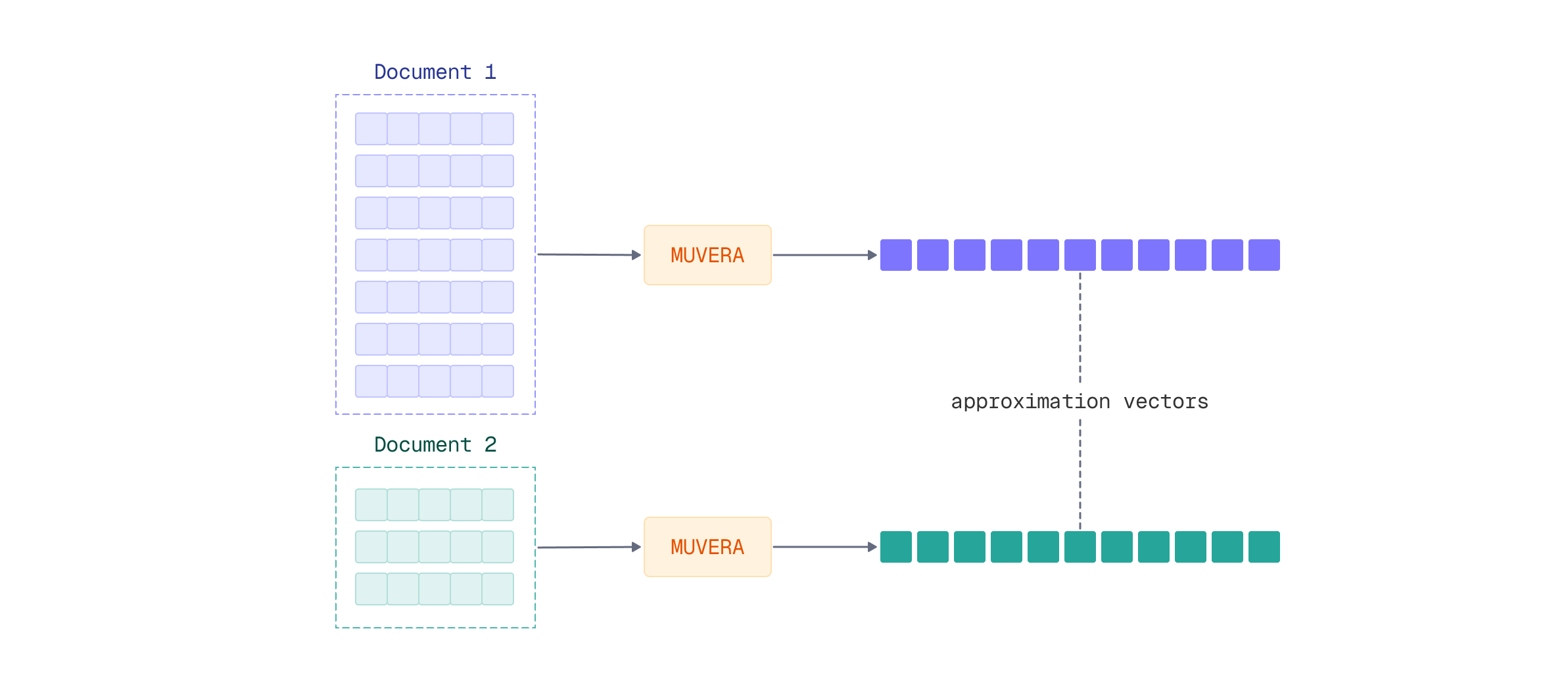
The resulting single vector approximates the multi-vector representation well enough for fast retrieval, achieving massive speedup. A reranking step with the original multi-vector data then aims to recover full accuracy.
For a deep dive into MUVERA’s architecture and mathematical foundations, see our detailed article: MUVERA: Making Multivectors More Performant.
Applying MUVERA Multi-Stage Retrieval
FastEmbed provides built-in support for MUVERA postprocessing, making it straightforward to implement this optimization. Let’s see how to apply MUVERA to multi-vector embeddings for fast retrieval with multi-stage reranking.
Setting Up MUVERA with ColModernVBERT
FastEmbed 0.7.2+ includes MUVERA as a postprocessing technique that transforms variable-length multi-vector sequences into fixed-dimensional single vectors. You can apply MUVERA to any late interaction model, including ColModernVBERT.
The workflow involves loading a multi-vector embedding model and wrapping it with a MUVERA processor:
from fastembed import LateInteractionMultimodalEmbedding
from fastembed.postprocess import Muvera

# Load ColModernVBERT model
model = LateInteractionMultimodalEmbedding(model_name="Qdrant/colmodernvbert")

# Wrap with MUVERA processor
muvera = Muvera.from_multivector_model(
    model=model,
    k_sim=6,        # 2^6 = 64 similarity buckets
    dim_proj=32,    # Projection dimensionality
    r_reps=20       # Random projection repetitions
)
The MUVERA processor accepts several key parameters that control the speed-accuracy tradeoff:
k_sim: Number of similarity buckets for SimHash clustering (more buckets = higher precision)dim_proj: Target dimensionality for the projection (lower = faster search, higher = better accuracy)r_reps: Number of random projections for robust encoding (higher = more stable representations)
Creating the Collection
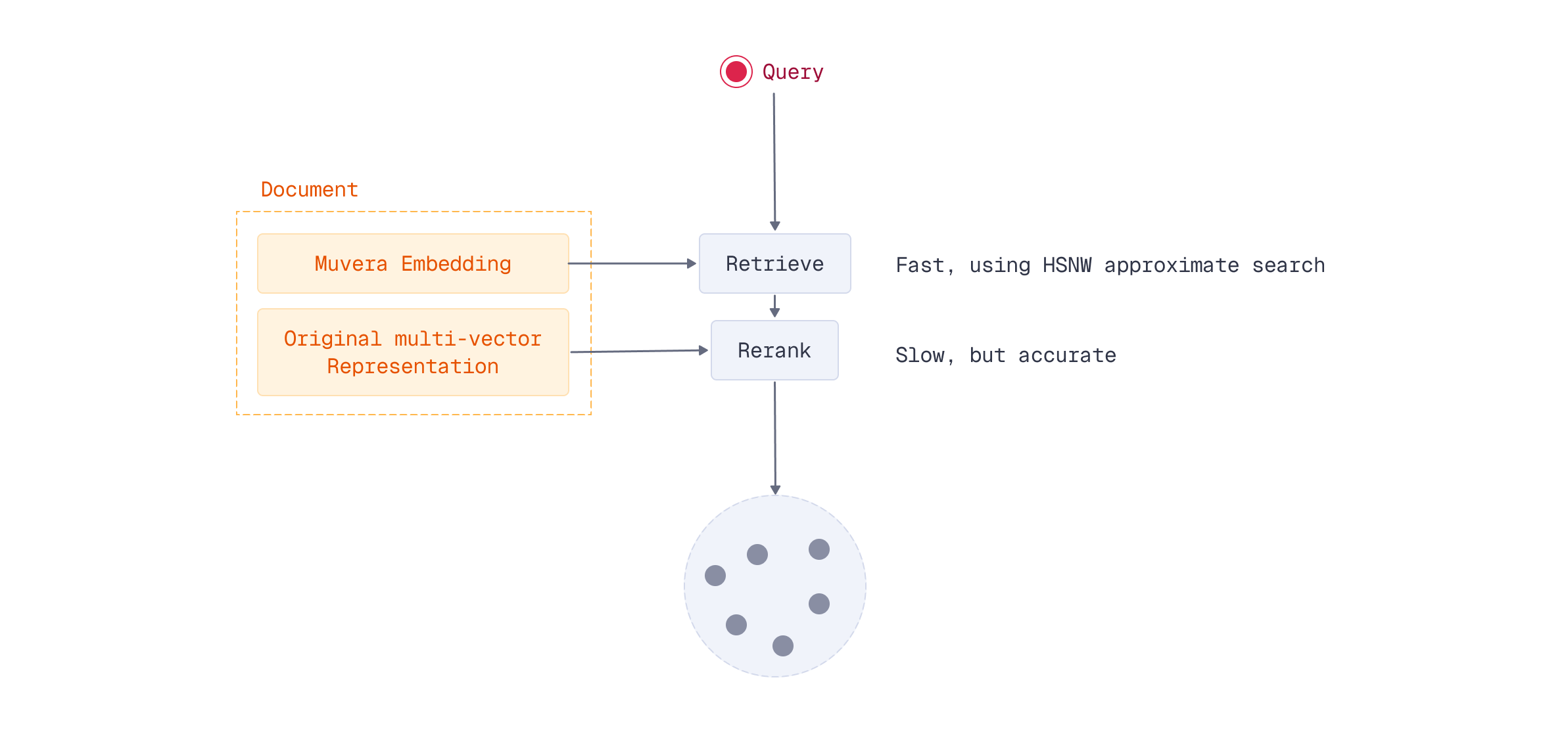
For multi-stage retrieval to work, you need to index both the MUVERA approximation vectors and the original multi-vector representations in Qdrant. The MUVERA vectors enable fast HNSW retrieval, while the multi-vector representations provide accurate reranking.
First, create a collection with both vector types:
from qdrant_client import QdrantClient, models

# Create collection with both vector types
client = QdrantClient("http://localhost:6333")
client.create_collection(
    collection_name="documents-muvera",
    vectors_config={
        "muvera": models.VectorParams(
            size=muvera.embedding_size,
            distance=models.Distance.COSINE
        ),
        "colmodernvbert": models.VectorParams(
            size=model.embedding_size,
            distance=models.Distance.COSINE,
            multivector_config=models.MultiVectorConfig(
                comparator=models.MultiVectorComparator.MAX_SIM
            )
        )
    }
)
The dual-vector approach stores:
- MUVERA embeddings: Single vector per document, fast HNSW retrieval
- Multi-vector representation: Full token sequences per document, precise MaxSim scoring
Embedding and Indexing Documents
Next, embed your documents and upload both representations. Generate multi-vector embeddings with ColModernVBERT, then process them through MUVERA:
# Embed documents
image_path = "images/financial-report.png"
doc_multivec = list(model.embed_image([image_path]))[0]
doc_muvera = muvera.process_document(doc_multivec)
Upload both the MUVERA approximation and the original multi-vector representation:
# Upload both representations
client.upsert(
    collection_name="documents-muvera",
    points=[
        models.PointStruct(
            id=0,
            payload={"source": image_path},
            vector={"muvera": doc_muvera, "colmodernvbert": doc_multivec}
        )
    ]
)
Querying with Multi-Stage Retrieval
At query time, you first retrieve candidates using the fast MUVERA vectors, then rescore those candidates using the original multi-vector representations. This hybrid approach maintains search quality while dramatically reducing compute requirements.
First, encode the query in both formats:
# Encode query in both formats
query = "quarterly revenue growth"
query_multivec = list(model.embed_text(query))[0]
query_muvera = muvera.process_query(query_multivec)
Then perform two-stage retrieval using Qdrant’s prefetch mechanism:
# Two-stage retrieval with Qdrant's prefetch
results = client.query_points(
    collection_name="documents-muvera",
    prefetch=models.Prefetch(
        query=query_muvera,
        using="muvera",
        limit=100,  # Stage 1: Fast MUVERA retrieval
    ),
    query=query_multivec,
    using="colmodernvbert",  # Stage 2: Precise MaxSim reranking
    limit=10,
    with_payload=True
)
This two-stage process achieves near-identical accuracy to full multi-vector search across all documents, but only computes expensive MaxSim operations for a small candidate set.
For complete implementation details and parameter tuning guidance, see the FastEmbed Postprocessing documentation.
Trade-offs and Considerations
Storage Requirements: MUVERA requires storing both representations - the single approximation vector and the full multi-vector sequence. This doubles storage compared to single-vector search, but remains practical for production systems. Offloading original vectors to disk might be a solution, if you can afford using that much memory.
Speed Gains: The performance improvement is substantial. Instead of computing MaxSim against millions of documents, you only compute it for your candidate set (typically 100-1000 documents). The MUVERA-powered HNSW retrieval scales logarithmically, making multi-vector search viable at scale.
Accuracy Preservation: Research shows MUVERA maintains nearly the same accuracy as full multi-vector search when properly configured. The key is choosing appropriate parameter values based on your dataset and quality requirements.
What’s Next
You’ve learned why MaxSim’s asymmetry prevents HNSW from efficiently indexing multi-vector representations, and how MUVERA solves this with single-vector approximations. By combining MUVERA’s fast retrieval with multi-vector reranking, you can achieve significant speedups while maintaining search quality.
The optimization techniques covered in this module - quantization, pooling, and MUVERA - are complementary techniques that can be combined for maximum efficiency. For example, you can test quantization on both your MUVERA vectors and your stored multi-vector representations, reducing memory footprint while maintaining the speed benefits of HNSW indexing. Or keep MUVERA vectors unchanged and play with quantization and pooling for the original vectors. These optimizations stack together, allowing you to build highly efficient production pipelines.
Now that you have multiple optimization tools in your toolkit, how do you evaluate which combinations work best for your use case? Let’s learn how to measure and compare different search pipeline configurations.

