

Retrieval-augmented generation (RAG) integrates external information retrieval into the process of generating responses by Large Language Models (LLMs). It searches a database for information beyond its pre-trained knowledge base, significantly improving the accuracy and relevance of the generated responses.
Language models have exploded on the internet ever since ChatGPT came out, and rightfully so. They can write essays, code entire programs, and even make memes (though we’re still deciding on whether that’s a good thing).
But as brilliant as these chatbots become, they still have limitations in tasks requiring external knowledge and factual information. Yes, it can describe the honeybee’s waggle dance in excruciating detail. But they become far more valuable if they can generate insights from any data that we provide, rather than just their original training data. Since retraining those large language models from scratch costs millions of dollars and takes months, we need better ways to give our existing LLMs access to our custom data.
While you could be more creative with your prompts, it is only a short-term solution. LLMs can consider only a limited amount of text in their responses, known as a context window. Current models accept hundreds of thousands of tokens, but most knowledge bases are larger than that, and every token you send adds cost and latency.
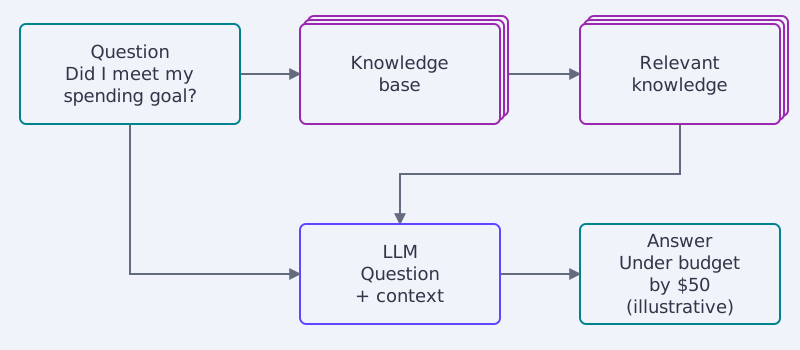
The overview diagram shows how a basic RAG system works. Before forwarding the question to the LLM, we have a layer that searches our knowledge base for the “relevant knowledge” to answer the user query. Specifically, in this case, the spending data from the last month. The retrieved context helps the LLM produce a relevant answer about our budget, but it can still make factual errors.
As your data grows, you’ll need efficient ways to identify the most relevant information for your LLM’s limited memory. This is where you’ll want a proper way to store and retrieve the specific data you’ll need for your query, without needing the LLM to remember it.
To check that your system keeps finding the right information as it grows, the RAG evaluation guide covers testing search precision, recall, and response accuracy.
Vector search engines like Qdrant store information as vector embeddings. This format supports efficient similarity searches to retrieve relevant data for your query, and is designed to stay fast even with billions of vectors.
This article will focus on RAG systems and architecture. If you’re interested in learning more about vector search, we recommend the following articles: What is a Vector Database? and What are Vector Embeddings?.
RAG architecture
At its core, a RAG architecture includes the retriever and the generator. Let’s start by understanding what each of these components does.
The Retriever
The retriever finds the chunks of your knowledge base that are most relevant to the question. It works in two phases: indexing your data ahead of time, and searching it when a question arrives.
How indexing works in RAG retrievers
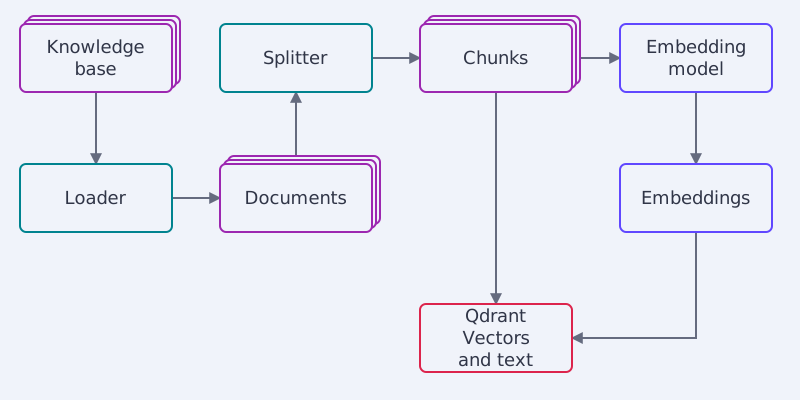
Indexing turns your documents into vectors that Qdrant can search. A loader gathers the documents, a splitter cuts them into chunks such as paragraphs, and an embedding model converts each chunk into a vector embedding. Qdrant stores each vector together with the text it came from.
Query vectorization
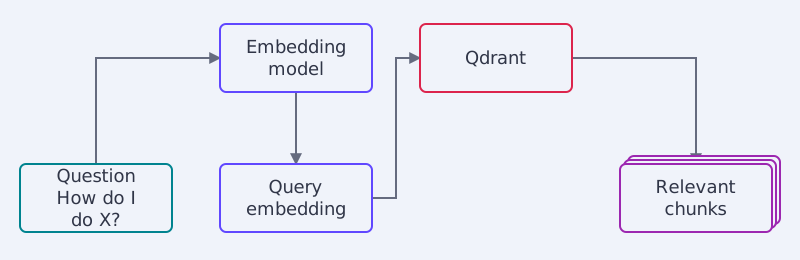
When a question arrives, the retriever embeds it with the same model it used for the chunks, so the query vector and the chunk vectors can be compared directly.
Retrieval of relevant documents
Qdrant then returns the chunks whose vectors are closest to the query vector. What “closest” means depends on the type of vector.
Sparse vector representations
Sparse vectors have one dimension per term in the vocabulary, and most of their values are zero. Keyword methods such as BM25 produce them, and Qdrant supports BM25 natively. They match exact terms well but miss synonyms. Sparse Vectors explains how learned models such as SPLADE improve on this.
Dense vector embeddings
Dense vectors come from embedding models, often built on transformer encoders such as BERT. They capture meaning rather than exact words, so a question about “compounds that cause BO” can match a chunk about “molecules that create body odor”. Vector Embeddings Explained shows how models like BERT produce them.
Hybrid search
Keyword matching and semantic matching fail in different places, so many RAG systems use both. In Qdrant, a single query can retrieve candidates with sparse and dense vectors and then fuse or rerank them. Hybrid Search in Qdrant explains the options.
The Generator
With the top relevant chunks retrieved, it’s now the generator’s job to produce a final answer by synthesizing and expressing that information in natural language.
The generator is a large language model trained on massive datasets to understand and generate human-like text. The original RAG paper (Lewis et al., 2020) used BART, a sequence-to-sequence model. Today the generator is usually an instruction-tuned LLM, and any capable model works. It takes not only the query (or question) as input but also the relevant chunks that the retriever identified as potentially containing the answer.
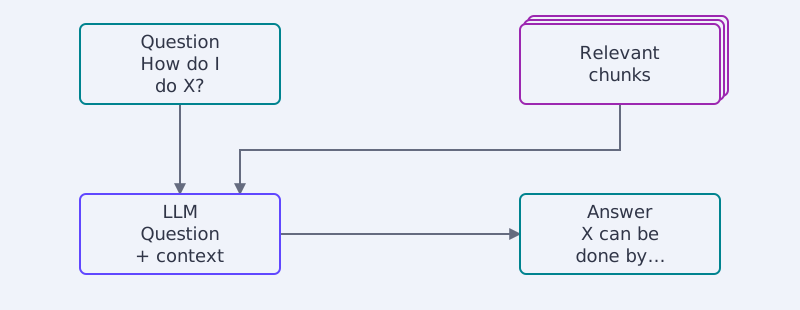
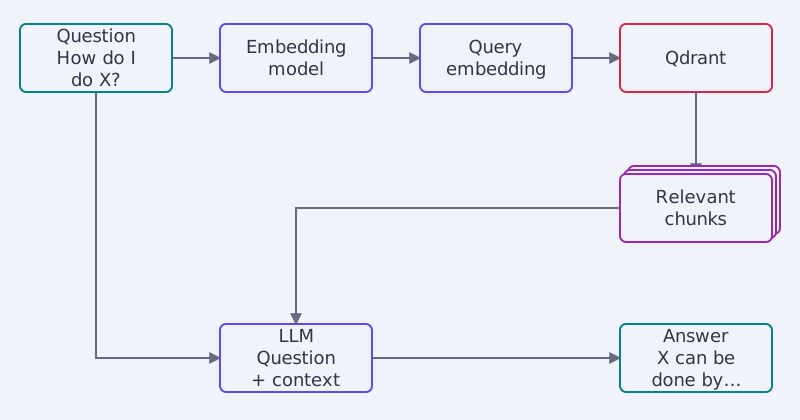
The retriever and generator don’t operate in isolation. The full pipeline diagram shows how retrieval feeds context to the generator to produce a response.
Where is RAG being used?
Because of their more knowledgeable and contextual responses, we can find RAG models being applied in many areas today, especially those that need factual accuracy and knowledge depth.
Real-World Applications
Question answering: This is perhaps the most prominent use case for RAG models. They power advanced question-answering systems that can retrieve relevant information from large knowledge bases and then generate fluent answers.
Language generation: RAG enables more factual and contextualized text generation for contextualized text summarization from multiple sources.
Data-to-text generation: By retrieving relevant structured data, RAG models can generate product/business intelligence reports from databases or describing insights from data visualizations and charts.
Multimedia understanding: RAG isn’t limited to text: it can retrieve multimodal information like images, video, and audio to enhance understanding. Answering questions about images/videos by retrieving relevant textual context.
Build Your First RAG App
5-Minute RAG with DeepSeek builds a complete pipeline with Qdrant: it embeds a small knowledge base with FastEmbed, retrieves the facts relevant to a question, and passes them to an LLM to ground its answer. The tutorial links a notebook you can run.
Once it runs, use the RAG evaluation guide to evaluate its answers.
What’s next?
Have a RAG project you want to bring to life? Join our Discord community where we’re always sharing tips and answering questions on vector search and retrieval.