
 Day 1
Day 1Points, Vectors and Payloads
Understanding Qdrant’s core data model is essential for building effective vector search applications. This lesson establishes the precise technical vocabulary and concepts you’ll use throughout the course.
Points: The Core Entity
Points are the central entity that Qdrant operates with. A point is a record consisting of three components:
- Unique ID (64-bit unsigned integer or UUID)
- Vector (dense, sparse, or multivector)
- Optional Payload (metadata)
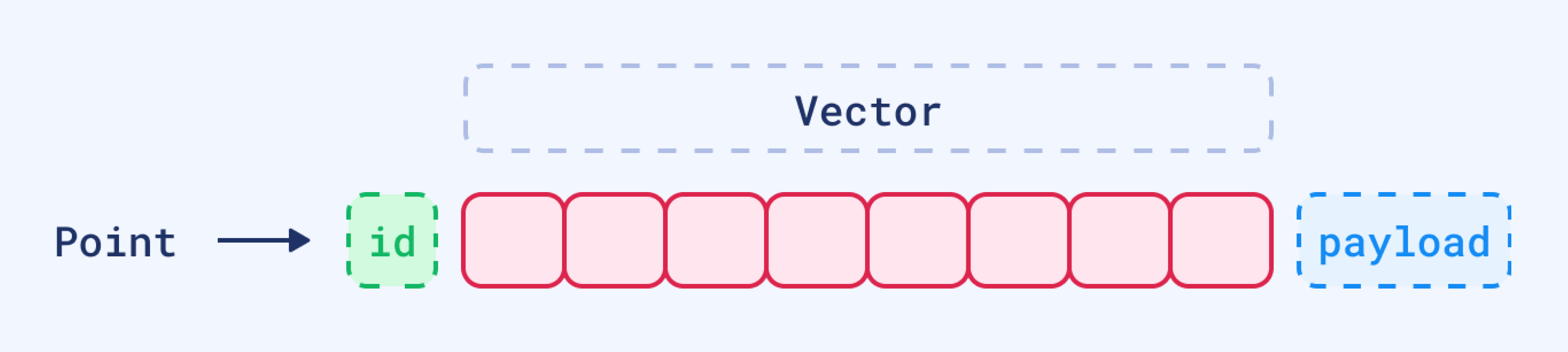
If IDs are not provided, Qdrant Client will automatically generate them as random UUIDs.
Vector Types in Qdrant
Qdrant supports different types of vectors to provide various approaches to data exploration and search.
Dense Vectors
At the core of every vector is a set of numbers, which together form a representation of the data in a multi-dimensional space.
Dense vectors are the typical vector representation used in vector search, generated by the majority of the embedding models, and capture the essential patterns or relationships within the data. That’s why the term embedding is often used interchangeably with vector when referring to the output of these models.
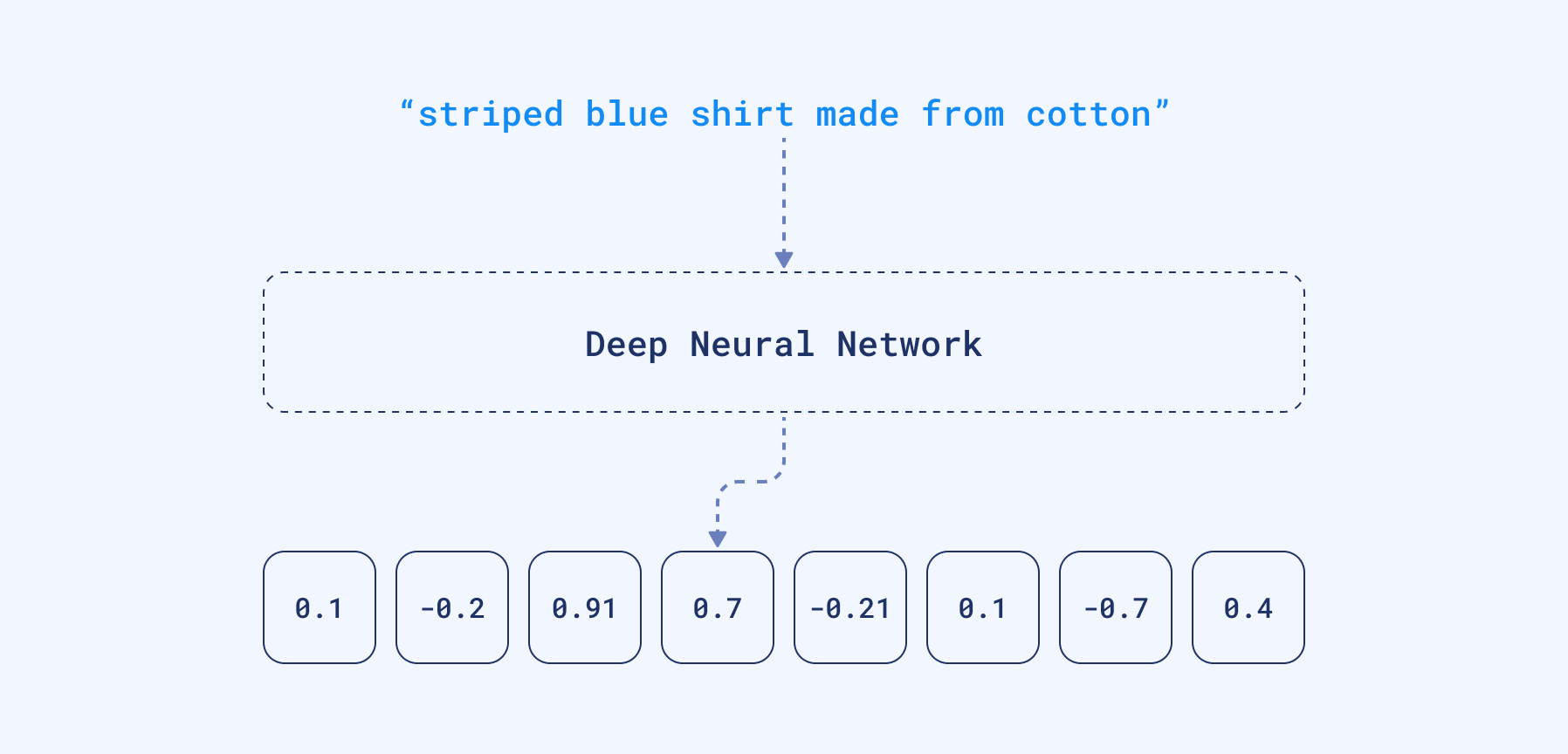
Embeddings are generated by neural networks to capture complex relationships and semantics within your data. These embeddings are represented as vectors in a high-dimensional space, which can then be stored and searched efficiently in a vector search engine.
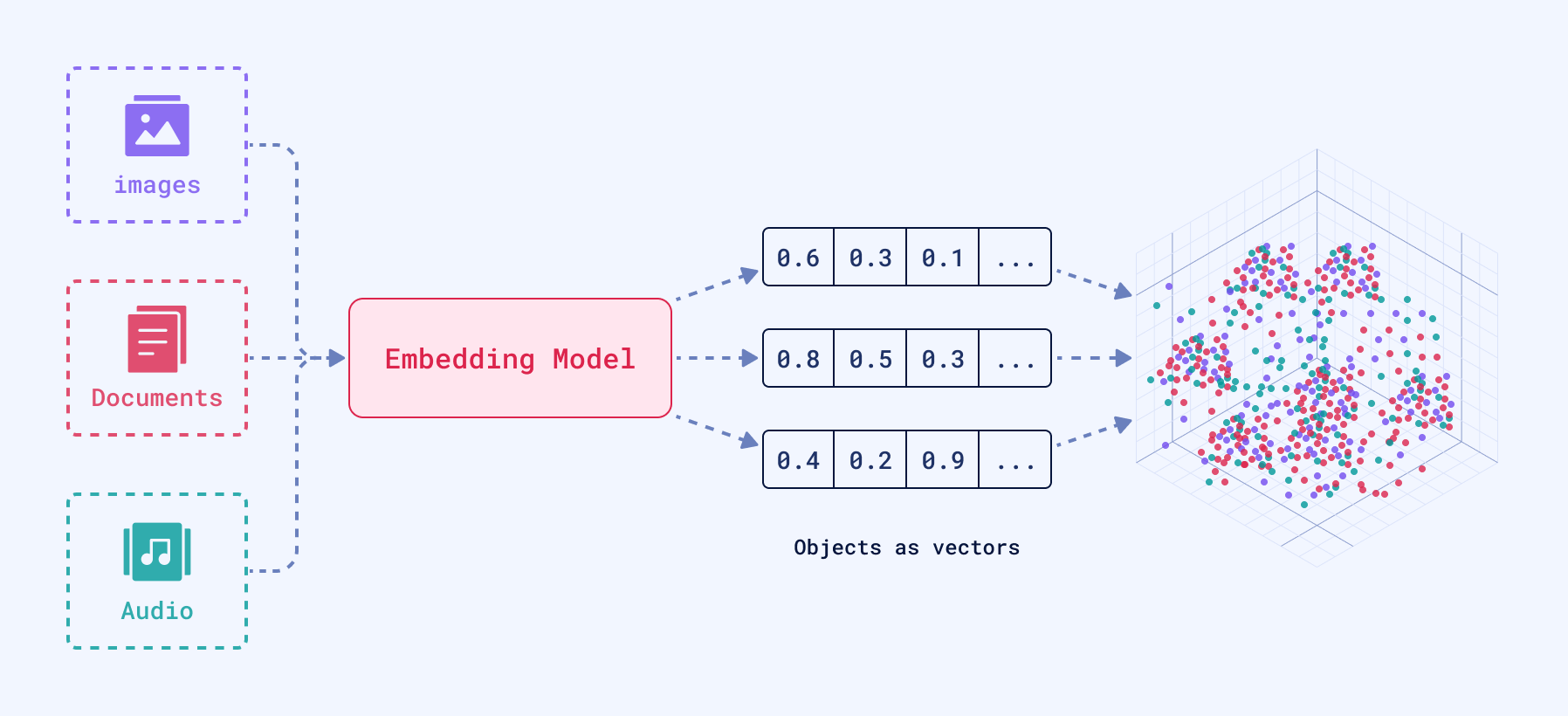
To represent textual data, for example, an embedding will encapsulate the nuances of language, such as semantics and context within its dimensions.
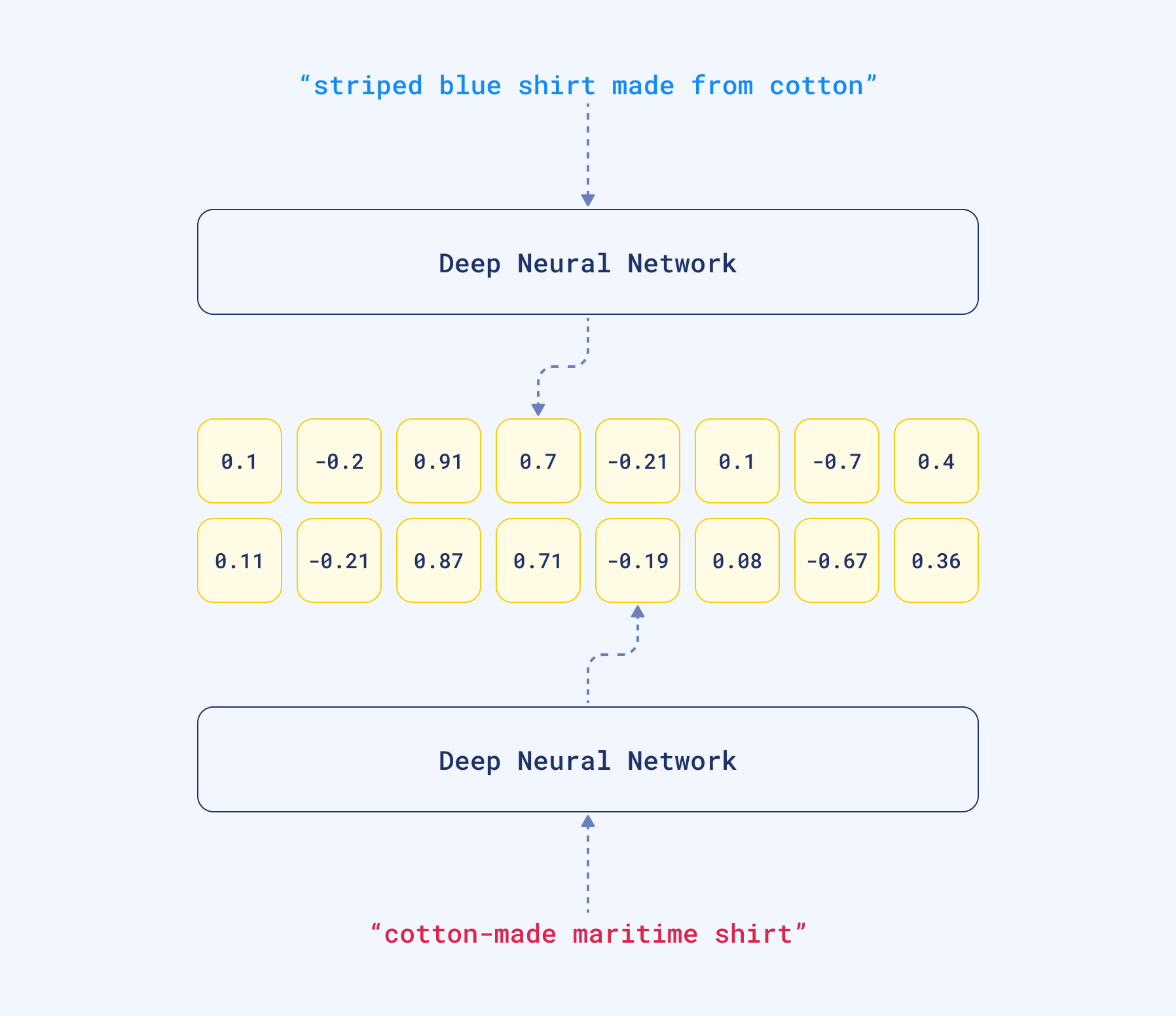
For that reason, when comparing two similar sentences, their embeddings will turn out to be very similar, because they have similar linguistic elements.
Sparse Vectors
Mathematically identical to dense vectors, but containing many zeros. They use optimized storage representation and have a different shape than dense vectors.
Representation: Sparse vectors are represented as a list of (index, value) pairs:
- index: integer position of non-zero value
- value: floating point number
Example:
# Dense vector: [0.0, 0.0, 0.0, 0.0, 0.0, 0.0, 1.0, 2.0, 0.0, 0.0]
# Sparse representation: [(6, 1.0), (7, 2.0)]

# Qdrant JSON format:
{
 "indices": [6, 7],
 "values": [1.0, 2.0]
}
The indices and values arrays must be the same size, and all the indices must be unique.
There is no need to sort the sparse representation by indices, as Qdrant will perform this internally while maintaining the correct link between each index and its value.
We will cover more about sparse vectors on day 3. If you would like to read up on the subject in advance, you can find more documentation here.
Multivectors
While most models produce one vector per input, advanced techniques like late-interaction models (e.g., ColBERT) generate a set of vectors, often one for each token. Qdrant’s multivector lets you store this whole matrix on a single point.
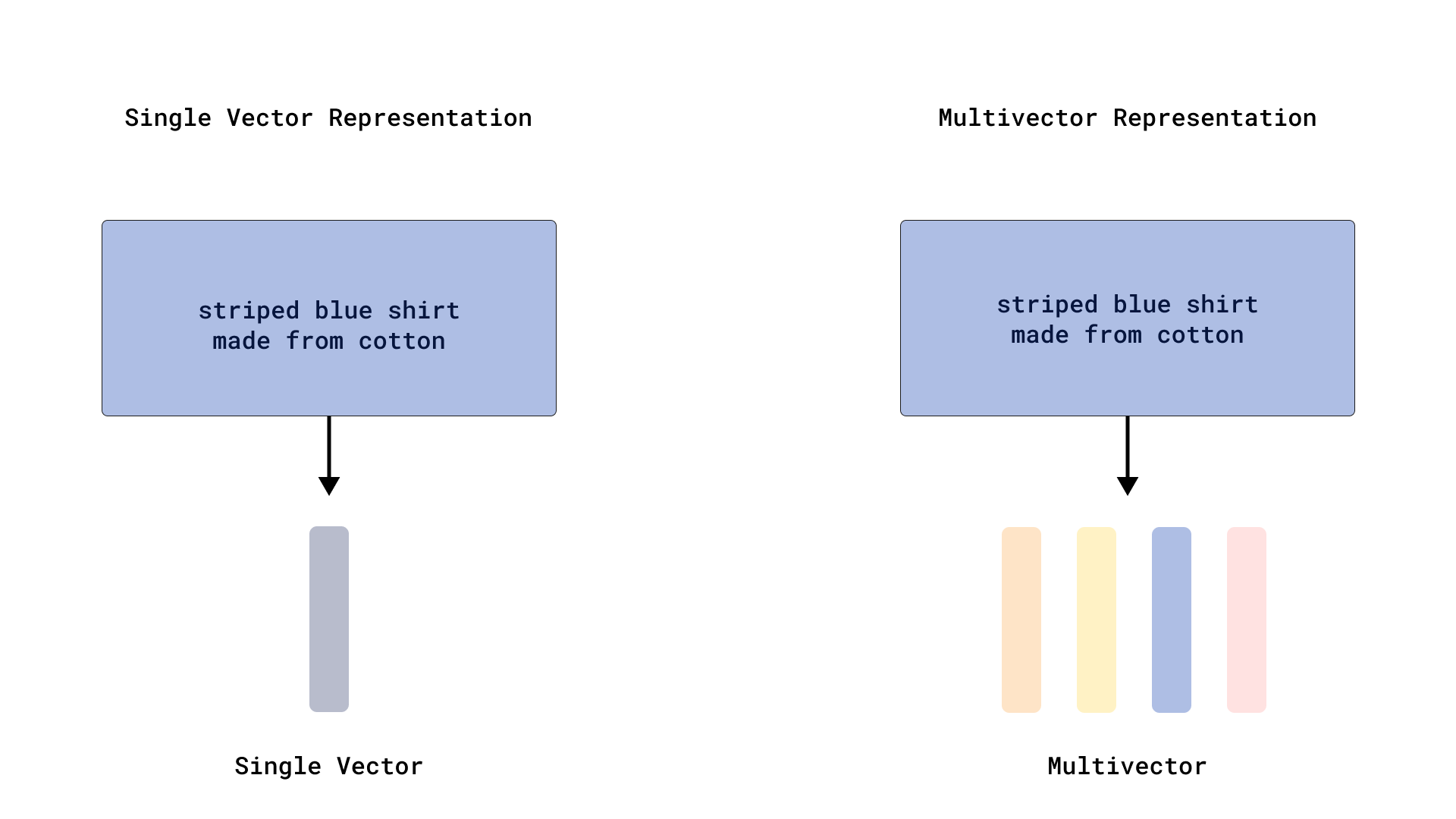
Structure:
- Variable number of vectors per set (multivector rows)
- Fixed size of each individual vector (multivector columns)
Example:
A multivector of size 4:
"vector": [
   [-0.013,  0.020, -0.007, -0.111],
   [-0.030, -0.055,  0.001,  0.072],
   [-0.041,  0.014, -0.032, -0.062],
   # ...
]
Use Cases:
- Multiple embeddings for the same object from different angles, same payload
- Late-interaction models (e.g., ColBERT) that output vectors for each text token or image patch.
- Any scenario requiring multiple related vectors per data point
Named Vectors
So, we learned that there are three types of vector structure in Qdrant: Dense, Sparse and Multivectors.
It is also possible to attach several embeddings of any type and structure to a single point. Qdrant uses Named Vectors to handle different vector spaces. Separate Named Vector Spaces can be defined during collection creation and managed independently.
To create a collection with Named Vectors, you need to specify a configuration for each vector space:
Collection Creation:
from qdrant_client import QdrantClient, models
import os

client = QdrantClient(url=os.getenv("QDRANT_URL"), api_key=os.getenv("QDRANT_API_KEY"))

# For Colab:
# from google.colab import userdata
# client = QdrantClient(url=userdata.get("QDRANT_URL"), api_key=userdata.get("QDRANT_API_KEY"))

client.create_collection(
    collection_name="{collection_name}",
    vectors_config={
        "image": models.VectorParams(size=4, distance=models.Distance.DOT),
        "text": models.VectorParams(size=5, distance=models.Distance.COSINE),
    },
    sparse_vectors_config={"text-sparse": models.SparseVectorParams()},
)
Point Insertion:
client.upsert(
    collection_name="{collection_name}",
    points=[
        models.PointStruct(
            id=1,
            vector={
                "image": [0.9, 0.1, 0.1, 0.2],
                "text": [0.4, 0.7, 0.1, 0.8, 0.1],
                "text-sparse": {
                    "indices": [1, 3, 5, 7],
                    "values": [0.1, 0.2, 0.3, 0.4],
                },
            },
        ),
    ],
)
PUT /collections/{collection_name}/points?wait=true
{
    "points": [
        {
            "id": 1,
            "vector": {
                "image": [0.9, 0.1, 0.1, 0.2],
                "text": [0.4, 0.7, 0.1, 0.8, 0.1],
                "text-sparse": {
                  "indices": [1, 3, 5, 7],
                  "values": [0.1, 0.2, 0.3, 0.4]
                }
            }
        }
    ]
}
client.upsert("{collection_name}", {
    points: [
        {
            id: 1,
            vector: {
                image: [0.9, 0.1, 0.1, 0.2],
                text: [0.4, 0.7, 0.1, 0.8, 0.1],
                text_sparse: {
                    indices: [1, 3, 5, 7],
                    values: [0.1, 0.2, 0.3, 0.4]
                }
            },
        },
    ],
});
use qdrant_client::qdrant::{
    NamedVectors, PointStruct, UpsertPointsBuilder, Vector,
};
use qdrant_client::Payload;

client
    .upsert_points(
        UpsertPointsBuilder::new(
            "{collection_name}",
            vec![PointStruct::new(
                1,
                NamedVectors::default()
                    .add_vector("text", Vector::new_dense(vec![0.4, 0.7, 0.1, 0.8, 0.1]))
                    .add_vector("image", Vector::new_dense(vec![0.9, 0.1, 0.1, 0.2]))
                    .add_vector(
                        "text-sparse",
                        Vector::new_sparse(vec![1, 3, 5, 7], vec![0.1, 0.2, 0.3, 0.4]),
                    ),
                Payload::default(),
            )],
        )
        .wait(true),
    )
    .await?;
import static io.qdrant.client.PointIdFactory.id;
import static io.qdrant.client.VectorFactory.vector;
import static io.qdrant.client.VectorsFactory.namedVectors;

import io.qdrant.client.grpc.Points.PointStruct;
import java.util.List;
import java.util.Map;

client
    .upsertAsync(
        "{collection_name}",
        List.of(
            PointStruct.newBuilder()
                .setId(id(1))
                .setVectors(
                    namedVectors(
                        Map.of(
                            "image",
                            vector(List.of(0.9f, 0.1f, 0.1f, 0.2f)),
                            "text",
                            vector(List.of(0.4f, 0.7f, 0.1f, 0.8f, 0.1f)),
                            "text-sparse",
                            vector(List.of(0.1f, 0.2f, 0.3f, 0.4f), List.of(1, 3, 5, 7)))))
                .build()))
    .get();
using Qdrant.Client;
using Qdrant.Client.Grpc;

await client.UpsertAsync(
    collectionName: "{collection_name}",
    points: new List<PointStruct>
    {
        new()
        {
            Id = 1,
            Vectors = new Dictionary<string, Vector>
            {
                ["image"] = new float[] {0.9f, 0.1f, 0.1f, 0.2f},
                ["text"] = new float[] {0.4f, 0.7f, 0.1f, 0.8f, 0.1f},
                ["text-sparse"] = ([0.1f, 0.2f, 0.3f, 0.4f], [1, 3, 5, 7]),
            }
        }
    }
);
import (
	"context"

	"github.com/qdrant/go-client/qdrant"
)

client.Upsert(context.Background(), &qdrant.UpsertPoints{
	CollectionName: "{collection_name}",
	Points: []*qdrant.PointStruct{
		{
			Id: qdrant.NewIDNum(1),
			Vectors: qdrant.NewVectorsMap(map[string]*qdrant.Vector{
				"image": qdrant.NewVector(0.9, 0.1, 0.1, 0.2),
				"text":  qdrant.NewVector(0.4, 0.7, 0.1, 0.8, 0.1),
				"text-sparse": qdrant.NewVectorSparse(
					[]uint32{1, 3, 5, 7},
					[]float32{0.1, 0.2, 0.3, 0.4}),
			}),
		},
	},
})
Vector Dimensionality
Dense vectors are the most common type used in semantic search and machine learning applications. Vector dimensionality directly impacts search efficiency, memory consumption, and retrieval accuracy.
Higher dimensions capture more detail but cost more in storage and compute. The choice balances accuracy against performance: smaller dimensions (384-512) are fastest but less detailed; mid-range (768-1536) offer balanced accuracy and speed; higher dimensions (3072+) provide maximum detail but require more storage.
Common Model Dimensions:
Here are some common open-source and commercial models and their dimensionalities:
| Model | Dimensionality | Use Case |
|---|---|---|
all-MiniLM-L6-v2 | 384 | Fast, lightweight semantic search. Excellent for prototyping. |
BAAI/bge-base-en-v1.5 | 768 | High-quality, general-purpose embeddings. A strong baseline for RAG. |
OpenAI text-embedding-3-small | 1536 | High-quality commercial model. Excellent for production semantic search. |
OpenAI text-embedding-3-large | 3072 | Maximum detail commercial model. Ideal for large-scale, high-accuracy RAG. |
Memory impact: A 1536-dimension Float32 vector requires 6KB. Scale that to 1M vectors and you need 6GB of memory. 3072-dimension vectors double the requirement.
Common Embedding Sources
Choosing the right embedding source is a critical decision that balances cost, performance, and accuracy. Here are the three primary approaches.
1. On-Premise, Optimized: FastEmbed by Qdrant
FastEmbed is Qdrant’s optimized embedding solution designed for on-premise, high-speed generation with minimal dependencies. It delivers low-latency, CPU-friendly embedding generation using quantized model weights and ONNX Runtime, making it up to 50% faster than traditional PyTorch-based models while maintaining competitive accuracy.
The default model for standalone use, BAAI/bge-small-en-v1.5, is lightweight at ~67MB compared to 300MB+ for many Hugging Face models. While the qdrant-client integration allows you to specify any compatible model, using the default is a great way to get started quickly.
from qdrant_client import QdrantClient
from fastembed import TextEmbedding

# This example uses FastEmbed's default model for embedding generation
embedding_model = TextEmbedding()
vector = embedding_model.embed("Qdrant is a vector search engine")
Choose FastEmbed when you need:
- On-premise execution for privacy-sensitive applications.
- High-speed CPU inference without heavy dependencies like PyTorch.
- A scalable, low-cost embedding generation solution tightly integrated with Qdrant.
2. Managed and Integrated: Cloud Providers
Cloud providers offer managed embedding generation, either through third-party APIs or integrated directly into Qdrant.
- Qdrant Cloud Inference: Our own managed service that generates embeddings directly within your Qdrant Cloud cluster. This eliminates the network latency associated with external API calls and simplifies your infrastructure, as you send raw text or images to Qdrant and get back search results in a single request.
- Third-Party APIs: Commercial APIs from providers like OpenAI and Anthropic offer state-of-the-art models. The trade-off is network latency and usage-based costs.
Choose a cloud-based approach when you:
- Prioritize ease of use and want to offload model management and infrastructure scaling.
- Need access to the latest commercial models with minimal setup.
- Can accept API costs and latency for high-quality embeddings.
3. On-Premise, Customizable: Open Source Models
Libraries like Sentence Transformers give you access to thousands of open-source models on the Hugging Face Hub. This approach offers maximum flexibility and control.
Popular models include:
all-MiniLM-L6-v2(384 dims, fast)BAAI/bge-base-en-v1.5(768 dims, balanced)intfloat/e5-large-v2(1024 dims, high performance)
These models run locally on your own hardware (CPU or GPU) but require managing dependencies like PyTorch or TensorFlow.
Choose open-source models when you:
- Need to fine-tune a model on your domain-specific data.
- Require full control over the model architecture and deployment environment.
- Have available GPU resources to accelerate inference for larger models.
Embedding Comparison
| Feature | FastEmbed | Cloud Providers (incl. Qdrant Inference) | Open Source Models |
|---|---|---|---|
| Execution | On-premise (CPU/GPU) | Cloud API | On-premise (CPU/GPU) |
| Speed | Optimized for low-latency CPU inference | API latency (external) or near-zero (Qdrant) | Varies by model and hardware |
| Control | High | Low | Maximum (fine-tuning, architecture) |
| Best for | Qdrant-native, lightweight, fast CPU | Ease of use, managed scaling | Domain-specific customization, full control |
Payloads (Metadata)
While vectors capture the essence of data, payloads hold structured metadata for filtering and refinement. This combination enables to combine semantic relevance from vectors with business logic from payloads.
Payloads can store textual data (descriptions, tags, categories), numerical values (dates, prices, ratings), and complex structures (nested objects, arrays). When searching for dog images, for example, the vector finds visually similar images while payload filters narrow results to images taken within the last year, tagged with “vacation,” or meeting specific rating criteria.
Learn more: Payload Documentation
Payload Types
Qdrant supports a variety of payload data types, each optimized for different filtering conditions. Using the correct type is essential for performance and memory efficiency.
| Type | Description | Example |
|---|---|---|
Keyword | For exact string matching (e.g., tags, categories, IDs). | category: "electronics" |
Integer | 64-bit signed integers for numerical filtering. | stock_count: 120 |
Float | 64-bit floating-point numbers for prices, ratings, etc. | price: 19.99 |
Bool | True/false values. | in_stock: true |
Geo | Latitude/longitude pairs for location-based queries. | location: { "lon": 13.4050, "lat": 52.5200 } |
Datetime | Timestamps in RFC 3339 format for time-based filtering. | created_at: "2024-03-10T12:00:00Z" |
UUID | A memory-efficient type for storing and matching UUIDs. | user_id: "550e8400-e29b-41d4-a716-446655440000" |
Data Structures
Any of the above types can be stored within more complex structures:
Arrays: A field can contain multiple values of the same type. A filter will succeed if at least one value in the array meets the condition.
- Example:
tags: ["vegan", "organic", "gluten-free"]
- Example:
Nested Objects: Payloads can be arbitrary JSON objects, allowing you to store structured data. You can filter on nested fields using dot notation (e.g.,
user.address.city).- Example:
user: {"id": 123, "name": "Alice"}
- Example:
Filtering Logic: Building Complex Queries
Qdrant’s filtering system uses logical clauses that can be recursively nested to create sophisticated query logic. Think of these as the building blocks for expressing complex business requirements.
Logical Clauses:
- must: All conditions must be satisfied (AND logic)
- should: At least one condition must be satisfied (OR logic)
- must_not: None of the conditions should be satisfied (NOT logic)
These clauses combine to express complex requirements. For instance, finding “electronics under $200 OR books with 4+ star ratings” becomes:
models.Filter(
    should=[
        models.Filter(must=[
            models.FieldCondition(key="category", match=models.MatchValue(value="electronics")),
            models.FieldCondition(key="price", range=models.Range(lt=200))
        ]),
        models.Filter(must=[
            models.FieldCondition(key="category", match=models.MatchValue(value="books")),
            models.FieldCondition(key="rating", range=models.Range(gte=4.0))
        ])
    ]
)
Condition Types: Precise Control
Beyond basic logical clauses, Qdrant provides a rich set of condition types for filtering on different kinds of data. These conditions allow you to build precise queries that match your application’s needs.
Here are some of the most common condition types:
| Condition Type | Use Case | Example |
|---|---|---|
Match | For exact value matching on keywords, numbers, or booleans. | category: "electronics" |
Range | For filtering on numerical or datetime boundaries. | price > 100.0 |
Geo | For location-based filtering using a radius or bounding box. | location within 5km of Berlin |
Full Text | For searching for specific words or phrases within a text field. | description contains "machine learning" |
Nested | For querying inside arrays of objects. | reviews where rating > 4 and verified = true |
Filtering Capabilities Reference
| Filter Type | Description | Example Query |
|---|---|---|
| Match | Exact value | "match": {"value": "electronics"} |
| Match Any | OR condition | "match": {"any": ["red", "blue"]} |
| Match Except | NOT IN condition | "match": {"except": ["banned"]} |
| Range | Numerical ranges | "range": {"gte": 50, "lte": 200} |
| Datetime Range | Time-based filtering | "range": {"gt": "2023-01-01T00:00:00Z"} |
| Full Text | Substring matching | "match": {"text": "amazing service"} |
| Geospatial | Location-based | "geo_radius": {"center": {...}, "radius": 10000} |
| Nested | Array object filtering | "nested": {"key": "reviews", "filter": {...}} |
| Has ID | Specific IDs | "has_id": [1, 5, 10] |
| Is Empty | Missing fields | "is_empty": {"key": "discount"} |
| Is Null | Null values | "is_null": {"key": "field"} |
| Values Count | Array length | "values_count": {"gt": 2} |
Advanced Filtering: Nested Objects
For complex data structures like arrays of objects, Qdrant provides nested filtering that ensures conditions are evaluated within individual array elements rather than across all elements.
Consider a product with multiple reviews:
{
  "id": 1,
  "product": "Laptop",
  "reviews": [
    {"user": "alice", "rating": 5, "verified": true},
    {"user": "bob", "rating": 3, "verified": false}
  ]
}
To find products with verified 5-star reviews (both conditions must apply to the same review):
models.Filter(
    must=[
        models.NestedCondition(
            nested=models.Nested(
                key="reviews",
                filter=models.Filter(must=[
                    models.FieldCondition(key="rating", match=models.MatchValue(value=5)),
                    models.FieldCondition(key="verified", match=models.MatchValue(value=True))
                ])
            )
        )
    ]
)
Without nested filtering, Qdrant would match products where ANY review has a 5-star rating AND ANY review is verified - potentially different reviews.
Performance Optimization
To maximize filtering performance, create payload indexes for frequently filtered fields. Qdrant automatically optimizes query execution based on filter cardinality and available indexes.
# Index frequently filtered fields
client.create_payload_index(
    collection_name="{collection_name}",
    field_name="category",
    field_schema=models.PayloadSchemaType.KEYWORD,
)

# For multi-tenant applications, mark tenant fields
client.create_payload_index(
    collection_name="{collection_name}",
    field_name="tenant_id",
    field_schema=models.KeywordIndexParams(type="keyword", is_tenant=True),
)
When filters are highly selective, Qdrant’s query planner may bypass vector indexing entirely and use payload indexes for faster results.
For comprehensive filtering examples and advanced usage patterns, see the Filtering Documentation and Complete Guide to Filtering in Vector Search.
Key Takeaways
Understanding Qdrant’s data model prepares you for building sophisticated search applications. Points combine unique IDs, vectors, and metadata into a flexible foundation. Multiple vector types (dense, sparse, multivector) support different use cases, while named vectors enable multiple vector spaces per point. Dimensionality choice balances accuracy against performance, and various embedding sources offer different trade-offs for speed, accuracy, and deployment requirements. Finally, payloads enable rich filtering and structured metadata alongside vector search.
This foundation sets you up for the advanced topics ahead: distance metrics, chunking strategies, and building real-world search systems.

