

If you run production vector workloads, you already know the compression ladder in Qdrant: float32 is the baseline, Scalar Quantization (SQ) compresses vectors by 4x with almost no recall hit, and Binary Quantization (BQ) packs vectors at 16x or 32x.
Qdrant 1.18 ships TurboQuant, a new rotation-based vector quantization method from Google Research, with extensions that make it work on real production embeddings. Summarizing the results of benchmarks across public embedding datasets:
- TurboQuant 4-bit is competitive with SQ, within ~1–2 percentage points on most datasets, and sometimes ahead of SQ (where the SQ int8 grid struggles with the embedding distribution).
- TurboQuant 2-bit and 1-bit match BQ’s storage budgets but consistently deliver higher recall.
The recommendation is straightforward: if you currently run SQ or BQ, try the equivalent TurboQuant configuration on a test subset of your data. It is a config change and a re-index. What you gain depends on where you start: SQ → TQ 4-bit is a memory win at competitive recall (half the storage, recall within ~1–2 pp on most embeddings); BQ → TurboQuant at the same storage class is a recall win at the same memory.
This article walks through what TurboQuant is, what we added on top to make it production-grade, and how it compares to SQ and BQ across public embedding datasets.
The Quantization Ladder in Qdrant
Before TurboQuant, Qdrant offered two primary production-grade quantization paths:
- Scalar Quantization (SQ) — int8 per coordinate. 4x compression. Recall is essentially indistinguishable from float32 on most embeddings. The default first step when memory matters.
- Binary Quantization (BQ) — 1-, 1.5-, or 2-bit storage (32x, ~21x, or 16x compression). Recall depends heavily on the embedding model; it works beautifully on isotropic, well-trained models.
TurboQuant adds a new path with four operating points: 8x (4 bits/dim), 16x (2 bits/dim), ~21x (1.5 bits/dim), and 32x (1 bit/dim).
Enabling TurboQuant
To enable TurboQuant, specify it in the quantization_config section of the collection configuration:
PUT /collections/{collection_name}
{
    "vectors": {
      "size": 1536,
      "distance": "Cosine"
    },
    "quantization_config": {
        "turbo": {
            "bits": "bits2",
            "memory": "pinned"
        }
    }
}
from qdrant_client import QdrantClient, models

client.create_collection(
    collection_name="{collection_name}",
    vectors_config=models.VectorParams(size=1536, distance=models.Distance.COSINE),
    quantization_config=models.TurboQuantization(
        turbo=models.TurboQuantQuantizationConfig(
            memory=models.Memory.PINNED,
            bits=models.TurboQuantBitSize.BITS2,
        ),
    ),
)
import { QdrantClient } from "@qdrant/js-client-rest";

client.createCollection("{collection_name}", {
  vectors: {
    size: 1536,
    distance: "Cosine",
  },
  quantization_config: {
    turbo: {
      memory: "pinned",
      bits: "bits2",
    },
  },
});
use qdrant_client::qdrant::{
    CreateCollectionBuilder, Distance, Memory, TurboQuantBitSize, TurboQuantizationBuilder,
    VectorParamsBuilder,
};
use qdrant_client::Qdrant;

client
    .create_collection(
        CreateCollectionBuilder::new("{collection_name}")
            .vectors_config(VectorParamsBuilder::new(1536, Distance::Cosine))
            .quantization_config(
                TurboQuantizationBuilder::new()
                    .memory(Memory::Pinned)
                    .bits(TurboQuantBitSize::Bits2),
            ),
    )
    .await?;
import io.qdrant.client.QdrantClient;
import io.qdrant.client.QdrantGrpcClient;
import io.qdrant.client.grpc.Collections.CreateCollection;
import io.qdrant.client.grpc.Collections.Distance;
import io.qdrant.client.grpc.Collections.Memory;
import io.qdrant.client.grpc.Collections.QuantizationConfig;
import io.qdrant.client.grpc.Collections.TurboQuantBitSize;
import io.qdrant.client.grpc.Collections.TurboQuantization;
import io.qdrant.client.grpc.Collections.VectorParams;
import io.qdrant.client.grpc.Collections.VectorsConfig;

client
    .createCollectionAsync(
        CreateCollection.newBuilder()
            .setCollectionName("{collection_name}")
            .setVectorsConfig(
                VectorsConfig.newBuilder()
                    .setParams(
                        VectorParams.newBuilder()
                            .setSize(1536)
                            .setDistance(Distance.Cosine)
                            .build())
                    .build())
            .setQuantizationConfig(
                QuantizationConfig.newBuilder()
                    .setTurboquant(
                        TurboQuantization.newBuilder()
                            .setMemory(Memory.Pinned)
                            .setBits(TurboQuantBitSize.Bits2)
                            .build())
                    .build())
            .build())
    .get();
using Qdrant.Client;
using Qdrant.Client.Grpc;

await client.CreateCollectionAsync(
	collectionName: "{collection_name}",
	vectorsConfig: new VectorParams { Size = 1536, Distance = Distance.Cosine },
	quantizationConfig: new QuantizationConfig
	{
		Turboquant = new TurboQuantization { Memory = Memory.Pinned, Bits = TurboQuantBitSize.Bits2 }
	}
);
import (
	"context"

	"github.com/qdrant/go-client/qdrant"
)

client.CreateCollection(context.Background(), &qdrant.CreateCollection{
	CollectionName: "{collection_name}",
	VectorsConfig: qdrant.NewVectorsConfig(&qdrant.VectorParams{
		Size:     1536,
		Distance: qdrant.Distance_Cosine,
	}),
	QuantizationConfig: qdrant.NewQuantizationTurbo(
		&qdrant.TurboQuantization{
			Memory: qdrant.Memory_Pinned.Enum(),
			Bits:   qdrant.TurboQuantBitSize_Bits2.Enum(),
		},
	),
})
The memory parameter in this snippet requires Qdrant 1.19 or later. On 1.18, omit it.
When enabling TurboQuant on an existing collection, use a PATCH request, or the corresponding update_collection method in any client SDK.
The bits field controls encoding bit depth. It defaults to bits4. Available values: bits4, bits2, bits1_5, and bits1. Lower bit depths offer higher compression at the cost of accuracy. See the benchmarks for the recall trade-off on each bit width. The full reference is in the quantization docs.
At a Glance
Recall, HNSW (m=16, ef_construct=128), on four representative datasets: arxiv-instructorxl-768, dbpedia-gemini, dbpedia-openai-ada, and wiki-cohere-v3-1024. The full ten-dataset table is in Detailed Benchmarks.
1. TQ 4-bit is competitive with SQ at half the storage. On arxiv-instructorxl and dbpedia-gemini it is about 1 pp below SQ; on dbpedia-openai-ada and wiki-cohere-v3 it actually beats SQ by up to 4.6 pp.
2. TQ 2-bit beats BQ 2-bit by 11–15 pp on these four datasets (and 9–24 pp across all ten datasets), at the same 16x storage.
3. TQ 1-bit beats vanilla BQ 1-bit by 9–21 pp on these four datasets (and 9–21 pp across all ten datasets), at the same 32x storage. BQ 1-bit here is the vanilla 1-bit configuration (1-bit storage, 1-bit query); the asymmetric variant (8-bit query) is in the detailed table.
What Is TurboQuant?
TurboQuant (Zandieh et al., 2025) is a rotation-based vector quantization algorithm in the Product Quantization (PQ) family, with a clean theoretical recipe:
- Apply a random orthogonal rotation to every vector. This redistributes per-coordinate variance evenly; after rotation each coordinate looks roughly Gaussian with the same variance.
- Quantize each coordinate independently with a fixed lookup table of representative values (Lloyd-Max codebook) for the standard normal distribution. One codebook of
2^blevels for the entire dataset, hard-coded as a small lookup table. - Score quantized vectors by reconstructing the dot product directly from the codebook indices. The rotation is orthogonal, so it preserves dot products and L2 distances. No need to ever undo it.
The elegance: no per-dataset training, no calibration set, no codebooks to persist. The codebook is derived once from the standard normal distribution and is universal. The same lookup table works for every dataset and every dimensionality. By contrast, PQ requires a learned codebook trained on representative data and shipped alongside the index.
For a visual explanation of TurboQuant, see this interactive walkthrough.
MSE vs PROD: Picking the Variant
The original paper proposes two variants. MSE is the literal recipe above: scalar Lloyd-Max quantization, score by codebook lookup. PROD adds a second QJL random projection on top of the indices to cancel the per-vector length bias that MSE inherits from rounding to a finite codebook.
Qdrant ships the MSE variant for three reasons:
- A vector index needs symmetric scoring. There are operations that require a score between two quantized vectors, not a query against storage: HNSW graph construction, relevance feedback, etc. MSE’s codebook lookup composes symmetrically: any pair of stored vectors can be scored against each other directly from their indices, with no float side required.
- Bit efficiency at fixed budget. At a given storage class, MSE puts every bit into the codebook itself; PROD splits the budget between the codebook and the QJL bit-correction. With Qdrant’s extensions described below, the bias that PROD spends bits to fix can be removed at almost no storage cost.
- Computational simplicity. In our implementation, MSE scoring is a stream of integer multiply-adds against bit-packed indices, a near-perfect fit for AVX-VNNI / AVX-512 / NEON dot-product instructions. PROD’s per-query random projection requires extra work that has to be paid on every score.
What Qdrant Adds
TurboQuant is not the only rotation-based vector quantization algorithm in this design space. RaBitQ (Gao & Long, SIGMOD 2024) also develops the same rotate-then-quantize foundation, with different implementation details. Qdrant borrows the ideas from both algorithms to achieve production-ready quantization quality: rotations from both, Lloyd-Max from TurboQuant, renormalization and 1-bit asymmetric scoring from RaBitQ. We also add our own extensions on top.
Let’s describe each extension over the vanilla MSE TurboQuant separately.
Length Renormalization
Vanilla MSE has a persistent length bias: quantized vectors are systematically shorter than the originals.
The fix we use here comes from RaBitQ rather than from the TurboQuant paper itself: store one extra per-vector scalar that records how much the quantization shrank the length, and multiply it back in at scoring time. We pay the same 4 bytes per vector that we already reserve for the L2 length and use them to store the ratio of original length to centroid-reconstruction length.
Step through the three stages below to see the error before and after renormalization.
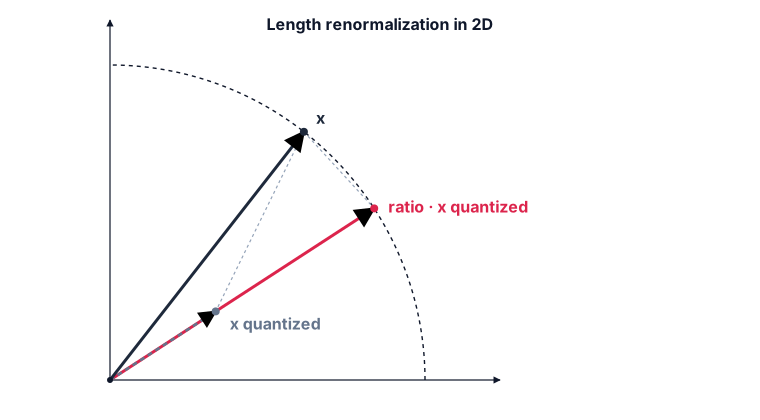
TurboQuant’s PROD variant spends an entire QJL random projection plus extra bits in the codebook on the same problem; RaBitQ-style renormalization spends 4 bytes and one multiplication.
Per-Coordinate Calibration (Anisotropy Compensation)
The rotation step gives every coordinate a roughly N(0, 1) distribution on isotropic data. The proof is based on uniformly distributed vectors across the sphere and does not extend to anisotropic embeddings, where a few directions concentrate most of the variance. After rotation those high-variance directions get spread across coordinates, but the per-coordinate distributions are not all identical Gaussians. They have different scales, different shapes, sometimes heavy tails. The Lloyd-Max codebook is fitted once for N(0, 1) and stays fixed, so coordinates that drift off the codebook grid waste centroid positions and lose recall.
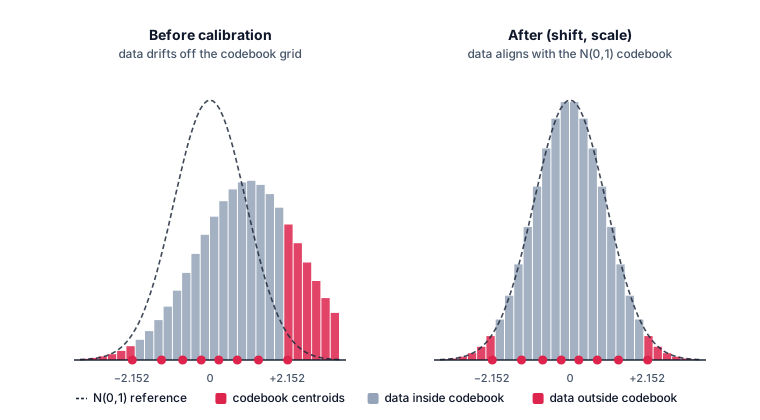
Because Qdrant stores data in segments, we can fix this per segment. For each segment we do a single pre-pass before quantization: estimate a (shift, scale) pair per coordinate after rotation, then apply x → (x + shift) · scale to pull the empirical per-coordinate distribution back onto the codebook’s grid. The same (shift, scale) is baked into the segment’s metadata and reused for every query that hits the segment.
This is free at search time thanks to the asymmetric scoring scheme. The stored code is
x⁺ = (x + shift) · scale, so the original vector isx = x⁺ / scale − shift. Plugging that into the dot product gives⟨q, x⟩ = ⟨q / scale, x⁺⟩ − ⟨q, shift⟩Here, the per-coordinate
1/scalecollapses into the query, and the⟨q, shift⟩term is a single scalar that depends only on the query. Both are computed once per query. The hot path still scores the rawb·D-bit code against a precomputed query, with one scalar added at the end; the scoring kernel does not change shape, and storage stays at exactlyb·Dbits per vector. All of the per-coordinate precision lives on the query side, where we have full float room to spend.Why not just mean + stddev? Mean-and-stddev rescaling assumes the post-rotation coordinates are Gaussian, exactly the assumption that breaks on anisotropic data, which is the case where we need calibration in the first place. We anchor calibration to the codebook itself instead: the
(shift, scale)pair is fit so the empirical quantiles at the probability levels of the outermost codebook centroid land at that centroid. The quantiles themselves are estimated with the P-Square algorithm (Jain & Chlamtac, 1985): streaming, no parametric fit, constant memory per coordinate.Sampling, not full scan. Running P-Square over every vector in the segment increases index-build time. We instead sample a random subset of segment vectors using Vitter’s Algorithm R (classical reservoir sampling), then run P-Square on the reservoir.
Truly isotropic data matches the theoretical Gaussian quantiles, the formula collapses to (shift=0, scale=1), and the encoded vector is bit-identical to vanilla TurboQuant. So the (shift, scale) correction never degrades isotropic data.
L2 and Unnormalized Dot
Vanilla TurboQuant assumes all inputs live on the unit sphere; that is, cosine distance only. We extend the scoring mechanism and unlock L2 and unnormalized dot by storing the original L2 norm, normalizing the vectors, and then applying the L2 norm back during scoring.
L2 distances are reconstructed via the identity ‖q − v‖² = ‖q‖² + ‖v‖² − 2⟨q, v⟩ = ‖q‖² + ‖v‖² − 2 ‖v‖ ‖q‖ ⟨q_normalized, v_normalized⟩, where all components on the right-hand side are already available.
Net result: cosine, dot, and L2 are all first-class in Qdrant’s TurboQuant. Same storage layout, same kernels, no precision tax for the non-cosine metrics.
L1 is also supported by full vector reconstruction at scoring time. Random orthogonal rotation preserves the L2 norm but not the L1 norm, which is the foundational invariant the entire algorithm relies on. There is no clean way to make L1 work without inverting the rotation per score, which would defeat the speedup. If your similarity is L1, stick with SQ.
SIMD Acceleration
The asymmetric scoring path (one float query against millions of quantized vectors) is the hot path of every search. The 4-bit and 2-bit kernels share most of a scoring core; 1-bit uses bit-plane scoring instead.
4-bit and 2-bit: scalar-quantized codebook + maddubs loop
Two ideas combine to make the 4-bit and 2-bit kernels fast:
The codebook is scalar-quantized to 8-bit integers. The Lloyd-Max codebook (16 centroids for 4-bit, 4 for 2-bit) is mapped to a single-byte LUT that fits in exactly one SIMD register. Centroid lookup by index becomes a single
pshufb(_mm_shuffle_epi8): “parallel indexing into a 16-byte table.”The query is scalar-quantized to two bytes per coordinate. Once per query, the rotated and anisotropy-prescaled
[f32]query becomes[i16]and is then split into two[i8]halves to feed_mm_maddubs_epi16.
With those two pieces, the inner loop collapses to: pshufb for the codebook lookup, two maddubs instructions for the multiply (one per query half), and a final madd_epi16 to widen the pair sums into an i32 accumulator. Scoring a 16-dimension chunk takes a handful of integer SIMD instructions. On VNNI-capable CPUs (Ice Lake+, Zen 4+), the maddubs + madd_epi16 pair compresses into a single VPDPBUSD; on ARMv8.2-A, SDOT plays the same role. The 2-bit kernel uses paired-nibble lookup tables, but the structure is identical.
1-bit: RaBitQ bit-plane scoring
The 1-bit scoring path follows RaBitQ as-is, without specific modifications. The data is one bit per coordinate (the sign of the rotated coordinate), bit-packed at 128 dimensions per 16-byte chunk. The query is scalar-quantized to B bits per coordinate, then transposed into B bit-planes. One plane holds bit b of every query coordinate. With that layout, the dot product becomes one AND plus one popcount per plane, weighted by 2^b and summed.
Detailed Benchmarks
Setup: HNSW index (m=16, ef_construct=128). Rows are ordered by storage class so the head-to-head TurboQuant vs SQ vs BQ comparisons line up.
Datasets:
arxiv-384— arXiv titles, 384-dim sentence-transformer embeddingsarxiv-iXL— arXiv titles, InstructorXL 768-dimdbp-gem— DBpedia entities, Gemini embeddingsdbp-3s— DBpedia entities, OpenAI text-embedding-3-small 1536-dimdbp-3l— DBpedia entities, OpenAI text-embedding-3-large 1536-dimdbp-oai— DBpedia entities, OpenAI ada-002 1536-dimcohere— Wikipedia, Cohere multilingual-v3 1024-dimh&m— H&M product catalog embeddings, 2048-dimlaion— LAION small CLIP image embeddingsads-1M— ad-creative embeddings, GTE multilingual
Recall:
| Variant (compression) | arxiv-384 | arxiv-iXL | dbp-gem | dbp-3s | dbp-3l | dbp-oai | cohere | h&m | laion | ads-1M |
|---|---|---|---|---|---|---|---|---|---|---|
| f32 (1x) | 0.9855 | 0.9419 | 0.9167 | 0.9384 | 0.9348 | 0.9625 | 0.9446 | 0.9967 | 0.9897 | 0.9298 |
| SQ (4x) | 0.9674 | 0.9285 | 0.9134 | 0.9362 | 0.9339 | 0.8839 | 0.9014 | 0.9789 | 0.9276 | 0.9187 |
| TQ 4-bit (8x) | 0.9442 | 0.9193 | 0.9020 | 0.9313 | 0.9271 | 0.9299 | 0.9271 | 0.9739 | 0.9438 | 0.9169 |
| TQ 2-bit (16x) | 0.8477 | 0.8227 | 0.8170 | 0.8838 | 0.8806 | 0.8480 | 0.8303 | 0.9195 | 0.8349 | 0.8706 |
| BQ 2-bit (16x) | 0.6948 | 0.6756 | 0.6689 | 0.7630 | 0.7513 | 0.7332 | 0.6880 | 0.7018 | 0.5953 | 0.7808 |
| TQ 1.5-bit (~21x) | 0.7567 | 0.7143 | 0.7391 | 0.8278 | 0.8197 | 0.7690 | 0.6460 | 0.8756 | 0.7213 | 0.7941 |
| TQ 1-bit (32x) | 0.7127 | 0.6763 | 0.6990 | 0.7997 | 0.7924 | 0.7356 | 0.6300 | 0.8540 | 0.6807 | 0.7717 |
| BQ asymmetric (32x) | 0.7070 | 0.5919 | 0.6112 | 0.7910 | 0.7824 | 0.7072 | 0.6287 | 0.7802 | 0.5800 | 0.7570 |
| BQ 1-bit (32x) | 0.6028 | 0.4683 | 0.4945 | 0.7041 | 0.6921 | 0.6098 | 0.5409 | 0.6989 | 0.4762 | 0.6760 |
The pattern repeats across all ten datasets:
- TQ 4-bit is competitive with SQ at half the storage. On 7 of 10 datasets TQ 4-bit trails SQ by 2.3 pp or less (
arxiv-384is the widest gap). On the other three it beats SQ:dbp-oai(+4.6 pp),cohere(+2.6 pp), andlaion(+1.6 pp). The pattern is consistent: when SQ’s int8-per-coordinate grid is mismatched with the embedding distribution, an adaptive 4-bit quantizer with anisotropy compensation does better, despite using half the bits. - TQ 2-bit beats BQ 2-bit by 9–24 pp on every dataset, at the same 16x storage class. The largest margins are on
laion(+24.0 pp) andh&m(+21.8 pp); the smallest isads-1M(+9.0 pp). - TQ 1-bit beats vanilla BQ 1-bit by 9–21 pp on every dataset, at the same 32x storage class. Against the stronger asymmetric BQ configuration (1-bit storage, 8-bit query), TQ 1-bit is still ahead on every dataset, though the margin narrows — between 0.1 pp (
cohere, essentially tied) and 10 pp (laion). - TQ 1.5-bit (~21x) sits between the 2-bit and 1-bit operating points and is the right pick when 32x is too aggressive but 16x leaves storage on the table.
When to Use TurboQuant
A practical guide:
- You currently run SQ → try TQ 4-bit. Comparable recall (often within 1–2 pp; sometimes higher) at half the memory. The easiest upgrade call on the ladder.
- You currently run BQ at any bit depth → try TurboQuant at the same storage budget (BQ 2-bit → TQ 2-bit, BQ 1.5-bit → TQ 1.5-bit, BQ 1-bit → TQ 1-bit). On the benchmarks described here, it consistently delivers higher recall, typically 9–24 pp at both the 16x and 32x storage classes. Stay on BQ if you observe a noticeable drop in throughput on your workload, or if the recall improvement is too small to matter for your use case.
- You need cosine, dot, or L2 → all three are first-class in TurboQuant. L1 → stay on SQ.
A word on indexing: TurboQuant has a small one-time pre-pass per segment (the calibration scan) that runs in a few seconds at production segment sizes. Once a segment is calibrated, the calibration is reused across queries and segment merges; it is paid once per segment, never per query.
Conclusion
TurboQuant gives Qdrant a new path on the compression ladder: 8x compression at SQ-level recall, and at 16x / 32x typically 9–24 percentage points of recall above BQ on every dataset we benchmarked. What makes that work is a hybrid: TurboQuant’s MSE codebook and integer-arithmetic SIMD kernels, RaBitQ’s per-vector length rescaling and bit-plane scoring at 1-bit, and the anisotropy-compensation pre-pass we developed on top to make all of it land on real production embeddings. The whole stack is shipping in Qdrant 1.18, on Cloud and in the standard Docker image. Migration from SQ or BQ is a config change and a re-index; the rest of the application stays identical.
Further Reading
Engineering deep-dives by the team that built this:
- TurboQuant + RaBitQ: a hybrid approach in Qdrant, by Ivan Pleshkov. Every algorithmic extension explained: renormalization, the reversible LCG + Fisher-Yates Hadamard rotation, anisotropy compensation, P-Square calibration, support for L2 and unnormalized dot. The post walks through each idea against the companion Python showcase, a readable toy-implementation to see exactly how each piece works in practice.
Background:
- TurboQuant: Redefining AI Efficiency with Extreme Compression — the original Google Research blog post.
- TurboQuant paper (arXiv:2504.19874) — Zandieh et al., 2025.
- RaBitQ paper (arXiv:2405.12497) — Gao & Long.
- Interactive TurboQuant explainer by Arkar Min Aung — a hands-on, step-by-step walkthrough of the algorithm with interactive visualizations. The clearest high-level explanation of TurboQuant available, and a great place to build intuition before reading the paper.
- Scalar Quantization in Qdrant — the int8 baseline this post refers to.
- Binary Quantization in Qdrant — the 1-bit baseline this post refers to.
Qdrant in agent memory:
- Qdrant TurboQuant Cuts Cognee Vector Memory 8x — how Cognee uses TurboQuant in Qdrant to shrink the vector memory behind its agent memory layer.