
Synchronize Qdrant Edge with a Server
Qdrant Edge can be synchronized with a collection from an external Qdrant server to support use cases like:
- Offload indexing: Indexing is a computationally expensive operation. By synchronizing an Edge Shard with a server collection, you can offload the indexing process to a more powerful server instance. The indexed data can then be synchronized back to the Edge Shard.
- Back up and Restore: Regularly back up your Edge Shard data to a central Qdrant instance to prevent data loss. In case of hardware failure or data corruption, you can restore the data from the central instance.
- Data Aggregation: Collect data from multiple Edge Shards deployed in different locations and aggregate it into a central Qdrant instance for comprehensive analysis and reporting.
- Synchronization between devices: Keep data consistent across multiple edge devices by synchronizing their Edge Shards with a central Qdrant instance.
Synchronizing Qdrant Edge with a Server
To support having local updates as well as updates from a centralized server, implement a setup with two Edge Shards:
- A mutable Edge Shard that handles local data updates.
- An immutable Edge Shard that mirrors a shard from a collection on a server using partial snapshots.
When querying data, merge results from both Edge Shards to provide a unified view. This way, new points added locally are available for search alongside the data synchronized from the server.
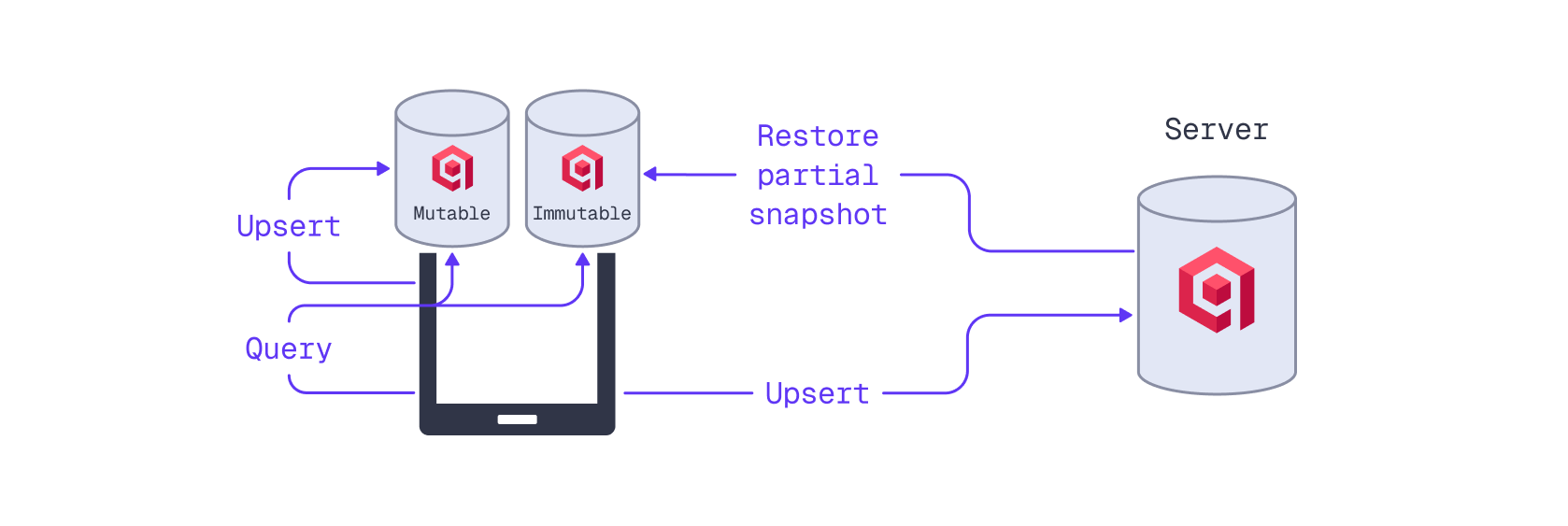
Implementing a dual-write mechanism that writes data to both the mutable Edge Shard and the server collection ensures that data is indexed on the server and synchronized back to the immutable Edge Shard, benefitting search performance.
For a Python example implementation of the patterns described in this guide, refer to the Qdrant Edge Demo GitHub repository.
1. Initialize a Mutable Edge Shard
The mutable Edge Shard will manage local data updates. It can be initialized from scratch, as detailed in the Qdrant Edge Quickstart Guide.
from pathlib import Path
from qdrant_edge import (
    Distance,
    EdgeConfig,
    EdgeShard,
    EdgeVectorParams,
)

MUTABLE_SHARD_DIR = "./qdrant-edge-directory/mutable"

Path(MUTABLE_SHARD_DIR).mkdir(parents=True, exist_ok=True)

VECTOR_NAME="my-vector"
VECTOR_DIMENSION=4

config = EdgeConfig(
    vectors={
        VECTOR_NAME: EdgeVectorParams(
            size=VECTOR_DIMENSION,
            distance=Distance.Cosine,
        )
    }
)

mutable_shard = EdgeShard.create(MUTABLE_SHARD_DIR, config)
const MUTABLE_SHARD_DIR: &str = "./qdrant-edge-directory/mutable";
const VECTOR_DIMENSION: usize = 4;
const VECTOR_NAME: &str = "my-vector";

fs_err::create_dir_all(MUTABLE_SHARD_DIR)?;
let config = EdgeConfig {
    on_disk_payload: true,
    vectors: HashMap::from([(
        VECTOR_NAME.to_string(),
        EdgeVectorParams {
            size: VECTOR_DIMENSION,
            distance: Distance::Cosine,
            on_disk: Some(true),
            quantization_config: None,
            multivector_config: None,
            datatype: None,
            hnsw_config: None,
        },
    )]),
    sparse_vectors: HashMap::new(),
    hnsw_config: Default::default(),
    quantization_config: None,
    optimizers: Default::default(),
};

let mutable_shard = EdgeShard::new(
    Path::new(MUTABLE_SHARD_DIR),
    config,
)?;
2. Initialize an Immutable Edge Shard from a Server Snapshot
Next, create the immutable Edge Shard from a snapshot on the server, as outlined in Initialize Edge Shard from existing Qdrant Collection:
import requests
import tempfile
import shutil

COLLECTION_NAME="edge-collection"
snapshot_url = f"{QDRANT_URL}/collections/{COLLECTION_NAME}/shards/0/snapshot"

IMMUTABLE_SHARD_DIR = "./qdrant-edge-directory/mutable"
data_dir = Path(IMMUTABLE_SHARD_DIR)

with tempfile.TemporaryDirectory(dir=data_dir.parent) as restore_dir:
    snapshot_path = Path(restore_dir) / "shard.snapshot"

    with requests.get(snapshot_url, headers={"api-key": QDRANT_API_KEY}, stream=True) as r:
        r.raise_for_status()
        with open(snapshot_path, "wb") as f:
            for chunk in r.iter_content(chunk_size=8192):
                f.write(chunk)

    immutable_shard = None
    if data_dir.exists():
        shutil.rmtree(data_dir)
    data_dir.mkdir(parents=True, exist_ok=True)

    EdgeShard.unpack_snapshot(str(snapshot_path), str(data_dir))

immutable_shard = EdgeShard.load(IMMUTABLE_SHARD_DIR)
const COLLECTION_NAME: &str = "edge-collection";
let snapshot_url = format!(
    "{QDRANT_URL}/collections/{COLLECTION_NAME}/shards/0/snapshot"
);

const IMMUTABLE_SHARD_DIR: &str = "./qdrant-edge-directory/immutable";
let data_dir = Path::new(IMMUTABLE_SHARD_DIR);

let restore_dir = tempfile::Builder::new()
    .tempdir_in(data_dir.parent().unwrap_or(Path::new(".")))?;
let snapshot_path = restore_dir.path().join("shard.snapshot");

let mut bytes = Vec::new();
std::io::copy(
    &mut ureq::get(&snapshot_url)
        .header("api-key", QDRANT_API_KEY)
        .call()?
        .into_body()
        .into_reader(),
    &mut bytes,
)?;
fs_err::write(&snapshot_path, &bytes)?;

if data_dir.exists() {
    fs_err::remove_dir_all(data_dir)?;
}
fs_err::create_dir_all(data_dir)?;

EdgeShard::unpack_snapshot(&snapshot_path, data_dir)?;

let immutable_shard = EdgeShard::load(data_dir, None)?;
3. Implement a Dual-Write Mechanism
With both Edge Shards initialized, you can implement a dual-write mechanism in your application as outlined in Update a Server Collection from an Edge Shard. When adding or updating a point, write it to the mutable Edge Shard and enqueue it for writing to the server collection.
from qdrant_edge import ( Point, UpdateOperation )
from qdrant_client import models
import time

SYNC_TIMESTAMP_KEY="timestamp"

id=2
vector=[0.4, 0.3, 0.2, 0.1]
payload={
    "color": "green",
    SYNC_TIMESTAMP_KEY: time.time()
}

point = Point(
    id=id,
    vector={VECTOR_NAME: vector},
    payload=payload
)

mutable_shard.update(UpdateOperation.upsert_points([point]))

rest_point = models.PointStruct(id=id, vector={VECTOR_NAME: vector}, payload=payload)

upload_queue.put(rest_point)
const SYNC_TIMESTAMP_KEY: &str = "timestamp";
let id = 2u64;
let vector = vec![0.4f32, 0.3, 0.2, 0.1];
let timestamp = SystemTime::now()
    .duration_since(UNIX_EPOCH)
    .unwrap()
    .as_secs_f64();
let payload = json!({
    "color": "green",
    SYNC_TIMESTAMP_KEY: timestamp,
});

let edge_points: Vec<PointStructPersisted> = vec![
    EdgePoint::new(
        PointId::NumId(id),
        Vectors::new_named([(VECTOR_NAME, vector.clone())]),
        payload.clone(),
    )
    .into(),
];
mutable_shard.update(UpdateOperation::PointOperation(
    PointOperations::UpsertPoints(
        PointInsertOperations::PointsList(edge_points),
    ),
))?;

let rest_point = PointStruct::new(
    id,
    HashMap::from([(VECTOR_NAME.to_string(), vector)]),
    payload.as_object().cloned().unwrap_or_default(),
);
upload_queue.push_back(rest_point);
Each point’s payload should include a timestamp field (SYNC_TIMESTAMP_KEY in this example) that records when the point was upserted. This timestamp is used to deduplicate data when the immutable Edge Shard is synchronized with the server.
4. Periodically Update the Immutable Edge Shard
You can periodically update the immutable Edge Shard with changes from the server using partial snapshots, as described in Update Qdrant Edge with Server-Side Changes.
While restoring a snapshot, you may want to pause and buffer any ongoing data updates on the mutable Edge Shard. Before taking the snapshot, ensure all queued data has been written to the server. After the restoration is complete, you can resume normal operations. Refer to the Qdrant Edge Demo GitHub repository for an example implementation in Python.
import time

manifest = immutable_shard.snapshot_manifest()

url = f"{QDRANT_URL}/collections/{COLLECTION_NAME}/shards/0/snapshot/partial/create"

sync_timestamp = time.time()

with tempfile.TemporaryDirectory(dir=data_dir) as temp_dir:
    partial_snapshot_path = Path(temp_dir) / "partial.snapshot"
    response = requests.post(url, headers={"api-key": QDRANT_API_KEY}, json=manifest, stream=True)
    response.raise_for_status()

    with open(partial_snapshot_path, "wb") as f:
        for chunk in response.iter_content(chunk_size=8192):
            f.write(chunk)

    immutable_shard.update_from_snapshot(str(partial_snapshot_path))
let sync_timestamp = SystemTime::now()
.duration_since(UNIX_EPOCH)
.unwrap()
.as_secs_f64();
let current_manifest = immutable_shard.snapshot_manifest()?;
let update_url = format!(
"{QDRANT_URL}/collections/{COLLECTION_NAME}/shards/0/snapshot\
/partial/create"
);
let temp_dir = tempfile::tempdir_in(data_dir)?;
let partial_snapshot_path = temp_dir.path().join("partial.snapshot");
let mut bytes = Vec::new();
std::io::copy(
&mut ureq::post(&update_url)
.header("api-key", QDRANT_API_KEY)
.send_json(¤t_manifest)?
.into_body()
.into_reader(),
&mut bytes,
)?;
fs_err::write(&partial_snapshot_path, &bytes)?;
let unpacked_dir = tempfile::tempdir_in(data_dir)?;
EdgeShard::unpack_snapshot(&partial_snapshot_path, unpacked_dir.path())?;
let snapshot_manifest = SnapshotManifest::load_from_snapshot(
unpacked_dir.path(),
None,
)?;
let immutable_shard = EdgeShard::recover_partial_snapshot(
data_dir,
¤t_manifest,
unpacked_dir.path(),
&snapshot_manifest,
)?;
This example records a sync_timestamp at the time of creating the partial snapshot. All points that were added to the mutable Edge Shard before this timestamp are now restored to the immutable Edge Shard. These duplicate points can now be deleted from the mutable Edge Shard:
from qdrant_edge import (
    Filter,
    FieldCondition,
    RangeFloat
)

mutable_shard.update(
    UpdateOperation.delete_points_by_filter(Filter(
        must=[
            FieldCondition(
                key=SYNC_TIMESTAMP_KEY, range=RangeFloat(lte=sync_timestamp)
            )
        ])
    )
)
let filter = Filter::new_must(Condition::Field(FieldCondition::new_range(
    SYNC_TIMESTAMP_KEY.parse::<JsonPath>().unwrap(),
    Range {
        lte: Some(OrderedFloat(sync_timestamp)),
        ..Default::default()
    },
)));

mutable_shard.update(UpdateOperation::PointOperation(
    PointOperations::DeletePointsByFilter(filter),
))?;
5. Query Both Edge Shards
To provide a unified search experience across all data, query both the mutable and immutable Edge Shards and merge the two result sets. Since a point may exist in both Edge Shards, deduplicate the results based on point ID.
from qdrant_edge import Query, QueryRequest

query_request = QueryRequest(
    query=Query.Nearest([0.2, 0.1, 0.9, 0.7], using=VECTOR_NAME),
    limit=10,
    with_vector=False,
    with_payload=True
)

mutable_results = mutable_shard.query(query_request)
immutable_results = immutable_shard.query(query_request)

all_results = list(mutable_results) + list(immutable_results)
all_results.sort(key=lambda x: x.score, reverse=True)

seen_ids = set()
unique_results = []
for result in all_results:
    if result.id not in seen_ids:
        seen_ids.add(result.id)
        unique_results.append(result)

results= [
    {
        "id": result.id,
        "score": result.score,
        "payload": result.payload
    }
    for result in unique_results[:10]
]
let query = QueryRequest {
    prefetches: vec![],
    query: Some(ScoringQuery::Vector(QueryEnum::Nearest(NamedQuery {
        query: vec![0.2f32, 0.1, 0.9, 0.7].into(),
        using: Some(VECTOR_NAME.to_string()),
    }))),
    filter: None,
    score_threshold: None,
    limit: 10,
    offset: 0,
    params: None,
    with_vector: WithVector::Bool(false),
    with_payload: WithPayloadInterface::Bool(true),
};

let mut all_results = mutable_shard.query(query.clone())?;
all_results.extend(immutable_shard.query(query)?);

all_results.sort_by(|a, b| {
    b.score
        .partial_cmp(&a.score)
        .unwrap_or(std::cmp::Ordering::Equal)
});

let mut seen_ids = std::collections::HashSet::new();
let results: Vec<_> = all_results
    .into_iter()
    .filter(|p| seen_ids.insert(p.id.clone()))
    .take(10)
    .collect();
Support
For explicit support in implementing Qdrant Edge in your project, please contact Qdrant Sales.

