
Tips for Low-Latency Search with Qdrant
Create Payload Indexes
If your search queries include filters, create payload indexes for the fields you filter on. Payload indexes are the primary way to improve filtered search performance in Qdrant. For best results, create payload indexes before uploading data.
Queries that filter on unindexed fields are not only slower; they can also unnecessarily consume cluster resources, negatively impacting the latency of other search queries. Consider blocking queries that filter on unindexed fields. This rejects queries that would degrade performance at the API boundary, surfacing misconfigured indexes as errors rather than latency spikes.
Scale Horizontally with Replicas
Qdrant can be deployed in a distributed configuration. In distributed mode, multiple instances of Qdrant, called peers, operate as a single entity, called a cluster. Data is stored in collections, which are divided into shards that are distributed across the peers. Each shard can have multiple replicas for redundancy and load balancing. Because every replica of the same shard contains the same data, read requests can be distributed across replicas, reducing latency and increasing throughput.
For example, a collection with three shards and a replication factor of two would have six total replicas (two replicas for each of the three shards). On a cluster with three peers, these replicas can be evenly distributed across the peers, with each peer hosting two replicas.
When querying a collection, Qdrant reads from one replica of each given shard. Each replica can handle read requests independently, so increasing the number of peers and increasing the replication factor enables you to distribute the read load across more peers, reducing latency and increasing throughput.
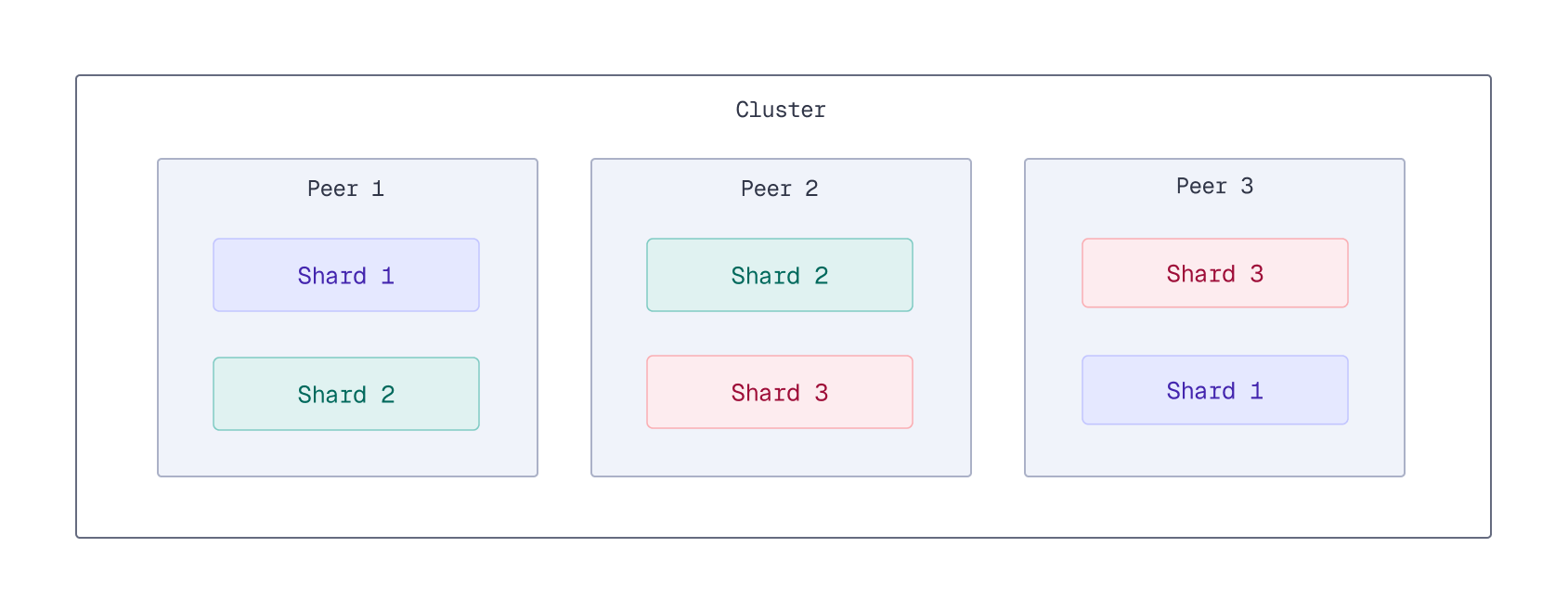
However, keep in mind that replicas are not free. You need more hardware to run more peers. Because writes need to be replicated across all replicas, increasing the replication factor can increase write latency. Therefore, it’s important to find the right balance between read performance and resource usage when configuring the replication factor.
Use Delayed Fan-Outs
Available as of v1.17.0
By default, a search operation queries a single replica of each shard in a collection. If a replica responds slowly due to load or network issues, overall search latency can increase. This phenomenon, where a single slow replica increases the 95th or 99th percentile latency of the entire system, is known as “tail latency.” High tail latency can noticeably degrade the user experience.
To reduce tail latency for read operations, Qdrant supports delayed fan-outs. With delayed fan-outs, if the initial request to a replica exceeds a specified latency threshold, an additional read request is sent to another replica. Qdrant will then use the first available response.
You can enable delayed fan-outs per collection by setting the read_fan_out_delay_ms parameter to the number of milliseconds to wait before attempting to read from another replica.
PATCH /collections/{collection_name}
{
    "params": {
        "read_fan_out_delay_ms": 100
    }
}
curl -X PATCH http://localhost:6333/collections/{collection_name} \
  -H 'Content-Type: application/json' \
  --data-raw '{
    "params": {
        "read_fan_out_delay_ms": 100
    }
  }'
client.update_collection(
    collection_name="{collection_name}",
    collection_params=models.CollectionParamsDiff(read_fan_out_delay_ms=100),
)
client.updateCollection("{collection_name}", {
  params: {
    read_fan_out_delay_ms: 100,
  },
});
use qdrant_client::qdrant::{CollectionParamsDiffBuilder, UpdateCollectionBuilder};

client
    .update_collection(
        UpdateCollectionBuilder::new("{collection_name}")
            .params(CollectionParamsDiffBuilder::default().read_fan_out_delay_ms(100u64)),
    )
    .await?;
import io.qdrant.client.grpc.Collections.CollectionParamsDiff;
import io.qdrant.client.grpc.Collections.UpdateCollection;

client
    .updateCollectionAsync(
        UpdateCollection.newBuilder()
            .setCollectionName("{collection_name}")
            .setParams(
                CollectionParamsDiff.newBuilder().setReadFanOutDelayMs(100).build())
            .build())
    .get();
using Qdrant.Client;
using Qdrant.Client.Grpc;

await client.UpdateCollectionAsync(
	collectionName: "{collection_name}",
	collectionParams: new CollectionParamsDiff { ReadFanOutDelayMs = 100 }
);
import (
	"context"

	"github.com/qdrant/go-client/qdrant"
)

client.UpdateCollection(context.Background(), &qdrant.UpdateCollection{
	CollectionName: "{collection_name}",
	Params: &qdrant.CollectionParamsDiff{
		ReadFanOutDelayMs: qdrant.PtrOf(uint64(100)),
	},
})
Replace 100 with your collection’s measured p95 read latency.
To disable delayed fan-outs after enabling, set this parameter to 0 (default).
An alternative approach to fanning out reads is to always read from multiple replicas, regardless of latency. To enable this, set the read_fan_out_factor parameter to the number of additional replicas to read from. Be aware that this increases the load on the cluster and is generally not recommended, as read_fan_out_delay_ms can achieve similar tail latency improvements with a much lower additional load on the system.
Query Indexed Data Only
Shards store their data in segments. Write operations go through several stages before the changes are fully indexed and searchable:
- First, each incoming write request is written to the shard’s write-ahead log (WAL). At this stage, the data is not yet searchable, but the write request is persisted and will eventually be applied.
- An update queue tracks entries from the WAL that still need to be applied. The update queue can track up to one million pending updates per shard. When the queue is full, clients experience back pressure: new write requests stall until the queue has capacity.
- Next, updates are taken from the queue and applied to one or more (unoptimized) segments. At this stage, the data is searchable, but not yet indexed, so searching over this data may be slower.
- Finally, the indexing optimizer creates a vector index (HNSW graph) for unoptimized segments. Once the indexing process is complete, the data is fully indexed, and search performance is optimal. Indexing is a relatively slow operation, so there can be a delay between when data is written and when it is fully indexed, especially under heavy write load.
Search latency can vary depending on where the data is in this process. Querying large amounts of unindexed data can lead to increased latency. This can occur under heavy write load, for example, during nightly batch updates or when processing a large backlog of updates after a period of downtime.
If your application requires a consistently low search latency, Qdrant offers two mechanisms to avoid searching unindexed data. You can either use the indexed_only query parameter, or enable the prevent_unoptimized optimizer setting. Choose one of these methods; there’s no need to use both.
indexed_only Search Parameter
Available as of v1.7.0
To restrict searches to indexed data and small segments below the indexing threshold, set the indexed_only search parameter to true. This ensures more consistent and lower response times. However, the tradeoff is that the most recent data might not be included in search results until it has been indexed.
A side-effect of using indexed_only is that it can cause “blinking” points in search results. When an unoptimized segment is below the indexing threshold, all its points are visible in indexed_only searches. But once inserts push the segment over the threshold, all its points temporarily disappear from search results until the segment has been indexed. Updates can also cause blinking points, since Qdrant implements them as a delete followed by an insert. To mitigate “blinking” points, use prevent_unoptimized instead, as described in the next section.
prevent_unoptimized Optimizer Setting
Available as of v1.17.1
To mitigate “blinking” points, an alternative to using indexed_only is to set the prevent_unoptimized optimizer setting to true. This prevents the creation of large segments with unindexed data. Instead, once a segment reaches the indexing_threshold, all additional points will be added in a “deferred” state. Deferred points are not yet visible in reads but are handled in write operations. Deferred points are promoted to visible points once the segment has been optimized.
Refer to Prevent Reads from Large Unindexed Segments for more details on how this works.
Pin Reads with Route Affinity
Available as of v1.19.0
Enabling prevent_unoptimized makes cross-replica “blinking” more prominent: points held back until a segment is optimized become visible on each replica at slightly different times, and because reads are spread across replicas, successive requests for the same query can land on different replicas and see a point appear, disappear, then reappear. To keep reads stable for a given client, send the X-Qdrant-Route-Affinity HTTP header with a stable value (such as a user or session ID) to pin all of that client’s reads to the same replica, without giving up load balancing across other clients. Refer to Read Affinity for details.
See Also
- Slow Request Log — Identify which specific queries are contributing to high latency.
 Ready to try Qdrant?