Optimizer
It is much more efficient to apply changes in batches than perform each change individually, as many other databases do. Qdrant here is no exception. Since Qdrant operates with data structures that are not always easy to change, it is sometimes necessary to rebuild those structures completely.
Storage optimization in Qdrant occurs at the segment level (see storage). In this case, the segment to be optimized remains readable for the time of the rebuild.
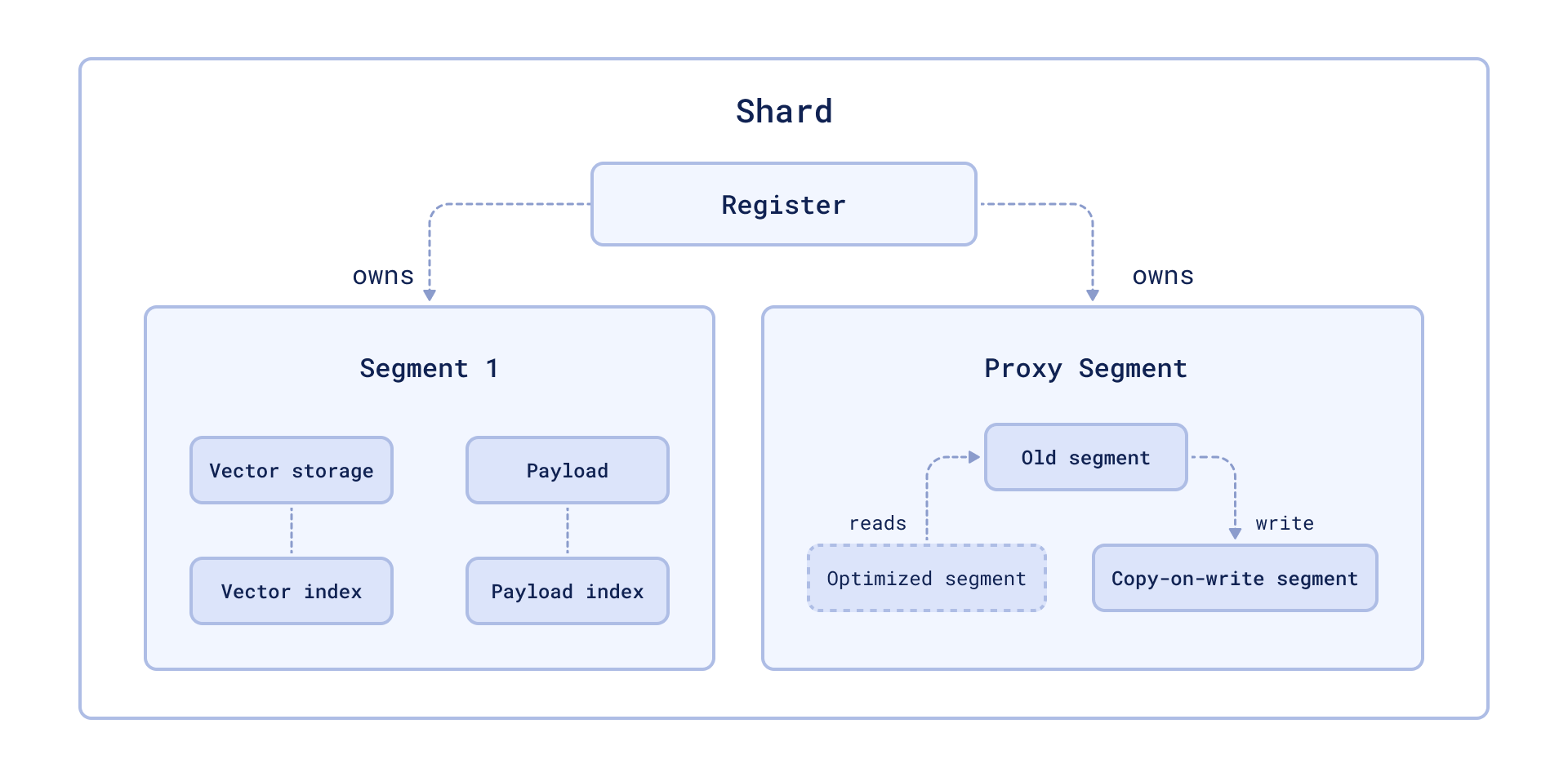
The availability is achieved by wrapping the segment into a proxy that transparently handles data changes. Changed data is placed in the copy-on-write segment, which has priority for retrieval and subsequent updates.
Vacuum Optimizer
The simplest example of a case where you need to rebuild a segment repository is to remove points. Like many other databases, Qdrant does not delete entries immediately after a query. Instead, it marks records as deleted and ignores them for future queries.
This strategy allows us to minimize disk access - one of the slowest operations. However, a side effect of this strategy is that, over time, deleted records accumulate, occupy memory and slow down the system.
To avoid these adverse effects, Vacuum Optimizer is used. It is used if the segment has accumulated too many deleted records.
The criteria for starting the optimizer are defined in the configuration file.
Here is an example of parameter values:
storage:
  optimizers:
    # The minimal fraction of deleted vectors in a segment, required to perform segment optimization
    deleted_threshold: 0.2
    # The minimal number of vectors in a segment, required to perform segment optimization
    vacuum_min_vector_number: 1000
Merge Optimizer
The service may require the creation of temporary segments. Such segments, for example, are created as copy-on-write segments during optimization itself.
It is also essential to have at least one small segment that Qdrant will use to store frequently updated data. On the other hand, too many small segments lead to suboptimal search performance.
The merge optimizer constantly tries to reduce the number of segments if there
currently are too many. The desired number of segments is specified
with default_segment_number and defaults to the number of CPUs. The optimizer
may takes at least the three smallest segments and merges them into one.
Segments will not be merged if they’ll exceed the maximum configured segment
size with max_segment_size_kb. It prevents creating segments that are too
large to efficiently index. Increasing this number may help to reduce the number
of segments if you have a lot of data, and can potentially improve search performance.
The criteria for starting the optimizer are defined in the configuration file.
Here is an example of parameter values:
storage:
  optimizers:
    # Target amount of segments optimizer will try to keep.
    # Real amount of segments may vary depending on multiple parameters:
    #  - Amount of stored points
    #  - Current write RPS
    #
    # It is recommended to select default number of segments as a factor of the number of search threads,
    # so that each segment would be handled evenly by one of the threads.
    # If `default_segment_number = 0`, will be automatically selected by the number of available CPUs
    default_segment_number: 0

    # Do not create segments larger this size (in KiloBytes).
    # Large segments might require disproportionately long indexation times,
    # therefore it makes sense to limit the size of segments.
    #
    # If indexation speed have more priority for your - make this parameter lower.
    # If search speed is more important - make this parameter higher.
    # Note: 1Kb = 1 vector of size 256
    # If not set, will be automatically selected considering the number of available CPUs.
    max_segment_size_kb: null
Indexing Optimizer
Qdrant allows you to choose the type of indexes and data storage methods used depending on the number of records. So, for example, if the number of points is less than 10000, using any index would be less efficient than a brute force scan.
The Indexing Optimizer is used to implement the enabling of indexes and memmap storage when the minimal amount of records is reached.
The criteria for starting the optimizer are defined in the configuration file.
Here is an example of parameter values:
storage:
  optimizers:
    # Maximum size (in kilobytes) of vectors to store in-memory per segment.
    # Segments larger than this threshold will be stored as read-only memmaped file.
    # Memmap storage is disabled by default, to enable it, set this threshold to a reasonable value.
    # To disable memmap storage, set this to `0`.
    # Note: 1Kb = 1 vector of size 256
    memmap_threshold: 200000

    # Maximum size (in KiloBytes) of vectors allowed for plain index.
    # Default value based on experiments and observations.
    # Note: 1Kb = 1 vector of size 256
    # To explicitly disable vector indexing, set to `0`.
    # If not set, the default value will be used.
    indexing_threshold_kb: 10000
In addition to the configuration file, you can also set optimizer parameters separately for each collection.
Dynamic parameter updates may be useful, for example, for more efficient initial loading of points. You can disable indexing during the upload process with these settings and enable it immediately after it is finished. As a result, you will not waste extra computation resources on rebuilding the index.
Prevent Reads from Unindexed Segments
Available as of v1.17.1
When a collection receives a high volume of updates, for example, during nightly batch updates or when processing a large backlog of updates after a period of downtime, the optimizer might not be able to index new points fast enough to keep up. When this happens, searches may slow down as Qdrant has to scan through large amounts of unindexed data for every query.
To address this, Qdrant supports querying indexed data only, by setting indexed_only to true. Because updates in Qdrant are implemented as a delete followed by an insert, a side effect of searching indexed data only is that it can cause recently updated data to temporarily disappear from search results until it is indexed again. This is because the delete operation immediately removes the old point from the index, while the insert operation adds the new point to an unindexed segment that is not yet visible to searches.
To mitigate this, the optimizer supports a prevent_unoptimized mode. When enabled, points written to an unindexed segment that is larger than indexing_threshold are accepted and durably stored but are not visible in search results until the optimizer has indexed the segment. These are called deferred points. Not until the optimizer finishes indexing a segment containing deferred points, do those points become visible.
Set prevent_unoptimized to true when creating or updating a collection:
PATCH /collections/{collection_name}
{
    "optimizers_config": {
        "prevent_unoptimized": true
    }
}
curl -X PATCH http://localhost:6333/collections/{collection_name} \
  -H 'Content-Type: application/json' \
  --data-raw '{
    "optimizers_config": {
        "prevent_unoptimized": true
    }
  }'
client.update_collection(
    collection_name="{collection_name}",
    optimizers_config=models.OptimizersConfigDiff(prevent_unoptimized=True),
)
client.updateCollection("{collection_name}", {
  optimizers_config: {
    prevent_unoptimized: true,
  },
});
use qdrant_client::qdrant::{OptimizersConfigDiffBuilder, UpdateCollectionBuilder};

client
    .update_collection(
        UpdateCollectionBuilder::new("{collection_name}").optimizers_config(
            OptimizersConfigDiffBuilder::default().prevent_unoptimized(true),
        ),
    )
    .await?;
import io.qdrant.client.grpc.Collections.OptimizersConfigDiff;
import io.qdrant.client.grpc.Collections.UpdateCollection;

client
    .updateCollectionAsync(
        UpdateCollection.newBuilder()
            .setCollectionName("{collection_name}")
            .setOptimizersConfig(
                OptimizersConfigDiff.newBuilder().setPreventUnoptimized(true).build())
            .build())
    .get();
using Qdrant.Client;
using Qdrant.Client.Grpc;

await client.UpdateCollectionAsync(
	collectionName: "{collection_name}",
	optimizersConfig: new OptimizersConfigDiff { PreventUnoptimized = true }
);
import (
	"context"

	"github.com/qdrant/go-client/qdrant"
)

client.UpdateCollection(context.Background(), &qdrant.UpdateCollection{
	CollectionName: "{collection_name}",
	OptimizersConfig: &qdrant.OptimizersConfigDiff{
		PreventUnoptimized: qdrant.PtrOf(true),
	},
})
With prevent_unoptimized enabled, setting indexed_only to true is not necessary to avoid slow searches, as unindexed segments do not return deferred points.
prevent_unoptimized | indexed_only | Effect |
|---|---|---|
false (default) | false | All points are searchable, but searches may be slow if there are many unindexed points. |
false (default) | true | Only indexed points are searchable, but recently updated points may temporarily disappear from search results until they are indexed. |
true | false (default) | Reads return indexed points and unindexed points that are not deferred. Deferred points are not visible to reads until indexed. |
true | true | Only indexed points are visible to reads. |
Effect on wait=true
Qdrant processes updates in strict order: each update is written to the write-ahead log and then applied sequentially by the update worker, preserving this order.
Under normal conditions, setting wait=true on a write request returns after the update has been applied to a segment. After enabling prevent_unoptimized, the response is held until every deferred point, including the current update, has been indexed and is visible for search. Depending on the volume of updates and the speed of the optimizer, this can take a significant amount of time and may lead to timeouts on the client side. If the client times out, the update can be expected to be durably stored and eventually indexed, but the client will not receive a confirmation for that specific request.
Because the update worker must finish indexing before continuing to consume the queue, a blocked wait=true request also delays all subsequent updates that use wait=true. Updates with wait=false are written to the write-ahead log immediately, but they are not applied until the blocked request unblocks. This head-of-line blocking means that wait=true can stall the entire update pipeline for as long as indexing takes. Use it with caution when prevent_unoptimized is enabled and the cluster is under heavy write load.
Monitoring Deferred Points
You can check the number of deferred points in a collection via the update_queue section in the response of the collection info API. The same information is also available in telemetry and metrics, enabling dashboards and alerting.
A non-zero deferred point count means the optimizer is processing a backlog. This is expected under heavy write load; monitor the count to confirm that it is decreasing over time.
Optimization Monitoring
Available as of v1.17.0
The /collections/{collection_name}/optimizations API endpoint returns information about the optimization of a specific collection, including:
- A summary of optimization activity, with the number of queued optimizations, queued segments, queued points, and idle segments (segments that need no optimization).
- Details about any currently running optimization, including:
- the specific optimizer
- its status
- the segments involved
- its progress
Optionally, you can use the with query parameter with one or more of the following comma-separated values to retrieve additional information:
queued, to return a list of queued optimizationscompleted, to return a list of completed optimizationsidle_segments, to return a list of idle segments
For example:
GET collections/{collection_name}/optimizations?with=queued,completed
Web UI
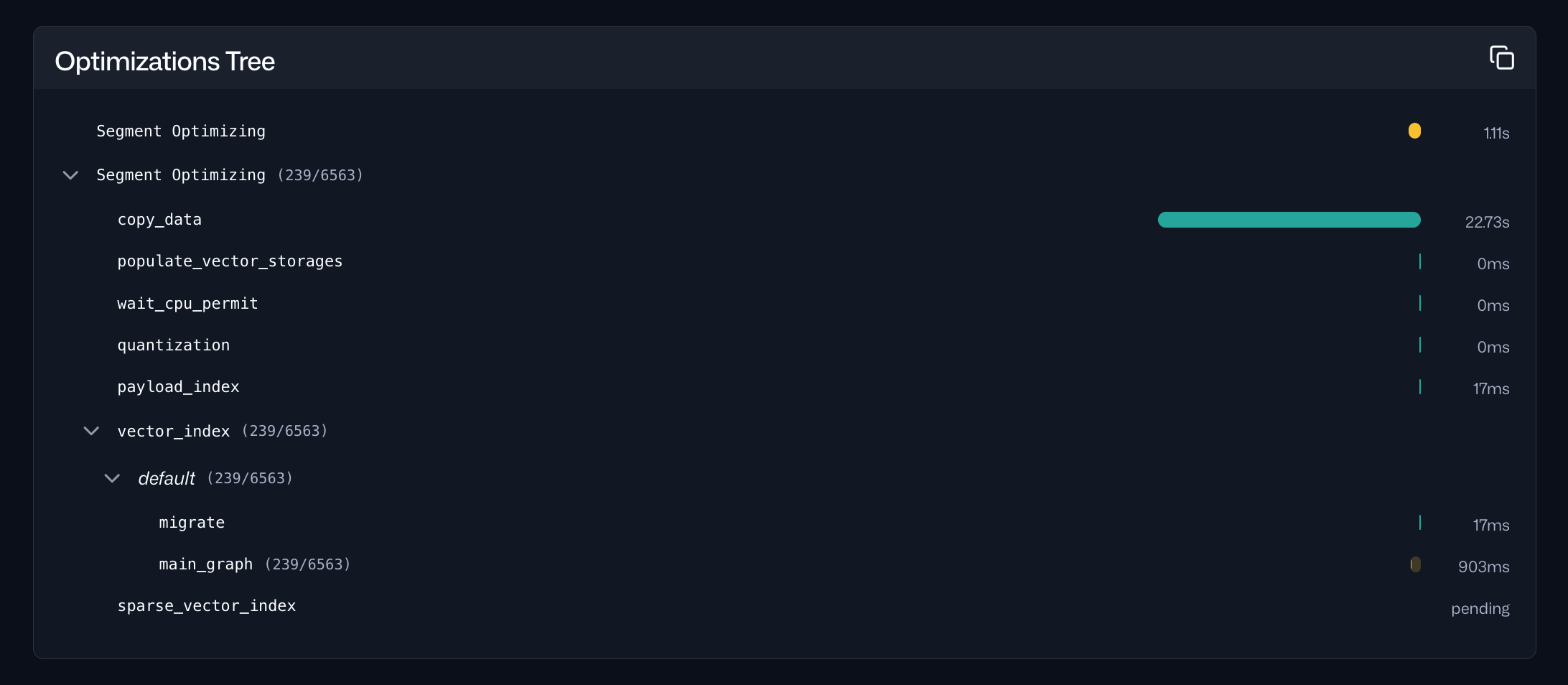
The same information is also accessible via the Optimizations tab within the Collections interface in the Web UI. For a specific collection, this tab provides an overview of the current optimization status and a timeline of current and past optimization cycles:
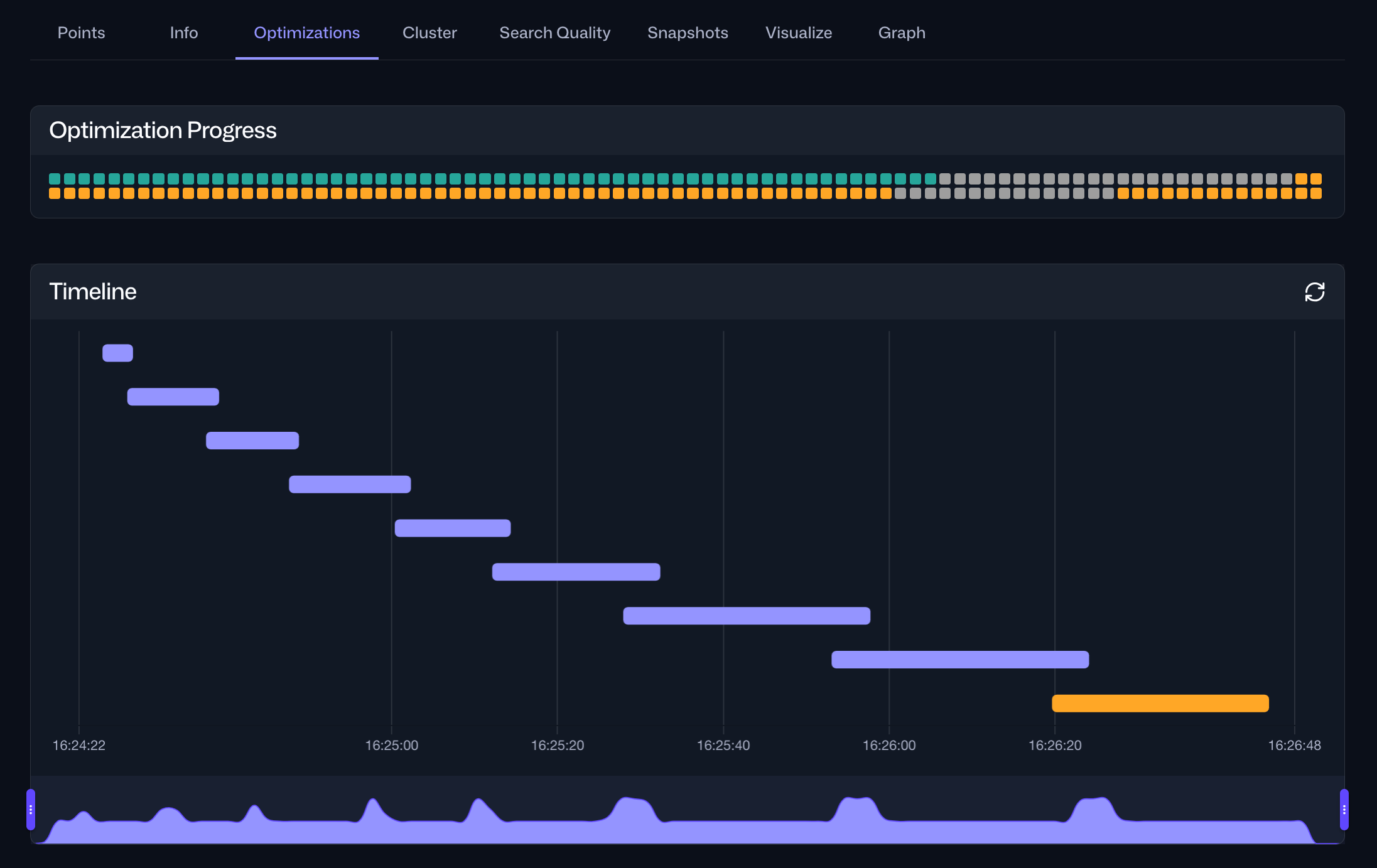
Selecting a specific optimization cycle from the timeline provides detailed information about the tasks performed during that cycle, including their durations: