


Qdrant Skills for AI Agents
Thierry Damiba
·March 31, 2026
On this page:
The standard RAG tutorial teaches a simple pattern: embed your documents, store them in a vector database, retrieve the top K, and feed them to the LLM. The vector engine is passive infrastructure. Put vectors in, get neighbors out. Configure once, forget about it forever.
This mental model is why most AI agents treat vector search as a black box. They can call the API. They cannot make the engineering decisions that determine whether it works well.
We built Qdrant skills to change that: deep Qdrant knowledge, encoded so agents (and humans if you’re reading this!) can navigate it.
Vector search has evolved
Production vector search is built from independent primitives that interact, not a single retrieval call:
- Quantization for memory compression
- HNSW parameter tuning for recall and latency tradeoffs
- Payload filtering with indexed fields
- Fusion strategies for hybrid retrieval (dense + sparse)
- Sharding and replication for scale
Each one of these is a lever. Pull one and it changes the others. Enable binary quantization and you cut memory 32x, but you need oversampling with rescore to preserve recall. Move vectors to disk and you free RAM, but need NVMe and io_uring to keep latency reasonable. Add more shards for throughput, but each shard adds network hops that hurt latency.
These primitives compound. The right combination depends on your data distribution, query patterns, and production constraints.
Cosmos, a visual search platform for creative professionals, is a canonical example of composable vector search in production. By combining multiple Qdrant features, they created a refined, intuitive search experience that understands the user’s taste. In a single collection using named vectors, they store CLIP vectors (text to image search), CNNs (for style), pHash (to identify duplicates), and color embeddings (for palette search). Color searches leverage five different vectors held in memory for fast distance calculations; text search relies on CLIP vectors. Hybrid queries blend the two.
They started with built-in reciprocal rank fusion, then moved to application-side fusion because they needed custom scoring that balanced relevance, engagement, and aesthetics. Every one of those choices was a tradeoff: memory for color precision, latency for ranking quality, simplicity for control.
Storage is passive. Vector search is a decision space with real engineering tradeoffs: memory vs latency, recall vs throughput, precision vs cost. An agent that only knows how to call search(query, top_k=10) is ignoring the entire tradeoff surface.
The agent gap
AI agents are good at calling APIs. Give an agent documentation for client.query_points() and it will write the call correctly.
But production vector search requires a different kind of knowledge:
“Memory usage is at 85% and climbing. What do I do?”
A documentation-trained agent might suggest quantization. It is a valid answer. But it is not a good answer, because it skips the diagnostic step: what’s actually consuming memory? Is it the vectors? Payload indexes? The HNSW graph? Or just page cache, which is normal OS behavior and not a problem at all?
The right first move is checking /telemetry for per-segment breakdown. Not blindly applying quantization because your training remembers that it lowers memory.
This is solutions architect knowledge that cannot be baked into the LLM. It’s diagnostic, situational, and built from seeing the same problems hundreds of times.
Documentation says: “Here’s how to enable scalar quantization.”
A solutions architect says: “First check if the vectors are actually the problem. If RSSAnon is high but you already have quantization, look at payload indexes. And you don’t need to worry about page cache filling available RAM. That’s the OS doing its job.”
The gap between “how to use a feature” and “when to use it, and why” is the gap between documentation and expertise. The gap between a toy image search app and Cosmos.
What we shipped
We built Qdrant skills: solutions architect knowledge encoded in a format that AI agents can navigate. Not better documentation. A diagnostic decision tree that tells agents when to use a feature, why, and what not to do.
We built skills for the problems that generate common questions:
- Deployment options: Prototyping vs self-hosted vs managed cloud vs edge. Which one, when, and why. (Cosmos chose managed cloud so they could focus on product instead of managing reindexing and scaling. Others need self-hosted for compliance.)
- Search quality diagnosis: Results are bad. Is it the model, HNSW approximation, quantization, or filters?
- Search strategies: When to use relevance feedback, hybrid search, keyword matching, or late interaction models.
- Memory optimization: What’s using RAM and how to reduce it without destroying performance.
- Search speed: Why search is slow. Latency vs throughput are opposite tuning directions.
- Scaling: More nodes, more replicas, or just better configuration? Depends on what you’re scaling for.
- Monitoring and debugging: How to detect problems before users report them.
- Version upgrades: What to check before, during, and after upgrading.
Skills handle the knowledge layer. For the infrastructure layer, qcloud-cli brings Qdrant Cloud management to the terminal. Create and scale clusters, manage API keys, configure backups, and select regions without leaving your workflow. Named contexts let you switch between staging and production with one command, and every operation works in CI/CD pipelines and scripts.
Together, skills tell your agent what to configure, and qcloud lets it do the configuring. An agent diagnosing a memory issue can recommend quantization (skill) and then apply it to the right cluster (qcloud). The knowledge and the tooling work as a pair.
Skills are open source and work with any agent that supports the skills format (Cursor, Claude Code, OpenClaw, OpenCode, OpenAI Codex, Pi).
Install with Claude Code:
/plugin marketplace add qdrant/skills
Or with npx skills:
npx skills add https://github.com/qdrant/skills
What skills encode that docs don’t
Compare two approaches:
Documentation-style (bad):
- Multimodal RAG: Build a multimodal RAG system using embeddings and a vision model for generation
- Basic RAG: Implement basic retrieval and generation with Qdrant
- Advanced RAG: Improve on basic RAG by adding re-ranking, query decomposition, query rewriting
Skills-style (good):
- What to do if search quality is bad?
- Don’t know what’s wrong yet? Test exact vs approximate search, isolate the layer
- Approximate worse than exact? Tune HNSW ef, enable oversampling with rescore
- Exact search also bad? Wrong embedding model. Test top MTEB alternatives.
- What to do if memory is too high?
- Don’t know what’s using memory? Check /metrics and /telemetry first
- Memory exceeds dataset size? Quantization, smaller datatypes, move indexes to disk
- Want everything on disk? Use mmap, enable async scorer, consider inline HNSW storage
The first approach organizes by feature. The second organizes by situation.
Documentation answers “how?” Skills answer “when?” and “why?”
Skills don’t replace documentation. They serve as navigation that agents can follow to the right documentation. “You’re in THIS situation, so read THAT section, and here’s what to watch out for.” Every skill bullet links to the relevant docs page. The skill provides judgment; the docs provide detail.
The structure is deliberately simple:
Problem-oriented sections. Not “Quantization” or “HNSW Parameters.” Instead: “Don’t Know What’s Using Memory,” “Search Was Fast Now It’s Slow,” “Approximate Search Worse Than Exact.” Named by symptoms, not features.
“Use when:” triggers. Each section opens with a one-liner that tells the agent when this section applies. Pattern-matching for machines.
Imperative bullets with doc links. “Enable scalar int8 quantization with always_ram=true” linked directly to the quantization docs. The skill tells you what to do. The docs explain how.
“What NOT to Do” sections. The highest-value content. These are the mistakes that sound reasonable but aren’t: “Don’t tune Qdrant before verifying the embedding model is right (most quality issues are model issues).” “Don’t assume memory leak when page cache fills RAM (normal OS behavior).” “Don’t put HNSW on disk for latency-sensitive production without NVMe.”
The result is a hierarchical navigation system over our documentation, organized by what you’re trying to solve, not what features exist. A decision tree, rooted in problems, branching toward the right documentation.
Real examples: same agent, same question, with and without skills
We ran each question 5 times on Claude Opus 4.6 (1M context), with and without Qdrant skills loaded. Same model, same system prompt, no cherry-picking.
With skills: 144/150 assertions passed (96%). Without skills: 97/150 (65%).
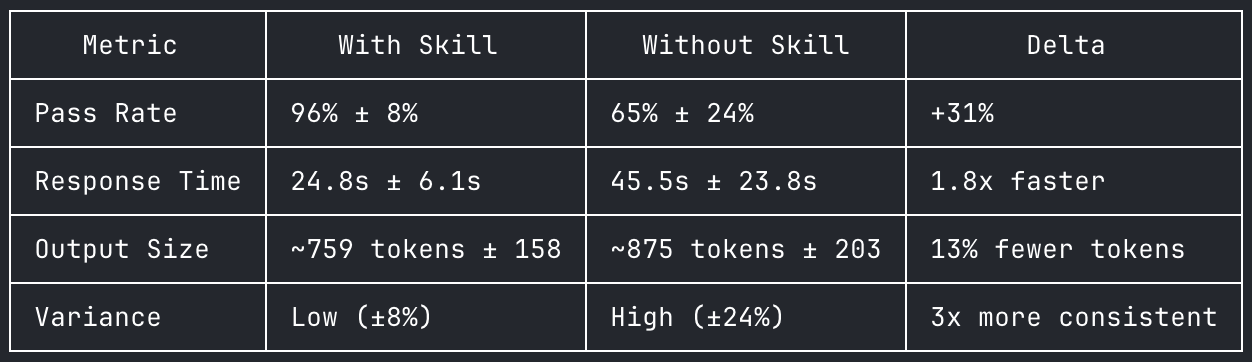
6 Qdrant scaling questions, 5 runs each, Claude Opus 4.6. Full data at qdrant-labs/skills-eval.
“We have a social media search index with a 3-month retention window. We run a nightly cron that deletes old posts but after 6 months in production our searches went from 15ms to 200ms and disk usage keeps climbing even though the dataset size is stable.”
Baseline pass rate: 32% across 5 runs. With skill: 100%. The largest delta in our evaluation.
Without skills:
Qdrant uses soft deletes. When you call
client.delete(filter=...), points are marked with tombstones but not physically removed from the HNSW graph. The optimizer merges segments and cleans up tombstones, but with a nightly bulk delete pattern, you’re creating a steady buildup of dead points that the default optimizer config can’t keep up with.Switch from filter-delete to collection aliasing with rolling collections. Instead of deleting from one collection, use time-bucketed collections behind an alias. Create monthly collections, point the alias at the active set, and drop the expired month entirely. Search across multiple collections by querying each and merging results client-side.
With skills:
You’re hitting the known degradation pattern of filter-and-delete at scale.
client.delete(filter=...)doesn’t physically remove data. It marks points as tombstoned. These tombstoned points still exist on disk and still get visited during search, which is why latency climbed from 15ms to 200ms. The optimizer creates new compacted segments while your next delete batch creates new tombstones.Switch to shard rotation with user-defined sharding. Create a collection with
sharding_method: "custom", create shard keys per month (2026-01,2026-02,2026-03). Ingest into the current month’s shard key. On rotation, pre-create the next month’s shard key, then drop the oldest. Dropping a shard key is instant: no tombstones, no fragmentation, no optimizer overhead, disk reclaimed immediately. Queries withoutshard_key_selectorautomatically search all shards, so no application changes needed for reads.
The difference: Both agents correctly diagnose tombstone degradation. But without the skill, Claude defaults to collection rotation with alias swapping, which requires application-level fan-out search across multiple collections and client-side result merging. The skill teaches shard rotation: a single collection with user-defined shard keys, where queries automatically span all time periods without fan-out and dropping a shard key reclaims resources instantly. The unskilled agent doesn’t know this pattern exists.
“We’re maxing out at 150 QPS but need 500. Single node, 32GB RAM, 8 cores, 20M vectors at 384 dims. We tried increasing hnsw_ef and segment count to 16 to make it faster but QPS actually got worse.”
Baseline pass rate: 60% across 5 runs. With skill: 100%.
Without skills:
The problem is too many segments. 16 segments means every query touches all 16 in parallel, starving other queries of CPU. Set
default_segment_numberto 2. Also lowerhnsw_efback to 64, it controls accuracy not throughput. Enable scalar quantization to compress vectors from ~29GB to ~7.5GB so everything fits in RAM.
With skills:
You’re tuning in the wrong direction. Both changes hurt throughput: increasing
hnsw_efmakes each query do more work (it’s a latency/accuracy knob, not throughput), and 16 segments means more overhead per query. For throughput, you want fewer, larger segments (default_segment_number: 2). Enable scalar quantization withalways_ram: trueto cut vector memory by 4x. Use the batch search API to amortize per-request overhead. Setoptimizer_cpu_budget: 2so indexing only uses 2 of your 8 cores, reserving 6 for queries. If still not enough after all tuning, add read replicas for horizontal scaling.
The difference: The unskilled agent catches the segment count issue and quantization but misses two things the skill provides: the batch search API for amortizing overhead, and limiting optimizer CPU budget to reserve cores for queries. It also doesn’t explain the latency vs throughput distinction clearly enough to prevent the user from making the same mistake again.
“We have a multi-tenant SaaS with 5,000 tenants, each with 10k-100k vectors. We started with one collection per tenant but at around 800 collections Qdrant started using 90%+ memory just for overhead. We tried grouping small tenants into shared collections but search got really slow because the HNSW graph is global.”
Baseline pass rate: 68% across 5 runs. With skill: 100%.
Without skills:
Your two attempts hit the two classic anti-patterns: collection-per-tenant has unsustainable overhead, and shared collection without tenant-aware indexing means HNSW builds one global graph where most traversed nodes get rejected by the filter. Put all tenants in one collection, add a
tenant_idpayload field, create a keyword index on it, and filter every query bytenant_id. Qdrant will use the payload index to restrict HNSW traversal to only that tenant’s vectors.
With skills:
Your shared collection approach failed because you’re building a global HNSW graph. Create one collection with a
tenant_idpayload field and a keyword index withis_tenant: true. This flag is critical: without it, Qdrant builds one global HNSW graph and scans sequentially per tenant. With it, Qdrant builds per-tenant HNSW segments so each tenant search only touches that tenant’s vectors. Usepayload_minstead of the defaultmparameter and setm: 0to disable the global HNSW entirely since you’ll never search without a tenant filter. For your 10x size range across tenants, use tiered multitenancy to promote large tenants to dedicated shards while keeping small tenants on shared shards.
The difference: Both agents give the correct high-level answer: consolidate into one collection with payload filtering. But the unskilled agent misses the specific configuration that makes it work: is_tenant: true for per-tenant HNSW segments, payload_m over global HNSW, and tiered multitenancy for uneven tenant sizes. The skilled agent gives you the architecture; the unskilled agent gives you the idea.
Try it
Skills are open source. Install them, break them, tell us what’s wrong. If you have a production debugging pattern we missed, open a PR. The best skills will come from engineers who have already spent the week we are trying to save you.
The piece of the stack between “the API works” and “the system works in production” is where most teams lose time. That gap is a diagnosis problem, not a documentation problem.
Special thanks to Andrey Vasnetsov, Evgeniya Sukhodolskaya, Jenny Cooper, Juan Carmona, Konstantin Babanakov, Nathan LeRoy, Kirstin Taufertshofer, and Neil Kanungo for making this happen.


