
Tips for Low-Latency Search with Qdrant
Scale Horizontally with Replicas
Qdrant can be deployed in a distributed configuration. In distributed mode, multiple instances of Qdrant, called peers, operate as a single entity, called a cluster. Data is stored in collections, which are divided into shards that are distributed across the peers. Each shard can have multiple replicas for redundancy and load balancing. Because every replica of the same shard contains the same data, read requests can be distributed across replicas, reducing latency and increasing throughput.
For example, a collection with three shards and a replication factor of two would have six total replicas (two replicas for each of the three shards). On a cluster with three peers, these replicas can be evenly distributed across the peers, with each peer hosting two replicas.
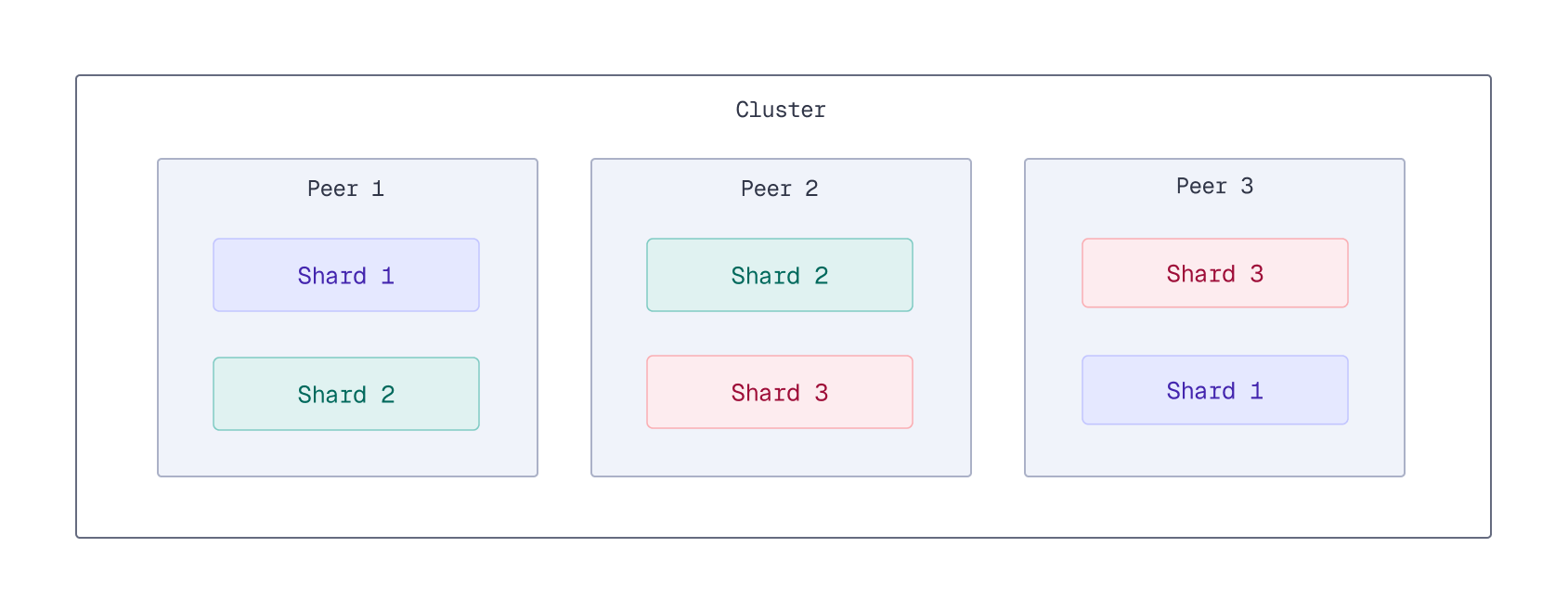
When querying a collection, Qdrant reads from one replica of each given shard. Each replica can handle read requests independently, so increasing the number of peers and increasing the replication factor enables you to distribute the read load across more peers, reducing latency and increasing throughput.
However, keep in mind that replicas are not free. You need more hardware to run more peers. Because writes need to be replicated across all replicas, increasing the replication factor can increase write latency. Therefore, it’s important to find the right balance between read performance and resource usage when configuring the replication factor.
Use Delayed Fan-Outs
Available as of v1.17.0
By default, a search operation queries a single replica of each shard in a collection. If a replica responds slowly due to load or network issues, overall search latency can increase. This phenomenon, where a single slow replica increases the 95th or 99th percentile latency of the entire system, is known as “tail latency.” High tail latency can noticeably degrade the user experience.
To reduce tail latency for read operations, Qdrant supports delayed fan-outs. With delayed fan-outs, if the initial request to a replica exceeds a specified latency threshold, an additional read request is sent to another replica. Qdrant will then use the first available response.
You can enable delayed fan-outs per collection by setting the read_fan_out_delay_ms parameter to the number of milliseconds to wait before attempting to read from another replica. To disable delayed fan-outs after enabling, set this parameter to 0 (default).
An alternative approach to fanning out reads is to always read from multiple replicas, regardless of latency. To enable this, set the read_fan_out_factor parameter to the number of additional replicas to read from. Be aware that this increases the load on the cluster and is generally not recommended, as read_fan_out_delay_ms can achieve similar tail latency improvements with a much lower additional load on the system.
Query Indexed Data Only
Available as of v1.17.0
Shards store their data in segments. Write operations go through several stages before the changes are fully indexed and searchable:
- First, each incoming write request is written to the shard’s write-ahead log (WAL). At this stage, the data is not yet searchable, but the write request is persisted and will eventually be applied.
- An update queue tracks entries from the WAL that still need to be applied. The update queue can track up to one million pending updates per shard. When the queue is full, clients experience back pressure: new write requests stall until the queue has capacity.
- Next, updates are taken from the queue and applied to one or more (unoptimized) segments. At this stage, the data is searchable, but not yet indexed, so searching over this data may be slower.
- Finally, the indexing optimizer creates a vector index (HNSW graph) for unoptimized segments. Once the indexing process is complete, the data is fully indexed, and search performance is optimal. Indexing is a relatively slow operation, so there can be a delay between when data is written and when it is fully indexed, especially under heavy write load.
Search latency can vary depending on where the data is in this process. Querying large amounts of unindexed data can lead to increased latency. This can occur under heavy write load, for example, during nightly batch updates or when processing a large backlog of updates after a period of downtime.
If your application requires a consistently low search latency, set the search parameter indexed_only to true. With this setting enabled, search operations will only consider indexed data, ensuring more consistent and lower response times. The tradeoff is that the most recent data might not be included in search results until it has been indexed.
Enabling indexed_only can cause recently updated data to temporarily disappear from search results until it is indexed again. To mitigate this, set the prevent_unoptimized optimizer setting to true when creating or updating a collection, or globally in the configuration file. This prevents the creation of large unoptimized segments by throttling updates from the update queue to match the indexing rate.