
Search Relevance
By default, Qdrant ranks search results based on vector similarity scores. However, you may wish to consider additional factors when ranking results. Qdrant offers several tools to help you accomplish this.
Score Boosting
Available as of v1.14.0
When introducing vector search to specific applications, sometimes business logic needs to be considered for ranking the final list of results.
A quick example is our own documentation search bar. It has vectors for every part of the documentation site. If one were to perform a search by “just” using the vectors, all kinds of elements would be equally considered good results. However, when searching for documentation, we can establish a hierarchy of importance:
title > content > snippets
One way to solve this is to weight the results based on the kind of element. For example, we can assign a higher weight to titles and content and keep snippets unboosted.
Pseudocode would be something like:
score = score + (is_title * 0.5) + (is_content * 0.25)
The Query API can rescore points with custom formulas based on:
- Dynamic payload values
- Conditions
- Scores of prefetches
To express the formula, the syntax uses objects to identify each element. Taking the documentation example, the request would look like this:
POST /collections/{collection_name}/points/query
{
    "prefetch": {
        "query": [0.2, 0.8, ...],  // <-- dense vector
        "limit": 50
    }
    "query": {
        "formula": {
            "sum": [
                "$score",
                {
                    "mult": [
                        0.5,
                        {
                            "key": "tag",
                            "match": { "any": ["h1", "h2", "h3", "h4"] }
                        }
                    ]
                },
                {
                    "mult": [
                        0.25,
                        {
                            "key": "tag",
                            "match": { "any": ["p", "li"] }
                        }
                    ]
                }
            ]
        }
    }
}
from qdrant_client import QdrantClient, models

tag_boosted = client.query_points(
    collection_name="{collection_name}",
    prefetch=models.Prefetch(
        query=[0.1, 0.45, 0.67],  # <-- dense vector
        limit=50
    ),
    query=models.FormulaQuery(
        formula=models.SumExpression(sum=[
            "$score",
            models.MultExpression(mult=[0.5, models.FieldCondition(key="tag", match=models.MatchAny(any=["h1", "h2", "h3", "h4"]))]),
            models.MultExpression(mult=[0.25, models.FieldCondition(key="tag", match=models.MatchAny(any=["p", "li"]))])
        ]
    ))
)
import { QdrantClient } from "@qdrant/js-client-rest";

const client = new QdrantClient({ host: "localhost", port: 6333 });

const tag_boosted = await client.query("{collection_name}", {
  prefetch: {
    query: [0.2, 0.8, 0.1, 0.9],
    limit: 50
  },
  query: {
    formula: {
      sum: [
        "$score",
        {
          mult: [ 0.5, { key: "tag", match: { any: ["h1", "h2", "h3", "h4"] }} ]
        },
        {
          mult: [ 0.25, { key: "tag", match: { any: ["p", "li"] }} ]
        }
      ]
    }
  }
});
use qdrant_client::qdrant::{
    Condition, Expression, FormulaBuilder, PrefetchQueryBuilder, QueryPointsBuilder,
};
use qdrant_client::Qdrant;

let client = Qdrant::from_url("http://localhost:6334").build()?;

let _tag_boosted = client.query(
    QueryPointsBuilder::new("{collection_name}")
        .add_prefetch(PrefetchQueryBuilder::default()
            .query(vec![0.01, 0.45, 0.67])
            .limit(100u64)
        )
        .query(FormulaBuilder::new(Expression::sum_with([
            Expression::score(),
            Expression::mult_with([
                Expression::constant(0.5),
                Expression::condition(Condition::matches("tag", ["h1", "h2", "h3", "h4"])),
            ]),
            Expression::mult_with([
                Expression::constant(0.25),
                Expression::condition(Condition::matches("tag", ["p", "li"])),
            ]),
        ])))
        .limit(10)
    ).await?;
import static io.qdrant.client.ConditionFactory.matchKeywords;
import static io.qdrant.client.ExpressionFactory.condition;
import static io.qdrant.client.ExpressionFactory.constant;
import static io.qdrant.client.ExpressionFactory.mult;
import static io.qdrant.client.ExpressionFactory.sum;
import static io.qdrant.client.ExpressionFactory.variable;
import static io.qdrant.client.QueryFactory.formula;
import static io.qdrant.client.QueryFactory.nearest;

import io.qdrant.client.QdrantClient;
import io.qdrant.client.QdrantGrpcClient;
import io.qdrant.client.grpc.Points.Formula;
import io.qdrant.client.grpc.Points.MultExpression;
import io.qdrant.client.grpc.Points.PrefetchQuery;
import io.qdrant.client.grpc.Points.QueryPoints;
import io.qdrant.client.grpc.Points.SumExpression;
import java.util.List;

QdrantClient client =
  new QdrantClient(QdrantGrpcClient.newBuilder("localhost", 6334, false).build());

client
  .queryAsync(
    QueryPoints.newBuilder()
      .setCollectionName("{collection_name}")
      .addPrefetch(
        PrefetchQuery.newBuilder()
          .setQuery(nearest(0.01f, 0.45f, 0.67f))
          .setLimit(100)
          .build())
      .setQuery(
        formula(
          Formula.newBuilder()
            .setExpression(
              sum(
                SumExpression.newBuilder()
                  .addSum(variable("$score"))
                  .addSum(
                    mult(
                      MultExpression.newBuilder()
                        .addMult(constant(0.5f))
                        .addMult(
                          condition(
                            matchKeywords(
                              "tag",
                              List.of("h1", "h2", "h3", "h4"))))
                        .build()))
                  .addSum(mult(MultExpression.newBuilder()
                  .addMult(constant(0.25f))
                  .addMult(
                    condition(
                      matchKeywords(
                        "tag",
                        List.of("p", "li"))))
                  .build()))
                  .build()))
            .build()))
      .build())
  .get();
using Qdrant.Client;
using Qdrant.Client.Grpc;
using static Qdrant.Client.Grpc.Conditions;

var client = new QdrantClient("localhost", 6334);

await client.QueryAsync(
  collectionName: "{collection_name}",
  prefetch:
  [
    new PrefetchQuery { Query = new float[] { 0.01f, 0.45f, 0.67f }, Limit = 100 },
  ],
  query: new Formula
  {
    Expression = new SumExpression
    {
      Sum =
      {
        "$score",
        new MultExpression
        {
          Mult = { 0.5f, Match("tag", ["h1", "h2", "h3", "h4"]) },
        },
        new MultExpression { Mult = { 0.25f, Match("tag", ["p", "li"]) } },
      },
    },
  },
  limit: 10
);
import (
    "context"

    "github.com/qdrant/go-client/qdrant"
)

client, err := qdrant.NewClient(&qdrant.Config{
    Host: "localhost",
    Port: 6334,
})

client.Query(context.Background(), &qdrant.QueryPoints{
    CollectionName: "{collection_name}",
    Prefetch: []*qdrant.PrefetchQuery{
        {
            Query: qdrant.NewQuery(0.01, 0.45, 0.67),
        },
    },
    Query: qdrant.NewQueryFormula(&qdrant.Formula{
        Expression: qdrant.NewExpressionSum(&qdrant.SumExpression{
            Sum: []*qdrant.Expression{
                qdrant.NewExpressionVariable("$score"),
                qdrant.NewExpressionMult(&qdrant.MultExpression{
                    Mult: []*qdrant.Expression{
                        qdrant.NewExpressionConstant(0.5),
                        qdrant.NewExpressionCondition(qdrant.NewMatchKeywords("tag", "h1", "h2", "h3", "h4")),
                    },
                }),
                qdrant.NewExpressionMult(&qdrant.MultExpression{
                    Mult: []*qdrant.Expression{
                        qdrant.NewExpressionConstant(0.25),
                        qdrant.NewExpressionCondition(qdrant.NewMatchKeywords("tag", "p", "li")),
                    },
                }),
            },
        }),
    }),
})
There are multiple expressions available. Check the API docs for specific details.
- constant - A floating point number. e.g.
0.5. "$score"- Reference to the score of the point in the prefetch. This is the same as"$score[0]"."$score[0]","$score[1]","$score[2]", … - When using multiple prefetches, you can reference specific prefetch with the index within the array of prefetches.- payload key - Any plain string will refer to a payload key. This uses the jsonpath format used in every other place, e.g.
keyorkey.subkey. It will try to extract a number from the given key. - condition - A filtering condition. If the condition is met, it becomes
1.0, otherwise0.0. - mult - Multiply an array of expressions.
- sum - Sum an array of expressions.
- div - Divide an expression by another expression.
- abs - Absolute value of an expression.
- pow - Raise an expression to the power of another expression.
- sqrt - Square root of an expression.
- log10 - Base 10 logarithm of an expression.
- ln - Natural logarithm of an expression.
- exp - Exponential function of an expression (
e^x). - geo distance - Haversine distance between two geographic points. Values need to be
{ "lat": 0.0, "lon": 0.0 }objects. - decay - Apply a decay function to an expression, which clamps the output between 0 and 1. Available decay functions are linear, exponential, and gaussian. See more.
- datetime - Parse a datetime string (see formats here), and use it as a POSIX timestamp in seconds.
- datetime key - Specify that a payload key contains a datetime string to be parsed into POSIX seconds.
It is possible to define a default for when the variable (either from payload or prefetch score) is not found. This is given in the form of a mapping from variable to value.
If there is no variable and no defined default, a default value of 0.0 is used.
Decay Functions
Decay functions enable you to modify the score based on how far a value is from a target using a linear, exponential, or Gaussian decay function. For all decay functions, these are the available parameters:
| Parameter | Default | Description |
|---|---|---|
x | N/A | The value to decay |
target | 0.0 | The value at which the decay will be at its peak. For distances, it is usually set at 0.0, but can be set to any value. |
scale | 1.0 | The value at which the decay function will be equal to midpoint. This is in terms of x units. For example, if x is in meters, scale of 5000 means 5km. Must be a non-zero positive number. |
midpoint | 0.5 | Output is midpoint when x equals target ± scale. Must be in the range (0.0, 1.0), exclusive. |
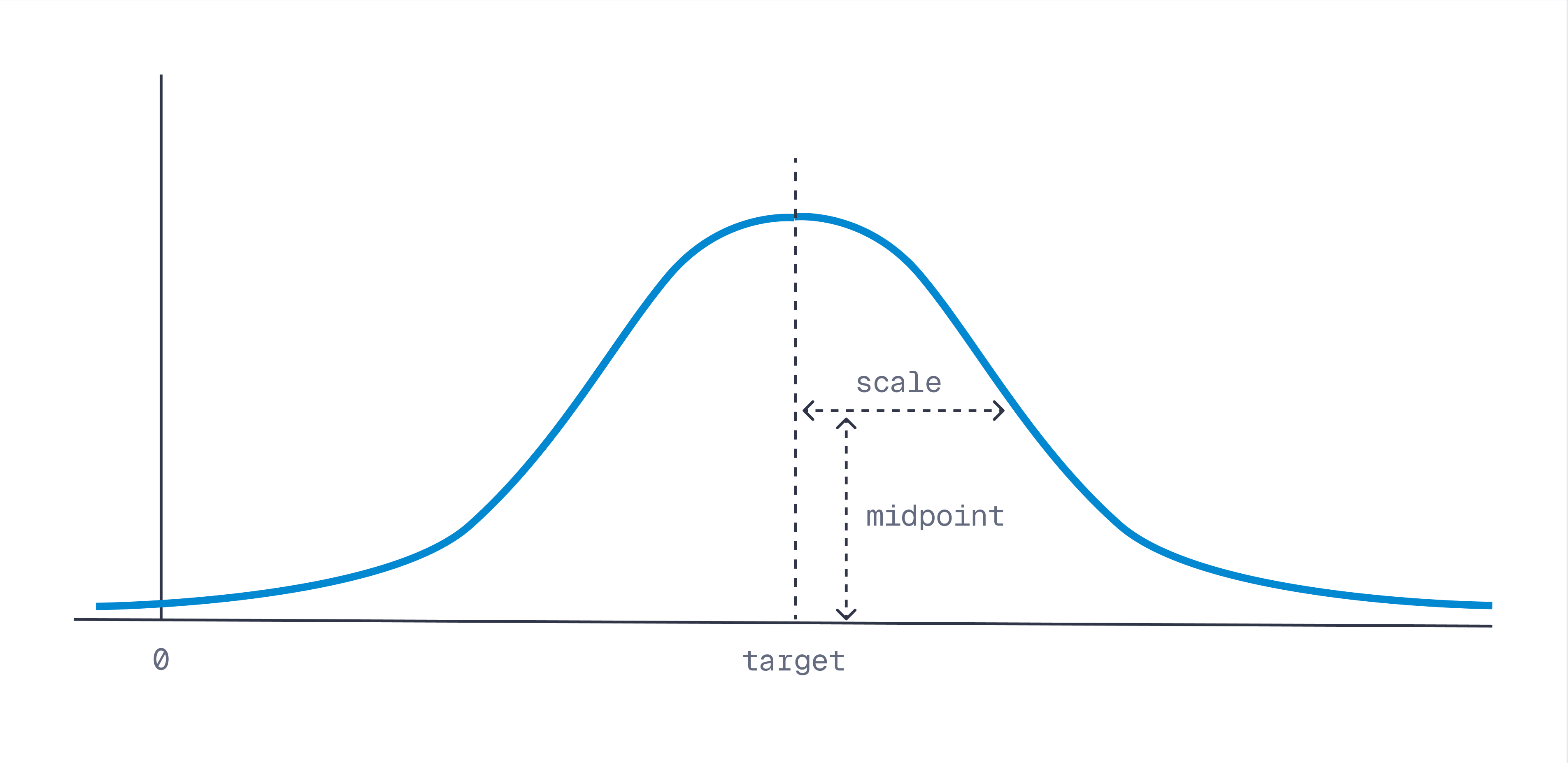
The formula for each decay function is as follows:
| Decay Function | Range | Formula | |
|---|---|---|---|
lin_decay | [0, 1] | ||
exp_decay | (0, 1] | ||
gauss_decay | (0, 1] |
Boost Points Closer to User
An example of decay functions is to combine the score with how close a result is to a user.
Considering each point has an associated geo location, we can calculate the distance between the point and the request’s location.
Assuming we have cosine scores in the prefetch, we can use a helper function to clamp the geographical distance between 0 and 1, by using a decay function. Once clamped, we can sum the score and the distance together. Pseudocode:
score = score + gauss_decay(distance)
In this case, we use a gauss_decay function.
POST /collections/{collection_name}/points/query
{
    "prefetch": { "query": [0.2, 0.8, ...], "limit": 50 },
    "query": {
        "formula": {
            "sum": [
                "$score",
                {
                    "gauss_decay": {
                        "x": {
                            "geo_distance": {
                                "origin": { "lat": 52.504043, "lon": 13.393236 }
                                "to": "geo.location"
                            }
                        },
                        "scale": 5000 // 5km
                    }
                }
            ]
        },
        "defaults": { "geo.location": {"lat": 48.137154, "lon": 11.576124} }
    }
}
from qdrant_client import QdrantClient, models

geo_boosted = client.query_points(
    collection_name="{collection_name}",
    prefetch=models.Prefetch(
        query=[0.1, 0.45, 0.67],  # <-- dense vector
        limit=50
    ),
    query=models.FormulaQuery(
        formula=models.SumExpression(sum=[
            "$score",
            models.GaussDecayExpression(
                gauss_decay=models.DecayParamsExpression(
                    x=models.GeoDistance(
                        geo_distance=models.GeoDistanceParams(
                            origin=models.GeoPoint(
                                lat=52.504043,
                                lon=13.393236
                            ),  # Berlin
                            to="geo.location"
                        )
                    ),
                    scale=5000  # 5km
                )
            )
        ]),
        defaults={"geo.location": models.GeoPoint(lat=48.137154, lon=11.576124)}  # Munich
    )
)
import { QdrantClient } from "@qdrant/js-client-rest";

const client = new QdrantClient({ host: "localhost", port: 6333 });

const distance_boosted = await client.query("{collection_name}", {
  prefetch: {
    query: [0.1, 0.45, 0.67],
    limit: 50
  },
  query: {
    formula: {
      sum: [
        "$score",
        {
          gauss_decay: {
            x: {
              geo_distance: {
                origin: { lat: 52.504043, lon: 13.393236 }, // Berlin
                to: "geo.location"
              }
            },
            scale: 5000 // 5km
          }
        }
      ]
    },
    defaults: { "geo.location": { lat: 48.137154, lon: 11.576124 } } // Munich
  }
});
use qdrant_client::qdrant::{
    GeoPoint,  DecayParamsExpressionBuilder, Expression, FormulaBuilder, PrefetchQueryBuilder, QueryPointsBuilder,
};
use qdrant_client::Qdrant;

let client = Qdrant::from_url("http://localhost:6334").build()?;

let _geo_boosted = client.query(
    QueryPointsBuilder::new("{collection_name}")
            .add_prefetch(
                PrefetchQueryBuilder::default()
                    .query(vec![0.01, 0.45, 0.67])
                    .limit(100u64),
            )
            .query(
                FormulaBuilder::new(Expression::sum_with([
                    Expression::score(),
                    Expression::exp_decay(
                        DecayParamsExpressionBuilder::new(Expression::geo_distance_with(
                            // Berlin
                            GeoPoint { lat: 52.504043, lon: 13.393236 },
                            "geo.location",
                        ))
                        .scale(5_000.0),
                    ),
                ]))
                // Munich
                .add_default("geo.location", GeoPoint { lat: 48.137154, lon: 11.576124 }),
            )
            .limit(10),
    )
    .await?;
import static io.qdrant.client.ExpressionFactory.expDecay;
import static io.qdrant.client.ExpressionFactory.geoDistance;
import static io.qdrant.client.ExpressionFactory.sum;
import static io.qdrant.client.ExpressionFactory.variable;
import static io.qdrant.client.PointIdFactory.id;
import static io.qdrant.client.QueryFactory.formula;
import static io.qdrant.client.QueryFactory.nearest;
import static io.qdrant.client.ValueFactory.value;

import io.qdrant.client.QdrantClient;
import io.qdrant.client.QdrantGrpcClient;
import io.qdrant.client.grpc.Common.GeoPoint;
import io.qdrant.client.grpc.Points.DecayParamsExpression;
import io.qdrant.client.grpc.Points.Formula;
import io.qdrant.client.grpc.Points.GeoDistance;
import io.qdrant.client.grpc.Points.PrefetchQuery;
import io.qdrant.client.grpc.Points.QueryPoints;
import io.qdrant.client.grpc.Points.SumExpression;
import java.util.Map;

QdrantClient client =
  new QdrantClient(QdrantGrpcClient.newBuilder("localhost", 6334, false).build());

client
  .queryAsync(
    QueryPoints.newBuilder()
      .setCollectionName("{collection_name}")
      .addPrefetch(
        PrefetchQuery.newBuilder()
          .setQuery(nearest(0.01f, 0.45f, 0.67f))
          .setLimit(100)
          .build())
      .setQuery(
        formula(
          Formula.newBuilder()
            .setExpression(
              sum(
                SumExpression.newBuilder()
                  .addSum(variable("$score"))
                  .addSum(
                    expDecay(
                      DecayParamsExpression.newBuilder()
                        .setX(
                          geoDistance(
                            GeoDistance.newBuilder()
                              .setOrigin(
                                GeoPoint.newBuilder()
                                  .setLat(52.504043)
                                  .setLon(13.393236)
                                  .build())
                              .setTo("geo.location")
                              .build()))
                        .setScale(5000)
                        .build()))
                  .build()))
            .putDefaults(
              "geo.location",
              value(
                Map.of(
                  "lat", value(48.137154),
                  "lon", value(11.576124))))
            .build()))
      .build())
  .get();
using Qdrant.Client;
using Qdrant.Client.Grpc;
using static Qdrant.Client.Grpc.Expression;

var client = new QdrantClient("localhost", 6334);

await client.QueryAsync(
    collectionName: "{collection_name}",
    prefetch:
    [
        new PrefetchQuery { Query = new float[] { 0.01f, 0.45f, 0.67f }, Limit = 100 },
    ],
    query: new Formula
    {
        Expression = new SumExpression
        {
            Sum =
            {
                "$score",
                FromExpDecay(
                    new()
                    {
                        X = new GeoDistance
                        {
                            Origin = new GeoPoint { Lat = 52.504043, Lon = 13.393236 },
                            To = "geo.location",
                        },
                        Scale = 5000,
                    }
                ),
            },
        },
        Defaults =
        {
            ["geo.location"] = new Dictionary<string, Value>
            {
                ["lat"] = 48.137154,
                ["lon"] = 11.576124,
            },
        },
    }
);
import (
    "context"

    "github.com/qdrant/go-client/qdrant"
)

client, err := qdrant.NewClient(&qdrant.Config{
    Host: "localhost",
    Port: 6334,
})

client.Query(context.Background(), &qdrant.QueryPoints{
    CollectionName: "{collection_name}",
    Prefetch: []*qdrant.PrefetchQuery{
        {
            Query: qdrant.NewQuery(0.2, 0.8),
        },
    },
    Query: qdrant.NewQueryFormula(&qdrant.Formula{
        Expression: qdrant.NewExpressionSum(&qdrant.SumExpression{
            Sum: []*qdrant.Expression{
                qdrant.NewExpressionVariable("$score"),
                qdrant.NewExpressionExpDecay(&qdrant.DecayParamsExpression{
                    X: qdrant.NewExpressionGeoDistance(&qdrant.GeoDistance{
                        Origin: &qdrant.GeoPoint{
                            Lat: 52.504043,
                            Lon: 13.393236,
                        },
                        To: "geo.location",
                    }),
                }),
            },
        }),
        Defaults: qdrant.NewValueMap(map[string]any{
            "geo.location": map[string]any{
                "lat": 48.137154,
                "lon": 11.576124,
            },
        }),
    }),
})
Time-Based Score Boosting
Or combine the score with the information on how “fresh” the result is. It’s applicable to (news) articles and, in general, many other different types of searches (think of the “newest” filter you use in applications).
To implement time-based score boosting, you’ll need each point to have a datetime field in its payload, e.g., when the item was uploaded or last updated. Then we can calculate the time difference in seconds between this payload value and the current time, our target.
With an exponential decay function, perfect for use cases with time, as freshness is a very quickly lost quality, we can convert this time difference into a value between 0 and 1, then add it to the original score to prioritize fresh results.
score = score + exp_decay(current_time - point_time)
That’s how it will look for an application where, after 1 day, results start being only half-relevant (so get a score of 0.5):
POST /collections/{collection_name}/points/query
{
    "prefetch": {
        "query": [0.2, 0.8, ...],  // <-- dense vector
        "limit": 50
    },
    "query": {
        "formula": {
            "sum": [
                "$score", // the final score = score + exp_decay(target_time - x_time)
                {
                    "exp_decay": {
                        "x": {
                            "datetime_key": "update_time" // payload key
                        },
                        "target": {
                            "datetime": "YYYY-MM-DDT00:00:00Z" // current datetime
                        },
                        "scale": 86400, // 1 day in seconds
                        "midpoint": 0.5 // if item's "update_time" is more than 1 day apart from current datetime, relevance score is less than 0.5
                    }
                }
            ]
        }
    }
}
from qdrant_client import QdrantClient, models

time_boosted = client.query_points(
    collection_name="{collection_name}",
    prefetch=models.Prefetch(
        query=[0.1, 0.45, 0.67],  # <-- dense vector
        limit=50
    ),
    query=models.FormulaQuery(
        formula=models.SumExpression(
            sum=[
                "$score", # the final score = score + exp_decay(target_time - x_time)
                models.ExpDecayExpression(
                    exp_decay=models.DecayParamsExpression(
                        x=models.DatetimeKeyExpression(
                            datetime_key="upload_time" # payload key
                        ),
                        target=models.DatetimeExpression(
                            datetime="YYYY-MM-DDT00:00:00Z" # current datetime
                        ),
                        scale=86400, # 1 day in seconds
                        midpoint=0.5 # if item's "update_time" is more than 1 day apart from current datetime, relevance score is less than 0.5
                    )
                )
            ]
        )
    )
)
import { QdrantClient } from "@qdrant/js-client-rest";

const client = new QdrantClient({ host: "localhost", port: 6333 });

const time_boosted = await client.query('collectionName', {
  prefetch: {
    query: [0.1, 0.45, 0.67], // <-- dense vector
    limit: 50
  },
   query: {
      formula: {
          sum: [ //  the final score = score + exp_decay(target_time - x_time)
              "$score",
              {
                  exp_decay: {
                      x: {
                          datetime_key: "update_time" // payload key
                      },
                      target: {
                          datetime: "YYYY-MM-DDT00:00:00Z" // current datetime
                      },
                      midpoint: 0.5,
                      scale: 86400 // 1 day in seconds
                  }
              }
          ]
      }
  }
});
use qdrant_client::qdrant::{
    DecayParamsExpressionBuilder, Expression, FormulaBuilder, PrefetchQueryBuilder, QueryPointsBuilder,
};
use qdrant_client::Qdrant;

let client = Qdrant::from_url("http://localhost:6334").build()?;

let _geo_boosted = client.query(
    QueryPointsBuilder::new("{collection_name}")
            .add_prefetch(
                PrefetchQueryBuilder::default()
                    .query(vec![0.1, 0.45, 0.67]) // <-- dense vector
                    .limit(50u64),
            )
            .query(
                FormulaBuilder::new(Expression::sum_with([ //  the final score = score + exp_decay(target_time - x_time)
                    Expression::score(),
                    Expression::exp_decay(
                        DecayParamsExpressionBuilder::new(Expression::datetime_key("update_time")) // payload key
                            .target(Expression::datetime("YYYY-MM-DDT00:00:00Z"))
                            .midpoint(0.5)
                            .scale(86400.0), // 1 day in seconds
                    ),
                ]))
            )
    )
    .await?;
import static io.qdrant.client.ExpressionFactory.datetime;
import static io.qdrant.client.ExpressionFactory.datetimeKey;
import static io.qdrant.client.ExpressionFactory.expDecay;
import static io.qdrant.client.ExpressionFactory.sum;
import static io.qdrant.client.ExpressionFactory.variable;
import static io.qdrant.client.QueryFactory.formula;
import static io.qdrant.client.QueryFactory.nearest;

import io.qdrant.client.QdrantClient;
import io.qdrant.client.QdrantGrpcClient;
import io.qdrant.client.grpc.Points.DecayParamsExpression;
import io.qdrant.client.grpc.Points.Formula;
import io.qdrant.client.grpc.Points.PrefetchQuery;
import io.qdrant.client.grpc.Points.QueryPoints;
import io.qdrant.client.grpc.Points.ScoredPoint;
import io.qdrant.client.grpc.Points.SumExpression;
import java.util.List;

QdrantClient client =
  new QdrantClient(QdrantGrpcClient.newBuilder("localhost", 6334, false).build());

List<ScoredPoint> time_boosted = client.queryAsync(
    QueryPoints.newBuilder()
        .setCollectionName("{collection_name}")
        .addPrefetch(
            PrefetchQuery.newBuilder()
                .setQuery(nearest(0.1f, 0.45f, 0.67f))  // <-- dense vector
                .setLimit(50)
                .build())
        .setQuery(
            formula(
                Formula.newBuilder()
                    .setExpression(
                        sum( //  the final score = score + exp_decay(target_time - x_time)
                            SumExpression.newBuilder()
                                .addSum(variable("$score"))
                                .addSum(
                                    expDecay(
                                        DecayParamsExpression.newBuilder()
                                            .setX(
                                                datetimeKey("update_time"))  // payload key
                                            .setTarget(
                                                datetime("YYYY-MM-DDT00:00:00Z"))  // current datetime
                                            .setMidpoint(0.5f)
                                            .setScale(86400)  // 1 day in seconds
                                            .build()))
                                .build()))
                    .build()))
        .build()
).get();
using Qdrant.Client;
using Qdrant.Client.Grpc;

var client = new QdrantClient("localhost", 6334);

await client.QueryAsync(
    collectionName: "{collection_name}",
    prefetch:
    [
        new PrefetchQuery {
            Query = new float[] { 0.1f, 0.45f, 0.67f }, // <-- dense vector
            Limit = 50
        },
    ],
    query: new Formula
     {
        Expression = new SumExpression
        {
            Sum = //  the final score = score + exp_decay(target_time - x_time)
            {
                "$score",
                Expression.FromExpDecay(
                    new()
                    {
                        X = Expression.FromDateTimeKey("update_time"),  // payload key
                        Target = Expression.FromDateTime("YYYY-MM-DDT00:00:00Z"),  // current datetime
                        Midpoint = 0.5f,
                        Scale = 86400 // 1 day in seconds
                    }
                )
            }
        }
    }
);
import (
    "context"

    "github.com/qdrant/go-client/qdrant"
)

client, err := qdrant.NewClient(&qdrant.Config{
    Host: "localhost",
    Port: 6334,
})

client.Query(context.Background(), &qdrant.QueryPoints{
    CollectionName: "{collection_name}",
    Prefetch: []*qdrant.PrefetchQuery{
        {
            Query: qdrant.NewQuery(0.1, 0.45, 0.67), // <-- dense vector
            Limit: qdrant.PtrOf(uint64(50)),
        },
    },
    Query: qdrant.NewQueryFormula(&qdrant.Formula{
        Expression: qdrant.NewExpressionSum(&qdrant.SumExpression{
            Sum: []*qdrant.Expression{ //  the final score = score + exp_decay(target_time - x_time)
                qdrant.NewExpressionVariable("$score"),
                qdrant.NewExpressionExpDecay(&qdrant.DecayParamsExpression{
                    X: qdrant.NewExpressionDatetimeKey("update_time"), // payload key
                    Target: qdrant.NewExpressionDatetime("YYYY-MM-DDT00:00:00Z"), // current datetime
                    Scale:  qdrant.PtrOf(float32(86400)), // 1 day in seconds
                    Midpoint: qdrant.PtrOf(float32(0.5)),
                }),
            },
        }),
    }),
})
Maximal Marginal Relevance (MMR)
Available as of v1.15.0
Maximal Marginal Relevance (MMR) is an algorithm to improve the diversity of the results. It excels when the dataset has many redundant or very similar points for a query.
MMR selects candidates iteratively, starting with the most relevant point (higher similarity to the query). For each next point, it selects the one that hasn’t been chosen yet which has the best combination of relevance and higher separation to the already selected points.
This is implemented in Qdrant as a parameter of a nearest neighbors query. You define the vector to get the nearest candidates, and a diversity parameter which controls the balance between relevance (0.0) and diversity (1.0).
POST /collections/{collection_name}/points/query
{
  "query": {
    "nearest": [0.01, 0.45, 0.67, ...], // search vector
    "mmr": {
      "diversity": 0.5, // 0.0 - relevance; 1.0 - diversity
      "candidates_limit": 100 // num of candidates to preselect
    }
  },
  "limit": 10
}
from qdrant_client import QdrantClient, models

client = QdrantClient(url="http://localhost:6333")

client.query_points(
    collection_name="{collection_name}",
    query=models.NearestQuery(
        nearest=[0.01, 0.45, 0.67], # search vector
        mmr=models.Mmr(
            diversity=0.5, # 0.0 - relevance; 1.0 - diversity
            candidates_limit=100, # num of candidates to preselect
        )
    ),
    limit=10,
)
import { QdrantClient } from "@qdrant/js-client-rest";

const client = new QdrantClient({ host: "localhost", port: 6333 });

client.query("{collection_name}", {
  query: {
    nearest: [0.01, 0.45, 0.67], // search vector
    mmr: {
      diversity: 0.5, // 0.0 - relevance; 1.0 - diversity
      candidates_limit: 100 // num of candidates to preselect
    }
  },
  limit: 10,
});
use qdrant_client::Qdrant;
use qdrant_client::qdrant::{MmrBuilder, Query, QueryPointsBuilder};

let client = Qdrant::from_url("http://localhost:6334").build()?;

client.query(
    QueryPointsBuilder::new("{collection_name}")
        .query(Query::new_nearest_with_mmr(
            vec![0.01, 0.45, 0.67], // search vector
            MmrBuilder::new()
                .diversity(0.5) // 0.0 - relevance; 1.0 - diversity
                .candidates_limit(100) // num of candidates to preselect
        ))
        .limit(10)
).await?;
import static io.qdrant.client.QueryFactory.nearest;
import static io.qdrant.client.VectorInputFactory.vectorInput;

import io.qdrant.client.QdrantClient;
import io.qdrant.client.QdrantGrpcClient;
import io.qdrant.client.grpc.Points.Mmr;
import io.qdrant.client.grpc.Points.QueryPoints;

QdrantClient client = new QdrantClient(QdrantGrpcClient.newBuilder("localhost", 6334, false).build());

client
    .queryAsync(
        QueryPoints.newBuilder()
            .setCollectionName("{collection_name}")
            .setQuery(
                nearest(
                    vectorInput(0.01f, 0.45f, 0.67f), // <-- search vector
                    Mmr.newBuilder()
                        .setDiversity(0.5f) // 0.0 - relevance; 1.0 - diversity
                        .setCandidatesLimit(100) // num of candidates to preselect
                        .build()))
            .setLimit(10)
            .build())
    .get();
using Qdrant.Client;
using Qdrant.Client.Grpc;

var client = new QdrantClient("localhost", 6334);

await client.QueryAsync(
    collectionName: "{collection_name}",
    query: (
        new float[] { 0.01f, 0.45f, 0.67f },
        new Mmr
        {
            Diversity = 0.5f,         // 0.0 - relevance; 1.0 - diversity
            CandidatesLimit = 100     // Number of candidates to preselect
        }
    ),
    limit: 10
);
import (
	"context"

	"github.com/qdrant/go-client/qdrant"
)

client, err := qdrant.NewClient(&qdrant.Config{
	Host: "localhost",
	Port: 6334,
})

client.Query(context.Background(), &qdrant.QueryPoints{
	CollectionName: "{collection_name}",
	Query: qdrant.NewQueryMMR(
		qdrant.NewVectorInput(0.01, 0.45, 0.67),
		&qdrant.Mmr{
			Diversity:       qdrant.PtrOf(float32(0.5)), // 0.0 - relevance; 1.0 - diversity
			CandidatesLimit: qdrant.PtrOf(uint32(100)),  // num of candidates to preselect
		}),
	Limit: qdrant.PtrOf(uint64(10)),
})
Caveat: Since MMR ranks one point at a time, the scores produced by MMR in Qdrant refer to the similarity to the query vector. This means that the response will not be ordered by score, but rather by the order of selection of MMR.
Relevance Feedback
Available as of 1.17
Relevance feedback distills signals from current search results into the next retrieval iteration to surface more relevant documents.
Qdrant provides a subtype of relevance feedback-based retrieval, where feedback is given by any model (relevance oracle) in a granular fashion: it rescores top retrieved results by their relative relevance to the query. A detailed overview of relevance feedback methods can be found in Relevance Feedback in Information Retrieval.
To use relevance feedback-based retrieval, two components are required:
- A collection of vectors to search through.
- An oracle to determine the relevance of search results.
The idea behind using relevance feedback-based retrieval is the following:
- Run a basic nearest neighbors search. Let’s call its results Retriever Similarity and the algorithm behind this search – retriever.
- Use any feedback model to assign a relevance score to the top X search results (X is not expected to be large, 3-5 is a good option). Let’s call these scores Feedback Score.
- Through analyzing the Feedback Score for the top results, determine if the feedback model agrees with the retriever, or if retrieval can be improved.
- If it can be improved, use feedback to modify retrieval (vector space traversal) to account for the discrepancies between the feedback model and the retriever.
For example, in this set of retrieved results:
| Point ID | Retriever Similarity | Feedback Score |
|---|---|---|
| 111 | 0.89 | 0.68 |
| 222 | 0.81 | 0.72 |
| 333 | 0.77 | 0.61 |
The feedback model considers the second result with ID 222 to be the most relevant, which is a discrepancy with retriever’s ranking. Hence, this feedback can potentially help make the next iteration of retrieval better.
To leverage the feedback in search across the entire collection, Qdrant provides a query interface that requires:
- The original query (
target), which can be a point ID, an inference object, or a raw vector. - A short list of initial retrieval results and their relevance score (
feedback). Each feedback item consists of:example, which can be point ID, an inference object, or a raw vector used by the retriever.score, the feedback score.
- A definition of the formula that modifies retrieval based on the feedback (
strategy).
POST /collections/{collection_name}/points/query
{
  "query": {
    "relevance_feedback: {
      "target": [0.1, 0.9, 0.23, ...],
      "feedback": [
        { "example": 111, "score": 0.68 },
        { "example": 222, "score": 0.72 },
        { "example": 333, "score": 0.61 }
      ],
      "strategy": {
        "naive": {
          "a": 0.12,
          "b": 0.43,
          "c": 0.03
        }
      }
    ]
  }
}
from qdrant_client import QdrantClient, models

client = QdrantClient()

client.query_points(
    "{collection_name}",
    query=models.RelevanceFeedbackQuery(
        relevance_feedback=models.RelevanceFeedbackInput(
            target=[0.1, 0.9, 0.23],
            feedback=[
                models.FeedbackItem(example=111, score=0.68),
                models.FeedbackItem(example=222, score=0.72),
                models.FeedbackItem(example=333, score=0.61),
            ],
            strategy=models.NaiveFeedbackStrategy(
                naive=models.NaiveFeedbackStrategyParams(
                    a=0.12,
                    b=0.43,
                    c=0.03
                )
            )
        )
    )
)
import { QdrantClient } from "@qdrant/js-client-rest";

const client = new QdrantClient({ host: "localhost", port: 6333 });

client.query("{collection_name}", {
    query: {
        relevance_feedback: {
            target: [0.1, 0.9, 0.23],
            feedback: [
                { example: 111, score: 0.68 },
                { example: 222, score: 0.72 },
                { example: 333, score: 0.61 },
            ],
            strategy: {
                naive: {
                    a: 0.12,
                    b: 0.43,
                    c: 0.03,
                },
            },
        },
    },
});
use qdrant_client::qdrant::{
    FeedbackItemBuilder, FeedbackStrategyBuilder, PointId, Query, QueryPointsBuilder,
    RelevanceFeedbackInputBuilder, VectorInput,
};
use qdrant_client::Qdrant;

let _points = client.query(
    QueryPointsBuilder::new("{collection_name}")
        .query(Query::new_relevance_feedback(
            RelevanceFeedbackInputBuilder::new(vec![0.01, 0.45, 0.67])
                .add_feedback(FeedbackItemBuilder::new(VectorInput::new_id(PointId::from(111)), 0.68))
                .add_feedback(FeedbackItemBuilder::new(VectorInput::new_id(PointId::from(222)), 0.72))
                .add_feedback(FeedbackItemBuilder::new(VectorInput::new_id(PointId::from(333)), 0.61))
                .strategy(FeedbackStrategyBuilder::naive(0.12, 0.43, 0.16))
        ))
        .limit(10u64)
).await?;
import static io.qdrant.client.QueryFactory.relevanceFeedback;
import static io.qdrant.client.VectorInputFactory.vectorInput;

import io.qdrant.client.grpc.Points.FeedbackItem;
import io.qdrant.client.grpc.Points.FeedbackStrategy;
import io.qdrant.client.grpc.Points.NaiveFeedbackStrategy;
import io.qdrant.client.grpc.Points.QueryPoints;
import io.qdrant.client.grpc.Points.RelevanceFeedbackInput;

import java.util.List;

client
    .queryAsync(
        QueryPoints.newBuilder()
            .setCollectionName("{collection_name}")
            .setQuery(
                relevanceFeedback(
                    RelevanceFeedbackInput.newBuilder()
                        .setTarget(vectorInput(0.01f, 0.45f, 0.67f))
                        .addFeedback(
                            FeedbackItem.newBuilder()
                                .setExample(vectorInput(111))
                                .setScore(0.68f)
                                .build())
                        .addFeedback(
                            FeedbackItem.newBuilder()
                                .setExample(vectorInput(222))
                                .setScore(0.72f)
                                .build())
                        .addFeedback(
                            FeedbackItem.newBuilder()
                                .setExample(vectorInput(333))
                                .setScore(0.61f)
                                .build())
                        .setStrategy(
                            FeedbackStrategy.newBuilder()
                                .setNaive(
                                    NaiveFeedbackStrategy.newBuilder()
                                        .setA(0.12f)
                                        .setB(0.43f)
                                        .setC(0.16f)
                                        .build())
                                .build())
                        .build()))
            .build())
    .get();
using Qdrant.Client;
using Qdrant.Client.Grpc;

await client.QueryAsync(
    collectionName: "{collection_name}",
    query: new RelevanceFeedbackInput
    {
        Target = new float[] { 0.2f, 0.1f, 0.9f, 0.7f },
        Feedback =
        {
            new FeedbackItem { Example = 111, Score = 0.68f },
            new FeedbackItem { Example = 222, Score = 0.72f },
            new FeedbackItem { Example = 33, Score = 0.61f },
        },
        Strategy =
        {
            Naive = new()
            {
                A = 0.12f,
                B = 0.43f,
                C = 0.16f,
            },
        },
    }
);
import (
	"context"

	"github.com/qdrant/go-client/qdrant"
)

client.Query(context.Background(), &qdrant.QueryPoints{
	CollectionName: "{collection_name}",
	Query: qdrant.NewQueryRelevanceFeedback(
		&qdrant.RelevanceFeedbackInput{
			Target: qdrant.NewVectorInput(0.01, 0.45, 0.67),
			Feedback: []*qdrant.FeedbackItem{
				{
					Example: qdrant.NewVectorInputID(qdrant.NewIDNum(111)),
					Score:   0.68,
				},
				{
					Example: qdrant.NewVectorInputID(qdrant.NewIDNum(222)),
					Score:   0.72,
				},
				{
					Example: qdrant.NewVectorInputID(qdrant.NewIDNum(333)),
					Score:   0.61,
				},
			},
			Strategy: qdrant.NewFeedbackStrategyNaive(&qdrant.NaiveFeedbackStrategy{
				A: 0.12, B: 0.43, C: 0.16,
			}),
		},
	),
})
Internally, Qdrant combines the feedback list into pairs, based on the relevance scores, and then uses these pairs in a formula that modifies vector space traversal during retrieval (changes the strategy of retrieval). This relevance feedback-based retrieval considers not only the similarity of candidates to the query but also to each feedback pair. For a more detailed description of how it works, refer to the article Relevance Feedback in Qdrant.
The a, b, and c parameters of the naive strategy need to be customized for each triplet of retriever, feedback model, and collection. To get these 3 weights adapted to your setup, use our open source Python package.
For a hands-on tutorial on determining the parameters, using them with the Relevance Feedback Query, and evaluating the results, check out Relevance Feedback in Qdrant.
Naive Strategy
For now, naive is the only available strategy.

