
Measuring ANN Recall
| Time: 15 min | Level: Beginner |
|---|
This tutorial focuses on ANN recall: how closely approximate nearest-neighbor (ANN) search matches exact kNN search, measured with recall@k.
Prerequisites. A Qdrant collection populated with your documents as points (vectors + optional payload).
The Retrieval Evaluation Stack
ANN recall measures how closely approximate search matches exact kNN. It’s the first of four evaluation layers; each higher layer measures a different property of the retrieval system, with different tools.
- ANN recall (this tutorial). Is the approximate index close to exact kNN?
- Retrieval relevance (Measuring Retrieval Relevance). Do the top-k results match query intent?
- Pipeline output quality (Evaluating Pipeline Output Quality). Does the end-to-end pipeline (retrieval + generator, ranker, or UI) produce the right output?
- Business impact. Do the KPIs the business cares about move? Application-specific, out of scope for these tutorials.
A high score on a higher layer requires acceptable scores on the layers below. Embedding quality (separately measured by benchmarks like MTEB) sets the ceiling on every downstream metric.
Measure ANN Recall with the Web UI
Qdrant’s Web UI includes an ANN Recall tab that measures the gap between approximate and exact search without writing evaluation code. Open the dashboard at http://localhost:6333/dashboard (or your cluster’s dashboard on Qdrant Cloud), navigate to your collection, open the ANN Recall tab, and click Check Index Quality to run the comparison.
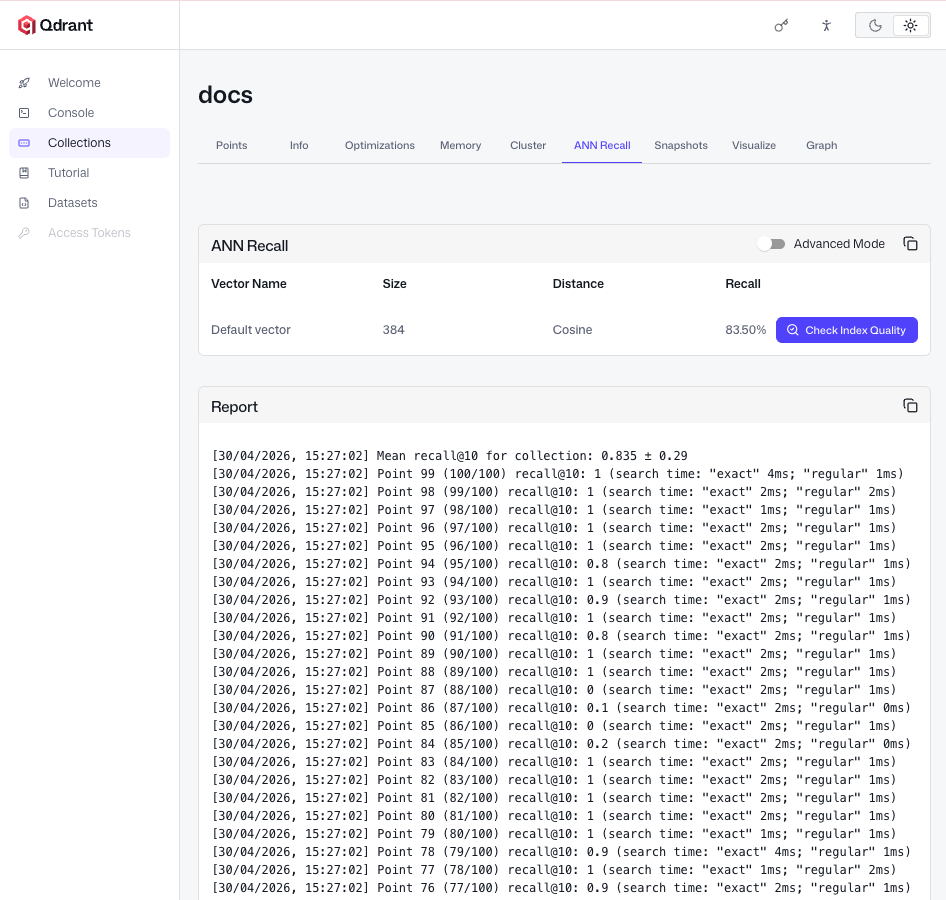
The tab reports average recall@k (1.0 = perfect overlap; 0.95+ is typical for well-tuned HNSW).
Tuning Search Recall
Toggle advanced mode in the ANN Recall tab to tune search-time parameters inline. The main one is hnsw_ef: the number of candidates evaluated during a search. Raising it explores more of the graph, improving recall at the cost of higher query latency. To see the effect, raise hnsw_ef (for example, to 256) and run the evaluation again.
Recall should increase at the cost of higher query latency.
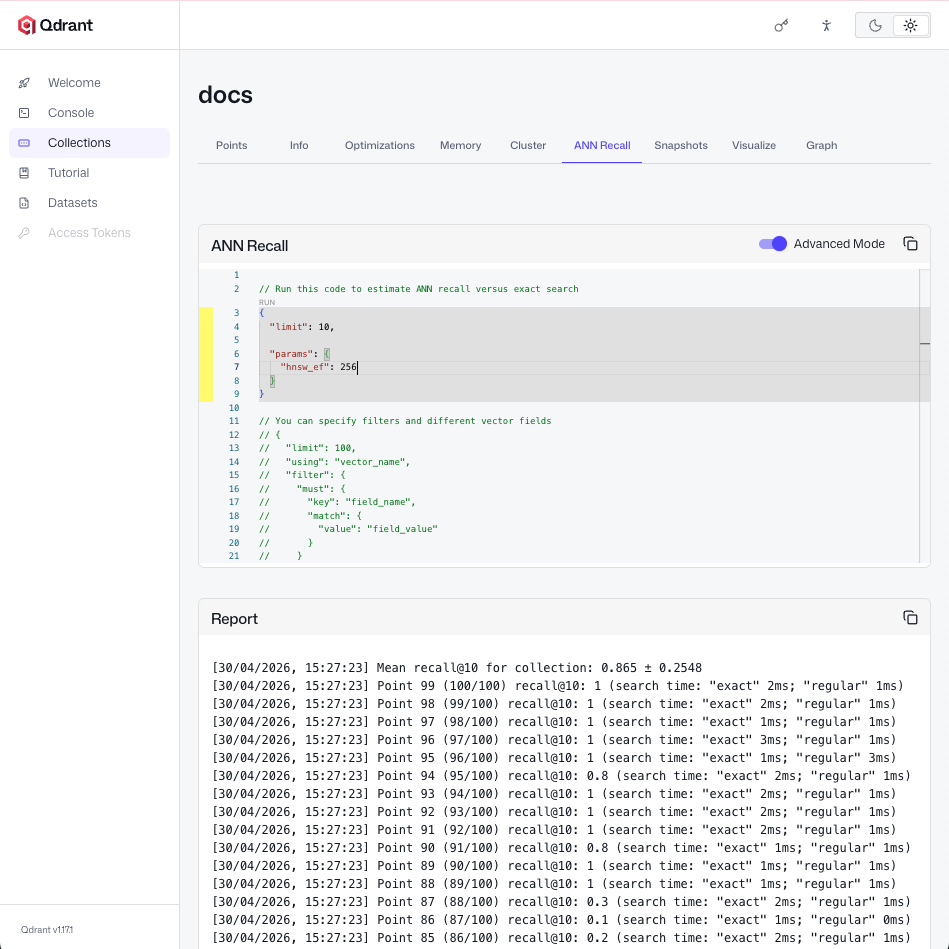
If hnsw_ef alone does not get you to your recall target, the build-time parameters m and ef_construct set the ceiling on the recall approximate search can achieve. Changing them requires rebuilding the HNSW index. For the trade-offs and how to choose values, see HNSW Indexing Fundamentals in the Qdrant Essentials course.
Automate in CI with Python
The Web UI is the fastest way to check recall interactively. For continuous integration or scripted regression tests, the Qdrant client exposes the same exact-search mode via search_params=models.SearchParams(exact=True). Compare the ANN and exact top-k sets yourself and compute recall@k.
This helper takes a list of query vectors and returns the average recall@k. Use a representative sample of query vectors from your workload (typically 20–50, embedded with the same model your collection uses) as your test set.
from qdrant_client import QdrantClient, models


def avg_recall_at_k(
    client: QdrantClient,
    collection_name: str,
    test_vectors: list,
    k: int,
) -> float:
    recalls = []
    for vector in test_vectors:
        ann_ids = {
            p.id for p in client.query_points(
                collection_name=collection_name,
                query=vector,
                limit=k,
            ).points
        }
        knn_ids = {
            p.id for p in client.query_points(
                collection_name=collection_name,
                query=vector,
                limit=k,
                search_params=models.SearchParams(exact=True),
            ).points
        }
        recalls.append(len(ann_ids & knn_ids) / k)

    return sum(recalls) / len(recalls)
Wire it into CI and fail the job when recall falls below your target threshold. This catches regressions from embedding model swaps or index config changes before they reach production.
Next Steps
Once ANN recall is on target, continue with Measuring Retrieval Relevance to check how well those results match user intent.
 Ready to try Qdrant?