
Qdrant Hybrid Cloud
Seamlessly deploy and manage your vector search across diverse environments, ensuring performance, security, and cost efficiency for AI-driven applications.
Qdrant Hybrid Cloud integrates Kubernetes clusters from any setting - cloud, on-premises, or edge - into a unified, enterprise-grade managed service.
You can use Qdrant Cloud’s UI to create and manage your database clusters, while they still remain within your infrastructure. All Qdrant databases will operate solely within your network, using your storage and compute resources. All user data will stay securely within your environment and won’t be accessible by the Qdrant Cloud platform, or anyone else outside your organization.
Qdrant Hybrid Cloud ensures data privacy, deployment flexibility, low latency, and delivers cost savings, elevating standards for vector search and AI applications.
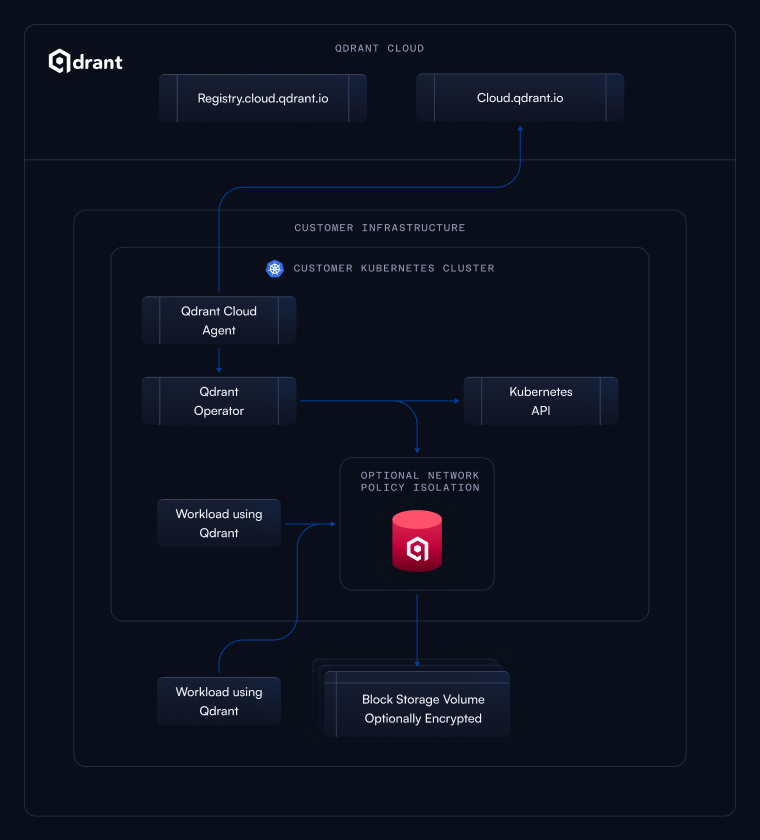
How it works: Qdrant Hybrid Cloud relies on Kubernetes and works with any standard compliant Kubernetes distribution. When you onboard a Kubernetes cluster as a Hybrid Cloud Environment, you can deploy the Qdrant Kubernetes Operator and Cloud Agent into this cluster. These will manage Qdrant databases within your Kubernetes cluster and establish an outgoing connection to Qdrant Cloud to transport telemetry and receive management instructions. You can then benefit from the same cloud management features and transport telemetry that is available with any managed Qdrant Cloud cluster.
Setup instructions: To begin using Qdrant Hybrid Cloud, read our installation guide.
Hybrid Cloud Architecture
The Hybrid Cloud onboarding will install a Kubernetes Operator, a Cloud Agent and a Prometheus Agent into your Kubernetes cluster.
Both the Cloud Agent and the Prometheus Agent will establish an outgoing connection to cloud.qdrant.io on port 443 to transport telemetry and receive management instructions. It will also interact with the Kubernetes API through a ServiceAccount to create, read, update and delete the necessary Qdrant CRs (Custom Resources) based on the configuration setup in the Qdrant Cloud Console.
The Qdrant Kubernetes Operator will manage the Qdrant databases within your Kubernetes cluster. Based on the Qdrant CRs, it will interact with the Kubernetes API through a ServiceAccount to create and manage the necessary resources to deploy and run Qdrant databases, such as Pods, Services, ConfigMaps, and Secrets.
The Prometheus Agent will collect metrics from the Qdrant databases and the Qdrant control plane components and also forward them to the Qdrant Cloud platform for monitoring and alerting purposes
All component’s access is limited to the Kubernetes namespace that you chose during the onboarding process.
The Cloud Agent and the Prometheus Agent only send telemetry data, metrics and status information to the Qdrant Cloud platform. They do not send any user data or sensitive information. The data includes:
- The health status and resource usage (CPU, memory, disk and network) of the Qdrant databases and Qdrant control plane components.
- Metrics exposed by the Qdrant databases and Qdrant control plane components.
- Metrics about the configuration of the Kubernetes cluster, such as the number and capacity of nodes, available StorageClasses and VolumeSnapshotClasses, and the Kubernetes distribution and version.
- Information about the Qdrant databases, such as the number, name and configuration of collections, the number of vectors, the number of queries, and the number of indexing operations.
- Telemetry and notification data from the Qdrant databases.
- Kubernetes operations and scheduling events reported for the Qdrant databases and Qdrant control plane components.
After the initial onboarding, the lifecycle of these components will be controlled by the Qdrant Cloud platform via the built-in Helm controller.
You don’t need to expose your Kubernetes Cluster to the Qdrant Cloud platform, you don’t need to open any ports for incoming traffic, and you don’t need to provide any Kubernetes or cloud provider credentials to the Qdrant Cloud platform.
Getting Access to Hybrid Cloud
Qdrant Hybrid Cloud is available as part of our Enterprise plan. To get access to Qdrant Hybrid Cloud, please contact us.
 Ready to try Qdrant?