
Video Anomaly Detection: Architecture, Twelve Labs, and NVIDIA VSS
| Time: 90 min | Level: Advanced | Output: GitHub |
|---|
This is Part 1 of a 3-part series on building real-time video anomaly detection from edge to cloud. We’ll go from architecture and integrations to a production-grade detection pipeline.
Series:
- Part 1 | Architecture, Twelve Labs, and NVIDIA VSS (here)
- Part 2 | Edge-to-Cloud Pipeline
- Part 3 | Scoring, Governance, and Deployment
In this tutorial, you will learn how to build a real-time video anomaly detection system that monitors live surveillance cameras across multiple sites, automatically detecting unusual events without training on specific anomaly types. You’ll see how Qdrant Edge integrates with Twelve Labs and NVIDIA Metropolis VSS to create a production-grade edge-to-cloud detection pipeline deployed on Vultr Cloud GPUs.
Introduction
What if your surveillance cameras could autonomously detect any type of anomaly (fights, accidents, intrusions, equipment failures) without ever being trained on those specific events? What if instead of manually reviewing hours of footage, operators received instant alerts with severity scores, incident timelines, and natural-language explanations of what happened?
This is what we’ve built to showcase how Qdrant Edge vector search, Twelve Labs video intelligence, NVIDIA Metropolis, and Vultr Cloud GPUs come together to solve a problem that traditional classifiers fundamentally cannot: detecting anomalies you’ve never seen before.
Instead of asking “is this a fight?” or “is this a robbery?”, we ask “how different is this from what we normally see?” That reframes anomaly detection as a nearest-neighbor search problem, where Qdrant shines.
In this tutorial you’ll learn how this is all possible by not only deploying the application in this step-by-step guide, but also learning the why of the technical architecture.
Specifically, you will build a platform that transforms live surveillance streams into:
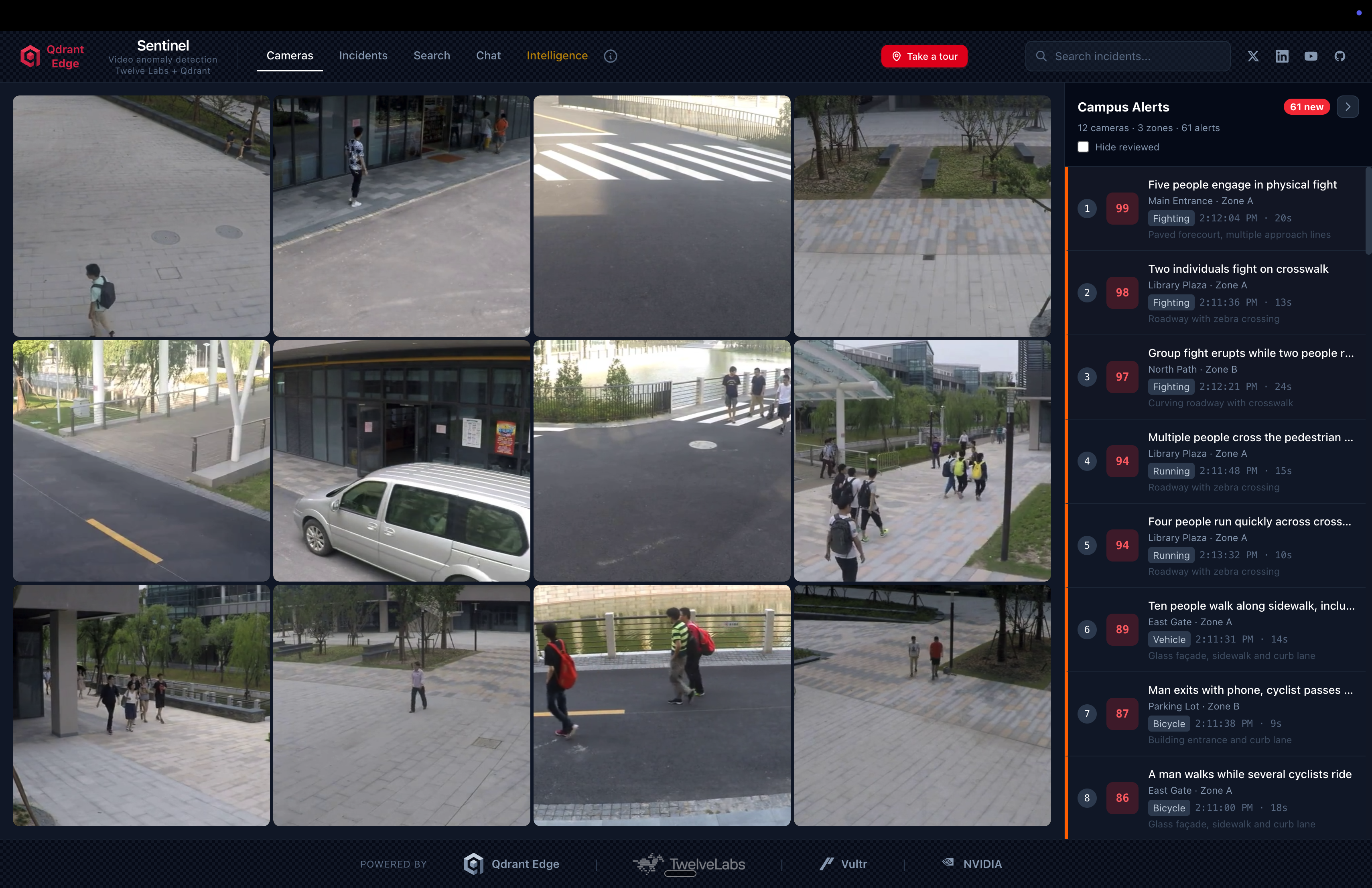
Anomaly Detection: Automatically scored clips using kNN distance from a normal baseline in Qdrant, with no anomaly labels required.
Incident Reports: Multi-signal incident formation using Twelve Labs embeddings, VLM captions, and audio transcription from NVIDIA VSS.
Semantic Video Search: Natural-language queries across all cameras and time periods. “Find clips similar to this incident” or “show me unusual activity at the north entrance last week.”
Interactive Q&A: Ask questions about detected events and get answers grounded in actual video content via Twelve Labs Pegasus.
Edge-to-Cloud Escalation: Lightweight edge triage on NVIDIA Jetson reduces cloud processing volume by ~6x while catching ~95% of true anomalies.
Application Demo
Before we begin coding, check out the project repository and live demo to get familiarized with what we’ll be building.
GitHub: qdrant/video-anomaly-edge
Live Demo: qdrant-edge-video-anomaly.vercel.app
Learning Objectives
In this series you will:
Build a kNN anomaly detector using Qdrant vector search that detects novel anomaly types without per-category training.
Integrate Twelve Labs Marengo for video embeddings that serve dual duty: kNN anomaly scoring and semantic understanding in a single model.
Deploy NVIDIA Metropolis VSS on Vultr Cloud GPUs for orchestrated video ingestion: embeddings, VLM captioning, audio transcription, and CV pipeline.
Implement a two-shard Qdrant Edge architecture on NVIDIA Jetson for sub-millisecond kNN lookups with live baseline updates.
Build an edge-to-cloud escalation pipeline powered by Vultr with ensemble scoring, temporal boosting, and offline resilience.
Understand baseline governance including quarantine, scrubbing, and poisoning prevention to maintain detection quality over time.
Prerequisites
- Python 3.12+: Download Python
- Node.js 20+: Download Node.js
- uv (Python package manager): Install uv
- Docker: Install Docker
- Twelve Labs API Key: Authentication
- Qdrant Cloud Account (or local instance): Qdrant Cloud
- Vultr Account (for GPU instances): Vultr Cloud GPUs
- FFmpeg: Download FFmpeg — Required for video chunking
- Intermediate understanding of Python, vector databases, and REST APIs.
Local Environment Setup
1. Clone the repository into your local environment.
git clone https://github.com/qdrant/video-anomaly-edge.git
cd video-anomaly-edge
2. Install dependencies with uv.
uv sync
3. Add environment variables.
cp .env.example .env
Edit .env with your credentials:
QDRANT_URL=http://localhost:6333
QDRANT_API_KEY=<your-qdrant-api-key>

# Twelve Labs (cloud video understanding)
TWELVE_LABS_API_KEY=<your-twelve-labs-api-key>
TWELVE_LABS_API_URL=https://api.twelvelabs.io/v1.3
TWELVE_LABS_MARENGO_INDEX_NAME=anomaly-marengo-search
TWELVE_LABS_PEGASUS_INDEX_NAME=anomaly-pegasus-summary
TWELVE_LABS_MARENGO_MODEL=marengo3.0
TWELVE_LABS_PEGASUS_MODEL=pegasus1.2

# NVIDIA VSS
NVIDIA_VSS_BASE_URL=http://localhost:8080
VSS_ENABLED=false

# Model
MODEL_NAME=MCG-NJU/videomae-base
MODEL_SERVER_URL=http://localhost:9877
ANOMALY_THRESHOLD=0.15
4. Clone the NVIDIA VSS framework (with Twelve Labs integration) for reference.
git clone https://github.com/qdrant/twelvelabs-nvidia-vss
5. Start the full stack with Docker Compose.
# Core services (backend, Qdrant, frontend)
docker compose up

# With NVIDIA VSS (requires GPU)
docker compose -f docker-compose.yml -f docker-compose.vss.yml up
6. Navigate to localhost:4321 to access the dashboard.
Why kNN Beats Classifiers for Anomaly Detection
Before jumping into the code, it’s important to understand why we use kNN vector search instead of a traditional classifier for anomaly detection.
Binary classifiers require labeled examples of every anomaly type you want to detect. This creates three fundamental problems:
Open-world coverage. You cannot enumerate every possible anomaly in advance. A classifier trained on UCF-Crime’s 13 categories will score 0.0 on a forklift collision or a pipe burst. The space of things that can go wrong is unbounded.
Label noise. Surveillance footage is ambiguous. Is a person running an anomaly? Depends entirely on context. kNN sidesteps this by only requiring labels for normal behavior.
Concept drift. What counts as “normal” changes over time. A school hallway looks different during class hours versus recess. kNN baselines can be updated continuously without retraining.
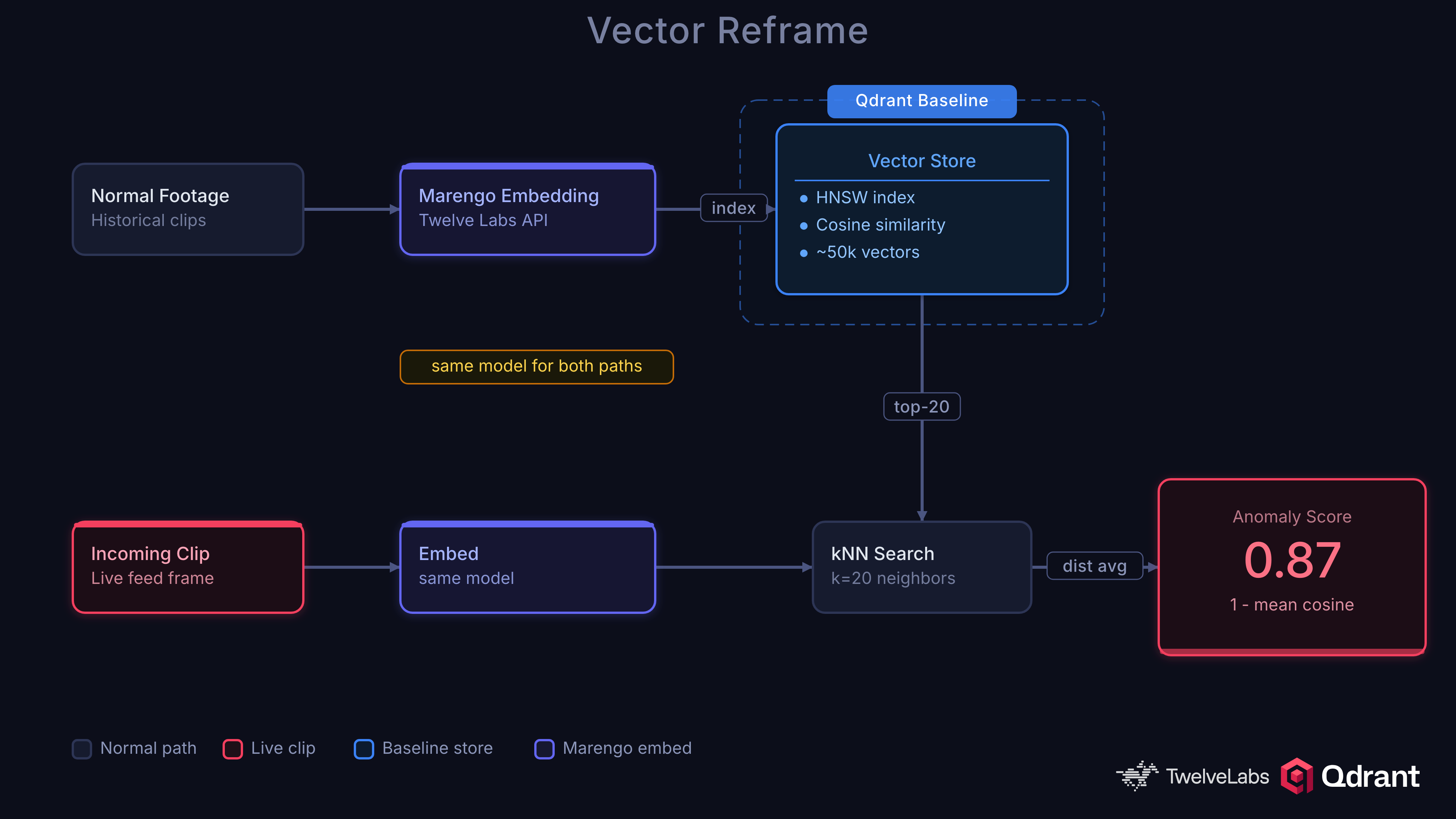
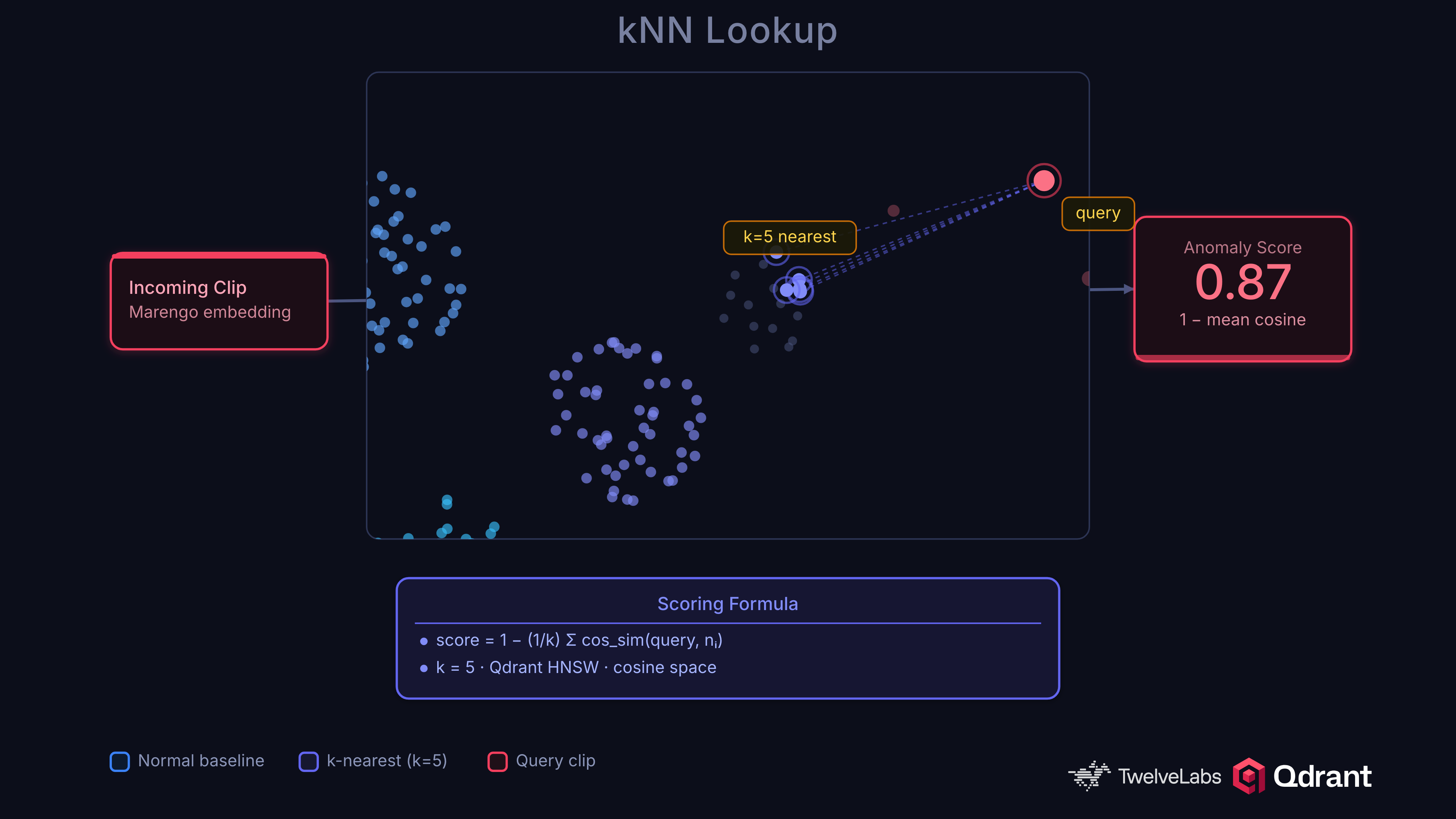
The kNN approach is simple and effective. Embed video clips into a vector space, build a baseline of normal embeddings in Qdrant, and flag clips whose nearest neighbors are far away:
anomaly_score = 1 - mean(top_k_cosine_similarities)
A clip surrounded by similar normal clips scores near 0. A clip far from anything in the baseline scores near 1. No training loop, no class labels for anomalies, no catastrophic forgetting.
The design also makes debugging easy, you can follow exactly what is happening throughout the process.
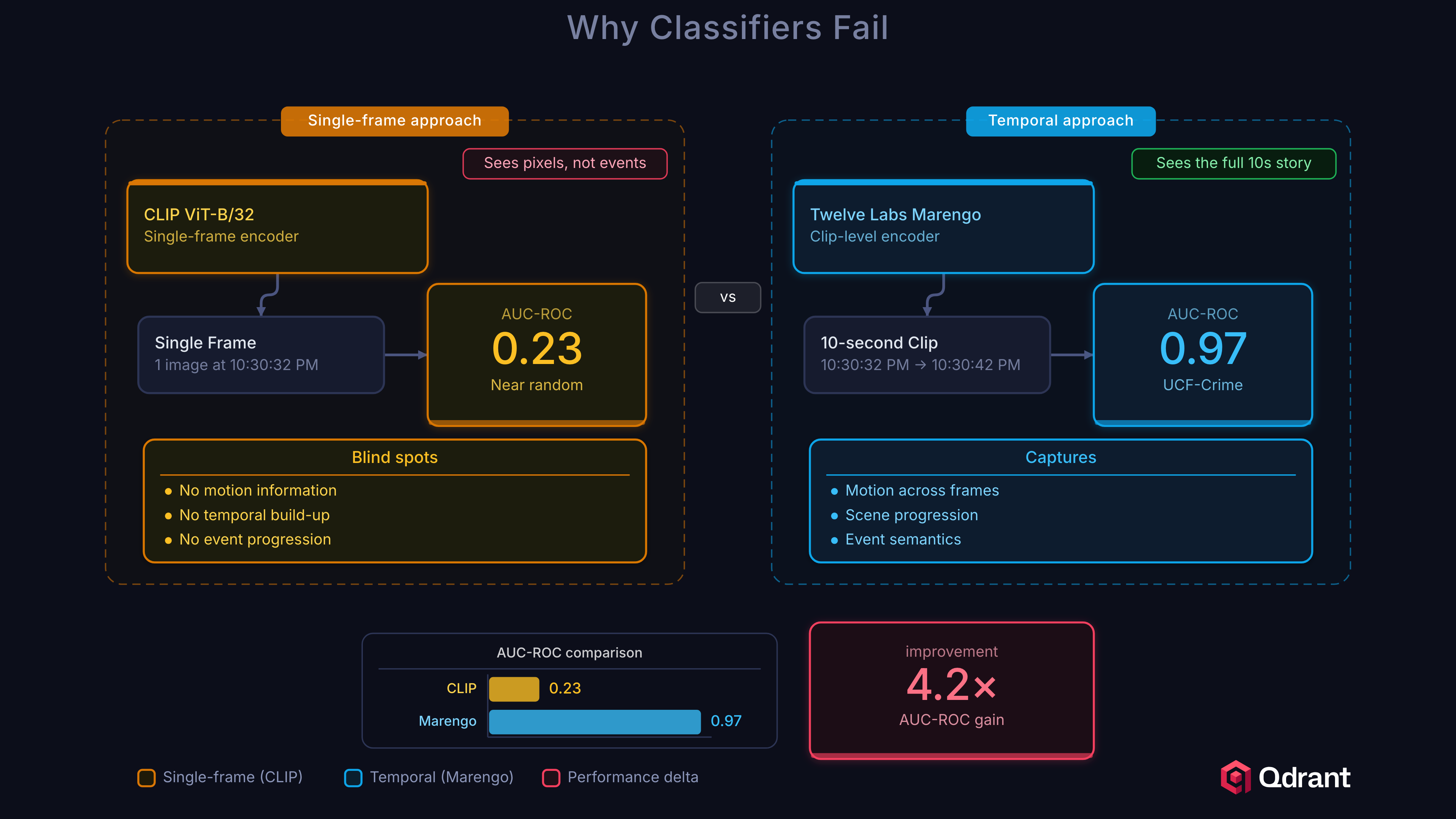
Let’s prove why this matters with some numbers. We tested CLIP ViT-B/32 (512-dim, single-frame image embeddings) as an alternative and it scored 0.23 AUC-ROC, near random. This failure is instructive. Surveillance anomalies are defined by temporal patterns: a person running, a fight developing, a car crash unfolding. Single-frame embeddings cannot distinguish “person standing” from “person falling” because the anomaly exists between frames, not within them.
| Model | AUC-ROC | Notes |
|---|---|---|
| Twelve Labs Marengo (cloud) | 0.9696 | Video-native, captures temporal dynamics |
| EfficientNet-B0 (edge) | ~0.85 | Spatial features only, high-recall triage |
| CLIP ViT-B/32 | 0.23 | Single-frame, no temporal context, fails |
This is why we use Twelve Labs Marengo in the cloud. It’s purpose-built for video understanding, processing temporal dynamics, object interactions, and scene context as a unified signal.
Architecture Overview
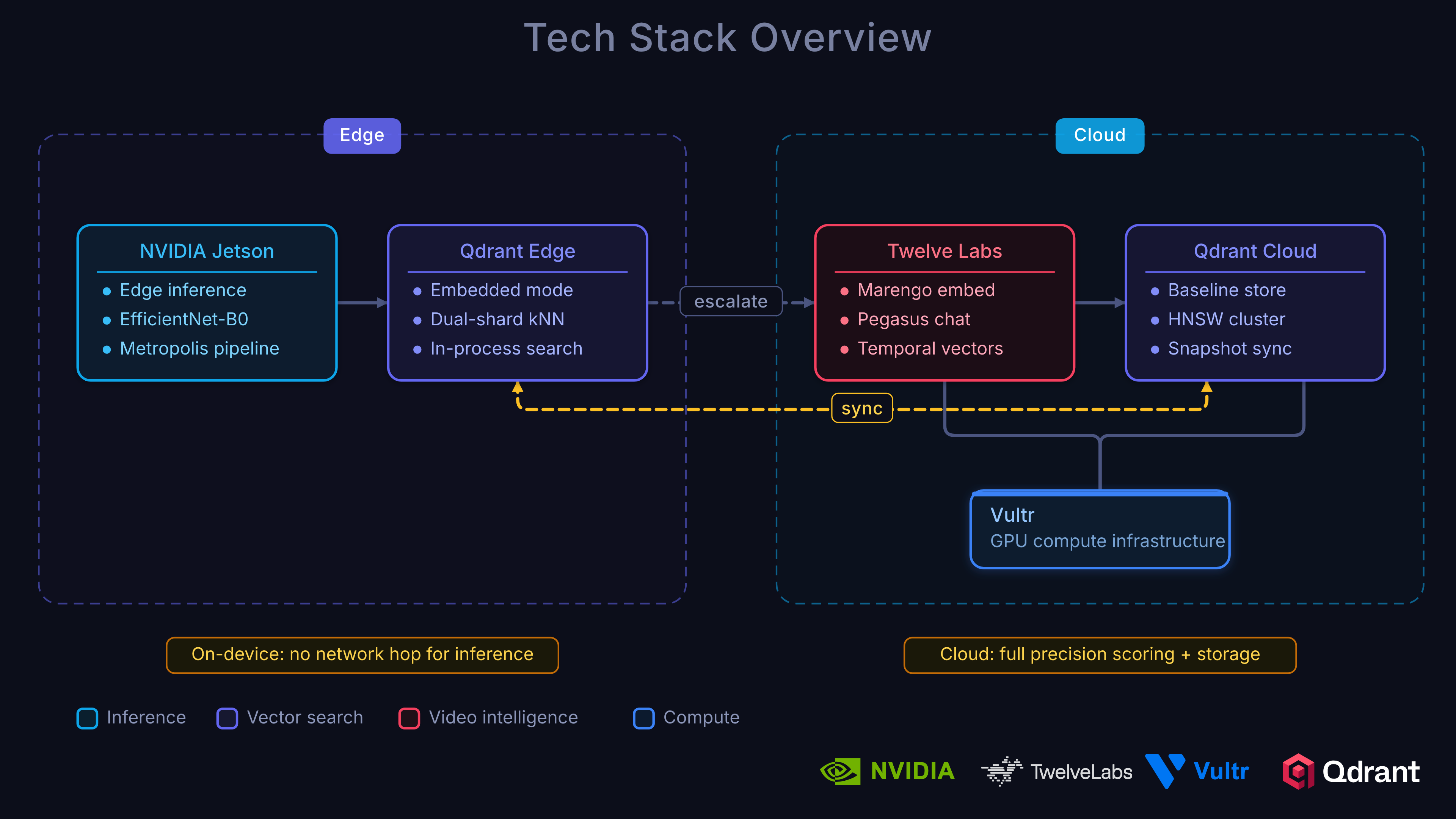
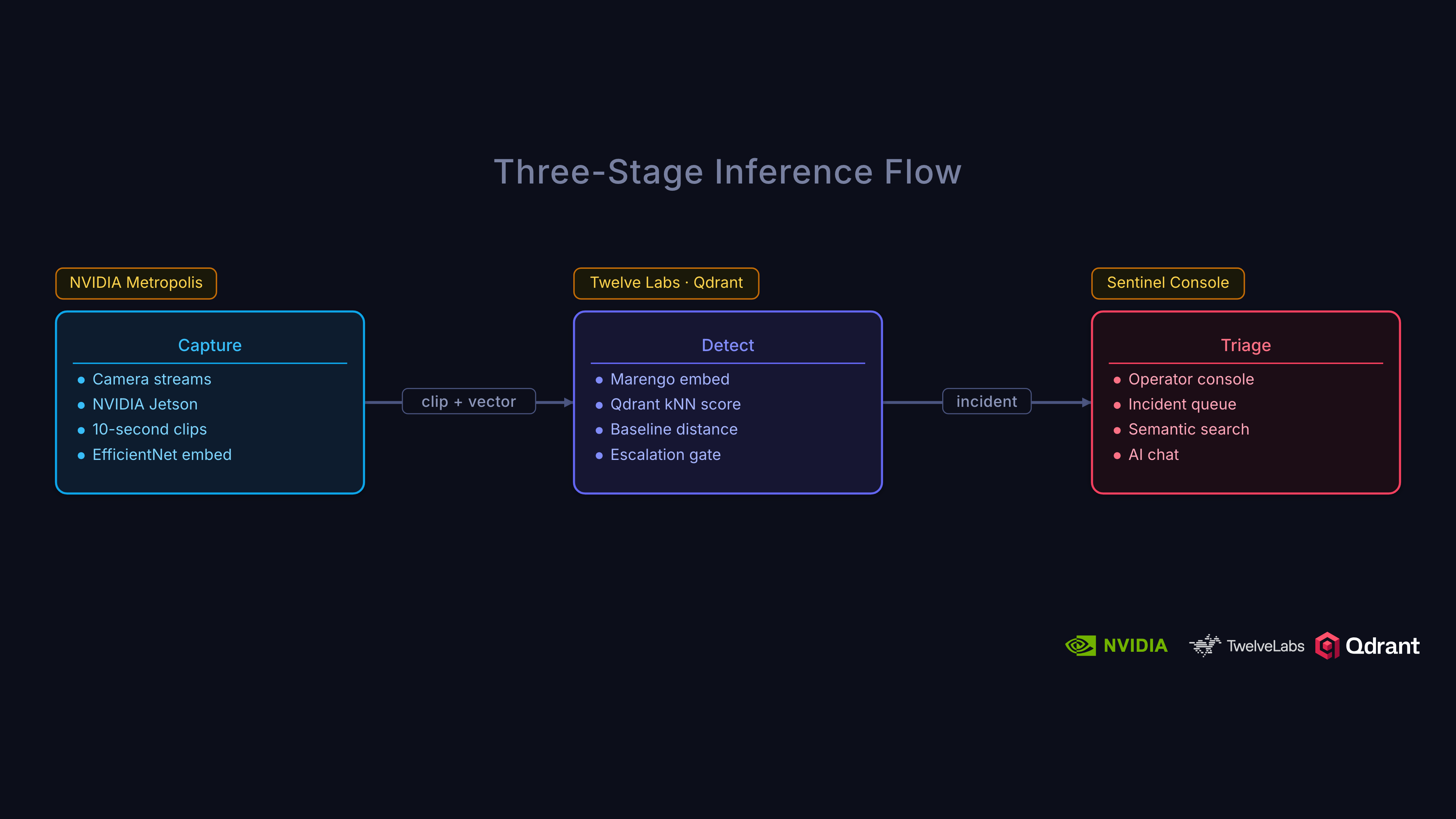
The system uses a three-tier architecture designed around a simple principle: cheap, fast triage at the edge; accurate, rich analysis in the cloud.
Architecture:
Edge Tier (NVIDIA Jetson)
- NVIDIA Metropolis:
- DeepStream (high-performance video decode + inference)
- Video Storage Toolkit
- IoT Gateway (for alert escalation)
- Qdrant Edge (two-shard)
- Mutable shard: live writes from incoming footage
- Immutable shard: HNSW, synced baseline
- Triage:
- High-recall: score → escalate or drop locally
- NVIDIA Metropolis:
Cloud Tier (Vultr GPUs)
- NVIDIA Metropolis VSS:
- Twelve Labs Marengo (video embeddings & understanding)
- VLM-based captioning
- Audio transcription
- Full computer vision pipeline
- Qdrant Cloud:
- Unified index for vectors + payload
- Rich incident management
- Baseline tracking & governance
- NVIDIA Metropolis VSS:
Escalation Pipeline
- Only anomaly candidates (escalated clips) are transmitted from edge to cloud, maximizing efficiency.
Dashboard
- Next.js frontend with real-time (WebSocket) incident and score monitoring
This layered, edge-to-cloud approach allows cheap, high-speed triage at each camera site, sending only interesting (potential) anomalies for deeper cloud analysis, semantic enrichment, and long-term governance. The edge has a loose threshold so it tags anything that even looks like it could be an anomaly.
We prefer false positives over false negatives on the edge because accidentally labeling a non-incident as an incident costs a cloud query. Missing an anomaly could be disastrous.
On the Edge tier: Each camera site runs NVIDIA Metropolis on Jetson. These hardware-accelerated devices can decode video and run inference via DeepStream, leverage camera management via the Video Storage Toolkit, and secure cloud transport via the IoT Gateway. Qdrant Edge sits alongside Metropolis, storing a two-shard local baseline for sub-millisecond kNN lookups. The edge operates as a high-recall triage filter whose job is not to make the final anomaly decision but to reduce the volume of footage that reaches the cloud.
Cloud tier: Escalated clips flow into NVIDIA Metropolis VSS running on Vultr Cloud GPUs. Twelve Labs produces video embeddings for kNN anomaly scoring in Qdrant and rich semantic signals for incident understanding, search, and Q&A. One model handles both jobs. A centralized Qdrant cluster indexes all representations. Ensemble scoring (70% cloud, 30% edge), temporal smoothing, and incident formation happen here.
Dashboard: Next.js frontend with real-time WebSocket updates showing incidents, device status, and anomaly score timelines.
Building the Twelve Labs Integration
So how do we get video embeddings that actually understand temporal dynamics? This is where Twelve Labs comes in.
Twelve Labs provides two key models for our architecture. Marengo handles embeddings and search, understanding what happened in a video at the visual and audio level. Pegasus handles conversational analysis, letting you ask questions about a video and get detailed, grounded answers. Together, they cover both the kNN scoring pipeline and the investigative Q&A workflow.
Let’s look at how we integrate them into our backend.
The client is a simple singleton initialized from TWELVE_LABS_API_KEY in your .env. The two models need separate indexes in Twelve Labs:
def _ensure_index(index_name: str, models: list[dict]) -> str:
    """Get or create a Twelve Labs index, return its ID."""
    client = get_client()
    indexes = client.index.list()
    for idx in indexes:
        if idx.name == index_name:
            return idx.id
    idx = client.index.create(name=index_name, models=models)
    return idx.id
Upload and Embed
When an escalated clip arrives from the edge, we upload it to Twelve Labs for indexing:
def upload_video(file_path: str | Path, index_type: str = "both") -> dict:
    client = get_client()
    result = {}

    if index_type in ("marengo", "both"):
        idx_id = get_marengo_index_id()
        task = client.task.create(index_id=idx_id, file=str(file_path))
        task.wait_for_done(timeout=UPLOAD_TIMEOUT)
        if task.status == "ready":
            result["marengo_video_id"] = task.video_id

    if index_type in ("pegasus", "both"):
        idx_id = get_pegasus_index_id()
        task = client.task.create(index_id=idx_id, file=str(file_path))
        task.wait_for_done(timeout=UPLOAD_TIMEOUT)
        if task.status == "ready":
            result["pegasus_video_id"] = task.video_id

    return result
Semantic Search with Marengo
Once videos are indexed, semantic search becomes trivial:
def search_videos(query: str, max_clips: int = 10) -> list[SearchResult]:
    client = get_client()
    idx_id = get_marengo_index_id()

    search_results = client.search.query(
        index_id=idx_id,
        search_options=["visual", "audio"],
        query_text=query,
        group_by="clip",
        threshold="medium",
        page_limit=max_clips,
        sort_option="score",
    )

    results = []
    for group in search_results.data:
        for clip in group.clips:
            results.append(SearchResult(
                video_id=clip.video_id,
                score=clip.score,
                start=clip.start,
                end=clip.end,
                confidence=clip.confidence,
            ))
    return results
This powers the investigative workflow: after an anomaly is detected via kNN, operators can search for similar events using natural language. “Person running near the loading dock” or “vehicle collision in parking lot.” Marengo understands both visual and audio signals.
Video Q&A with Pegasus
For deeper investigation, Pegasus provides conversational analysis of any indexed video:
def analyze_video(video_id: str, prompt: str) -> AnalysisResult:
    client = get_client()
    t0 = time.perf_counter()

    response = client.generate.text(
        video_id=video_id,
        prompt=prompt,
        temperature=0.2,
    )

    latency_ms = (time.perf_counter() - t0) * 1000
    return AnalysisResult(
        text=response.data if hasattr(response, "data") else str(response),
        video_id=video_id,
        latency_ms=latency_ms,
    )
Factory owners, security teams, or compliance officers can ask questions like “What safety violations are visible in this clip?” or “Describe the sequence of events leading up to the incident” and get detailed, video-grounded answers immediately. Think of this as RAG over video.
Connecting with NVIDIA VSS
Before jumping into the code, let’s cover what NVIDIA VSS is and the tools it provides.
VSS stands for Video Search and Summarization. It is an NVIDIA AI Blueprint giving developers a quick way to deploy powerful AI agents that can understand, search, and summarize video content. It provides:
- Vision Language Models (VLMs): Feed video frames into VLMs that generate rich text descriptions of each video chunk.
- Large Language Models (LLMs): Text descriptions from the VLM are fed to an LLM for summarization and natural-language Q&A.
- Retrieval-Augmented Generation (RAG): VSS stores generated descriptions in a vector/graph database. Questions retrieve the most relevant chunks first, leading to grounded answers.
- GPU-Accelerated Ingestion: High-performance pipeline for pulling in video from files or live RTSP streams, decoding, and preparing for AI models.
- CV Pipeline Integration: Works with object detection models like YOLO or NVIDIA DeepStream SDK for adding metadata.
- Audio Transcription: Processes audio tracks for speech-to-text, adding another searchable layer.
This NVIDIA VSS blueprint is incredibly powerful, but it’s also a lot to build, deploy, and manage. This is precisely where Twelve Labs provides a massive accelerator, abstracting away the VLM, audio, and reasoning complexity into a single API.
The true value is in modularity. Our architecture uses the Twelve Labs integration within VSS, creating a hybrid workflow where Twelve Labs handles the intelligence and VSS handles the orchestration.
Video Chunking for VSS
The first step in the VSS pipeline is chunking. Following the pattern from the Twelve Labs x NVIDIA VSS manufacturing sample, we split videos using FFmpeg’s segment muxer:
/backend/vss.py
def chunk_video(
    input_path: str | Path,
    output_dir: str | Path,
    chunk_duration_s: float | None = None,
) -> list[Path]:
    """Split a video into chunks using FFmpeg segment muxer."""
    input_path = Path(input_path)
    output_dir = Path(output_dir)
    output_dir.mkdir(parents=True, exist_ok=True)

    # Get video duration via ffprobe
    probe = subprocess.run(
        ["ffprobe", "-v", "quiet", "-show_entries", "format=duration",
         "-of", "default=noprint_wrappers=1:nokey=1", str(input_path)],
        capture_output=True, text=True,
    )
    duration = float(probe.stdout.strip()) if probe.stdout.strip() else 60.0

    if chunk_duration_s is None:
        if duration < 60:
            chunk_duration_s = duration  # Don't chunk short videos
        else:
            chunk_duration_s = duration / 30  # ~30 chunks

    pattern = output_dir / f"{input_path.stem}_chunk_%04d.mp4"

    subprocess.run(
        ["ffmpeg", "-y", "-i", str(input_path),
         "-c", "copy", "-map", "0",
         "-segment_time", str(chunk_duration_s),
         "-f", "segment", "-reset_timestamps", "1",
         str(pattern)],
        capture_output=True,
    )

    return sorted(output_dir.glob(f"{input_path.stem}_chunk_*.mp4"))
Why chunk at all? The same cost issue from the manufacturing sample applies here. Processing 24 hours of raw video is expensive. Our edge tier already filters ~85% of footage, and chunking the remaining escalated clips further optimizes the cloud pipeline. Only chunks of interest flow through the full VSS stack.
Async Upload to VSS
Chunks are uploaded to VSS in parallel using async I/O:
async def upload_to_vss(file_path: str | Path) -> Optional[str]:
    """Upload a single video file to NVIDIA VSS."""
    file_path = Path(file_path)

    with open(file_path, "rb") as f:
        content = f.read()

    timeout = aiohttp.ClientTimeout(total=VSS_UPLOAD_TIMEOUT)
    async with aiohttp.ClientSession(timeout=timeout) as session:
        data = aiohttp.FormData()
        data.add_field("file", content,
                       filename=file_path.name, content_type="video/mp4")
        data.add_field("purpose", "vision")
        data.add_field("media_type", "video")

        async with session.post(f"{NVIDIA_VSS_BASE_URL}/files", data=data) as resp:
            if resp.status == 200:
                body = await resp.json()
                return body.get("id")
            return None


async def upload_chunks_to_vss(chunk_paths: list[Path]) -> list[str]:
    """Upload multiple chunks to VSS in parallel."""
    tasks = [upload_to_vss(p) for p in chunk_paths]
    results = await asyncio.gather(*tasks, return_exceptions=True)
    return [r for r in results if isinstance(r, str)]
The full ingestion pipeline ties it together by chunking, uploading, and returning results:
async def ingest_video(file_path: str | Path) -> dict:
    """Full VSS ingestion pipeline: chunk video, upload all chunks."""
    if not is_enabled():
        return {"status": "disabled", "message": "VSS_ENABLED is false"}

    with tempfile.TemporaryDirectory(prefix="vss_chunks_") as tmp_dir:
        chunks = chunk_video(file_path, tmp_dir)
        file_ids = await upload_chunks_to_vss(chunks)

    return {
        "status": "ok",
        "total_chunks": len(chunks),
        "uploaded_chunks": len(file_ids),
        "vss_file_ids": file_ids,
    }
Docker Compose for VSS
To deploy VSS alongside the core services, we use a docker compose file:
/docker-compose.vss.yml
## docker compose -f docker-compose.yml -f docker-compose.vss.yml up
services:
  vss-server:
    image: nvcr.io/nvidia/metropolis/vss:1.0
    ports:
      - "8080:8080"
    environment:
      TWELVE_LABS_API_KEY: ${TWELVE_LABS_API_KEY}
      VLM_MODEL_TO_USE: twelve-labs
      DISABLE_CV_PIPELINE: "true"
      DISABLE_CA_RAG: "true"
    deploy:
      resources:
        reservations:
          devices:
            - driver: nvidia
              count: 1
              capabilities: [gpu]
    networks:
      - anomaly-net

  backend:
    environment:
      VSS_ENABLED: "true"
      NVIDIA_VSS_BASE_URL: http://vss-server:8080
    depends_on:
      - vss-server
Note: Setting VLM_MODEL_TO_USE: twelve-labs tells VSS to use the Twelve Labs remote deployment instead of running a local VLM. This eliminates the need for a dedicated VLM GPU. Twelve Labs handles the intelligence via API, while VSS handles the orchestration pipeline.
Recap
In Part 1, you set up the project, learned why kNN anomaly detection in Qdrant outperforms traditional classifiers for open-world surveillance, integrated Twelve Labs Marengo and Pegasus for video embeddings and Q&A, and connected NVIDIA VSS for GPU-accelerated ingestion. The architecture is in place. Now we need to build the edge.
What’s Next
In Part 2 | Edge-to-Cloud Pipeline, we’ll implement the two-shard Qdrant Edge architecture, edge triage scoring, escalation flow with ensemble scoring, and offline resilience.
In Part 3 | Scoring, Governance, and Deployment, we’ll cover incident formation, baseline governance, unified retrieval, results on UCF-Crime, and deployment on Vultr Cloud GPUs.
Additional Resources:
- Project Repository: qdrant/video-anomaly-edge
- NVIDIA VSS Twelve Labs Integration: qdrant/twelvelabs-nvidia-vss
- Twelve Labs Documentation: docs.twelvelabs.io
- Qdrant Documentation: qdrant.tech/documentation
- Vultr Cloud GPUs: vultr.com/products/cloud-gpu

